クラウド型ワークフロー『Questetra BPM Suite』は、ペーパーレス環境やリモートワーク環境を推進するための業務プラットフォームです。業務案件は業務フロー図に従ってコントロールされ、案件が人間工程に到達すれば担当者はアウトプットを求められます。また、案件が自動工程に到達した際には、「PDFの生成」や「クラウドストレージへの保存」といった既定の処理(サーバサイド処理)が自動的に行われます。(BPM: Business Process Management)
Process start triggered by Box, kintone, Google Calendar
Kyoto, Japan, April 12th, 2021, Questetra, Inc., the global SaaS provider of Business Process Management (BPM), today announced that they have published the new version 13.0 of the Cloud-based Workflow product Questetra BPM Suite. This new version is capable of automatically starting Business Processes triggered by data handled in popular business-oriented SaaS products such as Box, etc.
Today, various business-oriented SaaS products have come to be used for promoting Digital Transformation and to build frameworks to support remote working. However, even though some sort of effect is achieved, there is still the problem that it takes a lot of time and effort to exchange data between multiple SaaS products.
With the new version of Questetra BPM Suite, it is possible to build a mechanism, without coding, that automatically assigns an Examination Process to the appropriate person in charge when a contract document is placed in, for example, the file storage service Box. This will allow you to reduce the time and effort for work requests via email or chat services.
It is also able to build such a mechanism using data registered in kintone and Google Calendar in addition to Box as a trigger.
Questetra BPM Suite
Cloud-based Workflow Questetra BPM Suite is a business platform for realizing paperless environments and remote-working. Business issues are controlled according to a Business Flow Diagram. When a Process reaches a Human Task the user will be asked to add their input. Also, when an issue reaches an automated Step the predetermined processing (server-side processing) such as generating a PDF and saving it to cloud storage is performed automatically. (BPM: Business Process Management)) You can apply it to various business operations such as an Approval request flow, Document translation flow, Quality check process, and Invoice issuance process. Process owners of each Business Process can practice the Improvement of Business Processes little by little in daily work.
Automatically starting a new business operation linked with SaaS
Start Events have been added that automatically start Processes when new data (or files) are registered in SaaS. Box, kintone, Google Calendar are supported. *Available Editions: Advanced, Professional, Enterprise
Settings that automatically start a Business Process when files are placed in the folder in Box
Other Improvements
Box: Download File
This new Service Task allows you to automatically attach files stored in Box to a File-type Data Item. In the case of a Contract Creation workflow, for example, it will be possible to achieve a state in which the contract template saved in Box has been imported in advance. *Available Editions: Advanced, Professional, Enterprise
Box: Delete Shared Folder Link
This new Service Task allows you to automatically delete a Shared Link to a folder in Box. For example, it will be possible to build a mechanism in which a folder that has been set to be shared will automatically stop being shared after a specified period of time. *Available Editions: Advanced, Professional, Enterprise
Automatic generation of Google Meet URL
In a Service Task where appointments are automatically added to Google Calendar, the URL of Google Meet will be automatically generated and added to the appointment information. For example, in the business of managing online meeting reservations with customers, you can build a mechanism where once you enter the date and time of the meeting, the appointment with the Meet URL set is automatically registered, and the customer is informed of the URL by the email notification function. *Available Editions: Advanced, Professional, Enterprise
The company has improved the customer management process in the consulting business, enhancing the freshness and accuracy of customer information to implement a proactive utilization system.
Sevenzen Corporation Ltd.
Established
2002
Number of Employees
13 Contract Consultants: 500 (as of March 2021)
Business
Business process improvement and project management support
Reducing the time and effort required to manage clients in the consulting business
Q. What kind of business do you use Questetra for?
We, Sevenzen Corporation Ltd. support our clients’ (companies’) projects, such as business reform, new business development and information system reform with our skilled freelance consultants.
We also operate a website called Patio which is a freelance network. In this website we select the most suitable consultant for your project from among about 500 registered freelance consultants.
We have assisted a wide range of clients, including those in the manufacturing, apparel, pharmaceutical, retail, finance, logistics and trading industries.
We are using Questetra for various tasks such as attendance management, quotation approval, etc. In particular, we are actively using it for customer information management.
Q. What did you struggle with in managing customer information?
We manage our customer information with a business card manager where customer information is registered after their business card has been scanned. We use the registered customer information for sending New Year’s cards and sending out emails simultaneously.
However, we had the following problems managing customer information:
Some information was not registered or updated
The registered information was inaccurate
In our company, the person who obtained the business card was responsible for registering (and updating) the customer information. However, since this task was not a high priority for that person we could see some information was left unregistered. In addition, when we scanned the business cards the company name or client name may have been read inaccurately and the data was registered without being fully checked.
Due to these things, we had to check the accuracy of the customer information every time we used it because the information registered in the business card management service might not have been up-to-date or reliable. This was a huge hassle for us.
Plan for automatic integration with Box
Q. How did you use Questetra to solve the problem?
In order to reduce the time and effort and to use the customer information more efficiently, we improved the registration and update of customer information with Questetra. What we focused on then was to divide the work.
We decided that the person who got the business card only needs to put the card in the designated place, and the general affairs staff register the business cards in the business card manager once every fortnight.
As a result, the information on the business cards our employees obtained is now registered and updated without fail. In addition, we also decided that another member of the administration team checks the data which has been scanned and registered against the business cards.
The customer information is now always up to date and accurate, and we are now able to send New Year’s cards and emails without the need to double-check the data.
Q. Could you tell us about your future plans and requests to Questetra?
We are also using Questetra for the reception of the seminars we hold. We would like to automate this process in the future.
For example, we are planning the following things:
Automatically sending a survey request email to attendees after a seminar
Automatically sending URLs of files registered in Box (*1) to survey respondents
*1: Box is a cloud storage service used by 97,000 companies worldwide. 68% of Fortune 500 companies use Box. (As of January 2021)
We know Questetra prepares automatic processes to link with Box as standard, so we anticipate that such a system will be easy to set up. If this is achieved we will be able to operate it smoothly, even if the number of seminars to be held increases in the future.
At the same time, what we expect from Questetra is to enable us to adjust the design of public webforms. Every time we hold a seminar or something else, we set up a public webform on Patio but Questetra doesn’t look consistent with the design of Patio. It would be nice for us to be able to adjust the colours.
Improved business continuity through standardisation and visualisation of business processes[
Q. For what kind of business do you use Questetra?
Works Business Service Co. Ltd. is a BPO (Business Process Outsourcing) contractor that handles payroll and labor management on behalf of our clients. We are a member of the Works Human Intelligence Group which develops COMPANY, the HR and payroll system used by 1100 major corporate groups.
We are mainly commissioned by companies that use COMPANY.
Questetra is being used by the team that handles the payroll operations entrusted by our clients.
Specifically, we are dealing with two types of operations. One is interoffice operations such as reorganization, transfer, recruitment/retirement, leave/return procedures, payroll, bonus calculation. The other is legal operations such as social insurance, labor insurance, year-end adjustments, resident tax, etc. We are also dealing with peripheral tasks including employee benefits, expense management and helpdesk support.
Q. Could you give us an example of how you use our system?
One of the main areas of work that we undertake is monthly payroll. The payroll process broadly consists of the following steps:
Confirmation of employees on the payroll (e.g. start and finish of employment)
Checking attendance data
Confirmation of monetary data such as allowances and deductions
Calculation of fixed monthly salary
Calculation of overtime payments and statutory deductions
Confirmation of payroll calculation results
Delivery of calculation results (transfer data, payslips, accounting journal entries)
In simple terms this is how it works, but it requires a high level of expertise in the relevant laws, the regulations of each of our client companies and the details of the work, such as the flow of documents and data. In addition, since our payroll operation is related to people, employees of each company, unexpected issues will occur every day.
Therefore, before the introduction of Questetra, the following issues existed.
A large administrative effort was required to maintain the business (maintenance of processes and manuals, communication time, etc.)
Long handover periods
Oversights in the work
To resolve these issues, we organised the payroll processes and standardised the way the processes were handled.
Cut the handover period in half
Q. Please tell us about a specific solution
To explain the aforementioned problem in detail, there were differences in the work procedure and the level of output depending on the staff responsible for handling the work. Moreover, because the progress could not be checked in real time, it sometimes took us a long time to check the processing.
With Questetra, after reviewing the process of the payroll operation, we created a workflow diagram and determined what kind of processing would be done in each Task. Therefore, the method of getting the data, editing, and so on are clearly displayed on the operating screen.
After all these settings were configured, the platform for the processor to proceed with the operation was ready. Processors are now able to recognise the Tasks they need to process on Questetra, and handle them in accordance with the workflow diagram without any omissions. We also made it possible to maintain the same quality for every employee.
In reality, a huge number of Tasks are processed as shown in the following figure.
Through the standardisation and visualisation of the payroll operation we have been able to overcome our initial problems.
We now have a clearer picture of the processes and people responsible for processing, which enables us to provide a stable service with high standards of delivery and quality to our client companies. In addition, the workflow diagram allows us to see the status of processes in real time, which has reduced unnecessary communication and management time.
One of the most surprising benefits of the new system has been the handover of work. Originally this took two months, but it has now been reduced to one month because the chance of work being assigned to one person has become less. We believe that halving the handover time has made a significant contribution to the overall improvement in operational efficiency.
Q. Please tell us about your future plans and what you expect from Questetra
Currently, we are using Questetra mainly for monthly payroll operation, but we are planning to apply it to the year-end adjustment and annual renewal of the resident tax in the future. In particular, we believe that the year-end adjustment will have a great effect on reducing the training cost, since we employ a large number of fixed-term personnel.
What we expect from Questetra is to expand the range of functions to analyze business processing data. Currently, Questetra has a function to display the processing time and the number of processes as a dashboard graph, but if we can compare the data of the previous year/this year, and the previous month/current month respectively, we think this can be used for business improvement. We believe that such a function would make it easier to discuss improvements and to judge the effects of improvements.
The company has digitized the handling of inquiries in the publishing industry. Automation including integration with Google Sheets, significantly helps the company reduce the workload and helps the smooth transition to telecommuting due to the pandemic.
IPG Network, Inc.
Established
1992
Number of Employees
44 (as of March 31, 2023)
Business
Formulation of group management and financial strategies
800 Sheets of Paper per Month Reduced to Zero Through Digitization and Automation
Q. What kind of work are you using Questetra for?
We, Impress Professional Works Co., Ltd. are responsible for the business management, sales, and distribution management of all Impress Group companies. The Impress Group companies are developing two types of business. One is “content business” which provides various media & services including publishing and solutions for corporations mainly in the fields of IT, music, design, mountain guides, and mobile services. The other type is “platform business” which provides content business planning & development and distribution and sales functions.
We utilize Questetra for the handling of inquiries.
Our customer center is handling inquiries about the books published by three companies: Impress Corporation, Yama-kei Publishers co. and Ltd. Rittor Music, Inc.
The center receives about 30 to 40 inquiries a day from readers and the media. Most of them are about the contents of books, their defects, subscriptions to magazines, and requests to use the contents of books for TV programs.
Q. What do you feel about the automation of inquiry handling?
Before we introduced Questetra, we managed and aggregated response statuses using a sheet contained the types of inquiries.
Print the inquiries received via email. (The printouts are the inquiry response forms)
The leader decides the people responsible for handling the inquiries and gives them a sheet that describes the procedure. (either “Answer”, “Escalation” or ” Awaiting an answer from a supervisor after Escalation”)
The people answer the inquiries based on the procedure. After that, they put the sheet into the tray for completed inquiries.
When we did this work using paper, we found it difficult to understand the situation, because we weren’t able to see who was handling the inquiries or the status of the response unless we asked them.
In addition to that, we had to manually input the necessary data to be calculated, such as the number of handled inquiries and the number of inquiries by type, into a spreadsheet after counting all inquiries.
Since we introduced Questetra, we have handled this work as follows:
Inquiries received via email are automatically fed into Questetra.
The leader confirms the inquiry contents in a “Confirm contents” Task and selects the procedure.
The people responsible for handling inquiries process the automatically assigned Tasks based on the instruction of the leader.
We used to use 600-800 sheets per month for this job, but since we introduced Questetra, we haven’t used any, and the time and effort required for printing and understanding the situation has been greatly reduced.
We set up inquiry data to be automatically added to Google Sheets via data integration. This helps us aggregate easily with Google Sheets.
In addition, we also have set up a system for response emails to be automatically sent to the customer once the person responsible has entered the response text. Before introducing Questetra, we had to manually enter the address, sender, and subject in the email software, so there was a risk of mistakes occurring. However, now that the risk is eliminated and people can focus on creating answers.
DX Promotion is Started On-Site
Q. We’ve heard you had an issue with escalation
Yes, we had another major issue on dealing with inquiries.
Some inquiries cannot be handled by the customer center. For that, we ask the Editorial department to create an answer (escalation). In the past, it was difficult to manage inquiries awaiting answers from that department, so we frequently couldn’t provide satisfactory answers for customers.
We solved that with Questetra.
We have equipped a flow for asking the Editorial department for an answer with a workflow so that escalation (i.e. awaiting an answer from the Editorial department) is recognized. Also, in order to increase the frequency of reminders to the Editorial department, we have set up the workflow so that members of the customer center receive an alert one week after escalation. We can certainly remind the members of the Editorial department to create answers for inquiries by pushing a button to send a reminder email.
As a result, we can reduce the number of inquiries with the status “Awaiting an answer from the Editorial department” from 90 to 15 after we introduced Questetra.
Due to COVID-19, our Group companies have decided to actively promote telecommuting. We can smoothly allow the handling of inquiries to be done even while telecommuting because we completed the introduction of Questetra prior to the spread of COVID-19. We can easily imagine that promoting telecommuting would be difficult for us if we hadn’t introduced Questetra.
Furthermore, as book sales increased as a result of the increase in demand for goods consumed at home due to COVID-19, the number of inquiries has also increased by 20-30%. In spite of this, we have been better able to handle inquiries while maintaining our productivity because we could create an efficient work environment with Questetra.
Q. What do you expect from Questetra next?
Our initiative with Questetra can be regarded as the DX (digital transformation) promotion within the office. We believe that Questetra has helped our on-site members utilize IT for improvement of their operations.
In the future, we hope to utilize these achievements to support the promotion of DX in other departments (some of which have already started). That means we’d like to help each of them grow so that the entire company will grow.
One thing we expect from Questetra is more automatic processing functions, such as updating data in Google Sheets, for accelerating on-site DX. Actually, we sometimes create an idea for business improvement by seeing the prepared automatic processing functions. We suppose more automatic functions will help us accelerate DX.
株式会社Impress Professional Works は、インプレスグループにおいて、グループ全体の経営管理および販売・物流管理を担っています。インプレスグループでは、IT・音楽・デザイン・山岳自然・モバイルサービス等の分野において、出版を含む、各種メディア&サービスおよび法人向けソリューション等を提供する「コンテンツ事業」と、コンテンツビジネスの企画開発や流通販売機能を提供する「プラットフォーム事業」を展開しています。
Kyoto, Japan, January 18th, 2021, Questetra, Inc., the global SaaS provider of Business Process Management (BPM), today announced that they have published the new version 12.3 of the Cloud-based Workflow product Questetra BPM Suite. This new version is capable of controlling Kintone, a cloud database service, with the standard-equipped features.
There are many companies that are using multiple cloud services (SaaS) to promote Digital Transformation (DX). They are proceeding their business by retrieving from, updating/creating data, and storing it to SaaS.
Questetra BPM Suite has been providing features that can be linked with various cloud services such as Google Sheets, Microsoft OneDrive, Box, and Slack to help business to be carried out efficiently on such sites. With the new version 12.3, features for integrating with Kintone are added.
Using these features in the flow of opening a new trading account, for example, it is possible to build a mechanism that automatically registers customer information in the Customer Master managed in Kintone after credit examination, etc. with no code. This will allow you to reduce the time and effort required to manually register data and to prevent errors such as forgetting to register and registering incorrect information.
Questetra BPM Suite
Cloud-based Workflow Questetra BPM Suite is a business platform for realizing paperless environments and remote-working. Business issues are controlled according to a Business Flow Diagram. When a Process reaches a Human Task the user will be asked to add their input. Also, when an issue reaches an automated Step the predetermined processing (server-side processing) such as generating a PDF and saving it to cloud storage is performed automatically. (BPM: Business Process Management))
You can apply it to various business operations such as an Approval request flow, Document translation flow, Quality check process, and Invoice issuance process. Process owners of each Business Process can practice the Improvement of Business Processes little by little in daily work. (Examples of Business Flow Diagrams: https://questetra.zendesk.com/hc/en-us/articles/360012492211 )
Data adding/updating/deleting on Kintone app
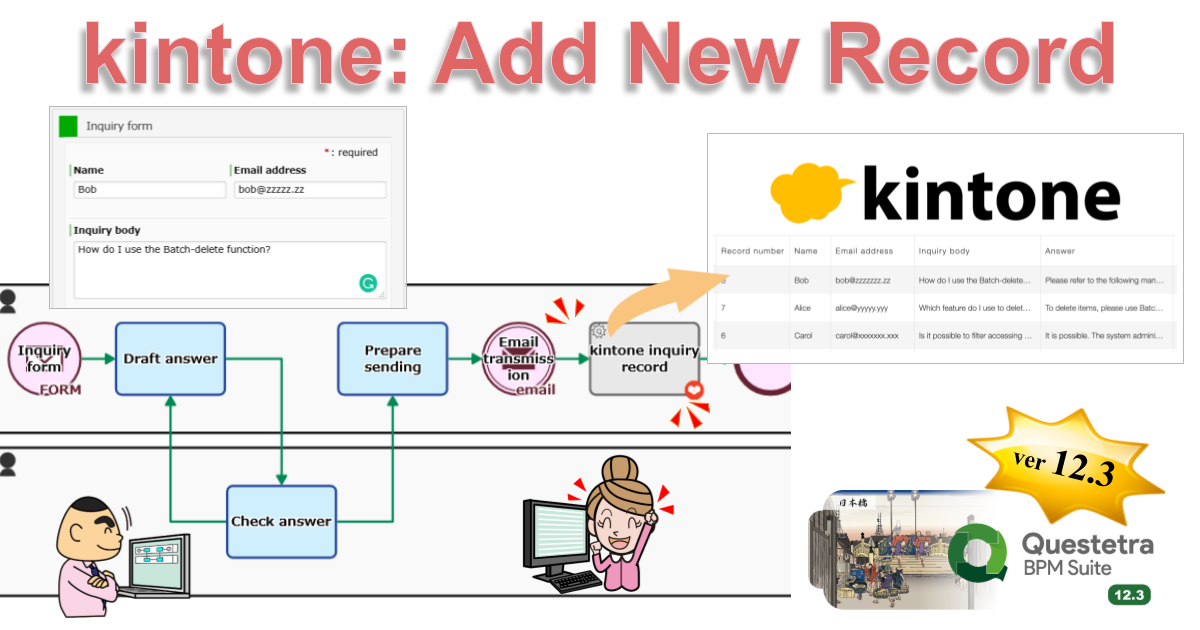
Adding data (records) to Kintone apps is now available. Moreover, it is now possible to update or delete the data that has been added already, or to upload files. For example, a record of a quote is automatically added to Kintone after the quote is approved along with a quote PDF that is automatically generated.
Using this new Service Task, it is now possible to automatically insert rows into Excel (Microsoft 365 Business). For example, if you are using Excel to aggregate sales, expenses, etc., you will be able to perform aggregation linked to your business.
Using this newly added Service Task, it is now possible to retrieve Kintone app data and to download files. You will even be able to retrieve data in a format that can be used as options in Questetra workflow Apps. This allows, for example, to utilize the Customer Master data stored in kintone as choices on Questetra workflow.
『Questetra BPM Suite』は、このような現場で業務が効率よく進められるように、様々なクラウドサービス、例えば Google Spreadsheet や Microsoft OneDrive、Box、Slack などと連携できる機能を提供してまいりました。新バージョン12.3では、クラウドデータベース『kintone』と連携できる機能が追加されます。
クラウド型ワークフロー『Questetra BPM Suite』は、ペーパーレス環境やリモートワーク環境を推進するための業務プラットフォームです。業務案件はワークフロー図に従ってコントロールされ、案件が人間工程に到達すれば担当者による処理が求められます。また、案件が自動工程に到達した際には、「PDFの生成」や「クラウドストレージへの保存」といった既定の処理(サーバサイド処理)が自動的に行われます。(BPM: Business Process Management)