株式会社Impress Professional Works は、インプレスグループにおいて、グループ全体の経営管理および販売・物流管理を担っています。インプレスグループでは、IT・音楽・デザイン・山岳自然・モバイルサービス等の分野において、出版を含む、各種メディア&サービスおよび法人向けソリューション等を提供する「コンテンツ事業」と、コンテンツビジネスの企画開発や流通販売機能を提供する「プラットフォーム事業」を展開しています。
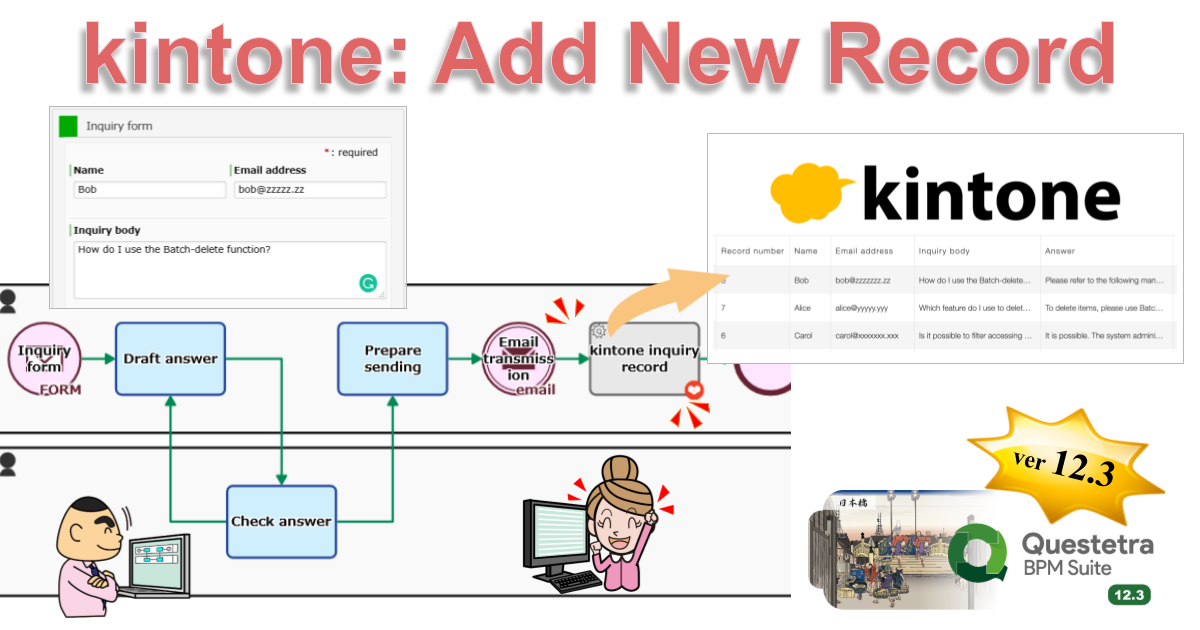
Kyoto, Japan, January 18th, 2021, Questetra, Inc., the global SaaS provider of Business Process Management (BPM), today announced that they have published the new version 12.3 of the Cloud-based Workflow product Questetra BPM Suite. This new version is capable of controlling Kintone, a cloud database service, with the standard-equipped features.
There are many companies that are using multiple cloud services (SaaS) to promote Digital Transformation (DX). They are proceeding their business by retrieving from, updating/creating data, and storing it to SaaS.
Questetra BPM Suite has been providing features that can be linked with various cloud services such as Google Sheets, Microsoft OneDrive, Box, and Slack to help business to be carried out efficiently on such sites. With the new version 12.3, features for integrating with Kintone are added.
Using these features in the flow of opening a new trading account, for example, it is possible to build a mechanism that automatically registers customer information in the Customer Master managed in Kintone after credit examination, etc. with no code. This will allow you to reduce the time and effort required to manually register data and to prevent errors such as forgetting to register and registering incorrect information.
Questetra BPM Suite
Cloud-based Workflow Questetra BPM Suite is a business platform for realizing paperless environments and remote-working. Business issues are controlled according to a Business Flow Diagram. When a Process reaches a Human Task the user will be asked to add their input. Also, when an issue reaches an automated Step the predetermined processing (server-side processing) such as generating a PDF and saving it to cloud storage is performed automatically. (BPM: Business Process Management))
You can apply it to various business operations such as an Approval request flow, Document translation flow, Quality check process, and Invoice issuance process. Process owners of each Business Process can practice the Improvement of Business Processes little by little in daily work. (Examples of Business Flow Diagrams: https://questetra.zendesk.com/hc/en-us/articles/360012492211 )
Data adding/updating/deleting on Kintone app
Adding data (records) to Kintone apps is now available. Moreover, it is now possible to update or delete the data that has been added already, or to upload files. For example, a record of a quote is automatically added to Kintone after the quote is approved along with a quote PDF that is automatically generated.
Using this new Service Task, it is now possible to automatically insert rows into Excel (Microsoft 365 Business). For example, if you are using Excel to aggregate sales, expenses, etc., you will be able to perform aggregation linked to your business.
Using this newly added Service Task, it is now possible to retrieve Kintone app data and to download files. You will even be able to retrieve data in a format that can be used as options in Questetra workflow Apps. This allows, for example, to utilize the Customer Master data stored in kintone as choices on Questetra workflow.
『Questetra BPM Suite』は、このような現場で業務が効率よく進められるように、様々なクラウドサービス、例えば Google Spreadsheet や Microsoft OneDrive、Box、Slack などと連携できる機能を提供してまいりました。新バージョン12.3では、クラウドデータベース『kintone』と連携できる機能が追加されます。
クラウド型ワークフロー『Questetra BPM Suite』は、ペーパーレス環境やリモートワーク環境を推進するための業務プラットフォームです。業務案件はワークフロー図に従ってコントロールされ、案件が人間工程に到達すれば担当者による処理が求められます。また、案件が自動工程に到達した際には、「PDFの生成」や「クラウドストレージへの保存」といった既定の処理(サーバサイド処理)が自動的に行われます。(BPM: Business Process Management)
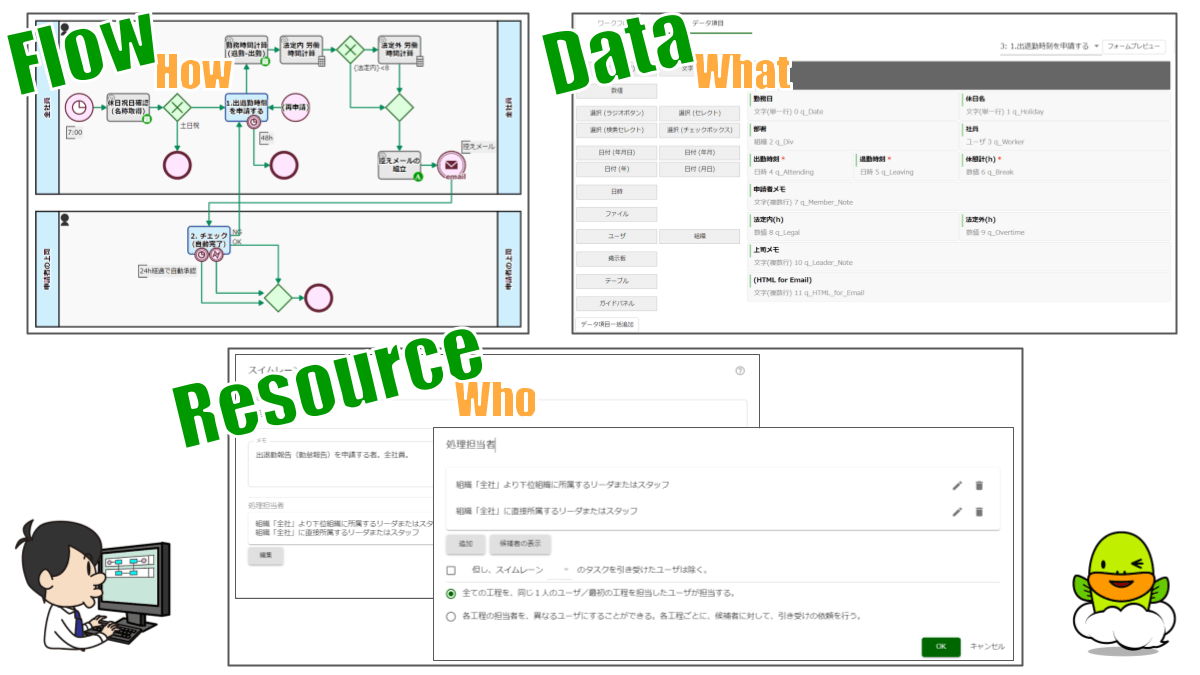
そして、必要最小限の「意思表示」や「データ入力」は、ワークフローエンジンを搭載したSaaSで実現されるべきだ。(もっとも、製品選定はナカナカ難しい。。。数値やファイルなどのデータ型を厳格に取り扱う製品もあれば、文字列型中心な製品もある。Web Form が自動生成される製品もあれば、詳細に設計できる製品もある。全ユーザが同じインターフェースになる製品もあれば、ユーザごとのパーミッション設定が可能な製品もある。)
株式会社ワークスビジネスサービスは、給与計算や労務管理に関する業務を、お客様に変わって処理する BPO 受託事業者です(BPO = Business Process Outsourcing)。大手1100企業グループに利用される人事・給与システム「COMPANY(カンパニー)」を開発する Works Human Intelligence グループに所属しています。
The company digitalizes the order inspection flow for system development, which enables approval and final approval of orders to be made outside the office. The period to the final approval shortens by more than 50%.
APPLIED TECHNOLOGY CO., LTD.
Established
1984
Number of Employees
253 (as of December 2022)
Business
Provides unique manufacturing solutions centered on the manufacturing industry, Develops various automatic design systems based on CAD, Develops structural analysis and cost estimation systems for the construction and civil engineering fields., Offers disaster prevention and environmental simulation., Provides support services for city planning and asset maintenance management., Develops and provides technical support for civil engineering systems
We at APPLIED TECHNOLOGY CO., LTD. develop information systems. We support many government agencies and companies, covering a wide range of fields, including manufacturing, civil engineering and construction, disaster prevention, and the environment.
Currently, for companies in the construction industry we are focused on proposing “toBIM” (Building Information Modeling), a kind of initiative to collect and visualize information on each process in construction, from the initial design stage to more detailed design, construction, and operation after completion. This initiative is expected to eliminate the understanding gap between the client and the contractor, improve quality, and shorten the deadline for delivery.
We use Questetra BPM Suite to inspect orders, make purchase decisions and make contracts for system development.
Q. What are the challenges in the order inspection flow?
Orders for software development are inspected by the sales and development divisions, and the orders are finally approved by the executive officer. The development department inspects the orders to see whether the development system and schedule have any problems.
In the past, we prepared printed order applications to circulate for review based on a format provided by Excel. Therefore, our main problem was that it was taking longer to make the final approval.
It usually took about a week for approval to be obtained because it was done only when the people in charge were in the office.
Auto-save required documents for approval
Q. How exactly do you use Questetra BPM?
Instead of circulating paper application forms, we have created a system where the series of processes from an application, approval to the final approval are done in a Web browser.
With a workflow diagram on Questetra BPM Suite we can complete 70% of the circulation flow. After that, we set up for applications, approvals, and final approval on the settings screen.
After we put this system into practice, the person involved in the inspection can make approvals and the final approval with smartphones and other devices from outside the office. Consequently, the process from the application to the final approval can be done in 2-3 days. We have worked on automation as well.
The files attached to the application are very important in providing the basis for approval and decision making. The files were manually stored on Google Drive for the purpose of managing the evidence which is used for inspection. To avoid this, we’ve created a mechanism where files are automatically uploaded to Google Drive when final approval is given.
This mechanism was achieved by simply putting the item Service Task (Google Drive: File Upload) in the workflow, and configuring it.
Q. Do you have any requests?
Regarding the Questetra BPM Suite specification, we would like you to add more automatic processing items.
In the future, we plan to further promote automation in order to reduce the burden on our employees and errors in operations as much as possible. Although we are using the published automatic processing items and sometimes we add minor modifications to them, the limitation of 10 items for registration is starting to become an obstacle for our automation plans. We hope to be able to add more automatic processing items in the future.
現在、特に注力しているのは、建設業で活躍する企業様向けの提案です(toBIM)。建設における設計の初期から詳細設計、施工、竣工後の運用へと進む各プロセスの情報を、集約、可視化する取り組み(BIM=Building Information Modeling)を提案しています。この取り組みにより、施主と建設事業者の認識違いの解消や、品質の向上、納期の短縮が実現されることが期待されます。
申請時に添付されたファイルは、承認・決裁の判断根拠になる大変重要なファイルです。監査などに利用するエビデンス管理を目的として、これらのファイルは手作業で Google ドライブに保存されていました。この手間を解消するために、最終決裁されると自動的にファイルが Google ドライブにアップロードされるような仕組みを構築しました。これは、ワークフローに「Google ドライブ: ファイルアップロード」というアイテムを組み込み、簡単な設定を行うだけで実現できました。
Kyoto, Japan, October 12th, 2020, Questetra, Inc., the global SaaS provider of Business Process Management (BPM) today announced that they have published the new version 12.2 of the Cloud-based Workflow product “Questetra BPM Suite” on Oct. 12th, 2020. This new version 12.2 allows building a mechanism that automatically uploads files for business use to Microsoft OneDrive with standard functions.
Home-based remote working is rapidly becoming widespread during the COVID-19 quarantine and work style reforms. Along with that, the use of cloud storage (online storage), which allows files to be shared and managed safely, is expanding.
So far, Questetra BPM Suite has been providing automatic processing features for connecting with the cloud storage services Google Drive and Box to upload files or to create folders, etc. Starting with the new version, it will also be possible to incorporate automated processing to do the same with Microsoft OneDrive.
For example, if you are doing market research, the final checked Research Report will be automatically uploaded to a folder in the Microsoft OneDrive. You can improve efficiency and prevent mistakes such as forgetting to upload or uploading to a wrong folder, in comparison with uploading manually.
Questetra BPM Suite
Cloud-based Workflow Questetra BPM Suite is a business platform for realizing paperless environments and remote-working. Business issues are controlled according to a Business Flow Diagram. When a Process reaches a Human Task the user will be asked to add their input. Also, when an issue reaches an automated Step the predetermined processing (server-side processing) such as Generating a PDF and Saving it to cloud storage is performed automatically. (BPM: Business Process Management)
You can apply it to various business operations such as Approval request flow, Document translation flow, Quality check process, and Invoice issuance process. Process owners of each Business Process can practice the Improvement of Business Processes little by little in daily work.
Automatic file upload etc. to Microsoft OneDrive
The Service Task of automatically uploading files to OneDrive (Microsoft 365 Business) is now available. Moreover, creating folders, deleting, and duplicating files/folders is possible. You will be able, for example, to automatically delete files stored in OneDrive after a specified period of time.
*Available in Editions of Advanced, Professional, and Enterprise
Other Improvements
Box Copy Files
Using this Service Task, you can duplicate the files stored in your Box storage. For example, files in folders that are accessible to employees only can be automatically duplicated in a folder that is open to the public to be shared.
*Available in Editions of Advanced, Professional, and Enterprise
Tasks list display sorted by Title
You can now sort the list of Tasks by Titles such as in My Tasks and All Processes. For example, if the Service Task (Data Assignment) is set so that the Title begins with the company name, the Task list can be sorted in order of the supplier name.
*Available in all Editions
Added GraalJS to script execution engine
GraalVM JavaScript (GraalJS) has now been added to the execution engine that can be used in the Script Task.
*Available in Editions of Professional and Enterprise
これまでの『Questetra BPM Suite』では、Google Drive、Box というクラウドストレージで、ファイルのアップロード、フォルダの作成などを行う自動工程が提供されていました。新バージョンからは、さらに Microsoft OneDrive についても、同様のことを実現する自動工程を組み込めるようになります。
例えば、市場調査を行う業務において、最終チェックされた「調査レポート」が Microsoft OneDrive のフォルダに自動的にアップロードされるようになります。手作業によるアップロードの手間を削減できるとともに、アップロード忘れや、アップロード先フォルダの誤りというようなミスを防止できるようになります。
Questetra BPM Suite とは
クラウド型ワークフロー『Questetra BPM Suite』は、ペーパーレス環境やリモートワーク環境を推進するための業務プラットフォームです。業務案件は業務フロー図に従ってコントロールされ、案件が人間工程に到達すれば担当者はアウトプットを求められます。また、案件が自動工程に到達した際には、「PDFの生成」や「クラウドストレージへの保存」といった既定の処理(サーバサイド処理)が自動的に行われます。(BPM: Business Process Management)
Doro Kensetsu Co., Ltd. has utilized Questetra BPM Suite to organize and systematize the business processes such as cost management of road-paving works. The BPM also has helped the company reduce the time taken to approve by 50% in audit flows of deliverables such as budgets.
Doro Kensetsu Co., Ltd.
Established
1967
Number of Employees
2,789 (as of March 31, 2023)
Business
Paving and general civil engineering, Manufacturing and selling asphalt mixtures and special emulsions for soil stabilization, Road cleaning and snow removal, Recycling and processing of industrial waste
The Processes – From Preparation of a construction budget to Approval – Accelerated by more than 50%
Q. What kind of work are you using Questetra for?
We Doro Kensetsu Co., Ltd. have expanded a road-paving business in Hokkaido, focusing on paving asphalt with its advanced technology.
We utilize Questetra mainly for cost management of paving work, outsourcing management, and verification reporting after the completion of construction.
Q. Please tell me specifically how you are using it
For road construction, a construction budget is created after we receive an order.
The budget contains the detailed processes and the estimate from suppliers concerning materials and equipment. Once the budget is approved by the approver, the construction can begin.
Once construction starts, we manage costs on a daily basis so that it does not exceed the planned construction cost in the budget. After the construction is completed, a final report over the actual cost of construction is made, and the approver determines whether to approve the budget. (Depending on the scale of construction, an intermediate cost report may be required)
Our business will prepare the following deliverables, including the construction budget.
Construction Budget (proven the appropriateness of estimated construction costs)
Intermediate and Final Cost Reports (proven the effectiveness of cost control)
Requests for order (proven the appropriateness of outsourcing costs)
Each deliverable goes through the three processes: drafting, reviewing, and approval.
With Questetra’s services, we have adopted a two-stage approval system.
First of all, after the draft is completed, around 10 inspectors check the contents of the draft at once. At this stage, the inspectors merely give their opinions on the contents. After the inspectors audit the contents, they are delivered to the approver, who finally approves or rejects (and returns) them.
Before we installed Questetra, we did our business in accordance with the following processes:
Our staff in charge of creating a draft sends an Excel file containing the contents of the draft to the IT administrator.
The IT administrator stores the file on an internal server and asks the inspectors (nearly 10 people) for a review by email. The IT administrator constantly checks to make sure the audit smoothly, and the IT administrator sometimes urges the inspectors for the review verbally or by e-mail if there is any delay.
After the review is completed, the IT administrator will request the final approval by email to the approver. The administrator will check that the approver completes the approval, and they will prompt the approver to respond verbally or by e-mail.
However, in those processes there were the following problems.
For example, storing the files along with the audit on an internal server, requesting nearly 10 inspectors for a review, and tracking the progress, all of which was carried out manually. That was a heavy burden on the IT administrator. In addition to that, we required 10 days on average from drafting to approval, the start date of construction was often delayed. Since we started to organize the processes with Questetra BPM Suite the following problems have been solved:
Not realizing the audit and approval of each inspector is at a standstill
The audit is delayed because the IT administrator can’t handle the burden
There are some manual processes that do not allow for a smooth audit
No one can follow who currently responsible for the job due to the Task being referred back many times
We can see the stagnation of the Issue in a graphical way. This has significantly reduced the communication costs associated with checking the situation.
In principle, we’re not allowed access to internal servers from outside the office. On the other hand, a cloud service like Questetra allows us to audit by connecting to the Internet with a PC or smartphone even when we’re out of the office. As a result the time required for audits has been greatly reduced.
After the installation of Questetra BPM Suite the audit can be completed within 3 to 5 days from drafting to approval.
Construction of a system that is also elderly employee-friendly
Q. We have heard that you have been struggling to create reports in Excel
After the construction is completed the client company verifies the construction. After that is completed we prepare a verification report in order to share the evaluation and notes of the construction within the company.
We have employees in a wide range of age groups, from young adulthood to middle age, who are in charge of preparing verification reports. Some of them had worked for government offices or other companies and are old-age employees.
We had used Excel to create a draft of the report as well as for cost management. However, it was often difficult for older employees to type data into Excel, and they often wrote reports on paper, which were then converted to Excel format by the IT administrator.
After we installed Questetra BPM Suite these problems were resolved.
Q. What innovations have you made?
With Questetra, we have devised the following points to make the drafting screen of the verification report as easy to use as possible for people who are not familiar with it.
Utilize options so they can gather the information they need for the report just by choosing the relevant option
Provide easy-to-understand explanations so that they can enter the information without hesitation
This enabled old-age employees to use Questetra to create their own report drafts, which significantly reduces the burden on the IT administrator.
Questetra BPM Suite also enables us to make drafts from anywhere as long as there is a connection to the Internet, which is one of the benefits for staff in charge of creating a draft, which encourages them to actively use Questetra.
In the future, we intend to apply Questetra to many of our internal operations in order to provide a better working environment for our employees and to create a strong organization that supports the BCP (Business Continuity Plan).