ブログ

  • Web会議歴8年、Hangouts Meet のコトなら何でも答えます

    Web会議歴8年、Hangouts Meet のコトなら何でも答えます

    「Web会議って、どうなん?」 「使い方、どうなん?」 バックリ聞かれても困るのだが、コレが結構な頻度で聞かれる。だんだんFAQ(よくある質問)みたいになってきたので、これまでの回答をまとめてみた/みる。(逐次追記中?)

    1. どうなん?(総評)

    • Q: Web会議って、どうなん?(バックリ)
    • A: 使ってますヨ。便利ですよ!(バックリ)

    今となっては「無いと困るツール」(必須ツール)です。

    使い始めて8年くらいになります。おそらく “メール” や “ケータイ電話” と同レベルです。

    具体的には Google 社 G Suite サービス内の「Meet」を使ってミーティングしてます。ウチでは、定例の業務進捗報告会だけでなく、部門内ミーティングや、社外の方との打ち合わせ(サポート含む)にも積極的に利用されています。

    ちなみに、業務進捗報告会は『週次報告会』や『月次報告会』って呼んでます。ワタシ自身が “主催者” になっているミーティングだけでも、軽く100回を超えた計算になります(数えてナイ)。”テレワーク3形態のヒト” や “出張がちなヒト” など、リモートワークな方が多い会社なので、とても重宝しています。

    <2020-04-14追記>
    2020年04月10日に、正式名称が変更になったようです。「Hangouts Meet」⇒「Google Meet」
    ◇Google、企業向け「G Suite」の「Hangouts Meet/Chat」を「Google Meet/Chat」に改称
    https://www.itmedia.co.jp/news/articles/2004/10/news070.html
    以降に記載されている「Hangouts Meet」「Google Meet」と、読み替えて下さい。

    ※2020年10月に「G Suite」は「Google Workspace」に名称変更されました。

    2. ナンなん?(製品)

    • Q: Meet ってナンなん?
    • A: ビデオ会議です!

    Meet” (Hangouts Meet) と呼ばれるクラウド製品で、”Meeting” (ミーティング)ができます(”お肉”[Meat]ではありません)。

    パソコンやスマホを使って、バーチャルな会議室に “入室” できます。「カメラ画像」だけでなく「パソコン画面上の資料」も全員で共有できます。正式には “ビデオ会議” と呼ぶそうです。が、ウチでは “Web会議を開く” とか “ネットミーティングに入る” とか “オンラインミーティングする” とか…。呼ばれ方はバラバラです。

    もし、”Webex”、”Zoom”、”Skype for Business” といった製品を使ったことがあれば「そんな感じ」です。機能面でそれ以上に知りたいことがあれば製品サイトへ(逃)。。。 (ラーニングセンター)

    どうでもイイ話ですが「Hangouts Meet」と「Hangouts」は、いちお別の製品です。アクセスURLもチガイます。(でも、似たようなものです。)

    Hangouts Meet従来のハングアウト
    会議の
    最大参加者数
    G Suite Basic – 100 人
    G Suite for Education – 100 人
    G Suite Business – 150 人
    G Suite Enterprise – 250 人
    G Suite Enterprise for Education – 250 人
    25 人
    会議への
    参加方法
    ブラウザ
    モバイルアプリ経由
    Google カレンダー
    会議へのリンク(URL)やコード
    電話からのダイヤルイン
    Hangouts Meet ハードウェア
    ブラウザ
    モバイルアプリ経由
    Gmail とカレンダー
    Hangouts Meet ハードウェア
    会議の録画G Suite Enterprise
    G Suite Enterprise for Education
    (録画は不可)

    「Hangouts Meet と 従来のハングアウト」より抜粋)

    最近(2019-10)最大参加者数が、(G Suite Business の場合)、「25人」から「150人」に増えたトコです。加えて、昨日(2020-03-04)、新型コロナウィルス感染症(COVID-19)の流行拡大により、一時的に「各会議の最大参加者数は250人に引き上げ」られたそうです(録画もデキル!)。

    3. おいくら万円?(経費)

    • Q: めっちゃ高いんちゃうん?
    • A: 個人的にはお安いと思ってるよ。

    もろもろセットで、ユーザ月額1360円(G Suite Business の場合)です。

    100人いたら毎月13万円です。(2020年3月現在)(本家の価格表

    “Hangouts Meet” は “G Suite” というクラウドツールのセット商品(←IT業界では「Suite 製品」と言ふ)の一部になっています。なので価格比較しづらいですね。

    いちお、、、”紹介するとご褒美をもらえる会”(G Suite ご紹介プログラム)には入っているのですが、なんかこのブログがステマっぽくなる(〇疑問回答 ×広告宣伝)ので、リンクは控えておきます。(どうしても知りたいなら探してw/問い合わせフォームもアリですw)

    4. イケてる?(性能)

    • Q: ちゃんと聞こえる?ちゃんと喋れる?
    • A: ウチは「最大100Mbps」の回線で十分な感じ。

    そもそも通信回線(帯域)はあまり問題にならないと感じています。(Wi-Fi 利用も無問題)

    むしろ「発表者のパソコン性能」の方が重要だと感じています。発表者のMemoryリソースやCPUリソースが枯渇して、ひと昔前の “衛星中継” みたいな時差コミュニケーションになってしまったケースが何度かあります。みんなが Core i3-2000番台以上[≒第2世代以上、≒2011年以降の発売]で、メモリを2GB以上つんでいるマシンを使っていれば大丈夫!?!(←新しいに越したことはない)

    ちなみに、もし「遅い」と感じれば画質を落とせば良いようです。同じ拠点の10人が使っても数メガbpsしか使わないようです。
    (ネットワークの追加要件)

    5. ムズイん?(ITリテラシ)

    • Q: ITベンチャーやからチャウん?
    • A: どんな会社でも使えると思いますよ!

    パソコンやスマホが使える方なら「誰でも “入室” できる」と思いますよ。

    60歳を超えている社外取締役の方でも、特に何の説明もせず、無事に “入室” できました/ています(使い方自体はカンタン)。むしろ “招待URL” を送り付けても不審がられないことが重要カモ、です。

    一方で “主催者” になるには「慣れ」が必要かもしれません。それでも「なにか特別なIT知識」は問われるようなことはありません。また、「G Suite 内にある様々なツールを全部(アレコレ)使いこなす」という視点に立てば、やっぱり “IT系企業向け” と言わざるを得ないような気もします。(←それでも、昔に比べれば随分カンタンに/フレンドリーになってきた)

    6. ナンデ始めたん?(動機)

    • Q: ふつうの会議でエエやん?
    • A: はい。単なる好奇心です!

    そもそも「クラウド製品を使ってみるコト」自体に興味があるのです(じつわ、我が社もクラウド製品を作っているので)。

    なので基本的には「新しいツールを楽しもう」というノリでした。(ひょっとして「生産性が向上するかも?」と妄想したのは事実です)

    実際、当初(2012-01ごろ)は、「プロジェクタ」にも「ビデオ会議」にも、、、つまりどちらにも資料投影しなければならなかったので、発表者によってはモゴモゴしてました。まぁ、メンドくさかったように記憶しています。また、当時は “コンシューマ向けツール” だったので、お遊び機能がイッパイありました。。。(←今はナイ)

    ちなみに、クラウド型オフィス『G Suite』は会社創業の日(2008年4月)に導入しました。(当時の名前は “Google Apps for Your Domain” から “Google Apps Premier Edition” で “Google Apps Vault” になって “Google Apps Unlimited” で “G Suite Business” かな?) 最近では、クラウド型CMS『WordPress.com』を “サードパーティ・プラグイン” が利用できるようなったタイミングでスグに導入しました。 そう言えば、前職は、クラウド型CRM『Synergy!』の共同創業(2005-06)した人間だったりもします。つまり、クラウド大好きです。

    7. ナンか変わった?(社内変化)

    • Q: やっぱり会議室なん?
    • A: いいえ。自席です。

    リモートワークの方が増えて「ビデオ会議」は必須になったのですが、その後、オフィス内に居るヒトも「自席参加」になりました。

    というのも、3年ほどたったある日(2015-01)に “プロジェクタ” が別件に供用されたことがあり、「全員自席にて Video Hangout。各自イヤホン+マイクの準備ヨロ!」という日がありました(”本体マイク” はダメ。とくにキーボード音がヤカマシイ)。そして、その週以降は、「イヤホンあるヒトは自席参加OK」というルールに変わりました。そして2018年1月には “プロジェクタ” の準備が邪魔くさくなって「全員自席参加」になった次第です。

    2018年1月に「Hangouts」から「Hangouts Meet」へ移行しました。画面共有の方法がちょっと変わったくらいで、誰も気にも止めない感じだったように思います。

    8. 工夫必要?(情報共有)

    • Q: 資料ダイジ? 飲み会(裏会議)もダイジ?
    • A: ウチの場合は無いです。

    きっと「会議の進め方」みたいな話と同じ (普遍的な話) なのだと思います。

    そもそも、CEOたるワタシが “不毛な会議” がキライなので、(加えてペーパーレスとキャッシュレスと「ミーティングレス」を公言していることもあって)、以前から「発表資料を作って書いてあることをしゃべる」というルールになっていました。ただ、”会議室でのミーティング” だと資料を印刷しがち。。。(← 今でも、社外の方とのミーティングの時などは、印刷してしまう。資源の浪費ゴメン>地球)

    それが “自席参加ビデオ会議” だと、むしろ、『発表資料が隅々までハッキリ見える』、『報告資料が間違っていたら発表中に修正してもらえる』となるので都合よいです。(決定事項を後で検索するのもカンタン)

    また、”自席参加” なので、あらかじめ “入室” しておいても時間を無駄にすることはありません。いつも定時の15分くらい前からポロポロと入室するヒトがいる感じですが、開始直前までみんな仕事してます。会議中も『関係なさげな報告発表の時には “内職” しちゃう』というスタイルにもなったように思います。もともと、縁遠い部門の情報まで全員が真剣に聞くなんて無意味だし、各自それぞれに生産性の向上を目指せばよいと思います。

    ということで、”資料” というか “予めの準備/発表事項の事前整理” は大事だと思います(←アタリマエやん)。でも、ビデオ会議になったからと言って、 “飲みニケーション” や “たばこミュニケーション” (古っ)といった「裏会議」は必要ないと思います。

    ちなみに業務時間中の “会話” もありません(←なんかサミシイ表現だなぁ)。つまり、定型業務は全部ワークフローです。雑談は全部チャットです。なので、事務所内はサナガラ “図書館” とか “自習室” といった感じです。(でも、ソコを意識しておかないと、リモートワーカーさん達がハミゴになっちゃう)

  • For Starter Edition Users

    For Starter Edition Users

    Thank you for using Questetra BPM Suite.

    As mentioned in the post “Expansion of Service System“, the service system will be changed on July 1, 2020. At that time, reception for the Starter Edition will be closed and a new Trial mode (free) will begin.

    Details of the “Trial mode”

    Trial mode is a free service for Basic, Advanced, and Professional editions in the new service system from July. When you apply for Trial mode, you will be asked to select the edition to use.

    • Price: Free
    • Number of Users that can be registered: 100
    • Features: Equivalent to the edition you choose (either of Basic / Advanced / Professional)
    • Period: 60 days (*1)
    • Service launch: July 1, 2020

    *1 The period cannot be extended.
    *2 The access URL for the workflow platform of Trial Edition is required when applying for the paid Edition.

    The expiration date of “Starter Edition” that will be discontinued

    The free Starter workflow platform you are using will be closed at the end of December.

    • Expiration date: The end of December 2020
    • Reception end date: The middle of July 2020

    If you migrate to a paid Edition (either of Basic/Advanced/Professional/Enterprise), you can continue to use the Business Process Definition and Business Data from January 2021 onwards. (Please apply by December 2020)

    For details on paid Editions, see “Expansion of Service System“.

    You can migrate some of the data created in the Starter’s workflow platform to a paid or trial workflow platform for yourself. For how to migrate, please refer to the following “Appendix; Data Migration Procedure”.

    *The service of Starter Edition will be automatically stopped if you do not use it for 15 days. Requests for restarting suspended services will be accepted until the end of June 2020. 

    Appendix; Data Migration Procedure

    Data migration is performed in the following procedure.

    • Export data from Starter’s workflow platform
    • Import to (migration destination) workflow platform

    Some of the data of the workflow platform can be migrated and some cannot.

    • Organization/Role/User information
      Can be migrated
    • Workflow Apps
      Can be migrated
    • Business data
      Export only
    • Open Chat
      Cannot export

    This section introduces how to export/import Organization/Role/User information and Workflow Apps and how to export Business data.

    How to export Organization/Role/User information

    Log in to the Starter workflow platform with a User who has “User Manager Authorization” and do the following operations.

    • After logging in, click on your User name at the top right corner and click on [System Settings] in the dropdown menu
    • Click [Organizations List] on the left menu
    • Click on [Download All] above the Organization List and select [CSV Download (UTF-8)]
    • The organization information CSV file will be downloaded

    For the Role/User information, replace “Organization” in the above description with “Role” or “User”.

    How to import Organization/Role/User information

    Log in to the Starter workflow platform with a User who has “User Manager Authorization” and do the following operations.

    • After logging in, click on your User name at the top right corner and click on [System Settings] in the dropdown menu
    • Click [Organizations List] on the left menu
    • Click on [Import Organization] above the Organization List
    • Click on [Browse…(or Choose file)] button and select CSV file of Organization information
    • Click on [Confirm] button after you confirmed the contents of the CSV file has been set into the field [CSV Text]
    • Click on [Add] button

    For the Role/User information, replace “Organization” in the above description with “Role” or “User”. Organizations and Roles related to User information must be registered before importing User information.

    How to export Workflow App

    Log in to the Starter workflow platform with a User who has “App Administrator” Authorization to the target App and do the following operations.

    • After logging in, click on your User name at the top right corner and click on [App Settings] in the dropdown menu
    • Display the details screen of the target workflow App
    • Click on the [Detail] button of the version you want to export from the version list to display the target version
    • Click on the button labeled [▼ Version **] just above the Workflow Diagram and select [Export Archive] on the dropdown
    • The archive file is exported (downloaded)

    How to import Workflow App

    Log in to the migration destination workflow platform as a User who has “App Creator” authorization, and follow the procedure described in the section “2. Import” on the page linked below.

    How to export Business Data

    Log in to the Starter workflow platform as a User who has “Data Viewer” authorization, and follow the procedure described in the page linked below to export (CSV download).

    * File-type/Table-type data cannot be downloaded in CSV format. It is necessary to download each one by a User operation on the Operation screen.

  • Starter エディションをご利用の方へ

    Starter エディションをご利用の方へ

    平素より Questetra BPM Suite をご利用いただき、誠にありがとうございます。

    サービス体系の拡充について」でご案内させていただいたように、2020年7月1日にサービス体系が変更されます。このタイミングで “スターター” の受付が終了し、”Trial モード” での提供(無料)がスタートします。

    “Trial モード” の内容

    Trial モードは、各エディション(Basic / Advanced / Professional)の “試用” を目的に提供されます。60日間、無料でご利用いただけます。Trial モードお申し込みの際、ご利用になるエディションをご選択ください。

    • 料金:無料
    • 期間:60日間(※1)
    • 登録可能ユーザ数:100
    • 機能:ご選択のエディションと同じ(Basic / Advanced / Professional のいずれか)
    • サービス開始:2020年7月

    ※1 期間の延長はできません。
    ※2 有償エディションをお申し込みの際、Trial ワークフロー基盤のアクセスURLが必要です。Trial のエディションは、お申し込みになる有償エディションと同じでなければなりません。

    廃止される “スターター” のご利用期限

    無料のスターターにてご利用中のワークフロー基盤は、12月末日に閉鎖されます。

    • ご利用期限:2020年12月末日
    • 受付終了日:2020年7月中旬

    有償のエディション(Basic / Advanced / Professional / Enterprise のいずれか)に移行していただけば、業務プロセス定義や業務データがそのままの状態で、2021年1月以降も継続してご利用可能です。(2020年12月までにお申し込みください)

    有償エディションの詳細は「サービス体系の拡充について」をご覧ください。

    スターターのワークフロー基盤に作られたデータの一部を、有償または Trial ワークフロー基盤に、ご自身で移行することができます。移行方法については、この後ろに続く「Appendix. データ移行方法」を参考にしてください。

    ※ スターターは15日間ご利用が無い場合、自動的にサービスが停止します。停止したサービスの再稼働に関するご依頼は、2020年6月末まで承ります。


    Appendix. データ移行方法

    データ移行は次の手順で行います。

    • Starter のワークフロー基盤からデータをエクスポート
    • (移行先の)ワークフロー基盤にインポート

    ワークフロー基盤のデータのうち、移行できるものとできないものがあります。

    • 組織 / ロール / ユーザ情報
      • 移行可能
    • ワークフローアプリ
      • 移行可能
    • 業務データ
      • エクスポートのみ可能
    • オープンチャット
      • エクスポート不可能

    「組織 / ロール / ユーザ情報」「ワークフローアプリ」のエクスポート・インポートの方法と、「業務データ」をエクスポートする方法を紹介します。

    組織 / ロール / ユーザ情報のエクスポート方法

    「ユーザ管理権限」を持つユーザで Starter のワークフロー基盤にログインし、以下の操作を行ってください。

    • ログイン後、右上の名前をクリックして表示される [システム設定] をクリック
    • 左たてメニュー [組織一覧] をクリック
    • 組織一覧画面の上部にある [全件ダウンロード] > [CSVダウンロード(UTF-8)] を選択
    • 組織情報のCSVファイルがダウンロードされます。

    ロール / ユーザ情報については、上記説明の「組織」を「ロール」または「ユーザ」に読み替えてください。

    組織 / ロール / ユーザ 情報のインポート方法

    「ユーザ管理権限」を持つユーザで移行先のワークフロー基盤にログインし、以下の操作を行ってください。

    • ログイン後、右上の名前をクリックして表示される [システム設定] をクリック
    • 左たてメニュー [組織一覧] をクリック
    • 組織一覧画面の上部の [組織一括登録] をクリック
    • [ファイルを選択] をクリックして、組織情報のCSVファイルを選択
    • 組織情報のCSVファイルの内容が [CSV入力] にセットされていることを確認したら、[確認] ボタンをクリック
    • 「追加」ボタンをクリック

    ロール / ユーザ情報については、上記説明の「組織」を「ロール」または「ユーザ」に読み替えてください。ユーザ情報に関連する組織とロールは、ユーザ情報をインポートする前に登録されている必要があります。

    ワークフローアプリのエクスポート方法

    対象ワークフローアプリの「アプリ管理権限」を持つユーザで、Starter のワークフロー基盤にログインし、以下の操作を行ってください。

    • ログイン後、右上の名前をクリックして表示される [アプリ設定] をクリック
    • 対象のワークフローアプリの詳細画面を表示
    • バージョン一覧からエクスポートしたいバージョンの [詳細] ボタンを押し、対象のバージョンを表示
    • ワークフロー図のすぐ上にある [▼バージョンX] をクリックして、表示されるメニューの中から [アーカイブのエクスポート] を選択
    • アーカイブファイルがエクスポート(ダウンロード)されます

    ワークフローアプリのインポート方法

    「アプリ作成権限」を持つユーザで移行先のワークフロー基盤にログインし、次のページ「2.インポートする」以降に書かれた手順でインポートしてください。

    業務データのエクスポート方法

    対象ワークフローアプリの「データ閲覧権限」を持つユーザで、Starter のワークフロー基盤にログインし、次のページの手順に従ってエクスポート(CSVダウンロード)してください。

    ※ ファイル型 / テーブル型は、CSV ダウンロードできません。操作画面からユーザ操作により1件ずつダウンロードしていただく必要があります。

  • Going Paperless and Cashless, and Others Improvements in Business Efficiency

    Going Paperless and Cashless, and Others Improvements in Business Efficiency

    Going Paperless and Cashless, and Others for Improvements in Business Efficiency

    I’ve developed a minor service for 12 years which manages business processes (Cloud-type Business Process Management: SaaS BPMS). I have got many opportunities to advise on “process improvement”. However, in some cases, I have some trouble providing an answer because the current process (As-Is Process) is so far removed from the digital era, so of course, they’re forced to use traditional methods. In this article, I reconsider the mindset as an adviser, an expert, and a consultant to handle such cases in the age of digital transformation.

    Table of contents of this article

    1. Paperless

    I think paper documents (e.g. documents for plan, report, approval, estimate, invoice, etc.) are not necessary for the following reasons:

    • The amount and thickness of the paper can be intimidating.
    • You will get a sense of relief by seeing the documents stored in a steel library.
    • You feel a sense of accomplishment just by searching for documents (and copying them).

    However, the purpose of paper documents is just to deliver information, their look and feel are meaningless if the business doesn’t proceed smoothly.

    Today, there are a lot of communication tools instead of paper documents and most of them require less time to process. However, you may be worried about the following things:

    • The authenticity is suspicious
    • IT deployment and operation cost
    • Learning security cost
    • Your handwriting may be bad
    • The sales of the printing shops and stamp shops may drop
    • Copying and shredding work may disappear

    As for history, the “hikyaku messenger” system was replaced by the postal system (and later, the Internet) as a public communication infrastructure because it was quite wasteful and expensive. Paper documents are no different from that. I honestly believe that the traditional way of passing around a paper document will disappear. At least, your routine work should be able to proceed without relying on this.

    Basically, paper documents don’t have a “search” function.

    The people in charge of promoting business process improvement should first regard “paperless” as the standard.

    *In order to digitize these tasks, you should utilize email systems and workflow systems, for example, you need to establish a corporate account based on cloud offices (G Suite, Office 365, etc) plus cloud workflows. In addition, I suggest you use cloud storage (Box, Dropbox, etc) in parallel with these cloud products.

    *As for national strategy, I suggest that the government try to change the legal text that values paper documents (It would require a lot of political power, though), which means the government can regard the digital documents as legal documents.

    2. Cashless

    I think cash (bills and coins, petty cash, change, etc) is not necessary for the following reasons:

    • The amount and thickness of cash can overwhelm you.
    • You will get a sense of security by seeing cash stored in a cash box.
    • Moreover, you feel a sense of accomplishment even by calculating the total.

    However, the purpose of cash is just to transfer money (payment) and there are no companies where wages are paid in cash.

    Today, there are a lot of payment tools besides cash and most of them require less time to process. However, you may be worried about the following things:

    • You need petty cash to buy stamps.
    • You may have a problem with paying on delivery
    • Some people have to reimburse others for unexpected expenses
    • You may hesitate to use cashless payment.
    • You may forget the benefit of sales.
    • Management of bills and coins may become unnecessary.
    • (Are you worried somehow?)

    As for history, the system of exchanging value (deciding the value by weighing coins) such as using gold and silver was replaced by the “managed currency system” (currency by table: just count the number of notes and coins) by the state power because the former system always starts with weighing and the exchange procedure was complicated. Cash is no different from that. I honestly think that the traditional payment system with cash will disappear. At least, your routine work should be able to proceed without relying on the traditional payment system with cash.

    Basically, notes and coins have a cost for their security.

    The people in charge of promoting business process improvement should regard “cashless” as the second standard.

    *In order to digitize these tasks (both procurement and collection), you need to rely on online services and payment tools provided by financial institutions. For example, you have to open a corporate account based on city banks (Mizuho Bank, The Bank of Tokyo-Mitsubishi UFJ, Sumitomo Mitsui Banking Corporation, etc.) plus direct banks (Rakuten Bank, The Japan Net Bank, etc) or online payment services (PayPal, Stripe, etc). In addition, I suggest you utilize a corporate account of cloud-based accounting systems (Money Forward, freee, Yayoi Online …) to widely manage that data.

    *As for national strategy, I suppose cash should be inconvenient and disadvantageous. For example, the government implements the devaluing of currency by continuing to give reward points for cashless payment, discontinuing large denomination bills, and adopting a new currency system. (It will require a lot of political power, though)

    3. Meeting-less

    I don’t think meetings are necessary. (Strategy meetings, report meetings, and general manager meetings, etc)

    # “Meeting” has some elements of an event so it is difficult for me to compare it with paper and cash because they are physical objects. However, the meeting is unnecessary! I have some reasons:

    • If you just hold a meeting, you feel like explaining and discussing the project.
    • You feel like approval has been obtained because no objections were made.
    • The participants also feel like they are working for some reason.

    Actually, the conclusion is often not determined even after the meeting is over, despite the purpose being this determine a conclusion. (Approval of budget, plan, payment, and accomplishment report, etc)

    So, Why? I considered some reasons below.

    • The draft as the input for the meeting has not been refined. (Everyone should improve it)
    • The draft has only been explained verbally. (Everyone should supplement it)
    • A draft has basically not been created. (Everyone should consider it)

    # Examples: a press release draft, a budget draft for acquiring the certification, a draft of the relocation plan of the office, a draft of the report on advertising effects in the month, and The draft Constitution of Japan, etc.

    What you must remember is that the conclusion is only determined based on drafts. You can’t determine the conclusion no matter how many meetings you have: you shouldn’t hold a meeting without any drafts (Input).

    As a precaution, you should create a business process where a draft is completed before you hold a meeting. When you draw a business process diagram, you first need to set it up to have the Task of creating a draft complete at the upstream Step, and second, you can set the Task of convening a meeting. Plus, you can set the Task of reviewing the draft as well.

    A well-organized draft consequently helps the following things.

    • Participants only need to express their agreement or disagreement in the meeting.
    • You only have to ask a few questions.
    • You just take a majority vote even if there are pros and cons.
    • (Even if the draft is rejected, its creator can rework it.)

    Besides, meetings are tough for those who have a lot of business trips or are in a different time zone (or who are telecommuting).

    The people in charge of promoting business process improvement should regard making improvements to become meeting-less as the third standard. (Reducing frequency/time)

    Depending on some cases, the meetings may be implemented online or the approval may be done in the workflow system.

    4. Aiming for automation and saving

    For improving business processes, business knowledge is essential.

    Furthermore, much motivation is also required.

    Plus, the content of reforms must be supported by colleagues and supervisors.

    In other words, improving business processes is a very stressful job.

    For example, I think it is a luxury if a railway worker continues to be dispatched to sell tickets even though the automatic ticket gate is invented, a paper invoice is mailed by a seller and a buyer continues to manually enter the data in the mail. And if the commodity manager orders an old computer, a payment order for the warehouse clerk and a receipt order for the section chief are made, moreover, the warehouse clerk manually updates the record book of merchandise in and the department chief manually updates the record book of merchandise in service in response to the order.

    An excessive thing destroys an organization. I’m worried that the business process may be obsolete or anachronistic. Therefore, it is necessary to do a review.

    Only reducing excessive operations and automating the tasks can help you to continuously improve business processes.

    The people in charge of promoting business process improvement must just keep trying.

  • Tips for Iterating the Improvement Cycle and Business Processes

    Tips for Iterating the Improvement Cycle and Business Processes

    Original Japanese version

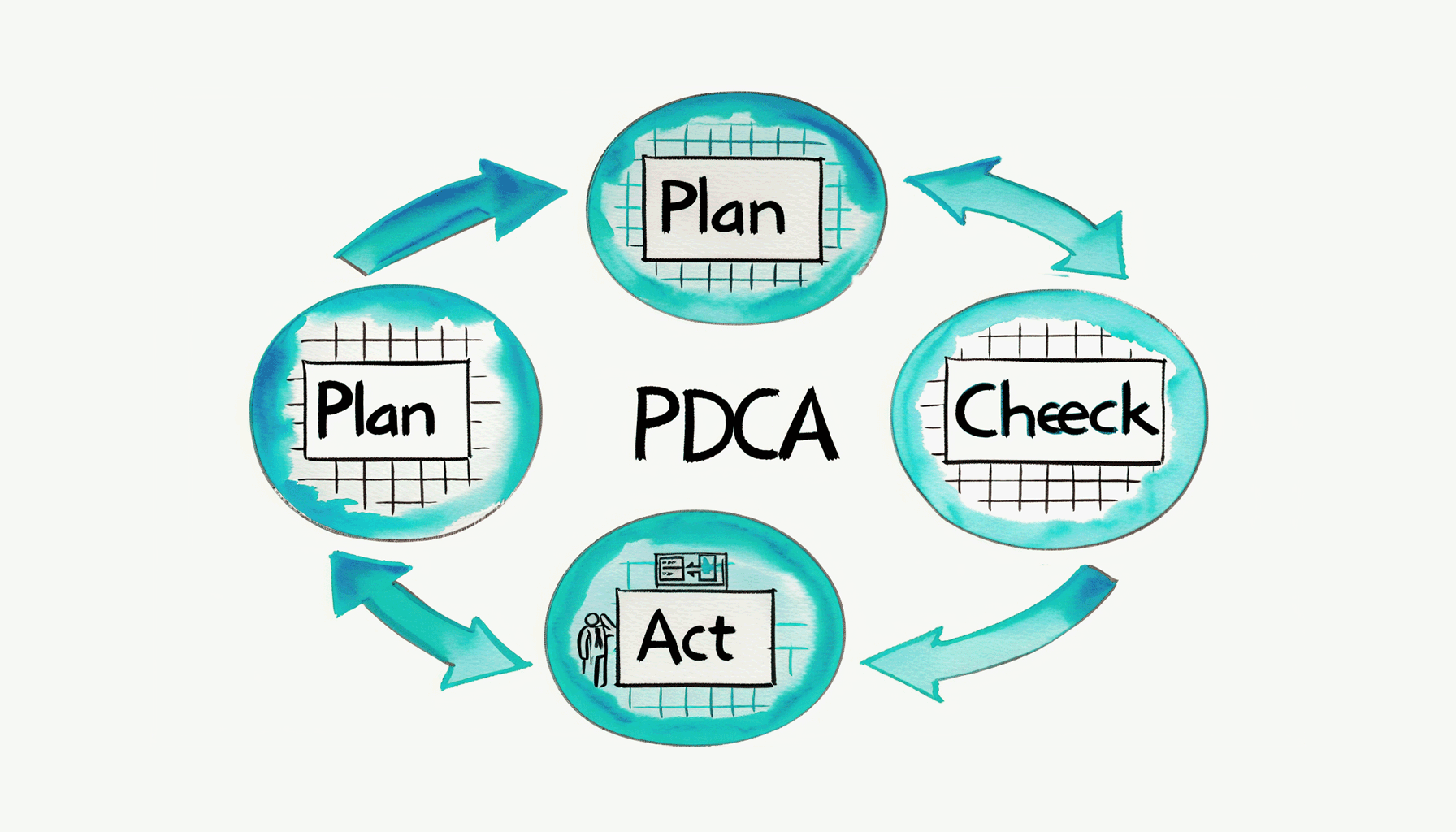
    It is tough to implement the improvement cycle of business processes. Although I honestly want to work on PDCA every month and every week, it takes time to grasp the current situation (Check) and deal with it (Act). Rather, it doesn’t seem to be realistic to upgrade the definition of the business process (Re-Plan). Anyway, I would like to show some ways to repeatedly do small improvements with a little ingenuity.

    1. Automatic Aggregation

    I’m mainly working on the automatic aggregation of business data these days.

    In other words, I’m modeling business processes by automatic periodic aggregation and by collecting data flowing to the business process. The company is run by Business Processes.

    To put it plainly, it is an automatic reporting function and I have listed some examples below.

    For example, if you create a business process (Workflow App) for aggregating the previous month’s expenses, the process starts automatically because of a timer, processes all the intermediate Tasks and ends. Email notifications to stakeholders and Timeline Posts are commonly set near the end of the flow.

    • 222 -Expense Claim
      • 222 -notice- Aggregate and notify the previous month expenses (← Monthly, calculated by each staff member)
      • 222 -cross- Aggregate the previous month expenses (← Monthly, company-wide)
    • 242 – Hours-worked Report
      • 242 notice- Update last week’s employee attendance book (← Weekly and by staff)
    • 242 b – Part-Time Hours-worked Report
      • 242b -cross- Aggregate the total working hours in the previous month by part-time staff
    • 216-Flexible-Billing-Cycle
      • 216-notice-Flexible-Report
    • (etc.)

    The frequently used Data extraction Task “Questetra BPMS: Process, Batch Extract as TSV”

    *Extracts process data as a multi-line TSV string from date-filtered processes. Items are specified in CSV format such as “string:0,date:2,select:3”. Tab code and line feed code are deleted.

    2. Are there any differences from monitoring?

    Honestly, you don’t need to implement the “aggregation process”. If you want to aggregate business data periodically you should use the monitoring function depending on the case. It helps you aggregate the historical data at any time.

    Aggregation processes simply automate that monitoring (and report it).

    3. Work I can do anytime = Work I will never do

    When reviewing the automatic aggregation, It’s actually really hard for people to see the information.

    • It doesn’t mean they aren’t interested
    • It doesn’t even mean they aren’t motivated

    But they don’t want to review the historical data much.

    However, that sentence might be misleading so I’d like to give a further explanation.

    I mean, reviewing is usually easier than the new work you face because you just have to look over it. Even so, humans tend to put off doing a review because they don’t see the immediate benefit of it. Consequently, you end up having less time to look at the aggregated data.

    If aggregating and reporting KPIs are a part of your work, you might regard it as a priority. However, in that case, you may become tired and less active in reviewing the aggregated work when it is completed. To be clear, you can see KPI information but you won’t go any further or examine it. Therefore, it doesn’t lead to any improvement through the PDCA and BPM cycles at all.

    The reason seems to be that if a task can be done at any time (i.e. it doesn’t have a strict deadline), then it’s inevitable that it will never get done.

    4. Let’s make an opportunity to Check!

    ltimately, an opportunity to inspire the person in charge of the task to do it right now is necessary.

    If you look over well-aggregated business data (or review the business), that will encourage everyone to comment and improve it a little. For example:

    • Director: whose job is to oversee the business
    • Auditor (accounting/internal office auditor): whose job is to audit

    The reason why they can review well is that the documents and reports to be checked are integrated into their routine.

    For such an opportunity, external triggers are probably significant. Even if you are good at self-management, it’s not easy to start all your tasks with internal triggers (your own will). It’s even possible to forget their existence.

    • You have to review, it’s now or never!
    • It’s time to review efficiently!

    Unless you give yourself the motivation to think of doing it, I’m afraid the opportunity won’t be there indefinitely.

    The automatic aggregation notification – aggregated, organized, and delivered on time – has become a pleasant self-management tool for me (for now).

    ▼Example of aggregation on two axes

    TSV String, Create Cross Tab for Numerical Sum

    ▼Example of simple aggregation

    TSV String; Sum of Number Column

    ▼Example of the data filter before aggregation

    TSV String, Filter by Text
  • 業務効率化のためのペーパーレス、キャッシュレス、そして〇〇レス

    業務効率化のためのペーパーレス、キャッシュレス、そして〇〇レス

    “業務プロセスを管理する” というマイナーな(?)サービスを創り続けて12年(クラウド型 業務プロセス管理: SaaS BPMS)。”プロセス改善” について、助言を求められる機会も少なくない。しかし、現状プロセス(As-Is プロセス)があまりにアナログな状態過ぎて、回答に窮してしまうケースもある。もちろん、彼らは “従来のヤリカタ” に魂を縛られているだけだ。。。この様な場合、助言者として、専門家として、コンサルタントとして、どのような心づもりをしておくべきのだろうか。。。デジタルトランスフォーメーションが叫ばれる今日、改めて考察してみた。

    1. ペーパーレス

    紙書類なんてイラナイ。(企画書、報告書、稟議書、見積書、請求書…)
    たしかに、、、

    • 枚数や分厚さで「威圧感」を演出できる。
    • スチール書庫に保管されている様子に「安心感」が得られる。
    • そして、書類を探し出すだけ(コピーを取るだけ)ですら「仕事をしたという達成感」が得られる。

    しかし紙書類の目的はただ一つ、”情報の受け渡し” のハズだ。”見た目” や “雰囲気” なんて無意味だ。仕事がスムーズに進められなければ意味が無い。
    今日、情報伝達ツールなんて紙書類以外に沢山ある。そして、そのほとんどは紙書類より手間がかからない。

    • 原本性が明確でなくなる?
    • ITの導入運用コストが掛かる?
    • セキュリティ学習コストが掛かる?
    • 字が汚くなるし漢字を忘れてしまう??
    • 印刷屋さん判子屋さんの売上が激減してしまう??
    • コピー仕事やシュレッダー仕事が無くなってしまう??
    • (なんか不安???)

    仕方ない。
    仕方ないのだ。

    かつての “飛脚” という仕組みは、無駄が多く費用的に高価であった。そして、公的な通信インフラとしての “郵便制度” (さらには “インターネット” )に取って代わられた。紙書類も、その運命と同じだ。「紙書類を回す」という古いヤリカタ滅びゆく運命と言わざるを得ない。少なくとも日々の仕事は、「紙書類を回す」という古いヤリカタに頼らず進められるようになるべきだ。

    そもそも紙書類は、”検索” ができない。。。
    業務プロセス改善の推進責任者は、『ペーパーレス』を第1の規範(金言)としたい。

    で、、、それらの業務をデジタル化するには、メールシステムやワークフローシステムにお世話になるべきだ。すなわち、クラウド型オフィス(G Suite、Office365…)+クラウド型ワークフロー(・・・単なる宣伝になるため自粛w・・・)あたりの法人アカウントを開通させる必要がある。加えて、クラウド型ストレージ(Box、Dropbox…)を並行活用するのも悪くない。

    ※国家戦略を語るなら、いっそ「紙書類を正とする法律文の書き方」から改めてしまうのはどうか? (かなりの政治力が要りそうだが) 例:「当該報告書等に記載すべき事項を記録した電磁的記録の作成をもつて、当該報告書等の作成に代えることができる。この場合において、当該電磁的記録は、当該報告書等とみなす。」

    2. キャッシュレス

    現金なんてイラナイ。(紙幣と硬貨、小口現金、釣銭…)

    たしかに、

    • 枚数や分厚さで「威圧感」(?)を演出できる。
    • 金庫に保管されている様子に「安心感」(?)が得られる。
    • そして、総額を数えるだけですら「仕事をしたという達成感」(?)が得られる。

    しかし現金の目的はただ一つ、”金銭の受け渡し” (決済)のハズだ。たとえば、給与賃金を紙幣硬貨で手渡している会社なんて、イマドキ皆無だ。
    今日、決済ツールなんて紙幣硬貨以外に沢山ある。そして、そのほとんどは紙幣硬貨より手間がかからない。

    • 小口現金が無いと切手購入に困る?
    • 宅配便の着払対応に困る?
    • 不意の出費で “立替犠牲者” が発生してしまう?
    • 支払の痛みを忘れてしまう??
    • 売上の有難味を忘れてしまう??
    • 紙幣硬貨管理の仕事が無くなってしまう??
    • (なんか不安???)

    仕方ない。
    仕方ないのだ。

    かつての “金・銀” といった価値交換の仕組み(秤量貨幣/ひょうりょうかへい)は、イチイチ重さを計る必要があり、その両替手続きも複雑なものであった。そして、国家権力による “管理通貨制度” (計数貨幣:枚数を数えるだけでイイ)に取って代わられた。今日の現金も、その運命と同じだ。「紙幣硬貨のヤリトリで決済する」という古いヤリカタ滅びゆく運命と言わざるを得ない。少なくとも日々の仕事は、「紙幣硬貨のヤリトリで決済する」という古いヤリカタに頼らず進められるようになるべきだ。

    そもそも紙幣と硬貨は、存在しているだけで “守るコスト” が掛かる。。。

    業務プロセス改善の推進責任者は、『キャッシュレス』を第2の規範(金言)としたい。

    で、、、それらの業務をデジタル化するには、(調達系業務でも回収系業務でも)、金融機関のオンラインサービスや決済ツールにお世話になるべきだ。すなわち、都市銀行(みずほ銀行、三菱UFJ銀行、三井住友銀行…)+ネットバンク(楽天銀行、ジャパンネット銀行…)+決済代行サービス/請求回収代行サービス(PayPal、Stripe、PayPay…)あたりの法人アカウントを開通させる必要がある。加えて、それらのデータを横断的に管理するために、クラウド型会計システム(マネーフォワード、freee、弥生オンライン…)の法人アカウントも活用したい。

    ※国家戦略を語るなら、(アリキタリな方針で恐縮だが)、「紙幣硬貨を不自由で不利なものにする」しかないのだろう。 キャッシュレス決済ポイント還元の継続、高額紙幣の全廃、新呼称新通貨でのデノミ。。。 (かなりの政治力が要りそうだが)

    3. ミーティングレス

    会議なんてイラナイ。(戦略会議、報告会議、部長会議…)

    #「会議」はイベント要素。「ペーパー」や「キャッシュ」は物質的なモノ。これらを同列に論ずるに、難はある、、、様な気がする、、、が、、、やっぱり、会議はイラナイ!

    たしかに、

    • 会議を開けば「説明した感」を演出できる。
    • 反論が無い様子に「承認を得た感」が得られる。
    • 参加者たちも、なんとなく「仕事をした感」が得られる。

    ところが現実、会議が終わっても “成案(結論)” がナンだったのかハッキリしないことが多い。会議の目的はただ一つ、”成案(結論)を得るコト” のハズなのだが。。。(予算承認、計画承認、決算承認、成果報告承認、などなど)

    何故か? 何故なのか??

    • 会議の Input としての “草案” が「練られていない」からだ。(ミンナが改善してぇ~!)
    • あるいは “草案” を「口頭で説明している」からだ。(ミンナが補足してぇ~!)
    • いや実は “草案” が「そもそも無い」からだ。(ミンナが考えてぇ~!)

    #草案の例:〇〇についてのプレス原稿案、〇〇認証の取得予算案、オフィス移転計画案、〇月度広告効果報告書案、日本国憲法草案、などなど

    そもそも「”草案” が無くてもミーティングの場でミンナで考えれば “成案” ができあがる」なんて幻想にすぎない。”草案” が無ければ、何度ミーティングを開催しても、まともな “成案” は得られないのだ。要するに「草案(Input)のないミーティング」は開いてはイケナイのだ。(三人寄れば…モヤモヤごっこ!)

    ミーティングまでに「草案」が完成されているような業務プロセスにしておくべきだ。業務プロセス図を書くなら、「ミーティング招集」の工程よりも上流工程で「草案作成」の工程が完了している必要がある。できれば「草案レビュー」の工程も完了させておきたい。

    そして、シッカリと練られた “草案” が存在していれば、

    • 会議参加者は賛否表明だけで済む。
    • セイゼイ、幾つかの質問をするだけで済む。
    • 賛否が分かれた場合でも、最終的に多数決を取れば良い。
    • (もし否決されても、起案者は更に草案を練り直せる)

    そもそも会議は、出張が多い方や時差のある方(や在宅勤務な方)にとってキビシイ。。。
    業務プロセス改善の推進責任者は、『ミーティングレスのための改善を行う』を第3の規範(金言)としたい。(頻度減/時間短縮)

    場合によっては、ネットミーティングでも良くなるかも知れない。場合によっては、ワークフローシステムでの承認クリックだけで良くなるかも知れない。

    4. 自動化・省力化にむけて

    そもそも、業務プロセスを改善するには、業務知識が必要だ。
    更には、業務プロセスを改善するには、貫徹できるだけ気合も必要となる。
    加えて、業務プロセスを改善するには、改革内容について周囲や上司から支持されなければならない。
    つまり業務プロセス改善は非常にストレスフルな仕事と言わざるを得ない。

    しかし、、、

    たとえば、自動改札機が発明されてもなお、もし “切符を切るための鉄道マン” を配置し続けるなら…、それは贅沢と言わざるを得ない。たとえば、売り手が紙書類としての請求書を郵送し、買い手が郵便物に記載されたデータを手入力し続けている状況があるなら…、それは贅沢と言わざるを得ない。たとえば、エライ人(物品管理官)が「古くなったパソコン使わせてあげて」と言ったら、倉庫係あての払出命令書と課長あての受領命令書が作られ、その命令書を受けて倉庫係が物品出納簿を手作業で更新し、その命令書を受けて課長が物品供用簿を手作業で更新しているようなら…、それは贅沢と言わざるを得ない、、、のだ。

    贅沢は組織を滅ぼす。 業務プロセスが「時代錯誤」になっているのではないだろうか? 業務プロセスが「貴族化」しているのではないだろうか? 常に自問し続けたい。業務の省力化は、継続的な業務プロセス改善の先にしかない。業務の自動化は、継続的な業務プロセス改善の先にしかない。
    業務プロセス改善の推進責任者は、ガンバルしかない。

  • RPA Robots are Dominant on PCs?

    RPA Robots are Dominant on PCs?

    Original Japanese version

    RPA Robots are Dominant on PCs?

    The software field of Robotic Process Automation (RPA) has surprisingly come to attract attention. In recent years the phrase “Work Style Reform” has become a buzzword in Japan, and RPA is obviously one of the keywords for releasing working people from simple computer work.

    0. RPA? Is it a buzzword??

    Recently, I’ve seen more articles about RPA, however, most of them make me worried about possible misunderstandings.

    In other words, some articles give an abstract introduction to the mechanism of Robots in the first line, such as the automation of daily work by robots. However, from the next line, they describe at length a dramatic future dominated by robots. Even in the articles regarding the application, they introduce improper usage.

    To begin with, RPA is not omnipotent. Its weaknesses and risks should be explained in detail. I think it’s better to take the articles written by such social affairs reporters of general newspapers with a pinch of salt (my personal opinion, though).

    Table of contents

    1. What is RPA

    It is a category name of software.

    *First of all, if some people don’t define that, conflict can happen. (Definition is necessary.)

    According to Wikipedia, it defines the efforts to improve the efficiency and automation of white-collar work. That’s almost right, however, what I’d like you to recognize more deeply is the definition of ”a software application that replicates the actions of a human being interacting with the user interface of a computer system”.

    Wikipedia(English): a software application that replicates the actions of a human being interacting with the user interface of a computer system

    The core of RPA is the ability to remember your typing operation on your computer. To be clear, the basic function is to learn how to use the keyboard and mouse “operational macro”.

    *If you’re interested, you can search for a video of ‘Blue Prism’ (a long-established product) or ‘Selenium’ (free software). Recently, they have released not only on-premises (desktop type) but also cloud-type products.

    Incidentally, in the field of software, the word “robot” is often used with the nuance of “duplicate” or “replica”. That is, humans are the “original” upon which robots are based (a dualistic concept). On the other hand, AI does not have such an “original”, so AI and robots are defined separately.

    *In other words, robots in the software industry don’t resemble Osamu Tezuka’s Astro Boy, but rather the “Copy Robot” in Perman by Fujiko F. Fujio. (Hope some of you can understand the point.)


    2. Evolution of robots

    Today, RPA can understand a variety of User Interfaces (UI).

    This means you can continue to use a system built for human manipulation (The User interface is the Human interface). This means it is possible to promote the automation of business without modifying existing business systems.

    Reducing IT capital expenditure is a great advantage.

    Testing the operation of software is a classic application of RPA. Now, products that can switch between various screens and that are split according to the condition of an event have been realized. RPA these days has been applied to online banking operations, which can also automatically scrape (or extract) displayed data. In other words, RPA can handle tasks – like obtaining a history of cash flows and viewing balances – more accurately and much faster than humans.

    Screen scraping has been done on the server side in accounting clouds

    3. Robot boycott?

    However, I’m wondering if robots are able to handle everything.

    If you think about it, mechanisms to eliminate robotic logins, such as two-factor authentication and a visual verification are also evolving. There are also many other systems that require human authentication by using security tokens, puzzles, and fingerprints.

    In fact, the information provider (similar to a resource server operator) requires that the log in subject be human.

    Why is that?

    In the first place, from the point of view of the information provider robots are inconvenient in various ways.

    For example, if there are announcements to users, they probably won’t be passed. On the other hand, if the User Interface is improved, the robots will give errors.
    This is not very helpful, and if robots access the User Interface many times it can sometimes be defined as an attack. Furthermore, there’s a concern about overlooking malicious operations.

    4. Suitable areas for RPA

    You should determine areas in which to use RPA after a thorough risk analysis. (It really depends on the case, though.)

    However, the question of whether or not to give a robot a password is hugely controversial.

    In this case, if a password is leaked from the robot, that is the worst scenario. In many cases, that password gives access not only to the work you want the robot to do but also the authority to delete data and users. At least, I suggest you shouldn’t set a password on any robots for automation.

    Incidentally, the biggest feature of RPA is that it is possible to control a User Interface (UI), but today’s business systems also have Application Programming Interface (API) as well.

    And with the API mechanism, there is no need to tell the computer the password. The Japanese government has been promoting Bank API since 2017 in the Banking Act because they want to protect depositors through strict password management.

    In addition, there is an RPA product that covers communications with Computer Interfaces. To use it, it is important to distinguish between the system which is communicating with a Human Interface and the one which is communicating with a Computer Interface.

     The details of APIs are covered in other articles, but I can say that a technology called OAuth Authorization is being used widely in API communications these days. It is the system where authorizers allow specific automatic communications. For example, you can link data between Facebook and Twitter without giving your password. Moreover, you can precisely specify the range of data that may be referenced and what can be updated. “What is “OAuth”, the Cloud Technology which Everyone Should Know?”

    5. How BPMS makes external requests

    Finally, I’d like to describe how Questetra, the BPMS (business process management system) requests data updates and data references from external systems.

    At least for Questetra, we suggest that data communication via BPMS is not implemented with a communication function through a User Interface. In other words, requests should be made as an OAuth client for the data update Task and the data reference Task.

    A system without API connections certainly makes automated tasks difficult, but API connections are necessary to reduce the security risk. (I.e. the age of API connections as a precondition seems to be coming to an end.)

    画像に alt 属性が指定されていません。ファイル名: rpa-robot-api-orchestration-via-bpms-en-592x315-1.webp

    PS. Some specific linkage images

  • Cloud BPM v11.13, Automatic Text-file Generation is Now available

    Cloud BPM v11.13, Automatic Text-file Generation is Now available

    Original Japanese version

    Eliminates unintentional deletion or content tampering

    Kyoto, Japan, January 20th, 2020, Questetra, Inc., the global SaaS provider of Business Process Management (BPM), today announced that they have published the new version 11.13 of the Cloud-based Workflow product “Questetra BPM Suite” on Jan. 20th, 2020. This new version allows the automated text file generation in a fixed format based on business data.

    In daily work, various text information is generated. For example, various types of text information are generated, from reports such as “Changes in the number of Web accesses” to official documents such as “Current state of the company.” In many cases, those text information is saved as a text file.

    With the new version 11.13, it is possible to place an automatic step at which text information is automatically saved in the middle of a Business Process. That is in other words, you can easily build a mechanism in which a file in a specified format is automatically generated at the same time text information is approved. For example, by arranging an automatic process such as automatic upload to cloud storage at further downstream, a series of document management processes can be unmanned so that the risk of unintentional text deletion or content tampering can be eliminated.

    Questetra BPM Suite

    Cloud-based Workflow “Questetra BPM Suite” is a business platform for realizing paperless environments and remote-working. Business issues are controlled according to a Business Flow Diagram. When a Process reaches a Human Task the user will be asked to add their input. Also, when an issue reaches an automated Step the predetermined processing (server-side processing) such as “Generate PDF” and “Save to cloud storage” is performed automatically. (BPM: Business Process Management)

    You can apply it to various business operations such as “Approval request flow”, “Document translation flow”, Quality check process, “Invoice issuance process”. Process owners of each Business Process can practice the “improvement of Business Processes” little by little in daily work.

    Automatic File-generation based on Business Data

    Using a Service Task a text file in accordance with the specified format is automatically generated out of business data. In addition to report files, it is capable of generating text files in various formats such as HTML, JSON, XML, or CSV.

    Text File Generation Configuration

    Other Improvements

    Converter of CSV file to Table-type data

    Using a Service Task, the contents of a CSV file can be inserted into a Table-type Data Item. At the approval step in a Work Report Process, for example, you can build a mechanism that allows you to check the CSV file in a table format without downloading it, or to enter the check results at each row. Converter (Excel-CSV FILE to Table type data)

    Converter of Table-type data to CSV file

    Using a Service Task, data entered in a table format can be converted to a CSV file. In the Business Partner Addition Process, for example, business partner information entered in a table format is converted to a CSV file, and the file can be uploaded to your core system. Converter (Table type data to Excel-CSV File)

    Enhanced automatic business data assignment

    In the Service Task that performs concatenation of String-type data and calculation of Numeric-type data, etc. the name and email address in User-type data can be output individually. Also, upon inserting a Table-type Data Item, it is now possible to output the value of each cell. Service Task (Data Assignment)

    See the release notes for details.
    Ver. 11.13 Release Note: https://support.questetra.com/versions/version-11130/

  • クラウド型ワークフローv11.13、ファイル生成機能を追加

    クラウド型ワークフローv11.13、ファイル生成機能を追加

    SaaSベンダーの株式会社クエステトラ(京都市、代表執行役 CEO 今村元一)は1月20日、クラウド型ワークフロー製品である 『Questetra BPM Suite』 の新バージョン11.13を公開しました。新バージョン11.13では、業務データに基づく定型フォーマットのテキストファイルを自動生成できるようになります。

    日々の業務では、様々なテキスト情報が生み出されます。たとえば「Webアクセス数の推移」といった報告書から「会社の現況」といったオフィシャルな文書まで、様々な文書が生み出されています。そして、それらのテキスト情報がテキストファイルとして保存されるケースは少なくありません。

    新バージョン11.13からは業務プロセスの途中に「テキスト情報が自動的にファイル化される自動工程」を配置できるようになります。すなわち、テキスト情報が承認されると同時に指定フォーマットのファイルが自動的に生成される、といった仕組みを簡単に構築することが可能となります。たとえば「クラウド型ストレージへの自動アップロード」といった自動工程を更に下流配置すれば、一連の文書管理プロセスが無人化され、恣意的なテキスト削除や内容の改竄が行われるリスクをゼロ化することも可能となります。

    Questetra BPM Suite とは

    クラウド型ワークフロー『Questetra BPM Suite』は、ペーパーレス環境やリモートワーク環境を推進するための業務プラットフォームです。業務案件は業務フロー図に従ってコントロールされ、案件が人間工程に到達すれば担当者はアウトプットを求められます。また、案件が自動工程に到達した際には、「PDFの生成」や「クラウドストレージへの保存」といった既定の処理(サーバサイド処理)が自動的に行われます。(BPM: Business Process Management)

    「稟議承認フロー」「文書翻訳フロー」「品質チェックプロセス」「請求書発行プロセス」といった様々な業務に適用していただけます。各業務のプロセスオーナーは日々の業務の中で少しずつ「業務プロセスの改善」を実践することが可能です。

    業務データに基づくファイル生成機能について

    サービス工程を利用して、業務データから指定したフォーマットに従ったテキストファイルが自動生成される様になります。レポートファイルの生成の他、HTML、JSON、XML、CSV など、様々な形式のテキストファイルを生成することができます。ファイル作成の手間やミスの混入リスクを下げることができます。

    その他の機能改良について

    CSVファイルのテーブル型データへの変換機能

    サービス工程を利用して、CSVファイルの内容をテーブル型データ項目に挿入できるようになります。例えば、作業報告プロセスで、CSVファイルを承認工程でダウンロードせずに表形式で確認したり、行ごとにチェック結果を入力したりできるような仕組みを構築できます。(コンバータ (Excel-CSV ファイル to テーブル型データ) )

    テーブル型データのファイルへの変換機能

    サービス工程を利用して、表形式に入力されたデータをCSVファイルに変換できるようになります。例えば、取引先追加プロセスにおいて、表形式に入力された取引先情報がCSVファイルに変換され、基幹システムにファイルアップロードできるようになります。(コンバータ (テーブル型データ to Excel-CSV ファイル))

    業務データの自動設定機能を強化

    文字型データの連結や数値型データの演算などを行うサービス工程において、ユーザ型データの名前、メールアドレスを個別に出力できるようになります。また、テーブル型データ項目を挿入する際、各セルの値を出力することなどもできるようになります。(サービスタスク「データ設定」)

    詳細については、リリースノートを御参照ください。

  • Business to Professional

    Business to Professional

    Thank you for using Questetra BPM Suite.

    The service system will be changed from July 1st, 2020, as described in the Expansion of Service System. I will explain how to change from Business or VIP that are before the change to Basic, Advanced, Professional or Enterprise Edition which will be after the change.

    Differences between the Service Systems

    There are the following differences in the paid Edition between the service systems until the end of June and after July 1st of 2020.

    Service system until the end of June

    • Type: Business, VIP (2 types)
    • All functions and support of “Questetra BPM Suite” are available in both Editions. The differences between the Editions are due to differences in the configuration and performance of the service platform.

    Service system from July 1st

    • Type: Basic, Advanced, Professional, Enterprise (4 types)
    • Available functions and support for “Questetra BPM Suite” vary by Edition. The available functions are the same for Professional and Enterprise, but there are differences in the support content and the configuration and performance of the service platform. Please refer to the following for more detailed information on each edition.
    For the details by each edition please see this chart.

    Transition to service system after July

    The remaining contract period as of the end of June will be automatically carried over as a new edition contract. There is no extra charge at that time.

    • Business (discontinued) ⇒ Professional (new)
    • VIP (discontinued) ⇒ Enterprise (new)

    Until the end of June, you can order renewal for the next contract period at the same usage fee as before. (for a period of 1 or 2 years)

    FAQ

    Q. My Business contract is going to be expired in September 2020. Which Edition will my contract be during the period between July and September?

    A. It will be Professional.

    Every Business that was contracted before July 2020 will be available as Professional on and after July 1st. For service system from July, please see Expansion of Service System.

    Q. My current contract will end in April 2020. I want to renew it for two years before the end of June, then what will the exact term be? And, what will happen if I need to add more users during that period?

    A. Your contract term will be from May 2020 to April 2022. In case you need to add User seats, you will be able to add user seats at the contracted price until the term-end. (10 users unit)

    Q. What if I do not sign up by the end of June 2020?

    A. You will choose from Basic, Advanced, Professional or Enterprise at the time of the next renewal. For service system from July, please see Expansion of Service System.

    Q. My current contract is Business (Flexible). How do I do to make a contract for two years term within June?

    A. You can order a Business with an annual contract by the end of June.

    E.g. You continue to use Business (Flexible) until June. Then you place order Business (annual) for two years (from July 2020 to June 2022) within June. For use after July 2022, you can choose from Basic, Advanced, Professional and Enterprise contracts.

    Inquiries

    For customers who are subscribing via partner-company, please consult your partner. For service system from July, please see Expansion of Service System.

  • Business から Professional 等への移行手続き

    Business から Professional 等への移行手続き

    平素より Questetra BPM Suite をご利用いただき、誠にありがとうございます。

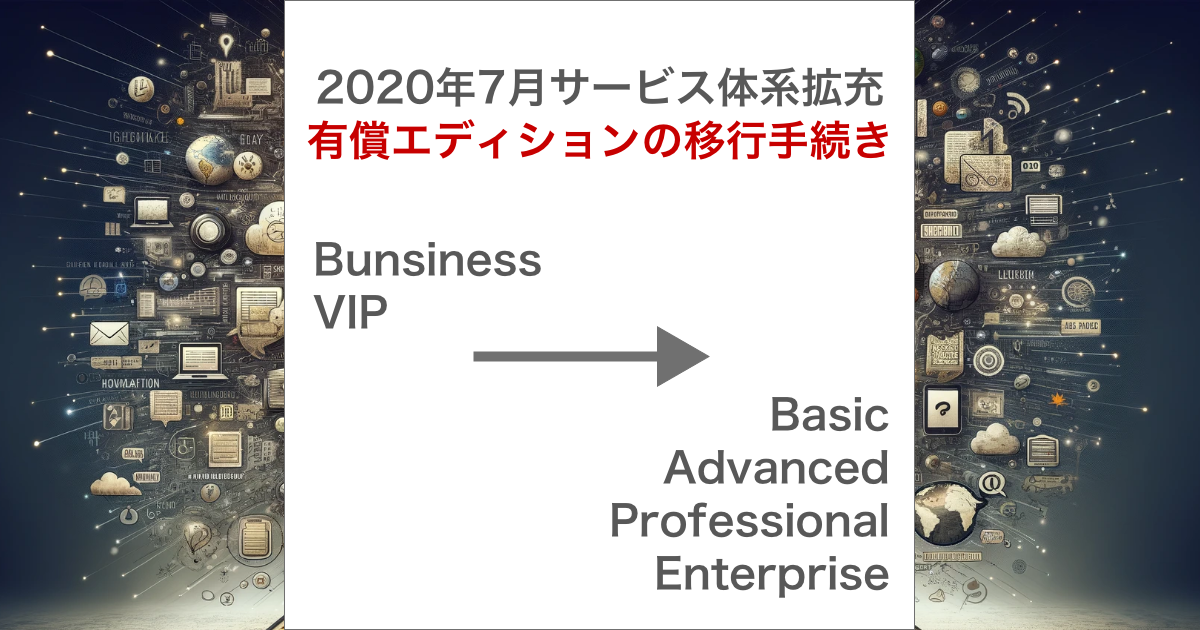
    サービス体系の拡充について」でご案内させていただいたように、2020年7月1日よりサービス体系が変更されます。変更前の Business, VIP から、変更後の Basic, Advanced, Professional, Enterprise への変更方法について説明いたします。

    サービス体系の違いについて

    2020年6月末までのサービス体系と2020年7月以降のサービス体系では、有償エディションについて次のような違いがあります。

    6月末までのサービス体系

    • 種類:Business, VIP (2種)
    • 両エディションとも「Questetra BPM Suite」のすべての機能・サポートを利用することができます。それぞれの違いはサービス基盤の構成や性能の違いによるものです。

    7月以降のサービス体系

    • 種類:Basic, Advanced, Professional, Enterprise (4種)
    • 「Questetra BPM Suite」の機能について、エディションごとに利用できる機能・サポートが異なります。Professional と Enterprise について、利用できる機能は同じですが、サポート内容やサービス基盤の構成や性能に違いがあります。

    7月以降のサービス体系への移行について

    6月末日時点における契約残期間につきましては、新エディションの契約として自動的に引き継がれます。その際、追加料金はかかりません。

    • Business (廃止) ⇒ Professional(新)
    • VIP(廃止) ⇒ Enterprise(新)

    6月末日までの期間は、これまでのご利用料金で、契約期間終了後の更新をご発注いただけます。(1年分または2年分)

    よくあるご質問について

    有償で利用中の Business(年間契約)が2020年9月に終了します。7 – 9月はどうなるのでしょうか?

    「Professional」です。

    2020年7月より前にご契約いただいた Business は、7月以降「Professional」としてご利用いただけます。7月以降のサービス体系については「サービス体系の拡充について」をご覧ください。

    現在の契約が2020年4月に終了します。6月末までに2年分の契約をしたいのですが期間はどうなりますか?また、その期間中にユーザの追加が必要になった場合にはどうなりますか?

    2020年5月から2年間です(2020年5月〜2022年4月)。ユーザの追加が必要になった場合、契約期間終了までの間、ご契約いただいた時の価格で追加していただけます。(10ユーザ単位)

    2020年6月末までに契約しない場合はどうなりますか?

    次の契約更新時に、Basic, Advanced, Professional, Enterprise から選んでご契約いただきます。7月以降のサービス体系については「サービス体系の拡充について」をご覧ください。

    現在の契約が日割契約(月単位の契約)です。6月末までに2年分の契約をしたいのですがどうしたら良いですか?

    6月末までに年間契約で Business をご注文いただくことが可能です。

    例: 6月まで Business(日割契約)を利用。6月中に7月から Business (年間契約)2年分(2020年7月〜2022年6月)をご契約いただけます。2022年7月以降のご利用は、Basic, Advanced, Professional, Enterprise から選んでご契約いただきます。

    サービス体系変更に関するお問い合わせ

    販売パートナー様から Questetra BPM Suite をご購入いただいている場合には、パートナー様にご相談ください。7月以降のサービス体系については「サービス体系の拡充について」をご覧ください。

  • About the End of Starter Edition

    About the End of Starter Edition

    Original Japanese version

    Thank you for using Questetra BPM Suite.

    The service system will be changed on July 1, 2020. At that time, reception for the Starter Edition will be closed and a new Trial mode (free) will begin.

    For details, see “For Starter Edition Users“.