AI-driven expense audits now catch fraud that supervisors and accounting previously missed.
1. Issue: Overlooking Fraud During the Approval Process
As a manufacturer and seller of industrial machinery, the company handles a high volume of expense reports due to frequent business travel.
The process for these reports is that an employee submits the report, their supervisor reviews and approves it, and then the accounting department handles the payment.
However, some expense reports contained fraudulent or non-compliant entries. Supervisors often failed to detect these issues, as the reports appeared to have no superficial problems, and approved them anyway.
As a result, the accounting department had to take on the additional task of checking for fraud, which significantly increased their workload.
2. Solution: Using AI to Detect Fraud and Policy Violations
To solve this problem, the process owner integrated an “AI Agent” step into the workflow.
The AI analyzes the submitted expense report against the company’s internal rules and regulations to identify potential fraud and policy violations.
AI reliably catches subtle fraud and policy violations missed by human eyes.
Before
View details of the workflow diagram1.Expense Report
An employee submits an expense report.
x1.Generate Expense Report
Based on the report from step 1, a formatted report is automatically generated.
x2.Detect Report Deficiencies by AI
Irregularities are detected and highlighted by the AI based on the instructions and the expense report from x1.
2.Boss Approval
Boss Approval or Rejection
3.Payment
Accounting will either approve or reject the payment.
After
View details of the workflow diagram1.Expense Report
An employee submits an expense report.
x1.Generate Expense Report
Based on the report from step 1, a formatted report is automatically generated.
x2.Detect Report Deficiencies by AI
Irregularities are detected and highlighted by the AI based on the instructions and the expense report from x1.
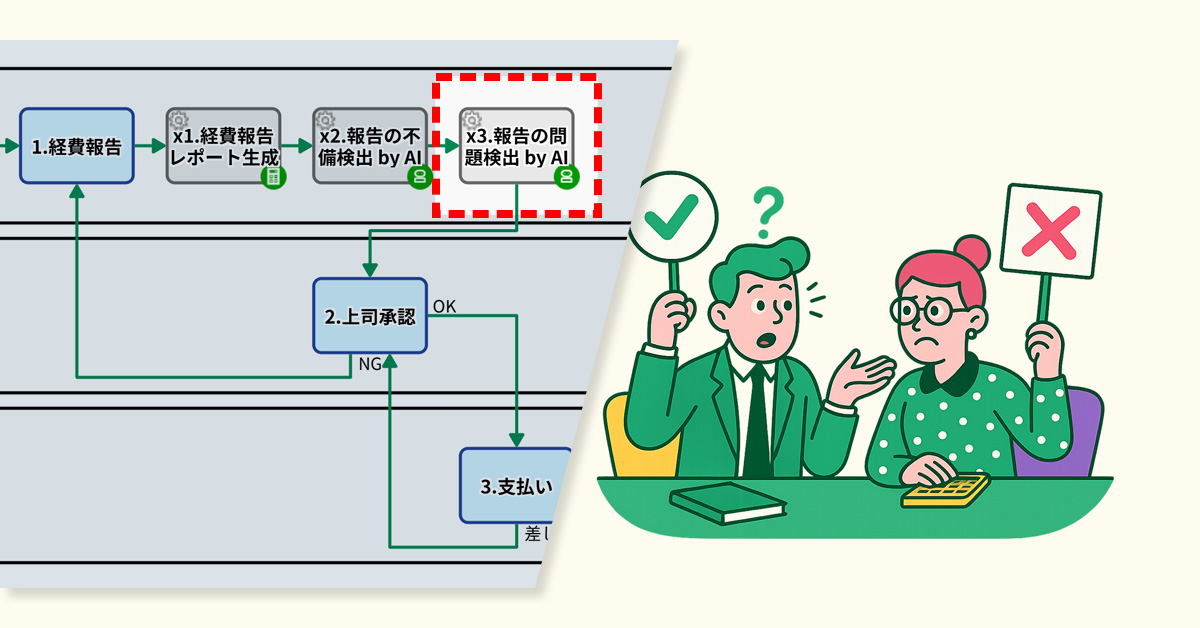
x3.Detect Issues in Report by AI
Based on the expense report from x1 and the provided instructions, the AI detects and highlights fraud and policy violations.
2.Boss Approval
Boss Approval or Rejection
3.Payment
Accounting will either approve or reject the payment.
AI reviews request content and suggests improvements to help applicants draft better requests.
1. Issue: Creating Responses Takes Time
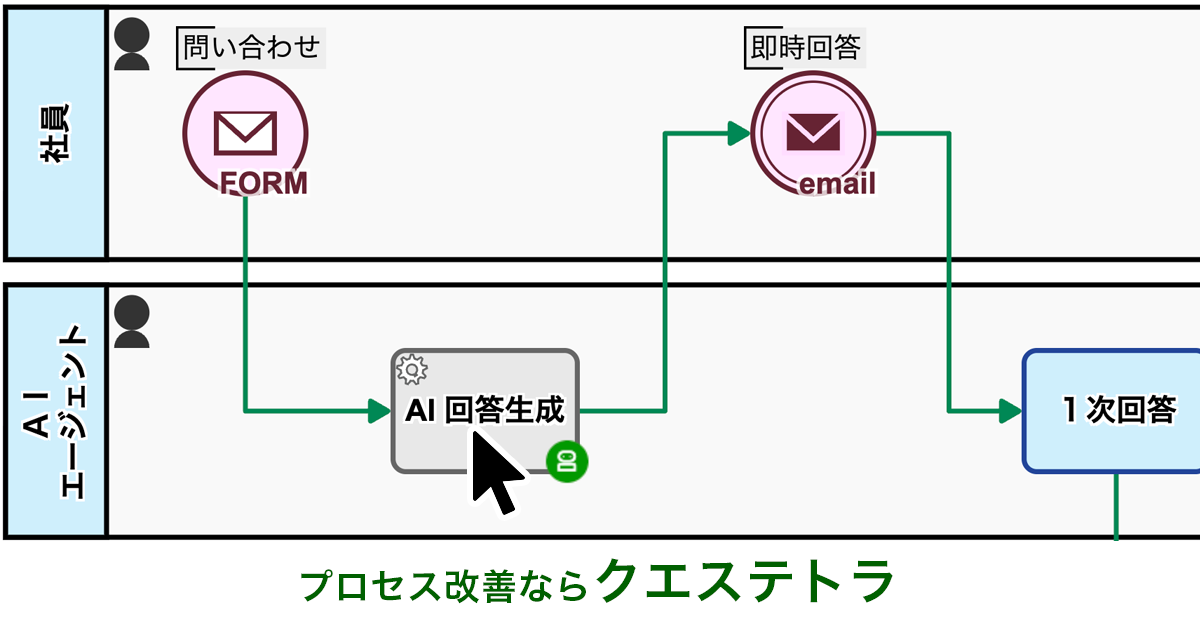
The IT department manages internal IT infrastructure and handles urgent employee requests every day. Inquiries are submitted through a web form, with automated acknowledgment sent instantly upon receipt.
With 20 staff members, each handles 1-2 queries per day, sometimes up to 30 during peak periods. The complexity of inquiries has increased due to the adoption of cloud services, making it more time-consuming to craft responses.
As a result, there was a demand for a more efficient and rapid process for handling inquiries.
2. Solution: AI-Assisted Response Creation and Streamlining
The process owner reviewed the internal workflow and introduced the “AI Agent” auto step.
This process kicks in right after an inquiry is logged, with AI gathering relevant information to draft potential solutions and preliminary responses automatically. This relieves staff from creating responses from scratch.
AI assistance saves time by eliminating the need to draft responses from scratch.
Before
View details of the workflow diagramsInquiry Input[FORM]
The requester fills out the inquiry form.
Inquiry received
Receive notification of inquiry acceptance.
1.Enter First Response
The internal help desk agent provides the initial response.
Status:Noise
When “Noise” is selected in step 1, the case status will be set to“Noise”.
Status:Completed
When ‘Final Answer’ is selected in step 1, the case status will be set to ‘Completed’.
Status:Second Response In Progress
When “Reply & Escalate” is selected in step 1, the case status will be set to “Under Secondary Review.”
Initial Response (Final)
Receive initial response via email, and the process is complete.
Initial Response (Interim)
Receive initial response via email, and the process is complete.
2. Enter Secondary Response or Completed Item
The technical support agent enters a second response or, if the investigation will take time, an estimated completion date.
Status:Completed
If you select “Second Response” in step 2, the case status will be set to “Completed.”
AI error-detection cut accounting’s workload by fixing flawed expense reports before approval.
1. Issue: Rework caused by errors in expense reports
As a manufacturer and distributor of industrial machinery, we regularly process employee expense reports for business travel and on-site assignments. The process involves an employee submitting a report, which is then reviewed and approved by their manager before being processed for payment by the accounting department.
However, due to busy schedules and other reasons, it was found that managers were often approving these reports without reviewing them thoroughly.
As a result, incomplete applications—lacking attached invoices or containing incorrect transaction dates—were being passed on to the accounting department.
This forced accounting staff to spend extra time verifying the details of each report, which ultimately caused payment delays.
2. Solution: Use AI to proactively detect errors in expense reports
To address this issue, the process owner incorporated an “AI Agent Process” and an “Automatic Report Generation Process” into the workflow.
When an expense report is submitted, a report is automatically generated based on its contents. Next, the AI analyzes the report to check for errors such as missing invoices or incorrect transaction dates. If any inconsistencies are found, the AI identifies the specific error and its reason, and this flagged report is then passed on to the manager for their approval.
This new system ensures that any flaws in the expense reports are visible before they ever reach the accounting department.
Pre-correcting errors in applications significantly reduced the time accounting staff spent reviewing and returning reports.
Before
View details of the workflow diagram1.Expense Reporting
Employee submits an expense report.
2.Boss Approval
The submitted proposal is subject to approval or denial by the boss.
3.Payment
Payment approval or rejection will be processed by the Accounting Department.
After
View details of the workflow diagram1.Expense Reporting
Employee submits an expense report.
x1.Generate Expense Report
Based on the first report, a report is automatically generated in the specified format.
x2.Detect Report Errors by AI
Based on the x1 expense report, the AI detects and highlights any discrepancies according to the instructions.
2.Boss Approval
The submitted proposal is subject to approval or denial by the boss.
3.Payment
Payment approval or rejection will be processed by the Accounting Department.
A special offer booking form encouraged inactive VIP customers to return and make appointments.
1. Issue: Emails to VIP customers don’t lead to bookings
Customers who have visited a certain number of times or spent a certain amount are designated as VIP customers, and they regularly receive mass emails with the latest information.
However, some of these customers have not visited for a long time and do not respond to the emails. The traditional email format sends the same information to everyone, lacking special offers or personalized suggestions, which fails to encourage them to book an appointment.
As a result, the mass emails have consistently failed to lead to salon visits.
2. Solution: Offer limited-time special benefits to encourage immediate bookings
The process owner introduced a system to send unresponsive VIP customers a special booking form with an offer of 10% off if they book within 48 hours.
Additionally, a checkbox was added during the email drafting stage, allowing staff to select customers they specifically wanted to encourage to book. Customers who were checked would then receive the mass email with the exclusive booking form URL embedded.
As a result, customers can now access the booking form with one click directly from the email. The short-term and clear incentive effectively encourages a sense of urgency, making immediate bookings more likely.
A special offer form helped bring back customers who had stopped visiting by encouraging them to book again.
Before
Parent ProcessChild Process
View details of the workflow diagramUsing Generative AI to Customize Announcement Text
Generative AI automatically inserts a different, customized sentence into each customer’s email.
Review email body and addresses
Staff members visually confirm the distribution data.
Automatic email sending
Email is sent to customers automatically.
After
Parent ProcessChild Process
View details of the workflow diagramUsing Generative AI to Customize Announcement Text
Generative AI automatically inserts a different, customized sentence into each customer’s email.
Review email body and addresses
Staff members visually review the distribution data. At this time, they check a box for any customer they want to encourage to book an appointment.
Automatic email sending
An email containing a URL for a dedicated booking form is sent to customers who are to be encouraged to make a booking.
VIP-Only Booking Form
After the email is sent, the dedicated booking form will be open for 48 hours.