Q. What type of operations do you use Questetra for?
At SMART VALUE we are proposing a wide range of cloud services for the solution of social issues.
More specifically, we offer a range of cloud services for the public sector, sales of vehicle information systems and equipment, operation of data centers and servers, and sales of mobile terminals.
We have introduced Questetra to visualize purchasing operations. Many of our purchasing operations require approval in advance, and we are using Questetra for the workflow from approval to ordering. In the approval flow, the approval route will be decided automatically depending on the scale of the purchase.
Q. How had you been handling the operations before Questetra?
We had been handling purchasing information on paper documents before.
However, the procurement process can be complex, with some staff placing orders themselves and others being managed by the administration department, and with multiple locations for the delivery of goods. Also, in some cases internal stock checks are required or internal approval is needed in advance. I guess there were only a few employees who understand the flow of the business perfectly at that time.
If you ask me whether the Workflow system of Questetra has accelerated business operations, I would say not that much.
However, the business rules and flow of the business has been clarified, so it is effective for internal control to eliminate rework and unify the different ways people handled things. In addition, I think it was quite a big improvement that I can grasp the number of purchases and how much we paid for them.
Easy to Design Flows. Now Expanding beyond Administration Work
Q. Please tell me about the difficulties you have been through.
We have conducted a drastic overhaul of internal rules along with the introduction of Questetra.
I think we designed the business very smoothly because we designed the work procedures from scratch. Even though we were anxious about how to draw a workflow diagram in the beginning, we could get used to it very quickly. It was very helpful for me as the person in charge of the introduction, because I didn’t need any programming skills, so the time from making a flow to testing it was short.
One thing I struggled with was the configuration of the allocation rules for each operation. We have so many sections and roles, so we have to set a lot of Swimlanes. It would be very useful if Questetra had a function that made it easier to set them up all at once.
Q. Are you considering expanding the use of Questetra to other operations?
The system is already being used for handling travel requests and business trip expense settlements. About 270 employees make requests for interim payments and reimbursements online, and their supervisors or the management department handles them online as well. Now, about 30 different operations are handled online.
More recently, we expanded its use to include the operational flow of SSL server certificate updates, besides the request handling. Even though we are still in the trial phase, it provides us with a detailed work record which was not previously available. We would like to encourage other departments to use the system in the future.
Questetra BPM Suite は、仕入調達業務の可視化のために導入しました。スマートバリューの商品仕入業務は、「事前に稟議が必要なもの」が少なくありません。Questetra を使って事前の稟議承認から発注までの業務フローに活用しています。承認フローは、調達規模に応じて自動的に承認経路が変わります。
Kyoto, Japan, June 17, 2013, Questetra, Inc., the global SaaS provider of Business Process Management (BPM), today announced that they have published the new version 9.6 of the cloud-based Workflow product “Questetra BPM Suite”. With the new version, With the new version, storing files to Google Drive, the Online Storage, is automated.
e.g. Only the approved quote is transferred after automatically generated
“Questetra BPM Suite” (Cloud-based Workflow) that digitizes business data, has been equipped with “Service Task” which ‘automates processing’. You can automate PDF file Generating, Arithmetic operations or Date calculation, only by placing Service Tasks in between human processing such as ‘Input’ and ‘Approve’.
With this new version 9.6, it automates File-Storing to Google Drive, the Cloud-storage as well. With this feature for example, you can totally automate the processing that ‘Storing a backup of only approved Quotation to “Google Drive”.
Questetra BPM Suite
“Questetra BPM Suite” is a Cloud-based Workflow which you can build and adjust your Business system by drag and drop placement of processing steps. No programming is needed. BPM: Business Process Management
Because it is standardly equipped with Real Time monitoring feature for business bottleneck and with Aggregation feature for performance, it helps you to improving the flow of business (Business Process) aggressively and continuously. The Free Trial Edition, it is limited by the number of users up to five.
Google Apps Connectivity
Even though they are independent Cloud-Services, you can use “Questetra BPM Suite” the Cloud-based Workflow, and “Google Apps” the Cloud-based Office Suite, in collaboration by 5 minutes setting.
Single Sign-on: Log-in with Google Apps ID/Password (OpenID)
Synchronizing of Users, Groups, Roles: Synchronizing with Google Apps Accounts (OAuth Consumer)
Google Gadget on Gmail: MyTask List, Colleague Workload (OAuth Service Provider)
Google Calendar Export: Exporting deadline date to Google Calendar (OAuth Consumer)
Google Drive Export: Exporting the list of business data or files to Google Drive (OAuth Consumer)
[New Feature] Google Drive Auto-Storing: Background file throwing to Google Drive (OAuth 2.0 Client)
Google Drive:
“Google Drive” is a Cloud-based storage (online storage) service, which is widely used to centralized management and to share of files. It is also included in “Google Apps”, the Cloud-based office Suite. In the year 2012, it has added features such as directly attach stored files to “Gmail” or “Google+”, and feature to synchronize with folders in Personal Computer. Now it is becoming a main service of Google Apps.
[New Feature] Auto-File-Throwing to Google Drive
Other Upgrading
In the New version 9.6, the following features are added other than ‘Auto-File-throwing to Google Drive’.
More Stiackers for Enterprise Social networking:
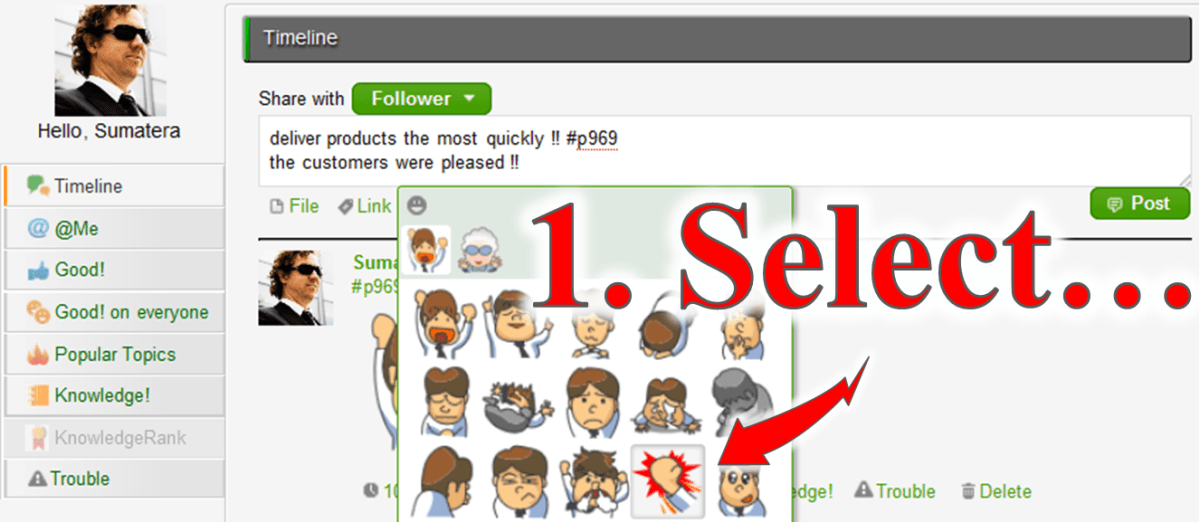
New series of Stickers which help to show feelings are added.
Messages of Enterprise Social Networking in Workflow screen:
Message-box will remain open on the screen to operate an allocated Task if there are messages related to the process.
APIs for Developer:
New APIs which operate allocation and termination are added to “Monitoring API” in Workflow APIs. Also, added new search criteria ‘Starred’ in “Worklist API”, sorted JSON response is available.
About Questetra
Questetra, Inc. is the enterprise cloud computing company in Kyoto Japan, founded in 2008. We optimize the world’s Business Processes.
Keep Usage Permissions of the Business System in a proper state at all times!
Q. What kind of operations do you use Questetra for?
Impress Group is a Media Enterprise group with more than a dozen subsidiaries, such as IT-related publisher Impress Japan Corp., etc. Through digital media and publishing media we provide content plus high-value-added services, according to today’s needs. (Tokyo Stock Exchange 9479)
Today, in addition to IT and PC related publications, the group sells a wide range of the content related to music, design, mountains and nature to name a few, and Impress Holding, Inc. takes care of the procurement of infrastructure and allocation of business resources.
We have introduced the Cloud-based Workflow system (Questetra) as a tool to control IT as a part of internal control reinforcement, and also as a tool to achieve operational efficiency.
Q. What kind of ‘IT control’ do you refer to?
In the Impress Group about 600 employees are using various business systems. These systems are of various types and purposes, from editing content to service providing and customer data management.
From the perspective of business process control, it is important to prevent mistakes by ensuring the appropriate use of these business systems. In addition, the business systems themselves must be managed properly.
Previously, the procedure for granting system use permissions had been carried out on paper. The requests for changes in system access due to hiring, resignations or employee transfers had been carried out by the Personnel Department or the person responsible at each subsidiary, but I must say there were various problems, such as:
Changes went unnoticed due to documents getting stuck somewhere during the paperwork processing
Difficulty searching for past procedure records
It took a long time to audit the implementation of the internal control
Now that the paperwork process has been digitized, the system usage authorization can be updated daily. In addition, the automatic recording of updates has made it easier to provide an audit trail, which has significantly reduced the cost of responding to internal control audits. I also think that the operational efficiency of the IT Systems Department has improved greatly.
Importance of an Overview of the Business Flow
Q. What was important for you to select a Workflow System?
Indeed, the digitization of our procedures was important, but I wanted to clarify the workflow. I was wondering how I could get an overview of the entire workflow system. In fact, I found Questetra while searching for images of business flow charts.
I think there are wonderful features that other products don’t have, such as the capability to set conditional expressions and to send emails to any destination at points in the workflow diagram, or the Swimlane function to automate the allocation to the person in charge of each step. I expect that the handover of operations whenever there is a change in personnel will become much easier if I can model all of the workflow diagrams on the BPM System.
Q. Is there any other important feature?
During the introduction of the workflow system, the ability to cooperate with G Suite was important. Connection configurations with G Suite were very easy, and we were able to link Questetra and G Suite in no time. We plan to continue with the application business processes in the areas of HR & Administration in the future.
Moreover, we aim to link more than one domain. We would like Questetra to have a feature to manage multiple domains like G Suite does, instead of operating Questetra on each domain separately. We are looking forward to that.
Kyoto, Japan, April 22, 2013, Questetra, Inc., the global SaaS provider of business process management (BPM), today announced that it has published the new version 9.5 of the cloud-based Workflow product “Questetra BPM Suite”. The new version is enhanced “Developer APIs” which are for programmers, allows to develop more advanced own applications that contribute to business process improvement.
Auto-Input APP and Monitoring System
In a Cloud-based Workflow product “Questetra BPM Suite” which is capable of passing business data through online, a mechanism of system cooperation called API* is available in standard. Since the publication of version 6.0 (June, 2010), Questetra has been utilized for business efficiency such as, not only a simple connection as ‘Estimate flow and Production flow’, but also ‘retrieving business data from the core system’.
*API: Application Programming Interface. A mechanism to make system functions available from the outside. Among them, Web API that enables to connect system via the Internet is spreading rapidly, since 2000. Web API is broadly classified into SOAP communication to perform strict XML file exchange, and REST communication to assume access from, such as JavaScript.
In this new version 9.5, we have enhanced “Developer APIs” which is for programmers among API that “Questetra BPM Suite” is offering. You are now able to develop such as ‘an Application for automatically enter some part of the inspection work report’ or ‘Monitoring system that displays real-time reporting Photos arriving from all over’.
Questetra BPM Suite
“Questetra BPM Suite” can be flexibly changed the flow of the business.
“Questetra BPM Suite” consists of features such as
Modeling feature: Available to build the business system without programming.
Task Operation feature: Available to enter the deliverable of accepted duties.
Enterprise Social feature: available to communicate closed to within the company.
Monitoring feature: Available to browse the progress in real time, or the performance of the past.
It is a Workflow that enables the active improvement of the business flow (business processes) continuous, to fit the actual processing situation. Programming knowledge and server knowledge is not needed. There is a limit of the number of users up to 5 people in the Free SaaS.
Screenshot: List of MyTask
APIs for Questetra BPM Suite
There are “Process Model Connecting APIs” which Workflow Designers also use, and “Developer APIs” which Programmers use. In the “Developer APIs” it will respond “JSON format” and “XML format”, etc. against the “HTTP request” (REST request). Both of “OAuth” and “Basic Authentication” are supported.
Process Model Connecting APIs
Email Receiving Process Start [Message Start Event (email)]: Automatic start triggered by email receiving *cf. [Message Throwing Intermediate Event (email)] is used to send an email that is inserted business data.
HTTP Receiving Process Start [Message Start Event (HTTP)]: Automatic start triggered by HTTP Request
HTTP receive data Capture [Message Catching Intermediate Event (HTTP)]: Data capturing *cf. [Message Throwing Intermediate Event (HTTP)] is used to transmit business data in HTTP.
Developer APIs
Workflow APIs
Process Start API: Processing the first task of business flow – e.g. Internal Affairs, Reporting of Orders
Worklist API: To confirm the User’s own allocated Tasks
Task Handling API: Processing the User’s own accepting Tasks
Monitoring API: Browsing data and current progress of the Process that is authorized to view
System Settings APIs
User Setting API: Adding, Deleting, etc. the login Users
Organization Setting API: Adding, Deleting, or changing the name of section and organization.
Membership Setting API: Updating of the Users who belong to department, etc.
Choices information API: Updating on choices that is utilized across business – e.g. Product Code List
About Questetra
Questetra, Inc. is the enterprise cloud computing company in Kyoto Japan, founded in 2008. We optimize the world’s Business Processes. Visit questetra.com
Kyoto, Japan, March 18, 2013, SaaS vendor company Questetra Inc. has published the new version 9.4 of the cloud-based Workflow product “Questetra BPM Suite SaaS Edition”. At the new version, “Sticker” is equipped on the Enterprise Social Network.(Keywords: Enterprise Social, Sticker, Cloud Workflow, SaaS BPM, Business Process Improvement)
“Questetra BPM Suite” (Cloud-based Workflow product) that provides delivery of Business data on Cloud, is equipped “Enterprise Social Network feature” as a standard. It makes the Users feel free to make advice regarding business data, and to share ‘URL’ or ‘Images’.
In the new version 9.4, “Sticker” that helps to express User’s emotion easily on the “Enterprise Social Network feature” is available. For example, when a delivery of goods has been successfully accepted, the project member can actively originate their feelings. It will promote the sharing of emotions that have been difficult by conventional internal e-mail or the report.
Questetra BPM Suite
The Business process ‘To-Be’ is changing along the changes in the business environment day by day. “Questetra BPM Suite” is a cloud-based workflow product which has a great feature of the flexibility to change the flow of the business.
“Modeling feature”, can build a Business System in non-programming
“Operating feature”, each worker can input their deliverables
“Enterprise Social Network feature”, good for sharing internal information
“Monitoring Feature”, visualizing progress and records; etc.
Aggressive improvement on the Flow of Business (Business Process) will be available because it visualizes the bottlenecks and Business challenges. You can take advantage of it for free of charge if your organization is up to 5 people. You do not need Programming knowledge nor Server Operational knowledge. In addition, the method of drawing business flow diagrams is in compliance with international standard notation, BPMN. (Other features: PDF Auto-generation, Data calculation, Google Apps connectivity, Multiple language, Open API, etc.)
“Enjoy your Routine!” We are start-up company in Kyoto Japan, have been continuing to create Business Software, and working hard to organize the world’s Business Processes.
To Manage the Progress of Accounting Support Services Work
High degree of freedom in designing the business flow.
Q. What kind of business do you use Questetra for?
We are deploying speedy accounting support services taking full advantage of IT.
In our main service, the monthly closing service, produces financial graphical reports every month which help the owners to consider their next move. We are also focused on support for starting a business, and we are providing our services to IT companies that are rapidly growing.
We are using Questetra as a tool for visualizing the Workflow of this accounting support service, and internally sharing the progress of report creation and certified tax accountant signatures, etc. We manage the progress of our service for each of our customers, which are more than 600 companies.
Q. Which feature of Questetra do you like best?
I like it very much because it has a high degree of freedom in designing the Workflow. Despite the fact that the deliverable varies depending on the size and industry of the customer, we are able to manage the progress of our service for all customers in one Workflow definition, because we can add the necessary tasks using the split condition settings.
The fact that it can cooperate with Google Workspace (formerly G Suite) is very helpful, because we have been actively using cloud services. We launch processes in batches using Google Apps Script in the customer master, and output the work completion records into a Google Spreadsheet.
Expanding to Various Services Business
Q. Has the business procedure changed compared to before the introduction of Questetra?
The basic procedures have not changed.
However, before the introduction of Questetra in the spring of 2012 we would record work progress on a check-sheet which was then passed to the supervisor to check it, but it was time-consuming to pass the paperwork around manually.
Now I think it has been sped up significantly by eliminating unnecessary delays, because we are able to report from outside the office. We have also automated the listing of completion records. We have been able to eliminate labor and errors associated with manual transcription.
Q. Are you planning to expand to other business areas?
At CHUO Accounting we believe that to achieve the Customer First principle, we must respond to our customer needs quickly.
We succeeded in visualizing the progress of service operations such as the annual settlement, a few months after introducing Questetra. We also make use of it on the new advisory contracts procedures, and on various applications inside company.
I would like to apply it to various business operations in the future. I think it is really great that I can configure the workflow easily.
また中央会計では、色々なクラウドを積極活用しているのですが G Suite(旧Google Apps)と連携できるところは非常に重宝しています。顧客マスターの Google Apps Script を使ってプロセスを一括起動したり、作業の完了記録を Google Spreadsheet に出力する等しています。