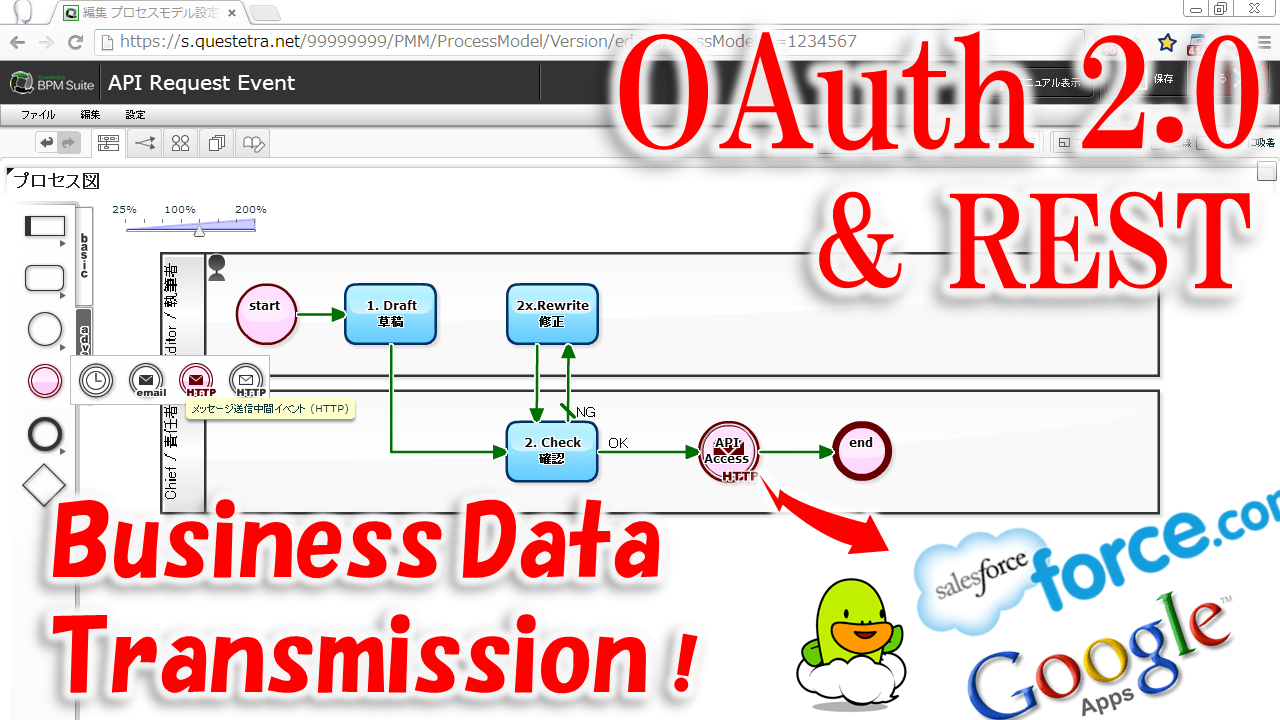
API からの『レスポンス』(の中身)は「application/json」だったり、「application/soap+xml」だったりするのだ。既に説明したように、人間には読みづらい。が、機械には非常に読み易い。ここで大切な事は、『レスポンス』だけでなく『リクエスト』でも、API との通信においては「人間には読みづらいフォーマット」が多用されていると言う事実だ。
#ちなみに json や xml はテキストなので、画像系データを載せづらいと言う弱点がある。
3. 具体的な API リクエスト
さて、、、ここまでの説明を踏まえて、『API リクエスト』の例を見てみよう。
3-1. 事例:カレンダー予定の追加
いきなり、リクエスト例を書いてみる。簡単追加(quickAdd)と言う API を使っている。
Request:
POST https://www.googleapis.com/calendar/{TeamCalendarID}/events/quickAdd
Content-Type: application/x-www-form-urlencoded

text=Meeting 2014-01-22
What is “OAuth”, the Cloud Technology which Everyone Should Know? The Web server and the OAuth server are something similar! The important fact is that being communicated by “request” and “response”!
0. Web technology to evolve
The flow of the times is ruthless…
“HTTPS”, “OpenID”, “OAuth”,,, “Basic technology”, which general users should understand properly about, is becoming more sophisticated and complicated every day.
In the speed of evolution of information and communication technology, even professionals who work for a company commonly known as an “IT start-up” do not have time to understand them all. “OAuth”, “a password-free collaboration technology” that is now being used by so many sites / applications for example, the outline is not yet deeply understood.
In this article, I will try to explain the outline of “the latest web technology” in a simple way so that even general business users can somehow understand it. Starting from “What is a server?”, to “What is OAuth?” …
“What’s it for?”
The reason behind it is that, the opportunity to explain more advanced cutting-edge technical terms has increased, since the “external system cooperation function” of our company Workflow product “Questetra BPM Suite” has been upgraded… (?!)
1. Two terms important for you to understand Web technology
What is a server? What is OAuth?
1-1. Referred as “Server”, because it serves services!
What is a server?
When you hear the word “Web server”, you might feel dizzy. When you hear the word “Beer server(*)”, you might feel happy.(* In Japan, Beer taps are referred to as Beer server)
But if you think carefully, it’s a “server” because it’s a machine for serving. There is no big difference between the two. Surely, there are not many opportunities to see a “Web server” (in real life), but there is nothing to be afraid of. It is only a “machine that does something on the Internet”.
What is important here, is the fact that it is based on “request” and “response” in the world of the Internet (≒ HTTP / HTTPS). Strangely, many people seem to have forgotten that. However, if you do not understand that, your comprehension of Web technology (the mechanism of the Web) will not improve. In this way, “the side to respond to requests” is the “server”. (And the requesting side is referred as “client”)
1-2. Is it called “Interface” because it is facing somebody?
UI, a term which many people may have heard sometime… Stands for ‘User Interface’.
In the case of “smartphone applications” (also “native applications”) like video games, an “interface” is displayed via a “smartphone application” itself which received the information from the server. Also, in the case of a system using a “general purpose software” (browser), a “Web server” itself transmits data after arranging the layout of information.
Anyway, UI is a mechanism for providing information to a USER (human), that machines close to humans present as a “layout of information”.
# When I heard from a sales representative explaining only the parts where a user can see, like saying “Our system sticks to UI, definitely this sophisticated UI …”, I personally tend to think that ‘Is the internal mechanism not sophisticated?’, or ‘I want the explanation about the entire system’s mechanism’. Yet, such a thing is unimportant.
Whereas, an API, is a “PROGRAM Interface”.
The partner of “UI” was the “USER”, but the partner of an “API” is the “PROGRAM”. That is, it refers to the information providing a mechanism against to a program (software). In this case, there is no need to make an information layout easy for a human being to understand. That part is not necessary. (* Application Programming Interface)
Now, what is important here are the facts that
・in addition to computers “providing information to people”,
・computers are also “providing information between them”.
In fact, a chain-like communication between “(1) smartphone (2) server (3) other server”, etc. is being carried out. And even when the human being (USER) is sleeping, such communications are taking place. Even though it tends to be ignored, unless you are aware of the fact that information is provided between machines, your comprehension of Web technology (the mechanism of Web) will not improve.
2. “Request” and “Response”
Close your eyes and imagine,,, There are countless “requests” on the Internet… Recognizing the “presence of a server” (1-1) and the “interface of the server” (1-2),
2-1. Types of “Request”
First of all, I want to delve into the transmission, that is, the “request”…
A. Not handing over anything when transmitting request B. Handing over something when transmitting request
First, there are two types of “requests”. (There really are more.)
Since it is hard to recognize, I would like you to imagine a beer server.
Imagine a “Beer server with only one tap” and a “Beer server like a vending machine”. You see, upon the same request, there are servers that require “money” and ones that don’t.
There are two methods “a. Simple request” and “b. Request with content” for “Requests” that are flying over the Internet.
a. postcard-like “request” b. envelope/ parcel-like “request”
The difference between them is the presence or absence of “contents”. In the case of “a. Simple request”, only a so-called URL is enough. For example, if you write “http://www.questetra.com/blog/”, it means that you are asking to “Displaying a blog page”.
Experts call this method “GET method”. “Professionals” use expressions, such as “ah, that data is delivered by GET” or the like, they are talking about “a. Simple request”.
On the other hand, the “request with contents” cannot be done with just the URL. When answering the questionnaire form or to upload an image, you must hand over a “request” as “envelope” or “parcel”. This method is referred to as “POST method”.
Hmm. Wait a minute. The metaphor of “envelopes” and “parcels” may be even wrong somehow…
Yes, in the case of an “envelope”, only text information is contained, while in the case of a “parcel” it contains binary information such as photos and videos.
So, “Requests” are roughly classified into the following three types. (Oh no, I’m getting dizzy!)
You don’t have to know it all since there are so many types (I do not know them all either), but there are also “text type information” and “image type information”.
The important fact here is that a “Response” is very similar to a “Request”. In fact, both are referred to as “messages”. By the way, there is no “URL” or “method order” in an “envelope” or “parcel” “response” (it is mandatory for “requests” only).
2-3. “Request” to API and “Response” from API
Hold on a second…
They say, Web communications of these days are carried out between computers.
That’s right, the “content” that is popular among computers is “application/json”, now.
(The contents of) “Response” from the API is “application/json” or “application/soap+xml”.
As I already explained, it is hard to read for human beings. But, it is very easy to read for machines.
The important thing here is that not only in “response” but also in “request”, it is a fact that “communication formats hard to read by humans” are widely used in communication with APIs.
# Incidentally, since json and xml are texts, the downside is that it is difficult to put image type data.
3. Examples of API Request
Well, let’s take a look at examples of “API request” based on the explanation so far.
3-1. Case: Adding schedule to a calendar
Here, I write an example of a request. I use an API called quickAdd.
Request:
POST https://www.googleapis.com/calendar/{TeamCalendarID}/events/quickAdd
Content-Type: application/x-www-form-urlencoded
text=Meeting 2014-01-22
If only one of you understand this, I would be satisfied for having written this article. In the request above, it says
“I send a request by an envelope (POST)” at the top and in the part of Content-Type, “Add a schedule (events) to the calendar {TeamCalendarID}” in the URL, “The content of the schedule is ‘Meeting 2014-01-22′” in the body.
And then, soon the response with content of “registration completed” is returned from the server in json format.
POST https://www.googleapis.com/blogger/v3/blogs/{TeamBlogId}/posts?isDraft=true
Content-Type: application/json

{
  “content”: “Hello<br>Hello<br>Hello”
}
In this request sample, it says;
“I send a request by an envelope (POST)” at the top, “Append an article to the blog {TeamBlogId}” in URL part, “The content of the article is ‘Hello<br> Hello<br> Hello<br>’” in the body
This is an example in which we are using json also for in the body. And json is also in the response:
Now that you are able to understand the “Request to API” and “Response from API” concepts.
However, not everyone can make a request. That is, there is an authority issue. So, what is important here is the “authorization” technology. That is referred to as OAuth, which is now used in various services such as Facebook and Twitter.
OAuth communication between Web servers can only communicate with “authorized systems” by system users.
In the following, I will mention about knowledge which “System operators / Configurators” and “Business Process designers” should know. Not for “System users”. In other words, those who only use it as a daily user do not need to know the following contents.
By the way, the concept of “permission” (authorization) is essentially different from the concept of “giving ID and password” (authentication). For example, if it is a “permission”, you can cancel it later. But it is difficult to ask to forget “ID and password”.
4-1. Setting up OAuth 2.0 communication
In short, “OAuth communication setting” is “a setup for automatic transmission and reception”. The flow is roughly as follows:
However, it would be faster for you to learn about “authorization setting” by actually doing it in the setting screen. Even if I write the procedure etc. In detail, it is not easy to get it into your head. So, forgive me, but I recommend you to access the “Google Console” first, and to start from creating a new “Project”! ※ https://cloud.google.com/console/project
1) Setting up automatic connection reception (Google side)
1-1. Federation setting user to access “Google console”
1-2. Go to the [Credential] menu and create [CLIENT ID]
– “Callback URL” of Questetra is required
1-3. Acquire “Client ID” and “Client secret”
2) Setting up automatic transmittal (Questetra side)
2-1. Create Process Model (Business Process Definition)
2-2. Create a Date type Data Item and a String type Data Item
2-3. Generate a string to be automatically sent
2-4. Register the Credential in [OAuth 2.0 setting] of the automatic transmission icon
2-5. Set the transmission destination in the “Communication setting” of the automatic transmission icon
4-2. Basic knowledge of OAuth 2.0 communication
Credential
Certificate for specific communication issued on the OAuth server side
Types of OAuth 2.0 server
A. API that provides only a connection permission (Access Token)
B. API that provides a mechanism for updating connection permission (Refresh Token) included
1. API that specification of permission range (Scope) is mandatory.
2. API that specification of permission range (Scope) is arbitrary.
Component of OAuth 2.0
a. OAuth 2.0 client
– a1. Program embedded in Web Application (Confidential client on Web server)
– a2. Program embedded in the Web client, etc (User-agent-based application)
– a3. Program embedded in local applications such as Android / iOS (Native application)
b. OAuth 2.0 authorization server (to issue access token: Authorization Server)
c. OAuth 2.0 resource server (to provide data, etc.: Resource Server)
OAuth 2.0 Terminology
[Consumer key] ID for identifying the client (client_id)
[Consumer secret] The secret key in pair of the client identification ID (client_secret).
[Authorize URL] Confirmation screen on which the end user gives permission to use the resource to the client
[Redirect URI] Endpoint that the client will receive an authorization code etc.
There are types of request called POST / GET to send a “request” to the server.
“Request” to the server may or may not have contents.
“Response” from the server has various contents.
Text communication called “json” seems to be prevalent in API communication between computers.
Although it was a very rough overview, first of all, if you have “system development knowledge” of this degree, it will be possible to set up automatic cooperation communication. The above knowledge does not require “programming knowledge”.
However, it is tough for system integrators (system construction) in this Cloud era.
After all, they must face “OAuth resources” around the world. In addition to so-called communication knowledge, they are required a wide range of knowledge, such as where and what kind of the “OAuth resource” are there, how much the use cost will be, or what measures should be taken if “OAuth resource” was unavailable.
P.S. Recommendation of Free trial
The cloud-based Workflow “Questetra BPM Suite” can be used for free if only a few people will use it! And, it has OAuth 2.0 client function as standard functionality.
There are still various functional restrictions, but I would like you to give it a try.
P.S.2 FAQ for Experts
The access token is sent in the HTML header. Currently (as of v9.8), it is not possible to send a request with “multi-level json data”. For File type data, the filename is sent. If you set to send multiple data with the same parameter name, it becomes an array.
Kyoto, Japan, January 20, 2014, Questetra, Inc., the global SaaS provider of Business Process Management (BPM), today announced that they have published the new version 9.8 of the cloud-based Workflow product “Questetra BPM Suite” on January 20, 2014. With the new version, automatic data transmission to ‘API that requires access right’ is available. For example, you will be able to easily build a system, that article which was approved in the workflow is automatically posted to external Blog system.
Automation of Transmission and reception of Business Data
Questetra BPM Suite
“Questetra BPM Suite” is a Workflow product which makes you be able to handle your business data on the Cloud. It will contribute to enhancing internal control and operational efficiency. It has a great feature that you can modify the configurations with easy Drag & Drop operation for the business rule or business flow. You can continuously improve complicated business processes such as Decision-making, Translating, or Complaint handling.
New Feature OAuth 2.0 Client
You can automate data communication with external system by placing Event Icon in the middle of a Workflow. By setting connection with the external system such as Google API or Force.com API, you can send and receive business data without human intervention. So far, it has been available ‘connecting function with API without Access Restriction’ or ‘connecting function that the usage was limited like file output to Google Drive’. But with this ‘OAuth 2.0 Client function’, you will be capable of accessing to various ‘OAuth 2.0 resource server’, so that you will achieve more flexible system conjunction (Mashup). We will publish successively for the specific method of connection setup and application examples as free samples, now on.
Other Improvements
In the new version 9.8, we made various improvements, other than “OAuth 2.0 Client function”.
Attachment on Form Start feature
The “Form Start feature” (of v9.7), which is capable of embedding an ‘Application Form’ or ‘Contact Form’ into Web page etc., and takes in input data from those Form to Workflow directly, now supports file attachment. You can use it for such as Public Offering that need file attachment.
Input Check with Regular Expression
In the input field of String type, Input Check using the “regular expression” is now available. In combination with such length limit and mandatory settings, you will be able to easily build business systems that require accurate data entry.
Script Check on Automatic Data Processing
In the “Script Task”, an automatic data processing which is capable of complicated data processing, is now to detect a syntax error of “ECMA Script” at script setting. It will allow you to efficiently perform improvement cycle for automatic processing steps.
Folding Display in ‘Task Feed’
In the “Task Feed”, the Enterprise Social Networking which associated with business data in Workflow, now sentence posts is folded automatically. Business communications in the team will be browsed more clear and easy.
Future Works
Cloud Computing is now going into popularization phase. Especially in the SaaS field, “Switching from company-owned to per-use” is accelerating, not limited to workflow, in many computer systems such as e-mail, groupware, CRM (Customer Relationship Management). Questetra BPM Suite has been grown to be used by 4000 companies in 100 countries (including Free SaaS). In the next major version Ver10, we are planning to continue to enhance the ability to understand the processing performance and business progress more easily.
About Questetra, Inc.
Questetra, Inc. is the enterprise cloud computing company in Kyoto Japan, founded in 2008. We optimize the world’s Business Processes.
「業務の可視化」という活動を、3つの視点で順に進めていくことで、それは結果的にBPM活動を行っていることなります。業務の現場において、BPM(Business Process Management)という言葉は、残念ながらあまり浸透していません。そういう場合には、「業務の可視化(見える化)」という言葉を整理して語ることで、結果的にBPMを理解していただくとができるのではないかと思っています。
今すぐ「業務の可視化」に取り組みたいとお考えの人は、Questetra BPM Suite という BPM システムを使って、早速取り組んでください。Questetra BPM Suite は無料でお試しいただけます。
Kyoto, Japan, October 7, 2013, Questetra, Inc., the global SaaS provider of Business Process Management (BPM), today announced that they have published the new version 9.7 of the cloud-based Workflow product “Questetra BPM Suite” on October 7, 2013. With the new version, ‘Application Form’ can be embedded in Web pages.
Workflow processing starts with the inquiry form entry
Questetra BPM Suite
“Questetra BPM Suite” is a Workflow product which makes you be able to handle your business data on the Cloud. It will contribute to enhancing internal control and operational efficiency. It has a great feature that you can modify the configurations with easy Drag & Drop operation for the business rule or business flow. You can continuously improve business flows complicated as such as Decision-making, Translating, or Complaint handling.
New Feature FORM START
In this v9.7, you can install ‘Application Form’ or ‘Inquiry Form’ on your Web site or blog page. The submitted application data or inquiry will be directly taken into the Workflow, and will be processed along the business rule that has been configured in advance. Although it has been available to start the processing automatically from the external system by using ‘API function’ so far, now you can connect the Workflow to your Web site or blog page easier. (This feature is a beta release for the time being. ‘File attachment’ is not available.
Other New Features
In the new version 9.7, the following features are added or enhanced.
Business Manual
Added a page to describe and edit the business manuals. Operators of the Process will be able to see “the Business Manuals” on the screen of Business Flow Diagram or Task Operating screens. It has been available to indicate manuals on the Operating screen so far, but this Business Manual feature is assumed to use for explanations on entire flow, etc..
In addition, together with release of this feature, hashtag (topic) on Business Model (Process Model) is available on the ‘Enterprise Social Networking’. It will help discussing on a whole Business Flow by putting Process Model ID (e.g. #m123), as well as putting Process ID hashtag (e.g. #p1234) to make communication on a project easier.
Data type Organization
You can set an allocation rule more flexible. Also, you can send emails to the Organization email address by Auto email transmission (Message Throwing Intermediate Event (email)). Including this Organization type, number of the Data type of the Workflow becomes 11 types (19* subtypes).
* String Type (single line/multiple lines), Numeric type, Select type (radio/check/select/search select), Date type (Y/M/D, Y/M, Y, M/D), Datetime type, File type, User type (select/search select), Organization type, Discussion type, Guide Panel type.
Auto Scripting
Auto-processing feature “Script Task” is newly added. Although it has been available to set Business data easily in “Service Task” so far, but now you can achieve more complicated data processing with ‘ECMA script’, a Script language made by incorporating parts that are common to JavaScript and JScript.
Future Works
Cloud Computing is now going into popularization phase. Especially in the SaaS field, “Switching from company-owned to per-use” is accelerating, not limited to workflow, in many computer systems such as e-mail, groupware, CRM (Customer Relationship Management). Questetra BPM Suite has been grown to be used by 4000 companies in 100 countries (including Free SaaS). In the next major version Ver10, we are planning to continue to enhance the ability to understand the processing performance and business progress more easily.
About Questetra, Inc.
Questetra, Inc. is the enterprise cloud computing company in Kyoto Japan, founded in 2008. We optimize the world’s Business Processes. Visit https://questetra.com/en/
Q. What kind of operations do you use Questetra for?
At CRIAX. Co. LTD we manage Karaoke Lounges, Comic cafes and restaurants. We have 67 stores mainly in Tokyo, including well-known ones in UTAHIROBA and KaraNet24.
In this type of amusement business it is important to observe the trends of competitors and changes in the economic situation, and that decisions related to new store openings and store remodelling are made quickly.
Until now we had been carrying out the decision-making procedures on paper, but we made it paperless using Questetra in order to achieve more rapid decision-making. Decision-making procedures are now completed in one third of the time.
Q. What was a Decisive Factor to Introduce Questetra?
Renovation of our information systems had been a challenge for some time. The cost of operation and management was increasing, while the areas where we wanted to improve efficiency were not being sufficiently systematized. In particular, we were facing a great challenge with decision-making procedures.
In August 2012 we introduced the cloud service G Suite (formerly Google Apps). We have succeeded in significantly reducing the operation and management costs of systems related to emails and groupware. Then we started to investigate the systematization of our business.
We were focusing on cloud-based products which would allow us to be free from servers or software, and accessible from various terminal devices, and we researched and evaluated cloud-based workflow products capable of connecting to G Suite. For products other than Questetra we found out they were limited to relatively simple flows, and that it was impossible to define more complicated flows like the ones we were expecting, such as a decision-making process that includes the president of the company. In contrast, we could surely believe that Questetra would help us achieve paperless work and speedy decision-making, given its capability to easily define complicated decision-making flows – such as concurrent approval requests to multiple section leaders – using the Process Modeler. I think it is really fabulous that the modification of business definitions does not depend on a single, designated individual.
Cross Section Advice on a Daily Basis!
Q. How was your impression about Questetra in actual operation?
One thing we did not expect was that communication between employees has been stimulated by the introduction of Questetra.
When we were circulating decision-making documents on paper, employees were barely aware of projects in which they were not involved. So, we gave a little wider authorization for data viewing, to let employees – particularly those in a department manager position – to actively browse projects in which they were not involved. As a result, they became able to share their know-how and experience, and to express their ideas.
Of course, the new communication channel was good as a way of obtaining new knowledge, but I also feel that it made the power of the organization greater because employees started to be interested in what others were doing.
Q. What kind of initiatives do you plan to implement in the future?
We really found Questetra is capable of being used in many operations in the organization, unlike other typical request-approval workflow products. In fact, some departments started reviewing their own Workflows spontaneously by themselves, instead of asking the IT Section, so we are going to support spontaneous business improvement.
In addition, as a company-wide effort, we are discussing and considering the digitization and standardization of other in-house operations as well. In particular, I am thinking of using Questetra proactively for Workflows that will be started by external actions, in order to enhance the satisfaction of business partners and customers. Specifically, it will be for inquiry handling and order acceptance processing.
Corporate Culture of Defining the Business Processes
M3 Solutions,inc.
Established
November 22, 1990
Number of Employees
310 (as of May 2024)
Business
Digital transformation (DX) support for healthcare facilities (sales and support of electronic medical records, manufacturing, sales, and support of medical accounting computers, sales of advanced medical devices)
Rapid Response to Queries or Demonstration Requests
Q. What kind of Business do you use Questetra for?
M3 Solutions,inc. sells iTickets, a booking system for clinics.
Patients of clinics which have implemented the iTicket system can check the current waiting times with their computer or Smartphone before making their booking. iTicket has a feature called the “Not Yet? Screen” in which patients of the clinic can see how many people are before them in the queue and the approximate waiting time. It will reduce the stress of waiting because patients can wait comfortably at their own house or other places. The system also reduces congestion in waiting rooms and the risk of nosocomial infections and has been installed in over 1200 clinics, mainly in the paediatric ENT sector.
We use Questetra for office operations associated with the iTicket booking system, i.e. processing service applications, recording responses to demonstration requests, managing the progress of surveys and responses to enquiries, and so on.
Q. Did you design the Business flow inside your company?
We already had a well-established culture of creating business flows prior to the introduction of Questetra (2010). We were creating business flows using drawing software such as Visio. I think we were able to become proficient at creating workflows in Questetra quickly because the operation is very intuitive.
There were no major difficulties in creating business process definitions by setting business data and conditional branching expressions.
Also for Process Management in Video Production!
Q. Were you able to expand the use of Questetra?
On the iTicket, as well as showing the current waiting list on a large monitor screen in the clinic, it also displays information such as medical information and information about the office closing, which is helpful for patients in the waiting room.
So we also use Questetra for to manage the production of video contents.
For example, in the case of Doctor’s Contents, which is a direct interview with the doctor of the clinic, we do various operations such as interviews, editing, setting up the distribution and reporting the distribution performance on Questetra. Even though we produce videos quite often, I feel it has eliminated mistakes and leakages, and inter-departmental communication has become very smooth.
Besides, we often plan services that connect patients and doctors. We manage the flow of the service using Questetra and it became our custom to record performance data.
Q. Which is your favorite feature of Questetra?
Soon after we introduced Questetra, the concept of “Roles” appeared. We really appreciate it and use it frequently.
Especially in carrying out a new project, instead of thinking in a fixed manner such as ‘a task for A department’ or ‘a job of Mr. B’, the flexible grouping concept like ‘C Role’ is very convenient. This concept of Role is very useful because we sometimes actually transfer the work itself to another team in the M3 Solutions,inc.
Q. What is your purpose for using Questetra BPM Suite?
Sansan, Inc. are developing “Sansan”, the cloud-based business card management service.
Sansan will contribute to the strengthening of the sales force and to sales growth by enabling the effective use of business card information in sales activities. We also are providing “Eight”, a business card management application for individuals which is based on the concept of turning business cards into business connections.
We conducted a third party allotment of new shares with a total value of 500 million yen in April 2013 to expand the market awareness of Sansan and Eight. We will continue to promote the expansion of our organization, and the improvement of both quality and efficiency to accelerate global business development. Under these circumstances, it is important not to drop the speed of decision-making related to business expansion. We decided to make use of Questetra BPM Suite on the Purchasing Application operation, which related to the execution of the various projects as the first goal.
Q. What advantages did you find?
At first, we tried to improve the efficiency of the Purchasing Application operations by using a simple workflow system from another company, which could also cooperate with G Suite (formerly Google Apps). But we were dissatisfied with the system’s inability to allow approvers and decision makers belong to multiple departments concurrently, we could not flexibly determine the personnel in charge of approval tasks, or even configure the deadline of tasks.
Besides cooperating with G Suite, Questetra BPM Suite is also equipped with features that solve the frustrations we had with the other system. Moreover, it is also better for modeling, since we can build a system by drawing a picture of a business flow diagram.
Even without any programming knowledge we could intuitively build a highly functional business system, with functions such as sending email alerts for tasks which have a deadline approaching. After becoming able to operate Purchasing Applications efficiently in Questetra BPM Suite, we have systematized 15 business flows in HR, Affairs, Legal, and 10 more in other sections.
Decision-making with the Enterprise Social Networking feature
Q. Do you think Questetra helps in raising the speed of decision-making?
I would say the most helpful feature for Sansan is Open Chat. Open Chat is a so-called Enterprise Social Networking function where users can not only send out information, but also associate this information with each business process or application.
Through the active use of Open Chat we can exchange detailed information related to each project without using the telephone, and it leaves records of these information exchanges associated with the projects. This means that important decisions, especially in the approval and decision-making process, can now be made without delays.
Q. Do you have any expectations for Questetra in the future?
Because both the sales and the number of employees have been increasing rapidly in the last few years in Sansan, it has become a big issue to strengthen the internal management system to cope with this. From now on, we would like to establish an environment where business can be conducted efficiently and securely by systematizing it in Questetra, allowing us to implement our internal company regulations.
We had made a strong request to Questetra about the improvement of Open Chat, and you responded to us superbly. One of our current request is that we want to be able to set conditional splits in accordance with the organization which the applicant belongs to, and I’m sure that this request will also be met.