ブログ

  • セキュリティ事故対応を共有で加速

    セキュリティ事故対応を共有で加速

    ISMS事務局の確認を廃止し、インシデント報告をチャットへ即時投稿。これにより対応を迅速化し、事務局の負担を軽減。

    ※このプロセス改善ストーリーはフィクションです。実在の人物や団体などとは関係ありません。

    1. 課題:情報共有の遅れによる対応遅延

    ITサービス企業 Gachatシステムズ社(従業員数:約120名)は、クラウドインフラや業務システムの開発・運用を手がける企業です。

    同社では、セキュリティインシデントが発生すると、発見者が状況を報告し、ISMS事務局が内容を確認し、対応を指示する仕組みを取っていました。

    しかし、初動報告や暫定対応報告が関係者に届くまでに事務局での確認を要するため、情報共有が遅れ、初動対応のスピードが損なわれるケースが多発していました。

    2. 解決策:社内チャットに自動で即時報告

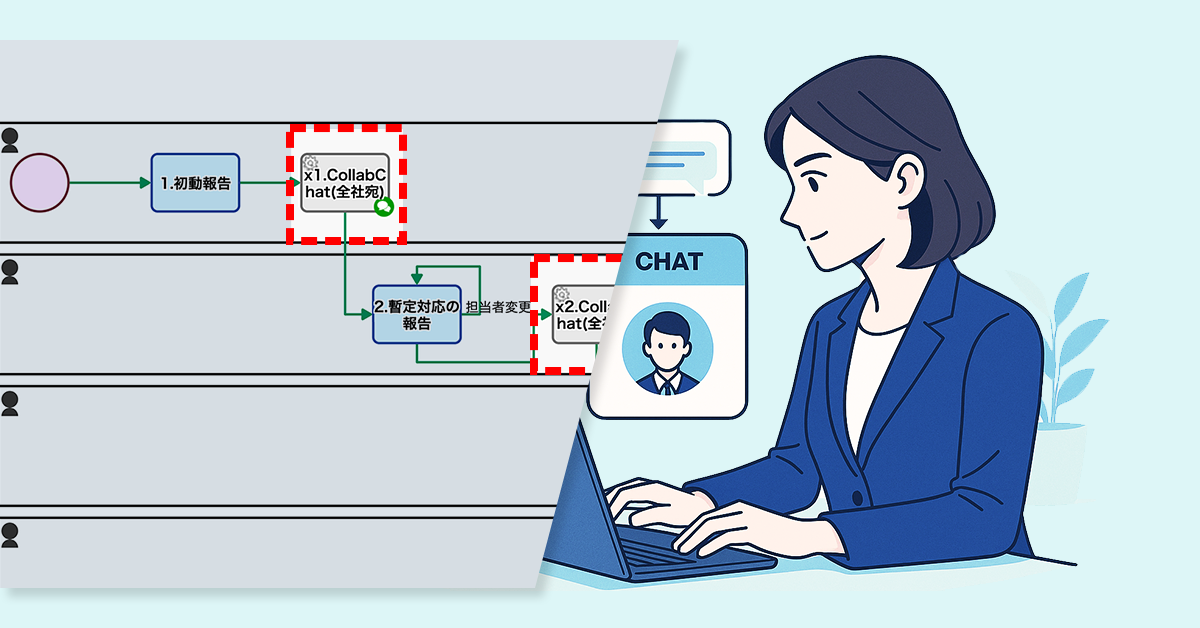
    プロセスオーナーは、報告内容が社内チャット※へ自動投稿される仕組みを構築しました。

    具体的には、初動報告や暫定対応報告を、ISMS事務局での事前確認を経ずに社内チャットへ自動投稿するように変更しました。これにより、報告完了後、即座に関係者へ共有され、事務局の確認待ちによる遅延を解消できる体制を整えました。

    ※Questetra BPM Suite では Collab chat(コラボチャット)と呼称しています

    Basic Edition
    Advanced Edition
    Professional Edition
    ワークフロー図の詳細を見る
    1. 初動報告

    発生したインシデントについての初動対応を報告します

    2. 初動報告確認

    報告されたインシデントについて確認を実施、情報共有が行われます

    3. 暫定対応の報告→担当者変更 

    報告されたインシデントについての暫定対応を実施し報告します。担当者が対応できない場合には現場の判断での変更が可能

    3’. (再)暫定対応の報告

    暫定対応報告の差し戻しに対応し、再度報告します

    4. 暫定対応の確認

    暫定対応の報告について確認し、不備があれば差し戻しを行います

    5. CEO確認

    発生したインシデントについてCEOが確認します

    6. 恒久対応の報告→担当者変更

    発生したインシデントに対して、恒久対応を実施し報告を行います

    6′. (再)恒久対応の報告

    恒久対応報告の不備について対応し、再提出を実施します

    7. 恒久対応の確認

    恒久対応の報告について詳細を確認、不備があれば差し戻しを行います

    Basic Edition
    Advanced Edition
    Professional Edition
    ワークフロー図の詳細を見る
    1. 初動報告

    発生したインシデントについての初動対応を報告します

    x1. CollabChat(全社宛)

    社内チャット(コラボチャット)で全社宛に投稿が行われます

    2. 暫定対応の報告→担当者変更 

    報告されたインシデントについての暫定対応を実施し報告します。担当者が対応できない場合には現場の判断での変更が可能

    x2. CollabChat(全社宛)

    社内チャット(コラボチャット)で全社宛に投稿が行われます

    3. 恒久対応の報告→担当者変更

    発生したインシデントに対して、恒久対応を実施し報告を行います。担当者が対応できない場合には現場の判断での変更が可能

    x3. CollabChat(CEO宛)

    発生したインシデントについてCEO宛にコラボチャットに投稿されます。

    3’. (再)恒久対応の報告

    恒久対応報告の差し戻しに対応し、再度報告します

    4. 恒久対応の確認

    恒久対応の報告について確認し、不備があれば差し戻しを行います

    x4. CollabChat(全社宛)

    社内チャット(コラボチャット)で恒久対応の報告が全社宛に投稿されます

    中央のバー操作で Before / After が比較できます

    3. 効果

    情報共有の即時化

    インシデント情報がリアルタイムで共有され、初動対応までの時間が短縮されました。

    対応品質の向上

    必要な部署がすぐに動けるようになり、リスク低減に直結しました。

    業務プロセスの簡素化

    確認工程を省くことで、担当者の負担が減り、対応プロセスがシンプルになりました。

    4. その他の業務への応用

    顧客対応

    クレームや問い合わせを即時共有し、チーム全体で迅速に対応可能に。

    開発プロジェクトの進捗共有

    開発状況や課題をリアルタイム共有することで、問題解決をスピードアップします。

    社内イベントの運営効率化

    準備や運営に必要な情報をチャットに集約し、部門間の連携を円滑化します。

  • Bring Back VIP Customers with a 48-Hour Special Offer

    Bring Back VIP Customers with a 48-Hour Special Offer

    A special offer booking form encouraged inactive VIP customers to return and make appointments.

    1. Issue: Emails to VIP customers don’t lead to bookings

    Customers who have visited a certain number of times or spent a certain amount are designated as VIP customers, and they regularly receive mass emails with the latest information.

    However, some of these customers have not visited for a long time and do not respond to the emails. The traditional email format sends the same information to everyone, lacking special offers or personalized suggestions, which fails to encourage them to book an appointment.

    As a result, the mass emails have consistently failed to lead to salon visits.

    2. Solution: Offer limited-time special benefits to encourage immediate bookings

    The process owner introduced a system to send unresponsive VIP customers a special booking form with an offer of 10% off if they book within 48 hours.

    Additionally, a checkbox was added during the email drafting stage, allowing staff to select customers they specifically wanted to encourage to book. Customers who were checked would then receive the mass email with the exclusive booking form URL embedded.

    As a result, customers can now access the booking form with one click directly from the email. The short-term and clear incentive effectively encourages a sense of urgency, making immediate bookings more likely.

    A special offer form helped bring back customers who had stopped visiting by encouraging them to book again.

    Basic Edition
    Advanced Edition
    Professional Edition
    View details of the workflow diagram
    Using Generative AI to Customize Announcement Text

    Generative AI automatically inserts a different, customized sentence into each customer’s email.

    Review email body and addresses

    Staff members visually confirm the distribution data.

    Automatic email sending

    Email is sent to customers automatically.

    Basic Edition
    Advanced Edition
    Professional Edition
    View details of the workflow diagram
    Using Generative AI to Customize Announcement Text

    Generative AI automatically inserts a different, customized sentence into each customer’s email.

    Review email body and addresses

    Staff members visually review the distribution data. At this time, they check a box for any customer they want to encourage to book an appointment.

    Automatic email sending

    An email containing a URL for a dedicated booking form is sent to customers who are to be encouraged to make a booking.

    VIP-Only Booking Form

    After the email is sent, the dedicated booking form will be open for 48 hours.

    You can move the slider

    3. Customers Case Study

    4. Other Business Applications

    We will enable AI-based reviews for the following tasks:

    Subscription Services

    5. Related Posts

  • セキュリティ報告の自走化体制へ

    セキュリティ報告の自走化体制へ

    担当者の誤指定や急な変更による対応遅延が課題だった。フロー内での担当者変更機能により、変更依頼が不要となり対応が迅速・円滑になり、管理者の負担も軽減された。

    1. 課題:担当者指定の誤りによる報告の遅延

    ITサービス企業 Gachatシステムズ社(従業員数:約120名)は、クラウドインフラや業務システムの開発・運用を手がける企業です。

    同社では、セキュリティインシデント発生時に初動報告を行い、対応責任者を指定する運用となっています。しかし、指定された担当者が実際には対応できない事例が多く見られました。主な要因としては、初期段階での担当者の誤指定や、休暇・欠勤・異動などによる急な担当者変更が挙げられます。

    担当者が対応できない場合には、報告のたびにシステム管理者へ変更依頼を行う必要があり、その結果、手続きに時間を要して報告が遅れる要因となっていました。

    2. 解決策:担当者変更機能の追加

    プロセスオーナーは、報告フロー内で担当者を変更できる機能を追加しました。

    これにより、暫定対応や恒久対応といった各工程において、担当者を処理画面上で変更できるようになりました。現場判断で迅速な人員調整ができます

    Basic Edition
    Advanced Edition
    Professional Edition
    ワークフロー図の詳細を見る
    1. 初動対応の報告

    発生したインシデントについての初動対応を報告します

    2. 初動対応の確認

    報告されたインシデントについて確認を実施、情報共有が行われます

    3. 暫定対応の報告

    報告されたインシデントについての暫定対応を実施し報告します

    3’. (再)暫定対応の報告

    暫定対応報告の差し戻しに対応し、再度報告します

    4. 暫定対応の確認

    暫定対応の報告について確認し、不備があれば差し戻しを行います

    5. CEO確認

    発生したインシデントについてCEOが確認します

    6. 恒久対応の報告

    発生したインシデントに対して、恒久対応を実施し報告を行います

    6′. (再)恒久対応の報告

    恒久対応報告の不備について対応し、再提出を実施します

    7. 恒久対応の確認

    恒久対応の報告について詳細を確認、不備があれば差し戻しを行います

    Basic Edition
    Advanced Edition
    Professional Edition
    ワークフロー図の詳細を見る
    1. 初動対応の報告

    発生したインシデントについての初動対応を報告します

    2. 初動対応の確認

    報告されたインシデントについて確認を実施、情報共有が行われます

    3. 暫定対応の報告 → 担当者変更

    報告されたインシデントについての暫定対応を実施し報告します。担当者が対応できない場合には現場の判断での変更が可能

    3’. (再)暫定対応の報告

    暫定対応報告の差し戻しに対応し、再度報告します

    4. 暫定対応の確認

    暫定対応の報告について確認し、不備があれば差し戻しを行います

    5. CEO確認

    発生したインシデントについてCEOが確認します

    6. 恒久対応の報告

    発生したインシデントに対して、恒久対応を実施し報告を行います

    6′. (再)恒久対応の報告

    恒久対応報告の不備について対応し、再提出を実施します

    7. 恒久対応の確認

    恒久対応の報告について詳細を確認、不備があれば差し戻しを行います

    <担当者変更機能について補足>

    暫定対応・恒久対応で指名された担当者による対応が困難な場合、処理担当者のタスク移譲が簡単に行えます。

    新しく指名したい担当者を「暫定担当者(恒久担当者)」で指定後、「担当者変更」を実施するだけで、業務の流れを止めずに各タスクが移譲されます。

    中央のバー操作で Before / After が比較できます

    3. 効果

    担当者変更の依頼が不要に

    現場で直接担当者を切り替えられるため、都度システム管理者に依頼する必要がなくなりました。

    システム管理者の負担が軽減された

    報告ごとの修正作業から解放され、本来の管理業務に集中できるようになりました。

    報告スピードの向上

    タスク移譲が即時に完了するため、報告や対応の流れが止まらず、全体の処理速度が高まりました。

    4. その他の業務への応用

    案件管理の報告フロー

    担当営業の変更に対応しやすくなり、報告遅延や情報の行き違いを防止できます。

    顧客クレーム対応

    対応担当者の不在時でも、現場判断で処理の引き継ぎができ、迅速な対応が可能になります。

    社内トラブル報告(備品破損・システム障害など)

    現場責任者の変更や代理対応が必要な場面で、管理者の介入なしに処理が進行できます。

  • Enhancing Trust in the IT Department with Progress Transparency

    Enhancing Trust in the IT Department with Progress Transparency

    Expected completion date notifications kept requesters informed and reduced phone inquiries.

    1. Issue: The Burden of Phone Calls to Verify Progress

    The Information Systems Department, serving as the help desk supporting the company’s IT infrastructure, handles between 20 to 30 inquiries daily with a team of 20 staff members.

    Some inquiries can be resolved with a single email, but more complex issues requiring investigation or an internal review often need a two-step response: sending a provisional initial response first, followed by a definitive final response later. This can take several days to complete in some cases, causing the department to be overwhelmed by frequent phone calls from requesters seeking progress updates.

    2. Solution: Pre-Notification of Estimated Completion Dates

    To better manage inquiries that require extended response times, the process owner enabled the inquiry response staff to enter either the final response or an expected completion date. Specifically, if an expected completion date is entered, the project status is automatically updated to “Second Response in Progress (Notification Sent)”, and a notification email with the estimated date is sent to the requester.

    Notifying requesters of expected completion dates reduced phone inquiries by keeping them informed.

    Basic Edition
    Advanced Edition
    Professional Edition
    View details of the workflow diagram
    Inquiry Input [FORM]

    The requester inputs the details of their inquiry into a form.

    Inquiry Received

    They receive a notification that an inquiry has been submitted.

    1. Enter First Response

    The internal help desk staff member enters the initial response.

    Status: Noise

    If “Noise” is selected in step 1, the case status will be set to “Noise.”

    Status: Completed

    If “Final Response” is selected in step 1, the case status will be set to “Completed.”

    Status: In Secondary Response

    If “Reply & Secondary Response” is selected in step 1, the case status is set to “Secondary Response in Progress.”

    First Response (Final)

    The requester receives the initial response by email, and the process is complete.

    First Response (Provisional)

    The requester receives the initial response by email, and the process is complete.

    2.Enter the second response

    The technical support representative will enter the text for the second response.

    Status: Completed

    If “Secondary Response” is selected in step 2, the case status is set to “Completed.”

    Second Response (Final)

    The requester receives the secondary response by email, and the process is complete.

    Basic Edition
    Advanced Edition
    Professional Edition
    View details of the workflow diagram
    Inquiry Input [FORM]

    The requester inputs the details of their inquiry into a form.

    Inquiry Received

    They receive a notification that an inquiry has been submitted.

    1. Enter First Response

    The internal help desk staff member enters the initial response.

    Status: Noise

    If “Noise” is selected in step 1, the case status will be set to “Noise.”

    Status: Completed

    If “Final Response” is selected in step 1, the case status will be set to “Completed.”

    Status: In Secondary Response

    If “Reply & Secondary Response” is selected in step 1, the case status is set to “Secondary Response in Progress.”

    First Response (Final)

    The requester receives the initial response by email, and the process is complete.

    First Response (Provisional)

    The requester receives the initial response by email, and the process is complete.

    2. Enter Second Response or Estimated Completion Date

    The technical support representative enters the secondary response, or if the investigation will take time, they enter the estimated completion date.

    Status: Completed

    If “Secondary Response” is selected in step 2, the case status is set to “Completed.”

    Status: Secondary Response in Progress (Estimated Date Entered)

    When “Secondary Response” is selected in step 2, the case status is set to “Secondary Response in Progress (Estimated Date Entered).”

    Second Response (Final)

    The requester receives the secondary response by email, and the process is complete.

    Notification of Estimated Completion Date

    You will receive an email with the estimated completion date.

    2b. Enter Second Response Text

    The technical support representative enters the secondary response.

    Second Response (Final)

    The requester receives the secondary response by email, and the process is complete.

    Before / After comparison (slider can be moved)

    3. Customers Case Study

    4. Other Business Applications

    We will enable AI-based reviews for the following tasks:

    Project Management in Product Development

    Management of Recruitment Processes in HR

    5. Related Posts

  • AI Enables Instant Responses for Internal Help Desk Requests

    AI Enables Instant Responses for Internal Help Desk Requests

    AI instant replies added to IT inquiry workflow reduce delays and employee anxiety.

    1. Issue: Dissatisfaction with Delayed Responses

    The Information Systems Department is responsible for our internal IT infrastructure, including PCs, networks, and servers. The 20-person staff handles a large volume of daily inquiries from employees.

    Inquiries are submitted via a web form, and an automatic acknowledgment email containing an incident ID (a management number for each inquiry) is sent immediately after submission. The number of inquiries per person has been increasing, with over 50 a day on some occasions. This has led to noticeable delays in responses.

    Furthermore, with only an incident ID in the acknowledgment email, employees were becoming anxious and concerned that their inquiries were being ignored.

    2. Solution: Instant AI-Powered Responses

    To address this, the process owner added an “AI Instant Response” step to the existing workflow. An AI now provides an automated response immediately after an inquiry is received.

    The acknowledgement email, which previously only contained the incident ID, now includes an initial response generated by the AI. This provides employees with hints and a potential course of action based on past knowledge right after they submit their inquiry.

    Provides immediate reassurance by showing employees their inquiry is being addressed right away, reducing anxiety.

    Basic Edition
    Advanced Edition
    Professional Edition
    View details of the workflow diagram
    Inquiry Input [FORM]

    The requester inputs the details of their inquiry into a form.

    Inquiry Received

    They receive a notification that an inquiry has been submitted.

    Leading to a Solution & Preparing Draft Verbal Response

    After gathering relevant information, the AI automatically generates a list of potential solutions and a draft of the response.

    1. Enter First Response

    The internal help desk staff member enters the initial response.

    Status: Noise

    If “Noise” is selected in step 1, the case status will be set to “Noise.”

    Status: Completed

    If “Final Response” is selected in step 1, the case status will be set to “Completed.”

    Status: In Secondary Response

    If “Reply & Secondary Response” is selected in step 1, the case status is set to “Secondary Response in Progress.”

    First Response (Final)

    The requester receives the initial response by email, and the process is complete.

    First Response (Provisional)

    The requester receives the initial response by email, and the process is complete.

    2. Enter Second Response or Estimated Completion Date

    The technical support representative enters the secondary response, or if the investigation will take time, they enter the estimated completion date.

    Status: Completed

    If “Secondary Response” is selected in step 2, the case status is set to “Completed.”

    Status: Secondary Response in Progress (Estimated Date Entered)

    When “Secondary Response” is selected in step 2, the case status is set to “Secondary Response in Progress (Estimated Date Entered).”

    Second Response (Final)

    The requester receives the secondary response by email, and the process is complete.

    Notification of Estimated Completion Date

    You will receive an email with the estimated completion date.

    2b. Enter Second Response Text

    The technical support representative enters the secondary response.

    Second Response (Final)

    The requester receives the secondary response by email, and the process is complete.

    Basic Edition
    Advanced Edition
    Professional Edition
    View details of the workflow diagram
    Inquiry Input [FORM]

    The requester inputs the details of their inquiry into a form.

    Inquiry Received

    They receive a notification that an inquiry has been submitted.

    Leading to a Solution & Preparing Draft Verbal Response

    After gathering relevant information, the AI automatically generates a list of potential solutions and a draft of the response.

    1. Enter First Response

    The internal help desk staff member enters the initial response.

    Status: Noise

    If “Noise” is selected in step 1, the case status will be set to “Noise.”

    Status: Completed

    If “Final Response” is selected in step 1, the case status will be set to “Completed.”

    Status: In Secondary Response

    If “Reply & Secondary Response” is selected in step 1, the case status is set to “Secondary Response in Progress.”

    First Response (Final)

    The requester receives the initial response by email, and the process is complete.

    First Response (Provisional)

    The requester receives the initial response by email, and the process is complete.

    2. Enter Second Response or Estimated Completion Date

    The technical support representative enters the secondary response, or if the investigation will take time, they enter the estimated completion date.

    Status: Completed

    If “Secondary Response” is selected in step 2, the case status is set to “Completed.”

    Status: Secondary Response in Progress (Estimated Date Entered)

    When “Secondary Response” is selected in step 2, the case status is set to “Secondary Response in Progress (Estimated Date Entered).”

    Second Response (Final)

    The requester receives the secondary response by email, and the process is complete.

    Notification of Estimated Completion Date

    You will receive an email with the estimated completion date.

    2b. Enter Second Response Text

    The technical support representative enters the secondary response.

    Second Response (Final)

    The requester receives the secondary response by email, and the process is complete.

    You can move the slider

    3. Customers Case Study

    4. Other Business Applications

    We will enable AI-based reviews for the following tasks:

    Customer Support Department

    Student Support at Educational Institutions

    5. Related Posts

  • Eliminate Wasteful Work with Withdrawal Notifications

    Eliminate Wasteful Work with Withdrawal Notifications

    Instant withdrawal notifications stop staff from responding to canceled inquiries, reducing wasted effort.

    1. Issue: Effort to create responses is wasted

    The in-house IT help desk of the company accepts IT-related inquiries from employees via a web form and handles 20 to 30 inquiries per day.

    This form has a function that allows users to withdraw their inquiries themselves. However, the system does not notify the help desk staff that an inquiry has been withdrawn. As a result, there were cases where the staff continued working on creating a response without realizing that the inquiry had been withdrawn.

    This resulted in unnecessary work being done, which led to a decline in the efficiency of the entire business.

    2. Solution: Withdrawal Notifications Shared Instantly

    To solve this problem, the process owner added a notification feature to the workflow.

    Specifically, when an inquiry is withdrawn, all staff members are automatically notified by email. The notification includes the subject and ID of the inquiry, as well as the date and time of withdrawal, so staff members can immediately understand the details of the cancellation.

    This allows staff to immediately see when an ongoing case is no longer necessary, allowing them to stop working on it quickly and move on to the next case.

    Withdrawal notifications reduce wasted effort by preventing the creation of unnecessary responses.

    Basic Edition
    Advanced Edition
    Professional Edition
    View details of the workflow diagram
    Inquiry Input

    An employee submits an inquiry to the internal help desk.

    AI Response

    An AI provides the initial response.

    Notification of Receipt

    A notification of receipt is automatically sent to the employee.

    Inquiry Withdrawn

    The inquiry content is withdrawn.

    Terminate End Event

    All processes are forcefully terminated.

    Basic Edition
    Advanced Edition
    Professional Edition
    View details of the workflow diagram
    Inquiry Input

    An employee submits an inquiry to the internal help desk.

    AI Response

    An AI provides the initial response.

    Notification of Receipt

    A notification of receipt is automatically sent to the employee.

    Inquiry Withdrawn

    The inquiry content is withdrawn.

    Withdrawal Notification

    A withdrawal notification is automatically sent to the help desk staff.

    Terminate End Event

    All processes are forcefully terminated.

    You can move the slider

    3. Customers Case Study

    4. Other Business Applications

    We will enable AI-based reviews for the following tasks:

    Product Development Department

    5. Related Posts

  • Standardizing Responses Through Noise Classification

    Standardizing Responses Through Noise Classification

    Help desk receives many out-of-scope inquiries but lacked tracking; workflow now classifies them to analyze trends.

    1. Issue: Unable to record and analyze noise incidents

    Accumulation and Analysis of “Noise” Issues Are Insufficient.
    The Information Systems Department acts as a help desk, supporting the company’s IT infrastructure and handling technical inquiries from employees on a daily basis. A team of 20 staff members processes 20 to 30 consultations each day.

    However, in recent years, there’s been an increase in “noise issues” that are considered outside the department’s purview, such as questions about “how to use conference rooms” or “home Wi-Fi settings.” The time spent on these issues disrupts their core operations. Furthermore, there’s no system in place to record or analyze this “noise,” making it impossible to understand trends or underlying causes.

    As a result, preventative measures and appropriate internal communications are not progressing, and there’s inconsistency in response standards.

    2. Solution: Automatic Classification of Case Status

    The process owner implemented a system to classify and record case statuses within the workflow.

    Specifically, automated steps were inserted before and after “[1. Enter initial response]” and “[2. Enter secondary response text].” Depending on the progress, the status is automatically set to “Initial Response in Progress,” “Secondary Response in Progress,” “Completed,” or “Noise.”

    As a result, if the “Noise” button is pressed during the initial response, the status will automatically become “Noise.”

    Analyzing accumulated noise data helps reveal inquiry trends, prevent recurrence, and improve operations.

    Basic Edition
    Advanced Edition
    Professional Edition
    View details of the workflow diagram
    Inquiry Input [FORM]

    An employee enters the details of their inquiry into a form.

    Receipt notification received

    Received notification of an inquiry.

    Enter the text for the first response

    The internal help desk agent enters the first response.

    ・Final Response: Reply with the final response.

    Noise: Close the case.

    Tentative Response: Reply and transition to a second response.

    Final First Response

    The first response is sent via email and the case is closed.

    Tentative First Response

    The first response is sent via email and the case is closed.

    Enter the second response.

    The technical support representative will enter the text for the second response.

    Final Second Response

    The second response is sent via email and the case is closed.

    Basic Edition
    Advanced Edition
    Professional Edition
    View details of the workflow diagram
    Inquiry Input [FORM]

    An employee enters the details of their inquiry into a form.

    Receipt notification received

    Received notification of an inquiry.

    Enter the first response

    The internal help desk agent enters the first response.

    ・Final Response: Reply with the final response.

    Noise: Close the case.

    Tentative Response: Reply and transition to a second response.

    Status:Noise

    If “Noise” is selected in step 1, the case status will be set to “Noise.”

    Status: Resolved

    If “Final Answer” is selected in step 1, the case status will be set to “Resolved.”

    Status: In progress of second response.

    If you select Reply & 2nd Response in step 1, the case status will be set to In progress of second response.

    Final First Response

    The first response is sent via email and the case is closed.

    Tentative First Response

    The first response is sent via email and the case is closed.

    Enter the second response.

    The technical support representative will enter the text for the second response.

    Status: Resolved

    If a second response is selected in step 2, the case status will be set to ‘Resolved’.

    Final Second Response

    The second response is sent via email and the case is closed.

    You can move the slider

    3. Customers Case Study

    4. Other Business Applications

    We will enable AI-based reviews for the following tasks:

    5. Related Posts

  • VIP顧客を呼び戻す48時間特典

    VIP顧客を呼び戻す48時間特典

    案内メールが来店に結びつかない課題があったが、特典付き予約フォームのURLが挿入されたメールを送信し、休眠顧客の即時予約を促進。再来店が促された。

    1. 課題:VIP顧客へのメールが予約に結びつかない

    Fuwari美容室では、過去の来店回数や利用額が一定以上の方をVIP顧客とし、最新情報を一斉メールで定期的に送っています。

    しかし、その中には長期間来店がなく、メールにも反応を示さない顧客もいました。従来のメールは全員に同じ案内を送る形式で、特典や個別の提案がなく、来店を促すきっかけになっていませんでした。

    その結果、一斉メールが来店につながらない状況が続いていました。

    2. 解決策:限定特典で即時予約を促す

    そこでプロセスオーナーは、反応がないVIP顧客に向けて「48時間以内の予約で10%オフ」特典付きの専用予約フォームを案内する仕組みを導入しました。

    さらに、メール本文と宛先を確認する段階で、予約を促したい顧客に対しスタッフがチェックを入れられるチェックボックスを追加しました。チェックを入れた顧客には、特典付き予約フォームのURLが挿入された一斉メールが配信されます。

    これにより、顧客はメールからワンクリックで予約フォームにアクセスできるようになりました。短期間かつ明確な特典が「今予約しよう」という気持ちを高め、即時予約につながりやすくなりました。

    Basic Edition
    Advanced Edition
    Professional Edition
    ワークフロー図詳細を見る
    生成AIによる告知文カスタマイズ

    生成AIが、顧客ごとに異なる一文を自動でメール文面に挿入します。

    本文・メアド確認

    スタッフが、配信データを目視で確認します。

    メール自動送信

    顧客に対し、自動的にメールが配信されます。

    Basic Edition
    Advanced Edition
    Professional Edition
    ワークフロー図詳細を見る
    生成AIによる告知文カスタマイズ

    生成AIが、顧客ごとに異なる一文を自動でメール文面に挿入します。

    本文・メアド確認

    スタッフが、配信データを目視で確認します。この際、予約を促したい顧客に対しては、チェックボックスにチェックを入れます。

    メール自動送信

    予約を促したい顧客に対し、専用予約フォームのURLが記載されたメールが配信されます。

    VIP専用予約フォーム

    メール配信後、専用予約フォームが48時間開設されます。

    中央のバー操作で Before / After が比較できます

    3. 効果

    休眠顧客の再来店獲得

    特典付きフォームから、来店が途絶えていた顧客の予約が入りました。

    顧客状況の可視化と名簿更新

    メール送信後の予約状況を確認し、その結果をもとにVIP顧客名簿を効率的に更新できました。

    行動喚起策の有効性確認

    期限と特典の組み合わせが即時行動を促す有効策であることを確認できました。

    4. その他の業務への応用

    この仕組みは、顧客の反応を可視化し、行動を促す点で汎用性が高く、さまざまな業務に応用できます。

    会員制ジム

    休眠会員へ期限付き特典リンクを送り、再来訪を促進できます。

    定期購読サービス

    更新期限前に特典付き申込フォームを配信し、継続意欲を可視化できます。

    展示会・セミナー運営

    過去の参加者に特典付き登録フォームを送り、次回参加見込みを把握できます。

  • 経費申請の不備、AIが事前に検知

    経費申請の不備、AIが事前に検知

    1. 課題:経費申請不備による手戻り

    産業用機械を製造・販売するDotoDoto精工株式会社では、顧客先への出張対応が多く、従業員による経費申請が頻繁に発生しています。これらの申請は、上司が内容を確認・承認し、その後、経理部門が支払い処理を行うという流れで運用されています。

    しかし、多忙などの理由により、上司による確認が不十分なまま承認されるケースが散見されました。

    その結果、請求書の添付漏れや記載ミスといった不備のある申請が、そのまま経理部門へ回ってしまうことがありました。

    このような場合、経理担当者はそのたびに内容を遡って確認する必要があり、結果的に支払いが遅れる原因となっていました。

    2. 解決策:AIで申請不備を検出

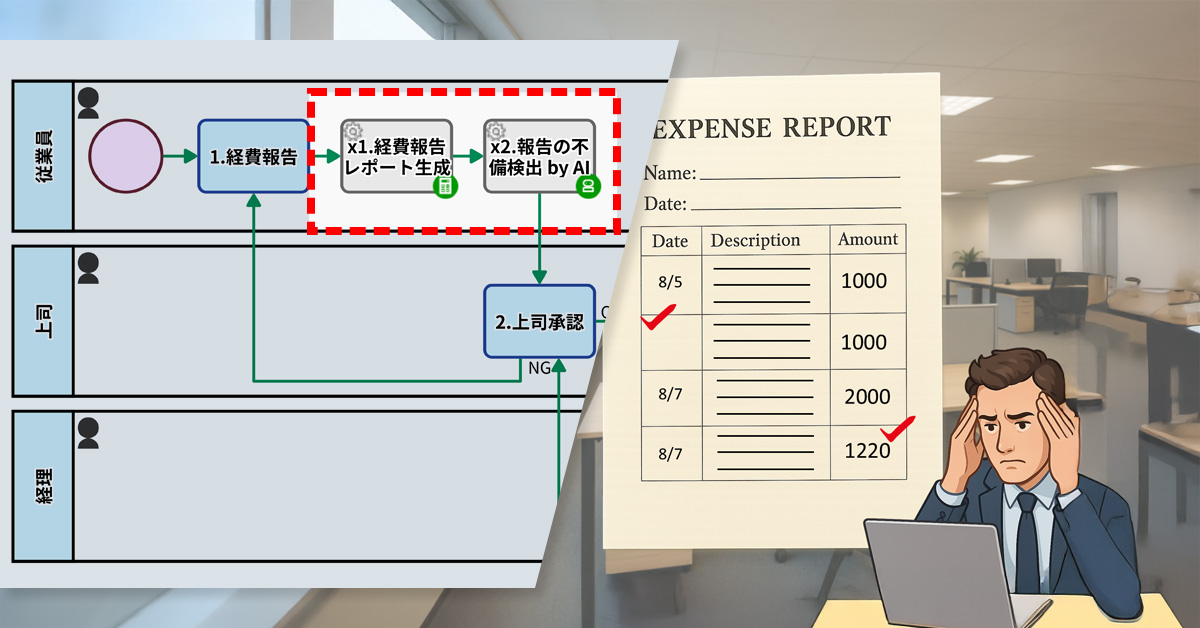
    この課題に対応するため、プロセスオーナーは、「経費報告レポート自動生成工程」「AIエージェント工程」をフローに組み込みました。

    申請が行われると、まず申請内容を簡単にまとめた「経費報告レポート」が自動生成されます。その後、AIがこのレポートを解析し、請求書の添付漏れや取引年月日の記載ミスといった不備の有無を判定します。不備があった場合には、該当箇所とその理由が明示され、その指摘内容が上司の承認フローへと引き渡されます。

    これにより、経理部門に届く前に申請内容の不備を確認できるようになりました。

    Basic Edition
    Advanced Edition
    Professional Edition
    ワークフロー図の詳細を見る
    1.経費報告

    従業員が経費報告を提出します。

    2.上司承認

    上司が承認もしくは差し戻しを行います。

    3.支払い

    経理部が支払いを承認もしくは差し戻しを行います。

    Basic Edition
    Advanced Edition
    Professional Edition
    ワークフロー図の詳細を見る
    1.経費報告

    従業員が経費報告を提出します。

    x1.経費報告レポート生成

    1.の報告を元に自動でフォーマットに沿ってレポートが生成されます。

    x2.報告不備検出 by AI

    x1の経費報告レポートを元に指示内容に従ってAIにより不備が検出・明示されます。

    2.上司承認

    上司が承認もしくは差し戻しを行います。

    3.支払い

    経理部が支払いを承認もしくは差し戻しを行います。

    中央のバー操作で Before / After が比較できます

    3.効果

    経理部門の負担軽減

    不備のある申請が事前に修正されることで、経理担当者による確認や差戻しの手間が大幅に削減されました。

    不備の検出精度が向上

    AIにより、記載漏れや金額ミス、添付忘れといった初歩的な不備が確実に検出されるようになり、経理に届く前の段階で是正されるようになりました。

    上司の確認業務の効率化

    AIによる指摘を参照しながら確認できるため、上司も要点を把握しやすくなり、承認にかかる時間が短縮されました。

    4. その他の業務への応用

    出張申請の内容チェック

    AIが申請内容を事前に確認することで、承認者は確認ポイントをすばやく把握でき、対応ミスを防げます。

    プロジェクト申請の不備検出

    新規プロジェクトの申請にも同様の仕組みを適用することで、書類の不備を早期に把握でき、立ち上げまでのスピードが向上します。

    契約書類の事前確認

    契約書の記載内容をAIが確認することで、法務担当者の確認作業をサポートし、見落としや形式ミスを未然に防ぐことができます。

  • Preventing Unnecessary Response Creation

    Preventing Unnecessary Response Creation

    A self-cancellation form automated inquiry closures, eliminating staff dependency, errors, and rework.

    1. Issue: Person-dependency on cancellation handling

    The company’s internal helpdesk receives IT-related inquiries from employees via a web form, handling around 20 to 30 requests per day.

    After receiving the inquiries, the helpdesk begins preparing responses. However, there are instances where the requester contacts them mid-process to say they’ve solved the issue on their own and no longer need assistance.

    The cancellation handling procedures, such as which information to record and how to process it in the system, were not clearly defined and left to the discretion of individual staff members, leading to inconsistent handling.

    As a result, errors such as missed cancellations and forgotten records occurred, requiring later corrections or verifications.

    2. Solution: Implementation of a Dedicated Cancellation Form

    To address this issue, the process owner introduced a system that allows requesters to complete their own cancellation procedures. By eliminating the need for individual staff responses, the goal was to fundamentally prevent person-dependency and rework.

    Specifically, the following three steps were taken:

    1. Developed a public form allowing requesters to cancel their inquiries.
    2. Included the public form URL in the ‘Inquiry Receipt Notification’ email.
    3. Added a setting (Terminate End Event) that automatically closes cases when an inquiry is cancelled.

    With this implementation, the requester only needs to submit the dedicated form to complete the cancellation process. As soon as it is submitted, any ongoing inquiries at the helpdesk are automatically terminated.

    Allowing requesters to self-cancel eliminates staff intervention, reducing errors, missed records, and rework.

    Basic Edition
    Advanced Edition
    Professional Edition
    View details of the workflow diagram
    Inquiry entry

    An employee contacts the internal help desk.

    AI-generated answer

    An initial response is provided by AI.

    Acknowledgment of receipt

    An acknowledgment of receipt is automatically sent to the employee.

    Basic Edition
    Advanced Edition
    Professional Edition
    View details of the workflow diagram
    Inquiry entry

    An employee contacts the internal help desk.

    AI-generated answer

    An initial response is provided by AI.

    Acknowledgment of receipt

    An acknowledgment of receipt is automatically sent to the employee.

    Cancel Request

    The inquiry has been withdrawn.

    Terminate End Event

    All workflows will be terminated.

    You can move the slider

    3. Customers Case Study

    4. Other Business Applications

    We will enable AI-based reviews for the following tasks:

    Self-Cancellation of Application Processes

    Automation of Customer Cancellation

    Automatic Cessation of Approval Flows

    5. Related Posts

  • 社内ヘルプの即レス化にAIが効く

    社内ヘルプの即レス化にAIが効く

    問い合わせの急増により対応遅れが課題となったため、受付直後にAIが初期回答を自動生成する工程を導入し、対応スピードと業務効率を向上させた。

    1. 課題:回答遅延に対する不満

    KibiKibi商事の情報システム部門(情シス部)は、パソコンからネットワーク、サーバーまで、社内のITインフラ全般を担当する「社内のお助け係」です。20人のスタッフが、日々社員から寄せられる多くの問い合わせに対応しています。

    問い合わせはWebフォームで受け付けており、直後に「インシデントID(問い合わせごとに振られる管理番号)」を記載した受付通知メールを自動送信する仕組みを整えています。一人あたりの問い合わせ件数は増加傾向にあり、1日50件を超える日もある状況です。その影響で、回答の遅れが目立つようになりました。

    さらに、通知メールにはインシデントIDしか記載されておらず、対応状況が見えないことで、「放置されているのでは」といった不安の声も上がっていました。

    2. 解決策:AIエージェントによる即時回答

    プロセスオーナーは、AIエージェント工程[AI即回答]をワークフローに追加しました。この工程では、AIがあらかじめ設定されたルールにもとづいて一次回答を作成。その後、この回答が通知メールに掲載されます。

    これにより、従来はインシデントIDのみが記載されていた受付通知メールに、AIが生成した一次回答が併記されるようになりました。社員は問い合わせ直後に、過去のナレッジにもとづいたヒントや対応方針を受け取ることができます

    Basic Edition
    Advanced Edition
    Professional Edition
    ワークフロー図の詳細を見る
    問合入力[FORM]

    依頼者が問い合わせ内容をフォームに入力します。

    受付通知受信

    問い合わせの受付の通知を受信します。

    解決法列挙&回答文案準備

    AIが関連情報を収集したうえで、解決策の候補と回答文の下書きを自動で生成します

    1.一次回答文を入力

    社内ヘルプデスクの担当者が1次回答を入力します。

    Status:ノイズ

    1.でノイズを選択した場合、案件ステータスが『ノイズ』に設定されます。

    Status:対応済

    1.で最終回答を選択した場合、案件ステータスが『対応済』に設定されます。

    Status:二次対応中

    1.で返信&2次回答と選択した場合、案件ステータスが『二次対応中』に設定されます。

    一次回答(最終)

    一次回答内容をメールで受信し、終了します。

    一次回答(暫定)

    一次回答内容をメールで受信し、終了します。

    2.二次回答文もしくは完了見込を入力

    技術対応担当者が二次回答文または、調査により対応に時間がかかる場合は完了見込み日を入力。

    Status:対応済

    2.で二次回答を選択した場合、案件ステータスが『対応済』に設定されます。

    Status:二次対応中(見込日入力済)

    2.で二次回答を選択した場合、案件ステータスが『二次対応中(見込日入力済)』に設定されます。

    二次回答(最終)

    二次回答内容をメールで受信し、終了します。

    完了見込通知受信

    完了見込日をメールで受信します。

    2b.二次回答文を入力

    技術対応担当者が二次回答文を入力します。

    二次回答(最終)

    二次回答内容をメールで受信し、終了します。

    Basic Edition
    Advanced Edition
    Professional Edition
    ワークフロー図の詳細を見る
    問合入力[FORM]

    依頼者が問い合わせ内容をフォームに入力します。

    受付通知受信

    問い合わせの受付の通知を受信します。

    解決法列挙&回答文案準備

    AIが関連情報を収集したうえで、解決策の候補と回答文の下書きを自動で生成します

    1.一次回答文を入力

    社内ヘルプデスクの担当者が1次回答を入力します。

    Status:ノイズ

    1.でノイズを選択した場合、案件ステータスが『ノイズ』に設定されます。

    Status:対応済

    1.で最終回答を選択した場合、案件ステータスが『対応済』に設定されます。

    Status:二次対応中

    1.で返信&2次回答と選択した場合、案件ステータスが『二次対応中』に設定されます。

    一次回答(最終)

    一次回答内容をメールで受信し、終了します。

    一次回答(暫定)

    一次回答内容をメールで受信し、終了します。

    2.二次回答文もしくは完了見込を入力

    技術対応担当者が二次回答文または、調査により対応に時間がかかる場合は完了見込み日を入力。

    Status:対応済

    2.で二次回答を選択した場合、案件ステータスが『対応済』に設定されます。

    Status:二次対応中(見込日入力済)

    2.で二次回答を選択した場合、案件ステータスが『二次対応中(見込日入力済)』に設定されます。

    二次回答(最終)

    二次回答内容をメールで受信し、終了します。

    完了見込通知受信

    完了見込日をメールで受信します。

    2b.二次回答文を入力

    技術対応担当者が二次回答文を入力します。

    二次回答(最終)

    二次回答内容をメールで受信し、終了します。

    追加された「AIエージェント工程」では、AIが初期回答を生成します。生成された回答文は、通知メールに掲載されます。

    工程の設定で、AIへの指示文(プロンプト)が記載でき、さらに問合文も読み込むことができます。

    メールの回答例
    Before / After 比較(スライダを動かせます)

    3. 効果

    「待たされない安心感」が、社内の業務をスムーズに。

    即時の安心感を提供

    問い合わせ直後に初期回答が届くことで、社員は「対応が始まっている」ことをすぐに実感でき、不安が軽減されました。

    情シス部門の業務負荷を軽減

    AIが一次対応を担うことで、より複雑で優先度の高い案件に集中できるようになりました。

    社員の満足度向上と業務効率の改善

    即時回答により業務の中断が減少し、社員のストレスも軽減。社内全体の作業効率向上につながりました。

    4. その他の業務への応用

    カスタマーサポート部門

    外部顧客からの問い合わせにもAIを導入することで、24時間体制で初期対応が可能になります。顧客満足度の向上と企業ブランドの強化が期待されます。

    営業部門での問い合わせ対応

    商品仕様や納期などの問い合わせにAIが応答する仕組みを導入すれば、営業担当が不在時でも対応が可能になり、機会損失の防止につながります。

    教育機関における学生対応

    履修登録や試験日程に関するよくある質問にAIが対応することで、職員の業務負荷を軽減し、学生への情報提供のスピードと質が向上します。

    5. 提案資料サンプル

    当社サービスの導入を検討いただく際の提案書サンプルです。課題に対する解決策の概要を記載しています。実際の相談内容に応じて、内容を個別にカスタマイズして提供いたします。

  • 脱コピペミス!証明書を自動作成

    脱コピペミス!証明書を自動作成

    株主名簿記載事項証明書プロセスにおいて、名簿データから株主情報を抽出して証明書を自動生成。手作業の転記ミスを防ぎ、精度と信頼性を確保します。

    1. 課題:株主名簿のコピー&ぺーストミス

    EsEs株式会社(未上場・株券不発行会社)は、株主に対して「株主名簿記載事項証明書」を発行しています。株主は、Webフォームを通じて証明書の発行を依頼します。依頼を受けた管理部の担当者は、文書作成ソフトを使って証明書を作成します。記載する情報は他の資料から手動でコピー&ペーストしています。

    しかし、手作業では氏名や住所、株式数の貼り間違いや記載漏れなどのミスが起こりやすくなります。内容に誤りがある証明書を発行してしまうと、株主から企業の事務処理体制に対する不信を招いたり、会社の信頼を損なうリスクが生じます。

    2. 解決策:証明書作成(情報差し込み)の自動化

    プロセスオーナーは、証明書発行フローを自動化し、手作業を大幅に削減しました。

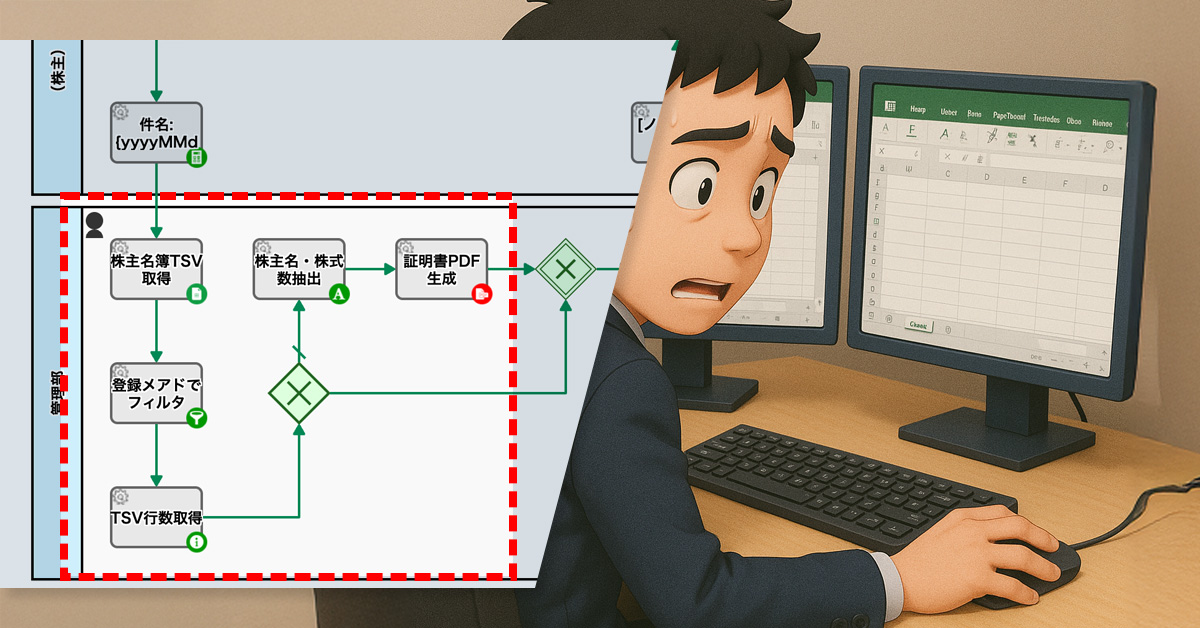
    具体的には、まず、社内に保存されている株主名簿データ(Google スプレッドシート)とWebフォームで受け取った依頼者の情報(メールアドレス)が照合されます。その後、名簿データにある株主情報の項目が自動で差し込まれた証明書PDFが生成されます。

    Basic Edition
    Advanced Edition
    Professional Edition
    ワークフロー図詳細を見る
    株主が公開Webフォームより請求

    1.証明書作成送信

    Email送信(または申請不受理の判断)

    Basic Edition
    Advanced Edition
    Professional Edition
    ワークフロー図詳細を見る
    株主が公開Webフォームより請求

    株主名簿ファイルから、TSVで株主一覧を取得

    請求者のメールアドレスで株主情報をフィルタし特定

    TSVでの請求者データの行数(何業目か)を取得

    TSVから請求者の情報(株主名・株式数)を抽出

    証明書PDFの生成

    1.依頼受理の判断

    Email送信(またはノイズとして処理)

    中央のバー操作で Before / After が比較できます

    3. 効果

    ミスの大幅な減少

    手作業の大幅な減少により、コピー&ぺーストミスが発生するリスクが大幅に減少しました。結果として、証明書の正確性が高まりました。

    作業時間の短縮

    従来の手作業と比べて短時間で証明書を発行できるようになりました。

    プロセスの透明性向上

    証明書発行の依頼状況をリアルタイムで把握できるようになりました。

    4. その他の業務への応用

    給与明細発行

    給与データに基づいて給与明細をPDFとして自動生成することが可能です。

    請求書発行

    売上データをもとに請求書をPDFで生成します。請求書は、クライアントに自動送信されます。

    サポート部門の顧客対応記録

    顧客とのやり取りを自動で文書化できます。報告書は、自動的に管理者へ送信されます。

    5. 提案資料

    当社サービスの導入を検討いただく際の提案書サンプルです。課題に対する解決策の概要を記載しています。実際の相談内容に応じて、内容を個別にカスタマイズして提供いたします。