ブログ

  • ワタシは大学院で、何を学んだのだろーか?

    ワタシは大学院で、何を学んだのだろーか?

    京都大学大学院、情報学研究科での2年間

    「どんな大学院生活だったんですか?」 おおぉぉぅ!!!!!! ・・・ほとんど忘れたね。 確かに、「起業してからのコト」については、書いたり答えたりする機会があったけど、、、「学生時代の事」はあんまり聞かれたコトがないカモ。。。 土曜日(6月1日)は大学院のOB達によるオープンイベント『超交流会2013』だ。イイ機会だし、大学院時代の記憶を整理しておこーと思った。イベントの統一テーマは「みんなのカミングアウト」だし。。。

    0. 「学部」時代はオチコボレ

    1993年、京都大学 建築学科に入学。授業には全く行かず、毎日遊び呆けた。

    1995年、マッキントッシュと言うパソコンを買った。ゲーム機として。

    大学院に進学する前、大学4年間は、通称『ドロップアウト組』に属していた。カッコ良さそうな響きだが、何か特別な「組織」がある訳ではなく、単に「落ちこぼれた人達」と言う意味で、そう呼ばれていた。4回生になって配属されたのは『建築情報システム』と言う研究室。「デザイン理論」や「構造計算」などの、いわゆる「本流研究室」には、行かなかった。いや、むしろ行けなかったと言った方が正しいか。

    1. 「建築」で大学院に行くぞ!

    1996年夏、京都大学大学院 工学研究科建築学専攻の入試に失敗。

    1997年夏、京都大学大学院 工学研究科建築学専攻の入試に失敗、アゲイン。

    ちょうどその頃、工学部建築学科にも「インターネット」がやってきた。インターネットケーブルが壁にガムテープで留められ、教授宛の電子メールは秘書さんが紙に印刷し、、、ITなんてミンナ無知だった。

    研究室のパソコン(PCサーバ)には全て Global IP が割り振られ、日夜世界中にSPAMメールやらウィルスやらをばらまいていた。楽しい時代だ。第1週のゼミは「はじめてのC言語」で、第2週のゼミが「はじめてのC++言語」。無茶苦茶な時代でもあったと思う。

    当然の末路だが大学院入試の季節を迎えても、『建築史』も知らなければ『構造計算』もできないままだった。

    大学院入試は「無謀な志願」であり、本人の予想通り不合格だった。しかし不思議な事に、心を入れ替えるでもなくサーバと戯(たわむ)れる同じ生活を続けた。そして、その翌年の大学院入試も再び不合格になる。(ほんとヒマだねー)

    2. 「コンピュータ分野」への華麗なる転身?

    1998年の3月、京都大学大学院 情報学研究科社会情報学専攻 の入試に合格。

    世の中が「ドットコムブーム」だの、「2000年問題」だの、ITで盛り上がっていた時代だった。「大学院浪人2年目」に突入する直前、なんと大学院合格の御便りが届いた。併願していた情報学研究科からだ。その年は、折しも1998年は京都大学大学院に『情報学研究科』と言う独立大学院が新設される年だったため、募集人数が多かったのだ。今村をその広き門戸をくぐる事が許された。

    今村は運が良いと思う。

    確かに当時、プログラミングも好きだったし、サーバ構築も得意だった。しかし、特に「時代の先を見越してITを学んだ」ワケでもナンでも無い。単なる偶然のめぐり合わせで、潤沢な研究予算のある研究室に入ることができた。

    (今でも建築図面を見たり、設計アイデアを練るのは、大好きだ)

    3. 恩師との出会い

    大学院時代の恩師は、上林弥彦先生と言う方だ。(以降「ボス」と呼ぶ)

    ボスは日本データベース学会の創始者であり、データベース界で知らない人は居ない有名な方だ。そして、その新設大学院「情報学研究科」の創建に大きく尽力した方でもある。時の総長(学長)、長尾先生と共に情報学研究科の『始祖』と言っても良い。当時、まだ50代後半だったが、それ以上の貫禄があった。ちなみに見た目は和田勉、笑い方はウド鈴木だ。(言いすぎやろ)

    「元ちゃん! 今度ケイが来るよ! ケイが!」(デヘヘヘ) ※ボスは必ずデヘヘヘと笑う

    聞けば『パソコンの父』と呼ばれ世界的に有名なアランケイ氏を研究室に招聘しちゃったと言う。愛くるしくもアリ、(暑苦しくもアリ)、一方で政治力のある人でもあった。

    そんな多忙な方だから「学生の指導」なんてしないか、と言えば、まるで違う。

    とある日、某企業から長期の研究開発オファーがあった事を報告した。今村にとっては、米国で開発するチャンスだった。日頃、学業よりも企業からの仕事を優先していた今村を暖かく見守ってくれていたボスだったが、少し勉強させようと思ったのだろう、こう言った。

    学業のけじめに論文を1本出して、その上で行っておいで!」(デヘヘヘ)

    そう言われて初めて真面目に論文を書いた。

    しかし、内容が稚拙だ。全く勉強してこなかったのだから仕方が無い。書いた文章をボスのところに持っていくと、どこの通信添削よりも遥かに真っ赤な添削が返ってきた。書いた量より、添削された量の方が多い日もあった。(今でも募集論文のテーマを覚えているが、ボスの専門領域とは全く違う内容だった)

    いよいよ渡米の日が近づいてくると、ボスの部屋でマンツーマンで赤ペン指導を受けるハメになった。ようやく書きあがったのは渡米前日の昼。自信を持ってボスの部屋に行くと、あれれ、、、またその場で赤ペンが書き込まれた。

    「じゃ、夕方の4時に持ってきて」(デヘヘヘ)

    しかし、ココまでくれば赤ペン通りに原稿を修正すればよいのだから楽勝だ。そして夕方の4時に持って言った。しかし、

    「ココは、こんな感じの方がイイね。じゃ、夕方の6時に」(デヘヘヘヘ)

    どうやら言い回しが気に入らないらしい。そして修正する。また今度は6時に持っていく。するとまた同じ事が繰り返される。

    「じゃ、夜の9時に、明日のフライトは何時なの?」
    「じゃ、夜中の12時に、間に合うよね」
    「じゃ、午前3時に、寝なきゃイイ」
    「じゃ、午前6時に、ガンバレ」

    ア・リ・エ・ナ・イ・・・。なんでこの人は、これ程に尽くしてくれるのだろうと思った。「折角、ウチの研究室に来たのだからね」の一言が強く胸に刺さった。

    #ちなみに、誠に、誠に、誠に遺憾ながら、その査読論文は「不合格」だった。(またか!)

    4. 起業

    大学には長く居たが、修士2回生の時は「勉強」したよーに思う。修士論文も、ひとえにボスの熱血指導のおかげで完成した。(他の教授陣の評価はCだったが、ボスの評価だけはBだった)

    #どうでも良いが本当は修士2回生の1月、すなわち2000年1月に法人を設立したかった。
    #しかし、ボスによる「一蹴」で4月にずれ込んだ。今から考えれば当たり前のことだ。

    会社を設立してからは、仕事になりそうな人を紹介してくれた。投資家も紹介してくれた。

    1年ほど経ったとある日、「増資したい」(会社の資金を増やしたい)と『事業計画書』を持って行った事がある。持参した『事業計画書』に自信が無かったので、「また赤ペンを食らうかもなー」と覚悟したのを覚えている。しかし、ボスはその『事業計画書』を開く事も無く言った。

    「幾ら要るの?」(デヘヘヘ)

    ボスは嬉しそうだ。

    わずか8ページ程度の査読論文に、あれ程までに一言一句、赤ペンを走らせていたボスなのに、事業計画書は読もうともしない。「無条件応援」とでも言えば良いのだろうか。何も疑うことなく、何も問いただすことなく、快く出資してくれた。

    「ウチの研究室の出身者には、社長が3人も居るんだよ」(デヘヘヘ)

    本当に嬉しそうだった。

    5. 情報学との縁

    ボスの出資から3年経ち、会社も軌道に乗りつつある時、ボスは突然亡くなってしまった。

    教授室で脳内出血で倒れたのだ。まだ60歳だった。平たく言えば、働き過ぎだ。

    葬式の時に思った。

    • おそらく、今村に偉い人を紹介してもボスにとっては何の「価値」も無かったはずだ。
    • 良く考えれば、今村を指導してもボスにとっては何の「価値」も無かったはずだ。
    • 今村は、偶然、情報学研究科に偶然迷い込んだ1学生にすぎない。
    • 競争社会にあって「関わらない方が良い存在」だったように思う。

    ・・・にも関わらず、ボスは本当に沢山のモノをくれた。きっと、あの出資金も、ドブに捨てるつもりだったのだろう。情報学の基礎知識が無い、(まー建築の知識も無いけど)、あんまり役に立たないであろう、、、そんな今村に対して「見返り」は期待しても仕方ない。。。

    ナンダ? なんでだ?

    敢えて言えば「縁」だ。

    人間は「自分とつながりのある人」の為に生きている。そして、その人とのつながりを太くする為に生きている。

    在りし日のボス

    6. 超交流会

    うーん、柄にもなく、シリアスな感じのマジメ文章を書いてしまった。

    でもね、、、やっぱり折角の「縁」は太くしていきたい。「縁」のとなりにある「縁」も、太いモノになって欲しい。そう思う。人間はホントに「社会性の強い生き物」なんだよ。他者との関係性の中で生きている。『損得』だけで行動している訳ではない。

    今村はまだ40歳だ。

    周囲のみんなに、大したモノはあげられない。

    でも、ま、今にして出来る事も、今なら出来る事も、今しか出来ない事も、少しならある。ある様な気がする。そして、そして、もう少ししたら、もう少し役に立つ人間に成長している、、、ハズだ。しばらく待っててくれ! (どうだか…)

    うん、、、

    うんうん、、、

    地縁血縁、そして、同窓の縁

    まー、とりあえず、超交流会で会おー!

  • Impress Holdings, Inc.

    Impress Holdings, Inc.

    Enhancement of Internal Control by Digitizing the Request for Login to the System

    Impress Holdings, Inc.

    Established

    1992

    Number of Employees

    44 (as of March 2023)

    Business

    Group management and financial strategies formulation


    Industry

    Media

    User Departments

    Human Resource, IT, Manufacturing dept

    Keep Usage Permissions of the Business System in a proper state at all times!

    Q. What kind of operations do you use Questetra for?

    Impress Group is a Media Enterprise group with more than a dozen subsidiaries, such as IT-related publisher Impress Japan Corp., etc. Through digital media and publishing media we provide content plus high-value-added services, according to today’s needs. (Tokyo Stock Exchange 9479)

    Today, in addition to IT and PC related publications, the group sells a wide range of the content related to music, design, mountains and nature to name a few, and Impress Holding, Inc. takes care of the procurement of infrastructure and allocation of business resources.

    We have introduced the Cloud-based Workflow system (Questetra) as a tool to control IT as a part of internal control reinforcement, and also as a tool to achieve operational efficiency.

    Q. What kind of ‘IT control’ do you refer to?

    In the Impress Group about 600 employees are using various business systems. These systems are of various types and purposes, from editing content to service providing and customer data management.

    From the perspective of business process control, it is important to prevent mistakes by ensuring the appropriate use of these business systems. In addition, the business systems themselves must be managed properly.

    Previously, the procedure for granting system use permissions had been carried out on paper. The requests for changes in system access due to hiring, resignations or employee transfers had been carried out by the Personnel Department or the person responsible at each subsidiary, but I must say there were various problems, such as:

    1. Changes went unnoticed due to documents getting stuck somewhere during the paperwork processing
    2. Difficulty searching for past procedure records
    3. It took a long time to audit the implementation of the internal control

    Now that the paperwork process has been digitized, the system usage authorization can be updated daily. In addition, the automatic recording of updates has made it easier to provide an audit trail, which has significantly reduced the cost of responding to internal control audits. I also think that the operational efficiency of the IT Systems Department has improved greatly.

    Importance of an Overview of the Business Flow

    Q. What was important for you to select a Workflow System?

    Indeed, the digitization of our procedures was important, but I wanted to clarify the workflow. I was wondering how I could get an overview of the entire workflow system. In fact, I found Questetra while searching for images of business flow charts.

    I think there are wonderful features that other products don’t have, such as the capability to set conditional expressions and to send emails to any destination at points in the workflow diagram, or the Swimlane function to automate the allocation to the person in charge of each step. I expect that the handover of operations whenever there is a change in personnel will become much easier if I can model all of the workflow diagrams on the BPM System.

    Q. Is there any other important feature?

    During the introduction of the workflow system, the ability to cooperate with G Suite was important. Connection configurations with G Suite were very easy, and we were able to link Questetra and G Suite in no time. We plan to continue with the application business processes in the areas of HR & Administration in the future.

    Moreover, we aim to link more than one domain. We would like Questetra to have a feature to manage multiple domains like G Suite does, instead of operating Questetra on each domain separately. We are looking forward to that.

  • 株式会社インプレスホールディングス

    株式会社インプレスホールディングス

    業務システムの利用申請をワークフロー化。内部統制監査への対応コストも大幅低減。

    株式会社インプレスホールディングス

    1992年

    44名

    ※2023年3月末 時点

    グループ経営・財務戦略の策定

    人事・総務、情報システム、申請・承認

    この事例に関連するプロセス改善記事

    この記事の目次

    内部統制強化と業務効率化を目的として導入

    インプレスグループは、IT関連出版を行う『株式会社インプレスジャパン』など、十数社を傘下にもつメディア企業グループです。出版メディアやデジタルメディアを通じて、時代が求める付加価値の高いコンテンツ+サービスを提供しています。(東証1部 9479)

    今日では「ITパソコン」関連だけでなく、「音楽」「デザイン」「山岳自然」などの幅広い分野のコンテンツを販売し、持株会社である『株式会社インプレスホールディングス』が、経営資源の配分やインフラの提供を行っています。

    クラウド型ワークフローシステム(Questetra)は、内部統制強化の一環としての「ITの統制」を実現するツールとして、またあわせて業務効率化を実現するツールとして導入しました。

    運用に課題があった、多種多様な業務システムの利用権限申請

    インプレスグループでは、グループ内の約600名の従業員が様々な業務システムを活用しています。「コンテンツの編集」はもちろん、「サービスの提供」や「取引・顧客データの管理」など、利用する業務システムは多岐に及びます。

    「業務処理統制」の視点で言えば、これらの業務システムを上手に活用して業務処理そのものに「ミス」が起きない様にする事が大切です。ただ一方で「全般統制」の視点で言えば、それらの業務システムそのものが適切に運用される必要があります。

    従来、システム利用権限の付与手続きは書面で行っていました。『情報システムのアカウント発行・停止申請』と言う形で、特に各子会社の人事部や業務責任者の回付を経て、社員の入社・退社・異動に伴う利用システム変更依頼を受け付けるのですが、以下の課題がありました。

    1. 回付中の書類がどこかで止まっていても気付かない
    2. 過去の手続き記録を検索しづらい
    3. 内部統制の実施状況について監査を受ける際に時間がかかる

    申請のオンライン化で内部統制監査対応コストも改善

    今では、回付処理のオンライン化によってシステム利用権限が即日更新されるようになりました。また、更新内容が自動的に記録されるようになった事で監査証跡を簡単に提出できるようになり、「内部統制の実施状況に関する監査」(内部統制監査)への対応コストも大幅に下がったと言えます。情報システム部門自身の業務効率も非常に向上したと感じています。

    業務フロー全体を俯瞰できるシステムを探していた

    システムの選定については、「手続の電子化」も重要だったのですが、むしろ業務フローを明確にしたいと言う思いから「業務フロー図を全体俯瞰できる仕組み(システム)」を探していました。実は、『業務の流れ図』で画像検索していた折に Questetra を発見しました。

    業務フロー図中の分岐ポイントで「条件分岐式を設定できる機能」や、業務フローのアラートポイントで「任意の送信先にメール送信できる機能」、各処理工程の担当者の割り当てを自動化できる「スイムレーン機能」が連動している点が、他製品には無い本当に素晴らしい機能だと思います。全ての業務フロー図を BPM システム上に記述できれば、担当者異動時の引き継ぎが、かなり楽になるのではないかと期待しています。

    また、ワークフローシステムの導入プロジェクト自体は、「G Suite(旧Google Apps)と連携できる事」が重要でした。

    G Suite との連携設定は非常に簡単で、すぐに Questetra と G Suite を連携させることができました。今後は人事総務の申請系業務プロセスにおいても利用して行く予定です。

    また、複数のドメインを連携させたいとも考えています。各ドメインごとに別々の Questetra を運用するのではなく、「G Suite の複数ドメイン管理」の様な仕組みを Questetra 側も持って欲しいと思っています。期待しています。

    ※ 2020年10月に「G Suite」の名称は「Google Workspace」に変更されました。

    ※ 本事例は2013年5月時点の情報です

    同業種の導入事例

    • 株式会社IPGネットワーク
      株式会社IPGネットワーク

      出版業での書籍に関する問い合わせ対応業務を電子化。コロナ禍の影響による在宅ワークへの切り替えもスムーズに。

    • 株式会社インプレスR&D
      株式会社インプレスR&D

      電子書籍の企画から納品までの制作工程の管理をシステム化、事業開始時の業務要件の整理やシステム稼働後の運用監視まで幅広く活用

    • 株式会社インプレスホールディングス
      株式会社インプレスホールディングス

      業務システムの利用申請をワークフロー化。内部統制監査への対応コストも大幅低減。

  • 「業務プロセス」 って、なんですか??

    「業務プロセス」 って、なんですか??

    IT業界で使われている「業務プロセス」という言葉。 はて、さて、どんな意味があるのだろう?

    0. 業務プロセスとは?

    「業務プロセスって、ナンですか??」 一般の方から真顔で聞かれると困る。

    • 組織の中に飛び交っている案件の「その流れ方」のコトです。
    • イヤ、チガウ。組織としての「仕事の進め方」のコトです。
    • ア、イヤ、ソノ。貴方にとっての「救いの書」です!?!

    しかし、ホント、これ(業務プロセス)、ナンなんだろう。。。この言葉、毎日毎日使っていると、たまに分からなくなる。しかも全く同じ質問文でも、実は、みんな「聞きたい事」が違う。だから適当に答えると(その真顔の裏に思いを馳せずに答えると)、まず間違いなくガッカリされる。(切ない)

    業務プロセスのメタファー(比喩的表現)

    1. “業務の流れ” である

    • 「業務プロセスを改善しましょう!」(!?)
    • 「この際、業務プロセスの自動連携を考えましょう!」(!??)
    • 「アドホックな業務プロセスの実行時にはコラボレーションツールの活用が有効です!」(zzz。目噛んで死ね)

    IT業界における「業務プロセス」(Business Process)とは、

    • たぶん【道】と言ってイイと思う。
    • たぶん【川】と言ってイイと思う。
    • たぶん【線路】と言ってイイと思う。

    個人的には、『【線路】と【列車】』のタトエが好きだ。

    たとえば、『しっかりとした【線路】が引かれていれば、次々に【列車】を走らせられますよね』と説明する。その後、『しっかりとした「業務プロセス」(業務の流れ)が設計されていれば、「仕事」(案件)がグルグル回りますよ』と。。。

    世のコンサルタント達は、意味不明な日本語をあやつるのが仕事だが、、、彼らの言う「業務プロセス」においても、「個々の【列車】を指しているのではない」という点は押さえておきたい。つまり「業務」には、

    • 英語の「Business」(e.g. “That’s your business” 貴方自身の問題よ)
    • あるいは法律用語としての「業務上の」(e.g. “業務上過失”)

    などと同様に「反復」というニュアンスが込められている。そして「業務プロセス」は「反復可能な手順」といった位置づけで使われる言葉なのだ。

    一般的に「業務プロセス」は、沢山の「工程」から構成される。「工程」は【駅】をイメージすれば良い。

    2. 「プロセス」と「業務プロセス」の違い?

    さらに注意が必要なのは「プロセス」(Process)だ。

    たとえば、システム管理者がパソコン画面を見ながら「プロセスを殺した」とボヤけば、「何らかの理由で暴走したソフト(アプリケーションソフトウェア)が、強制停止させられた事」が伝わる。つまり「プロセス」は「たくさん走っているもの」であり、「その中に暴走したプロセスが存在していたのだ」と理解できる。メタファーに置き換えて理解するなら、【たくさんの列車】の中に【暴走列車】がいる様子を想像すればよい。

    しかし一方で、「ワークフローの “プロセス詳細” を確認する」などと言われればどうだろう。どちらかと言えば【線路】をイメージするヒトの方が多いように思う。ただ、このようなケースにおける「プロセス」も、(一般の方には理解しがたいのだが)、【個別の列車】が意図されているケースが多い

    もっとも、文脈によっては「プロセス」を【線路】と認識される可能性が高いシーンはある。その様な場合には【列車】であることを強調すべく、「プロセスインスタンス」という言葉が使われる。・・・が、これはもはや宇宙語だ。(そして宇宙人たちは「プロセスを実行する」なんて言葉も平気で使う)。またその逆に「業務プロセス」が【列車】と認識される可能性が高いシーンもある。そのような場合には「プロセスモデル」という言葉が使われる。($&%#?)

    3. 「業務」と「仕事」の違い?

    話がやや脱線するが、「仕事」(Work)とは何だろう?

    誤認されることが少ないので考察する必要もないのだが、、、基本的には「流れてきたプロセスへの対処」を意味する。ここで言う「流れてきたプロセス」(あえて “案件” と言おう)は、もちろん【列車】の方だ。

    たとえば、以下の2文を比較してもらいたい。後者はイマイチ意味が通じない。

    1. Aさんが仕事を処理した後に、Bさんが次の仕事を処理する
    2. Aさんが業務を処理した後に、Bさんが次の業務を処理する

    つまるところ、IT業界において「仕事」とは「誰かに処理されるモノ」なのだ。そして「仕事リスト/Worklist」と言えば「インボックス/未処理箱()に入っている案件の一覧」が想起される。

    ちなみに「工程」という言葉も実はヤヤコシイ。もちろん「仕事(Work)が処理される場所」なのだが、それを英語で「タスク(Task)」という。これは国際標準(BPMN)に従った表現なので仕方がない。ただ、「ユーザ」【駅員】の視点で「タスク(Task(s))」という表現を使えば、これは流石に「処理すべき仕事」を意味する。すなわち「タスク」は、「システム開発者」【運転指令所】が言えば「工程」になり、「ユーザ」【駅員】が言えば「仕事」になる。うん、使わないに越したことはない。(&$%&$%??)

    4. 「業務プロセス」からポンポンと成果が生まれるようにするために

    「仕事を回す」って何だろう?

    改めて考えると「仕事が回る」って日本語は、実に面白い。例えば、、、「たった3人で仕事を回してます!」とか、「特定の誰かが居なくても仕事は回るんです!」とか、そんな使われ方をする。(回覧板的な「回す」なんだろうけど)

    つまるところ、、、何人かの仕事がグルっと回ると、、、『成果』が1つ出来上がる、、、のだろう。更にもう1回グルっと回ると、また違った『成果』が完成する。

    そうか! 「業務プロセス」は【ガラポン】とも言えるゾ。

    (どなたか、、、「ガラポンです」って回答する勇気をクダサイ)

    そして、十分な品質を持つ『成果』【タマ】が、ポンポンと安定して出てくようにするには、日々のメンテナンスが欠かせないと言える。

    という事で、、、「業務プロセスの管理」(Business Process Management)に興味が湧いた奇特な方は、無料で始められるクラウド型ビジネスプロセス管理『Questetra BPM Suite』を是非お試しください。

  • Cloud Workflow v9.5 Enhanced API

    Cloud Workflow v9.5 Enhanced API

    Make your own APP for Workflow Automation!

    Kyoto, Japan, April 22, 2013, Questetra, Inc., the global SaaS provider of business process management (BPM), today announced that it has published the new version 9.5 of the cloud-based Workflow product “Questetra BPM Suite”. The new version is enhanced “Developer APIs” which are for programmers, allows to develop more advanced own applications that contribute to business process improvement. 

    Auto-Input APP and Monitoring System

    In a Cloud-based Workflow product “Questetra BPM Suite” which is capable of passing business data through online, a mechanism of system cooperation called API* is available in standard. Since the publication of version 6.0 (June, 2010), Questetra has been utilized for business efficiency such as, not only a simple connection as ‘Estimate flow and Production flow’, but also ‘retrieving business data from the core system’. 

    *API: Application Programming Interface. A mechanism to make system functions available from the outside. Among them, Web API that enables to connect system via the Internet is spreading rapidly, since 2000. Web API is broadly classified into SOAP communication to perform strict XML file exchange, and REST communication to assume access from, such as JavaScript. 

    In this new version 9.5, we have enhanced “Developer APIs” which is for programmers among API that “Questetra BPM Suite” is offering. You are now able to develop such as ‘an Application for automatically enter some part of the inspection work report’ or ‘Monitoring system that displays real-time reporting Photos arriving from all over’. 

    Questetra BPM Suite

     “Questetra BPM Suite” can be flexibly changed the flow of the business. 

    “Questetra BPM Suite” consists of features such as

    • Modeling feature: Available to build the business system without programming. 
    • Task Operation feature: Available to enter the deliverable of accepted duties.
    • Enterprise Social feature: available to communicate closed to within the company.
    • Monitoring feature: Available to browse the progress in real time, or the performance of the past. 

    It is a Workflow that enables the active improvement of the business flow (business processes) continuous, to fit the actual processing situation. Programming knowledge and server knowledge is not needed. There is a limit of the number of users up to 5 people in the Free SaaS. 

    Screenshot: List of MyTask

    APIs for Questetra BPM Suite

    There are “Process Model Connecting APIs” which Workflow Designers also use, and “Developer APIs” which Programmers use. In the “Developer APIs” it will respond “JSON format” and “XML format”, etc. against the “HTTP request” (REST request). Both of “OAuth” and “Basic Authentication” are supported. 

    Process Model Connecting APIs

    • Email Receiving Process Start [Message Start Event (email)]: Automatic start triggered by email receiving 
      *cf. [Message Throwing Intermediate Event (email)] is used to send an email that is inserted business data.
    • HTTP Receiving Process Start [Message Start Event (HTTP)]: Automatic start triggered by HTTP Request
    • HTTP receive data Capture [Message Catching Intermediate Event (HTTP)]: Data capturing
      *cf. [Message Throwing Intermediate Event (HTTP)] is used to transmit business data in HTTP. 

    Developer APIs

    Workflow APIs

    • Process Start API: Processing the first task of business flow – e.g. Internal Affairs, Reporting of Orders
    • Worklist API: To confirm the User’s own allocated Tasks
    • Task Handling API: Processing the User’s own accepting Tasks
    • Monitoring API: Browsing data and current progress of the Process that is authorized to view

    System Settings APIs

    • User Setting API: Adding, Deleting, etc. the login Users
    • Organization Setting API: Adding, Deleting, or changing the name of section and organization. 
    • Membership Setting API: Updating of the Users who belong to department, etc.
    • Choices information API: Updating on choices that is utilized across business – e.g. Product Code List

    About Questetra

    Questetra, Inc. is the enterprise cloud computing company in Kyoto Japan, founded in 2008. We optimize the world’s Business Processes. Visit questetra.com 

    For more press release information, please contact:
    https://questetra.com/en/contact-en/ or +81-75-205-5007

  • Cloud Workflow v9.4 Sticker Post function

    Cloud Workflow v9.4 Sticker Post function

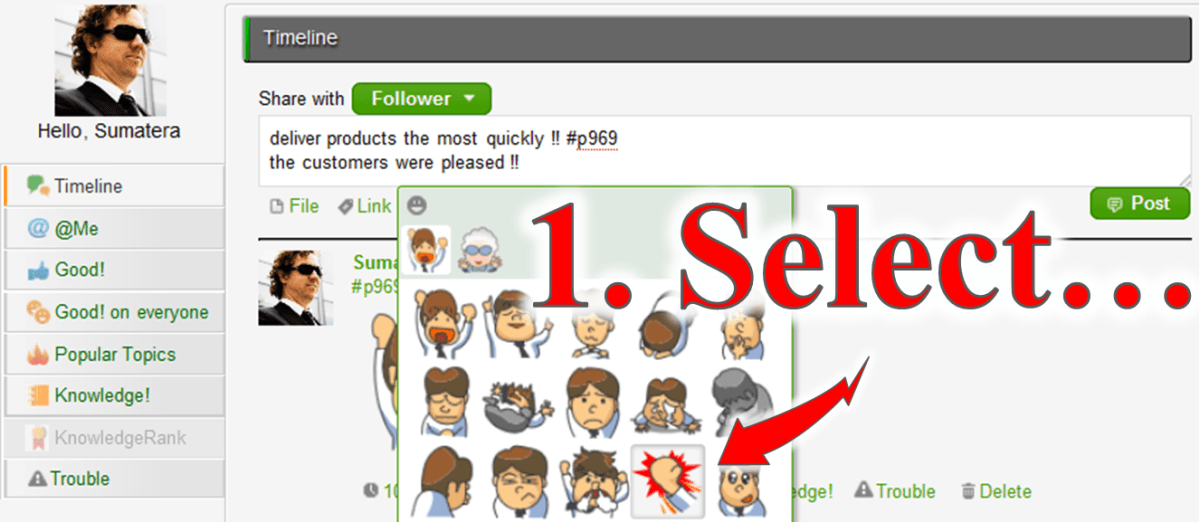
    Kyoto, Japan, March 18, 2013, SaaS vendor company Questetra Inc. has published the new version 9.4 of the cloud-based Workflow product “Questetra BPM Suite SaaS Edition”. At the new version, “Sticker” is equipped on the Enterprise Social Network.(Keywords: Enterprise Social, Sticker, Cloud Workflow, SaaS BPM, Business Process Improvement)

    “Questetra BPM Suite” (Cloud-based Workflow product) that provides delivery of Business data on Cloud, is equipped “Enterprise Social Network feature” as a standard. It makes the Users feel free to make advice regarding business data, and to share ‘URL’ or ‘Images’.

    In the new version 9.4, “Sticker” that helps to express User’s emotion easily on the “Enterprise Social Network feature” is available. For example, when a delivery of goods has been successfully accepted, the project member can actively originate their feelings. It will promote the sharing of emotions that have been difficult by conventional internal e-mail or the report.

    Questetra BPM Suite

    The Business process ‘To-Be’ is changing along the changes in the business environment day by day. “Questetra BPM Suite” is a cloud-based workflow product which has a great feature of the flexibility to change the flow of the business. 

    • “Modeling feature”, can build a Business System in non-programming
    • “Operating feature”, each worker can input their deliverables
    • “Enterprise Social Network feature”, good for sharing internal information
    • “Monitoring Feature”, visualizing progress and records; etc.

    Aggressive improvement on the Flow of Business (Business Process) will be available because it visualizes the bottlenecks and Business challenges. You can take advantage of it for free of charge if your organization is up to 5 people. You do not need Programming knowledge nor Server Operational knowledge. In addition, the method of drawing business flow diagrams is in compliance with international standard notation, BPMN. (Other features: PDF Auto-generation, Data calculation, Google Apps connectivity, Multiple language, Open API, etc.)

    *BPM: Business Process Management


    “Enjoy your Routine!” We are start-up company in Kyoto Japan, have been continuing to create Business Software, and working hard to organize the world’s Business Processes. 

  • CHUO Accounting Office

    CHUO Accounting Office

    CHUO Accounting Office

    Established

    1986

    Number of Employees

    2,816 (as of January 2022)

    Business

    Accounting consulting services, company establishment support services, sales increase support services, various services and media management


    Industry

    Professional Service

    User Departments

    Accounting (contract business)

    To Manage the Progress of Accounting Support Services Work

    High degree of freedom in designing the business flow.

    Q. What kind of business do you use Questetra for?

    We are deploying speedy accounting support services taking full advantage of IT.

    In our main service, the monthly closing service, produces financial graphical reports every month which help the owners to consider their next move. We are also focused on support for starting a business, and we are providing our services to IT companies that are rapidly growing.

    We are using Questetra as a tool for visualizing the Workflow of this accounting support service, and internally sharing the progress of report creation and certified tax accountant signatures, etc. We manage the progress of our service for each of our customers, which are more than 600 companies.

    Q. Which feature of Questetra do you like best?

    I like it very much because it has a high degree of freedom in designing the Workflow. Despite the fact that the deliverable varies depending on the size and industry of the customer, we are able to manage the progress of our service for all customers in one Workflow definition, because we can add the necessary tasks using the split condition settings.

    The fact that it can cooperate with Google Workspace (formerly G Suite) is very helpful, because we have been actively using cloud services. We launch processes in batches using Google Apps Script in the customer master, and output the work completion records into a Google Spreadsheet.

    Expanding to Various Services Business

    Q. Has the business procedure changed compared to before the introduction of Questetra?

    The basic procedures have not changed.

    However, before the introduction of Questetra in the spring of 2012 we would record work progress on a check-sheet which was then passed to the supervisor to check it, but it was time-consuming to pass the paperwork around manually.

    Now I think it has been sped up significantly by eliminating unnecessary delays, because we are able to report from outside the office. We have also automated the listing of completion records. We have been able to eliminate labor and errors associated with manual transcription.

    Q. Are you planning to expand to other business areas?

    At CHUO Accounting we believe that to achieve the Customer First principle, we must respond to our customer needs quickly.

    We succeeded in visualizing the progress of service operations such as the annual settlement, a few months after introducing Questetra. We also make use of it on the new advisory contracts procedures, and on various applications inside company.

    I would like to apply it to various business operations in the future. I think it is really great that I can configure the workflow easily.

  • 中央会計株式会社

    中央会計株式会社

    月次決算サービスの作業進捗を可視化。600社へのサービス提供をスピードアップ!

    中央会計株式会社

    昭和61年

    会計コンサルティングサービス、会社設立支援サービス、売上アップ支援サービス、各種サービス・メディア運営

    会計・経理(受託業務)

    この事例に関連するプロセス改善記事

    この記事の目次

    業務フロー設計の自由度が魅力

    中央会計株式会社では、ITをフル活用したスピーディな会計支援サービスを展開しております。

    主力サービスの『月次決算サービス』では、経営者の皆さんが「次の一手」を考える際に役立つグラフィカルな財務レポートを、毎月作成しています。起業支援にも力を入れており、急成長IT企業様にもサービス提供させて頂いています。

    Questetra は、この会計支援サービスのワークフローを可視化するツールとして活用しています。「報告書作成」や「税理士署名」などの進捗を共有しています。600社を超える契約企業様それぞれに対するサービス進捗を管理しています。

    業務フロー設計の自由度が高い所が、とても気に入っています。お客様の業種や規模に応じて納入物が異なるのですが、必要な作業を「条件分岐設定」で追加する事ができ、一つの業務フロー定義で全てのお客様へのサービス進捗を管理できています。

    また中央会計では、色々なクラウドを積極活用しているのですが G Suite(旧Google Apps)と連携できるところは非常に重宝しています。顧客マスターの Google Apps Script を使ってプロセスを一括起動したり、作業の完了記録を Google Spreadsheet に出力する等しています。

    ※ 2020年10月に「G Suite」の名称は「Google Workspace」に変更されました。

    作業スピードが大幅に向上し、ミスが減少

    基本的な作業手順は変わっていません。

    しかし、2012年の春に Questetra 導入するまでは、紙のチェックシートで作業進捗を記録し、上司が作業結果を確認していたのですが、この「紙の受け渡し」にはどうしても時間がかかっていたと言えます。

    今では、社外作業の報告もその場でできるようになり、無駄な遅延が無くなり、大幅にスピードアップしたと思います。また、完了記録の一覧も自動化しています。手入力による転記の手間やそれに伴うミスを無くすことができました。

    様々な社内業務に展開予定

    中央会計は、『お客様第一主義』を実現すべく、お客様ニーズにスピーディに対応して行きたいと考えています。

    Questetra を導入して数か月後には「本決算」などのサービス業務の作業進捗を『見える化』しました。また、新規の顧問契約手続きや、社内の各種申請にも活用しています。

    これからも色々な業務に適用して行きたいと思います。簡単に業務フローを設定できる点は、本当に素晴らしいと思います。初年度は「草の根的な改善活動」でしたが、それでも十分な結果を残すことができました。2年目からは具体的な改善目標を数値で設定し、さらなる改善を進めていきたいと考えています。また、Questetra のアカウント付与は、まだ社内の全員ではありません。今後は更に利用範囲を広げ、より多岐に及ぶ業務改善がすすめられる環境にしたいと考えています。

    ※ 本事例は2013年3月時点の情報です

    同業種の導入事例

  • NFCスマホを「かざす」で、業務フローを変える?

    NFCスマホを「かざす」で、業務フローを変える?

    ビジネス IT の世界でも「かざす」が盛り上がってきた。2014年あたりには流行語大賞を取るかもしれない。。。キー・テクノロジーは『NFC』だ。 Near Field Communication / 近距離無線通信。

    1. ドコモ契約に『NFC』の文字が!

    2か月前の2012年11月、NTTドコモの利用規則が一つ廃止された。

    • スマートフォン向けおサイフケータイご利用規則(2010年12月制定)

    これに変わって2つの利用規則が新たに制定された。

    • おサイフケータイ対応端末ご利用規則
      おサイフケータイ対応スマートフォン[FeliCa]
    • おサイフケータイ対応端末ご利用規則
      おサイフケータイ対応スマートフォン[NFC(FeliCa搭載)]

    2つのタイトルを見比べれば分かるが、聞きなれない『NFC』と言う言葉が足されれている。そして、ドコモの商品紹介ページのアイコンも微妙に2種類になった。ここにある『NFC』とは通信用語で Near Field Communication の略だ。

    あえて「予測されている事」を先に書けば、

    • 新世代スマホの多くは『NFC端末』になる。
    • NFC により「小さなデータのやり取り」が飛躍的に改善する。

    そして、2015年には『NFCスマホ』のシェアは、なんと3割~5割になる、らしい。。。 実際のところは、iOS の対応動向次第なのだろうが、NFC は 2013年で一気に増える、と私も思う。 さて、さて、『NFC』とはナンダ??

    アルファベットの「3文字」って覚えにくい。今回の NFC は、アメフト(NFL)のリーグ名 NFC (National Football Conference)と同じだから覚えやすい?!?ちなみに、吉本興業の養成所は『NSC』(New Star Creation)だ。名前は似ているが中身はズイブン違う。

    2. 小さな業務データの伝送方式

    2-1. バーコード

    「小さなデータを素早く読み取る/読み取ってもらう」と言えば『バーコード』だ。

    「JAN コード」と聞いて懐かしい思い出がよみがえるシステムエンジニアは少なくない。今でも、あらゆる商品に印刷され、スーパーのレジ等で大活躍だ。『バーコード リーダ』が「おぉー、君はレタスだねー!」と、データを読み取ってくれる。。。

    2-2. ICタグ

    その後『ICカード』(Integrated Circuit / 集積回路)なんてのが出てきた。コッチは RFID (Radio Frequency IDentification)の一種で、電波を使って個体識別する仕組みだ。

    非接触の ICタグは、定期券・学生証・入場券と言ったカード類だけでなく、リストバンド・キーホルダー・小さなシールまで、イロイロなものに埋め込まれている。電波を使うから、一度に大量の個体を識別する事だってできる。「ピピピ…。キミが食べた回転ずしの皿の枚数は20枚デス!」

    ICタグと言えば、個人的には「IC ストラップ」が思い出ぶかい。10年程前の話だが、某ラジオ局のイベント用に「街中をオリエンテーションさせる仕組み」を開発した。キーホルダーみたいなものを、街中の『IC リーダ』にかざして回る、と言うイベントだった。

    2-3. スマホの IC エミュレーション

    そして IC タグ(IC カード)は、スマホにも入ってきた。いわゆる「おサイフケータイ」だ。

    つまり、これまでのスマホも『データ受信器』に対してデータを渡すことができた。(FeliCaチップが IC タグとしてのふるまいをエミュレーションしているだけなので、「IC タグ(IC カード)が入っている」と言えば、若干の語弊がある)

    3. 読み取る側にもなれる新世代スマホ

    2013年から本格化することになる『NFCスマホ』。そもそも『NFC』と言う通信用語が「ニア・フィールド・通信」(!?!)であり、他の NFC 端末と同様に「3つの顔」を持つ。

    • a. 「非接触ICリーダ」としての顔
    • b. 「非接触ICタグが埋め込まれたモノ」としての顔
    • c. 「他の『NFC機』との通信機」としての顔 (Android Beam)

    やはり注目すべきは、新世代スマホは「IC カード」でありながら「IC リーダ」にもなれる!という点だ。

    個人的には、cのスマホとテレビを素早く接続できる様にしたいねー。外で撮影したスマホ動画を家族ですぐに見れるとか、超イイぢゃん。。。(ペアリング・ハンドオーバ)

    4. 業務の進め方は変わるか?

    たとえば、顧客管理(CRM/SFA)や販売促進(キャンペーン)等でも、大きな期待が寄せられている。

    つまり、お客さん自身が、店先の『ICタグ(NFCタグ)』(SmartTags)を読み取り、必要に応じて情報を追加してサーバ送信することだってできる。仮に「データ読取装置」が設置できない行商や露天商でも、これまでのクーポンシステムや会員カードシステムが、極めて低コストで構築できるようになるかもしれない。

    たとえば、入退室管理や勤怠が変わるかも知れない。

    社員証が「B.データを渡す側」でしかなかった時代は「ICリーダとしてのゲート(読み取り機)」の設置が必要だったが、『A.データの受取側』になれるなら「出社したら、カ・ザ・シ・テ・ネ(ハート)と笑顔で笑いかけるお姉さんが写ったICポスター」に自分のスマホをかざすだけで出社ログを送信するなんて事も簡単安価に実現できる。

    たとえば、プリンターや複合機の保守点検も変わるかも知れない。

    その複合機や制御機器などに「タグシール」を貼り付けておけば、フィールド・エンジニアリング(サービスマン派遣)スタッフは、スマホを使って点検機器のIDを記録・報告することができる。必要に応じて、製品仕様や過去の保守記録にアクセスすることも簡単になる。

    フィールドエンジニアリング業務とは

    フィールドエンジニアリング(field engineering)とは、定期点検で障害発生を未然に防止したり、実際に発生してしまった障害に対応したりするサービス。複合機や制御機器などの販売事業には欠かせない。

    多くの場合、緊急的な依頼に基づいて、カスタマエンジニア(Customer Engineer)と呼ばれる作業員が派遣される。ちなみに日本では「サービスマン(service-man)」と言う何とも不思議な和製英語も使われているが、今日ではガス器具や大型家電製品などの修理員と言う意味に限って使われているような気がする・・・。(どうでもイイ)

    以下の業務プロセスでは、作業員(CE)への仕事割り当てが行われ、作業員(CE)からの作業報告が記録される。最大の狙いは言うまでも無く『作業進捗の可視化』だ。

    5. IC リーダとしての NFC スマホ体験

    さて、、、発売日(2月9日)に入手したDocomo の NFC スマホ『Xperia Z』(SO-02E)で、さっそく「読み取る」を試してみた。

    アプリサイト『Google Play』で「NFC リーダ」を検索すれば、先行する KDDI 機や海外勢のオカゲもあり、すでに沢山の Android アプリがある。

    5-1. 交通系カード

    関西人的には「IC カード」と言えば『PITAPA/ICOCA』だ。だが、まぁ、ここは、、、大人しく『PASMO/SUICA』にかざしてみようではないか。対応アプリは本当に多い。

    おぉ、、、どのアプリも、素早い、見やすい、カンタンだ。(表示内容はアプリによって様々だ)

    ただ、率直な感想として、パソコンの「IC リーダ」を始めて使った時ほどの「感動」は無い。やはり特筆すべき点は “移動中” に履歴データを参照できるというところだ。。。むむむ、、、交通費精算フローの合理化アイデアが湧いてくる。

    とは言うものの、交通費情報は交通システム側から会社に直接届けられるべきで、「利用者たる社員が介在しなければならない」と考える時点でダメだ。

    5-2. 運転免許証

    今や運転免許証も「非接触 IC」だ。『ICカード運転免許証』と呼ばれる。

    免許証の読取アプリも複数ある。実際に『暗証番号1』があれば「氏名、生年月日、免許証交付年月日、有効期間、免許の種類、免許証番号」が表示され、『暗証番号2』があれば「本籍、顔写真」も表示される。免許証に記載されなくなった「本籍」も、こんなトコに登録されている・・・。なるほど「偽造免許証」は作りにくくなったのだろう。

    ん・・・? しかしまぁ、これを読み取って、一般人は何に応用すればイイのだろうか??? (もっとも「暗証番号」を忘れた人は相当多いと思う)

    5-3. その他

    色んな「非接触 IC」に、かざしてみる。それぞれ表示される情報がオモシロイ。

    ただ、やはり、それぞれのアプリには得意・不得意がある。特定のカードにしか反応しないアプリ、反応するクセに読める情報に限りがあるアプリ、堂々と「エラー」と叫ぶアプリ、などなど、、、。

    NFC カード(NFC タグ)の種類
    細かい話だが『NFC スマホ』は、NFC-A (TypeA)、NFC-B (TypeB)、NFC-F (FeliCa) の通信が可能だ。日本における具体例は、こんな感じになる。
    – Type A: たばこ自販機の『taspo(タスポ)』、入館証、社員証など
    – Type B: 国税の電子申請等で使う『住基カード』、『運転免許証』、『ICパスポート』など
    – FeliCa: 電子マネーの『Edy』、各種交通乗車券(日本・香港)、入館証など

    6. NFC スマホの業務活用(妄想)

    • 来客がかざすだけで Wifi 設定が完了するタグの設置
    • かざすだけでマナーモードに設定できるタグを会議室入口に設置
    • 会議開始時に目覚ましタイマーをセット
    • 点検スタッフ等の巡回記録(スタンプラリーとも言う)
    • NFC カードのユニークIDを使った占い(来客の暇つぶし)

    いろいろと妄想してみるのだが、コレといったアイデアがまとめらない。

    たとえば、「NFC タグ(シール)をオフィスの入り口に貼っておく勤怠管理」であれば、社員が自身の「NFC スマホ」を玄関の NFC タグにかざすだけで出勤や帰宅が記録できる。また、会議室等の設備利用や離席休憩の記録としても活用できそうだ。

    ただ、これは社員全員が『NFC 端末』を所有していなければならない。ひるがえって、やはり、NFC 端末をオフィスの入り口に置いておくパターン(社員は登録した IC カードかざす)の方が現実的と言える。IC カードなら、流石に何枚か持っているだろう。

    もっとも「NFC スマホ」を使った業務革新は、非常に可能性を感じる。とにかくアチコチに、NFC タグを貼りまくって、かざしまくってみたいとは思う。

    入手可能な NFC タグ(シール)
    現状、日本では『MIFARE UltraLight』(マイフェア)と『FeliCa』(フェリカ)だけだ。通信販売で気軽に購入できる。それぞれ、単価と性能に大きな違いがあり用途に応じた選択が必要。
    – NFC-A (Type1): Topaz – 96 bytes
    – NFC-A (Type2): MIFARE UltraLight – 48 bytes
    – NFC-F (Type3): FeliCa
    – NFC-A/B (Type4): MIFARE DESFire
    各タグの固有 ID (UID/IDm)だけを活用する様な軽量システムであれば、数日で構築できてしまう。なお、MIFARE Ultralight の『UID』は7バイトのシリアル番号、FeliCa Lite の『IDm』は8バイトのユニーク値だ。1844京枚(京は兆の1万倍)に達したらユニークで無くなるのだろうか。。。

  • Workflow Products for Google Apps

    Workflow Products for Google Apps

    Japanese Version (original)

    Google announced that Google Apps would be rebranded as G Suite on September 29, 2016.

    https://en.wikipedia.org/wiki/Google_Workspace

    Google announced that G Suite would be rebranded as Google Workspace on October 6, 2020, and that Workspace would emphasize increased integration between the apps, such as the ability to create Docs from within Chats, or start a Meet call from within a presentation.

    https://en.wikipedia.org/wiki/Google_Workspace

    The number of workflow products connecting with Google Apps has increased due to more companies adopting Google Apps.

    1. What is Google Apps

    It’s hard to explain it well.

    However, in short words, Google will maintain a business email address (i.e. ‘example@questetra.com’ instead of ‘example@gmail.com’, therefore running the internal mail server is not useful anymore.

    Google Apps has the same interface as Gmail, which not only accustoms you easily but lets a lot of people use it immediately.
    You can also set up a calendar (Google Calendar) and document management (Google Drive) as well as e-mail (Gmail). With these facts, Questetra applied on the day the company was founded (April 2008).

    Google Apps launched the trial operation in August 2006, the full-scale for enterprise in February 2007 ( then called “Google Apps Premier Edition”), the official blog in November 2009 making it easier to access information.

    2. What is a Google Apps integrated Workflow

    Working on a smartphone and a tablet while transferring or going outside becomes common, for example:

    • Sending and receiving emails
    • Schedule sharing
    • File management

    Moreover, If you handle those tasks with Google Apps, you’ll want to handle the rest of your tasks online. For example:

    • Sending a request for approval
    • Applying for expenses
    • Adjusting transportation expense

    However, it’s hard for you to handle those tasks online merely with Google Apps features. Therefore, many companies have two options – (1) introducing workflow products, (2) paper workflow.

    Incidentally, I think a workflow product is a mechanism to deliver task information online, and I suppose a Google Apps integrated workflow product is one that can use and store data in Google Apps.

    *For the Executive government and large corporations, it is certainly meaningful to protect the traditional manner – paper workflow. However, I think most organizations should follow the trend of the information society.

    3. The Scope of Workflow

    There are various ways to deliver task information online.

    • Daily reports (internal report)
    • Approving estimates
    • Handling complaints
    • Tasks from the automatic generation of estimates to their delivery and issuing invoices
    • Tasks from the arrangement of dispatching field engineers to the recording of the outline of the visit

    The functions required for workflow products change depending on the types of workflows you want to bring online. If the workflow is complex you must prepare a workflow product that supports looping and concurrent processing for that.

    4. What are the workflow products for Google Apps

    On the day when Google Apps Marketplace was launched, Questetra applied for the workflows category.

    The next day, when 4 products were listed, I remember that Questetra’s entry from Japan was somehow unusual. However, that gave us an opportunity to be interviewed by TechCrunch, the global media.

    Questetra Helps Managing Business Processes Via The Web, Supports Google Apps (2010-03-16)
    “It’s also one of the first applications distributed through the Google Apps Marketplace that launched just last week.”

    And now, 40 systems have been listed.

    • Questetra BPM Suite SaaS Edition: $5~$10
    • Streamline: $3
    • cloudstep Workflow : unknown
    • Gluegent Flow: $3 per user
    • rakumo: $3

    Meanwhile, there are some G-Suite workflow products that haven’t been listed on the Marketplace, yet.

    • Sateraito Office/ Workflow for Google Apps
    • Tsunayoshi Workflow: $2
    • Agileworks Google Apps: $2.4million
    • X-point2 Google Apps:$6000
    • Cloud Gate UNO: $2
    • DSK Option Service Workflow: unknown

    The number of services running on the GAE platform has increased (Google App Engine: A server software environment launched as a paid version service in February 2009). It runs on the platform of the PaaS system provided by Google so operating costs can be reduced. However, in many cases, that means workflows that are only available to Google Apps users. Moreover, Questetra also considered running the system on the GAE platform several times, but the server software is so big that it’s not realistic to let the system run on the GAE PaaS.

    5. Tips on how to choose the best Workflow Product

    I only can say the selection should be made based on the careful consideration of the tasks to be handled online. In other words, it cannot be said that all companies seek Questetra’s products.
    Specifically, I considered the following things.

    • The number of types of workflow
    • Complexity of each workflow
    • Necessity of mechanical processing (automatic processing)
    • The number of tasks (Issues) flowing to them

    *Questetra publishes all the actual service levels. In 2012, we marked four nines (99.99% availability record) while three (99.9%) is an industrial standard. Please refer to the following URL if you’re interested. (https://questetra.com/en/security-en/)

    6. Conclusion

    Questetra provides a starter plan so that you can use the application immediately.

    Moreover, you can integrate with Google Apps even in the free version as much as you want, although there are some restrictions, such as automatic suspension after 15 days and the number of available users (10 users). If you are interested, please feel free to apply for it!

    PS. search Japanese workflow products, so many products…

    • 1. R@bitFlow: RICOH JAPAN :$5million
    • 2. X-point・AgileWorks: ATLED: $5
    • 3. rakumo: rakumo inc. : $3
    • 4. SpaceFinder: DAIKIN INDUSTRIES,LTD : 3million for 25 licences
    • 5. intra-mart: NTT DATA INTRAMART: unknown
    • 6. Workflow EX: Knowlbo: unknown
    • 7. rakrak workflow: Sumitomo Electric Information Systems Co., Ltd.: unknown
    • 8. Cybouzu Garoon: Cybozu, Inc.: $8
    • 9. Streamline: mitori :$3
    • 10. WaWaFlow: iii@oec: $4
    • 11. J-MOTTO Workflow: Rismon Business Portal Co., Ltd.: $20
    • 12. DocGear Cabinet: Shachihata Inc. : $8000 (excluding tax)
    • 13. LS CloudWare: LittleSoft Corporation : $3
    • 14. MajorFlow Cloud: Panasonic Net Solutions Co., Ltd: $300
    • 15. OpenCube WorkFlow R/1 for SharePoint: NTT DATA Smart Sourcing Corporation: $5000
    • 16. Create!Webflow: Infotec,Inc :$6000
    • 17. Questetra BPM Suite: Questetra : $10 per user/ Free
    • 18. EXPLANNER/FL・FlowLites: NEC Corporation $3million
    • 19. Organizational Workflow : NextSet, Inc : $1
    • 20. Web Plant: Canon IT Solutions Inc :$2million
    • 21. Gluegent Flow: Gluegent, Inc: $3
    • 22. ArielAirOne Enterprise: Works Applications Co., Ltd: unknown
    • 23. Activiti: Alfresco Software, Inc: unknown
    • 24. Cloudstep Workflow: Systena Corporation: $30
    • 25. Integrated WorkFlow: NCI SYSTEMS INTEGRATION, INC: unknown
    • 26. Hi-PerBT Workflow: Hitachi Solutions, Ltd: unknown
    • 27. WebSERVE smart workflow: Fujitsu System Solutions: $5000
    • 28. ExchangeUSE: Fuji Electric IT Solutions Co., Ltd: $7000
    • 29. Tsunayoshi Workflow : Yoshidumi: $2
    • 30. Sateraito Office/ Workflow for Google Apps: Sateraito Office: $1 per user
    • 31. Business Desingner: UNION THINK CO, LTD: unknown
    • 32. GlobalFlow5: Panasonic Solution Technologies Co., Ltd: $7000
    • 33. eValue V: OTSUKA CORPORATION: $3000
    • 34. desknet’s NEO: NEOJAPAN Inc $7
    • 35. Kaiden!: Sumitomo Life Information Systems Co., Ltd: unknown
    • 36. Redmine: Jean-Philippe Lang: $149
    • 37. Image Flow Foundation: Nihon Unisys, Ltd: unknown
    • 38. POWER EGG:D-CIRCLE,INC: $45
    • 39. SmartDB: DreamArts Corporation : $3000
    • 40. ActionPassport: eNet Solutions Co.,Ltd : $10 per user
    • 41. Box Workflow: BoxWorks: $5 per user
    • 42. Galileopt NX-I: MIROKU JYOHO SERVICE CO: $3 million
    • 43. Next Workflow: LINKcom Inc: $5000
    • 44. IntrameriT Workflow: TSUZUKI DENKI CO., LTD: $4 per user
    • 45. Lysithea Flow: Hitachi Solutions、Ltd: $4 per user
    • 46. ExiveFlow: MARUBENI IT SOLUTIONS INC. : $2million
    • 47. NI Collabo Smart: NI Consulting Co., Ltd: $4
    • 48. Joyzo (kintone): JOYZO, INC: $30
    • 49. ALIVE SOLUTION WF: MITSUBISHI ELECTRIC BUSINESS SYSTEMS CO., Ltd: $5million
    • 50. OpenText Process360: Open Text Corporation: $7000
    • 51. Nintex Workflow 2013: Abalance Group: $1.5million
    • 52. PCADream21: PCA CORPORATION: $500 per user
    • 53. Rugthyme® Workflow: Toshiba Digital Solutions Corporation: unknown
    • 54. Dugong: DENSAN CO., LTD.: unknown
    • 55. ThemiStruct Workflow: OGIS-RI Co., Ltd.: unknown
  • Google Apps ワークフロー製品の一覧

    Google Apps ワークフロー製品の一覧

    English version

    Google announced that Google Apps would be rebranded as G Suite on September 29, 2016. (Google は、2016年9月29日に “Google Apps” のブランド名を “G Suite” に変更すると発表しました。)

    https://en.wikipedia.org/wiki/Google_Workspace

    Google announced that G Suite would be rebranded as Google Workspace on October 6, 2020, and that Workspace would emphasize increased integration between the apps, such as the ability to create Docs from within Chats, or start a Meet call from within a presentation. (Google は、2020年10 月6日に G Suite を Google Workspace にブランド変更し、Workspace ではチャット内からドキュメントを作成したり、プレゼンテーション内から Meet 通話を開始したりする機能など、アプリ間の統合の強化を重視すると発表しました。)

    https://en.wikipedia.org/wiki/Google_Workspace

    「Google Apps 連携ワークフロー製品」が増えた。いや、ホントに増えた。「Google Apps」の導入企業自体が増えているのだから、当然と言えばトウゼンなのだが。。。

    Google Apps とは?

    なかなか上手に解説できない。

    要すると「会社版の Gmail」だ(?!) 出来る事は Gmail と同じだ(!) ただし example@gmail.com ではなく example@questetra.com の様な、”会社のメールアドレス” を Google さんが管理してくれる。もう「自社でメールサーバを運用する」なんて、バカバカしくてやってられない。

    なんせ Gmail と同じインターフェースなのだから、慣れるも何も、多くの人がスグに使える。ちなみに、メールだけじゃなく、カレンダー(Google Calendar)と文書管理(Google Drive)などもセットで使える。「コリャ便利だわ」と、クエステトラ社は、会社が設立された日(2008年4月)に申し込んだ。当時の名称は Google Apps Premier Edition。もちろん製品としての弱点や私なりの不満点が無い訳ではないが、やっぱ、スゴイ。。。

    ちなみに歴史は、2006年8月に試運転開始、2007年2月に企業向けに本格リリースされ(当時のサービス名称は「Google Apps Premier Edition」)、2009年11月に公式ブログが始まり、情報を入手しやすくなったところ。ちなみにライバル製品は、Microsoft の「Office 365」、IBM の「SmartCloud」。

    Gmail のユーザ数は「Yahoo!Mail」や「Hotmail」を抜いて世界一になった(2012年)し、スマホ(Android)のログインIDにも使われているのだから、そりゃー強い。(MS は Outlook.com で巻き返し中??)

    Google Apps 連携ワークフローとは?

    移動中や外出中にスマホ・タブレットで「仕事する」のもアタリマエになってきた。そして、

    • メール送受信
    • スケジュール共有
    • ファイル管理

    などを Google Apps で行っていると、他の業務もオンライン化したくなる。ただ、

    • 稟議を回す
    • 経費を申請する
    • 交通費を精算する

    といった仕事を Google Apps 機能だけでオンライン化するのは難しい。そこで、多くの会社では、(1) ワークフロー製品を導入する!、(2) 紙で回す!?!、の二択になっているのが実態だ。

    ちなみに、ワークフロー製品とは「業務情報の受け渡し」がオンラインで行われる仕組みと考えれば良いと思う。そして「Google Apps 連携ワークフロー製品」とは、Google Apps にあるデータを活用したり Google Apps にデータ保存したりできるワークフロー製品なのだと思う。

    確かに行政や大会社などでは、「紙で回す」という “古いシキタリ” を守ること自体に意味があるのかも知れない。しかし、ほとんどの組織は情報化社会の潮流に従うべきだと思う。

    ワークフローの守備範囲?

    業務情報をオンラインで受け渡しする、と言っても多岐に及ぶ。

    • 日報(社内報告)
    • 見積書の承認
    • クレームへの対応
    • 見積書の自動生成から納品そして請求書発行までの業務
    • 派遣保守員(フィールドエンジニア)の手配から往訪概要の記録までの業務

    など様々な業務が考えられる。「どの業務フローをオンライン化したいか」によってワークフロー製品に求める機能が変わってくる。業務の流れ(「業務フロー」という)が複雑な場合、たとえば、ループ処理・同時並行処理といったフローに対応するワークフロー製品でなければならない。

    Google Apps ワークフロー製品には、どんなものがあるか?

    『Google Apps Marketplace』が、(当時ナリモノイリで?)、開設された日、Questetra は「ワークフロー」のカテゴリに応募した。

    翌日には4製品が掲載され、日本からエントリされた Questetra は「異質な感じ」だったのを覚えている。でも、それをキッカケに世界的なメディア「TechCrunch」に紹介された。(ナツカシイ)

    Questetra Helps Managing Business Processes Via The Web, Supports Google Apps (2010-03-16)
    “It’s also one of the first applications distributed through the Google Apps Marketplace that launched just last week.”

    京都の Questetra はビジネス・プロセスの管理を助ける — Google Appsもサポート (2010-03-17:和文翻訳記事)
    “Questetraは、先週オープンしたGoogle Apps Marketplaceを通じて販売される最初の製品のひとつとなっている”

    TechCrunch

    そして、今日では40のシステムが掲載されるに至っている。

    • [500-1000円] Questetra BPM Suite SaaS Edition
    • [315円] Streamline / ストリームライン
    • [???] cloudstep ワークフロー
    • [???] Gluegent Apps ワークフロー
    • [315円] rakumoワークフロー

    もちろん、Marketplace には掲載されていない Google Apps 連携ワークフロー製品は他にもある。

    • サテライトオフィス・ワークフロー
    • [240円] 繋吉ワークフロー
    • [0-2000円] Win2 Workflow for Google Apps
    • [???] Agileworks Google Apps 連携オプション
    • [???] X-point2 Google Apps 連携
    • [???] Cloud Gateワークフロー
    • [???] DSKオプションサービス ワークフロー

    最近は “GAE プラットフォーム” (Google App Engine:2009年2月に有料サービスが開始されたサーバソフト稼働環境)で動作するサービスが増えてきた。つまり Google が提供している PaaS と言うシステム基盤の上で動く製品だ。何より運用コストを抑えられる。ただ、多くの場合「Google Apps ユーザしか利用できないワークフロー」と言う事になる。なお Questetra も GAE 基盤上でのシステム運用を何度か検討してみたが、そもそもサーバソフトが大きすぎて GAE PaaS 上で動かすことは現実的でないと考えている。

    Google Apps ワークフロー製品を比較するコツ

    基本的には「オンライン化させたい業務」をよく検討して選定すべき、としか言えない。つまり、「どんな会社でも Questetra が一番」とは言えない。(言いたいケド・・・)

    乱暴なたとえだが、買うべきモノは『自転車』な人に、『自動車』や『トラック』を売りつける訳には行かない。具体的には以下のような検討項目があげられる。

    • 業務フローの種類数
    • それぞれの業務フローの複雑さ
    • 機械的な処理(自動処理)の必要性
    • それらに流れる仕事(案件)の数

    ちなみに、Questetra はサービスレベルの実績値を全て公開している。業界的にはスリーナイン(99.9%)が一つの目安だが、2012年はフォーナイン(稼働率99.99%)を記録した。是非参考にして欲しい。

    結論

    Questetra は、無料からスタートできる。

    もし興味あれば、気軽に申し込んで見て欲しい!

    PS. 単に「ワークフロー製品」で国内流通製品を調べるとイッパイ・・・

    • 1. R@bitFlow: RICOH JAPAN – 518万円
    • 2. X-point・AgileWorks: ATLED – 【540円/人月】
    • 3. rakumo: 日本技芸 – 【324円/人月】
    • 4. SpaceFinder: ダイキン工業 – 300万円(推)
    • 5. intra-mart: NTT DATA INTRAMART – 【2484円/人月】
    • 6. ワークフローEX: Knowlbo – 【???円/人月】
    • 7. 楽々ワークフロー: 住友電工情報システム – ???万円
    • 8. サイボウズ ガルーン: サイボウズ – 【912円/人月】
    • 9. Streamline: ミトリ – 【324円/人月】
    • 10. WaWaFlow: アイアットOEC – 【702円/人月】
    • 11. J-MOTTOワークフロー: リスモン・ビジネス・ポータル – 【378円/人月】
    • 12. パソコン決裁 DocGear Cabinet: シャチハタ – 86万円
    • 13. LS クラウド・ウェア: リトルソフト – 【324円/人月】
    • 14. MajorFlowクラウド: パナソニックネットソリューションズ – 【432円/人月】
    • 15. OpenCube WorkFlow R/1 for SharePoint: NTTデータ・スマートソーシング – 97万円
    • 16. Create!Webフロー: インフォテック – 74万円
    • 17. Questetra BPM Suite: クエステトラ – 【1000円/人月 ・ 無料】
    • 18. EXPLANNER/FL・FlowLites: NEC – 259万円
    • 19. 組織ワークフロー: ネクストセット – 【100円/人月】
    • 20. Web Plant: キヤノンソフトウェア – 216万円(推)
    • 21. Gluegent Flow: グルージェント – 【???円/人月】
    • 22. アリエル・エンタープライズ: アリエル・ネットワーク – ???万円
    • 23. Activiti: Alfresco Software – OSS
    • 24. cloudstep Workflow: システナ – 【???円/人月】
    • 25. Integrated WorkFlow: エヌシーアイ – ???万円
    • 26. Hi-PerBT ワークフロー: 日立ソリューションズ – ???万円
    • 27. WebSERVE smart ワークフロー: 富士通システムズ – ???万円
    • 28. ExchangeUSE: 富士電機 – 75万円
    • 29. 繋吉ワークフロー: 吉積情報 – 【259円/人月】
    • 30. サテライトオフィス・ワークフロー for Google Apps: Sateraito Office – 【100円/人月】
    • 31. 業務デザイナー: ユニオンシンク – ???万円
    • 32. GlobalFlow5: パナソニック – 75万円
    • 33. eValue NS: 大塚商会 – 145万円
    • 34. desknet’s NEO: – 【716円/人月】
    • 35. 皆伝!ワークフロー: スミセイ情報システム – ???万円
    • 36. Redmine: redmine.org – OSS
    • 37. Image Flow Foundation: 日本ユニシス – ???万円
    • 38. POWER EGG: ディサークル – 96万円
    • 39. ひびき Sm@rtDB: ドリーム・アーツ – ???万円
    • 40. ActionPassport: イーネットソリューションズ – 【453円/人月】
    • 41. Box Workflow: BoxWorks – 【600円/人月】
    • 42. Galileopt NX-I: ミロク情報サービス – ???万円
    • 43. ネクストワークフロー: リンコムネクスト – ???万円
    • 44. IntrameriT Workflow: 都築電気 – 124万円
    • 45. リシテア Flow: 日立ソリューションズ – ???万円
    • 46. ExiveFlow: 丸紅ITソリューションズ – ???万円
    • 47. NIコラボ スマート: NIコンサルティング – 【540円/人月】
    • 48. Joyzo (kintone): Joyzo – 【842円/人月】
    • 49. ALIVE WF: 三菱電機ビジネスシステム – 500万円
    • 50. OpenText Process360: オープンテキスト – ???円
    • 51. Nintex Workflow 2010: リアルコム – ???円
    • 52. ワークフローEX for Dream21: ピー・シー・エー – 75万円
    • 53. Rugthymeワークフロー: 東芝ソリューション – 円
    • 54. Dugong: 電算 – ???円
    • 55. ThemiStruct-ワークフロー: オージス総研 – ???円
  • MITSUBISHI PENCIL CO., LTD.

    MITSUBISHI PENCIL CO., LTD.

    Moving Complex Business that had been processed by Notes to the cloud workflow. Approximately 800 employees are utilizing for day-to-day operations.

    mitsubishi-pencil-OPG

    Established

    1925

    No. of Employees

    Consolidated : 566 Group Total: 2,708 (As of the end of November 2023)

    Main Business

    Writing Instruments, Industrial Materials, Cosmetics

    Industry

    Manufacturing

    User Department

    Human Resource, Approval Flows

    Migrating the Notes Workflow to the Cloud

    Achieving Simultaneous Review Flow by Multiple Officers

    Q. What kind of operations do you use Questetra for?

    Mitsubishi Pencil group consists of Mitsubishi Pencil Co., Ltd., 43 subsidiaries and 3 associated companies with approximately 2800 employees. We manufacture and sell writing instruments and peripheral products in Japan and overseas, including “uni” brand products.

    Since our foundation in 1887, we have been working to improve quality and innovation as the market-leading writing instruments manufacturer in the world, under the company motto ‘the highest quality is the best service’. Now about 45% of our sales are overseas.

    We are using Questetra for about 30 business operations from General Affairs to Human Resources, such as, for example, the Decision Making flow which we call “President’s Office Approval”. In the President’s Office Approval the important management projects will be reviewed by multiple directors at the same time, such as investment in new facilities or a new information system.

    Q. What workflow system were you using before introducing Questetra?

    We were using Notes 6.5 before Questetra.

    The Workflow was quite well built so we had no functional problem, but we wanted to replace it with cloud-based general-purpose software and standardize operations by the end of 2012. This is also in line with medium-term management plan to improve the efficiency of existing operations, which began in 2010.

    We actually investigated and tried a variety of products and found that most of the cloud-based Workflow products are simple and linear, so those did not meet our requirements. And then at a cloud-related exhibition we were lucky to find Questetra, which can easy perform complex tasks such as concurrent processing and looping in the cloud. It was a major advantage compared to Notes that the Workflow creation screen is very graphical and intuitive, so complex workflows can be created even without being an application expert.

    Implementing the Migration to Questetra from Notes By in-house Members

    Q. What trouble did you have in the Migration process?

    We assumed a replacement period of about six months, and I think it actually progressed as we assumed. It was completed successfully without major problems.

    Specifically speaking, we started the test run in small groups of 10-20 members from around December of 2011, then increased the number of users gradually since the beginning of 2012. By July 2012 approximately 800 employees were using the system for day-to-day operations and procedures.

    Though we omitted some parts that were implemented in Notes, I think it is great that with only a small number of in-house members we have realized the building and operation of the workflow system. Also, we are once again satisfied with the fact that we can change the flow of operations by ourselves as many times as we want to improve the usability for the users.

    One of the difficulties was to respond to internal requests from employees who were used to Notes’ screens and operations until they got used to the new Questetra screens. We had some meetings between administrators of users of each Workflow to work out the specifications for the replacement. At the same time we created a manual for all users and held briefings at each site. After starting operation we followed up by responding to enquiries, and in a few months I’d say it has settled down.

    Q. Are you going to increase the number of Apps in the future?

    For example, we are planning to actively utilize it in the administrative procedures of domestic offices and overseas plants.

    For overseas factories, there are procedures such as factory shipment, domestic inspection and shipping, and we consider it necessary to promote the visualization of bottleneck processes and rework points.