Billing operations at companies tend to require time-consuming tasks such as creating and sending invoices and confirming payments. This article introduces a method to automate these billing tasks to reduce time and effort, prevent errors, and improve work quality and efficiency.
Tools Required for Automation
The following two tools (cloud services) are required to automate billing operations.
PayPal
Questetra BPM Suite
What is PayPal?
PayPal is a payment processing service in the United States.
You can send money and make payments between PayPal accounts, and you can link multiple payment services such as bank accounts (transfer) and credit/debit cards to your PayPal account. Therefore, multiple payments can be made with a single account (email address ID/password).
What is Questetra BPM Suite?
Questetra BPM Suite is a business system development platform.
No-code/low-code business systems (workflow Apps) can be built. In addition to PayPal, the following cloud services can be linked through APIs to enable automated processing for each service.
GoogleWorkspace
Google Docs, Google Sheets, Google Slides, Google Groups, Google Drive, Google Calendar, Gmail
Microsoft 365
Box
kintone
Slack
WordPress
Stripe
Salesforce
Google BigQuery
Google Analytics
Google Fit
Google Translate
DeepL
AirTable
SendGrid
ChatWork
Typetalk
Backlog
Image-Charts
Zendesk Support
…amongst others.
Automation Mechanisms
A draft invoice is automatically created on PayPal based on the*1 billing information (email address, company name, name of the person in charge, billing amount, billing date, etc.) entered into Questetra BPM Suite. (In this case, Questetra BPM Suite sends a signal to PayPal to create a draft invoice and to send the billing information.)
Questetra BPM Suite signals PayPal to send the invoices created on PayPal to the billing address.
Questetra BPM Suite will retrieve the payment status of the billing partner*2 on PayPal.
*1 It is also possible to automatically insert information that has already been obtained.
*2 The billing party (payer) must have a PayPal account in order to automate the process described in this article.
How to Automate Invoice Creation/Sending and Payment Confirmation
In Questetra BPM Suite, the workflow diagram shown in the figure below serves as a blueprint for the business system.
On the workflow diagram created, there are steps that are processed by users and steps that are processed automatically (by the system). These steps are processed in sequence from the start to the end of the process.
PayPal Automatic Billing
The figure above is a workflow diagram that illustrates the “PayPal Automatic Billing” workflow. The specific process flow is as follows
Manual task: Enter the billing details (billing information, billing amount, payment due date, and other items predetermined when the workflow application was created).
Automatic processing step (PayPal invoice generation item): A draft invoice is automatically generated on PayPal based on the information entered in 1.
Automatic processing step (PayPal invoice sending item): The invoice generated in step 2 is automatically sent to the billing recipient.
Automatic processing step (Timer item): Waits until the day after the payment due date entered in step 1. (It waits at the same step for the set period of time.)
Automatic processing step (PayPal payment status check item): The payment status is automatically retrieved for the invoiced item.
Once a process is initiated in this manner, all that is required is to enter the billing information to automate the process from invoice creation to confirmation of invoice delivery and payment.
How to Automate Billing Operations
The simple workflow App described in the previous section can be applied to automate the actual billing process.
For example, billing tasks involving multiple departments and intradepartmental approvals can be automated by using PayPal’s automated processing items. An actual sample workflow App can be viewed at the following support site.
Thus, with Questetra BPM Suite, you can build business systems for various operations with no or low code and automatically process API-connected cloud services.
Electronic or automated business operations. Why not try it yourself?
Hello, I am Mr. Hayashi from the Marketing Department of Questetra, Inc.
The other day, one of our customers asked us if we had any videos or learning resources for business flow diagrams and BPMN (Business Process Model and Notation).
The notation of business flow diagrams in Questetra BPM Suite provided by our company follows BPMN (Business Process Model and Notation). This BPMN is a notation (a drawing technique) of business processes designed to enable many people to understand business flow intuitively, but many think it is challenging to create diagrams and rules of notation.
For this reason, we have published several learning materials related to business flow diagrams and BPMN.
Yes, there are learning resources!
This blog introduces these learning contents with explanations. The contents range from introductory to somewhat specialized, so we hope you will use them according to your purpose and level.
Familiarize Yourself with Manga
This is a comic book to learn how to improve business operations based on the concept of BPM. This may be the easiest to get to grips with.
In this manga, Takeo-kun struggles to improve the current situation of his company, which is riddled with problems. The manga depicts the specific points of “where” and “how” to improve the workflow.
By reading the manga, you can quickly learn about the concept of BPM (Business Process Management), business modeling (visualization), and optimization of business operations.
Next, we introduce four types of text content. Textbooks overlap with videos in some areas, but their strength is that you can read at your own pace and take your time to deepen your understanding.
Why doesn’t our section chief draw a workflow diagram?
This is the text version of the “Introduction to Business Flow Diagrams” contents. It starts with the question, “What is a business flow diagram in the first place?” Why is a business flow diagram necessary? Why are they not drawn if they are necessary? and “What” and “How” to learn to draw business flow diagrams.
This is an introductory guide to BPMN, explaining how to draw business flow diagrams using BPMN in four stages while showing specific diagrams. There are some tasks to draw flow diagrams, so you can deepen your understanding by actually drawing the diagrams as you read the text.
A business flow diagram visualizes the flow of business operations, and this content explains the key points for defining a vague business flow as a flow diagram.
It is especially recommended for those who would like to draw a business flow diagram but do not know where to start.
How to Proceed with Process Improvement Activities
This content focuses on improving business processes, with four chapters covering the four business processes of translation, proposal preparation, inquiry response, and results inspection, respectively. It also explains specific methods for identifying problems and issues and improving flow diagrams.
These are Questetra BPM Suite business templates that you can download and use. There are a variety of apps for different purposes and difficulty levels, from simple work requests and attendance reports to those that automatically generate PDF files and those that work with Google Drive, Salesforce, etc. There are also apps that can be used casually, such as conference room applications, so please try out the results of your study by actually operating and arranging workflows.
Finally
It is said that business flow diagrams are not something you learn. The best way to understand BPMN and business flow diagrams is to actually try creating flow diagrams. In that case, please use Questetra BPM Suite, which enables you to create flow diagrams easily on your PC. A free trial is also available.
Hello, I am Mr. Hayashi from the Marketing Department of Questetra, Inc.
Today, many companies are introducing remote work (telework). Questetra is no exception, with many people working remotely on a daily basis.
I have been working remotely for about two and a half years, and while there are many good things about it, there are also some things I need to pay attention to.
So, I would like to talk about some things to watch out for when working from home that I have learned from my own experience.
Benefits of Remote Work
The most crucial benefit of working from home is that employees don’t have to commute. In my case, I lived about 30 minutes away from my office by bicycle or bus. But, despite that, I remember how much easier it was to work there.
It is also good for the company to save money on employee commutes and office maintenance costs.
Another advantage of remote work is that you can work quietly and at your own pace without worrying about the eyes of those around you. Speaking of this, an acquaintance of mine who has back pain said, “Remote work helps me because I can work in a comfortable posture, which I cannot do in the office.”
Points to Consider When Working Remotely
On the other hand, remote work also has some unexpected pitfalls. From here, I would like to discuss some points to be aware of from the standpoints of both employees and managers.
No. 1: Take care of your physical and mental health
The ability to work from home or in an environment that suits you is one of the advantages of remote work, but this can backfire in some cases.
For example,
Loneliness of working alone
Impatience and anxiety due to not knowing what is going on around you
Difficulty in distinguishing between work and private life
For these reasons, many remote workers experience more stress than those who work in an office.
Therefore, remote workers need to pay more attention to their physical and mental health than office workers.
This may be especially important for those who work remotely and have very few opportunities to go out. I too have always been a stay-at-home person, so I make a conscious effort to get outside at least once a day. These light walks are a simple way to relieve stress.
Come to think of it, I often see people running in the evening after the COVID pandemic. Some of them may be running after work to keep their bodies and minds in good shape.
No. 2: Be more organized in your work
It is easy to get lazy when working from home, but the trick is to keep a balance between your work and leisure, and avoid stress.
Recently, the Pomodoro Technique (*), in which you work hard for 25 minutes and then rest for 5 minutes, has been getting much attention lately. This type of work style may be good for working from home. On the other hand, a work style in which you sit at a desk aimlessly is inefficient and leads to fatigue and stress.
In the above example, the ideal pattern is to concentrate on the work for 25 minutes and then relax for the next 5 minutes and do a little physical activity or drink a cup of tea. Note that if you look at the Internet, social networking sites, or do other work during this 5-minute break, you will not be able to rest your body and mind.
* Pomodoro Technique: A time management technique developed by Francesco Sirillo, a consultant from Italy. It is characterized by repeating a set of short periods of work and short breaks.
No. 3: Communication is important
Now, as already mentioned, loneliness is a surprisingly significant pitfall of remote work.
This depends on your personality, but some people who continue to work remotely cannot stand the idea of working alone at home and want to go to the office. This shows the importance of ensuring some means of communication and having opportunities for communication, even when working remotely.
For example, Questetra uses Questetra BPM Suite for business progress and management, and one of its functions is Open Chat. This is a communication tool that allows users to chat within the company or team, and to send mentions to individuals using the @ symbol.
I mostly use Open Chat to talk to people about business, and it’s helpful that I can easily look back at past conversations.
Of course, we try to ask business questions in Open Chat as appropriate, but unlike in the office, when working remotely, you don’t know what is going on with the other person, so you may wonder if the time is right to ask a question. This kind of consideration, if taken too far, can cause stress.
I try not to waste time by asking questions or getting unnecessary confirmation, but if it is essential for my work I will ask questions in the chat room right away. Another advantage of chat is that the person who answers those questions can reply at a time that is convenient for them.
We also use Google Meet to hold video meetings for problems that are too hard to solve over chat. This is because it is much smoother to talk face to face than to send messages back and forth endlessly. I think that video meetings and open chats have solved communication problems to some extent for me.
Incidentally, our Open Chat sometimes (often?) includes some casual chit-chat. I think this kind of communication is necessary, especially when working remotely.
No. 4: Value sharing
Closely related to the above discussion of communication, I realize that in remote work various types of sharing are more important than in the office. This sharing can range from small topics of conversation at work to information and data necessary for business operations.
I am going to talk about Questetra BPM Suite again, but the reason I am able to work remotely so smoothly is that my business processes are shared by Questetra BPM Suite.
For example, Questetra displays the progress of operations at a glance as shown in the figure below.
Sharing processes and progress is also important to reaffirm that you are working as a team. For example, if it is clear who is in charge of what tasks and where they stand, the loneliness and anxiety of working remotely may be alleviated.
The same can be said for the sharing of work results and deliverables. By clearly defining the goal of your work, your position in the business will become more apparent, and it will be easier to feel a sense of accomplishment. This sense of accomplishment is very important when working remotely, where people tend to feel lonely and anxious.
No. 5: Environment
Now that we have listed the key pitfalls to avoid when working remotely, let’s look at the basic premise of these points.
It is very important to have an environment suitable for remote work
For example, Questetra BPM Suite is a cloud-based service that allows users to access and work on the same system from anywhere with an Internet connection, just as if they were in the office. In addition, because work progresses automatically according to a work flow diagram, work can be transferred smoothly even if you are working from home. This is another crucial point for remote work.
Incidentally, there are many cases in which managing employee attendance is an issue for remote workers, but Questetra has solved this problem by using an App called the Attendance and Absence Report Flow. This is a great tool that allows employees to report their arrival and departure times from home, as well as post the day’s work to Open Chat by filling out an entry screen.
Sample Attendance and Absence Reporting Flow
In addition, if we are talking about improving the environment, there is no better way than to promote paperless work and eliminate the use of stamps. In the first place, paper documents cannot be circulated when working remotely, and having to go to the office to affix a stamp or sign a document is a real hassle.
Questetra BPM Suite can solve these problems by utilizing functions such as automatic PDF generation and automatic file storage in conjunction with cloud storage. In addition, Questetra is evolving daily to support business efficiency and paperless operations; for example, the integration with Box has recently been further enhanced to centralize and automate the electronic signature process (from generating documents for signature to requesting signatures) for documents stored in Box.
Summary
Finally, here is a list of five points to avoid difficulties when working remotely.
Take care of your mental and physical health
Have a good work ethic
Value communication
Value sharing
Care for the environment
The above are just a few points to keep in mind based on my own experience, but I would like to work remotely in an environment that is as comfortable as possible while taking care of my physical and mental health.
We recommend Questetra BPM Suite, which we also fully utilize in our business, for creating an environment suitable for remote work. A free trial is also available.
Icons have the potential to overcome language barriers because they can be understood by everyone, and they can be understood immediately. And now, in 2022, Google Icons seem to have moved. I’m a little late to the game, but I’m going to give it a try right away.
0. Material Symbols
I’m really interested in Material Symbols, which is the latest icon system.
When I see something like Variable Font Technology I want to look it up.
Say hello to the newest iconography using variable font technology, Material Symbols! Available in 3 styles: Outlined, Rounded and Sharp. Each provides 4 stylistic attributes: Weight, Fill, Optical size, and Grade. Check out the full library at http://fonts.google.com/icons
In recent years a common understanding has developed in the IT industry, that
settings ← The gear icon is the settings menu
menu ← The three-line icon (⇔ hamburger icon) is the main menu
In the future, the dependence on languages will decrease more and more. If the standardization of icons continues at this rate, it may become possible to use any language without feeling uncomfortable, even if the appropriate language is not selected. (Maybe the day is not far off when all mankind will be operating with the same interface.)
Is it because of the spread of smartphones with narrow screens? In any case, the culture of the last century of explaining things clearly with words has completely gone out of fashion.
2. Are There Any Easy to Use Icons?
All systems/software in the world should use the same icons. (originality should be kept to a minimum)
Accessible to all
Easy to use
Free to use
Such an icon collection continues to be anticipated. As of today, the most promising are:
Font Awesome and
Google Fonts Material Icons
And in 2022, a sister collection to Google Fonts Material Icons appeared.
Google Fonts Material Symbols
※ It is more like a parent-child version (i.e. slightly higher) than a sister version (where both are equal).
The Material Symbols font is the variable version of the Material Icons font.
Incidentally, Questetra’s website uses Font Awesome, and in 2018 the company became a user of the paid version (Font Awesome Pro). In addition, Questetra products have recently introduced Google Fonts Material Icons by Google Inc. All the operation screens already have Google Icons (I think).
3. Variable Font Technology!?
In layman’s terms, it is a technology that covers the variation/customization of:
FILL axis: Fill or not (Fill)
wght axis: 7 levels of Weight (thickness)
GRAD axis: Grade 3 levels (degree of embossment)
opsz axis: Size 4 steps (size)
※ It does not cover the differences in shape (Outlined, Rounded, and Sharp).
★ For example, the “unselected” and “selected” states of an icon can be achieved by changing the CSS style from FILL 0 to FILL 1.
★ When “Fill” was made an on-off variable (0-1 variable), the two-tone icon (e.g.email) that existed in the Material Icons era could no longer exist (← the price of evolution).
Incidentally, an unfilled email in global standard Business Process Management Notation (BPMN) means incoming (Catch). A filled email means sending (Throw). Material Symbols can be displayed with the same font data! (How cool is that?)
▽ “Static font” mode
▽ “Variable font” mode
4. Better to Learn By Doing!
Google Fonts Material Symbols will be used in many fields.
The mere mention of being able to reduce the amount of font data is attractive enough. (Just the mention that it was created by Google?)
Therefore, I set up Google Fonts’ icon font Material Symbols and (Material Icons) so that they can be displayed on websites.
help_outline What icons are available in Google Fonts Material Icons?
What icons are available in Google Fonts Material Symbols?
How well does Google Fonts work with WordPress?
What operations are required to edit a WordPress post?
How is it different from FontAwesome?
Where should icons be used in HTML text?
And what is the point of having them alongside FontAwesome?
Questetra uses the cloud service WordPress.com (WordPress theme: Astra) as its Content Management System (CMS).
5. Directions
Basically, all you have to do is select an icon in the respective gallery and embed the code that appears. Material Symbols, Font Awesome and Material Icons are not all that different from each other.
If you type <span class="material-icons">settings</span>
The filled character settings will be displayed.
If you type <span class="material-icons-outlined">settings</span>
The outlined character settings will be displayed.
(Note: Default Filled and Outlined are treated as different shapes.)
5-1. In the Case of Material Symbols
If you type <span class="material-symbols-outlined">settings</span>
settings will be displayed.
If you type <span class="material-symbols-outlined" style="font-variation-settings: 'FILL' 1;">settings</span>
settings will be displayed.
5-2. In the Case of Font Awesome
If you type <i class="fa-solid fa-gear"></i>
[icon name=”gear” prefix=”fa-solid”] will be displayed. Incidentally, if you have installed the Plugin, you may enter [[icon name="gear" prefix="fa-solid"]].
6. Troubles that Occurred
6-1. Icon display position shifts up and down
WordPress administrative privileged users are to be set up with reference to the documentation.
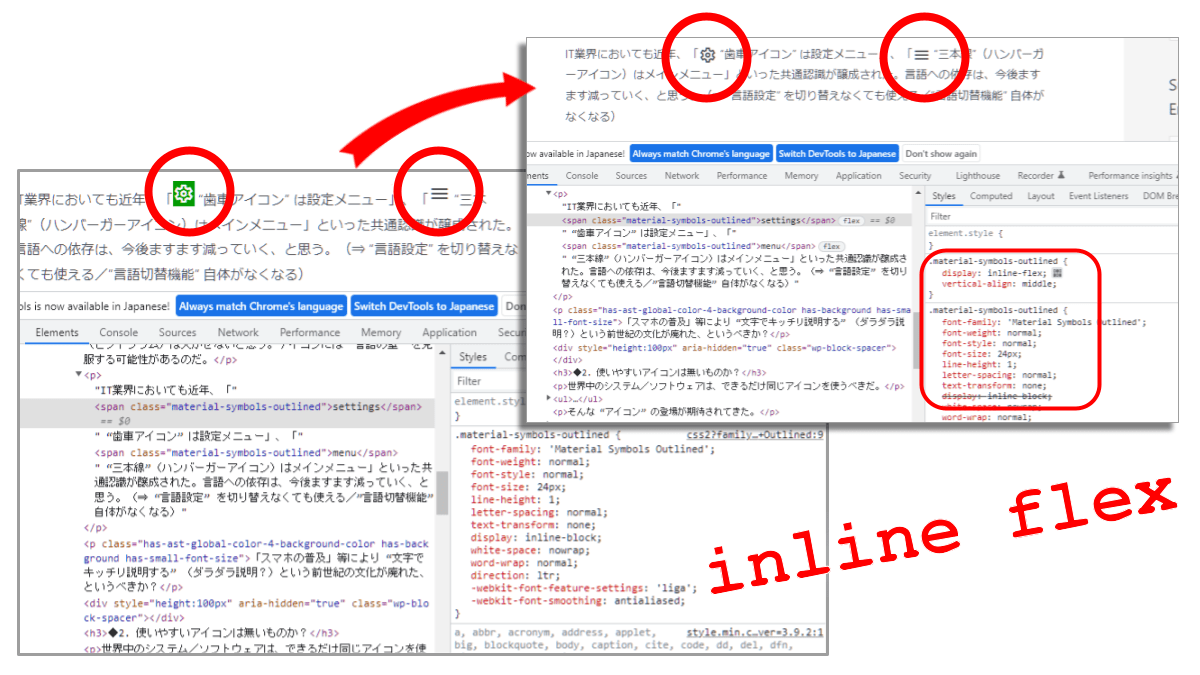
However, when used as is, there was a discrepancy. It seems that the reason is that the setting is 「line-hight:1, display:inline-block, …」. Although the intention is unclear, this trouble is avoided by applying the netizens’ recommendation of (↓ Static font / Variable font):
6-2. Compatibility with WordPress Editor is Not Good
Like Font Awesome, Material Symbols (and Material Icons) are incompatible with the WordPress editor (Gutenberg).
Currently, if you use “Edit as HTML” for each block to input span tags, the input you have written may be rewritten. In particular, multi-level listings cannot be input.
It is a hassle to enter span tags when editing as HTML to begin with. Font Awesome is a stable editing tool because you don’t have to switch to Edit as HTML by entering a shortcode. (⇒Material Symbols (and Material Icons) should also be made into a plug-in)
6-3. The range of CSS loading that should be there is troubling
0. Don’t use Material Symbols
1. I want to use Material Symbols as a Static font
2. I want to use Material Symbols as Variable font
It depends on each page. If you want to compose various axes in a static font and want to control it in detail, does the writer themself decide the range to be read (in number..number format)?
(This is too cumbersome, tedious & difficult to maintain.)
However, the font file (WOFF2) for the whole pattern is almost 10 times larger, 2026KB. (Should we assume that there is only one?)
▽ For the time being, all patterns should be considered…?
というしっかりした「軸」があります。Questetra BPM Suite は、パソコン上でワークフロー図を作成すると、その通りに業務を自動で進行させられるだけでなく、構築した業務プロセスの変更や共有も簡単におこなえます。そのため緊急事態が発生した場合でも、臨機応変にプロセスを変更して対応できます。こうしたプロセスの柔軟性も、BCP における重要なポイントといえます。
また上述したとおり、Questetra BPM Suite はクラウド型のソフトウェアであり、オフィス以外の場所で、スマートフォンやタブレットからでも業務プロセスにアクセスして仕事ができるというフットワークの軽さを持っています。
Hello, this is Hayashi from the Marketing Department. Suddenly, not many people like to work overtime, do they?
If it is also wasted overtime, even more so.
At my former company, long hours of overtime work were the norm. It was common practice to stay at the office until late at night just to check in with your boss or wait for the return of circulated documents. Looking back on it now, we wasted most of that overtime. There were many people who worked overtime to make up for their low base salary, and there was even one particular person who spent all his time at his desk making origami “turtles” to kill time (unrelated to his work, of course).
This is an extreme example, but even though sweatshops and death from overwork have become social problems, the reality is that there are still many company employees in Japan who usually return home late at night. Both workers and companies should not want to work overtime if possible.
Therefore, in this article we will explain how to reduce overtime work by improving business processes, using actual examples. Even the turtle maker in the above example, would not have to do this kind of overtime work if the company’s operations were made more efficient, leading to higher salaries.
What is the best way to reduce unnecessary overtime?
Operations need to be optimized to improve efficiency and reduce wasteful overtime.
The meaning of the word “optimization” varies depending on the situation in which it is used, but when used in the context of optimizing business processes, it refers to:
reviewing and improving business flows and procedures
Below are some examples of operations that we would like to optimize if possible.
Time-consuming approvals, applications and requests for approval
Past cases that are difficult to refer to
Obviously wasteful work, such as duplication of work or duplication of effort
Where only the person in charge knows about the work
Where it is time-consuming to communicate with external parties
These are issues and problems that we see a lot in our operations.
So how can we review these points?
In the next section, we will provide examples of how we have successfully optimized operations and reduced overtime.
A Case Study of Reducing Overtime Work by Optimizing Operations (From a case study of Ichijo Sendai Corporation)
A custom-built housing manufacturer, Ichijo Sendai Construction Co., Ltd. had a problem with excessive overtime work by site supervisors.
FAX Communication Becomes a Major Burden
In general, various types of construction work are outsourced to outside subcontractors for the construction of custom-built houses. In addition, these subcontractors are subject to a wide variety of procedures, such as requests, inspections, and payments.
The company’s business process involves reporting, communicating, and confirming these procedures by fax, so it was necessary to improve efficiency in the following areas.
Burden of documentation (site supervisor)
Too much time and effort required to send faxes (both site supervisor and subcontractors)
Need to return to the office only to check the faxed documents (site supervisor)
Burden of follow-up confirmation when faxing errors occur (both site supervisors and subcontractors)
In addition, fax communication not only caused excessive overtime for site supervisors, but also delayed construction work due to the difficulty of checking the status of the work.
Automate, Digitize and Optimize Operations
First and foremost, in order to optimize operations in this case, it was imperative to make the fax-based operations paperless. Therefore, the company decided to introduce Questetra BPM Suite to automate and digitize operations.
Specifically, construction plan data is input into Questetra BPM Suite, and PDF files of documents such as request forms and notices are automatically generated accordingly. These files are automatically sent to the subcontractors via email, greatly reducing the workload of the site supervisor in creating documents and communicating with external parties. The subcontractors can also simply reply to the email with a simple comment, and the work proceeds more smoothly, as they can report the completion of construction and notify the client of the billing process.
Files generated by Questetra BPM Suite are also automatically saved to Google Drive. This means that the foreman can now check the contents of documents on his smartphone or tablet while on site. There is no longer a need to return to the office just to check an incoming fax.
Challenges Solved by Optimization
Ichijo Sendai Corporation has succeeded in drastically reducing overtime work for site supervisors by optimizing operations.
As many of you may have noticed, the company’s case study included issues such as:
More efficient communication with external parties
Easier reference to records and tracking of progress
Improving inefficient operations
This applies to the operations we mentioned at the beginning of this article, which we would like to optimize if possible. We have already mentioned that the company solved these issues by utilizing Questetra BPM Suite and Google Drive.
Although not directly mentioned in the company’s case study, the problem of time-consuming approvals, applications, and requests for approval can also be solved by eliminating paper documents through automation and paperless processes, thereby eliminating the need for a rubber stamp. In particular, cloud-based BPM tools and workflow systems can speed up the application and approval process, as they can be used anywhere as long as there is an Internet environment.
Questetra BPM Suite to Support Business Optimization
Questetra BPM Suite, introduced in the case study above, is a cloud-based BPM tool.
To begin with, BPM tools are software that supports the progress and improvement of business operations in accordance with the concept of BPM (Business Process Management). BPM is a business management concept that aims to keep business processes constantly optimized through the PDCA cycle.
In other words, it is inevitable that Questetra BPM Suite, a BPM tool, was used for business optimization in the case of Ichijo Sendai Corporation. Business optimization is the process of identifying problems and issues in business processes and improving them, and BPM tools play an important role in this process.
For example, with Questetra BPM Suite you can draw a business process diagram on the computer screen and proceed with the business automatically according to the diagram. In addition, it is easy to refer to past cases as data related to the business is accumulated. Such convenience in business visualization and data reference makes it easy to identify issues and problems latent in the business and strongly supports the optimization of the business.
Optimization of operations has a direct impact on improving the workplace environment, such as reducing overtime work, and leads to improved corporate performance. Why don’t you take this opportunity to take the first step toward optimizing operations to reduce wasteful overtime with Questetra BPM Suite, which you can try for free?
Hello, this is Hayashi from the Marketing Department.
In the previous article we discussed how spreadsheet-based operations can be improved from a business process management (BPM) perspective. That article was mainly about how to improve business processes within a team.
However, there are cases where business processes are not limited to those within the team, but also include those outside the team (clients and business partners, etc.). In addition, these processes may involve exchanging files and data with external companies.
Cloud storage such as Google Drive and Box are useful tools not only for sharing within a team, but also for such external interactions.
In this issue, we will discuss BPM methods and business process improvement using BPM tools with specific examples on the theme of external interactions utilizing cloud storage.
The Importance of Sharing in BPM
The details of Business Process Management (BPM) have been explained in the previous article, so I won’t go into them here, but in general, BPM is:
A business management approach that continuously improves business processes through the PDCA (Plan-Do-Check-Act) cycle
and the 4 components are,
Business modelling (definition and visualization of business processes)
Execution of operations
Monitoring of process status (grasping the situation)
Analysis, problem detection, and process improvement
Now, two types Sharing will be the major points in improving business processes through BPM.
The first is the sharing of business processes within the team, which is essential to the execution of operations described above. The other is the process of sharing documents and data in the business process.
In many cases, sharing such documents and data has become a business challenge. In the next section, we will introduce an example of business process improvement by reconsidering sharing from the perspective of BPM.
Sharing via Cloud Storage
In the case of Ichijo Sendai Corporation, it was reported that by reviewing the exchange/sharing of documents with external parties, operations were greatly improved.
The company is a custom-built housing manufacturer specializing in wooden houses, but in the past, communication with subcontractors involved in the construction of houses was handled by fax. This was in order to handle the wide variety of procedures involved in the construction of houses, including requests, inspections, and payments. However, each time a report, communication, or confirmation is made, a large number of documents are naturally created and sent. This was a huge burden for both companies, leading to excessive overtime work for site supervisors and delays in construction. This is a problem stemming from the sharing of documents.
The company therefore embarked on a fundamental review of its construction management operations and began to improve processes using Questetra BPM Suite.
Questetra BPM Suite is a software (BPM tool) that supports the progression and improvement of business operations based on the BPM concept. In this improvement activity, the linkage between Questetra and Google Drive was an important point.¥
In the new construction management process using Questetra, documents such as construction request forms and inspection acceptance notification forms, which were previously prepared by the person in charge and sent by fax, are now automatically generated as PDF files by Questetra and automatically sent to subcontractors via email.
Upon receiving the file via email, the subcontractor simply replies to the email with a brief comment ( which was previously done by fax), and the completion report and invoicing notice can be sent. At the same time, Questetra automatically generates the related documents (completion reports and invoicing notifications). The generated files are also automatically saved to Google Drive, so that the person in charge can check the documents with a smartphone or other device even when they are not in the office.
Results of Reviewing Sharing Procedures in BPM
Ichijo Sendai Corporation, which introduced Questetra BPM Suite and improved its business processes using BPM methods, achieved the following results.
Reduced the burden of paperwork
Eliminated the need to return to the office to confirm receipt of faxes (significantly reducing overtime work)
Reduced the time and effort required to exchange documents with subcontractors
Significantly reduced construction delays due to fax omissions, etc.
The key point of this business improvement is that the sharing of documents for construction management, which used to be done by fax, was made more efficient by linking Questetra BPM Suite, a BPM tool, with Google Drive, a cloud storage system. The effect was not only to reduce the time and effort required for document preparation, transmission, and confirmation, but also to drastically reduce overtime work for site supervisors and construction delays.
Further Improvement by Integrating Questetra BPM Suite and Cloud Storage
Incidentally, the Kyoto University iPS Cell Research Foundation, which also utilized Questetra BPM Suite to streamline its purchasing process, cited the following reason for choosing Questetra BPM Suite over other workflow products:
Questetra comes standard with functions that can be integrated with Box
As more and more companies and organizations are utilizing Box for their business operations in recent years, Questetra is also strengthening its Box integration functions.
Cloud storage, which allows access to files and data from anywhere with an Internet environment, is a tool that can be used on its own to improve business efficiency. However, as shown in the above case study, when considering further streamlining and improving business processes, including file sharing via cloud storage, integration with BPM tools is an effective option.
Why don’t you start with Questetra BPM Suite, a free trial of which is also available, to connect with BPM tools that will take your business on the next step towards improving efficiency by implementing cloud storage?
Hello, this is Hayashi from the Marketing Department.
Today, many companies utilize a variety of tools on their PCs, ranging from simple programs such as Word and Excel to workflow systems that manage the entire business. Without these tools, many companies would not be able to conduct their daily operations.
Furthermore, in the past few years there have been major changes in work styles, as typified by remote work. Many companies are reviewing their business processes (work flow and procedures) and re-selecting the tools used in their operations.
BPM (Business Process Management) is an effective business management method for reviewing and improving such business processes. The use of appropriate tools is an important aspect of business process improvement.
In this series, we will examine how typical tools used in the office can be used to improve business operations from a BPM perspective.
In the first session, we will discuss spreadsheet software such as Excel, based on actual examples of business efficiency improvement.
What is BPM (Business Process Management)?
BPM (Business Process Management) is a business management approach that continuously improves business processes through the PDCA cycle and consists of the following four elements:
Modeling of business operations (definition and visualization of business processes)
Business implementation
Process condition monitoring (monitoring the status of process conditions)
Analysis, problem identification and process improvement
The purpose of BPM is to constantly optimize business processes by repeating these elements. If a system is established in which the status of business processes is constantly checked and problems are immediately corrected when discovered, errors and retention will be reduced, and business can always proceed efficiently.
In addition, the field’s ability to independently identify and improve operational issues and problems will help improve organizational capabilities.
For more information on the relationship between the PDCA cycle and BPM, please refer to this article.
Relationship between BPM and Tools
We will now discuss the relationship between spreadsheets and BPM.
Advantages and Disadvantages of Excel
Many companies use Excel in their operations.
One of the advantages of Excel is its versatility; it does not require special knowledge to write or save data and can be handled by anyone. Spreadsheet software such as Excel is indispensable, especially for administrative tasks that involve tabulation.
In the past Excel had weaknesses such as:
Difficulty sharing files in real time
Multiple people could not edit a file at the same time
However, with the advent of Excel Online, a cloud-based service, these disadvantages have been improved considerably.
However, when Excel is used by itself, the time-consuming process of adding and deleting information is a point where there is room for improvement.
It is not uncommon for the updating process of opening an Excel file, entering and deleting information, and so on, to become a burden on the business process. If this work is done manually, there is a risk of input errors and omissions.
In the next section, we will discuss the possibilities of integrating tools based on a case study that successfully improved the efficiency of tabulation operations from the perspective of BPM.
Manual Input into Spreadsheet Software Becomes a Burden on Operations
In the case study of Impress Professional Works Inc. it was reported that the company succeeded in going paperless and improving efficiency by utilizing Questetra BPM Suite to handle inquiries that were previously handled by paper-based systems.
The company’s conventional inquiry response operations had the following problems:
Time-consuming data entry and tabulation
Difficulty keeping track of progress
This was due to the fact that the company used to manage and tally the status of responses using paper inquiry response forms, and the data necessary for tallying was manually entered into a spreadsheet software program by counting the number of inquiry response forms. In addition, it was impossible to confirm who was in charge of which case and how the case was being handled without asking the person in charge about the progress of the case.
Therefore, the company introduced Questetra BPM Suite, a BPM tool, and embarked on full-scale business improvement.
What is the Right Tool for BPM Promotion?
Questetra BPM Suite and other BPM tools are software specialized for promoting business and operational improvements in line with the concept of Business Process Management (BPM).
Software known as BPM tools or workflow systems are characterized by their ability to approach the entire business process, for example, a BPM tool can easily do things like:
Schematize business processes and automatically execute operations according to the diagram (modeling and execution of operations)
Real-time display of the progress of operations and the workload of each person (monitoring)
See how long it took to complete a process (analysis and problem detection)
Now, the figure below is a sample screen of a business process visualized by Questetra BPM Suite.
Sample screen of a Questetra BPM Suite “Work Request Flow”
Questetra visualizes the progress of operations in real time, so the problem of struggling to grasp the progress status described in the above section is easily solved.
Real-life Examples of Business Improvement by Linking Tools
On the other hand, the company solved the other problem of time-consuming data entry and tabulation by linking the tools together.
This was done by using the ability to link data from Questetra BPM Suite to Google SpreadSheet, and the company has built a business process so that inquiry data is automatically added to Google SpreadSheet. The integration of these tools has greatly reduced the time and effort required for data entry and tabulation.
Example of an Inquiry Response Flow incorporating automatic processing tasks to Google SpreadSheet
Smoothly Implement BPM with Questetra BPM Suite
As in the case study described in the section above, the options for business process improvement can be greatly expanded by linking BPM tools with other tools. Furthermore, it cannot be overlooked that such improvements are greatly influenced by the BPM concept of visualizing business processes, monitoring the processes, and identifying and improving issues and problems.
As mentioned at the beginning, Questetra BPM Suite is a BPM tool that supports business progress and process improvement in line with the concept of BPM. These BPM tools are indispensable for the smooth implementation of the BPM method.
Questetra BPM Suite, a cloud-based BPM tool, can be used immediately after application, and a free trial is also available. Why don’t you take this opportunity to improve your business processes by BPM with Questetra BPM Suite?
たとえば、Questetra BPM Suite を導入していただいている三信電気株式会社様の事例では、受発注業務と申請業務をペーパーレス化して、管理コストを50%削減したことが報告されています。同様に、ヴァイタル・インフォメーション株式会社様の事例でも、Questetra BPM Suite を利用して受注決裁業務をペーパーレス化し、管理部門の業務時間を月間20時間削減したことが述べられています。
Hello, I am Hayashi from the Marketing Department. Who hasn’t experienced an inadvertent mistake at work?
As human beings, it is difficult to eliminate 100% of these mistakes.
However, sometimes a small mistake in work can develop into a major situation that could affect the company’s credibility, so error prevention is a major issue regardless of industry.
In this article we will explain how to create a system to prevent work errors in the context of business processes.
What are the Causes of Work Erarors?
Careless mistakes are often caused by a lack of attention. Forgetting a task that needs to be done or skipping a necessary step are examples of such mistakes.
So why do these mistakes happen? The causes can vary. For example, if fatigue is causing a loss of attention and concentration, taking appropriate breaks may help prevent mistakes.
However, if there are problems with work procedures or the work environment that are causing frequent errors, then these need to be reviewed from the ground up.
Problem #1: No “check” process
If no one in the business process checks the work (deliverables), then;
Establishing a “checking process”
…may help to reduce errors in the work process.
The figure below shows a business process diagram for handling inquiries.
At first glance, there appears to be no problem, but there is no checking step in this process, and no measures are taken to prevent operational errors. This could result in a response email with errors or misspellings being overlooked.
Therefore, we will improve this as shown in the figure below.
By designating a third party to perform the checks, errors can be detected at an early stage and their effects can be prevented from spreading.
Another method is to incorporate processes such as double-checking if a simple check is not sufficient. However, it is also important to keep in mind that checking also costs time, labor, and other costs, and to be careful to avoid unnecessary duplication of work.
Problem #2: Operations are not Standardized
On the other hand, there are cases in which each individual has his or her own way of doing the work, which may cause work errors.
While veteran workers can perform tasks according to the procedures that are easiest for them, newcomers have a disadvantage in that they find it difficult to understand the correct procedures.
Even those who know the work well may make mistakes due to carelessness caused by familiarity, and performing work without a clear understanding of the procedures is a high-risk activity.
Therefore, standardization of operations is necessary.
Standardization of operations means extracting the best business procedures at that point in time, and then creating manuals so that everyone can follow the same procedures.
If standardization is properly implemented, it will be easier to avoid mistakes caused by lack of knowledge or experience. However, even if a manual is prepared for a person who is familiar with the work, he or she may ignore the manual and skip processes that are not considered necessary or cut corners in less important processes.
This disregard for manuals is troublesome because it may lead to more efficient work for the employee, but if this disregard for manuals becomes the norm, it is hard to understand why manuals exist.
Therefore, it is important to constantly optimize the work process by promptly improving the manual when a problem is discovered or a better method is found. By taking the initiative in this process, each member of the team will have a sense of ownership, and a culture of compliance with the manual will be fostered.
Establish Business Processes to Prevent Work Errors
Now, we have discussed the causes of work errors and their solutions. As many of you may have already noticed, preventing work errors is closely related to improving business processes.
For example, whether it is improving or restructuring a business process to include a checking process, or extracting the best procedures and creating a manual, such work cannot be done without first gaining a firm grasp of the entire business process.
What is needed is visualization of business operations.
The modelling of business operations is intended to make it easier to grasp the flow of business operations by presenting a graphical representation of the flow. In the above section, process diagrams without checking processes and process diagrams with checking processes have already appeared, but these are business process diagrams (workflow diagrams) drawn in BPMN notation.
For example, the figure below is an example of a basic business process diagram drawn using BPMN. The “process” part actually includes specific tasks, but this diagrammatic representation allows anyone to intuitively grasp the flow of the entire business process.
Other business processes can also be represented visually to obtain advantages such as the following:
Gain a bird’s eye view of the entire business
Make it easier to identify problems and issues
For example, bottlenecks in operations (points where operations have become stagnant) and unnecessary duplication of work, which have been somehow overlooked, may become clear at a glance when they are depicted in a diagram.
Automate Operations to Prevent Work Errors
On the other hand, there is a solution to avoid human error, although it may sound a bit rough, which is to not have humans perform the work.
For example, if the work involves data collection, entry, and processing, one approach is to introduce RPA tools and have robots take charge of these tasks. Of course, there is a cost involved in introducing RPA, but the advantage of RPA is that by having a robot perform simple tasks on behalf of a human, the human can focus on more important tasks. Robots do not lose concentration due to fatigue, nor do they make mistakes because of it.
Another effective way to prevent work errors is to use BPM tools to automate the progress and management of the entire business. In the case of Sanshin Electric Co. Ltd. which uses Questetra BPM Suite for order management, it is reported that the introduction of BPM tools has not only reduced input errors but also succeeded in reducing costs.
Questetra Helps Build a System to Prevent Work Errors
In the above section, we discussed two types of software: RPA tools and BPM tools. Roughly speaking, RPA tools are tools that automate specific tasks that are part of business operations, while BPM tools automate the progress and management of the entire business.
However, there are cases in which the handing over of tasks becomes an issue when introducing RPA tools, for example. This is because there are cases where it is time-consuming for a human to give work instructions to a robot or for a human to receive the results of work done by a robot.
However, these issues can be solved by linking BPM tools with RPA tools.
This is a collaboration in which the entire business process is managed by the BPM tool and the process by the RPA tool is incorporated into the BPM tool. This linkage automates the work transfer between humans and robots and enhances the effectiveness of RPA tool implementation.
Questetra BPM Suite, introduced in the case study mentioned above, is a cloud-based BPM tool that can be widely integrated with RPA tools.
Reference: Collaboration between BPM Workflow and RPA Tool
Questetra BPM Suite is available for free trial. Why don’t you start by visualizing and reviewing your business processes with Questetra and practice preventing work errors?