To Manage the Progress of Accounting Support Services Work
High degree of freedom in designing the business flow.
Q. What kind of business do you use Questetra for?
We are deploying speedy accounting support services taking full advantage of IT.
In our main service, the monthly closing service, produces financial graphical reports every month which help the owners to consider their next move. We are also focused on support for starting a business, and we are providing our services to IT companies that are rapidly growing.
We are using Questetra as a tool for visualizing the Workflow of this accounting support service, and internally sharing the progress of report creation and certified tax accountant signatures, etc. We manage the progress of our service for each of our customers, which are more than 600 companies.
Q. Which feature of Questetra do you like best?
I like it very much because it has a high degree of freedom in designing the Workflow. Despite the fact that the deliverable varies depending on the size and industry of the customer, we are able to manage the progress of our service for all customers in one Workflow definition, because we can add the necessary tasks using the split condition settings.
The fact that it can cooperate with Google Workspace (formerly G Suite) is very helpful, because we have been actively using cloud services. We launch processes in batches using Google Apps Script in the customer master, and output the work completion records into a Google Spreadsheet.
Expanding to Various Services Business
Q. Has the business procedure changed compared to before the introduction of Questetra?
The basic procedures have not changed.
However, before the introduction of Questetra in the spring of 2012 we would record work progress on a check-sheet which was then passed to the supervisor to check it, but it was time-consuming to pass the paperwork around manually.
Now I think it has been sped up significantly by eliminating unnecessary delays, because we are able to report from outside the office. We have also automated the listing of completion records. We have been able to eliminate labor and errors associated with manual transcription.
Q. Are you planning to expand to other business areas?
At CHUO Accounting we believe that to achieve the Customer First principle, we must respond to our customer needs quickly.
We succeeded in visualizing the progress of service operations such as the annual settlement, a few months after introducing Questetra. We also make use of it on the new advisory contracts procedures, and on various applications inside company.
I would like to apply it to various business operations in the future. I think it is really great that I can configure the workflow easily.
また中央会計では、色々なクラウドを積極活用しているのですが G Suite(旧Google Apps)と連携できるところは非常に重宝しています。顧客マスターの Google Apps Script を使ってプロセスを一括起動したり、作業の完了記録を Google Spreadsheet に出力する等しています。
アルファベットの「3文字」って覚えにくい。今回の NFC は、アメフト(NFL)のリーグ名 NFC (National Football Conference)と同じだから覚えやすい?!?ちなみに、吉本興業の養成所は『NSC』(New Star Creation)だ。名前は似ているが中身はズイブン違う。
I have been using cloud type Office, ‘Google Apps’ since our company was established in April 2008. It’s convenient, so Questetra is a workflow product that works with Google Apps.
[!] “G Suite” would be rebranded as “Google Workspace” (2020-10)
Google announced that G Suite would be rebranded as Google Workspace on October 6, 2020, and that Workspace would emphasize increased integration between the apps, such as the ability to create Docs from within Chats, or start a Meet call from within a presentation.
The number of workflow products connecting with Google Apps has increased due to more companies adopting Google Apps.
1. What is Google Apps
It’s hard to explain it well.
However, in short words, Google will maintain a business email address (i.e. ‘example@questetra.com’ instead of ‘example@gmail.com’, therefore running the internal mail server is not useful anymore.
Google Apps has the same interface as Gmail, which not only accustoms you easily but lets a lot of people use it immediately. You can also set up a calendar (Google Calendar) and document management (Google Drive) as well as e-mail (Gmail). With these facts, Questetra applied on the day the company was founded (April 2008).
Google Apps launched the trial operation in August 2006, the full-scale for enterprise in February 2007 ( then called “Google Apps Premier Edition”), the official blog in November 2009 making it easier to access information.
2. What is a Google Apps integrated Workflow
Working on a smartphone and a tablet while transferring or going outside becomes common, for example:
Sending and receiving emails
Schedule sharing
File management
Moreover, If you handle those tasks with Google Apps, you’ll want to handle the rest of your tasks online. For example:
Sending a request for approval
Applying for expenses
Adjusting transportation expense
However, it’s hard for you to handle those tasks online merely with Google Apps features. Therefore, many companies have two options – (1) introducing workflow products, (2) paper workflow.
Incidentally, I think a workflow product is a mechanism to deliver task information online, and I suppose a Google Apps integrated workflow product is one that can use and store data in Google Apps.
*For the Executive government and large corporations, it is certainly meaningful to protect the traditional manner – paper workflow. However, I think most organizations should follow the trend of the information society.
3. The Scope of Workflow
There are various ways to deliver task information online.
Daily reports (internal report)
Approving estimates
Handling complaints
Tasks from the automatic generation of estimates to their delivery and issuing invoices
Tasks from the arrangement of dispatching field engineers to the recording of the outline of the visit
The functions required for workflow products change depending on the types of workflows you want to bring online. If the workflow is complex you must prepare a workflow product that supports looping and concurrent processing for that.
4. What are the workflow products for Google Apps
On the day when Google Apps Marketplace was launched, Questetra applied for the workflows category.
The next day, when 4 products were listed, I remember that Questetra’s entry from Japan was somehow unusual. However, that gave us an opportunity to be interviewed by TechCrunch, the global media.
Meanwhile, there are some G-Suite workflow products that haven’t been listed on the Marketplace, yet.
Sateraito Office/ Workflow for Google Apps
Tsunayoshi Workflow: $2
Agileworks Google Apps: $2.4million
X-point2 Google Apps:$6000
Cloud Gate UNO: $2
DSK Option Service Workflow: unknown
The number of services running on the GAE platform has increased (Google App Engine: A server software environment launched as a paid version service in February 2009). It runs on the platform of the PaaS system provided by Google so operating costs can be reduced. However, in many cases, that means workflows that are only available to Google Apps users. Moreover, Questetra also considered running the system on the GAE platform several times, but the server software is so big that it’s not realistic to let the system run on the GAE PaaS.
5. Tips on how to choose the best Workflow Product
I only can say the selection should be made based on the careful consideration of the tasks to be handled online. In other words, it cannot be said that all companies seek Questetra’s products.
Specifically, I considered the following things.
The number of types of workflow
Complexity of each workflow
Necessity of mechanical processing (automatic processing)
The number of tasks (Issues) flowing to them
*Questetra publishes all the actual service levels. In 2012, we marked four nines (99.99% availability record) while three (99.9%) is an industrial standard. Please refer to the following URL if you’re interested. (https://questetra.com/en/security-en/)
6. Conclusion
Questetra provides a starter plan so that you can use the application immediately.
Moreover, you can integrate with Google Apps even in the free version as much as you want, although there are some restrictions, such as automatic suspension after 15 days and the number of available users (10 users). If you are interested, please feel free to apply for it!
PS. search Japanese workflow products, so many products…
1. R@bitFlow: RICOH JAPAN :$5million
2. X-point・AgileWorks: ATLED: $5
3. rakumo: rakumo inc. : $3
4. SpaceFinder: DAIKIN INDUSTRIES,LTD : 3million for 25 licences
5. intra-mart: NTT DATA INTRAMART: unknown
6. Workflow EX: Knowlbo: unknown
7. rakrak workflow: Sumitomo Electric Information Systems Co., Ltd.: unknown
8. Cybouzu Garoon: Cybozu, Inc.: $8
9. Streamline: mitori :$3
10. WaWaFlow: iii@oec: $4
11. J-MOTTO Workflow: Rismon Business Portal Co., Ltd.: $20
12. DocGear Cabinet: Shachihata Inc. : $8000 (excluding tax)
13. LS CloudWare: LittleSoft Corporation : $3
14. MajorFlow Cloud: Panasonic Net Solutions Co., Ltd: $300
15. OpenCube WorkFlow R/1 for SharePoint: NTT DATA Smart Sourcing Corporation: $5000
16. Create!Webflow: Infotec,Inc :$6000
17. Questetra BPM Suite: Questetra : $10 per user/ Free
18. EXPLANNER/FL・FlowLites: NEC Corporation $3million
19. Organizational Workflow : NextSet, Inc : $1
20. Web Plant: Canon IT Solutions Inc :$2million
21. Gluegent Flow: Gluegent, Inc: $3
22. ArielAirOne Enterprise: Works Applications Co., Ltd: unknown
23. Activiti: Alfresco Software, Inc: unknown
24. Cloudstep Workflow: Systena Corporation: $30
25. Integrated WorkFlow: NCI SYSTEMS INTEGRATION, INC: unknown
Google announced that Google Apps would be rebranded as G Suite on September 29, 2016. (Google は、2016年9月29日に “Google Apps” のブランド名を “G Suite” に変更すると発表しました。)
Google announced that G Suite would be rebranded as Google Workspace on October 6, 2020, and that Workspace would emphasize increased integration between the apps, such as the ability to create Docs from within Chats, or start a Meet call from within a presentation. (Google は、2020年10 月6日に G Suite を Google Workspace にブランド変更し、Workspace ではチャット内からドキュメントを作成したり、プレゼンテーション内から Meet 通話を開始したりする機能など、アプリ間の統合の強化を重視すると発表しました。)
なんせ Gmail と同じインターフェースなのだから、慣れるも何も、多くの人がスグに使える。ちなみに、メールだけじゃなく、カレンダー(Google Calendar)と文書管理(Google Drive)などもセットで使える。「コリャ便利だわ」と、クエステトラ社は、会社が設立された日(2008年4月)に申し込んだ。当時の名称は Google Apps Premier Edition。もちろん製品としての弱点や私なりの不満点が無い訳ではないが、やっぱ、スゴイ。。。
ちなみに歴史は、2006年8月に試運転開始、2007年2月に企業向けに本格リリースされ(当時のサービス名称は「Google Apps Premier Edition」)、2009年11月に公式ブログが始まり、情報を入手しやすくなったところ。ちなみにライバル製品は、Microsoft の「Office 365」、IBM の「SmartCloud」。
Achieving Simultaneous Review Flow by Multiple Officers
Q. What kind of operations do you use Questetra for?
Mitsubishi Pencil group consists of Mitsubishi Pencil Co., Ltd., 43 subsidiaries and 3 associated companies with approximately 2800 employees. We manufacture and sell writing instruments and peripheral products in Japan and overseas, including “uni” brand products.
Since our foundation in 1887, we have been working to improve quality and innovation as the market-leading writing instruments manufacturer in the world, under the company motto ‘the highest quality is the best service’. Now about 45% of our sales are overseas.
We are using Questetra for about 30 business operations from General Affairs to Human Resources, such as, for example, the Decision Making flow which we call “President’s Office Approval”. In the President’s Office Approval the important management projects will be reviewed by multiple directors at the same time, such as investment in new facilities or a new information system.
Q. What workflow system were you using before introducing Questetra?
We were using Notes 6.5 before Questetra.
The Workflow was quite well built so we had no functional problem, but we wanted to replace it with cloud-based general-purpose software and standardize operations by the end of 2012. This is also in line with medium-term management plan to improve the efficiency of existing operations, which began in 2010.
We actually investigated and tried a variety of products and found that most of the cloud-based Workflow products are simple and linear, so those did not meet our requirements. And then at a cloud-related exhibition we were lucky to find Questetra, which can easy perform complex tasks such as concurrent processing and looping in the cloud. It was a major advantage compared to Notes that the Workflow creation screen is very graphical and intuitive, so complex workflows can be created even without being an application expert.
Implementing the Migration to Questetra from Notes By in-house Members
Q. What trouble did you have in the Migration process?
We assumed a replacement period of about six months, and I think it actually progressed as we assumed. It was completed successfully without major problems.
Specifically speaking, we started the test run in small groups of 10-20 members from around December of 2011, then increased the number of users gradually since the beginning of 2012. By July 2012 approximately 800 employees were using the system for day-to-day operations and procedures.
Though we omitted some parts that were implemented in Notes, I think it is great that with only a small number of in-house members we have realized the building and operation of the workflow system. Also, we are once again satisfied with the fact that we can change the flow of operations by ourselves as many times as we want to improve the usability for the users.
One of the difficulties was to respond to internal requests from employees who were used to Notes’ screens and operations until they got used to the new Questetra screens. We had some meetings between administrators of users of each Workflow to work out the specifications for the replacement. At the same time we created a manual for all users and held briefings at each site. After starting operation we followed up by responding to enquiries, and in a few months I’d say it has settled down.
Q. Are you going to increase the number of Apps in the future?
For example, we are planning to actively utilize it in the administrative procedures of domestic offices and overseas plants.
For overseas factories, there are procedures such as factory shipment, domestic inspection and shipping, and we consider it necessary to promote the visualization of bottleneck processes and rework points.
Recently, some people told me “I totally don’t understand the necessity of a Workflow.”
I know that ordinary people may have never seen a Workflow diagram, have never worked along a Workflow diagram, so they will never even think about doing a Workflow diagram.
Therefore, going back to basics, I would like to summarize my thoughts about “need of a Workflow diagram and how to draw one.” (It’s gonna be a long one.)
Section 1: What is a “Workflow diagram” for?? Section 2: Reasons why you don’t have a “Workflow diagram” Section 3: Reasons why a “Workflow diagram” is hard to draw Section 4: The way to draw a “Workflow diagram”
Example of Workflow diagram for “Web Contents Creation”
1. What is a “Workflow diagram” for?
First of all, what is a “Workflow diagram”?
Sometimes they are named in different ways: “Workflow diagram,”“Flow Chart” or “Business Process Diagram,” etc. What they are is a “figure that shows in what direction the work goes.” In Japanese official documents, it is described as “Flow Chart of operations.”
The biggest feature of a Workflow diagram is that it is described graphically, whereas a work manual is written in words. A “figure to know the way to go” is shown in the Workflow diagram. The expression ‘flow’ and ‘diagram’ together means “a diagram showing overall flow”. You can understand the entire flow more quickly by seeing a diagram than by reading the words.
The idea of a Workflow diagram is for all the workers to understand the following by themselves.
What part of the process of the entire business am I working on?
What should I receive (INPUT), create (process) and whom should I pass it to (OUTPUT)?
1-1) To share the current state of Flow, or the changes to the flow, within company 1-2) To tell the current state of the Flow internally 1-3) To report the current state of the Flow, externally
1-1. To share the current state of Flow, or the changes to the flow, within company
This is the most important point.
If you try to make progressive discussions about, for example, “increasing the productivity of the entire team by devising the flow of work ” or “Consider the information transmission procedure that does not cause fraud”, a detailed business flow diagram that represents the current situation is indispensable.
Even so… “To share the current state of flow, or the changes to the flow, within the company” is a purpose of usage on quite high-level. If you let workers create a Workflow diagram actually, those will be “individualistic” or different by “styles”, even for day-to-day work that they do casually. In other words, “flow of current situation” varies between individuals. Thus, there could exist the following examples of “individualism” in every company.
1-1-1. Complaint Handling flow
When writing reply emails for complaints, Mr.A asks his Boss to review all of them before transmitting, whereas Mr.B asks only occasionally.
1-1-2. Adding a New Web-contents flow
When adding a new Web page, Mr.A writes a draft after the designer has drawn the illustrations, then again asks for the layout to the designer, whereas Mr.B asks the designer for illustrations and a layout after finishing writing a draft.
Incidentally, you need to be careful with the expression “individual styles in Workflow”, because they often lead to big misunderstandings. Especially, you must not confuse the implications of the following cases.
-A. Individual styles in personal skill; ‘the quality of the deliverables varies from person to person.
-B. Individual styles in communication channels; ‘channels and procedures of transmission of deliverables will vary from person to person’.
I will discuss the “B” case’s ‘no rules for channels or task order’ in this article, but you need to be careful because “A” cases are often a matter of daily conversation. The expression of ‘Individual styles in Workflow’ is used in the cases of for example, “A1”, ‘the results vary from person to person because the Excel skills differ from person to person’, or “A2”, ‘the judgment standards are different for Director A and Director B’. Yet, the Workflow is standardized.。
1-2. To tell the current state of the Flow internally
The need “To tell the current state of the Flow internally” is easy to understand.
In particular, if there is a Workflow diagram, you can include new members to the team. When you have got new employees or personnel change, the newcomers can understand the approximate flow of work immediately if you give them the Workflow diagram saying ‘See? Our team is operating like this.’ A Workflow diagram will be a very effective weapon for companies in the business expansion period that are actively employing, or companies that have many regular personnel changes. There is no comparison with the classic “I will give you a copy of company regulations and business manuals”. (Definitely, they wouldn’t read it…)
You need to be careful with superiors who say “We don’t have Workflow diagram. We do OJT”. Certainly, On Job Training where trainees jump into the real world, might be one of the effective methods to join the work force immediately, on the other hand, it might become a cruel way of training. That is, rookies with less senior employee supervision must learn by themselves, as a result, they might go on without learning the flow of the business expertise. (They will end up building their own methods to do their job.)
1-3. To report the current state of the Flow, externally
Compared to the above two, the third one “To report the current state of the Flow externally” may have a little more of a passive purpose.
The most obvious example would be the internal control reporting system by the SOX Act. The listed companies submit their “Flow Chart of operations” to the Financial Services Agency to report that ‘we have got good governance’. And this helps protect investors. (However, just because we report, it does not mean that the worksite will become lively, nor does it mean that sales will increase…)
2. So, Why Don’t You have a Workflow diagram?
In the 1st section, we confirmed the purpose of the use of Workflow diagrams. Thus Workflow diagrams are indispensable.
Then why don’t you have one in spite of this necessity?
2-1. Incapable of creating. 2-2. Capable of creating, but don’t because it doesn’t make sense. 2-3. Capable of creating, but don’t because you don’t know who should do it.
2-1. Incapable of creating
“Incapable of creating” is comprehensible.
Something cannot exist if it cannot be made.
However, it is often the case. I want you to try to draw an actual familiar Workflow. Even if you are a hard-bitten, veteran employee, when you click on “NEW” in PowerPoint or Visio, you will have nothing to write in the blank canvas in front of you. It’s not because you don’t know the Business. Rather, you know it better than anyone else. Simply, the depiction of the Workflow is difficult.
I myself became capable of drawing a flow of almost all the businesses on the spot now (I’m bragging, I know) because I have experience of modeling about 500 business, but at first, it used to take 5-10 hours to finish just one. Moreover, there were still many points to improve when I woke up the next day. You will be forced to re-write over and over again for the first 10 flows.
2-2. Capable of creating, but don’t because it doesn’t make sense
“Capable of creating, but don’t because it doesn’t make sense” is potentially a serious issue.
However, cases like these are plenty. So, why do you feel ‘it doesn’t make sense’, then? It comes down to two reasons:
A) “Because a Workflow diagram becomes obsolete”, and
B) “Because you cannot control the flow of the business with only a Workflow diagram”.
As for the A) obsolescence of a Workflow, examples can be internal factors such as A1) ’Purchase of a personal computer was decided to procure collectively by Affairs Department’ or A2) ’the organization is reorganized and structure of the Department or team has changed’, and external factors such as A3) ’The need to halve the standard delivery time arose with the emergence of rival companies’, all of these would change the Workflow itself. At that moment, the Workflow diagram made with great pains becomes a thing of the past. I don’t have to say that the maintenance of them is difficult. Also, about B) Workflow is hard to control, although there may be some possible measures such as “sticking the Workflow diagram on the wall” or a “monthly training program”. Still, a Workflow diagram only written on paper is limited.
2-3. Capable of creating, but don’t because you don’t know who should do it
“Capable of creating, but don’t because you don’t know who should do it” is a serious problem.
It’s almost negligence. It may seem surprising, but it often occurs in mature organizations used to Workflow diagrams.
For example, when it comes to a smooth flow of operations between the Sales department and the Manufacturing department, conflicts of interest occur. These are the so-called cross-departmental Workflows. You must take on hard negotiations in a meeting to define, for example: ‘Hey, you guys at the Sales Department should check the order info before us!’. Not only do you need to be well versed about the business of the departments involved, but you also have to arbitrate them in the name of “overall optimization”. It’s human nature to avoid trouble. (This is related to organizational theory. After all, it seems that top management needs to appoint the “process owner (see below)”.
3. Why is a “Workflow diagram” hard to draw?
As I mentioned in “2-1. Incapable of creating,” drawing a Workflow diagram is difficult. Here, I want to study the reason why it is difficult.
By the way, I’m not going to discuss the drawing tools. Just as for painting, brushes and canvas are the tools. Rather, I’d like to discuss the causes of the difficulties of a subject, such as ‘a Galloping horse’ or ‘a nude’.
3-1) In fact, there are no rules 3-2) Wondering about the granularity of the process 3-3) Wondering about the range of exceptions
3-1. In fact, there are no rules
“In fact, there are no rules” is fatal.
Because there is no subject to draw. The Workflow you are going to draw seems like ‘a horse’ or like ‘a car’, or like ‘a temple’. You can’t draw a picture of something when you don’t know what it looks like.
Can a business be done without a Workflow (rule)? Well, yes, it can. All I can say is that humans are just amazing…
3-2. Wondering about the granularity of the process
“Wondering about the granularity of the process” is a phrase that should be spoken by the experts.
I have described the operational process of “replying to a complaint” in section 1, you can further deconstruct it as much as you want including, for example: ‘writing the title’, ‘writing the mail body’, or ‘reviewing’. You can go as detailed as you want to. Various granularities can be considered, but as a principle, the granularity of the process of the Workflow should consider what “an employee gets as input and makes as output corresponding to the aforementioned input.”
3-3. Wondering about the range of exceptions
“Wondering about the range of exceptions” is the ultimate problem. I may say even a never-ending problem.
Here also, as a principle, those exceptions that occur rarely should be omitted. There will be no end if you try to draw all the exception handling that occur rarely. And the more you do it, the harder it will be to see the whole. On the other hand even as I say this, for important businesses, there is a way to think about contingency plans or procedures. Even if they rarely occur, when they do, you would want to address them as soon as possible.
4. The way to draw a “Workflow diagram”
I’d like to discuss how to draw a Workflow diagram and who should draw it, based on the reasons why it is necessary (chapter 1), the reasons why there isn’t one (chapter 2), and the reasons why it is difficult to draw (chapter 3).
The Workflow diagram must be easily maintained, it must be convenient for everyone who uses it, and it must have a good effect on the company.
4-1. Changes in the sophistication of IT tools 4-2. Changes of the International Standard Notation 4-3. Changes in the Process Owner’s Mind
4-1. Changes in the sophistication of IT tools
Of course, I want to use IT tools. Computers are great!
Since 2000, the beginning of the 21st century, Information Technology has been developed based on the idea to “Leave data exchange on the business to the computer”. Even since the 20th century ‘Workflow Systems’ have existed. Now those have been greatly advanced by IT, and although it is not widely recognized it is called “BPM System”.
The concept is simple. It is devised so that if you instruct the computer in the business rules in the Workflow diagram, etc., the computer mediates the exchange of data between humans. That is, the computer determines “what the next step is”, “to whom should this issue go”, and designates the work appropriately. For example, someone creates a quote and registers it on the computer, the computer asks the boss ‘to check and to approve it’. And if someone writes a manuscript in Japanese and registers it on the computer, the computer asks the translator ‘to translate this into English’.
It doesn’t matter if it is 100 or 1000 tasks, the computer handles the progress of all the work in the company and designates the tasks one after another. It might sound bad, but human labor becomes “a piece of gear”. The computer brings the work, humans do as they are told.
By the way, this IT implementation would lead to reducing human jobs greatly as the industrial revolution did. However, humans may take new roles. Smartphones now memorize phone numbers for us, and we are OK with it. Don’t worry if a computer can beat human in a game of chess, writing novels or blog articles. There are lots of other things only humans can do.
4-2. Changes of the International Standard Notation
If possible, the Workflow diagram should be easy to maintain.
People around the world have been thinking about it together with different formats of the Workflow diagram (the way to draw icons and the way to connect them) have been proposed in the past.
Since 2000, a format of BPMN has been decided as the way of drawing the Workflow diagram, in conjunction with the “changes in the sophistication of the IT tools”. Although the format itself is evolving, it has become the de facto standard. It was led by IBM, Oracle, Microsoft and other major IT companies. And, as expected, it is rational enough to be understood by both humans and computers. (Questetra is not the only organization who proposes this format.)
Recently, the U.S. government and the Japanese government showed changes in the adoption of the Workflow. So that their government’s operations will be written in BPMN soon. (Keywords: ‘ Business/System optimization’)
4-3. Changes in the Process Owner’s Mind
‘Should I master the IT tools (BPM system), and learn BPMN?’ The answer is yes.
But there is a matter that is more important. That is to clarify who is responsible for maintenance of the Workflow diagram. They are called Process Owners. In other words, process owners should be determined for each Workflow in the company. Concurrent appointments may be alright in the beginning.
This is the most important issue in this article.
As well as for information systems and quality management, the employment of the Process Owner corresponds to “indirect investment”. It should look for very high return on investment in the medium term, or he or she must be a person who brings high returns on investment. Depending on the organization, they might hire a person who bundles process owners as one of the executives. In fact, many companies have the CPO (Chief Process Officer) position to serve as the person responsible for optimizing the Workflow enterprise-wide, as well as the CTO (Chief Technical Officer), who is responsible for the strategy and technology, and the CIO (Chief Information Officer) who is responsible for the information strategy. (There is also discussion about whether the COO and CFO should be involved or not, but I think a person with specialized knowledge of the “business processes” should govern the entire company.)
By the way, BPMN is for the computers. There is no need to understand BPMN deeply for generalists who want to improve the Workflow (including the process owner end user). However, they do need to work with Workflow diagrams and to be able to read the diagrams roughly.
So, what should process owners do? I think (though my thoughts correspond to 2013), it is a mix between A) “to learn the theory (knack)” and B) “to imitate the good practices”.
4-3-1. To learn the theory (knack)
About A) Theory, there are specialized manuals, for example, “BPM 100 Success Secrets”, but they are not yet the definitive textbook. (Though I think some easy to understand handbooks by the OCEB (OMG Certified Expert In BPM) will come out in the near future.) For now, it may be enough to check a variety of good books and magazine articles about how to draw the Workflow which has been around for a while now.
4-3-2. To imitate the good practices
A good example for B), is hard to find. It is, of course, because the skills to improve operational efficiency are not meant to be shared easily. It is a “source of competitiveness” in some cases. However, recently you can find templates and samples of Workflow diagrams on a web search. Like other companies, Questetra offers a site of operations templates called “workflow sample”. It has more than 500 Workflow diagrams, so I want you to come and visit our site and do a search.
5. Summary
Finally, an advertisement of Questetra, at last.
To tell the truth, Questetra is a company developing a ‘BPM system’, a dream IT tool. And we got the attention from Gartner, the world’s largest survey company, as a “Cool Vendor in the Global BPM”.
Moreover, Questetra is providing a “Free Edition”. I strongly recommend you try it. If you are a small organization or if you are a large company, how about trying it with a small team for free?
It is easy to use. All you need is a Web browser (SaaS BPM). I would like you to visit our “User Support site” see the Manual pages, tutorials, etc. The following are some summaries of its functions.
Determine the Flow.(Drag & Drop) To design a Workflow by placing icons. Each processing step (task) is represented by a rounded rectangle.
Determine the input item(Data Setting) To determine items needed for your business, such as String type, Date type, Select type. e.g. ‘Applicant Name’, ‘Reason for Request’, etc.
Set the Access Level To determine which item can be entered in which handling process. e.g.: ‘”Reason for Request” cannot be edited at the Approval Task’, etc.
Set the personnel To determine who (from which area/team) should handle the task. e.g. ‘Approval Task to Direct superior of the applicant’, etc.
Set the split rules To describe Split condition expressions. e.g. ‘If it is more than 5 million JPY, task must go to the President’
ー Innovating the world’s business through software!!
CEO: IMAMURA, Genichi; Questetra, Inc. (2013-01-18)
「ウチには業務フロー図なんてネーぜ。OJTだ、おー・じぇー・てー!」などと、カタカナ用語でごまかそうとする上司には細心の注意が必要だ。確かに、実際の現場に身をもって飛び込んでいく On Job Training は即戦力化と言う視点で有効な手法かも知れない。が、一方で「獅子の子落とし」的な残酷な教育訓練になってしまうケースも少なくない。すなわち、先輩社員のフォローが少ない新人は、自力でガケから這い上る羽目になり、結果として社内ノウハウとしての「業務の流れ」を教わらずに成長してしまう。(自己流の「業務の流れ」を作ってしまう?)
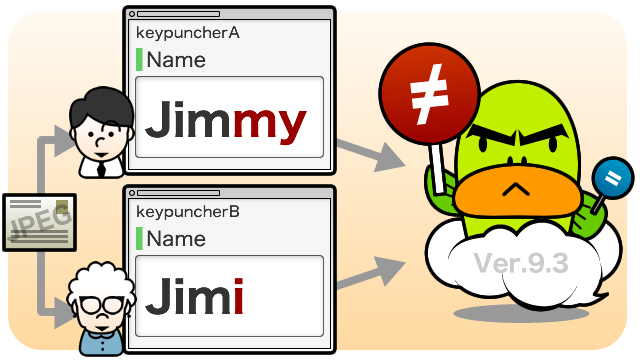
Kyoto, Japan — December 18, 2012 — SaaS vendor company Questetra, Inc. has published the new version 9.3 of the cloud-based Workflow product “Questetra BPM Suite”, which visualizes both of ‘Business Flow Diagram’ and ‘ Progress of each Project’, on Dec. 17th, 2012. In the new version, features for Business Process Outsourcers (BPO) have been enhanced.
In the BPO process, in order to improve the quality of data, steps of ‘Comparing multiple data’ are installed. For example, supposing a simple commissioned business such as digitizing manuscripts from ‘postcard application’ ‘questionnaire’, or information of characters inside photo image. There a step, that verifying identity of two text data which have been input by two independent operators will be installed. (Verify input method)
Before the version 9.3, it was available only conditional expression by monadic evaluation, such as “the {Billing amount} is less than 1,000,000 JPY”, or “{Home Address} starts with Kyoto prefecture and includes Nakagyo-ku”. But in the new version 9.3, it is available to set conditional expressions by comparing two items, such as “{Billing amount} is greater than {Quote}” or “{Work Address} is the same as the {Home Address}”. From now on, it is possible to automate more verification processes for BPO business companies and other business which needs data verification.
Questetra BPM Suite
The Business process ‘To Be’ is changing day by day along changes in the business environment, penetration of cloud technology, and the evolution of mobile devices. We must aggressively think about “new business flow” that we’ve never thought in the past, such as approval with the Tablet for automatically generated quotes, quick response with the Smartphone to complaints, or manual preparation at home by telecommuting.
Cloud-based Workflow, “Questetra BPM Suite” is a service to build the flow of business on the Internet. Not only the “Workflow Feature (Task Processing function)” which enables to pass project data online, equipped as the standard also “Monitoring Feature” which visualizes the progress of Process, and “Modeling Feature” which is easy modifying the flow of Process with Drag & Drop .Not only providing complex business process quickly to IT, It visualizes processing records of “Who What and When” graphically. No need to know about neither Programming nor Server operation. Is also possible to find “business bottleneck” work “point of mistake” by workers and improve the flow of the business by themselves (Employee driven PDCA cycle). Questetra will contribute to the realization of paperless and eradication of human error.
1. Placing Icon of SPLIT Place a Split icon (Gateway) into Business Flow Diagram with Drag & Drop.
2. Setting SPLIT Condition Expression Open the Condition Rule setting in property, select business data to compare.
Questetra, Inc.
“Enjoy your Routine!” We are start-up company in Kyoto Japan, have been continuing to create Business Software, and working hard to organize the world’s Business Processes.
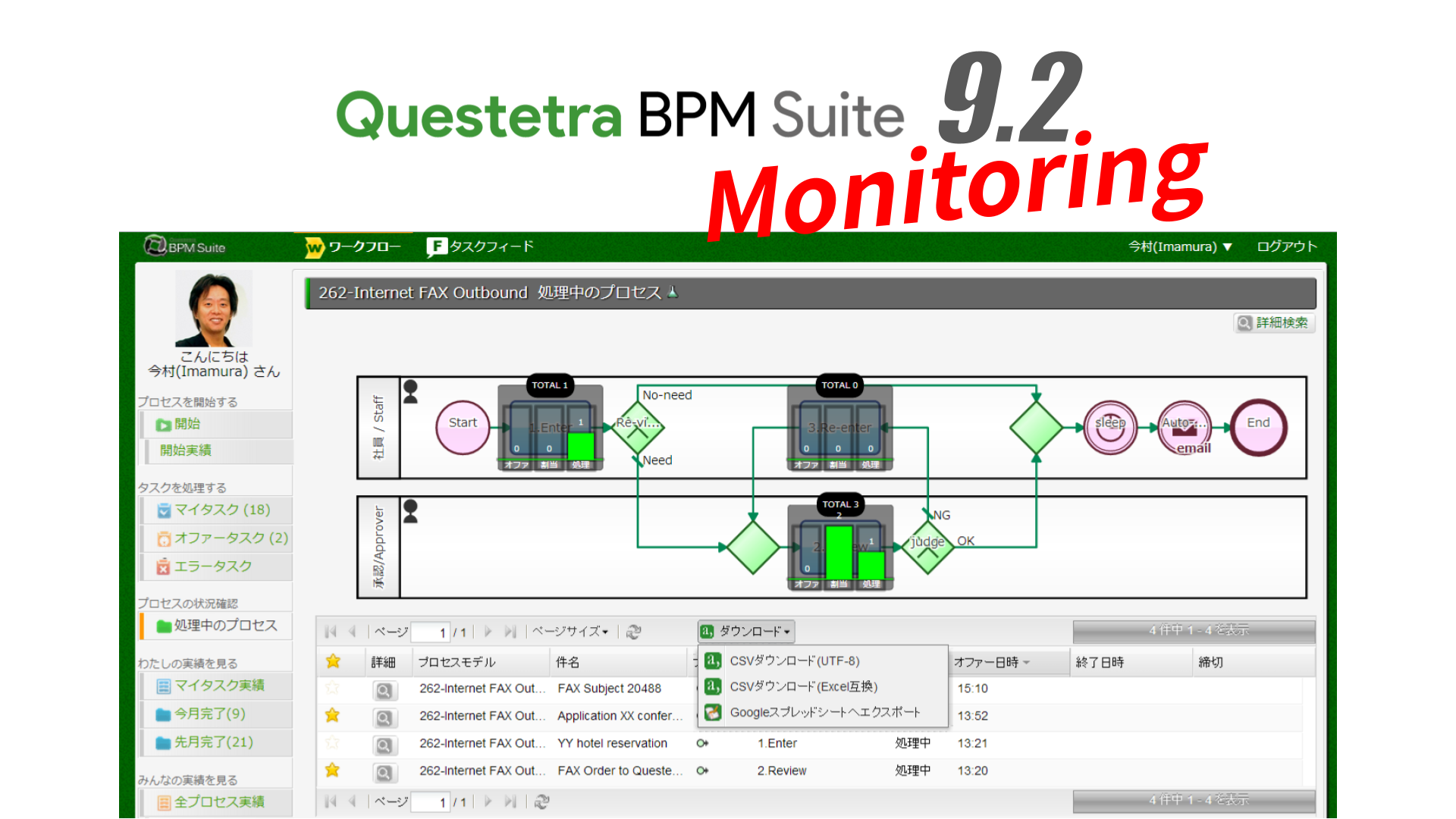
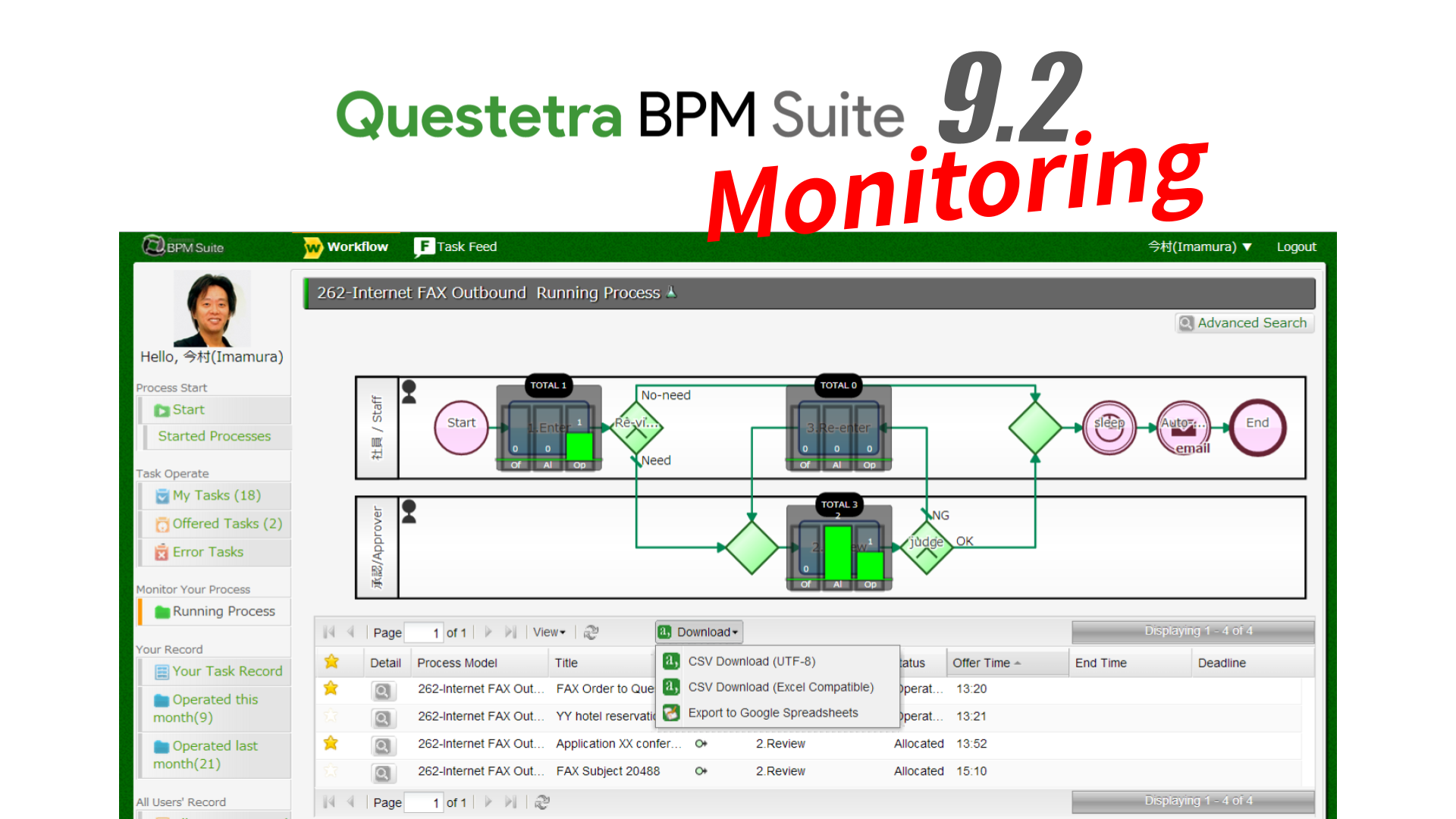
Kyoto, Japan — November 13, 2012 — SaaS vendor company Questetra, Inc. has published the new version 9.2 of the cloud-based Workflow product “Questetra BPM Suite SaaS Edition” on Nov. 13th, 2012. In the new version, it’s available to easily check, the progress of the projects that a User has personally involved, on the work flow diagram. By clicking the business process, it is also possible to display a list of projects that are stuck.
In the “Quote Approval Workflow”, for example, if a salesperson has been submitted for approval on multiple Quotes, the salesperson will be able to check what stage the approval is, easily on the work flow diagram.
Questetra BPM Suite
Questetra BPM Suite SaaS Edition, the cloud based Workflow system, is a service to design a flow of your Business on the Internet. It makes handling business data smoothly in various works such as Decision makings, Expense applications, Complaints support. Also, it helps continuous business improvement by visualizing ‘who did what’ and ‘time spent to process’.
Because it can be designed without programming even complicated conditional split or collaboration between Workflows, not limited to mere approval flow, it can be applied to various other business processes such as Customer Services, Marketing and Product Development. In addition, we are publishing more than 400 business templates which conforming to international standard notation (BPMN 2.0) for Free.
The jobs done by a User oneself will be able to be visualized in a Processes breakdown pie chart. Because the data list is narrowed down in the “click in the chart area”, you will be able to easily see the project you have recently worked with.
Monthly Operation Chart by one click – enhanced
The jobs done by a User oneself will be able to be visualized in a Monthly Task Operation bar chart. Because the data list is narrowed down in the “click in the chart area”, you will be able to easily see the project you have done in certain month.
Notification function to the Social Enterprise – enhanced
In the standard equipped social enterprise feature, a new original mascot character will inform the Task allocation. When the deadline is approaching or has been exceeded, it would tweet to you more gently. Watch out, sometimes it would turn into angry face.
Free Trial
Questetra is always issuing Free accounts on-line. There is neither functional limitation nor Usage expiration. Though, service will be automatically shutdown if not login for 15 days. And the number of users to be register is limited at 5 people.
Questetra, Inc.
“Enjoy your Routine!” We are start-up company in Kyoto Japan, have been continuing to create Business Software, and working hard to organize the world’s Business Processes.