Stripe is an American IT company, operating in over 25 countries, that allows both private individuals and businesses to accept payments over the Internet. (Wikipedia)
Even though most articles focused on “…merchants and other businesses in Japan can use Stripe to sell goods in around 130 different currencies”, I thought its “Connect feature”, which allows us to automate “intermediary exploitation” (?), or its “Protection racket fee” (??), is ‘Super cool!’.
For instance, the desk work in a sales agency could become unmanned.
Well, this industry is always like that, even if they announce the “Landing in Japan!”
(Nobody expects…)
2. Impressions of the reference
It’s good.
I could skim it without getting lost, compared to Google’s reference in which I get lost in the links every time I visit it. To understand the functions overview, I would say it takes 30 minutes for the tutorials and one hour for the API references (as long as you are familiar with APIs).
Although, on the reference page, they tell you to “throw this CURL command in your own terminal!” when you haven’t even logged in. I don’t know how to say it, but I thought it’s very “pushy” or “masculine”…
Regarding to the sample codes, they insist “This is the simplest way!”…
It’s “manly” or “brisk” or…
However, I think it would be good for me to learn their ways.
Although this is my very personal and irresponsible opinion, I think people who are “admire burly young Stripe, rather than PayPal –which is getting old.” will come up.
# By the way, if there is anything you absolutely do not understand, I recommend you to make a functional comparison (or pre-learning) with “WebPay”, which is popular within Japan (which I also recommend), on their Website…
3. Basic structure of Stripe
To roughly summarize it, it manages:
A, Customer information / Credit card information in [Customers]
B, Billing information in [charge]
(That’s simple.)
Putting it simply, it registers A, and sends billing information of B1 B2 B3 B4 B5 B6 B7 B8 B9 to A.
4. Characteristics of Stripe
Even though I have experienced various APIs, such as Google APIs, mainly, kintone APIs, or “Corporate Number System Web-APIs”, etc. I think “Stripe APIs” are distinctive somehow…
Notably, the “Test Mode” is very easy to use.
Honestly, I thought Questetra (Cloud-based Workflow) should emulate its interface (or rather its design concept).
In fact, for implementers who are still anxious even after conducting tests to try the “utilization of APIs”. I suppose this system design, which handles in parallel “Test Mode and Live Mode” be contributing to push up the speed and the quality of the implementation to a higher level.
# More specifically, it distinctively uses the four keys (Basic authentication) and bravely disregards the “Grant Flow for OAuth”.
5. To call from Workflow
Well, naturally, in my role,
I tried accessing Stripe APIs from an auto-step in Questetra BPM Suite, a Cloud-based Workflow.
* The gray rectangles are auto-steps, and the blue rectangles are human steps.
The point is to delegate all the “information of Credit cards or email addresses” to Stripe, and Questetra storages only “A. Customer information”. (Steps in the first half)
* The actual data is like “cus_9K3Z1YSdyG6mvV”.
And after that, it will send “B. Billing information” to Stripe each time charge occurs. (Loop in the last half)
* As a matter of fact, the method of directly delivering information to Stripe from a browser using “Stripe.js”, and delivering only “cus_foobar” to the server, is the “Royal road”. (Even though there is a Cross site issue…)
Additional Notes (2017-09): For information on how to make browser communication with Stripe Elements, please see the following.
Incidentally, the Workflow diagram above seems quite a plain sample. However, it will become a full-fledged business Process by adding, for example, human steps such as “Confirmation of Completion schedule” or “Shipping of goods”, or auto-steps such as “Sending Thank-you mail” or “Sending invoice PDF”, etc. (This is a so-called “Modeling of a Business Process”.)
By the way, even though the ‘Credit card number should not be stored’ it is a quite important knack for the Credit card settlement business, you should record at least the last four digits of the number. (In cases where you could be requested “the card you charged to”) So in this example, I recommend you to make it overwrite the ‘Credit card number’ with the ‘last 4 digits of the card number’.
6. Concrete API calls
Here, I have packaged this automatic processing step.
This package will allow people who are not capable of writing Script to POST to Stripe APIs.
The following are brief explanations of the contents of the Add-on for people who want to create their own package.
At the first Step, information of [A, Customers], that is “information of a customer and Credit card” is sent in 8 parameters.
var responseJson = "";
var uri = "https://api.stripe.com/v1/customers";
var response = httpClient.begin()
  .basic( secretKey, "" )
  .formParam( "description", stripeDesc )
  .formParam( "email", stripeEmail )
  .formParam( "source[object]", "card" )
  .formParam( "source[exp_month]", expMonth )
  .formParam( "source[exp_year]", expYear )
  .formParam( "source[number]", stripeCardNum )
  .formParam( "source[cvc]", stripeCardCvc )
  .formParam( "source[name]", stripeCardName )
  .post( uri );
var httpStatus = response.getStatusCode() + "";
It POSTs ‘Name of the contract’ in “description”, ‘Credit card number’ in “source[number]”, and so on… Soon a reply “O.K. Memorized!” will be returned, then it will store the necessary information among that Response (JSON) into the Workflow side. (Customer ID and Last four digits)
At the second Step, information of the [B, Charge], that is the “Billing information” is sent in 4 parameters.
var responseJson = "";
var uri = "https://api.stripe.com/v1/charges";
var response = httpClient.begin()
  .basic( secretKey, "" )
  .formParam( "description", stripeDesc )
  .formParam( "customer", stripeCusId )
  .formParam( "amount", stripeAmount )
  .formParam( "currency", stripeCurrency )
  .post( uri );
var httpStatus = response.getStatusCode() + "";
It POSTs ‘Contents of providing service’ in “description”, amount of the fee in “amount”, and so on… Soon a reply “O.K. it’s charged!” will be returned, then it will store the necessary information among that Response (JSON) into the Workflow side. (Charge ID and Last four digits)
7. Conclusion
As for e-commerce systems of this kind, they used to build them on their own. (Until recently…)
There used to be projects to develop this kind of systems which cost $50K, $100K, $200K, all over the world. (Maybe still now?)
However, now we are able to build it easily, only with Stripe and Questetra. Something greater could be done if you connect to other Cloud services.
Thus, you are able to build up a system which would cost hundreds of thousands of dollars a few years ago, by yourself, in a few days, for Free!
(Of course, you must have a business idea, separately!)
I truly think it is becoming an awesome era…
Oh, one more important thing at the end…
Questetra, a Cloud-based Workflow, is FREE of charge!
せっかくなので、この自動処理工程をパッケージ化しておきました。これを使えば「スクリプトなんて書けないよー」という方でも、Stripe API への POST ができます。以下は「自分用のパッケージを作るんだー!」という方のために、Addon の内容をカンタンに説明します。(詳しいマニュアルはコチラ: M415自動工程業務プロセス定義で利用可能な自動工程を追加する)
Determine the priority of work by auto-detection of delayed projects
Q. What kind of business are you utilizing Questetra for?
MonotaRO Co., Ltd. is an Online mail order company that operates a mail order site called “MonotaRO”.
We sell all kinds of indirect materials on the internet, from common tools such as pliers or screwdrivers to electricity generators which cost tens of thousand dollars. Nowadays, we handle ten million products for the purpose of supporting manufacturing.
We are using Questetra as a platform for various day-to-day operations, such as product development and general requests.
Q. Please tell us about how you use it more specifically.
For private brand products for example, we plan products that reflect the needs of our customers day by day.
Specifically, we are planning products such as dry cell batteries and walkie-talkies under the MonotaRO brand, and there are always approximately 100 projects that are in the pipeline. We used to manage these projects using Excel, so it was difficult for us to determine which projects were delayed or which should be given priority. Since many of the projects have several Steps such as selection of suppliers or quality checks, the planning period can take several months.
Now, we have built a mechanism in Questetra to automatically detect delayed projects which greatly reduces the burden on the administrators.
Utilization range from Non-IT Departments to Auto-processing using advanced IT technology
Q. Please tell us the reasons why you chose Questetra.
Above all, it is excellent to enable employees outside of the IT system Department to design Business flows.
Actually, in the past we had to give up a company-wide deployment of a system, which had been used by the IT system Department, because it was very difficult for regular employees to use. In contrast, we are very thankful for Questetara because even regular administrative and operational staff are able to configure complex business rules by themselves.
As a result, workers in the IT department can focus on activities such as supporting the embedding of Script Steps (automated processes).
Q. Please tell us your plans of use expansion in the future.
Currently, Questetra is used differently by different departments.
I realized that there are still many inefficient in-house operations because their Business Processes are not well defined. I would like to promote further use of Questetra in these departments and business operations, specifically for activities such as in-house workshops based on best practices.
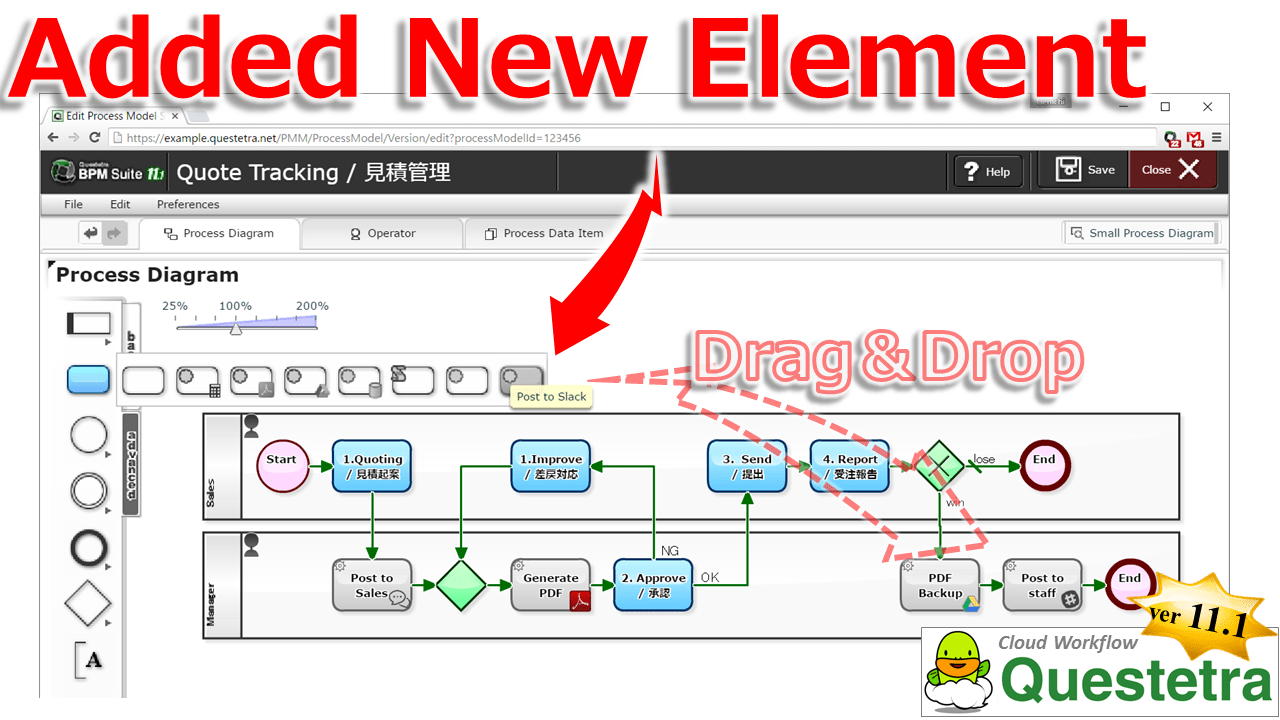
Kyoto, Japan – September 5th, 2016 – Questetra, Inc., the global SaaS provider of Business Process Management (BPM), today announced that they have published the new version 11.1 of the Cloud-based Workflow product “Questetra BPM Suite” on Sep. 5th, 2016. In this new version 11.1, Modelling Elements which were not included as standard functions, such as “Automatic submission to other Cloud” or “Automatic conversion to CSV format” are now available. (Service-Task add-on feature)
To formulate a “Quotation submission” into Workflow (Business system), for example, a Process-owner (administrator of business operation) would arrange several human-processing Steps and automated Steps to create a Business Process Definition (Modelling). Specifically, to define by drag & drop placement of Step-icons, such as #1) Drafting, #2) Approving, #3) Submitting, #4) Reporting the Result, #5) Storing the PDF of Winning Quotation into File Server.
Thus far, it was also possible for anyone to undergo the automation of processing easily with icons of pre-equipped Auto-processing Steps, such as “Auto-generation of PDF” and “Auto-storing to Google Drive”. However, in order to create an Auto-step icon for a processing that is not prepared as a standard Modelling Element, advanced configurations were required, such as writing a Script. With the new version 11.1, you are able to add Modelling Elements by importing Add-ons that specify data treatment and request procedures. That will allow you an easy drag & drop placement of Auto-processing Step icons, such as “Sharing Win-loss information with other departments on Slack”. This will help Questetra users to promote “Improvement of productivity” by using automated Steps.
Questetra BPM Suite
Cloud-based Workflow “Questetra BPM Suite” is a business platform for achieving paperless and telework environments. When a business issue “arrives” at a Step, a User (worker) processes it in a previously specified manner and enters the work result, then the issue goes on to the next step automatically. Its most outstanding feature is its drag & drop feature used in the configuration of the “Business flow”. This feature allows a Process-owner to iterate the Improvement cycle on his/her as a part of the day-to-day work. (BPM: Business Process Management).
Since it is applicable not only to simple business operations such as “Decision-making request” or “Document translation”, but also more complicated operations such as “Pre-shipment Quality check” and “Invoicing-Payment confirmation”, it allows to centrally visualize the progress of various in-house businesses.
Service-Task Addon feature
By importing Service definition files (Add-on XML) in advance, custom Service Steps (Service Tasks) will become available for Business Modelling. It is also possible to create definition files (Add-on XML) on your own, in case where you could not find what you want.
Other Improvements
Enhancement of Script Step
In [Script Task] (Script Step) for Auto-processing, “Method of HTTP request transmission” and “Method of Email transmission” are now available. This enables to complete external communication processing only by [Script Task], which had been thus far separately arranged as [Throwing Message Intermediate Event]. Also, due to the addition of external communication functions, time-out period of the Auto-processing Step will be extended to 30 seconds from two seconds. (Likewise, [Service Task] that has been added by Add-on XML will have a 30 seconds limitation.)
Renewal of Collective setting Functions in the Editing permission on all Human Steps
We have changed the access level configuration (read/write setting) which used to be a matrix structure of Processing-step and Business data, to a more graphical configuration screen. Moreover, the configuration of Access level is now able to be imported and exported in CSV format.
OAuth 2.0 for [Developer APIs]
Concerning [Developer APIs] which responds to requests from outside (Workflow APIs and System Settings APIs), OAuth 2.0 communication is available now. Although communication in Basic Authentication and in OAuth 1.0 is currently available, OAuth 1.0 has become deprecated and will not be supported in future versions.
technavio: GLOBAL BUSINESS PROCESS MANAGEMENT AS A SERVICE MARKET 2016-2020
… Business processes that are integrated with cloud services like software as a service (SaaS), platform as a service (PaaS), and infrastructure as a service (IaaS) are commonly referred to as BPMaaS. In recent times, it has been observed that many organizations have started adopting BPMaaS solutions to maintain product quality, remove inefficiencies in manufacturing processes, check errors, track design changes, enhance overall productivity and reduce costs, ensure time management, boost ROI, and improve time-to-market.
Exchanges JSON with Cloud Services via OAuth2 or Custom-Headers
Kyoto, Japan – May 23rd, 2016 – Questetra, Inc., the global SaaS provider of Business Process Management (BPM), today announced that they have published the new version 11.0 of the cloud-based Workflow product “Questetra BPM Suite” on May 23rd, 2016.
In this new version 11.0, it has become capable of communicating with more External APIs, for its automatic communication function has been enhanced. Specifically, it allows data federation with Core system which requires “Custom HTTP header” such as a Cloud database service “kintone”. This feature will allow configurations, e.g., automatic reference to “Client Master information” which exists external in the middle of “Estimate approval Process”, and automatic update of Common options file by “Daily synchronization Process”.
Questetra BPM Suite
“Questetra BPM Suite” is a multipurpose Cloud-based Workflow product (SaaS product) which is capable of “PDF Auto-generation” and “External connectivity”, etc. Using this product, you will be able to make various in-house processes going Online, not only simple business operations such as “Application procedure”, “Decision-making request”, or “Document translation”, also complicated operations such as “Service provisioning Process” or “Process of sequential operations to Bill issuance from Order acceptance”. (BPM: Business Process Management)
Its most outstanding feature is Mouse-driven configuration of “Business flow”. This feature allows a Process-owner, who knows the business should be, to continue to iterate the Improvement cycle on his/her own in day-to-day work. (Free for up to 10 Users)
Enhancement of HTTP Request Transmission function
Regarding Setting property of “Throwing Message Intermediate Event (HTTP)”, an optional “HTTP header” becomes available to be added. With this function, it is now capable of communication methods which adding header such as “X-Cybozu-API-Token:” or “X-ChatWorkToken:”, instead of having been capable of secure communications only Requests that were authorized by “OAuth 2.0 communication” or by “Basic Authentication” until now.
Regarding the feature to indicate current progress (current Step) on a Business Flow Diagram, “Route that passed through up to that point in time” has become obvious. In addition to “Current location of the Issue” and “Operator of the upstream Step” that have been indicated with icons, “Pass route” is shown in red arrow.
Dashboard
Regarding [Dashboard] feature which concurrently displays multiple Aggregation graph, it is now available to display, e.g. a line graph such as “Monthly change in the total amount of the order”, or a bar chart of “Weekly changes in total amount of Reimbursed expenses (Department breakdown)”. You are now able to display graphs from various aspects, in addition to being limited to “the number of Issues that operated by own” or “Bottlenecking in Decision-making Process (Heat map)” so far.
Hierarchical Select-box
You are able to set up hierarchical relation (dependency) among Select type data items. For example, when you select an option of “8: East Asia” at a Selection form for “Area” (out of 1: North America/2: Africa…./8:East Asia), in a Select form for “Country”, only “81: Japan/82:Korea/852:Hong Kong/86: China…” will be displayed. So far, additional description of JavaScript was required to achieve this, you are now able to set up easily by specifying the dependency. (Forward Match of [Options ID])
『Questetra BPM Suite』は、「自動PDF生成」や「外部接続」等をサポートする高機能なクラウド型ワークフロー製品(SaaS製品)です。「申請手続」「稟議承認」「文書翻訳」といったシンプルな業務だけでなく、「サービス提供プロセス」や「受注報告から請求に至る一連の業務プロセス」といった複雑な業務に至るまで、様々な社内プロセスを幅広くオンライン化することができます。(BPM: Business Process Management)
We will start Questetra BPMS SLA on April 1, 2016.
Now, we would like to announce that we are going to change some of the contents of our service from April 1st, 2016; including the “Introduction of service quality guarantee system”. This is a summary of those changes.
For more details regarding each change, we are planning to add a description on the related web pages, such as “Price”.
1. Implementation of SLA
As the use of the Cloud service is becoming common, many of our customers have requested us to clarify our service level. However, we were unable to provide a baseline since the service started in 2009 up until now.
From April 1st, 2016 on, we will establish an “Equal to or more than 99.9% uptime” as our Service Level Agreement. If by any chance, the accumulated downtime and the actual value of the “Service availability rate” became less than the guaranteed value, we will issue “Service credits”.
Service credit
If the availability rate is less than 99.9% in a given month: The equivalent of 10% of the month’s fee will be issued as service credit.
If the availability rate is less than 99.0% in a given month: The equivalent of 30% of the month’s fee will be issued as service credit.
Downtime is defined as the state in which the main system has no external connectivity.
Service credits will be issued within 30 days upon receipt of claim from the customer.
Service credits can only be applied for future payments of the customer.
Service credits cannot be transferred or be applied to the payment of other contracts.
As the “Electronic document storage” of receipts of expense has increased, many of our customers have requested us to provide more storage capacity. However, we have limited the storage for “Attachments” to up to the equivalent of “1GB multiplied by the number of available User accounts”.
From April 1st, 2016 on, we will ensure storage capacity to up to the equivalent of “5GB multiplied by the number of available User accounts”, which is 5 times more than before. As a result, you’ll be able to save a larger amount of “attachments”.
Subject of Storage limit (specification)
Files stored in File type data items in the Workflow
Files attached on Open Chat (Enterprise SNS)
We will also start selling options for Extra Storage for those who need more capacity.
There are no limitations on the type of data stored, such as String type data items and Date type data items, etc.
Separate “Communication restrictions” apply to the transmission of data to Questetra (HTTP: 100MB).
3. Coverage for Flexible plan
Some customers, such as the ones who were conducting trials in small teams, or whose business have busy seasons and offseason, have requested a charge method according to actual usage. So far, even in such a cases, you had to register specifying the number of User accounts in advance.
From April 1st, 2016 on, you will be able to choose the “Flexible Plan”, which is based on the actual use. In those cases, you will pay the fee that corresponds only to the use (Fluctuating number of accounts registered) on a subsequent basis.
New Prices
Flexible Plan: 12.00 USD per User / Month (6.00 USD per User / Month for Contracts Over 200 Users)
Annual Plan: 9.60 USD per User / Month (4.80 USD per User / Month for Contracts Over 200 Users)
Addition and Deletion of Users is available at anytime through [Users with Administrators privileges].
When “The number of registered Users” on a given day is less than 20, it will be considered as 20 people (minimum).
In the “Annual Plan”, we do not refund based on cancellation or decrease in User accounts that occur within the validity period of a contract.
You cannot change to “Flexible Plan” from “Annual Plan”(only until the annual update).
Please note that, the “Monthly Plan”(currently in use) will no longer be available in the future. We appreciate your understanding in this matter.
Kyoto, Japan – November 2nd, 2015 – Questetra, Inc., the global SaaS provider of Business Process Management (BPM), today announced that they have published the new version 10.4 of the cloud-based Workflow product “Questetra BPM Suite” on November 2nd, 2015.
In this new version 10.4, significant speeding up has been achieved in “Combo-box form” (Search select) in the data input screen. This will allow a Select input form to set up to refer a Master data which is as large as tens of thousands of articles. For example, by registering “Customer Master” in the Workflow platform, “Selection of a Customer” in invoicing or billing operation will become more efficient and accurate. It is also possible to register entire “Postcode-address Master” which the number of records reaches 150,000.
Speeding up Combo-box (Search-select)
The processing speed of the Data Selection Form that refers to the “Options master” (options XML), has become significantly faster. For example, a setting of input completion of data, such as “Address” and “Postcode” in referring the entire Postcode list which reaches to 150,000 lines, is now available.You can confirm the operation on the demonstration system in the following URL. http://en.workflow-sample.net/2015/11/zipcode-xml.html
Other Improvements
Debugging Execution
A designer of Business Process Definition (Process Model) becomes to be able to test run a Process Model (Debugging execution) in the middle of designing. From now on, you are able to flow testing Issues freely, without affecting the Process Models in operation nor Issue processing logs, whereas previously there was a need to test operation on another Workflow environment when you have modified many parts.
User Timezone
It becomes capable of displaying by the Timezone of each User of the time information on Issue date and in the logs of Issue processing, etc. It allows overseas staffs and remote workers who are working in different Timezone from the system standard time (server time) to recognize the time information more easily.
Request Message Throwing (enhanced)
In the function of HTTP Request automatic sending to external servers, it becomes capable of sending any text as Request body. However, it is limited to the formats (Content-type) of “text/xml”, “text/plain”, “application/json”, for the time being.