ブログ

  • Setting Deadlines for Approval Requests Also Increases the Sense of Responsibility

    Setting Deadlines for Approval Requests Also Increases the Sense of Responsibility

    Key Point
    1. Ashi-Ashi Works had digitized its Approval Application Process
    2. The accounting manager, general affairs manager, and executive vice president were noticeably slow to respond, causing delays in the process
    3. By setting deadlines for each process, they were able to prevent delays
    4. The accounting manager, general affairs manager, and executive vice president’s sense of responsibility also increased

    1.Issue: Delays at parallel review steps

    Ashi-Ashi Works is a BPO (Business Process Outsourcing) company. The company has implemented a business process management system and is operating a workflow system for approval requests.

    As an improvement to the Approval Application workflow, a greater degree of efficiency was achieved by making it possible to simultaneously process the Comments step, in which the accounting manager, general manager, and executive vice president write their comments after approval by the applicant and supervisor, thereby reducing the time it took to reach the president’s decision in the final step.

    However, recently, due to busy schedules or forgetting to process a transaction, the input of either the accounting manager, the general manager, or the executive vice president may be delayed. The advantage of parallelization is that multiple steps can proceed simultaneously, but the process will not proceed to the president’s decision step until all three have been dealt with. Therefore, the lead time target of three business days or fewer is exceeded in an increasing number of cases.

    2.Solution: Set a deadline for the comments step

    The president of the company, who is the final decision maker, instructed the process owner that the task of entering comments and findings is not an act of approval or rejection, but rather about entering opinions and advice, and if not processed within one business day, it can be considered that there are no findings.

    The process owner reorganizes the flow so that a deadline is automatically set for the comment input task and the task moves to the next step after one business day has passed.

    Additionally, if the deadline has passed, the data item for entering findings will automatically be filled in with “No findings (expired)”.

    Basic Edition
    Advanced Edition
    Professional Edition
    View workflow diagram details
    • 1. Application
    • 2-1. First approval
      • The supervisor fills in the required information and submits the application.
    • 3-a. Comments (General Affairs)
      • The General Affairs Manager will enter their comments.
      • After 24 hours, the item will automatically move to the next step as it has expired
    • 3-b. Comments (Accounting)
      • TheAccounting Manager will enter their comments.
      • After 24 hours, the item will automatically move to the next step as it has expired
    • 3-c. Comments (Executive Vice President) *Only for amounts under 1 million yen
      • The Executive Vice President enters their comments.
      • After 24 hours, the item will automatically move to the next step as it has expired
    • 4. Approval
      • The President makes the decision.

    Compare Before/After

     (you can move the slider)

    3.Effects

    1. Maintaining target lead times for review applications
      • By setting deadlines and automatically transitioning to the next step when a deadline expires, process delays are prevented. This is expected to improve the efficiency of business processes and increase the speed of the entire business.
    2. Increased sense of responsibility among department heads
      • By clearly stating that no findings have been made if the deadline is not met, the accounting manager, general affairs manager, and executive vice president will feel a stronger sense of responsibility for their roles.
  • Increasing the number of decision makers…will it slow things down?

    Increasing the number of decision makers…will it slow things down?

    How can we resolve the matchmaking issues that arise when multiple approvers are involved in a workflow?

    1. Issue: Stagnation in the approval process

    At BunBun Shoji, speed is a common value throughout the company, and they pursue competitive advantage by performing their work quickly and efficiently. The decision-making workflow is structured so that decisions are made solely by the department manager. Recently, it has also become possible to complete the approval workflow with just the proxy approval of the deputy manager, which is expected to lead to even faster decision-making.

    Despite the implementation of proxy approval, the time taken for approvals has not decreased and the number of backlogged cases has increased. Interviews with the general manager and deputy general manager by the process owner revealed that many employees assume that somebody else will make the decision.

    For example, in the marketing department, the areas of responsibility were divided between one manager and two deputy managers.

    • Manager: Online advertising and access analysis
    • Deputy Manager A: Transportation advertising, market research, smartphone app development
    • Deputy Manager B: Web content production

    2. Solution: Automatic payment over time

    The proxy decision-making rule also represents a shift away from relying on department heads. This can be seen as an evolutionary process for the organization, especially in terms of business continuity.
    Therefore, to ensure both efficient task execution and adherence to the proxy approval rule, the Process Owner implemented a feature that automatically approves requests after 24 hours. Specifically, a 24-hour timeout was applied to the Manager’s Approval Step [2. Approve]. Consequently, any approval item remaining unresolved for 24 hours is automatically forwarded to the Approval Notification Event, with the draft content preserved as it is.

    Basic Edition
    Advanced Edition
    Professional Edition
    • 1. Proposal: The applicant starts the Workflow App, enters each item in the application, and clicks the [Submit a request] button. If advice is required, the applicant selects an advisor and clicks the [Ask advisor for advice] button.
    • 2. Approve: The department manager of the applicant’s department decides whether or not to approve the request. To approve the request, click the [Approve] button. To reject the request, click the [Return] button. If no decision is made within 24 hours, the event will be automatically and forcibly sent to the approval notification event. [Timer boundary event]
    • Notification of approval: The applicant will be notified by email that the application has been approved.
    • 2b. Approve by proxy: The deputy manager of the applicant’s department decides whether or not to approve the request. To approve the request, click the [Approve by proxy] button. To reject the request, click the [Return by proxy] button.
    • Notification of proxy approval: The applicant will be notified by email that the request has been approved by proxy.
    Set a timeout for the manager’s Approval Step [2. Approve]

    3. Effects

    • Reduce time taken for approval:
      • Time saving: Business delays (approval processes that took several days or more than a week) no longer occurred.
      • There are no more missed decisions even when the manager is absent or on holidays.
    • Streamline decision-making:
      • The pressure to make decisions within a limited time frame of 24 hours forced all parties involved to make decisions quickly and logically.
      • Decision-making across the organization has been streamlined due to a reduction in ambiguous proposals requiring approval.
    • Delegating approval authority:
      • Deputy managers also began to proactively make decisions, and the number of proxy decisions increased.
      • The burden on managers has been reduced.
      • The assistant manager had the opportunity to hone their leadership skills.
    • Increased employee engagement:
      • The faster decision-making process has enabled employees to act more quickly, which has also increased their enthusiasm and motivation for their work.
      • Employees also became less dependent on their superiors and began to take a more proactive approach to their work.
    • Revitalizing internal communication:
      • The need to make decisions within a limited 24-hour time frame stimulated communication between the parties involved.
      • This led to more active discussion and information sharing, which in turn led to better decision-making.
    • Raising compliance awareness:
      • Setting clear approval rules and deadlines also led to improved awareness of compliance.
      • This has enabled them to prevent fraudulent and non-transparent transactions and increase their credibility as a company.
    • Strengthening risk management:
      • Rapid decision making allows for rapid risk response.
      • They were able to quickly respond to changes in the business environment and increase the stability of their business.

    4. Other Business Applications

    The timeout setting can be applied to various tasks other than approval requests.

    • Expenses calculation:
      • Set up a rule that when an expense claim is submitted, the manager must approve or reject it within 24 hours.
      • If no decision is made within 24 hours, the application will be automatically considered approved.
    • Customer response:
      • Set up rules to ensure that a representative responds to customer inquiries within 24 hours.
      • If the issue is not addressed within 24 hours, a system will be put in place that will automatically escalate the issue and have a responsible person handle the issue.
    • Recruitment activities:
      • The human resources staff establishes a two-week deadline to screen applicant documents after submission.
      • The application will be automatically rejected if the document screening process exceeds two weeks.
    • Vacation requests:
      • The request will be automatically approved if HR fails to approve it within a designated timeframe.
  • Applying Generative AI to the Photography Workflow

    Applying Generative AI to the Photography Workflow

    AI generates reference images from shooting instructions, reducing search time and improving shoot preparation efficiency.

    1. Issue: The burden of searching for reference images

    The director and web designer write the shooting instructions on the work request form, and the shooting assistant checks the contents and prepares for the shoot. When it is difficult to convey the image with only text, the person requesting the shoot finds a reference image that is close to the desired image and attaches it.

    The previous method was time-consuming and labor-intensive due to the need to search for suitable reference images and communicate work requests. Additionally, if a matching reference image was not available, the photography assistant had to rely solely on textual descriptions to understand the requester’s vision, leading to increased communication and potential misunderstandings.

    2. Solution: Automatically generate reference images from shooting instructions

    The Process Owner integrated a “Reference Image Auto-Generation” Step into the Workflow. This step utilizes the OpenAI (ChatGPT) API to automatically generate reference images based on the shooting instructions provided by the requester. By automating this process, requesters can receive visual references, enabling them to provide more specific and detailed shooting instructions when making requests.

    As a result, the camera assistant can quickly and efficiently prepare for the shoot by checking the automatically generated reference images and, if necessary, by simply communicating with the requester.

    AI image generation helps requesters quickly find reference images, speeding up work requests and improving efficiency.

    Basic Edition
    Advanced Edition
    Professional Edition
    View details of workflow diagrams
    Work request

    The requester requests the photography assistant to take a photo with an external photographer. The request includes the date and time of the photo shoot, the location, and the content.

    Request confirmation

    The photography assistant reviews the requester’s request and clarifies any unclear points with the requester.

    Automatic folder creation

    A folder to store all the photographed photo data is automatically created.

    Shooting

    The photographer will take photos based on the given request and deliver them to the photography assistant. The photographer should check with the photography assistant if they have any questions about the request.

    Automatic folder creation

    A folder to store all the photographed photo data is automatically created.

    Confirmation of delivered data

    The photography assistant checks the delivered data, selects photos according to the request, and stores them in a folder.

    Confirmation

    The requester checks the delivered photo data, and if there are any shortages or problems, asks the photography assistant to select photos again.

    Reselection

    The photography assistant reviews and filters the photos to find any data that matches the request, or any similar data, and saves them in a designated folder.

    Additional shooting

    The photographer will take additional photos at the photography assistant’s request if the requester finds the photo data lacking. The requester will receive these additional photos directly from the photographer.

    Basic Edition
    Advanced Edition
    Professional Edition
    View details of workflow diagrams
    Work request

    The requester requests the photography assistant to take a photo with an external photographer. The request includes the date and time of the photo shoot, the location, and the content.

    Automatic generation of reference images

    AI images are generated from the shooting instructions in the work request.

    Request confirmation

    The photography assistant reviews the requester’s request and clarifies any unclear points with the requester.

    Automatic folder creation

    A folder to store all the photographed photo data is automatically created.

    Shooting

    The photographer will take photos based on the given request and deliver them to the photography assistant. The photographer should check with the photography assistant if they have any questions about the request.

    Automatic folder creation

    A folder to store all the photographed photo data is automatically created.

    Confirmation of delivered data

    The photography assistant checks the delivered data, selects photos according to the request, and stores them in a folder.

    Confirmation

    The requester checks the delivered photo data, and if there are any shortages or problems, asks the photography assistant to select photos again.

    Reselection

    The photography assistant reviews and filters the photos to find any data that matches the request, or any similar data, and saves them in a designated folder.

    Additional shooting

    The photographer will take additional photos at the photography assistant’s request if the requester finds the photo data lacking. The requester will receive these additional photos directly from the photographer.

    Before / After comparison (slider can be moved)

    3. Customers Case Study

    4. Other Business Applications

    We will enable AI-based reviews for the following tasks:

    Marketing work (content creation)

    Architecture and interior design

    5. Related Posts

  • AWSインフラでプロダクトを支えるDevOpsエンジニア募集

    AWSインフラでプロダクトを支えるDevOpsエンジニア募集

    AWSインフラでプロダクトを支えるDevOpsエンジニア募集

    クエステトラ社は自律、創造、誠実、そして世界視点という価値観を共有する仲間と共に、成長を続けています。あなたのスキルと情熱が、私たちの技術革新を加速する鍵です。ここで私たちと一緒に、あなたの可能性を最大限に発揮しませんか?

    募集要項

    職種と雇用形態

    ソフトウェアエンジニア(フルタイム専門裁量、フルタイム一般)

    募集人数

    1~2名

    契約期間

    無期雇用(定め無し)

    就業場所

    クエステトラ社オフィス(京都市中京区、烏丸御池駅から徒歩3分)

    勤務時間

    • フルタイム専門裁量
      • 1日7時間のみなし労働時間勤務
    • フルタイム一般
      • 所定労働時間:7時間/日、35時間/週
      • 勤務時間帯:09:00 ~ 17:00(12:00~14:00の間に1時間休憩)

    加入保険

    健康保険、厚生年金保険、雇用保険、労災保険

    休日

    • 完全週休二日制(土・日)、祝日
    • 年末年始(12/30~1/3)
    • 年次有給休暇
    • 慶弔休暇(有給)

    手当

    交通費支給あり(月額 40,000 円まで)

    福利厚生

    月次懇親会やリラックスしてコミュニケーションを取れるイベントが、会社負担で定期的に開催されています。

    ジョブディスクリプション(ソフトウェアエンジニア)

    業務内容

    • SaaS プロダクトまたは周辺ツールの開発・テストに従事します。
    • インフラの構築および SaaS プロダクトの運用に従事します。
    • まれに、ブログ/チュートリアルを執筆します。

    基本給

    • フルタイム専門裁量:月50万円~100万円
    • フルタイム一般:月30万~60万円
    • パートタイム:時間1400円~5000円

    選考合格時に「試用期間」(2か月/50時間程度など)「試用期間中の基本給」(減額なし/80%など)「試用期間終了後の基本給」(月33万円/時間1200円など)が個別に提示されます。(「試用期間終了後の基本給」については、最低保証額だけが提示され、実際の基本給は試用期間終了後に決定される場合もあります。)

    試用期間

    原則として2か月

    必要能力経験

    コンピュータサイエンスもしくは関連する分野の大学院・大学・専門学校を 卒業(修了)した者もしくは在学中の者(または関連職種での実務経験4年)

    歓迎能力経験

    1. Java / Python / JavaScript などのプログラミング言語を使用した Web アプリケーション開発経験
    2. Linux / Apache / Java などの技術を使用した Web アプリケーション運用経験
    3. HTML/CSS による Web UI 開発経験
    4. ブログ等での情報発信の経験

    募集部署(製品開発部)からのメッセージ

    自社SaaSを支える技術力

    私たち製品開発部は、自社開発の BPM SaaS (Questetra BPM Suite) を継続的に成長させるため、開発と運用の両面から技術的挑戦に取り組んでいます。特に、可用性・拡張性を意識したインフラ設計や、IaC や CI/CD を活用した効率的な運用体制の構築に力を入れています。AWS 環境下での自動化・最適化に興味がある方や、コードでインフラを育てたい方には、日々の業務がきっと刺激的に映るはずです。

    DevOps・SREの文化を実践中

    開発チームと運用チームの間に明確な壁はなく、全員がSRE的な視点を持ってプロダクトの安定稼働と進化に関わっています。監視設計や障害対応、パフォーマンス改善など、実運用に直結するテーマに対して、コードを用いた仕組み化・自動化を積極的に推進しています。定期的なふりかえりやドキュメント整備など、継続的改善の文化も根づいており、技術的チャレンジを楽しめる環境です。

    「コードで組織を強くする」仲間を募集

    当社では、コードを書く力が組織の成長を支える重要な武器だと考えています。だからこそ、エンジニアが提案・改善しやすいカルチャーと、小回りの利くチーム運営を大切にしています。スタートアップ的な自由度と、安定運営中のプロダクトという両立環境で、技術を軸にした価値提供に挑戦してみませんか?あなたの技術と視点が、次の進化をつくります。

  • 問合せはローテーションで平等割当

    問合せはローテーションで平等割当

    BPO受託業務において、オペレータが自発的に問い合わせを選ぶ方式により、消極的な姿勢が生まれていた。これにより業務の生産性が低下していたため、プロセスオーナーは案件を均等に20人へローテーションで自動割り当てる新方式を導入し、対応の偏りとモチベーション低下の課題を解決した。

    1.課題:タスクが積極的に引き受けられない

    MoshiMoshiビーピーオー社は、BPO受託業務として、20人のオペレータがメール問い合わせに対応するコンタクトセンターを運営しています。

    問い合わせ対応は「対応者」が自ら案件を引き受ける方式で運用されています。手が空いているオペレータは「引き受け待ち一覧」にリストされた問い合わせを選択し、引き受けます。

    オペレータは時給制で働いています。評価制度としては、対応が高評価を得た場合にプラス評価がつく一方で、クレーム発生時にはマイナス評価を受ける仕組みが採用されています。

    一方、対応数は評価として直接反映されないため、積極的に対応を引き受けるモチベーションが生まれません。そのため、できるだけ仕事を後回しにする傾向が見られ、全体の生産性が低下しています。

    2.解決策:ローテーションで均等に割り当て

    この課題を解決するために、プロセスオーナーは「ローテーション割り当て方式」を導入しました。従来の方式では対応者が自発的に仕事を選ぶ形でしたが、新しい方式では、問い合わせが均等に配分される仕組みです。

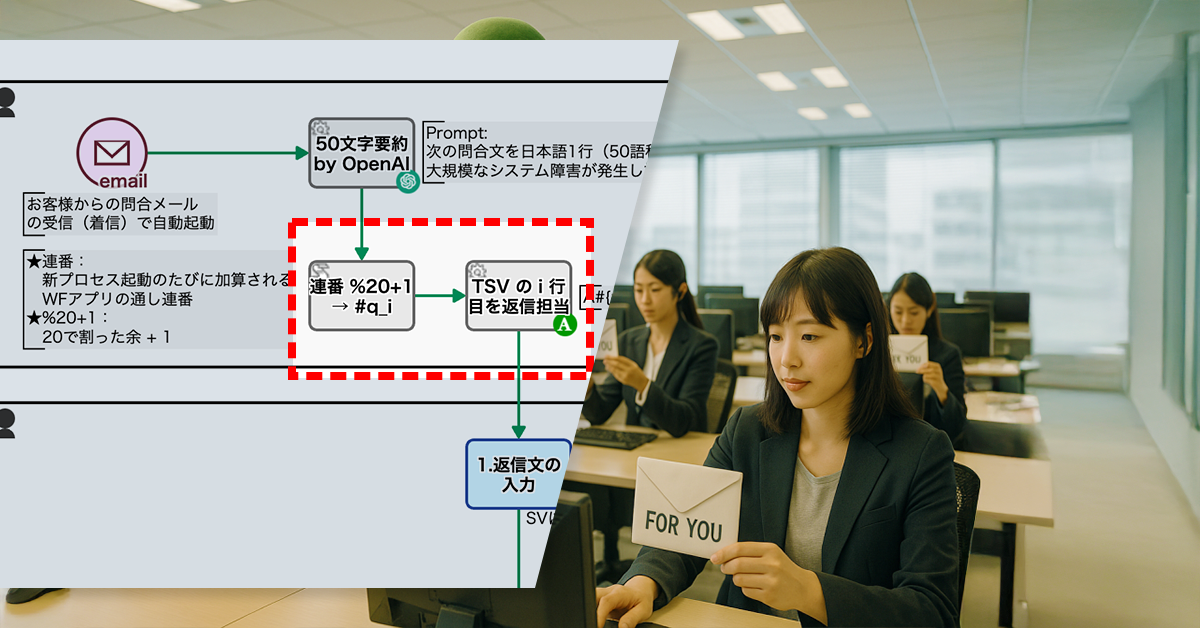
    具体的には、案件毎に付与される通し番号(プロセス連番)を20で割った剰余に1を加えた値を使用し、1〜20までの数字を計算します。その番号に対応したオペレータに案件が割り当てられます。(例:5ならEさん、14ならNさん)。

    ※番号の計算は、「スクリプトタスク」を利用します。

    Before :

    詳細を見る
    • Email着信によりプロセス起動
    • 50文字要約 by OpenAI
      • Emailの内容が要約される
    • 1.返信文の入力
      • 返信メールを送信
      • SVにレビュー依頼
    • 2.返信文のレビュー
    • Email送信

    After :

    詳細を見る
    • Email着信によりプロセス起動
    • 50文字要約 by OpenAI
      • Emailの内容が要約される
    • プロセス連番 % 20(20で割った余り) + 1
    • TSV の i 行目を返信担当にセット
    • 1.返信文の入力
      • 返信メールを送信
      • SVにレビュー依頼
    • 2.返信文のレビュー
    • Email送信

    Compare Before/After

    (スライダを使い before/after の比較が可能です)

    3.効果

    1. 業務の平準化
      • 問い合わせ対応の分担が均等になり、特定のオペレータへの負荷集中がなくなりました。
      • 全体の処理スピードが向上し、問い合わせ対応の遅延が減少しました。
    2. 積極性の向上
      • 仕事の選択制がなくなったことで、対応者が消極的になる問題が解消されました。
      • 均等な業務割り当てにより、オペレータの責任感が向上し、積極的な対応が増えました。
    3. オペレータのスキル向上
      • すべての対応者が一定数の問い合わせを処理することで、対応経験が蓄積され、スキルが向上しました。
      • 業務の均等配分により、全員が幅広い問い合わせに対応できるようになりました。

    4. 他業務への応用

    1. サポート対応の公平化
      • 電話やチャット対応業務でもローテーション制を導入することで、特定の担当者への業務集中を防げます。
    2. 社内タスクの分配最適化
      • 定型業務(例:報告書レビューやマニュアル更新)にも自動ローテーションを導入することで、属人化を防止できます。

  • 規程差分の確認は、AIにお任せ!

    規程差分の確認は、AIにお任せ!

    1. 課題:新旧規程の差分みえず、レビュー負担増

    RuleRule製薬は、新薬の研究開発に特化した製薬会社です。新しい科学的知見や技術の進歩、安全性の確保の観点から、社内規程を最新の規制や基準に適合させる必要があり、頻繁に見直しを行っています。

    規程変更時、起案者は「新規程」と「旧規程」の両方を登録しますが、差分が明示されていないため、レビュアやCEOは変更点を迅速に把握できません。その結果、確認作業に時間がかかり、効率的な判断が難しくなっています。

    2. 解決策:AIによる新旧対照表の自動生成

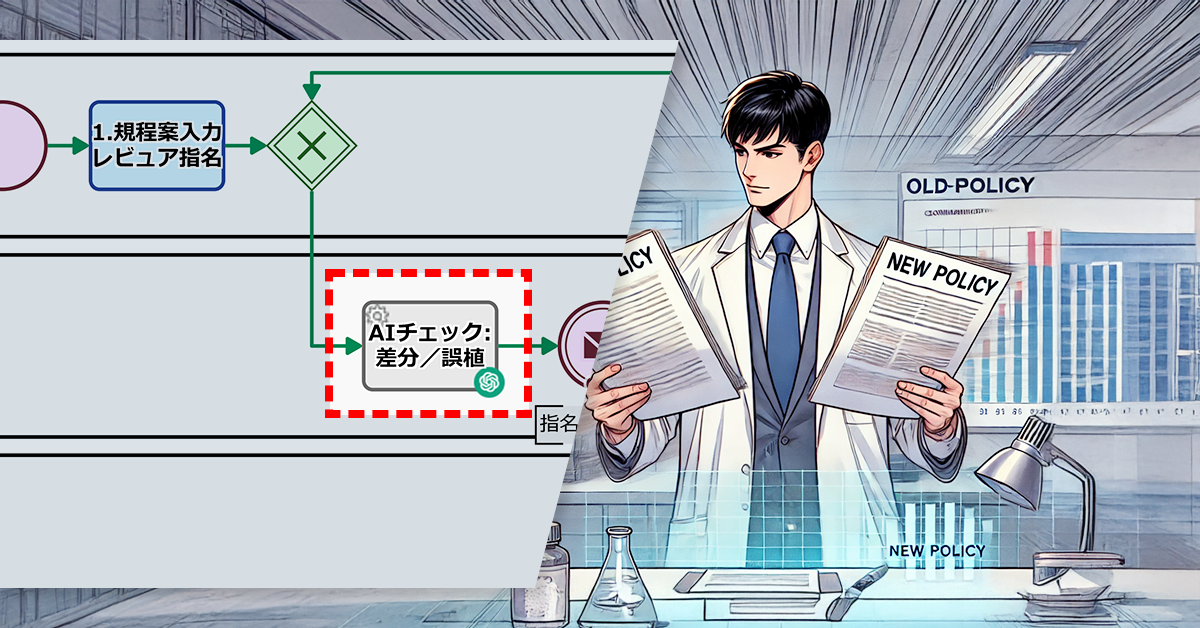
    この問題を解決するために、プロセスオーナーは生成AI(ChatGPT)を導入し、ワークフローアプリに組み込みました。

    具体的には、生成AIに適切な指示を与えることで、「新規程」と「旧規程」を基に自動で「新旧規程対照表」が作成されます。これにより、規程改廃が起案されるたびに差分が可視化されるようになりました。

    Basic Edition
    Advanced Edition
    Professional Edition
    ワークフロー図の詳細を見る
    1. 規程案入力 レビュア指名

    起案者が規定案を入力し、レビュアを指名します。

    AIチェック:差分/誤植

    旧規程が入力されている場合は、AIにより新旧規程対照表が作成されます。

    2. 規程案をレビュー

    規程案が提出(※最提出含む)されると、指名レビュアは通知メールを受け取り、規定案をレビューします。

    1X. 差戻対応

    2.で差し戻しがあった場合は差し戻しに対応します。

    3. CEO承認/取締役会決議

    2.を受け、CEOが承認・不承認を判断します。

    件名に[成案]

    3.で承認となった場合は、案件の件名に[成案]というプレフィックスが付与されます。

    件名に[廃案]

    3.で不承認となった場合は、案件の件名に[成案]というプレフィックスが付与されます。

    Before/After (スライドで動かせます)

    3. 効果

    対応速度の向上

    生成AIが自動で対照表を作成することで、レビュアやCEOは変更点を即座に把握できるようになり、確認作業の遅延が解消されました。

    ミスの削減

    変更点の可視化により、見落としや誤認が減少。規程の誤りを早期に検出できるようになり、内容の精度も向上しました。

    4. その他の業務への応用

    • 契約書の修正・管理
      • 契約書の変更点を自動で比較・通知することで、承認プロセスがスムーズに進み、契約締結の遅延を防ぎます。
    • 社内マニュアルの改訂管理
      • 手順書や社内マニュアルの変更点を可視化し、関係者へ自動通知することで、最新情報を確実に共有できます。

    5. 提案資料

    当社サービスの導入を検討いただく際の提案書サンプルです。課題に対する解決策の概要を記載しています。実際の相談内容に応じて、内容を個別にカスタマイズして提供いたします。

  • ワードプレス投稿ミスの傾向を把握

    ワードプレス投稿ミスの傾向を把握

    1. 課題:依頼内容の不備が分析できない

    ◯△×社のWebサイトはWordPress.comで構築されており、現在はマーケティング部が運用・管理を担当しています。マーケティング部では、ワークフローアプリを通じて他部署からの依頼を受け取り、記事の投稿を行っています。

    しかし最近では、依頼に基づいて記事を作成する中で、「掲載されている商品情報が古い」「価格や仕様に誤りがある」といった内容の不備が発生するケースが見られるようになりました。これまでは、記事の公開前にマーケティング部が内容を確認し、不備があった場合には、特定の権限を持つメンバーがワークフローアプリ上で該当の依頼を削除することで対応していました。

    ところが、依頼内容の不備は増加傾向にあり、どの部署からの依頼で多く発生しているのか、どのような内容に問題が集中しているのか、といった傾向を把握するのが難しくなっています。さらに、依頼を削除するとワークフローアプリ上から完全に消えてしまうため、過去の事例を検索・分析することができません。このように、データに基づいた改善策を講じることが難しい状態が続いており、同様の不備が繰り返されるリスクが高まっています。

    2. 解決策:破棄される依頼の件名にキーワードを付与

    この課題に対応するため、プロセスオーナーは草稿の校正後に「草稿をWPへ」と「草稿の破棄」の2つの選択肢を設定しました。「草稿の破棄」を選択すると、ワークフロー上で以下の処理が行われます。

    • 依頼の件名に自動で “[Abandon]” が付与される
    • 依頼は終了扱いになるが、履歴は記録される

    例えば、「ブログ『2025年の新機能』の追加」という件名の場合、「[Abandon] ブログ『2025年の新機能』の追加」と表示され、検索時に簡単に絞り込めるようになります。

    Basic Edition
    Advanced Edition
    Professional Edition
    ワークフロー図の詳細を見る
    草稿投入(社員のみ)

    マーケティング部社員が作成した草稿が投入できます。

    依頼原稿をバックアップ

    他部署からの依頼原稿が、自動的にバックアップされます。

    校正

    公開に必要な全項目がセットされていない場合、マーケ部員が原稿の校正を行います。

    画像をWPへ

    WordPress.com 上にメディアファイルをアップロードします。

    原稿をWPへ

    WordPress.com 上に下書き状態の記事(投稿)を作成します。

    微修正して公開

    マーケ部員が下書きを微修正して、公開します。

    公開通知

    記事の公開が部内共有されます。

    Basic Edition
    Advanced Edition
    Professional Edition
    ワークフロー図の詳細を見る
    草稿投入(社員のみ)

    マーケティング部社員が作成した草稿が投入できます。

    依頼原稿をバックアップ

    他部署からの依頼原稿が、自動的にバックアップされます。

    校正

    公開に必要な全項目がセットされていない場合、マーケ部員が原稿の校正を行います。

    件名変更

    件名に自動で “[Abandon]” が付与されます。

    画像をWPへ

    WordPress.com 上にメディアファイルをアップロードします。

    原稿をWPへ

    WordPress.com 上に下書き状態の記事(投稿)を作成します。

    微修正して公開

    マーケ部員が下書きを微修正して、公開します。

    公開通知

    記事の公開が部内共有されます。

    Before / After 比較(スライダが動きます)

    3. 効果

    依頼ミスの識別

    件名に “[Abandon]” を付与することで、過去の依頼ミスをすぐに特定できます。

    依頼履歴の検索性向上

    削除した依頼も履歴が残るため、”[Abandon]” をキーワードにして検索し、過去の依頼を簡単に確認できます。

    データ分析の促進

    ミスの傾向を可視化し、問題が多い部署や依頼内容を分析しやすくなります。

    4. その他の業務への応用

    レビュー・承認フローの管理

    商品情報の修正依頼や広告掲載の承認フローでも、誤った依頼を識別・記録し、再発防止につなげられます。

    顧客対応履歴の管理

    カスタマーサポート(CS)での誤対応を明示し、同じトラブルの再発を防ぎます。

    発注・仕入れ管理の最適化

    発注ミスの履歴を残すことで、仕入れルールの見直しや確認強化ができます。

    プロジェクト管理の効率化

    不要なタスクや誤った仕様変更を識別し、無駄な作業を削減できます。

  • 不明瞭なweb更新依頼を確認せよ

    不明瞭なweb更新依頼を確認せよ

    不明確な指示をなくし、快適なコンテンツ制作だ

    ※このプロセス改善ストーリーはフィクションです。実在の人物や団体などとは関係ありません。

    1. 課題:指示が不明確な依頼内容に困惑

    DonDonウェブ社は50人規模のWebサイト制作会社です。そのマーケティング部では、Webページ、広告クリエイティブ、販促資料など日々Webコンテンツの更新を行っています。

    社内の依頼者からのweb更新依頼には「デザインを良くしたい」「テキストを分かりやすく」など、抽象的な指示が含まれることが多く、編集者が内容を正しく解釈できず、作業が滞るケースが頻発していました。

    現行のワークフローでは、不明瞭な依頼があっても編集者は直接修正を求める手段がなく、試行錯誤しながら対応するしかありませんでした。その結果、意図と異なる修正が発生し、生産性の低下を招いていました。

    2. 解決策:依頼の差し戻しで明確な指示を確保

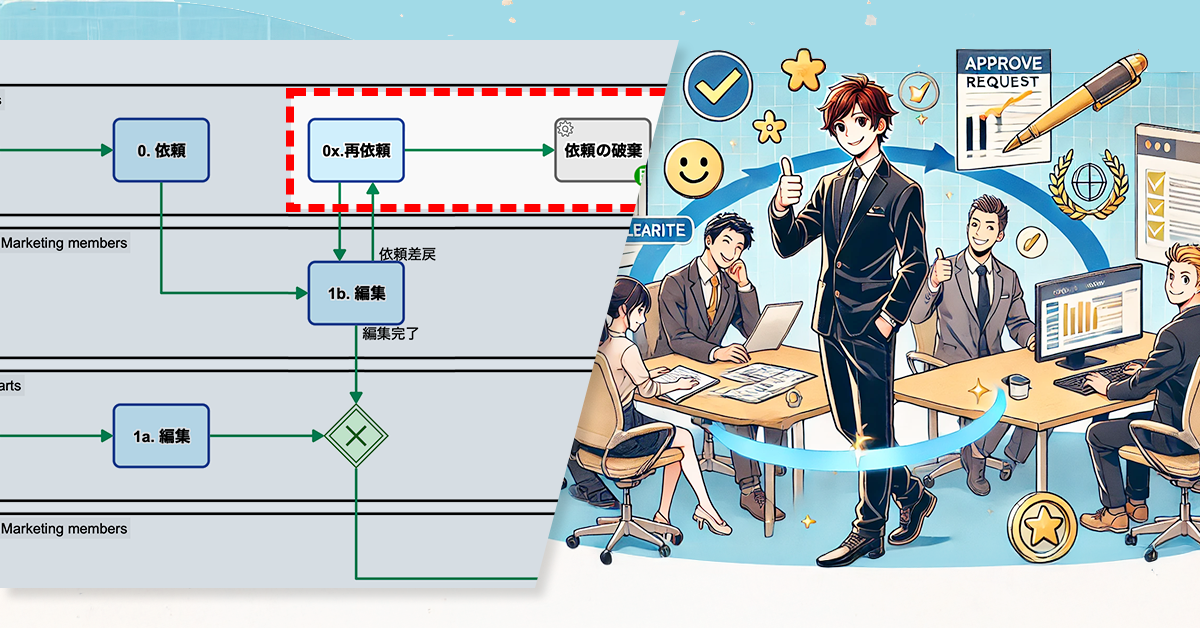
    プロセスオーナーは、編集者が依頼を差し戻せるフローを追加しました。具体的には、依頼内容に不明瞭な点や誤解の可能性を発見した場合、依頼を差し戻して修正を求めることが可能になります。

    これにより、編集者が適切な指示を受け、作業を進められるようになります。

    ワークフロー図の詳細を見る
    0. 依頼(Request)

    依頼者が作業を開始し、編集の依頼を行う。

    1. 編集(Edit)

    依頼者が作業を開始し、編集の依頼を行う。

    1a. 編集(Edit, 自発的な編集)

    編集者が自発的に編集作業を開始。

    1b. 編集(Edit, 依頼による編集)

    依頼者からの編集依頼を受けて編集作業を実施。

    2. レビュ(Review)

    編集者が作成した内容を確認し、問題がないかチェックする。修正が必要な場合は、編集者に再編集を依頼する。

    1x. 再編集(Re-edit)

    レビュ担当者からのフィードバックを受け、再編集を行う。

    ワークフロー図の詳細を見る
    0. 依頼(Request)

    依頼者が作業を開始し、編集の依頼を行う。

    0x. 再依頼(Request)

    編集者からの差し戻しについて対応する

    1. 編集(Edit)

    依頼者が作業を開始し、編集の依頼を行う。

    1a. 編集(Edit, 自発的な編集)

    編集者が自発的に編集作業を開始。

    1b. 編集(Edit, 依頼による編集)

    依頼者からの編集依頼を受けて編集作業を実施。

    2. レビュ(Review)

    編集者が作成した内容を確認し、問題がないかチェックする。修正が必要な場合は、編集者に再編集を依頼する。

    1x. 再編集(Re-edit)

    レビュ担当者からのフィードバックを受け、再編集を行う。

    案件の破棄

    再依頼の必要がない場合に終了させ

    ます

    Before / After 比較(スライダを動かせます)

    3. 効果

    業務の円滑化

    不明瞭な依頼を事前に修正できるため、編集者の迷いや行き違いが減少。

    意図が明確になることで、作業のやり直しが減少し、効率的な更新が可能に。

    作業効率の向上

    適切な指示を受けた状態で作業を開始できるため、試行錯誤の時間を短縮できます。

    依頼の修正回数が減り、編集者が本来の業務に集中できる時間が増加します。

    チームの連携強化

    誤解の少ない指示が増えることで、より質の高いコンテンツ制作が可能になります。

    4. その他の業務への応用

    デザイン修正

    クライアントからのフィードバックが曖昧な場合、デザイナーが直接確認を求められるようになり、認識のズレを防ぎながらスムーズな修正対応が可能になります。

    システム開発

    タスクの仕様が曖昧な場合、開発者が要件を明確にするために差し戻しを活用。結果として、開発途中の手戻りを削減し、よりスムーズな進行が実現できます。

  • ランダム割当で問合対応を公正に

    ランダム割当で問合対応を公正に

    BPO受託業務において、従来のローテーション割当を悪用し、自作自演の簡単問い合わせで負担を軽減する不正が発生。これによりオペレータ間の公平性が損なわれるため、割当方式をランダムに変更し、業務の公正化と負担分散を強化します。

    1.課題:ローテーション割当の悪用

    MoshiMoshiビーピーオー社は、BPO受託業務として、20人のオペレータがメール問い合わせに対応するコンタクトセンターを運営しています。

    対応者は従来、ローテーションで割り当てられていました。この仕組みでは、特定の順番で次の対応者が決まるため、オペレータは自身の割当タイミングを予測できる状態にありました。

    先般、この仕組みを悪用する事例が発生しました。一部のオペレータが自分に割り当てられるタイミングを狙って、簡単な問い合わせを自作自演で送信し、自身の業務負担を軽減する不正行為が起こりました。

    この不正行為は、オペレータ間の公平性を損ねます。さらに、不正によって工数が偏ることで、他のオペレータの負担増や対応遅延につながる恐れもあり、大きなリスクとなっています。

    2.解決策:ランダム割当への変更

    プロセスオーナーは、従来のローテーション割当方式を見直し、ランダムに対応者を決定する仕組みに変更しました。

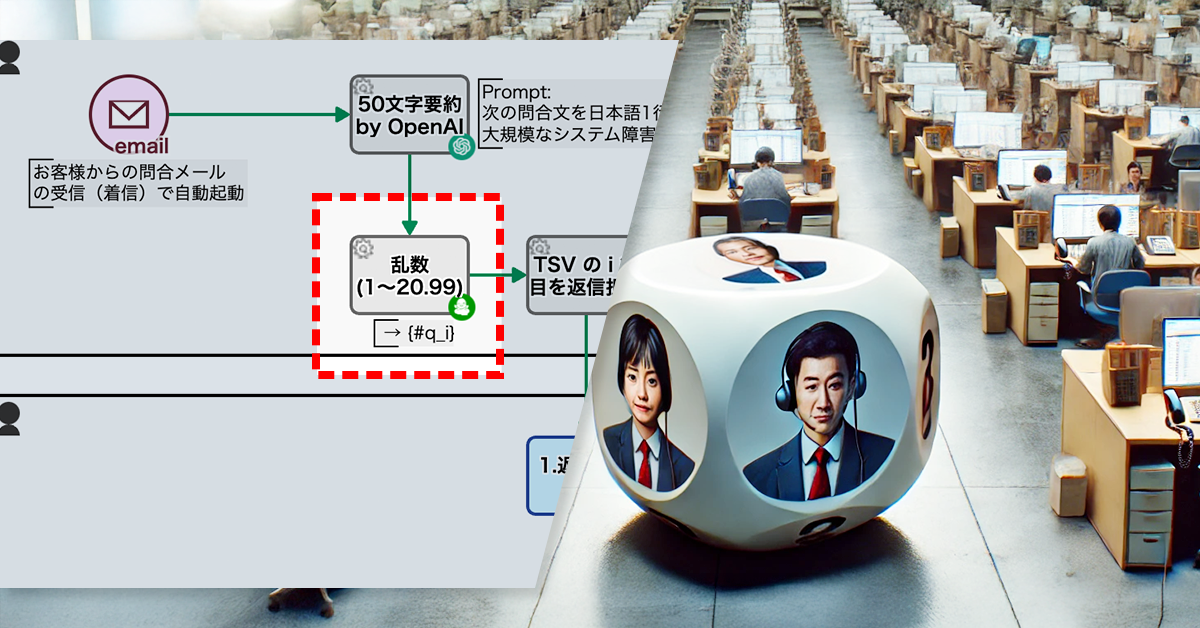
    具体的には、1~20の乱数が生成され、その値に応じた対応者に決定されます(例:乱数が5ならEさん、14ならNさん)。

    ※乱数の生成は、アドオン自動工程『数値: 乱数生成』を利用します。

    Before :

    詳細を見る
    • Email着信によりプロセス起動
    • 50文字要約 by OpenAI
      • Emailの内容が要約される
    • プロセス連番 % 20(20で割った余り) + 1
    • TSV の i 行目を返信担当にセット
    • 1.返信文の入力
      • 返信メールを送信
      • SVにレビュー依頼
    • 2.返信文のレビュー
    • Email送信

    After :

    詳細を見る
    • Email着信によりプロセス起動
    • 50文字要約 by OpenAI
      • Emailの内容が要約される
    • 乱数 1~20 が生成される
    • TSV の i 行目を返信担当にセット
    • 1.返信文の入力
      • 返信メールを送信
      • SVにレビュー依頼
    • 2.返信文のレビュー
    • Email送信

    Compare Before/After

    (スライダを使い before/after の比較が可能です)

    3.効果

    1. 不正な問合操作の防止
      • 問い合わせの割当が予測不可能になるため、不正な問い合わせ操作を未然に防ぐことができます。
    2. 対応業務の公平性向上
      • ランダム割当によって、特定のオペレータが有利になる状況を排除し、業務の公平性が向上します。
    3. 特定の従業員への業務の偏りの防止
      • ランダム割り当てによって、特定のオペレータへの業務負担の偏りを防ぐことができます。
  • 規程改廃を止めるな!見逃し防止策

    規程改廃を止めるな!見逃し防止策

    1. 課題:レビュー遅延による業務の停滞

    RuleRule製薬は、新薬の研究開発に特化した製薬会社です。新しい科学的知見や技術の進歩、安全性の確保の観点から、社内規程を最新の規制や基準に適合させる必要があり、頻繁に見直しを行っています。

    この見直しを円滑に進めるため、社内規程の改廃プロセスを活用しています。本プロセスでは、起案者が新たな規程案を登録すると、レビュアへ通知メールが送信される仕組みになっています。

    しかし、起案者が差し戻しを受けて修正・再提出した際には、レビュアに通知メールが送られないため、気づかれずレビューが遅れるケースが頻発していました

    2. 解決策:再提出時にも通知メールを配信

    この問題を解決するため、プロセスオーナーは、規程案が再提出された際にもレビュアへ通知メールが送信されるようにしました。

    具体的には、差戻対応タスクの再提出フロー後に統合ゲートウェイを配置し、再提出時にも通知メールが送信されるように変更しました。これにより、レビュアは再提出を確実に把握でき、見逃しを防げるようになりました。

    ※統合ゲートウェイとは…ワークフローの分岐・統合を制御するためのモデリング要素です。詳しくはこちら

    Basic Edition
    Advanced Edition
    Professional Edition
    ワークフロー図の詳細を見る
    1. 規程案入力 レビュア指名

    起案者が規定案を入力し、レビュアを指名します。

    2. 規程案をレビュー

    規程案が提出(※最提出含む)されると、指名レビュアは通知メールを受け取り、規定案をレビューします。

    1X. 差戻対応

    2.で差し戻しがあった場合は差し戻しに対応します。

    3. CEO承認/取締役会決議

    2.を受け、CEOが承認・不承認を判断します。

    件名に[成案]

    3.で承認となった場合は、案件の件名に[成案]というプレフィックスが付与されます。

    件名に[廃案]

    3.で不承認となった場合は、案件の件名に[成案]というプレフィックスが付与されます。

    Before/After (スライドで動かせます)

    3. 効果

    対応速度の向上

    レビュアが再提出を即座に把握できるようになり、レビューの遅延が解消されます。

    作業時間の短縮

    規程改廃プロセスの停滞が解消され、全体の作業時間が短縮される可能性があります。

    ミスの削減

    通知漏れがなくなり、コミュニケーションミスやプロセスの遅延が減ります。

    4. その他の業務への応用

    • 契約書の修正・管理
      • 契約書作成時、修正後の再提出を自動通知することで、承認プロセスの遅延を防ぎ、契約締結を迅速化できます。
    • 顧客対応における問い合わせ管理
      • 顧客からの問い合わせに対し、追加対応が必要になった場合に担当者へ自動通知を行うことで、対応の抜け漏れを防ぎ、迅速なフォローアップを可能にします。
    • 人事評価におけるフィードバックの管理
      • 上司が部下の評価に対してフィードバックを行い、差戻しがあった場合に自動で通知を行うことで、評価プロセスを円滑に進め、従業員の成長をサポートします。

    5. 提案資料

    当社サービスの導入を検討いただく際の提案書サンプルです。課題に対する解決策の概要を記載しています。実際の相談内容に応じて、内容を個別にカスタマイズして提供いたします。

  • 依頼先は自分?Web更新を迅速に

    依頼先は自分?Web更新を迅速に

    無駄な手続きゼロ!依頼不要で編集開始、スムーズな更新へ

    ※このプロセス改善ストーリーはフィクションです。実在の人物や団体などとは関係ありません。

    1. 課題:編集者が自分の作業リクエストを出す非効率

    DonDonウェブ社は50人規模のWebサイト制作会社です。マーケティング部では、Webページや広告クリエイティブ、販促資料などを日々更新しています。

    通常、マーケティング部では、依頼者からのWeb更新リクエストを受け、対応可能なメンバーが作業を引き受け、編集を行います。また、作業完了後は別の編集者がレビューを行います。

    しかし、編集者自身が「このページを更新すべきだ」と気づいた場合でも、まず依頼者として案件を登録しなければなりませんでした。この手間が負担となるだけでなく、まれに他のメンバーが同じ案件を引き受けてしまい、案件を登録した本人が編集できなくなることもありました。

    2. 解決策:編集者が自ら作業を開始できるフローを導入

    プロセスオーナーは、編集者が自ら判断し、すぐに作業を開始できるように、新たな編集工程を導入しました。これにより、従来の「依頼登録 → 編集作業」という流れを見直し、編集者は依頼登録を経由せずに、直接編集作業を開始できるようになりました。

    ワークフロー図の詳細を見る
    0. 依頼(Request)

    依頼者が作業を開始し、編集の依頼を行う。

    1. 編集(Edit)

    依頼者が作業を開始し、編集の依頼を行う。

    2. レビュ(Review)

    編集者が作成した内容を確認し、問題がないかチェックする。修正が必要な場合は、編集者に再編集を依頼する。

    1x. 再編集(Re-edit)

    レビュー担当者からのフィードバックを受け、再編集を行う。

    ワークフロー図の詳細を見る
    0. 依頼(Request)

    依頼者が作業を開始し、編集の依頼を行う。

    1. 編集(Edit)

    依頼者が作業を開始し、編集の依頼を行う。

    1a. 編集(Edit, 自発的な編集)

    編集者が自発的に編集作業を開始。

    1b. 編集(Edit, 依頼による編集)

    依頼者からの編集依頼を受けて編集作業を実施。

    2. レビュ(Review)

    編集者が作成した内容を確認し、問題がないかチェックする。修正が必要な場合は、編集者に再編集を依頼する。

    1x. 再編集(Re-edit)

    レビュ担当者からのフィードバックを受け、再編集を行う。

    Before / After 比較(スライダを動かせます)

    3. 効果

    自分で作業依頼を出す無駄な手続きが無くなりました

    • 依頼登録の手間がなくなり、迅速な業務が行えるようになりました。
    • 編集作業の重複を防ぎ、業務の無駄を削減します。
    • プロセス全体がスムーズに進行し、業務の停滞を防ぎます。

    4. その他の業務への応用

    デザイン修正

    クライアントやディレクターの指示を待たず、デザイナーが直接修正作業を開始できます。

    社内ドキュメントの更新

    必要な修正がすぐに反映され、業務マニュアルの鮮度を維持できます。

    商品情報の変更

    販売ページやカタログの修正がスムーズに行えます。

    バグ修正

    開発者が気づいた不具合を即座に修正できる体制を構築できます。

  • ワードプレス草稿を一元管理

    ワードプレス草稿を一元管理

    1. 課題:草稿が管理されていない

    ◯△×社のマーケティング部では、WordPress.com を活用してWebサイトを運営しています。

    他部署から依頼された記事については、ワークフローアプリを通じて草稿が共有され、投稿プロセスに沿って管理・校正を行ったうえで公開しています。

    一方で、マーケティング部のメンバーが自ら記事を執筆する際は、直接 WordPress.com にログインして草稿を作成しており、ワークフローを経由しないため、草稿の管理が十分に行き届いていない状況です。

    2. 解決策:全ての草稿をワークフローシステムで一元管理

    この課題を解決するため、プロセスオーナーはすべての草稿をワークフローシステムで管理できるようにしました。

    具体的には、記事作成プロセスに「草稿投入」の専用フローを追加し、マーケティング部のメンバーが草稿を登録できる仕組みを構築しました。

    これにより、他部署からの依頼による草稿も、マーケティング部内で作成された草稿も、すべてワークフローシステム上で一元管理できるようになりました。

    Basic Edition
    Advanced Edition
    Professional Edition
    ワークフロー図の詳細を見る
    依頼原稿をバックアップ

    他部署からの依頼原稿が、自動的にバックアップされます。

    画像をWPへ

    WordPress.com 上にメディアファイルをアップロードします。

    原稿をWPへ

    WordPress.com 上に下書き状態の記事(投稿)を作成します。

    微修正して公開

    マーケ部員が下書きを微修正して、公開します。

    公開通知

    記事の公開が部内共有されます。

    Basic Edition
    Advanced Edition
    Professional Edition
    ワークフロー図の詳細を見る
    草稿投入(社員のみ)

    マーケティング部社員が作成した草稿が投入できます。

    依頼原稿をバックアップ

    他部署からの依頼原稿が、自動的にバックアップされます。

    校正

    公開に必要な全項目がセットされていない場合、マーケ部員が原稿の校正を行います。

    画像をWPへ

    WordPress.com 上にメディアファイルをアップロードします。

    原稿をWPへ

    WordPress.com 上に下書き状態の記事(投稿)を作成します。

    微修正して公開

    マーケ部員が下書きを微修正して、公開します。

    公開通知

    記事の公開が部内共有されます。

    Before / After 比較(スライダが左右に動きます)

    3. 効果

    記事進行状況の可視化

    誰がどの記事を執筆しているか、進捗や履歴を含めて一覧で把握できます。

    必須項目の入力漏れ防止

    ワークフローアプリのチェック機能により、入力ミスや抜け漏れがなくなります。

    作成件数のモニタリング

    登録された記事数をリアルタイムで確認でき、業務量が把握できます。

    4. その他の業務への応用

    「誰が」「何を」「どこまでやったか」を明確にし、履歴を残す必要がある業務に応用できます。

    • 社内報やニュースレターの制作管理
    • SNS投稿やキャンペーン原稿の作成フロー
    • マニュアル・資料作成の進捗管理
    • 動画やデザイン制作のレビュー・公開プロセス
    • 問い合わせ対応文面のレビュー・承認管理