Kyoto, Japan July 8th, 2019 Questetra, Inc., the global SaaS provider of Business Process Management (BPM), today announced that they have published the new version 11.11 of the Cloud-based Workflow product “Questetra BPM Suite” on Jul. 8th, 2019. This new version introduces a mechanism of automatically appending rows to a Google Sheets using only the standard features.
In daily work, various systems and services besides Workflow systems are used within the organization for the purpose of sales support, file storage/sharing, communication, collaboration, etc. In order to improve the convenience and productivity of users, it is essential to automate data coordination and processing among these multiple services.
Up to now “Questetra BPM Suite” has been capable of passing and receiving data in cooperation with external services by setting up HTTP communication or importing packaged “Add-ons” for communication processing, but knowledge of APIs and preparations in advance were required for them. In v11.11 a Service Task that performs the function has been added. By using the Service Task you will be able to build a system such as an “Order acceptance flow”, for example, in which data concerning an order is automatically added to a Google Sheets right after the approval Step is processed, without the need for any extra programming.
Questetra BPM Suite
Cloud-based Workflow “Questetra BPM Suite” is a business platform for realizing paperless environments and remote-working.
Business issues are controlled according to a Business Flow Diagram. When a Process reaches a Human Task, the user will be asked to add their input. Also, when an issue reaches an automated Step the predetermined processing (server-side processing) such as “Generate PDF” and “Save to cloud storage” is performed automatically. (BPM: Business Process Management)
You can apply it to various business operations such as “Approval request flow”, “Document translation flow”, Quality check process, “Invoice issuance process”. Process owners of each Business Process can practice “improvement of Business Process” little by little in daily work.
Google Sheets: Append New Row
It will be able to automatically append data to Google Sheets using the Service Task. When you are using Google Sheets for aggregating sales or expenses, you can connect them with your business. Thus, you can reduce the work time spent on the administration of this process.
Other Improvements
Google Sheets: Download Choice Data
It allows you to collectively retrieve various master data (i.e. Customer master, Product master, etc.) automatically using the Service Task. The retrieved data can be used as options in the Select type Data Item.
Converter (Date to Japanese era string)
Using the Service Task, Date type and Datetime type data can be converted to a string of Japanese calendar date format. (e.g. Converts a value of Date type Data “2019-07-08” to “令和元年7月8日”)
Google Drive: Folder Search
This Service Task allows you to search for folders on Google Drive. It can be used incorporated in processing such as to store files to a folder that are found in a search.
業務案件は業務フロー図に従ってコントロールされ、案件が人間工程に到達すれば担当者はアウトプットを求められます。また、案件が自動工程に到達した際には、「PDFの生成」や「クラウドストレージへの保存」といった既定の処理(サーバサイド処理)が自動的に行われます。 (BPM: Business Process Management)
I have experienced working with RPA tools such as BasicRobo (Formerly BizRobo), UiPath (Server: UiPath Orchestrator) and WinActor (Server: WinDirector), and there are a number of ways to achieve integration with them, so I’d like you to refer to the following articles.
Authentication (Single Sign-on)
Questetra BPM Suite is capable of OpenID integration with G Suite. It can also be connected to a Single Sign-on service via G Suite. (e.g. Cloud Gate > G Suite > Questetra)
In addition, it is capable of authentication cooperation with SAML 2.0, and I have experience of making connections with IdPs (authentication servers) such as Office 365 (On-premise Active Directory+ADFS or Azure Active Directory), OneLogin, HENNGE one, and Salesforce.
I have a track record of making connections with groupware such as G Suite, Office365, and Cybozu Garoon. We have examples of cooperation with services such as Google Spreadsheet, Google Calendar, SharePoint Online, and Microsoft Excel, all of which are included in these Groupware. With Cybozu Garoon, there’s an example of portlet-based integration. * Examples of integration via authentication and with chat services is summarized separately in another category.
There are cases of cooperation with online storage such as Box, Dropbox, Google Drive, and OneDrive. Since there is a limit in the size of file attachments in Questetra, you can expand the range of support by combining it with these online storage services.
There are examples of collaboration with services such as Salesforce, kintone, Zoho CRM, e-sales manager: Remix CLOUD, Synergy! and Oracle CRM On Demand. * kintone is not specific to CRM, however I have included it because it is often compared with CRM.
There are examples of cooperation with chat services such as, Slack, Chatwork, Microsoft Teams, Google Hangouts Chat Typetalk and LINE. For Slack in particular, there are some integration add-ons which have been pre-installed.
Input/ Output of paper (Scanner/ Fax etc)
There are examples of cooperation with paper related services such as SVFCloud (document generation ), ScanSnap(scanning), Transfax, eFax(faxing), Google Cloud Print and convenience store printing.
There are other examples of integration with various services. There are various methods of cooperation such as using REST API, email and via csv file, etc.
We have been able to integrate with quite a lot of systems and services. As I mentioned at the beginning, services with REST API have a high possibility of integration even if they are not listed, and they are expected to increase more from now on.
If you have any questions or concerns etc., please feel free to contact us using the inquiry form. We can also handle consultations related to collaboration with the service.
Apply for Free Edition of Questetra (Starter Plan) Here
By applying for a free Questetra account of your own you will be able to use all the Questetra features including those mentioned above.
Directly imports files released by the government into business data
Kyoto, Japan – April 8th, 2019 – Questetra, Inc., the global SaaS provider of Business Process Management (BPM), today announced that they have published the new version 11.10 of the Cloud-based Workflow product “Questetra BPM Suite” on Apr. 8th, 2019. This new version is capable of importing designated files into Business data automatically. In a Workflow App for corresponding to document request, for example, document files to be sent to the customer is attached automatically.
In daily work, “files” are used in various scenes. To deal with many files, the effort of downloading the files and uploading them to the system is iterated. While work styles reform being promoted so productivity improvement has been attracted much attention, if you can automate file-related tasks, you can expect to be able to concentrate on more added value operations.
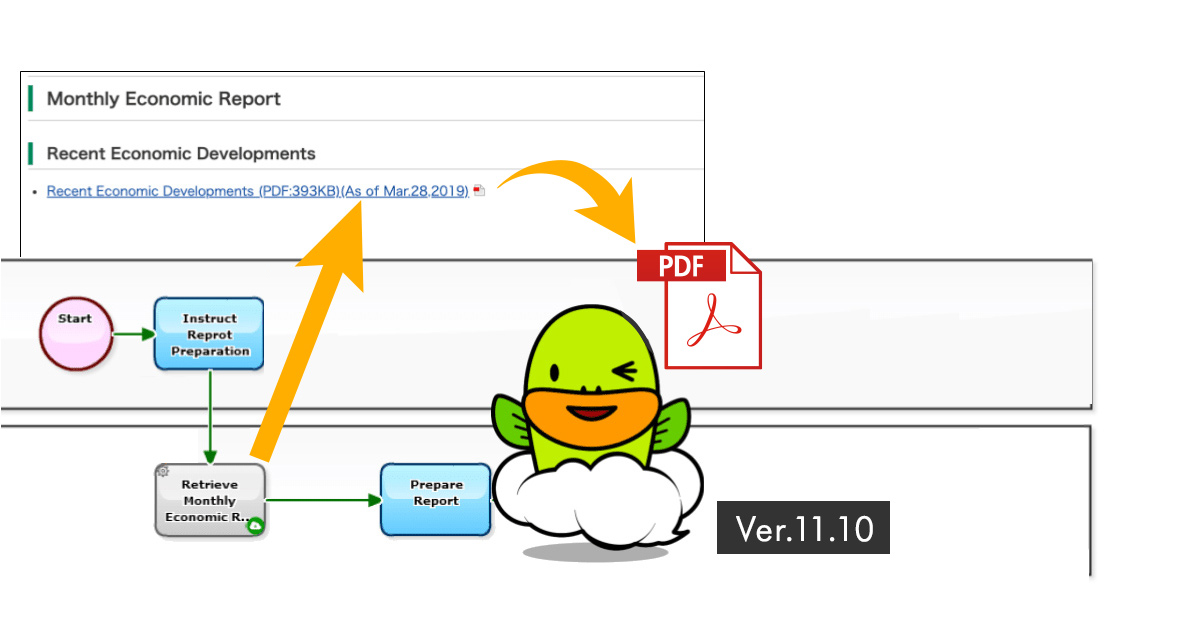
Until now, retrieving files stored on the Internet was possible by HTTP communication and simple programming, but it required preparation based on the knowledge regarding communication and programming. On and after the new version 11.10, a Service Task for “downloading files from any website” is added. With this, you can easily obtain files from any web site simply by placing and setting modeling elements on a Workflow diagram. By utilizing this feature, it is possible to configure a scheme that automatically attaches monthly statistical data (PDF) published by the government every month or catalog file in responding to the customer request.
Questetra BPM Suite
Cloud-based Workflow “Questetra BPM Suite” is a business platform for realizing environments of paper-less and remote-working. Business issues are controlled according to Business Flow Diagram. When a process reaches a Human Task, the user will be asked to input. Also, when an issue reaches to automated Step, the predetermined processing (server-side processing) such as “Generate PDF” and “Save to cloud storage” is performed automatically. (BPM: Business Process Management)
You can apply it to various business operations such as “Approval request flow”, “Document translation flow”, “Quality check process, “Invoice issuance process”. Process owner of each Business Process can practice “improvement of Business Process” little by little in daily work. (Examples of Business Flow Diagram: https://en.workflow-sample.net/)
Automatic File Retrieving
Using this Service Task, files on any website can be automatically set (attached) to File type Data Item. Instead of you had to download a file on the Internet manually and then upload (attach) it to File type Data Item so far, you can automate this task.
Other Improvements
Slack File Upload
Using this Service Task, it is possible to post files to the specified channel of Slack, an enterprise social networking. You can check files (deliverables, etc.) created and confirmed on a Workflow on the e-chat that you use on a daily basis.
Expansion of utilization of Field Name
In Service Task (Data Assignment), it becomes possible to write formulas using “Field Names”. Utilizing Field Names, maintainability will be improved since checking of configuration becomes easier for good visibility.
Easy configuration for OAuth2.0
Configuring a Service Task (Add-on), OAuth2 setting can be done by selecting.
これまでも HTTP 通信や簡単なプログラミングを行うことで、インターネット上に置かれたファイルを取得することが可能でしたが、通信やプログラミングに関する知識と準備が必要でした。新バージョン 11.10 からは「任意の Web サイトからファイルをダウンロード」するサービス工程が追加されます。これにより、ワークフロー図上にモデリング要素を配置・設定するだけで、任意のWebサイトから簡単にファイルを取得できるようになります。この機能を活用することで、毎月政府が公開する月例統計データ(PDF)、お客様の要求に応じた資料ファイルなどを自動添付する仕組みを構築することができます。
Questetra BPM Suite とは
クラウド型ワークフロー『Questetra BPM Suite』は、ペーパーレス環境やリモートワーク環境を推進するための業務プラットフォームです。 業務案件は業務フロー図に従ってコントロールされ、案件が人間工程に到達すれば担当者はアウトプットを求められます。また、案件が自動工程に到達した際には、「PDFの生成」や「クラウドストレージへの保存」といった既定の処理(サーバサイド処理)が自動的に行われます。 (BPM: Business Process Management)