ブログ

  • Ichijo Sendai CO., Ltd.

    Ichijo Sendai CO., Ltd.

    The company automates the interactions of documents with subcontractors in constructing the wooden residential housing with Questetra BPM Suite. The company also dramatically reduces the cost of construction management and legal ledger preparation.

    Ichijo-sendai-OPG

    Ichijo Sendai CO., Ltd.

    Established

    1986

    Number of Employees

    110

    Business

    Construction of custom-made wooden houses


    Industry

    Construction

    User Departments

    Manufacturing dept (Construction)

    Automation dramatically reduces the burden on the our on-site supervisors and our subcontractors

    Q. Which task does the company aim to improve?

    We, Ichijo Sendai CO., Ltd. are part of the Ichijo Komuten group, a custom house builder specializing in wooden residential housing. We operate their business in 6 areas of Miyagi and Iwate Prefecture.

    We pursue uncompromising performance of housing in all areas of energy conservation, earthquake resistance, durability, and health.

    After signing a contract with a customer, their house is completed through various processes, including site surveys, discussions on specifications, design, and construction. We have worked on BPM (Business Process Management) to dramatically improve construction operations.

    Q. What were the challenges in the construction business?

    In construction, various types of construction work, such as foundation work, carpentry work, exterior wall work, and equipment work, are generally outsourced to subcontractors for each type of construction. As the construction progresses, our on-site supervisors need to report, communicates, and confirms various procedures such as requests, inspections, and payments with our subcontractors.

    In recent years, delays in communication and reporting have happened frequently due to the complicated procedures, and the burden of on-site supervisors has become increasingly problematic. Therefore, we have started to fundamentally reconsider some operations related to construction management.

    These interactions were done by fax, so we encountered the following challenges:

    • Fax transmission is a big burden to both our on-site supervisors and our subcontractors
    • Our on-site supervisors have to take a lot of time to prepare documents
    • Our on-site supervisors have to go back to their office just to check the receipt of a fax
    • When they missed a fax transmission, the time and mental burden of following it up is significant

    Because of the large amount of time and effort involved in using fax, many of our on-site supervisors had a lot of overtime work. In addition, they had a difficult time grasping the situation so they couldn’t communicate with the subcontractors smoothly, which sometimes delayed the construction.

    To automate the operations we installed Questetra BPM Suite.

    Automation of legal ledger preparation

    Q. How exactly does it work?

    We automate the creation and saving of the following documents to Google Drive with Questetra BPM Suite:

    • Documents prepared by our on-site supervisors
      • Construction request
      • Notification of inspection acceptance, request for transfer and claim
    • Documents created by subcontractors
      • Construction completion report, request for inspection
      • Confirmation of transfer, invoice processing notification

    The assistant extracts the construction plan data managed by the core system as CSV data and converts it into a Google Spreadsheet. After that, the data is automatically put into Questetra BPM Suite via a Google Sheets script.

    Questetra BPM Suite automatically generates the documents mentioned above (construction request or notification of inspection acceptance, etc.) as a PDF file to meet the schedule based on the construction plan data.

    Our subcontractors automatically receive an email with these files attached. They can report the completion of construction or invoice processing notification by simply replying to the email with a comment. At the same time, the relevant documents (construction completion report or invoice processing notification) are automatically generated as well.

    The files are automatically saved to Google Drive, so our on-site supervisors can use Google Drive’s browse and search functions to check and review the contents of the files if necessary in the construction site.

    Consequently, our on-site supervisors successfully reduced the time spent going back to their office to confirm the receipt of the fax and doing overtime. At the same time, our subcontractors also reduced the time and effort required to exchange documents, so the delay in construction due to using fax has been significantly reduced.

    Expanding BPM into sales and design operations

    According to Article 40, paragraph 3 of the Construction Business Act, a company should create and store the records on their orders concerning the types of construction work, date, subcontractors, and price.

    In order to build a house, dozens of kinds of construction are sometimes outsourced. Our administrative processing system had a lack of resources in compiling the process control records, management of orders, and financial management in one ledger. That was because they were managed by different systems and that took a lot of time and effort.

    However, since we installed Questetra BPM Suite to manage the construction work that our on-site supervisors are responsible for, all the information required in the ledger has been recorded in Questetra BPM Suite. Therefore, they built a system to generate a ledger PDF automatically based on data stored in Questetra BPM Suite. Thus, the task of creating a ledger was automated.

    Within our office, through their BPM initiatives with Questetra BPM Suite, the following points were widely recognized.

    • Integrating Google Workspace with the BPM system can achieve a significant reduction of administrative processing
    • Automation of clerical work that used to rely on part-timers can be carried out gradually and steadily

    Based on this experience, we plan to combine Google Workspace functionality with BPM systems to facilitate efficiency in the operations of the sales division, design division, general affairs division, etc. which mainly use Google Workspace functions such as Gmail, Google Drive, Meet, and Google Forms.

    (This article was created based on an interview with the staff of Questetra who is in charge of Ichijo Sendai CO., Ltd.)

    (In publishing this article we have obtained permission from the representative at Ichijo Sendai CO., Ltd.)

  • Cloud BPM v12.1, Listing by High Priority

    Cloud BPM v12.1, Listing by High Priority

    Original Japanese version

    Never missing a primal issue, accelerating productivity improvement

    Kyoto, Japan, July 13th, 2020, Questetra, Inc., the global SaaS provider of Business Process Management (BPM), today announced that they have published the new version 12.1 of the Cloud-based Workflow product “Questetra BPM Suite” on Jul. 13th, 2020. This new version allows displaying a list of your duties narrowing down by conditions you wish such as “new arrival” or “close to deadline” with one click.

    Amid growing concerns over labor shortages due to work style reforms and the declining birthrate and aging population, improving productivity is a major issue. In the most business scene, employees themselves are also trying to implement measures to improve their productivity. A huge amount of work is being processed in daily business, and it is one of the ways to improve productivity that processing duties in the order of priority.

    Although it was possible to classify by the priority by putting stars on one’s tasks in Questetra BPM Suite, it was troublesome that they had to be manually attached. In the new version 12.1, a feature that allows narrowing down tasks by conditions you like is provided. With this feature, you can one-click display the narrowed down tasks list after saving the criteria that filter by high priority specific task, client, or words in the title, etc.

    Questetra BPM Suite

    Cloud-based Workflow Questetra BPM Suite is a business platform for realizing paperless environments and remote-working. Business issues are controlled according to a Business Flow Diagram. When a Process reaches a Human Task the user will be asked to add their input. Also, when an issue reaches an automated Step the predetermined processing (server-side processing) such as Generating PDF and Saving to cloud storage is performed automatically. (BPM: Business Process Management))

    You can apply it to various business operations such as Approval request flow, Document translation flow, Quality check process, and Invoice issuance process. Process owners of each Business Process can practice the Improvement of Business Processes little by little in daily work.

    Filtering function on My Tasks and Offered

    On the screens of [My Tasks] and [Offered] that lists tasks, you can now execute searches with setting search conditions and specifying display items. And the configured condition can be named, saved, and displayed on the side menu as a button. Using the button, you can display the search result (the list of filtered tasks) with one click.

    Other Improvements

    Paging display of My Tasks/Offered

    When the number of Tasks in My Tasks or Offered exceeds the specified number, they are displayed on multiple pages. You no longer need to scroll all the way down to the bottom, by specifying the number of items per page appropriately.

    Indication of Contract information

    You can check the “Edition” and “Payment Plan” on the license information page (viewable only by the system administrator).

    Enhanced Script Task

    The Script Task is now capable of parsing the XML string and encoding/decoding Bsc64. Also capable of getting the header information of the response to the HTTP request sent in the script.

    See the release notes for details.
    Ver. 12.1 Release Note: https://support.questetra.com/versions/version-1210/

  • クラウド型ワークフローv12.1、優先度の高い仕事の一覧表示

    クラウド型ワークフローv12.1、優先度の高い仕事の一覧表示

    SaaSベンダーの株式会社クエステトラ(京都市、代表執行役 CEO 今村元一)は7月13日、クラウド型ワークフロー製品である 『Questetra BPM Suite』 の新バージョン12.1を公開しました。新バージョン12.1では、「新着の」や「締切が近い」など、目的に応じて絞り込んだ自分の仕事の一覧を、ワンクリックで表示できるようになります。

    働き方改革の推進や少子高齢化により労働力不足の懸念が高まる中、生産性の向上が大きな課題となっています。多くの業務遂行の現場では、従業者自身も生産性向上の施策に取り組んでいます。日々の業務では、膨大な量の仕事が処理されますが、優先度の高い仕事から処理されるようにすることは、生産性を高めるための工夫の一つです。

    『Questetra BPM Suite』は、これまでも自分の仕事にスターマークをつけて、優先度の高いものを分類することは可能でしたが、手動でつけなければならないという課題がありました。新バージョン12.1からは、自分の仕事を目的に応じた条件で絞り込むことができる機能が提供されます。これにより、例えば、優先的に対応しなければならない工程、顧客、件名に含まれる文言など、で絞り込む件を保存しておき、絞り込まれた仕事の一覧をワンクリックで表示することが可能になります。

    Questetra BPM Suite とは

    クラウド型ワークフロー『Questetra BPM Suite』は、ペーパーレス環境やリモートワーク環境を推進するための業務プラットフォームです。業務案件は業務フロー図に従ってコントロールされ、案件が人間工程に到達すれば担当者はアウトプットを求められます。また、案件が自動工程に到達した際には、「PDFの生成」や「クラウドストレージへの保存」といった既定の処理(サーバサイド処理)が自動的に行われます。(BPM: Business Process Management)

    「稟議承認フロー」「文書翻訳フロー」「品質チェックプロセス」「請求書発行プロセス」といった様々な業務に適用していただけます。各業務のプロセスオーナーは日々の業務の中で少しずつ「業務プロセスの改善」を実践することが可能です。

    (業務フロー図サンプル: https://questetra.zendesk.com/hc/ja/articles/360012492211

    マイタスク / 引き受け待ちタスクの絞り込み機能について

    自分の仕事が一覧表示される「マイタスク」と、引き受け待ち状態の仕事が一覧表示される「引き受け待ち」において、検索条件や表示項目を設定して検索できます。それらの設定に名前をつけて保存し、サイドメニューに表示させることができます。これにより、予め設定しておいた設定に基づく検索結果(絞り込まれた仕事の一覧)を、ワンクリックで表示することができるようになります。

    その他の機能改良について

    マイタスク / 引き受け待ちタスクのページング表示

    自分の仕事や引き受け待ち状態の仕事が指定された件数を越える場合に、複数ページに分けて表示されます。1ページあたりの件数を適切に設定することで、画面スクロールの回数を減らすことができます。

    契約情報の表示

    ライセンス情報ページ(システム管理者のみ閲覧可能)で、契約中の「エディション」と「支払プラン」を確認できます。

    スクリプト工程を強化

    スクリプト工程にて、XML 文字列を解析したり、Bsc64 エンコード / デコードができるようになります。また、スクリプト内で送信した HTTP リクエストについて、レスポンスのヘッダ情報を取得できるようになります。

    詳細については、リリースノートを御参照ください。

  • Cloud BPM, Kicking Off New Service System

    Cloud BPM, Kicking Off New Service System

    Original Japanese version

    Providing functions and supports fit your needs

    Kyoto, Japan, July 1st, 2020, Questetra, Inc., the global SaaS provider of Business Process Management (BPM), today announced that they will start vending Questetra BPM Suite, a cloud-based workflow product, in their new service system.

    Background of service system renewal

    In recent years, the environment surrounding companies has changed drastically due to the global economic recession caused by COVID-19, diversification of values regarding work styles, and the occurrence of disasters due to climate change. In addition, improvement in productivity has become an urgent issue because of the reduction of working hours due to work style reform and the decrease in the working population due to the declining birthrate and aging population.

    Even under these circumstances, companies must continue to grow steadily. To that end, you must work on improving business processes in order to respond to changes in the business environment and to increase productivity. Furthermore, you must continue to make improvements instead of ending it at one time.

    We, Questetra Co., Ltd. has decided to renew our service system of Questetra BPM Suite, considering that many companies will promote existing business process improvement efforts.

    Concerning the service system renewal, we have taken the following three points into consideration.

    • Increasing the number of automated processes that would increase productivity
    • Providing detailed support to users who work on business process improvement
    • Allows you to choose from four editions with the combination of features and support that meets your needs

    By reforming this service system, we believe the users of Questetra BPM Suite will have a greater chance of improving your business processes that will lead to success in business.

    Details of new service system

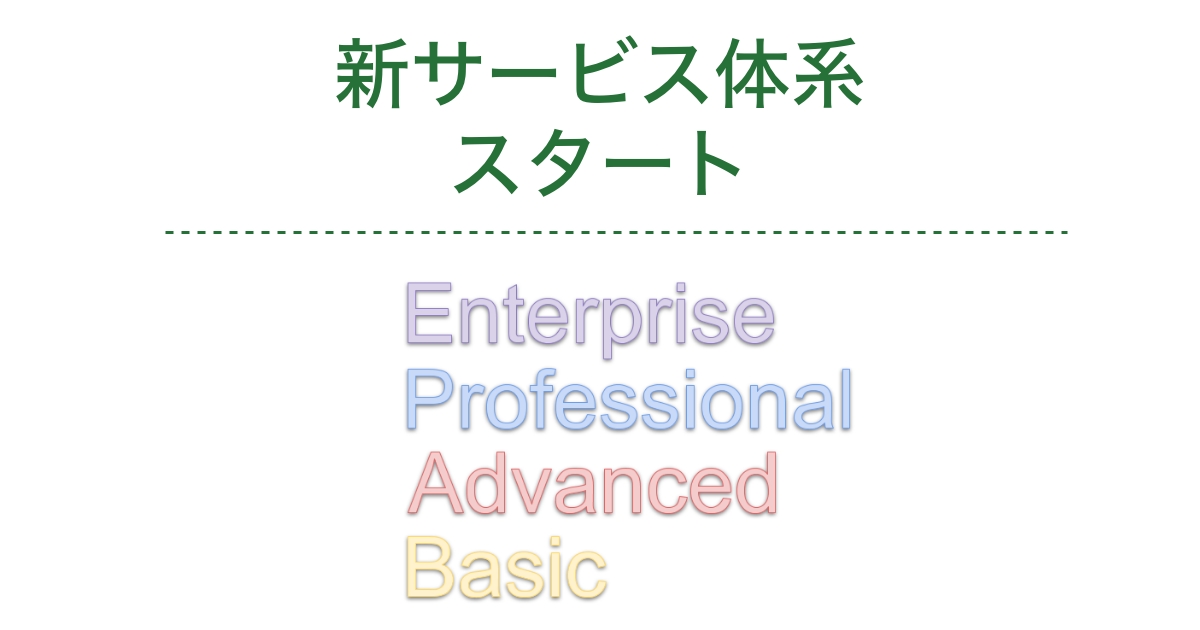
    It consists of four editions with different features and support available.

    • The price is for one month per user. Excluding tax. Separately, there is an annual contract price (20% OFF).
    • Trial mode: 100 users / 60 days available / Free
    • If you wish “Don’t want to be affected by other users,” or “Want to access in the domain of my organization,” please consider using the Enterprise edition.

    Please also refer to the following page for consideration.

  • クラウド型ワークフロー、新サービス体系を開始

    クラウド型ワークフロー、新サービス体系を開始

    SaaSベンダーの株式会社クエステトラ(京都市、代表執行役 CEO 今村元一)は7月1日、「Questetra BPM Suite Basic」「Questetra BPM Suite Professional」等、4種類のワークフローサービスを開始しました。

    サービス体系刷新の背景

    近年、新型コロナウイルスの影響による世界レベルの景気失速、ワークスタイルに対する価値観の多様化、気候変動による災害の発生など、企業を取り巻く環境は激しく変化しています。また、働き方改革による労働時間の削減や少子高齢化による労働人口の減少の影響を受け、生産性の向上が喫緊の課題となっています。

    このような状況の中でも、企業は着実に成長を続けなければなりません。そのためには、ビジネス環境の変化に対応し、かつ生産性を向上させるために、ビジネスプロセスの改善に取り組むことが求められます。更にいうと、改善は一度で終わらせず、継続的に取り組まれなければなりません。

    今後、多くの企業において、既存のビジネスプロセス改善の取り組みが推進されると考え、株式会社クエステトラは『Questetra BPM Suite』のサービス体系を刷新することにいたしました。

    サービス体系の刷新においては、次の 3 点を考慮しております。

    • 生産性を高める自動処理工程の数を増やす
    • ビジネスプロセス改善に取り組むユーザに、きめ細やかなサポートを提供する
    • ユーザのニーズに合った機能とサポートの組み合わせを 4 つのエディションから選べるようにする

    本サービス体系の刷新により、『Questetra BPM Suite』のユーザ様はビジネスプロセスの改善を通じて事業が成功する確率が高まると考えております。

    新サービス体系の詳細

    利用可能な機能とサポートが異なる 4 つのエディションから構成されます。

    • 価格は1ユーザあたりの1カ月分。税別。別途、年間契約の価格あり(20%OFF)。
    • Trial モード: 登録可能ユーザ数100 / 60日間利用可能 / 無料
    • Enterprise は「他ユーザの影響を受けたくない」「自分たちの組織のドメインでアクセスしたい」などのご要望がある場合にご利用をご検討ください。

    以下についても参考にしてください。

  • 株式会社一条工務店仙台

    株式会社一条工務店仙台

    木造住宅の建築において発生する協力会社様との書類のやり取りを自動化。施工管理業務や法定台帳の作成業務を大幅にコストダウン。

    Ichijo-sendai-OPG

    株式会社一条工務店仙台

    昭和61年

    110名

    木造注文住宅建設事業

    製造・開発(施工業務)

    この事例に関連するプロセス改善記事

    この記事の目次

    「施工」関連業務が効率化のターゲット

    “株式会社一条工務店仙台” は、“株式会社一条工務店” のグループ会社である、木造住宅を専業とするハウスメーカー(注文住宅メーカー)です。宮城県、岩手県の 6 箇所の拠点から営業を展開しています。

    「家は、性能。」という企業ポリシーのもと、省エネ・耐震・耐久・健康、すべてにおいて “妥協しない性能” を追求しています。

    住宅は、お客様との契約の後、敷地調査・仕様の打ち合わせ・設計・施工など、様々な工程を経て完成します。今回、一条工務店仙台が BPM (Business Process Management) に取り組み、業務効率を劇的に改善させるターゲットとしたのは、「施工」に関連する業務です。

    FAXの利用による非効率さを解消へ

    「施工」の工程では一般に、基礎工事、大工工事、外壁工事、設備工事といった、様々な種類の工事が施工種別ごとに協力工業者様に委託されることになります。工事の進行に応じて、一条工務店仙台の社員である “現場監督” との間で、依頼・検査・支払など多岐にわたる手続きをヌケモレなく「報告・連絡・確認」することが必要となります。

    近年に至り、手続きの煩雑さが原因となる「連絡・報告」遅れが散見されるようになったり、“現場監督” の時間的な業務負荷が問題視される機会が増えてきたため、施工管理業務の抜本的な見直しが検討されることとなった次第です。

    これらのやり取りが FAX を利用して行われていましたが、次のような課題が存在していました。

    • FAX 送信の手間が、現場監督・協力会社様の双方にとって大きい。
    • 現場監督は、書類を作成する手間が大きい。
    • 現場監督は、受信した FAX を確認するためだけに事務所に戻る手間が大きい。
    • FAX 送信モレが発生した時、後追い確認の時間的・精神的な負担が大きい。

    このように FAX の利用における手間の大きさから、多くの現場監督は残業過多に陥っていました。また、状況の把握をしづらいことが原因で、情報伝達に遅れが生じ、施工の遅れにつながってしまうことも発生していました。

    このような状況を「業務の自動化」で解決するために Questetra BPM Suite が採用されました。

    法定の台帳作成業務を自動化

    Questetra BPM Suite で、以下の書類を作成し、Googleドライブへ保存する業務が自動化されました。

    • 現場監督が作成するもの
      • 工事依頼書
      • 検査合格通知書、引渡・請求依頼書
    • 協力会社様が作成するもの
      • 工事終了報告書、検査依頼書
      • 引渡確認書、請求処理通知書

    基幹システムで管理されている施工計画データを、アシスタントが CSV データとして抽出し、Google スプレッドシートの形に変換します。その後、そのデータは Google スプレッドシートのスクリプトにより Questetra BPM Suite に自動投入されます。

    Questetra BPM Suite では、施工計画データに基づいた工事のスケジュールに合わせて、前述の書類(工事依頼書や検査合格通知書など)が PDF 形式のファイルとして自動的に生成されます。

    協力会社様には、これらのファイルが添付されたメールが自動送信されます。協力会社様は、メールに簡単なコメントをつけて返事をするだけで、工事終了報告や請求処理通知を行うことができます。また、それと同時に関係する書類(工事終了報告書や請求処理通知書)が自動的に生成されます。

    “現場監督”と “協力業者様” の負担が激減

    生成されたファイルは、Google ドライブにも自動保存されるため、現場監督は必要に応じて Google ドライブの検索機能や閲覧機能を利用してファイルの内容を『現場にいながら』確認することができます。

    現場監督は、ドキュメント作成の手間や、FAX の受信を確認するために事務所に戻るという手間がなくなり、残業が大幅に減りました。同時に、協力会社様の方でも書類のやり取りに関する手間が減ったことから、FAX の送信漏れなどによる工事の遅れも大幅に削減されました。

    販売や設計業務にも BPM を広げたい

    建設業法では、どのような工事を、いつ、どの協力会社様に、いくらで発注したのか台帳を作成し保管しなければならないことが定められています(建設業法第40条3)。

    1 軒の家を建てるには、数十種類の工事が発注されることがあります。一条工務店仙台では、『工程の管理』『発注の管理』『財務管理』が別々のシステムで管理されている為、これらの工事の記録を一つの『台帳』にまとめるのは、手間が大きく現状の事務処理体制ではリソース不足という課題がありました。

    現場監督が担当する「施工」業務を Questetra BPM Suite で管理するようになってからは、台帳に記載するべき情報がすべて Questetra BPM Suite 上に記録されるようになりました。そこで、Questetra BPM Suite に格納されたデータに基づく台帳PDFを、自動的に生成する仕組みを構築しました。こうして、台帳を作成する業務も自動化されました。

    一条工務店仙台の社内では、今回の Questetra BPM Suite を利用した BPM の取り組みを通じて、

    • G Suite と BPM システムを連携させる事で、大幅な事務処理の削減を実現できること
    • パートさんの手作業に頼っていた事務処理業務の自動化を少しずつ着実に進めていけること

    が広く認識されました。

    この経験を活かし、G メール・Google ドライブ・Meet・Google フォーム等「G Suite」を使い込んでいる営業部門や設計部門、総務部門などの業務にも、『G Suite の機能と BPM システムを組み合わせて効率化を推進する』 活動が展開されることになっています。

    ※ 2020年10月に「G Suite」の名称は「Google Workspace」に変更されました。

    (本記事は、一条工務店仙台様を担当するクエステトラ社のスタッフにインタビューして作成されたものです)

    (本記事の公開にあたっては、一条工務店仙台様ご担当者の許可を得ています)

    ※ 本事例は2020年6月時点の情報です

    同業種の導入事例

    • 株式会社一条工務店仙台
      株式会社一条工務店仙台

      木造住宅の建築において発生する協力会社様との書類のやり取りを自動化。施工管理業務や法定台帳の作成業務を大幅にコストダウン。

    • 道路建設株式会社
      道路建設株式会社

      道路舗装工事の原価管理業務などの業務プロセスを整理、仕組み化。予算書などの成果物の審査フローで、承認までにかかる時間の50%短縮を実現。

  • Cloud BPM v12.0: Automatic Text-file intake is Now Available

    Cloud BPM v12.0: Automatic Text-file intake is Now Available

    Reduce the labor of downloading text files

    Original Japanese version

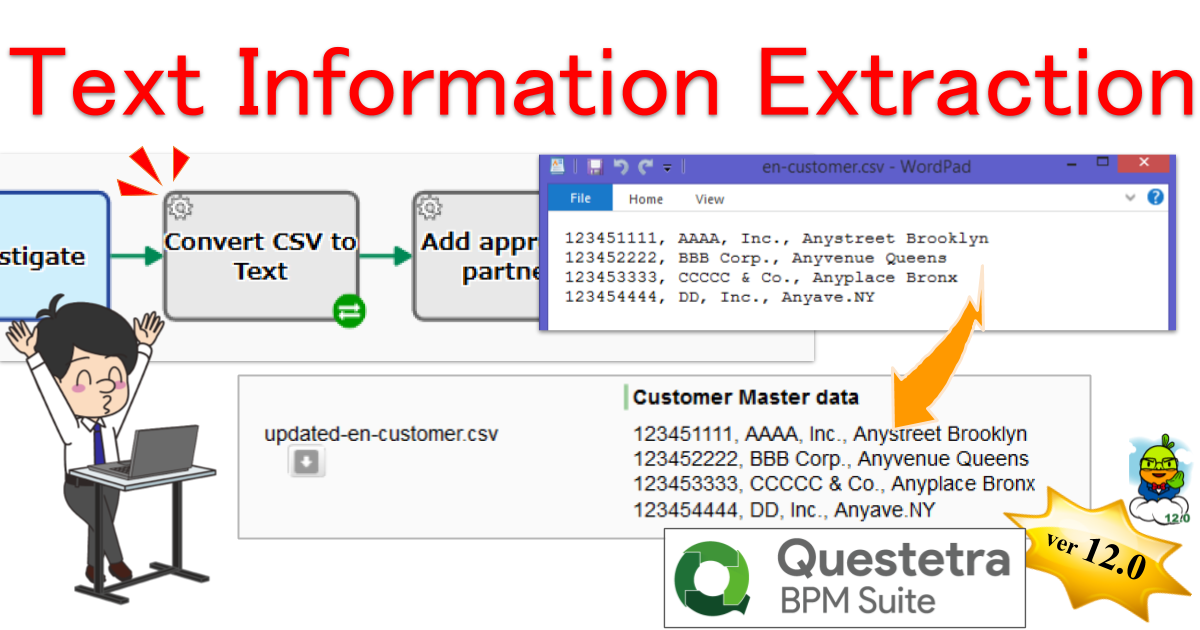
    Kyoto, Japan, May 11th, 2020, Questetra, Inc., the global SaaS provider of Business Process Management (BPM), today announced that they have published the new version 12.0 of the Cloud-based Workflow product “Questetra BPM Suite” on May 11th, 2020. This new version is capable of extracting text information from the files, such as CSV, or HTML that are stored in File-type Data Item, and stores it into String-type automatically.

    In daily work, various text files are used. Various files such as “master file” that is, for example, Supplier CSV or “Draft file” like newsletter email HTML are used. But the effort of checking the contents of the file is not a few.

    With the new version 12.0, an automatic step that converts text files to string data is now available as one of the standard features. By equipping this automatic Step in a business process, the labor of downloading and opening the file is eliminated. In the Credit Check Process of a supplier, for example, the processing of adding the approved supplier information to the existing supplier CSV file will be fully automated using together with other automatic features. It is also possible to eliminate the risk of intentional information deletion or tampering with the contents.

    Questetra BPM Suite

    Cloud-based Workflow “Questetra BPM Suite” is a business platform for realizing paperless environments and remote-working. Business issues are controlled according to a Business Flow Diagram. When a Process reaches, a Human Task the user will be asked to add their input. Also, when an issue reaches an automated Step the predetermined processing (server-side processing) such as “Generate PDF” and “Save to cloud storage” is performed automatically. (BPM: Business Process Management)

    You can apply it to various business operations such as “Approval request flow”, “Document translation flow”, Quality check process, “Invoice issuance process”. Process owners of each Business Process can practice the “improvement of Business Processes” little by little in daily work. (Examples of Business Flow Diagram: https://questetra.zendesk.com/hc/en-us/articles/360012492211

    Automatic Text Information Extraction

    It is now capable of extracting the content of a text file into a String-type Data Item automatically. You can now confirm the contents without downloading the file, for example, the Customer Master that has been set to File-type Data Item. (Converter (Text File to String type data))

    Text File Auto-extraction Settings

    Other Improvements

    Service Task (Throwing Message to Start Event)

    It eases the configuration that sending a request to a Message Start Event (HTTP) on the same workflow platform to startup. You do not need to specify the access URL or parameter name, just specify the value of the data to be sent, and you will be able to achieve the “configuration” described above.

    Enhanced HTTP request transmission

    In the Throwing Message Intermediate Event (HTTP), you can now specify the Content-type when specifying File-type Data Item in the request body. You can set any character string such as “application / octet-stream” so that it will be possible to flexibly respond to API requests of other cloud services.

    Official release of HTML5 Modeler

    The Flash modeler has been discontinued, and the App editing function (HTML5 modeler) using HTML/Javascript has been officially released.

    See the release notes for details.
    Ver. 12.0 Release Note: https://support.questetra.com/versions/version-1200/

  • クラウド型ワークフローv12.0、ファイル読込機能を追加

    クラウド型ワークフローv12.0、ファイル読込機能を追加

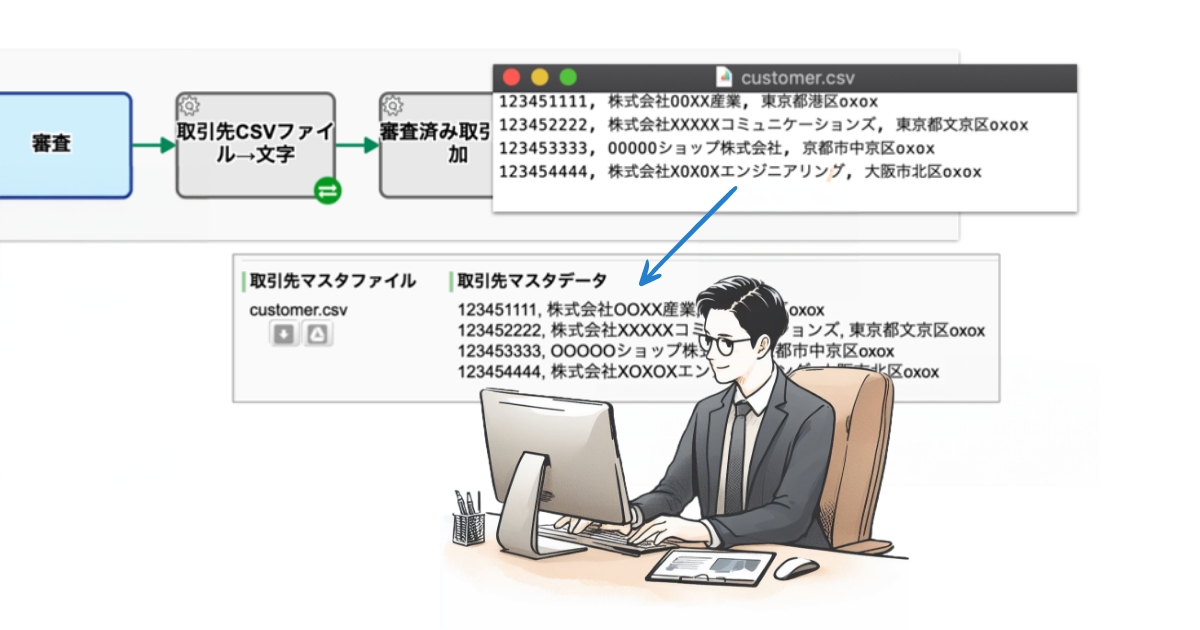
    SaaSベンダーの株式会社クエステトラ(京都市、代表執行役 CEO 今村元一)は5月11日、クラウド型ワークフロー製品である 『Questetra BPM Suite』 の新バージョン12.0を公開しました。新バージョン12.0では、Textファイル・CSVファイル・HTMLファイルといったファイル型データからテキスト情報を自動抽出して、文字型データに格納できるようになります。

    日常業務において、様々なテキストファイルが利用されます。取引先CSVのような「マスタファイル」やメールマガジンのHTMLといった「原稿ファイル」など、様々なファイルが利用されています。そして、ファイルの内容を確認する手間は決して小さくありません。

    新バージョン12.0からは、「テキストファイルが自動的に文字データ化される自動工程」が標準機能化されます。本自動工程を業務プロセスに組み込むことで、ファイルをダウンロードしたり、開いたりする手間が削減されます。例えば、取引先の与信調査プロセスにおいて、他の自動工程も活用すると、承認された取引先情報が既存の取引先CSVファイルに自動的に付加される、という処理が無人化されます。恣意的な情報削除や内容の改ざんが行われるリスクをゼロにすることも可能になります。

    Questetra BPM Suite とは

    クラウド型ワークフロー『Questetra BPM Suite』は、ペーパーレス環境やリモートワーク環境を推進するための業務プラットフォームです。業務案件は業務フロー図に従ってコントロールされ、案件が人間工程に到達すれば担当者はアウトプットを求められます。また、案件が自動工程に到達した際には、「PDFの生成」や「クラウドストレージへの保存」といった既定の処理(サーバサイド処理)が自動的に行われます。(BPM: Business Process Management)

    「稟議承認フロー」「文書翻訳フロー」「品質チェックプロセス」「請求書発行プロセス」といった様々な業務に適用していただけます。各業務のプロセスオーナーは日々の業務の中で少しずつ「業務プロセスの改善」を実践することが可能です。

    (業務フロー図サンプル: https://questetra.zendesk.com/hc/ja/articles/360012492211

    テキストファイルを文字データとして抽出する機能について

    サービス工程を利用して、テキストファイルの内容を文字型データ項目に挿入できるようになります。例えば、ファイル型データ項目にセットされた取引先マスタファイルを、ダウンロードせずに内容を確認することができるようになります。(コンバータ (テキストファイル to 文字型データ) )

    その他の機能改良について

    プロセス起動サービスタスク

    同じワークフロー基盤の「メッセージ開始イベント(HTTP)」にリクエストを送信し、プロセスを起動する “設定” が容易になります。アクセスURLやパラメータ名などを指定する必要がなく、送信するデータの値を指定するだけで、前述の “設定” ができるようになります。

    HTTPリクエスト送信機能の強化

    「メッセージ送信中間イベント(HTTP)」において、リクエストボディにファイル型データ項目を指定する際、Content-Type を指定できるようになります。「application/octet-stream」など任意の文字列を設定することができ、他クラウドサービスのAPIの要求に柔軟に対応できるようになります。

    HTML5モデラーの正式リリース

    Flash モデラーが廃止され、HTML/Javascript を利用したアプリ編集機能(HTML5モデラー)が正式リリースされました。

    詳細については、リリースノートを御参照ください。

  • 道路建設株式会社

    道路建設株式会社

    道路舗装工事の原価管理業務などの業務プロセスを整理、仕組み化。予算書などの成果物の審査フローで、承認までにかかる時間の50%短縮を実現。

    douken-OPG

    道路建設株式会社

    昭和42年

    59名 ※2025年3月時点

    ■舗装及び一般土木工事
    ■アスファルト合材及び土壌安定用特殊乳剤の製造販売
    ■道路清掃・除雪などの業務
    ■産業廃棄物の再生処理 等

    会計・経理、製造・開発

    この事例に関連するプロセス改善記事

    この記事の目次

    報告業務を中心に利用

    道路建設株式会社は、高度な技術力を活かしたアスファルト舗装を中心に、北海道での道路舗装事業を展開しています。

    Questetra は、舗装工事の原価管理業務、外注管理業務、工事完了後の検定報告業務などを中心に活用しています。

    工事の実行予算書など作成→承認までの期間が1/2以下に

    道路工事では、受注後に「実行予算書」が作成されます。

    「実行予算書」には、詳細な “工程” や資材・機材等に関する協力業者からの “見積” が記録されています。そして、「実行予算書」が決裁者に “承認” されれば、工事を開始することができます。

    工事が開始されると、「実行予算書」で計画した工事原価を上回らないよう、日々原価管理を行います。工事終了後、実際に発生した工事原価について最終報告を行い、決裁者の承認を得ます(工事規模によっては中間原価報告が必要です)。

    本業務では「実行予算書」を含め、次のような成果物が作成されます。

    • 実行予算書(工事予想原価の妥当性判断)
    • 中間及び最終原価報告書(原価管理の出来を判断)
    • 発注伺い(外注費用の妥当性判断)

    それぞれの成果物が完成するまでに、起案 → 審査 → 承認 という工程が処理されます。

    まず、起案者による起案後、10名前後の審査者が一斉に起案内容を確認します。この段階では承認・否決の判断は行われず、内容に対する意見を各審査者が述べます。全員の審査が終了後、起案内容は最終決裁者に届き、最終決裁者が承認もしくは否決(差し戻し)する形式となっています。

    Questetra でも、この2 段階の決裁システムを採用しています。

    導入前はIT管理者が中継役で時間も手間もかかっていた

    Questetra 導入以前は、次のように進めていました。

    起案者は、起案内容が記入された Excel ファイルを IT 管理者へ送信します。

    IT 管理者は、Excel ファイルを社内サーバーに保管した上で、審査者(10名前後)に審査をメールで依頼します。IT 管理者は審査状況を逐一確認し、滞留している場合は、口頭・メールで審査者に審査を促します。

    全員の審査が終了したら、最終決裁者にメールで承認を依頼します。承認状況を確認し、滞留している場合は、口頭・メールで承認を促します。

    このような流れで成果物の審査フローを進めていたのですが、次のような課題が生じていました。

    審査に伴う、社内サーバーへの保管、審査者(10名前後)への審査依頼、進捗の把握が全て手作業であり、IT 担当者に多くの負荷が発生していました。また、起案から承認まで平均して10日間程度発生してしまい、工事着手日が遅れるケースが散見されていました。

    • 誰かの審査や承認で滞留していることに気付かない
    • 負荷の大きい IT 管理者が対応できないと、審査が遅れてしまう
    • 手作業で実施する工程があり、スムーズな審査ができない
    • 複数回の差し戻しの結果、誰がその仕事(のボール)を握っているのかが分からなくなる

    滞留状況の確認や外出時の対応が可能に

    Questetra でプロセスを整理して以降、案件の滞留状況をグラフィカルな画面で確認できるようになりました。おかげで状況確認のために発生していたコミュニケーションコストが大幅に減りました。

    また、原則として、外出先から社内サーバへのアクセスはできませんが、クラウドサービスである Questetra であれば、外出時でもインターネットに接続して PC やスマートフォンで審査ができるようになりました。その結果、審査工程にかかる時間が大幅に削減されました。

    Questetra 導入後、起案から承認まで早ければ当日中、多くが 3 ~ 5 日で審査終了となっています。

    Excelの報告書から脱却し、高齢社員でも起案可能な仕組みを構築

    工事終了後、発注者による工事検定が行われます。検定終了後、工事に対する評価や指摘内容を社内で共有するために、検定報告書を作成しています。

    検定報告書の作成は、ミドル層からベテラン社員まで幅広い年齢層の人が担当しています。中には官庁や他企業の OB の方もおり、こちらは高齢な人が多いという特徴があります。

    報告書の起案も、原価管理業務と同様に Excel を使っていました。しかし、高齢社員にとっては Excel への入力が難しい場合が多く、本人は紙で報告書を作成し、それを IT 部門の担当者が Excel に起こすこともありました。

    このような状況を解決すべく、Questetraでは検定報告書の起案画面に、慣れない人にもできるだけ使いやすくする工夫を行いました。

    • 選ぶだけで報告に必要な情報が集まるように選択肢を活用
    • 迷わずに入力できるように分かりやすい説明文を記載

    これにより、高齢社員でも自ら Questetra を使って起案できるようになり、IT 部門の担当者の負担を激減させることができました。

    インターネットさえつながればどこからでも起案できることも、起案者が積極的に Questetra を利用するようになったポイントです。

    今後は、社員がより働きやすい環境を得ることができるように、また BCP(事業継続計画)に対応した強い組織を目指し、社内の多くの業務に Questetra を適用していくつもりです。

    ※ 本事例は2020年4月時点の情報です

    同業種の導入事例

    • 株式会社一条工務店仙台
      株式会社一条工務店仙台

      木造住宅の建築において発生する協力会社様との書類のやり取りを自動化。施工管理業務や法定台帳の作成業務を大幅にコストダウン。

    • 道路建設株式会社
      道路建設株式会社

      道路舗装工事の原価管理業務などの業務プロセスを整理、仕組み化。予算書などの成果物の審査フローで、承認までにかかる時間の50%短縮を実現。

  • Web会議歴8年、Hangouts Meet のコトなら何でも答えます

    Web会議歴8年、Hangouts Meet のコトなら何でも答えます

    「Web会議って、どうなん?」 「使い方、どうなん?」 バックリ聞かれても困るのだが、コレが結構な頻度で聞かれる。だんだんFAQ(よくある質問)みたいになってきたので、これまでの回答をまとめてみた/みる。(逐次追記中?)

    1. どうなん?(総評)

    • Q: Web会議って、どうなん?(バックリ)
    • A: 使ってますヨ。便利ですよ!(バックリ)

    今となっては「無いと困るツール」(必須ツール)です。

    使い始めて8年くらいになります。おそらく “メール” や “ケータイ電話” と同レベルです。

    具体的には Google 社 G Suite サービス内の「Meet」を使ってミーティングしてます。ウチでは、定例の業務進捗報告会だけでなく、部門内ミーティングや、社外の方との打ち合わせ(サポート含む)にも積極的に利用されています。

    ちなみに、業務進捗報告会は『週次報告会』や『月次報告会』って呼んでます。ワタシ自身が “主催者” になっているミーティングだけでも、軽く100回を超えた計算になります(数えてナイ)。”テレワーク3形態のヒト” や “出張がちなヒト” など、リモートワークな方が多い会社なので、とても重宝しています。

    <2020-04-14追記>
    2020年04月10日に、正式名称が変更になったようです。「Hangouts Meet」⇒「Google Meet」
    ◇Google、企業向け「G Suite」の「Hangouts Meet/Chat」を「Google Meet/Chat」に改称
    https://www.itmedia.co.jp/news/articles/2004/10/news070.html
    以降に記載されている「Hangouts Meet」「Google Meet」と、読み替えて下さい。

    ※2020年10月に「G Suite」は「Google Workspace」に名称変更されました。

    2. ナンなん?(製品)

    • Q: Meet ってナンなん?
    • A: ビデオ会議です!

    Meet” (Hangouts Meet) と呼ばれるクラウド製品で、”Meeting” (ミーティング)ができます(”お肉”[Meat]ではありません)。

    パソコンやスマホを使って、バーチャルな会議室に “入室” できます。「カメラ画像」だけでなく「パソコン画面上の資料」も全員で共有できます。正式には “ビデオ会議” と呼ぶそうです。が、ウチでは “Web会議を開く” とか “ネットミーティングに入る” とか “オンラインミーティングする” とか…。呼ばれ方はバラバラです。

    もし、”Webex”、”Zoom”、”Skype for Business” といった製品を使ったことがあれば「そんな感じ」です。機能面でそれ以上に知りたいことがあれば製品サイトへ(逃)。。。 (ラーニングセンター)

    どうでもイイ話ですが「Hangouts Meet」と「Hangouts」は、いちお別の製品です。アクセスURLもチガイます。(でも、似たようなものです。)

    Hangouts Meet従来のハングアウト
    会議の
    最大参加者数
    G Suite Basic – 100 人
    G Suite for Education – 100 人
    G Suite Business – 150 人
    G Suite Enterprise – 250 人
    G Suite Enterprise for Education – 250 人
    25 人
    会議への
    参加方法
    ブラウザ
    モバイルアプリ経由
    Google カレンダー
    会議へのリンク(URL)やコード
    電話からのダイヤルイン
    Hangouts Meet ハードウェア
    ブラウザ
    モバイルアプリ経由
    Gmail とカレンダー
    Hangouts Meet ハードウェア
    会議の録画G Suite Enterprise
    G Suite Enterprise for Education
    (録画は不可)

    「Hangouts Meet と 従来のハングアウト」より抜粋)

    最近(2019-10)最大参加者数が、(G Suite Business の場合)、「25人」から「150人」に増えたトコです。加えて、昨日(2020-03-04)、新型コロナウィルス感染症(COVID-19)の流行拡大により、一時的に「各会議の最大参加者数は250人に引き上げ」られたそうです(録画もデキル!)。

    3. おいくら万円?(経費)

    • Q: めっちゃ高いんちゃうん?
    • A: 個人的にはお安いと思ってるよ。

    もろもろセットで、ユーザ月額1360円(G Suite Business の場合)です。

    100人いたら毎月13万円です。(2020年3月現在)(本家の価格表

    “Hangouts Meet” は “G Suite” というクラウドツールのセット商品(←IT業界では「Suite 製品」と言ふ)の一部になっています。なので価格比較しづらいですね。

    いちお、、、”紹介するとご褒美をもらえる会”(G Suite ご紹介プログラム)には入っているのですが、なんかこのブログがステマっぽくなる(〇疑問回答 ×広告宣伝)ので、リンクは控えておきます。(どうしても知りたいなら探してw/問い合わせフォームもアリですw)

    4. イケてる?(性能)

    • Q: ちゃんと聞こえる?ちゃんと喋れる?
    • A: ウチは「最大100Mbps」の回線で十分な感じ。

    そもそも通信回線(帯域)はあまり問題にならないと感じています。(Wi-Fi 利用も無問題)

    むしろ「発表者のパソコン性能」の方が重要だと感じています。発表者のMemoryリソースやCPUリソースが枯渇して、ひと昔前の “衛星中継” みたいな時差コミュニケーションになってしまったケースが何度かあります。みんなが Core i3-2000番台以上[≒第2世代以上、≒2011年以降の発売]で、メモリを2GB以上つんでいるマシンを使っていれば大丈夫!?!(←新しいに越したことはない)

    ちなみに、もし「遅い」と感じれば画質を落とせば良いようです。同じ拠点の10人が使っても数メガbpsしか使わないようです。
    (ネットワークの追加要件)

    5. ムズイん?(ITリテラシ)

    • Q: ITベンチャーやからチャウん?
    • A: どんな会社でも使えると思いますよ!

    パソコンやスマホが使える方なら「誰でも “入室” できる」と思いますよ。

    60歳を超えている社外取締役の方でも、特に何の説明もせず、無事に “入室” できました/ています(使い方自体はカンタン)。むしろ “招待URL” を送り付けても不審がられないことが重要カモ、です。

    一方で “主催者” になるには「慣れ」が必要かもしれません。それでも「なにか特別なIT知識」は問われるようなことはありません。また、「G Suite 内にある様々なツールを全部(アレコレ)使いこなす」という視点に立てば、やっぱり “IT系企業向け” と言わざるを得ないような気もします。(←それでも、昔に比べれば随分カンタンに/フレンドリーになってきた)

    6. ナンデ始めたん?(動機)

    • Q: ふつうの会議でエエやん?
    • A: はい。単なる好奇心です!

    そもそも「クラウド製品を使ってみるコト」自体に興味があるのです(じつわ、我が社もクラウド製品を作っているので)。

    なので基本的には「新しいツールを楽しもう」というノリでした。(ひょっとして「生産性が向上するかも?」と妄想したのは事実です)

    実際、当初(2012-01ごろ)は、「プロジェクタ」にも「ビデオ会議」にも、、、つまりどちらにも資料投影しなければならなかったので、発表者によってはモゴモゴしてました。まぁ、メンドくさかったように記憶しています。また、当時は “コンシューマ向けツール” だったので、お遊び機能がイッパイありました。。。(←今はナイ)

    ちなみに、クラウド型オフィス『G Suite』は会社創業の日(2008年4月)に導入しました。(当時の名前は “Google Apps for Your Domain” から “Google Apps Premier Edition” で “Google Apps Vault” になって “Google Apps Unlimited” で “G Suite Business” かな?) 最近では、クラウド型CMS『WordPress.com』を “サードパーティ・プラグイン” が利用できるようなったタイミングでスグに導入しました。 そう言えば、前職は、クラウド型CRM『Synergy!』の共同創業(2005-06)した人間だったりもします。つまり、クラウド大好きです。

    7. ナンか変わった?(社内変化)

    • Q: やっぱり会議室なん?
    • A: いいえ。自席です。

    リモートワークの方が増えて「ビデオ会議」は必須になったのですが、その後、オフィス内に居るヒトも「自席参加」になりました。

    というのも、3年ほどたったある日(2015-01)に “プロジェクタ” が別件に供用されたことがあり、「全員自席にて Video Hangout。各自イヤホン+マイクの準備ヨロ!」という日がありました(”本体マイク” はダメ。とくにキーボード音がヤカマシイ)。そして、その週以降は、「イヤホンあるヒトは自席参加OK」というルールに変わりました。そして2018年1月には “プロジェクタ” の準備が邪魔くさくなって「全員自席参加」になった次第です。

    2018年1月に「Hangouts」から「Hangouts Meet」へ移行しました。画面共有の方法がちょっと変わったくらいで、誰も気にも止めない感じだったように思います。

    8. 工夫必要?(情報共有)

    • Q: 資料ダイジ? 飲み会(裏会議)もダイジ?
    • A: ウチの場合は無いです。

    きっと「会議の進め方」みたいな話と同じ (普遍的な話) なのだと思います。

    そもそも、CEOたるワタシが “不毛な会議” がキライなので、(加えてペーパーレスとキャッシュレスと「ミーティングレス」を公言していることもあって)、以前から「発表資料を作って書いてあることをしゃべる」というルールになっていました。ただ、”会議室でのミーティング” だと資料を印刷しがち。。。(← 今でも、社外の方とのミーティングの時などは、印刷してしまう。資源の浪費ゴメン>地球)

    それが “自席参加ビデオ会議” だと、むしろ、『発表資料が隅々までハッキリ見える』、『報告資料が間違っていたら発表中に修正してもらえる』となるので都合よいです。(決定事項を後で検索するのもカンタン)

    また、”自席参加” なので、あらかじめ “入室” しておいても時間を無駄にすることはありません。いつも定時の15分くらい前からポロポロと入室するヒトがいる感じですが、開始直前までみんな仕事してます。会議中も『関係なさげな報告発表の時には “内職” しちゃう』というスタイルにもなったように思います。もともと、縁遠い部門の情報まで全員が真剣に聞くなんて無意味だし、各自それぞれに生産性の向上を目指せばよいと思います。

    ということで、”資料” というか “予めの準備/発表事項の事前整理” は大事だと思います(←アタリマエやん)。でも、ビデオ会議になったからと言って、 “飲みニケーション” や “たばこミュニケーション” (古っ)といった「裏会議」は必要ないと思います。

    ちなみに業務時間中の “会話” もありません(←なんかサミシイ表現だなぁ)。つまり、定型業務は全部ワークフローです。雑談は全部チャットです。なので、事務所内はサナガラ “図書館” とか “自習室” といった感じです。(でも、ソコを意識しておかないと、リモートワーカーさん達がハミゴになっちゃう)

  • For Starter Edition Users

    For Starter Edition Users

    Thank you for using Questetra BPM Suite.

    As mentioned in the post “Expansion of Service System“, the service system will be changed on July 1, 2020. At that time, reception for the Starter Edition will be closed and a new Trial mode (free) will begin.

    Details of the “Trial mode”

    Trial mode is a free service for Basic, Advanced, and Professional editions in the new service system from July. When you apply for Trial mode, you will be asked to select the edition to use.

    • Price: Free
    • Number of Users that can be registered: 100
    • Features: Equivalent to the edition you choose (either of Basic / Advanced / Professional)
    • Period: 60 days (*1)
    • Service launch: July 1, 2020

    *1 The period cannot be extended.
    *2 The access URL for the workflow platform of Trial Edition is required when applying for the paid Edition.

    The expiration date of “Starter Edition” that will be discontinued

    The free Starter workflow platform you are using will be closed at the end of December.

    • Expiration date: The end of December 2020
    • Reception end date: The middle of July 2020

    If you migrate to a paid Edition (either of Basic/Advanced/Professional/Enterprise), you can continue to use the Business Process Definition and Business Data from January 2021 onwards. (Please apply by December 2020)

    For details on paid Editions, see “Expansion of Service System“.

    You can migrate some of the data created in the Starter’s workflow platform to a paid or trial workflow platform for yourself. For how to migrate, please refer to the following “Appendix; Data Migration Procedure”.

    *The service of Starter Edition will be automatically stopped if you do not use it for 15 days. Requests for restarting suspended services will be accepted until the end of June 2020. 

    Appendix; Data Migration Procedure

    Data migration is performed in the following procedure.

    • Export data from Starter’s workflow platform
    • Import to (migration destination) workflow platform

    Some of the data of the workflow platform can be migrated and some cannot.

    • Organization/Role/User information
      Can be migrated
    • Workflow Apps
      Can be migrated
    • Business data
      Export only
    • Open Chat
      Cannot export

    This section introduces how to export/import Organization/Role/User information and Workflow Apps and how to export Business data.

    How to export Organization/Role/User information

    Log in to the Starter workflow platform with a User who has “User Manager Authorization” and do the following operations.

    • After logging in, click on your User name at the top right corner and click on [System Settings] in the dropdown menu
    • Click [Organizations List] on the left menu
    • Click on [Download All] above the Organization List and select [CSV Download (UTF-8)]
    • The organization information CSV file will be downloaded

    For the Role/User information, replace “Organization” in the above description with “Role” or “User”.

    How to import Organization/Role/User information

    Log in to the Starter workflow platform with a User who has “User Manager Authorization” and do the following operations.

    • After logging in, click on your User name at the top right corner and click on [System Settings] in the dropdown menu
    • Click [Organizations List] on the left menu
    • Click on [Import Organization] above the Organization List
    • Click on [Browse…(or Choose file)] button and select CSV file of Organization information
    • Click on [Confirm] button after you confirmed the contents of the CSV file has been set into the field [CSV Text]
    • Click on [Add] button

    For the Role/User information, replace “Organization” in the above description with “Role” or “User”. Organizations and Roles related to User information must be registered before importing User information.

    How to export Workflow App

    Log in to the Starter workflow platform with a User who has “App Administrator” Authorization to the target App and do the following operations.

    • After logging in, click on your User name at the top right corner and click on [App Settings] in the dropdown menu
    • Display the details screen of the target workflow App
    • Click on the [Detail] button of the version you want to export from the version list to display the target version
    • Click on the button labeled [▼ Version **] just above the Workflow Diagram and select [Export Archive] on the dropdown
    • The archive file is exported (downloaded)

    How to import Workflow App

    Log in to the migration destination workflow platform as a User who has “App Creator” authorization, and follow the procedure described in the section “2. Import” on the page linked below.

    How to export Business Data

    Log in to the Starter workflow platform as a User who has “Data Viewer” authorization, and follow the procedure described in the page linked below to export (CSV download).

    * File-type/Table-type data cannot be downloaded in CSV format. It is necessary to download each one by a User operation on the Operation screen.

  • Starter エディションをご利用の方へ

    Starter エディションをご利用の方へ

    平素より Questetra BPM Suite をご利用いただき、誠にありがとうございます。

    サービス体系の拡充について」でご案内させていただいたように、2020年7月1日にサービス体系が変更されます。このタイミングで “スターター” の受付が終了し、”Trial モード” での提供(無料)がスタートします。

    “Trial モード” の内容

    Trial モードは、各エディション(Basic / Advanced / Professional)の “試用” を目的に提供されます。60日間、無料でご利用いただけます。Trial モードお申し込みの際、ご利用になるエディションをご選択ください。

    • 料金:無料
    • 期間:60日間(※1)
    • 登録可能ユーザ数:100
    • 機能:ご選択のエディションと同じ(Basic / Advanced / Professional のいずれか)
    • サービス開始:2020年7月

    ※1 期間の延長はできません。
    ※2 有償エディションをお申し込みの際、Trial ワークフロー基盤のアクセスURLが必要です。Trial のエディションは、お申し込みになる有償エディションと同じでなければなりません。

    廃止される “スターター” のご利用期限

    無料のスターターにてご利用中のワークフロー基盤は、12月末日に閉鎖されます。

    • ご利用期限:2020年12月末日
    • 受付終了日:2020年7月中旬

    有償のエディション(Basic / Advanced / Professional / Enterprise のいずれか)に移行していただけば、業務プロセス定義や業務データがそのままの状態で、2021年1月以降も継続してご利用可能です。(2020年12月までにお申し込みください)

    有償エディションの詳細は「サービス体系の拡充について」をご覧ください。

    スターターのワークフロー基盤に作られたデータの一部を、有償または Trial ワークフロー基盤に、ご自身で移行することができます。移行方法については、この後ろに続く「Appendix. データ移行方法」を参考にしてください。

    ※ スターターは15日間ご利用が無い場合、自動的にサービスが停止します。停止したサービスの再稼働に関するご依頼は、2020年6月末まで承ります。


    Appendix. データ移行方法

    データ移行は次の手順で行います。

    • Starter のワークフロー基盤からデータをエクスポート
    • (移行先の)ワークフロー基盤にインポート

    ワークフロー基盤のデータのうち、移行できるものとできないものがあります。

    • 組織 / ロール / ユーザ情報
      • 移行可能
    • ワークフローアプリ
      • 移行可能
    • 業務データ
      • エクスポートのみ可能
    • オープンチャット
      • エクスポート不可能

    「組織 / ロール / ユーザ情報」「ワークフローアプリ」のエクスポート・インポートの方法と、「業務データ」をエクスポートする方法を紹介します。

    組織 / ロール / ユーザ情報のエクスポート方法

    「ユーザ管理権限」を持つユーザで Starter のワークフロー基盤にログインし、以下の操作を行ってください。

    • ログイン後、右上の名前をクリックして表示される [システム設定] をクリック
    • 左たてメニュー [組織一覧] をクリック
    • 組織一覧画面の上部にある [全件ダウンロード] > [CSVダウンロード(UTF-8)] を選択
    • 組織情報のCSVファイルがダウンロードされます。

    ロール / ユーザ情報については、上記説明の「組織」を「ロール」または「ユーザ」に読み替えてください。

    組織 / ロール / ユーザ 情報のインポート方法

    「ユーザ管理権限」を持つユーザで移行先のワークフロー基盤にログインし、以下の操作を行ってください。

    • ログイン後、右上の名前をクリックして表示される [システム設定] をクリック
    • 左たてメニュー [組織一覧] をクリック
    • 組織一覧画面の上部の [組織一括登録] をクリック
    • [ファイルを選択] をクリックして、組織情報のCSVファイルを選択
    • 組織情報のCSVファイルの内容が [CSV入力] にセットされていることを確認したら、[確認] ボタンをクリック
    • 「追加」ボタンをクリック

    ロール / ユーザ情報については、上記説明の「組織」を「ロール」または「ユーザ」に読み替えてください。ユーザ情報に関連する組織とロールは、ユーザ情報をインポートする前に登録されている必要があります。

    ワークフローアプリのエクスポート方法

    対象ワークフローアプリの「アプリ管理権限」を持つユーザで、Starter のワークフロー基盤にログインし、以下の操作を行ってください。

    • ログイン後、右上の名前をクリックして表示される [アプリ設定] をクリック
    • 対象のワークフローアプリの詳細画面を表示
    • バージョン一覧からエクスポートしたいバージョンの [詳細] ボタンを押し、対象のバージョンを表示
    • ワークフロー図のすぐ上にある [▼バージョンX] をクリックして、表示されるメニューの中から [アーカイブのエクスポート] を選択
    • アーカイブファイルがエクスポート(ダウンロード)されます

    ワークフローアプリのインポート方法

    「アプリ作成権限」を持つユーザで移行先のワークフロー基盤にログインし、次のページ「2.インポートする」以降に書かれた手順でインポートしてください。

    業務データのエクスポート方法

    対象ワークフローアプリの「データ閲覧権限」を持つユーザで、Starter のワークフロー基盤にログインし、次のページの手順に従ってエクスポート(CSVダウンロード)してください。

    ※ ファイル型 / テーブル型は、CSV ダウンロードできません。操作画面からユーザ操作により1件ずつダウンロードしていただく必要があります。