Do you play ‘Dragon Quest Walk’? (*a smartphone app of SQUARE ENIX)
In my family, we all love Dragon Quest and not only me, but also my kids (9 years old and 7 years old ) play with the app.
The way to commute is by walking!
I walk to work every day.
So, it is an overwhelming advantage over the children. (Dad should be strong all the time)
And these days, I walk longer to earn more advantages. (Sounds like a cheat)
According to the statistics of the automatic measurement application Google Fit, I often walk since the release of the app of ‘Dragon Quest Walk’ (9/12 release). Especially after the day when my kids installed it on my old phone (9/14), the daily number of steps doubled. (See the calendar below)
*Android and iPhone are equipped with gyro-sensors, accelerometers, and GPS, so they can automatically count steps and distance traveled in quite an accurate way. The app specialized in such functions is called “Activity Tracker”.
Use in business reports?
One day, when I was walking, I could think of many ideas such as more effective usage of Fitness Data and detection of overwork.
For example,
The data of the number of steps of couriers who have been carrying their company smartphones
If there is such data today, I wonder, should it be managed by the company?
(As well as that, I considered the data of the number of steps taken by the tour conductor of a travel agency and that of the distance traveled by an outside salesperson, etc)
It is true that this includes private time data, so it is difficult to handle.
But if I extract only working hours (at any given time), I hope it’s okay to use it.
What I point to here, is that the Labor Standards Act, which relies solely on time for wages (compensation), is even more unreasonable from the viewpoint of “Productivity”. Therefore, I always think the system of paying a premium for more than 10,000 steps per day would become reasonable. (Sounds outrageous)
Implement in REST API!
Anyway, I made the system.
If you look at the super simple Workflow Diagram and the Data input screen above, you can somehow understand. What I would like to show you is,
The Task of “Picking up the step count data of arbitrary time”
A report of the number of steps from 9 a.m. to 17 p.m. is received automatically the next morning
The number of steps in the daily report is automatically added to the daily report which was submitted
Furthermore, if you set up a Task for a superior such as “Superior Approval”, it would become a great workflow (maybe?)
Walking is not relevant to my job, so there is a doubt whether it’s useful or not (this is difficult to verify). If you think the system I developed can contribute to the automation of work at the company, please let me know. If you are eager to use the system, we would like to improve the specification of the automatic processing.
P.S.
Incidentally, “Fit REST API (v1)” was a very peculiar API. (Please refer to the link for the implementation script)
The format of posting Request Json (aggregate) works the same way as the Slides API and the Sheets API (batchUpdate), however Fit REST API (v1) causes some problems below.
Not referring to device Raw data, regardless of the permission (OAuth2Scope)
A part of the ID is obfuscated so that only the data generation clients can see it
Recording in nanoseconds instead of milliseconds
The number of steps and distance crossing the time boundary are added to the total calculations
How do you like it?
In addition, I was surprised that the parameters will be designed to obtain others’ data in the future (although it obtains only my own data). While similar services to Google Fit Website are unlikely to be revived, we will continue to monitor the trends of other services.
# I personally have kept entering “blood pressure” and “bodyweight”, so I sometimes think to analyze the trend of their increase and decrease in the morning, daytime and evening.
P.P.S.
By the way, you might wonder how far I’ve played Dragon Quest Walk?
I have finished all the stories that have been released so far.
I cleared “Chapter 5.” in Lv 48, of course, there is no charge. (← I can’t cheat before my children.)
I don’t know if I can exercise or maintain my health without game apps but I will enjoy walking with my children for a while. (We are no-charge gamers!)
Aren’t you really an industry guy? Did you know that Questetra’s website is operated on WordPress.com?
Yes, migration to WordPress 5.0 was forced on us in December 2018. From then on 5.0’s new editor (Gutenberg Editor)has become the standard editor for Questetra.
Indeed…it’s pretty obedient. However, about major cloud products whether they like them or not, at first, “personal experience”has significance…
Of course, the truth is that I was a little anxious. But no cloud product (especially SaaS CMS) can be understood without actually using it, and practice makes perfect. Only after experiencing it can you recognize the objective. Moreover, you can search for links.
2. An Unexpectedly Smooth. Transition
Farewell, the old editor that I have been accustomed to for about 6 years It’s already 9 months since that “Shocking Day”…
Now my employees and part-timers understand how to use the new visual editor (Gutenberg Editor) when creating an official site or a support site. I think its mechanism is basically more intuitive than the previous editor (Classic Editor). (WordPress 5.2.2 now)
Even old-fashioned people (i.e. me) are now using the “Block Editor” for duplication and arranging.
Speaking of which…if you get into trouble I wonder if Google Assistant will give an old answer to a new problem…(a Zen dialogue)
3. The Latest Version is Not So Flexible
Even though it is a Visual editor, the shortcode continues to be active. Recently, you might hear that the page looks less attractive because it looks too simple for a website.
Certainly, even for information pages like employment rules, you would like to apply various layout design features. For example,
Listing “sentences” in the Definition list (dl dd dt)
Setting a box and insert annotations there
Setting an accordion to be able to open and close the definition’s explanation section
In these cases, shortcode “start” ([su_foo]) and shortcode “end” ([/ su_foo]) are written in a “Shortcode Block”, and “Shortcode Contents” is written in a “Paragraph Block”. Are you kidding me?
4. Let’s Try a Plugin!
Adopt a Plugin published by a Theme vender Anyway, “Block Plugin” was installed in Questetra’s WordPress environment.
Extends the Gutenberg functionality with several unique and feature-rich blocks.
About the design of blocks, I’m in the middle of testing the plugin and I will add new information about the blocks later.
Trivia: “Death of Page Builders” was already expected when Gutenberg debuted. The manufacturer of the WordPress theme “ASTRA” used by Questetra (Brainstorm Force, Inc.) released the Block Plugin quickly. Although I tried it soon after, the plugin (v1.5) at that time was unwillingly rejected because it was difficult to incorporate Font Awesome icons together with Font Awesome Pro. However, the specification was subsequently improved (all Font Awesome Icon were replaced with SVG) in v1.8.1 (alas, no one was aware).
ちなみに “Fit REST API (v1)” は、とてもクセのある API でした。(実装 Script などはリンク先を参照してください)Request Json を POST する形式(aggregate)は、Slides API や Sheets API (batchUpdate)などと同じ仕組みなのですが、
許諾(OAuth2 Scope)内容に関わらず、デバイス Raw データには参照させない…、とか
データ生成クライアントのみが参照できるようにIDの一部が難読化されている…、とか
ミリ秒ではなく、マイクロ秒でもなく、ナノ秒で記録されている…、とか (マバタキは何ナノ秒なの?)
集計の境界時刻をまたぐウォーキング(歩数や距離など)は、そのどちらにも合算されてしまう…、とか
なんともオモムキ(?)がある API です。さらに、(現時点では自身のデータしか取得できませんが)、将来的には “他人のデータ” も取得できそうな Parameters 設計になっていること、も新鮮でした、にも驚きました。ま、「Google Fit Web サイト」の類似サービスが復活することはなさそうですが、それ以外の周辺サービスの動向については、今後もウォッチし続けていきたいと思っています。
Kyoto, Japan – October 7th, 2019 – Questetra, Inc., the global SaaS provider of Business Process Management (BPM), today announced that they have published the new version 11.12 of the Cloud-based Workflow product “Questetra BPM Suite” on Oct. 7th, 2019. This new version allows the automated controlling of Box folders. (Box: a cloud content management service)
In recent years, even though the idea of “cloud-first” (i.e. prioritizing the use of cloud services when constructing a system) is spreading, many organizations still have vague concerns about information security.
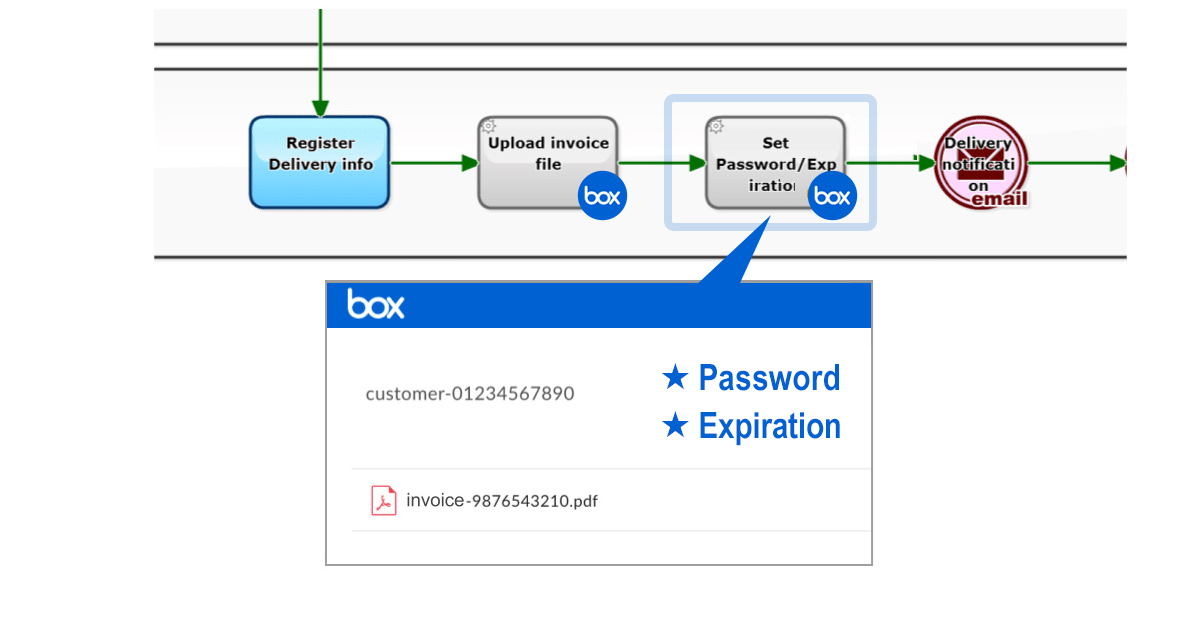
With the new version 11.12 you can equip your Business Processes with automation, such as setting up a download password and expiration date for Box folders. That is, for example, settings for sharing an invoice file will be configured automatically. This will greatly reduce the risk of “settings errors” and “settings omissions” in file-sharing operations with business partners.
Questetra BPM Suite
Cloud-based Workflow “Questetra BPM Suite” is a business platform for realizing paperless environments and remote-working. Business issues are controlled according to a Business Flow Diagram. When a Process reaches a Human Task the user will be asked to add their input. Also, when an issue reaches an automated Step the predetermined processing (server-side processing) such as “Generate PDF” and “Save to cloud storage” is performed automatically. (BPM: Business Process Management)
You can apply it to various business operations such as “Approval request flow”, “Document translation flow”, Quality check process, “Invoice issuance process”. Process owners of each Business Process can practice the “improvement of Business Processes” little by little in daily work.
Box Folder Sharing
Using a Service Task, folders that have been created in Box can be shared. Also, the download-password and expiration date will be set so that you can securely share files such as invoices, estimates, catalogs, etc. with your partners. (Box: Create Shared link to Folder)
Box Create Shared link to Folder
Other Improvements
Box: Search Folder
Using this Service Task, you can automate a folder search of Box folders. You can easily configure automation, for example, checking the existence of a certain folder and creating that folder if it didn’t exist.
Box: Delete Folder
Using this Service Task, you can automate the deletion of folders in Box. You can easily configure automation, for example, removing folders after their expiration.
HTML5 Modeler
The new App editing function [HTML5 Modeler], which uses HTML/Javascript, is now available as a preview version. We are planning to migrate to the HTML5 Modeler from the flash version in the first half of 2020.
クラウド型ワークフロー『Questetra BPM Suite』は、ペーパーレス環境やリモートワーク環境を推進するための業務プラットフォームです。業務案件は業務フロー図に従ってコントロールされ、案件が人間工程に到達すれば担当者はアウトプットを求められます。また、案件が自動工程に到達した際には、「PDFの生成」や「クラウドストレージへの保存」といった既定の処理(サーバサイド処理)が自動的に行われます。(BPM: Business Process Management)
Responding to the Consumption Tax Hike (Additional Billing) in the Workflow!: For a certain SaaS vendor the consumption tax hike in 2019 necessitated “additional billing”. OK, so… let’s try to automate the generation and transmission of this special invoice…
1. Additional billing for a consumption tax hike?
October 2019, consumption tax will be increased to 10%.
Well, they say “this is for securing stable financial resources for social security”, so it would be inevitable.
Thus…SaaS vendors are required to revise “unearned revenue” (sales paid in advance). In simple language, we must make additional billing for consumption tax regarding annual contracts. Even if it is already paid, it does not matter.
Therefore, I would like to develop a system in which a PDF invoice file detail the difference in the new tax will automatically be 1)generated and 2)transmitted. As a matter of course, I will do it with “Questetra BPM Suite”.
[Voice in my heart] Well, with the modeling skill I have, creating any “Business Process” would be a piece of cake. Not only workflows for “daily work” which will be improved continuously but also a one-off “repetitive job”, I can create workflow Apps and automated systems so quickly, bwahaha!!
I presume that most of the Steps that compose the Business Process will mainly be editing of CSV/TSV columns (processing like Excel work). If I have added the “automatic processing steps” (Add-ons) for multiplying, sorting, adding suffixes, summing up numeric columns, and so on, I should be able to assemble a Business Process with most of the steps automated.
Sum of numeric columns
Multiply numeric columns by 1.1
Re-order
2. Billing system completed
I have completed a workflow App. (Excuse me for omitting the creation procedure.)
I configured it so that entry of scheduled sales slip is the input of the Business Process. (also referred to as the “workflow trigger.”)
In the case of Questetra Inc., all “sales slips” (including the prorated portion) have been put into Accounting SaaS at the time of closing. Hence, all I need to do is filter all sales slips by company name (“account sub-title name” in our case of ours) then copy & paste (select & copy cell range in TSV). With that entry, billing processes to each company will be started.
# Although it is a detail, all slips are backed up in Google Sheets, so I use data there to extract “after October 2019”. (Since data on the Accounting SaaS is a little hard to copy.)
At first glance, the Process diagram looks like quite a long Business Process. Certainly, there are many more automatic processing Steps (represented in gray) than I expected. However, there are not so many human Task (in light blue). It could be said it is Workflow Automation in the modern style. Even though I cannot deny that it looks like a hasty preparation, I suppose this could be sufficient as it may be 5 -10 years before the next tax hike.
At the steps to be handled specifically by humans, the followings are performed.
Input Sales Slip: Enter “sales slips paid after October” (slip of sales paid in advance) for each billing destination company
Check Generated PDF: Check the invoice PDF generated automatically (separate the detailed data into 2 columns as needed.)
Check Settlement Date: Sales representative determines whether the default payment date and billing date are acceptable.
Check Settlement: Check the bank deposit for the amount charged.
Incidentally, for clients who require a paper invoice, an attribute “must be mailed” is given. It is devised so that in a Process flagged with that attribute, a paper invoice is automatically output from the printer in the office (with Google Cloud Print) as soon as the third step is finished. (All I have to do is to put it in a window envelope.)
Separately, for the accounting system, it is also equipped with functions to automatically generate “correction slips” such as renewed sales slips, credit note, and payment schedule slips. (Only payment schedule slips are imported with the “not realized” flag.)
[Supplement for those with accounting knowledge] “Annual contract” sales are apportioned each month of the contract period (fractions are added to the first month if there are any) and are recorded on the 1st day of each month. The CSV of the sales slip is automatically generated in the Order Acceptance flow and is automatically linked (added) to Google Sheets. (The next morning, information to be imported to the accounting SaaS” is automatically collected.) In this case, information that crosses fiscal years (sales after the next fiscal year) is also required, so it must refer to the Google Spreadsheet (instead of the accounting SaaS).
3. Operation of the billing system
Now, regarding all annual contracts, the third step “Check Settlement Date” must be finished at an early stage. Considering the circumstances of various clients, I think “the earlier the better.” For the time being I have set the default value of “Billing date” to September 1, 2019, and of “Payment due date” to October 31, 2019. (Progress monitoring is important.)
Well, I guess various troubles and inquiries will occur.
For example, a flexible response will be necessary for cases where the billing amount is small. For small scale users, the “annual contract amount” is also small, and depending on the contract period, the difference between old and new consumption taxes may be several hundred yen. For now, even though I can think of a few ideas like “billing at the next payment invoice” or “renewing the contract ahead of schedule”, thinking about what I should do is really puzzling.
That is, for the sales representatives (or the partners), they may dare to think “I’d better pay it out of my pocket rather than talking about such a troublesome subject.” Hmm, I guess there is a better way of communication.
Anyway, I am still groping in the dark. If anything good happens, I will inform you.
# By the way, I want the country’s basic system (especially the tax system) to be simpler.