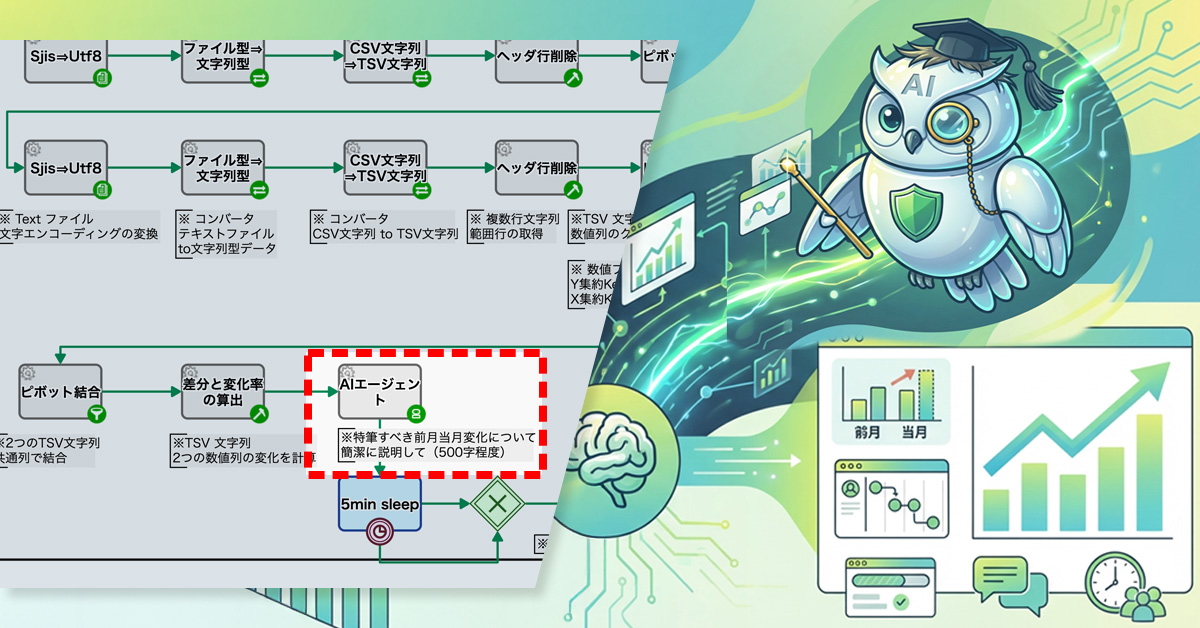
AI summarizes notable client sales changes, helping teams quickly detect important trends and anomalies.
1. Issue: Growth in client-specific sales data makes changes harder to detect
The accounting department of a cloud services company operated with a three-person team and had already systemized processes ranging from importing accounting data to generating monthly client-specific sales summaries and month-over-month comparisons. These routine operations were running stably, and the aggregated results were regularly shared with executive management and the sales department.
However, as the number of clients increased, the client-specific sales report with month-over-month comparisons grew to several hundred rows. Even when accounting staff manually reviewed the report, it became difficult to determine which clients required closer attention.
In actual monthly review operations, the team could still track sales amounts and month-over-month changes for a few major clients. On the other hand, for medium-sized clients, even significant month-over-month fluctuations tended to be buried within the large report, making it difficult to identify and share important changes with the sales department and executive management.
2. Solution: Use AI to Generate Narrative Explanations of Key Sales Changes
The process owner added an AI agent after the aggregation step so that, in addition to the numerical report, the details of sales changes are output as text.
Specifically, the AI agent was given a prompt to “briefly explain notable sales changes based on the difference data between the previous month and the current month.” This allows the AI to extract major changes and distinctive trends from the difference data. Each time the monthly process is executed, the AI summarizes changes in client-specific sales in narrative form.
AI highlights major client sales changes instantly before reviewing detailed reports.
Before
View details of workflow diagramRegister 2 files
Register the current month file and the previous month file, then start the monthly comparison process.
Pivot Aggregation
Aggregate sales amounts by business partner and subaccount, and list the monthly sales structure.
Pivot Merge
Join the current month and previous month aggregation results using common fields to create comparable data.
Calculate Differences and Change Rates
Calculate the month-over-month difference and change rate to clearly quantify sales changes.
email
The key points organized by AI are automatically notified and shared with executive management and the sales department.
After
View details of workflow diagramRegister 2 files
Register the current month file and the previous month file, then start the monthly comparison process.
Pivot Aggregation
Aggregate sales amounts by business partner and subaccount, and list the monthly sales structure.
Pivot Merge
Join the current month and previous month aggregation results using common fields to create comparable data.
Calculate Differences and Change Rates
Calculate the month-over-month difference and change rate to clearly quantify sales changes.
AI Agent
Based on the difference data, AI summarizes notable sales changes from the previous month to the current month in narrative form.
It extracts important changes not only for major clients but also for medium-sized clients.
email
The key points organized by AI are automatically notified and shared with executive management and the sales department.
CLARA, Inc. specializes in cloud infrastructure development and operations, business consulting, and human resource services, primarily focusing on Japan and China. Since our founding in 1997, we’ve helped enterprises grow their cross-border businesses. Within CLARA, Inc., the Corporate IT Group, part of our Cloud Solutions Department, manages the company’s entire information system infrastructure. In today’s environment, where SaaS is widely accessible, our goal is to create seamless collaboration between people and systems, preventing the IT department from becoming a bottleneck.
Challenges in Managing Diverse SaaS Applications
For some time, we’ve used Questetra to manage account administration tasks related to employee onboarding and offboarding, ensuring smooth coordination with HR and other departments. However, the rapid shift to remote work following the COVID-19 pandemic led to a dramatic increase in SaaS usage, significantly increasing the workload associated with issuing new accounts. Although our processes were visible in Questetra, the actual configuration required manual work: accessing each service’s management interface, copying and pasting information, and executing commands. In a remote setting, checking progress through informal communication became difficult, leading to increased workload and communication issues.
This situation highlighted the need to automate account provisioning while maintaining control and minimizing reliance on manual intervention.
Why We Chose to Continue Using Questetra as the Foundation
Instead of replacing our existing tools, we decided to build upon Questetra to address these challenges. Questetra is more than just a workflow system; it provides robust control over complex tasks and inter-departmental dependencies. For example, our “Order Fulfillment Process” involves sales, contract management, finance, and multiple engineering teams (server, network, SSL), resulting in complex branching and parallel processing. Critical dependencies, such as not being able to bill until the server is activated, are deeply integrated into our operations. Managing these processes via email or chat inevitably leads to delays and errors.
Questetra allows us to directly define these cross-departmental handovers and parallel processes within the workflow, clearly outlining who does what and when. We explored other workflow systems, but none matched Questetra’s ability to represent and control such complexity, human decisions, and parallel execution. With this control as our foundation, we’ve successfully integrated automation to solve our current challenges.
Questetra’s Integration of Human-Centric Processes and Automation
Our focus was on avoiding complete automation. We aimed for a system that eliminates unnecessary manual tasks and data entry errors while maintaining control by incorporating human judgment and confirmation points within the processes. Instead of forcing a single system to handle everything, we adopted an architecture that leverages each tool’s strengths in its optimal location.
The architecture is designed with Questetra as the central hub, orchestrating the automated actions of various backend tools. The roles are divided as follows:
Human Process and Progress Management: Questetra BPM Suite
Notifications and Communication: Slack
IT Task Management and Audit Logs: Jira Service Management
HR initiates a workflow in Questetra, and upon approval, a ticket is automatically created in Jira via an API, triggering automatic account provisioning in Okta. Previously, these manual tasks introduced delays; now, results are immediately returned to Questetra upon completion, and HR is promptly notified.
Overall Structure of Tool Integration
Implementation Benefits
Integrating various SaaS tools using Questetra as a central hub has yielded significant quantitative and qualitative benefits. Preparing a new employee’s account, which used to take about a week, can now be completed in half a day. While automation through Okta and other tools is crucial, Questetra’s role as the process’s starting point allows us to directly transfer accurately entered HR data to each system, eliminating wasteful manual transcription steps and errors.
Improved real-time capabilities have also enabled progress visualization and bottleneck detection, creating an environment where we can confidently prepare for an employee’s first day.
Useful Features of Questetra BPM Suite
To further enhance integration with third-party SaaS applications, we actively use custom add-ons. In addition to integrating with external tools such as automatic task creation in Jira, we’ve tailored features to specific needs, such as supplementing Slack notifications with custom logic to accommodate holidays. This development is guided by internal guidelines summarizing Questetra’s unique implementation rules and characteristics. Employees have uploaded these guidelines to AI systems for enhanced usability.
As a result, the challenges of differing specifications and constraints that we previously struggled with have become far more manageable, enabling efficient development. We can now respond quickly to even the most specific needs of our users, demonstrating that Questetra’s flexibility to add business-specific add-ons is critical for maximizing its utility.
Process Control in the AI Era and Initiatives for Building the Next Era
In an era where AI manages repetitive tasks, we expect Questetra to function as the central hub connecting people, AI, and SaaS. We anticipate a future where AI handles processes while humans make final decisions.
Within this framework, expectations for Questetra are growing as a process platform that seamlessly integrates decisions among various SaaS, AI systems, and humans. Even if some tasks are replaced by AI, assuming that human judgment is always necessary at certain points when looking at the overall picture, the value of Questetra, which allows for overseeing and controlling the entire process, remains unchanged.
In line with CLARA, Inc.’s mission of building the next era, we will continue to partner with Questetra to develop business processes tailored for the future.
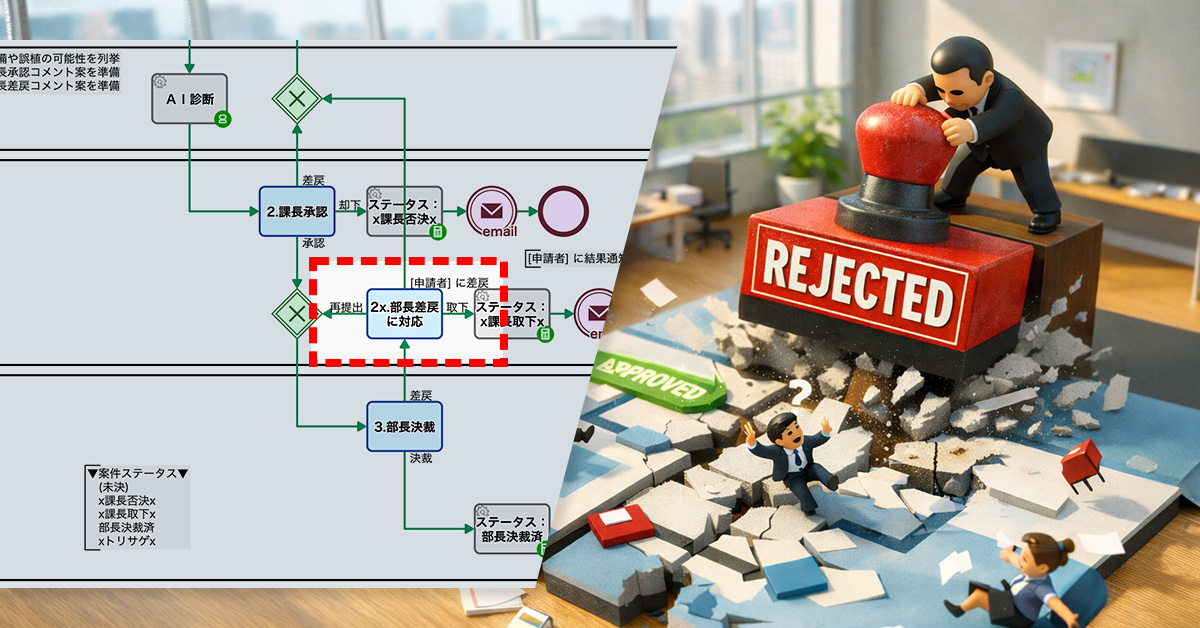
Return-for-revision enables feedback, reduces rework, and improves organizational decision quality.
1. Issue: The division manager cannot provide feedback on the section manager’s decision
In the approval process for equipment purchases, a hierarchical workflow was used in which the applicant submitted a request, the section manager reviewed it, and the division manager made the final decision. This process included an “AI assessment” step to check application details, significantly reducing returns due to formal deficiencies.
However, as operations continued, another issue emerged. Cases approved by the section manager were repeatedly rejected by the division manager, the final decision-maker. The division manager could only choose between “approval” and “rejection,” and once rejected, the case was closed at that point.
This structure created the following problems:
Since the reasons for rejection were not shared, the basis for decisions was not accumulated or learned by section managers or the organization as a whole
Rejected cases were terminated, requiring applicants to recreate and resubmit them from scratch
2. Solution: Addition of a return-for-revision route
The process owner designed a new “return-for-revision route” that allows cases to be sent back from the division manager to the section manager.
With this design, the division manager can now choose either “approval” or “return for revision” at the decision stage. When returning a case, providing a reason is mandatory, and the case is sent back to the section manager instead of being closed.
As a result, the section manager can review the reason for return and decide whether to resubmit, request revisions from the applicant, or withdraw the application.
Sharing clear feedback builds organizational knowledge and improves decision-making.
Before
View details of the workflow diagram1.Apply
The applicant initiates a request for equipment purchase. They enter the requested amount and details, and start the approval process.
AI Assessment
For the application details, AI checks for possible omissions and formal deficiencies. At the same time, it automatically generates draft comments for the section manager to reference during approval.
2.Section Manager Approval
The section manager reviews the application details and decides whether to approve or return it for revision. They make the decision efficiently while referring to the AI-generated comment suggestions.
3.Division Manager Approval
The division manager makes the final decision, choosing either approval or rejection.
Result Notification
The decision result is automatically notified to the applicant. Whether approved or rejected, the outcome is shared promptly.
After
View details of the workflow diagram1.Apply
The applicant initiates a request for equipment purchase. They enter the requested amount and details, and start the approval process.
AI Assessment
For the application details, AI checks for possible omissions and formal deficiencies. At the same time, it automatically generates draft comments for the section manager to reference during approval.
2.Section Manager Approval
The section manager reviews the application details and decides whether to approve or return it for revision. They make the decision efficiently while referring to the AI-generated comment suggestions.
3.Division Manager Approval
The division manager makes the final decision, choosing either approval or return for revision.
2x. Respond to division manager’s return (request for revision)
Based on the feedback returned by the division manager, the section manager can choose to request resubmission from the applicant, resubmit the application, or withdraw it.
Result Notification
The decision result is automatically notified to the applicant. Whether approved or rejected, the outcome is shared promptly.
Auto-branching by contract length skips unnecessary emails, reducing workload and errors.
1. Issue: Burden of reviewing the renewal confirmation email list
A company currently, approximately 30 client companies have outsourcing contracts related to DX promotion support. Contract periods range from one month to about one year, and around 80% of clients renew their contracts. The sales department’s contract management staff send renewal confirmation emails to clients 60 days and 30 days before the contract end date, based on customer information registered in the system.
These sending schedules are automatically set in advance based on the contract end date. Staff members check the delivery list ყოველდღ and send emails to the relevant clients after confirming there are no errors. However, for contracts with short durations, there is a possibility that renewal confirmation emails may be sent shortly after the contract begins, which is not appropriate.
Therefore, staff needed to check not only the number of days remaining until the contract end date but also the contract duration each time to determine whether the email should be sent. Since this verification task occurs daily, it created a significant workload and introduced risks of judgment errors and oversight.
2. Solution: Automatic branching based on contract duration
The process owner incorporated a branching event before the renewal confirmation email sending step, where a decision is made based on the contract duration.
Specifically, if the contract period is less than two months, the workflow branches to a route that skips the 60-day prior email sending step. If the contract period is less than one month, it is configured to skip the 30-day prior emailsending step as well.
Automation reduces manual checks and improves contract management efficiency.
Before
View details of the workflow diagramCustomer Registration
The sales representative registers the customer information.
x1.Scheduled Sending Date and Time
The scheduled date and time for sending contract renewal confirmation emails are automatically set based on the registered customer information.
2.Sending Approval (60 days prior)
The contract manager reviews the email content and scheduled sending date 60 days before the contract end, and approves the email for sending after confirming there are no errors.
Pending (60 days prior)
The process waits until 60 days before the contract end date.
Send 60-day prior notification email
Send an email to the customer.
3.Sending Approval (30 days prior)
The contract manager reviews the email content and scheduled sending date 30 days before the contract end, and approves the email for sending after confirming there are no errors.
Pending (30 days prior)
The process waits until 30 days before the contract end date.
Send 30-day prior notification email
Send an email to the customer.
After
View details of the workflow diagramCustomer Registration
The sales representative registers the customer information.
x1.Scheduled Sending Date and Time
The scheduled date and time for sending contract renewal confirmation emails are automatically set based on the registered customer information.
Branching
If the contract period is two months or longer, the process proceeds to the “2. Sending Approval (60 days prior)” route. If it is less than two months, the process moves to the next branching point.
2.Sending Approval (60 days prior)
The contract manager reviews the email content and scheduled sending date 60 days before the contract end, and approves the email for sending after confirming there are no errors.
Pending (60 days prior)
The process waits until 60 days before the contract end date.
Send 60-day prior notification email
Send an email to the customer.
Branching
If the contract period is one month or longer, the process proceeds to the “3. Sending Approval (30 days prior)” route. If it is less than one month, the process proceeds to the end.
3.Sending Approval (30 days prior)
The contract manager reviews the email content and scheduled sending date 30 days before the contract end, and approves the email for sending after confirming there are no errors.
Pending (30 days prior)
The process waits until 30 days before the contract end date.
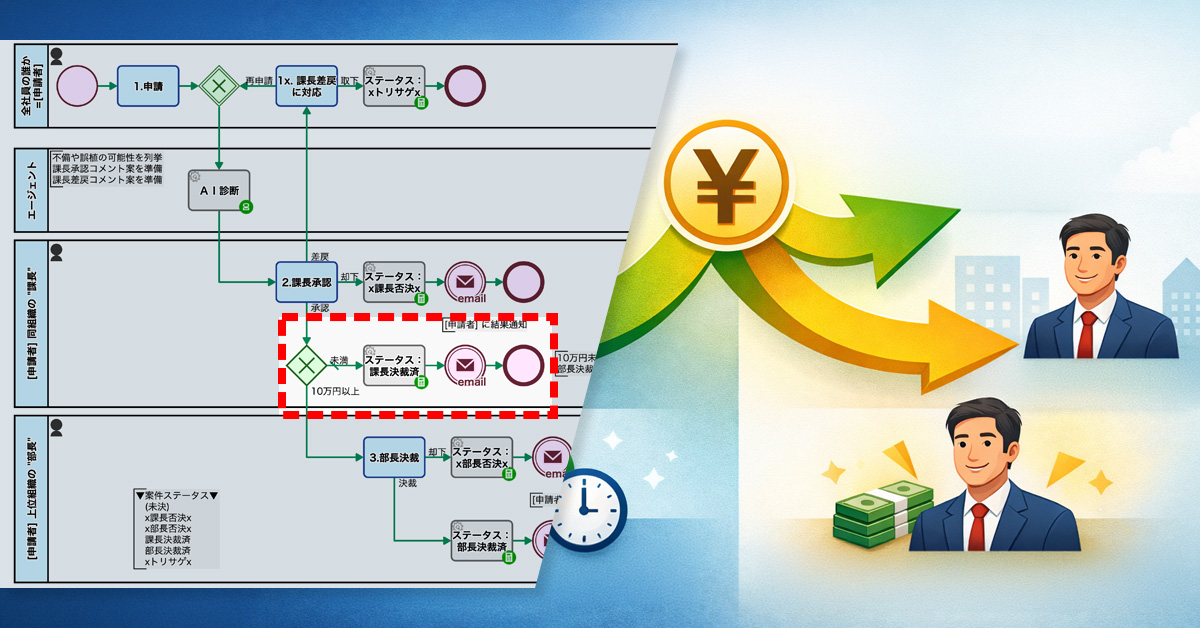
Amount-based routing reduces bottlenecks by limiting division manager approvals to high-value cases only.
1. Issue: Decision-making concentrated on the division manager
In the approval process for equipment purchases, a hierarchical workflow was used in which the applicant submitted a request, the section manager reviewed it, and the division manager made the final decision.
AI-based checks for errors and the generation of draft comments had been introduced, reducing formal mistakes in applications. However, the approval workflow itself had not been revised, and the division manager consistently remained responsible for the final decision. As a result, the bottleneck in the approval process was not structurally resolved.
Since all cases, regardless of amount, required the division manager’s approval, requests were constantly concentrated at that level. The division manager had to process a large number of cases in a short time, making it difficult to secure sufficient time for careful review—especially for high-value cases that would normally require more thorough consideration.
2. Solution: Branching approval routes based on amount thresholds
The process owner incorporated amount-based branching into the approval workflow. The approval route is automatically determined based on the amount entered by the applicant.
As a result, cases under 100,000 yen are completed with section manager approval, while only cases of 100,000 yen or more proceed to division manager approval.
Faster processing by completing small cases at the section manager level.
Before
View details of the workflow diagram1.Apply
The applicant initiates a request for equipment purchase. They enter the requested amount and details, and start the approval process.
AI Assessment
For the application details, AI checks for possible omissions and formal deficiencies. At the same time, it automatically generates draft comments for the section manager to reference during approval.
2.Section Manager Approval
The section manager reviews the application details and decides whether to approve or return it for revision. They make the decision efficiently while referring to the AI-generated comment suggestions.
3.Division Manager Approval
The division manager makes the final decision.
Result Notification
The decision result is automatically notified to the applicant. Whether approved or rejected, the outcome is shared promptly.
After
View details of the workflow diagram1.Apply
The applicant initiates a request for equipment purchase. They enter the requested amount and details, and start the approval process.
AI Assessment
For the application details, AI checks for possible omissions and formal deficiencies. At the same time, it automatically generates draft comments for the section manager to reference during approval.
2.Section Manager Approval
The section manager reviews the application details and decides whether to approve or return it for revision. They make the decision efficiently while referring to the AI-generated comment suggestions.
Branching based on amount thresholds
After the section manager’s approval, the approval route is determined based on the requested amount. Requests under 100,000 yen are completed with section manager approval, while only requests of 100,000 yen or more proceed to division manager approval.
3.Division Manager Approval (for cases of 100,000 yen or more)
Only when the requested amount is 100,000 yen or more does the division manager make the final decision. This setup allows the division manager to focus on high-value or exceptional cases.
Result Notification
The decision result is automatically notified to the applicant. Whether approved or rejected, the outcome is shared promptly.
[Release Date: March 24, 2026 / Source: Questetra, Inc.]
Questetra, Inc. (Headquarters: Nakagyo-ku, Kyoto; CEO: Genichi Imamura), provider of the cloud-based Business Process Management Suite (SaaS BPMS) “Questetra BPM Suite,” has published a case study detailing Nippon Light Metal Company, Ltd.’s (Headquarters: Minato-ku, Tokyo; President: Ichiro Okamoto) successful implementation of their system.
Nippon Light Metal’s Quality Assurance Group at the Kambara Electrical Material Center has digitized processes previously managed with paper and email, enabling real-time progress tracking. They have already developed around 20 applications, including solutions for complaint handling and blueprint registration, significantly accelerating business improvements driven by employees in the field. We interviewed key personnel to understand the reasons behind the implementation and its specific benefits.
Background: Breaking Down Progress “Black Boxes” and Reducing Data Entry Burden
The Quality Assurance Group is responsible for managing the quality assurance system, issuing inspection reports, and handling customer complaints. Addressing reported issues requires collaboration across multiple departments.
Previously, relying on paper and email made it difficult to track progress, leading to a “black box” effect where it was unclear which tasks were stalled, where, and why, resulting in delays. Furthermore, redundant data entry and transcription placed a significant burden on staff.
Why Questetra: Focusing on Flow Management, Not Just Task Management
After evaluating various tools to advance business reform through digital transformation (DX), we selected Questetra. A key deciding factor was Questetra’s design philosophy, which emphasizes viewing business processes not simply as record management, but as a continuous flow connecting seamlessly to subsequent stages.
Nippon Light Metal also highly valued the platform’s flexibility, allowing field personnel to create applications independently without the need for coding skills, and the ability to quickly identify bottlenecks using features like heatmaps and search functions.
Starting with a simple “Attendance Report” application, Nippon Light Metal has now developed approximately 20 applications, including “Defect Notifications”, “Calibration Management”, and “Drawing Registration”, with about 10 currently in active use.
Real-Time Progress Tracking: Visualizing the status of each process has enabled timely follow-up and effectively identified bottlenecks.
Significantly Improved Operational Efficiency: Digitalization has reduced the time-consuming tasks of data transcription and cumbersome approval procedures.
Empowered Field Improvement Discussions: Leveraging web form functions allows them to gather feedback even from workers without a Questetra account, fostering field-driven discussions on continuous improvement.
About Questetra BPM Suite
Questetra BPM Suite is a cloud-based Business Process Management System (SaaS BPMS).
Users can develop and operate workflow systems entirely through a web browser, without requiring any programming knowledge (coding skills). This empowers business departments to continuously improve their business processes independently.
Typical business processes, such as approval requests, quotation submissions, and inquiry handling, can be created as workflow systems using a no-code approach. Furthermore, integration with generative AI allows for the automation of tasks such as automatic draft document generation and generating draft response proposals.
Company Info
Nippon Light Metal Company, Ltd.
Location
Minato-ku, Tokyo
Representative
Ichiro Okamoto
Business Activities
Manufacture and sale of alumina, aluminum hydroxide, various chemicals, and aluminum ingots/alloys. etc.
Enhanced Quality Assurance through Visible Progress: A Continuous Improvement Cycle
Established
March 30, 1939
No. of Employees
2,051 (As of March 31, 2025)
Main Business
Alumina, aluminum hydroxide, various chemical products, and aluminum ingots and alloys: manufacturing and sales; aluminum sheet products, transportation-related products, electronic materials, and other products: manufacturing and sales.
Kambara Electric Materials Center, Quality Assurance Group
Overview of Company and Department Roles
The Quality Assurance Group at Nippon Light Metal Co., Ltd.’s Kambara Electric Materials Center is responsible for maintaining quality assurance systems, issuing inspection reports, and managing customer complaints. They work closely with other departments, such as Production and Technology, to implement improvements based on identified issues.
The ultimate goal is to establish a system that ensures we constantly deliver products that meet our customers’ needs.
Challenges Before Implementing Questetra BPM Suite
The Quality Assurance Group is responsible for quickly addressing and correcting operational issues. However, response times were often slow, and problem resolution took considerable time.
A primary reason for this was the lack of visibility into the progress of individual tasks, making it difficult to share status updates. It was difficult to identify stalled tasks and their specific bottlenecks. Additionally, relying on paper and email for information exchange led to time-consuming and inefficient data entry, transcription, and approval processes.
Discovery and Selection of Questetra BPM Suite
As the company proceeded with business reforms through DX, we considered introducing a tool that could visualize business processes.
Questetra BPM Suite stood out because it not only manages business operations but also transforms them into a flow, enabling continuous process improvement.
The platform allows us to visualize operations and improve processes, while its no-code flexibility empowers our on-site personnel to design and manage applications. We were also impressed by its ability to quickly identify bottlenecks and improvement areas using heatmaps and process search functions. These factors led to the decision to implement Questetra.
Solution and Implementation of Questetra BPM Suite
During the initial implementation phase, a team of five members from the DX Promotion Team spearheaded the effort, starting with an attendance reporting application. Building a system for automatic attendance report tallying helped them grasp Questetra’s basic operations and design principles. This success opened their eyes to Questetra’s potential for improving their everyday tasks.
Subsequently, the Quality Assurance Group organized operations such as handling complaints, managing calibrations, and registering drawings, systematically converting them into Questetra applications. Questetra provided assistance with some initial application development, which deepened our understanding of modeling methods and design concepts. Now, we are confident in our ability to independently develop applications.
We have created approximately 20 applications, and about 10 are already in active use. While Questetra currently covers a portion of our overall scope, we intend to expand its reach and transform it into a central mechanism for quality assurance operations.
Benefits of Implementation
Questetra has enabled us to visualize the status of our operations, allowing us to respond and follow up promptly with an accurate understanding of progress. This has clarified bottlenecks in execution and helped us identify areas for process improvement. Moreover, transitioning from paper-based and email processes to an online application has significantly improved operational efficiency by reducing time spent on complex data entry and transcription.
Furthermore, Questetra’s web form functionality allows us to collect information from individuals without Questetra accounts, leading to more active discussions about on-site improvements. In the future, we plan to encourage younger employees to take the lead in application development, further simplifying the reporting and improvement proposal processes, thus expanding field-led improvements.
Valuable Features of Questetra BPM Suite
The heatmap and process search functions, providing clear progress visualization, are effectively used to prioritize improvement efforts. The web form function allows us to easily receive reports from team members who do not have Questetra accounts.
We are also utilizing Questetra’s AI Agent function to add an automatic reply generation feature to our time and attendance application, further enhancing on-site efficiency.
Looking ahead, we are exploring the implementation of a system that uses AI to automatically aggregate and analyze collected data for quality enhancement purposes.
Message to Companies Facing Similar Challenges
Quality assurance and ISO compliance require continuous improvement—not just system implementation. It’s crucial to identify and address business challenges constantly. Starting with small app deployments and accumulating success stories on-site is the first step towards continuous enhancement.
Questetra BPM Suite is a tool that not only manages work but also drives it forward, fostering movement and autonomy in the field and naturally accelerating improvements.
Office building of Nippon Light Metal Co., Ltd.
(This case is based on information at the time of the interview.)














![[Case Study] Nippon Light Metal Streamlines Quality Assurance with Questetra, Eliminating Bottlenecks and Driving Business Process Reform](https://questetra.com/wp-content/uploads/2023/12/ogp-singlepage-en.png)