タグ: Product

利用中のカテゴリ:info-en(英語プレスリリース)

  • No-Code Development Platform v17.2 Support for Model Context Protocol

    No-Code Development Platform v17.2 Support for Model Context Protocol

    Kyoto, Japan, Questetra Inc. (CEO: Genichi Imamura) today announced the release of version 17.2 of its cloud-based workflow product, Questetra BPM Suite.

    This update implements server-side functionality for the Model Context Protocol (MCP), an open standard that facilitates seamless communication between AI and applications.This improvement empowers users to leverage external AI clients to understand and interact with business process information within Questetra using natural language.

    What is Questetra BPM Suite?

    With its no-code platform, you can easily create workflow systems for routine business tasks such as approval requests, quotation submissions, and inquiry responses.

    By integrating generative AI, Questetra automates complex intellectual tasks, including automatic document drafting and generating suggested responses.

    Key Enhancements in v17.2

    1. MCP Server Functionality Implemented

    This release includes server functions for the standard MCP protocol. This allows external AI clients (chatgpt.com) to independently access App definitions and status information within Questetra through the Questetra-provided MCPserver.

    • Information Accessible to AI:
      • List of process models
      • Search and detailed views of Process Instances
      • Search for Tasks assigned to the logged-in user, including My Tasks and Offered Tasks
    • Example Usage Scenarios:
      • “Show me my prioritized tasks for this week, sorted by upcoming deadlines.”
      • “Identify processes that are awaiting approval and pinpoint where the bottlenecks are.”
      • “Based on historical data, what is the expected completion date for this process?”

    By enabling natural language dialogue, the system eliminates the need for complex search conditions or intricate screen navigation, providing streamlined access to operational status and facilitating informed decision-making.

    2. SPA-ization of Main Screens and UI Renewal

    Key screens, such as “My Tasks” and “Process Details,” which are frequently used by business users, have been significantly updated.

    • Migration to SPA (Single Page Application) Format:
      The platform has been migrated from a traditional page-transition model to an SPA architecture. This means only the necessary data is retrieved asynchronously, without requiring a full page reload.
    • Adoption of Material Symbols:
      The UI now incorporates Material Symbols provided by Google for its icons.

    By minimizing screen transition latency and using more visually appealing icons, we aim to reduce operational friction for users handling numerous tasks. This eliminates wasted time due to system delays, allowing users to focus on their core responsibilities within a highly efficient work environment.


    3. OAuth 2.1 and CSP Support

    API integration and front-end security are now aligned with the latest standard protocols.

    • Auth 2.1 (PKCE) Support:
      Supports PKCE, a more secure authorization flow for API authentication.
    • CSP (Content Security Policy) Implementation:
      Enforces restrictions by default to mitigate the risk of cross-site scripting attacks in new environments.

    This provides a more secure environment for API integration with external applications and AI clients. By strengthening browser-level defenses, Questetra enhances security governance for enterprise usage.


    4. Extended Data Handling and AI Agent Process

    The release includes enhanced data manipulation features designed for developers and operations personnel.

    • YAML Format Response:
      The API for acquiring process details now supports YAML as a response format.
    • Process Log Acquisition API:
      A new API endpoint (/API/Admin/ProcessLog/listCsv) has been added to output Process logs in CSV format.
    • AI Agent Process Updates:
      Supports the latest AI models: Claude Haiku 4.5 / Sonnet 4.5 / Opus 4.5.

    For more details, please refer to the release notes.

    About Questetra

    Questetra, Inc. is a Kyoto-based SaaS BPM vendor optimizing business processes around the world.

    Corporate Name: Questetra, Inc. (株式会社クエステトラ)
    CEO: IMAMURA Genichi
    Corporate Address: 206 Takamiya-cho Oike Bldg. 4th Fl., Nakagyo-ku, Kyoto 604-0835, Japan
    Capital Stock: 184,057,500 JPY
    Founded: April 1, 2008
    URL: https://questetra.com/

    Inquiries regarding this press release

    pr@questetra.com or 075-205-5007

  • No-Code Development Platform v17.1 Makes Workflow and Chat Even More Seamless

    No-Code Development Platform v17.1 Makes Workflow and Chat Even More Seamless

    Questetra, Inc. (Kyoto City, CEO: Genichi Imamura) has released the new version v17.1 of its cloud-based workflow product, Questetra BPM Suite.

    The new version improves the compatibility between task processing and chat functions, integrating business flows and conversations more seamlessly. Related conversations can now be displayed on the process details screen, allowing task processors to check and make decisions on the spot, making it easier to process [My Tasks].

    Additionally, we’ve implemented various updates simultaneously, such as bolstered security, expanded CSV/TSV processing capabilities, and enhancements to our AI agents and APIs.

    What is Questetra BPM Suite?

    Questetra BPM Suite is a cloud-based business process management system (SaaS BPMS) that allows business departments to take the lead in continuously improving their business processes. Workflow systems (workflow apps) can be developed and operated entirely within a web browser, eliminating the need for programming knowledge or coding skills.

    Without coding, you can establish routine business processes like approval requests, quotation submissions, and inquiry responses as a workflow system. Additionally, by integrating generative AI, intellectual tasks such as automatically generating document drafts and crafting response drafts can be automated.

    Enhancements in v17.1

    1. Enhanced Chat Functionality

    • Related Conversations Display Improved
      Chat can now be displayed on the process details screen, allowing you to check tasks and have conversations at the same time.
    • Notification UI Improvements
      Clicking “See all” updates the display within the dialog, preventing any interruption to your work.
    • Layout Improvements
      The left-side menu now supports independent scrolling, and can be opened or closed, enabling wider and more efficient use of the screen.
    • Thread Search Enhancements
      You can now search all channels you have permission to access, rather than being limited to searching within a single channel.

    2. Enhanced Security

    • Detecting Suspicious Logins and Additional Authentication
      For security, password logins from new devices are flagged as suspicious and require additional authentication with a one-time password. A notification email will be sent to the user upon detection.

    3. CSV/TSV Processing Enhancements

    • Supports Saving to Numeric Data Items
      Enables direct saving of aggregated CSV values to data items.
    • Automatic Assignment of ID Columns
      Automatically assign IDs to input data to make it easier to identify rows.
    • Saving to Multi-line Text Fields in Columns
      Each CSV column can now be saved as a separate String-type multi-line data item.

    4. Other Improvements

    • Faster Process Log Display
      Smoothly check logs even for projects with large amounts of data.
    • AI Agent Enhancements
      Supports the latest models such as Claude 3.7 Sonnet / GPT-4.1 series, and improves processing stability.
    • REST API Enhancements
      Added API for checking specific app permissions. When processing tasks, branch destinations can now be specified by node number.

    For more information, see the release notes.

    About Questetra

    Questetra, Inc. is a Kyoto-based SaaS BPM vendor optimizing business processes around the world.

    Corporate Name: Questetra, Inc. (株式会社クエステトラ)
    CEO: IMAMURA Genichi
    Corporate Address: 206 Takamiya-cho Oike Bldg. 4th Fl., Nakagyo-ku, Kyoto 604-0835, Japan
    Capital Stock: 184,057,500 JPY
    Founded: April 1, 2008
    URL: https://questetra.com/

    Inquiries regarding this press release

    pr@questetra.com or 075-205-5007

  • Questetra BPM Suite Releases New Feature: “AI Agent”

    Questetra BPM Suite Releases New Feature: “AI Agent”

    Kyoto, Japan – Questetra, Inc. has released a new feature called “AI Agent Task” in its cloud-based workflow product, Questetra BPM Suite, enabling easy and practical use of generative AI within workflow applications.

    With this feature, generative AI can be seamlessly incorporated into workflow apps. For example, by simply configuring an automated step as “Summarize inquiries concisely,” each inquiry will be automatically summarized.

    Background: The Gap Between Expectations and Reality in Generative AI Utilization

    Interest in generative AI continues to grow among companies, with many considering its adoption to reduce man-hours and operational costs.

    However, actual implementation often stalls due to challenges such as:

    • A lack of personnel with knowledge and skills regarding generative AI.
    • Difficulty identifying concrete use cases

    Overview of the New Feature: What is AI Agent ?

    The AI Agent allows users to input natural words instructions, based on which the AI automatically executes processing. No specialized knowledge such as programming or API configuration is required.

    Powered by Anthropic’s LLM model, Claude 3.5 Sonnet v2, the AI Agent delivers high comprehension and accuracy.

    Example instructions include:

    • “Please summarize the inquiry concisely.”
    • “Translate this application document into French.”
    • “Classify the report contents into categories.”

    The AI output can be used as-is or reviewed by a human in a subsequent step, ensuring both safety and accuracy.

    In Questetra BPM Suite, it has been possible to incorporate generated AI such as OpenAI ChatGPT and Google Gemini into workflow applications, but API linkage settings and individual contracts with each generated AI provider were required. The new functionality is available at no additional cost for all editions of Basic, Advanced, and Professional.

    Benefits of AI Agent Task × Flexible Workflow Design

    AI Agent Task is designed to handle commonly recurring use cases in business such as translation, summarization, classification, and requirement extraction. Moreover, Questetra BPM Suite allows AI Agent tasks to be freely placed anywhere in the workflow, and this flexibility supports ease of deployment in the field.

    Thus, field personnel can experience the tangible effects immediately by incorporating and trying it out without worrying how to use AI.

    Comments from the Development Manager

    Questetra, Inc. CTO Akihiro Hatanaka

    The AI Agent is tailored to address the biggest challenge in the introduction of generative AI in the field; We don’t know how to utilize generative AI in our business. This feature allows AI to be integrated into the business process as if it is a member of the field.

    Comments from Partner Company

    Naoto Kume, CEO, Highsmart Corporation

    We offer consulting services specializing in the medical industry. We are supporting DX promotion using BPMS, especially in administrative operations where operations are required to be carried out by a smaller number of people.

    The AI Agent is very attractive in that it can incorporate the power of generated AI into business processes even in the medical industry, where so-called IT departments are not well organized. It can execute tasks simply by writing what you want to be done, thus accelerating the on-site improvement cycle significantly. We regard it as a big step forward in autonomous business improvement.

    About Questetra BPM Suite

    Questetra BPM Suite is a cloud-based business process management system (SaaS BPMS). You can develop and operate workflow systems (Workflow Apps) entirely through a web browser, without needing programming knowledge (coding skills). This allows business departments to lead continuous process improvements.

    You can systematize various day-to-day operations such as approval flows, quotation submission processes, and inquiry handling. Advanced automation, such as “Requesting AI to draft a document” or “Saving files to Google Drive,” can also be implemented in No-Code.

    (Examples of business process improvements:  https://questetra.com/en-solutions/ )

    (Examples of Business Flow Diagrams: https://questetra.zendesk.com/hc/en-us/articles/360012492211)

    Please see the Release Notes for details.

    About Questetra, Inc.

    Questetra, Inc. is an enterprise cloud computing company in Kyoto Japan, founded in 2008. We optimize the world’s Business Processes.
    Visit https://questetra.com/

    Corporate Name: Questetra, Inc. (株式会社クエステトラ)
    CEO: IMAMURA Genichi
    Corporate Address: 206 Takamiya-cho Oike Bldg. 4th Fl., Nakagyo-ku, Kyoto 604-0835, Japan
    Capital Stock: 184,057,500 JPY
    Founded: April 1, 2008
    URL: https://questetra.com/
    Contact: pr@questetra.com

  • No-Code development platform v16.2, Introducing New String-type, “Markdown”

    No-Code development platform v16.2, Introducing New String-type, “Markdown”

    Kyoto, Japan, Dec. 15th, 2024 — Questetra, Inc., the global SaaS provider of Business Process Management (BPM), today announced the publication of the new version 16.2 of the No-Code development platform Questetra BPM Suite. In this new version 16.2, a new String-type Data Item, Markdown, is added.

    Markdown is a lightweight markup language that lets you easily format text (like bold or italic) and structure layouts (like bullet points or links) using simple syntax. It’s supported by many cloud tools, including Google Docs and WordPress, and is widely used across various fields today.

    In the new version 16.2, business users can input text using Markdown syntax, which will automatically be rendered into a document display of visually appealing format during the later stages.

    For example, telecommunications companies can improve operational efficiency when creating outage information for publication on their websites. During the drafting process, details such as the cause of the outage, affected areas, and the date and time of occurrence can be organized using bullet points and bold text. The Markdown text created is displayed in an easy-to-read format for approvers. This allows approvers to review the information in a well-structured manner, enabling quick and accurate approvals without misunderstandings.

    What is Questetra BPM Suite

    Questetra BPM Suite is a cloud-based business process management system (SaaS BPMS). You can develop and operate workflow systems (Workflow Apps) entirely through a web browser, without needing programming knowledge (coding skills). This allows business departments to lead continuous process improvements.

    You can systematize various day-to-day operations such as approval flows, quotation submission processes, and inquiry handling. Advanced automation, such as “Requesting AI to draft a document” or “Saving files to Google Drive,” can also be implemented in No-Code.

    (Examples of business process improvements: https://questetra.com/solutions-en/)

    (Examples of Business Flow Diagrams: https://questetra.zendesk.com/hc/en-us/articles/360012492211)

    Markdown texts

    When entering Markdown text, you can check the display in the preview field.

    Other improvements

    Task Operating Screen Decoration: Markdown Supported

    You can now decorate (add descriptions to) the Task Operating screen using Markdown syntax. (Eligible Editions: Basic, Advanced, Professional)

    File Upload to Google Drive: Convert to Google Workspace Files

    In the automated Step for uploading files to a specified folder in Google Drive, files can now be converted into “Google Workspace files” (Google Docs, Sheets, Slides) during the upload.
    (Eligible Editions: Advanced, Professional)

    Open Chat: Carousel Display for Multiple Attachments

    The in-house social networking feature, Open Chat, now supports viewing multiple attached images in a carousel format, allowing users to switch between them horizontally. Additionally, it now supports “thumbnail display for video files” and “preview playback for video files.” (Eligible Editions: Basic, Advanced, Professional)

    Please see the Release Notes for details.

    Version 16.2 Release Note: https://support.questetra.com/versions/version-162/

    About Questetra, Inc.

    Questetra, Inc. is an enterprise cloud computing company in Kyoto Japan, founded in 2008. We optimize the world’s Business Processes.


    Corporate Name

    Questetra, Inc. (株式会社クエステトラ)

    CEO

    IMAMURA Genichi

    Corporate Address

    206 Takamiya-cho Oike Bldg. 4th Fl., Nakagyo-ku, Kyoto 604-0835, Japan

    Capital Stock

    184,057,500 JPY

    Founded

    April 1, 2008


  • No-Code development platform v16.1, Enhanced Linkage with Microsoft Lists

    No-Code development platform v16.1, Enhanced Linkage with Microsoft Lists

    Original Japanese version

    Fostering team collaboration with Microsoft 365

    Kyoto, Japan, Aug. 19th, 2024 — Questetra, Inc., the global SaaS provider of Business Process Management (BPM), today announced the publication of the new version 16.1 of the No-Code development platform Questetra BPM Suite. The new version 16.1 strengthens linkage with Microsoft Lists, allowing user companies to build a system for automatically adding List Items with no coding.

    Microsoft Lists is a list management tool included in Microsoft 365. It allows you to manage information in a table format like Excel and can be used for a variety of purposes, including task management, event management, and asset management.

    In the new version 16.1, you can incorporate an automatic process step that adds list items (row data) to Microsoft Lists into the workflow. For example, if the task of adding FAQs to a site is managed in the “FAQ Creation” list of Microsoft Lists, you can create a mechanism that automatically adds the response results of the Inquiry Response flow to the “FAQ Creation” list.

    【What is Questetra BPM Suite】

    Questetra BPM Suite is a cloud-based Business Process Management System. (SaaS BPMS)

    Business Systems can be developed by drawing workflow diagrams. No coding is required. Not only will the daily work be digitized, it will also be possible to promote unmanned and automated operations. (DX, Workflow Automation)

    It can be applied to various business operations such as an Approval request flow, Document translation flow, Quality check process, and Invoice issuance process. Process owners of each Business Process can practice the Improvement of Business Processes little by little in daily work. (Examples of Business Flow Diagrams: https://questetra.zendesk.com/hc/en-us/articles/360012492211 )

    【Microsoft Lists: Add/Update/Delete List Item】

    An Auto-step item has been added to automatically insert List Items of Microsoft Lists, a cloud service. By linking business data with “Fields”, when a business case reaches this Auto-sep, data will be automatically inserted into each corresponding Field as a List Item. Auto-steps have also been added to update and delete List Items using the List Item ID as a key. (Eligible editions: Advanced, Professional)

    【Other improvements】

    <Box: Move Folder>

    Cooperation with the cloud storage service Box will be further strengthened. In addition to the existing folder creation and search, it will now be possible to move a specified folder into any folder. (Eligible editions: Advanced, Professional)

    <Timer Start: Number of Organizations>

    You can start Processes periodically for the number of organizations you specify. For example, you can automatically start Progress Report processes every Monday for each section leader in the sales department. (Eligible editions: Advanced, Professional)

    <Specifying the language of the Published Form>

    You can now specify the language for button names and error messages for Published Forms (?locale=en after the URL for English, ?locale=ja for Japanese). Previously, it was dependent on the system language of the workflow platform. (Eligible editions: Advanced, Professional)

    Please see the Release Notes for details.

    Version 16.1 Release Note: https://support.questetra.com/versions/version-161/

    About Questetra, Inc.

    Questetra, Inc. is an enterprise cloud computing company in Kyoto Japan, founded in 2008. We optimize the world’s Business Processes.

    Corporate Name: Questetra, Inc. (株式会社クエステトラ)
    CEO: IMAMURA Genichi
    Corporate Address: 206 Takamiya-cho Oike Bldg. 4th Fl., Nakagyo-ku, Kyoto 604-0835, Japan
    Capital Stock: 184,057,500 JPY
    Founded: April 1, 2008
    URL: https://questetra.com/en/
    Contact: pr@questetra.com

  • No-Code development platform v16.0, Gemini Cooperation Added

    No-Code development platform v16.0, Gemini Cooperation Added

    Original Japanese version

    Enhanced incorporating generative AI into workflows

    Kyoto, Japan, Apr. 15th, 2024 – Questetra, Inc., the global SaaS provider of Business Process Management (BPM),today announced the publication of the new version 16.0 of the No-Code development platform Questetra BPM Suite.

    With this new version 16.0, it is now possible to place a Google Gemini Step in a workflow, allowing user companies to install a mechanism to automatically communicate with the generative AI model Google Gemini, developed by Google, within their business Processes with no code.

    In an Inquiry Handling workflow, for example, it can incorporate a function that automatically generates a draft response when an inquiry email arrives.

    <Google Gemini cooperation>

    Furthermore, our company quickly focused on generative AI, which is making remarkable progress, and added an automatic step that collaborates with OpenAI ChatGPT in 2023.

    What is Questetra BPM Suite

    Questetra BPM Suite is a cloud-based Business Process Management System. (SaaS BPMS)

    Business Systems can be developed by drawing workflow diagrams. No coding is required. Not only will the daily work be digitized, it will also be possible to promote unmanned and automated operations. (DX, Workflow Automation)

    It can be applied to various business operations such as an Approval request flow, Document translation flow, Quality check process, and Invoice issuance process. Process owners of each Business Process can practice the Improvement of Business Processes little by little in daily work.

    (Examples of Business Flow Diagrams: https://questetra.zendesk.com/hc/en-us/articles/360012492211 )

    Google Vertex AI: Gemini: Chat

    You will be able to send messages to Gemini models and save the answers in a Data Item. By setting prompts(specific instructions), you can receive answers tailored to your needs.
    (* Eligible editions: Advanced, Professional)

    <Google Vertex AI: Gemini:Chat settings>

    Other Improvements

    Microsoft Lists: Search List Items/Get List Item

    Added automatic items that retrieve the value of the specified column from the list items in the cloud service Microsoft Lists extracted by the search filter. For example, when combined with an automatic step that creates selection options, Accounts Master in Microsoft Lists can be used as options of a Select-type Data Item. (* Eligible editions: Advanced, Professional)

    WordPress.com: Automatic Posting feature

    An automated step that creates a draft of a new Post to the cloud service WordPress.com has been implemented. When a business Process token reaches this automatic step, the Post title, body, category, etc. are automatically set via API.
    It will be possible to build a system, for example, when the manual content is approved in the Manual Creation workflow, a draft is immediately generated on WordPress.com.
    (* Eligible editions: Advanced, Professional)

    Password policy setting rules

    The password policy setting rules for the password login function has been strengthened.(* Eligible to all editions)

    Please see the Release Notes for details.
    Version 16.0 Release Note: https://support.questetra.com/versions/version-160/

    About Questetra, Inc.

    Questetra, Inc. is an enterprise cloud computing company in Kyoto Japan, founded in 2008. We optimize the world’s Business Processes.
    Visit https://questetra.com/

    Corporate Name: Questetra, Inc. (株式会社クエステトラ)
    CEO: IMAMURA Genichi
    Corporate Address: 206 Takamiya-cho Oike Bldg. 4th Fl., Nakagyo-ku, Kyoto 604-0835, Japan
    Capital Stock: 184,057,500 JPY
    Founded: April 1, 2008
    URL: https://questetra.com/
    Contact: pr@questetra.com

  • No-Code development platform v15.2, Outlook Cooperation Added

    No-Code development platform v15.2, Outlook Cooperation Added

    Original Japanese version

    Easier DX promotion for Microsoft 365 users

    Kyoto, Japan, Dec. 18th, 2023 — Questetra, Inc., the global SaaS provider of Business Process Management (BPM), today announced the publication of the new version 15.2 of the No-Code development platform Questetra BPM Suite. This new version 15.2 enables the creation of a system that automatically initiates a workflow upon receiving an email in Microsoft 365 Outlook for Business.

    The cloud software Microsoft 365 for business is used by approximately 260 million people worldwide and has become an essential system for many companies. (source)

    Until now, Questetra BPM Suite has provided the ability to link workflows with OneDrive for file management and Excel for spreadsheet calculations with no-code, facilitating Microsoft 365 users to promote DX more easily. Additionally, the ability to link with Outlook, an email management tool, has been added in the new version 15.2.

    With the new version, you can build a system, for example, that automatically initiates an inquiry response flow triggered by an inquiry email reception in Outlook. Moreover, by utilizing automatic tasks to import email texts and attachments, the effort of data transcription is eliminated, preventing errors caused by this.

    Outlook for Business Linkage

    What is Questetra BPM Suite

    Questetra BPM Suite is a cloud-based Business Process Management System. (SaaS BPMS)

    Business Systems can be developed by drawing workflow diagrams. No coding is required. Not only will the daily work be digitized, it will also be possible to promote unmanned and automated operations. (DX, Workflow Automation)

    It can be applied to various business operations such as an Approval request flow, Document translation flow, Quality check process, and Invoice issuance process. Process owners of each Business Process can practice the Improvement of Business Processes little by little in daily work. (Examples of Business Flow Diagrams: https://questetra.zendesk.com/hc/en-us/articles/360012492211 )

    Outlook for Business: Process Auto-start

    Added a Start Event that automatically initiates the workflow when an email is received in Outlook. You can set a specific category of emails to trigger to launch automatically. For example, you can create a system that automatically starts a System Failure Response flow when an incoming email is classified into the “Alert” category.

    Outlook for Business Auto-start settings

    Other Improvements

    OneDrive for Business: Process Auto-start

    Added a Start Event that automatically initiates a workflow when a file is uploaded to a specified folder in OneDrive. You can build a system that automatically starts the Application Response flow when a handwritten application form image is uploaded to a OneDrive folder.

    OneDrive for Business: Shared Link Create/Delete

    You can now automatically create (or delete) shared links for files in OneDrive using an automated task. You can create a system where once a quote on OneDrive is approved, a shared link is automatically created for the customer to download it.

    OpenAI ChatGPT: Chat

    The automatic task for sending chat messages to ChatGPT and getting responses has been enhanced. GPT-4-32k has been added to the Model selection, and it is now possible to specify any Model by text input. “gpt-4-vision-preview”, which can perform image analysis, can now be specified as the Model.

    Eligible editions: Advanced, Professional

    ★Please see the Release Notes for details.
    Version 15.2 Release Note: https://support.questetra.com/versions/version-152/

  • No-Code development platform v15.1, Added Twilio SendGrid Integration Function

    No-Code development platform v15.1, Added Twilio SendGrid Integration Function

    Original Japanese version

    Control massive email delivery with Workflow

    Kyoto, Japan, Aug. 14th, 2023, Questetra, Inc., the global SaaS provider of Business Process Management (BPM), today announced that they have published the new version 15.1 of the No-Code development platform Questetra BPM Suite. The new version 15.1 allows controlling mass email delivery from the workflow by linking with the cloud-based email delivery service Twilio SendGrid.

    With the growing need for corporate marketing automation in recent years, there is also an increasing need for automatic delivery of personalized emails. Questetra BPM Suite has been traditionally providing items that can send emails from workflows, but it was unsuitable for mass distribution.

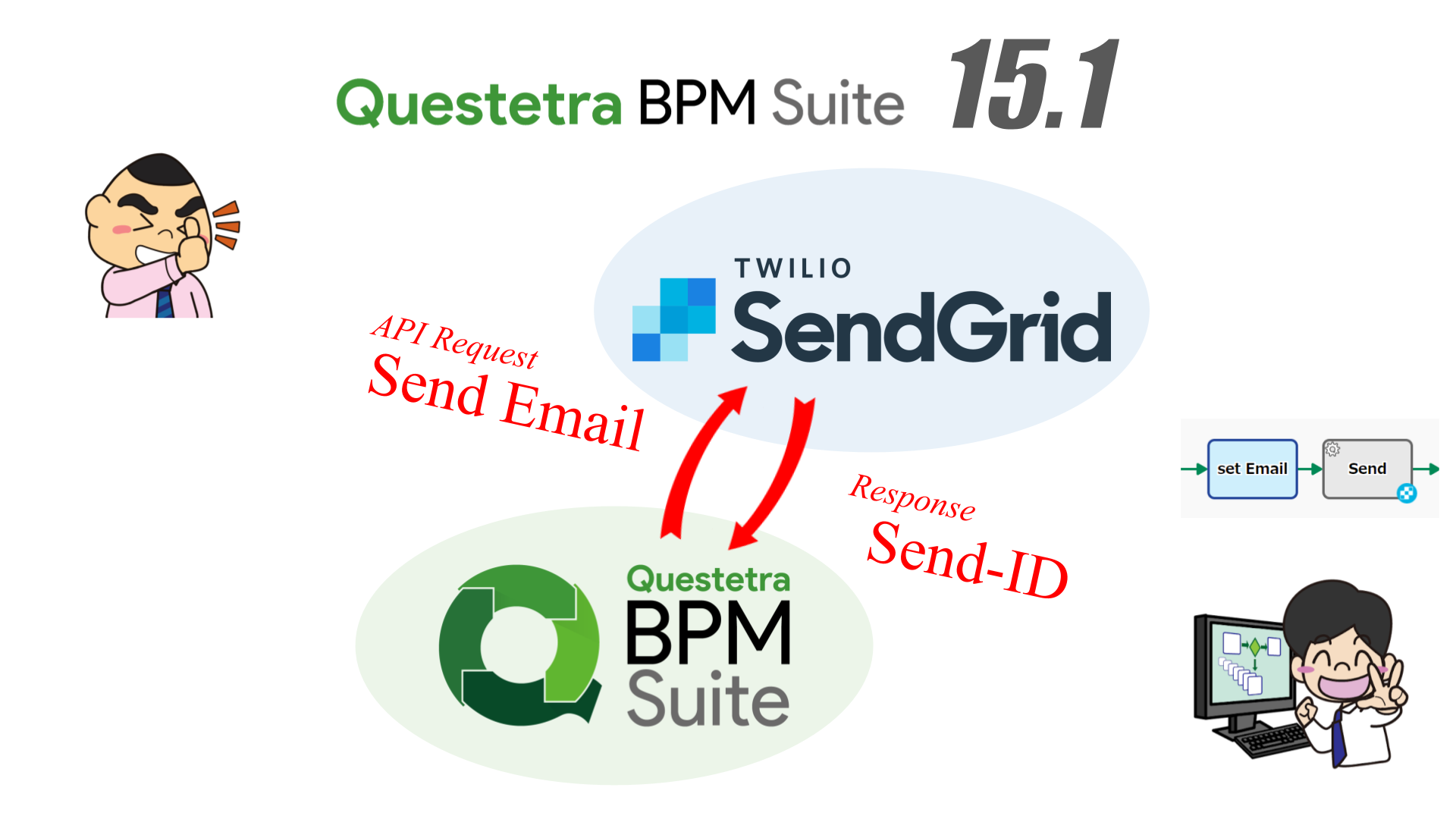
    The new version 15.1 adds a built-in item that can automatically handle Twilio SendGrid. Therefore, you’ll be able to create full-fledged email marketing processes like nurturing and newsletters. In addition, by linking the workflow and Twilio SendGrid with an API, it will be possible to automatically insert workflow data into emails, preventing erroneous input of delivery data.

    【What is Questetra BPM Suite】

    Questetra BPM Suite is a cloud-based business process management system (SaaS BPMS) that allows you to design, automate, and track the progress of business flows. By linking visually easy-to-understand business processes and APIs, you can improve the efficiency of your business. Furthermore, due to its ease of customization, it is possible to implement process management that matches the characteristics of the organization. Since it is cloud-based, it can be used in a remote work environment and reduces operating costs, contributing to improved communication and cooperation within the company. (Examples of Business Flow Diagrams: https://questetra.zendesk.com/hc/en-us/articles/360012492211

    【Twilio SendGrid Auto-processing Items】

    By using the following automatic processing items you can build a mechanism, for example, to automatically send seminar information emails periodically to the email address entered on the material request page.

    • Twilio SendGrid: Send Bulk Email
      • This item sends bulk email to the contacts in the specified lists and/or segments on SendGrid.
    • Twilio SendGrid: Add or Update Contact
      • This item adds or updates a contact on SendGrid.
    • Twilio SendGrid: Add or Update Contact (Custom Fields)
      • This item adds or updates a contact on SendGrid with the specified custom field values.

    * Eligible editions: Advanced, Professional

    A email delivery business process

    For details, please refer to the release notes.

    Ver. 15.1 Release Note: https://support.questetra.com/versions/version-151/

  • No-Code Development Platform v15.0, Enhanced Subprocess Function

    No-Code Development Platform v15.0, Enhanced Subprocess Function

    Original Japanese version

    Centralized management of Sub-process business data in the Parent Process

    Kyoto, Japan, Apr. 16th, 2023, Questetra, Inc., the global SaaS provider of Business Process Management (BPM), today announced that they have published the new version 15.0 of the No-Code development platform Questetra BPM Suite. With the new version 15.0, data in Child Processes (Subprocesses) can be referenced from Parent Processes, enabling efficient division of business processes.

    A business process, for example, that starts with order acceptance and ends up through billing, contains many detailed works such as customer registration, and multiple departments are concerned with those works. In such a large-scale business process, there were many needs to improve the process for each detailed work or to manage business data by each department. Questetra BPM Suite has responded to such needs with the function of dividing large-scale processes (sub-processing). However, it can be said that there was a problem that the management of divided data became difficult.

    In the new version 15.0, the data of multiple divided child processes can be referenced from the parent process, so in addition to managing data for each child process, it is now possible to collectively manage data for all large-scale processes.

    What is Questetra BPM Suite

    Questetra BPM Suite is a cloud-based business process management system (SaaS BPMS). It has functions such as business flow designing, task automation, and progress management. Visualized business processes and API linkages improve business efficiency and contribute to the improvement of internal communication and collaboration. Because it is easy to customize, it is possible to manage business processes according to each organization. In addition, since it is cloud-based, it can reduce operating costs and be used in a remote environment.

    (Examples of BusinessFlowDiagrams: https://questetra.zendesk.com/hc/en-us/articles/360012492211)

    Service Task (Start Child Process)

    Reference the Child Process data from the Parent Process

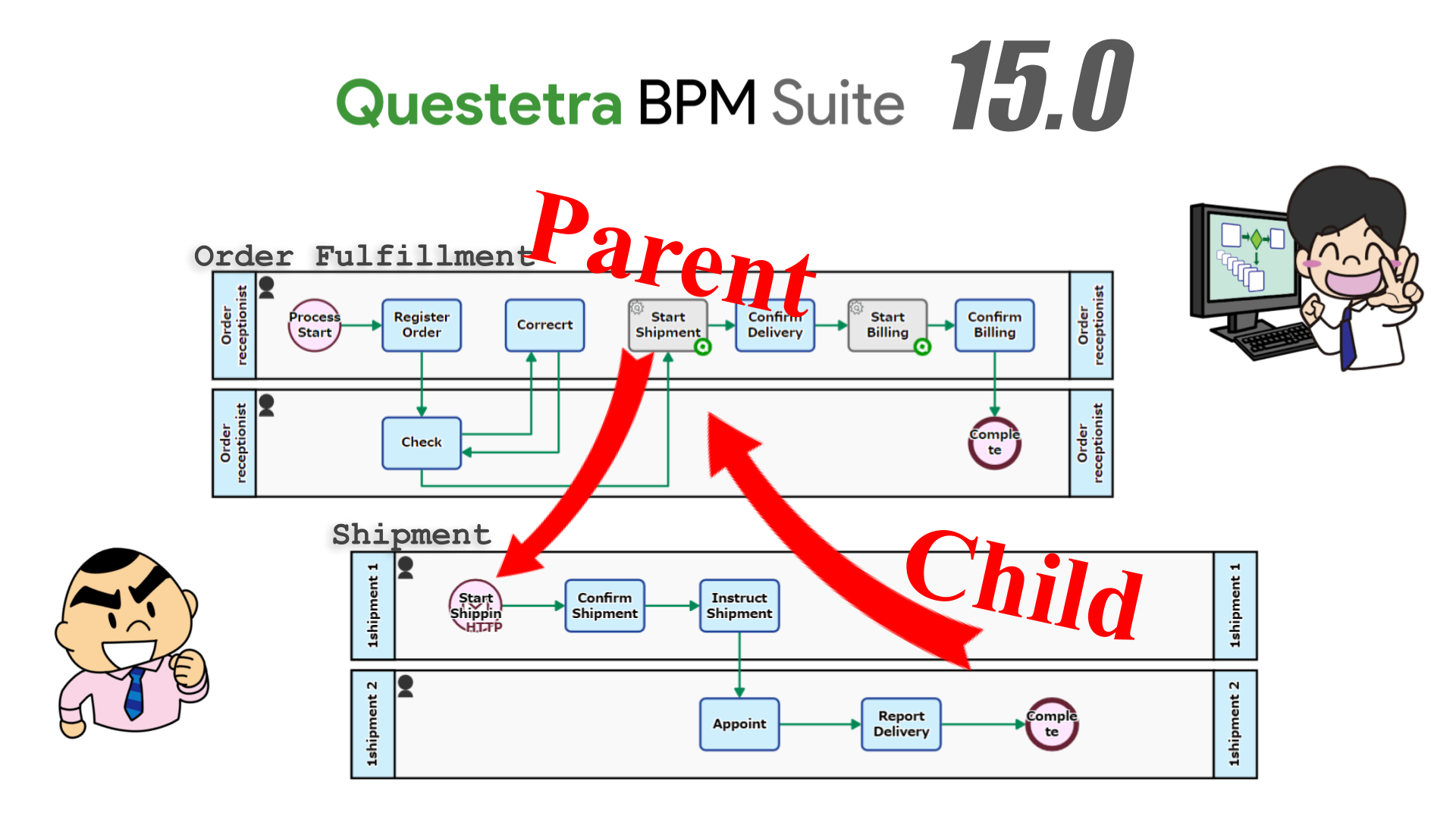
    When the Child Process terminates, the data of the Child Process is automatically conveyed to the Parent Process. Only the data allowed in the Child Process can be seen from the Parent Process.

    Waits for Child Process to complete

    It is now possible to set to wait for Child Process to complete in the interprocess linkage settings. That is, for example, if you have built a mechanism that automatically starts the Shipment Process (Child Process) in the middle of the Order Fulfillment Process (Parent Process), the data (Delivery date, etc.) entered in the Shipment Process (Child Process) can be reflected on the Order Fulfillment Process (Parent Process) side.

    * Eligible editions:  Professional

    Outline of Child Process data reference

    * For details, please refer to the release notes.

    Ver. 15.0 Release Notes: https://support.questetra.com/versions/version-150/

  • No-Code Development Platform v14.2, Enhanced  Function for Stripe integration

    No-Code Development Platform v14.2, Enhanced Function for Stripe integration

    Original Japanese version

    Automation of various billing-related tasks

    Kyoto, Japan, Dec. 12th, 2022, Questetra, Inc., the global SaaS provider of Business Process Management (BPM), today announced that they have published the new version 14.2 of the No-Code development platform Questetra BPM Suite. In the new version, 14.2. This new version has enhanced functionality for integration with Stripe, the cloud payment processing service enabling configurations of more advanced automated billing processes.

    In recent years, various payment agency services have become available, and the usability of B to C payment operations is improving daily. In the B to B market as well, the emergence of billing agency services, etc., has made it possible to reduce the burden of billing operations. However, even when such agency services are employed, the business processes of order acceptance and invoicing are still separated. Thus, the workload of transferring data between the two operations remains, and the possibility of operational errors persists.

    Using Questetra BPM Suite, Version 14.2 automates customer registration, invoice creation/sending, billing, and payment confirmation through Stripe. Furthermore, linking with the order process on Questetra BPM Suite, the entire process from order acceptance to invoicing can be automated, reducing operators’ workload and minimizing operational errors.

    What is Questetra BPM Suite

    Questetra BPM Suite is a No-Code development platform for realizing paperless and remote-working environments. You can develop a workflow system with No code by Dragging & Dropping the Step icons. It will help on-site-led digitization, automation, and unmanned operation to be realized. This is a cloud SaaS service for ISO-certified companies, BPO contractors, and corporations who want to work on continuous process improvement. You can apply it to various business operations such as an Approval Request Flow, Document Translation Flow, Quality Check Process, and Invoice Issuance Process. Process owners of each Business Process can practice the Improvement of Business Processes little by little in their daily work.

    (Examples of Business Flow Diagrams:https://questetra.zendesk.com/hc/en-us/articles/360012492211 )

    Stripe: Create/Search Products

    This automated process enables the automatic creation of Stripe product objects and the search for registered products. For example, you can build a system for automatically searching whether a purchased product is registered in Stripe, and if not, it automatically registers the product.

    In addition, by using “Stripe: Modeling Element” in combination with other existing “Stripe: Modeling Element” Automated processing such as Create Customer, Create Draft Invoice, Email Invoice, and Billing by Invoice, you can automate the billing operations. For example, customer and product information entered at the time of order acceptance is automatically registered on Stripe. The system can then create an invoice based on the registered information and automatically send it to the customer. *Eligible editions: Advanced, Professional

    “Billing Process” Overview

    Stripe: Update Customer Information

    This updates the customer information registered on Stripe. By combining this automated process with the existing “customer search” process, you can realize automated maintenance of customer information. *Eligible editions: Advanced, Professional

    Stripe: Add items to draft invoice

    This adds an item to the draft invoice created on Stripe. For example, you can build a system in which product information is automatically added to the invoice draft when a customer purchases additional products after the invoice draft is created. *Eligible editions: Advanced, Professional

    ★For details, please refer to the release notes.
    Ver. 14.2 Release Notes: https://support.questetra.com/versions/version-142/

  • No-Code development platform v14.1, Box Integration Enhanced

    No-Code development platform v14.1, Box Integration Enhanced

    Original Japanese version

    Centralize and automate the digital signature process

    Kyoto, Japan, Aug. 8th, 2022, Questetra, Inc., the global SaaS provider of Business Process Management (BPM), today announced that they have published the new version 14.0 of the No-Code development platform Questetra BPM Suite. In the new version, 14.1, the cooperation with the cloud storage “Box” has been further strengthened, which will allow users to automatically request the signature of documents.

    In recent years, the need for paperless offices has increased, and the importance of electronic signatures in companies has become even more essential. In addition, many services that support the electronic signature process, such as electronic signatures, document management, and workflows, have been provided to improve user convenience. On the other hand, business personnel have to handle the process from document creation to signature requests and then the storage of signed documents with separate services. As a result, the process is divided into individual utilized services, and the new issue of not being able to unify business processes has arisen.

    In the new version 14.1, Questetra BPM Suite will automate the request to sign documents on Box. Not only is the specified document automatically stored in Box, as in the past, but also from the original generation of the signature required document to the signature request are all completed in a streamlined, unified process on Questetra BPM Suite.

    Questetra BPM Suite

    Questetra BPM Suite is a No-Code development platform for realizing paperless and remote-working environments. You can develop a workflow system with No code by Dragging & Dropping the Step icons. It will help on-site-led digitization, automation, and unmanned operation to be realized. This is a cloud SaaS service for ISO-certified companies, BPO contractors, and corporations who want to work on continuous process improvement.

    You can apply it to various business operations such as an Approval Request Flow, Document Translation Flow, Quality Check Process, and Invoice Issuance Process. Process owners of each Business Process can practice the Improvement of Business Processes little by little in their daily work. 

    (Examples of Business Flow Diagrams: https://questetra.zendesk.com/hc/en-us/articles/360012492211

    Box Sign: Create Sign Request

    Using this automatic processing item, a signature required document is automatically created from the specified file stored on Box. In addition, a request to sign the created document is automatically sent. *Available Editions: Advanced, Professional

    Box Sign: Create Sign Request flow

    Other Improvements

    Box: Download File as PDF/Text/Image

    This new Service Task allows you to download the specified file on Box in the specified format and save it on Questetra BPM Suite. For example, thumbnail images of video files on Box will be automatically acquired and can be used in posting on SNS. *Available Editions: Advanced, Professional

    Box: Add Metadata to File

    This new Service Task allows you to add metadata (file attribute information) to the specified file on Box. For example, by describing the “edited” attribute on a file in advance, you can easily search for “edited product image.” *Available Editions: Advanced, Professional

    Google Drive: Delete Shared Link

    This new Service Task allows you to delete shared links for files and folders in Google Drive. For example, you will be able to build a mechanism such as to publish materials only during a particular exhibition period. *Available Editions: Advanced, Professional

    Ver. 14.1 Release Note:  https://support.questetra.com/versions/version-141/

  • Introduced Update Date Choice system

    Introduced Update Date Choice system

    Original Japanese version

    Convenience improvement for Pre-renewal Verification

    Kyoto, Japan, Mar. 25th, 2022, Questetra, Inc., the global SaaS provider of Business Process Management (BPM), today announced that they are going to introduce updating schedule options for the cloud-based workflow, Questetra BPM Suite, on and after April the 1st.

    Conventionally;

    On the release date of the new version, all customers’ workflow platforms were updated. (Notice announced principally 2 weeks in advance)

    Hereafter (on and after April 1, 2022);

    • Workflow platforms for which [Rapid Update] is chosen will be updated on the release date of the new version
    • Workflow infrastructures for which [Scheduled Update] is selected will be updated approximately one month after the release date of the new version

    However, updates with a bug fix version (patch version) will be applied to all workflow platforms.

    Demands for Pre-verification

    In recent years, due to the declining workforce and COVID-19 effect, further improvement in work quality and productivity has been required. Many companies are actively pursuing business reforms that utilize IT to meet these demands.

    Specific examples include the automation of operations that realize labor-saving and unmanned operation, and the construction of a telework environment that includes the utilization of cloud services.

    Customers who are using Questetra BPM Suite are no exception to these efforts. In particular, Questetra BPM Suite is used for business automation and data linkage with multiple cloud services.

    There was a problem using Questetra BPM Suite, as the automatic processing did not work as expected due to the update, especially when the customer’s own automatic processing was set.

    Previously, the verification workflow platform (“Online Demo Platform”) which has no access restrictions was used to verify the new version. However, since it is also a workflow platform that anyone can access it was difficult to verify, for example, for scripts used in actual business. In addition, the update of the verification workflow platform to the new version was done only one week in advance of the customer’s platform update, and it was an environment where a sufficient verification period could not be taken.

    Based on this background, you will be able to choose the update to the major/minor version (*), either;

    • at the same time as the release of the new version [Rapid Update]
    • about one month after the release of the new version [Scheduled Update]

    This makes it easier to verify scripts used in actual business by separately subscribing to a workflow platform for verification and selecting [Rapid Update]. In addition, the period until the [Scheduled Update] is about one month, so you will be able to secure a sufficient verification period.

    * Version notation X.Y.Z (e.g. 13.2.1) means that X is the major version, Y is the minor version, and Z is the patch version. (Semantic versioning)

    Starting

    From the update to the new major version scheduled for April 2022.

    * This update is performed only with the workflow platform for verification of sales partners by [Rapid Update], and for the customer’s platforms, it will be performed by [Scheduled Update] about one month after [Rapid Update].