Kyoto, Japan, Jan. 17th, 2022, Questetra, Inc., the global SaaS provider of Business Process Management (BPM), today announced that they have published the new version 13.3 of the Cloud-based Workflow product Questetra BPM Suite. This new version 13.3 allows you to automate the invitation of collaborators to Box.(Box: Cloud storage service)
Box is a cloud service that provides a safe and efficient way to use files of all formats. You can not only save the file, but also invite Box users outside your organization to collaborate on the file. This feature allows you to quickly share files with teams that include members outside your organization.
Starting with the new version 13.3, Business Processes can incorporate the ability to invite collaborators to Box files and folders. For example, when the outsourcing procedure for a system development project is completed, it will be possible to build a mechanism in which the editing authority for project-related files is automatically granted to the person in charge of the outsourced company without coding.
Questetra BPM Suite
Cloud-based Workflow Questetra BPM Suite is a business platform for realizing paperless environments and remote-working. Business issues are controlled according to a Business Flow Diagram. When a Process reaches a Human Task the user will be asked to add their input. Also, when an issue reaches an automated Step the predetermined processing (server-side processing) such as generating a PDF and saving it to cloud storage is performed automatically. (BPM: Business Process Management))
You can apply it to various business operations such as an Approval request flow, Document translation flow, Quality check process, and Invoice issuance process. Process owners of each Business Process can practice the Improvement of Business Processes little by little in daily work. (Examples of Business Flow Diagrams: https://questetra.zendesk.com/hc/en-us/articles/360012492211 )
Box: Add Collaboration
You will be able to use this item to automatically invite Box users outside your organization to your Box files and folders as editors or viewers. * Available in Advanced, Professional
Box: Add Collaboration
Other Improvements
Box: Delete Collaboration
You will be able to use this item to automatically delete the collaborator settings set for Box files and folders. This allows you to build a mechanism, for example, that prevents the person in charge of the contractor from accessing the files that could be viewed and edited when the system development project is terminated. * Available in Advanced, Professional
Google Sheets: Delete Sheet
You will be able to delete sheets in Google Sheets using this item. If you are building a mechanism that automatically adds the sheet of the month every month and inserts the data extracted from other systems, for example, it allows you to add a mechanism that will automatically delete the sheet of the previous month to prevent the file size from becoming too large. * Available in Advanced, Professional
Improved ease of specifying Issues data filtering conditions
When specifying the filter conditions with the function to search the Issue data, it is now possible to select and specify relative values for the date and time from the options.
No-code integration with high-speed Big data analysis cloud
Kyoto, Japan, Oct. 11th, 2021, Questetra, Inc., the global SaaS provider of Business Process Management (BPM), today announced that they have published the new version 13.2 of the Cloud-based Workflow product Questetra BPM Suite. This new version 13.2, will allow you to build a mechanism to automatically add business data to Google BigQuery tables using only standard features.
Google BigQuery is a cloud service that stores big data and is capable of analyzing it at high speed. For example, Google BigQuery analyzes homepage access logs, order data, etc. at high speed, and the results will be used to predict order trends or to create daily reports. As Google BigQuery is also used by large companies such as UPS, Inc., Twitter, Inc., and Toyota, many companies are working on the use of big data.
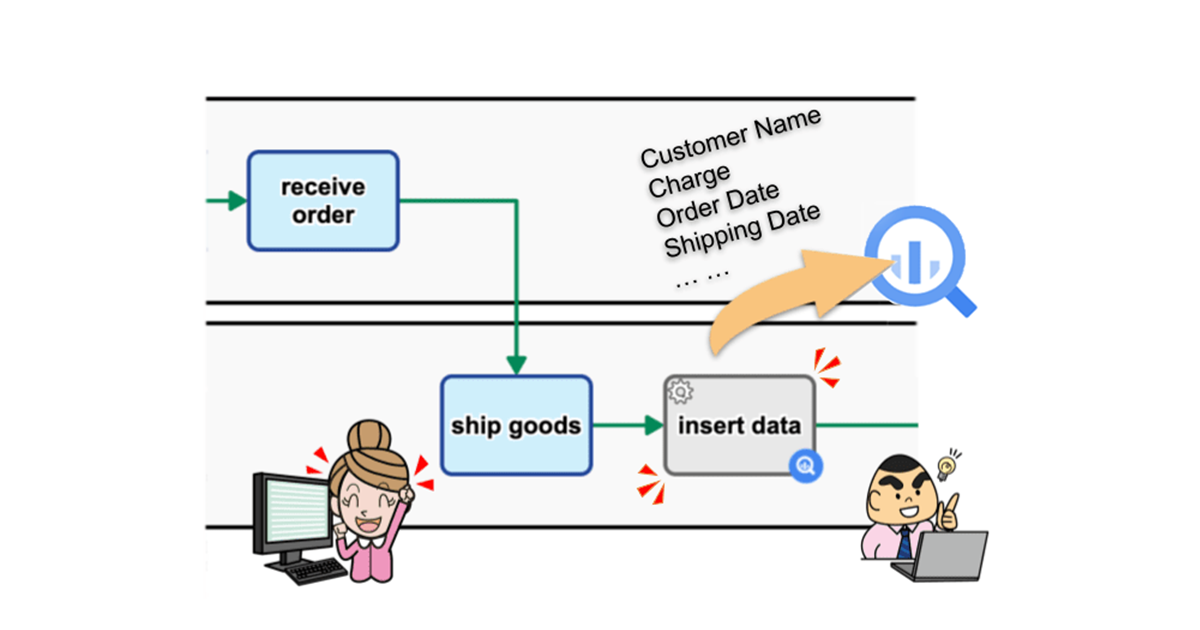
Starting with the new version 13.2, Business Processes will incorporate the ability to add data to Google BigQuery tables. You will be able to build a mechanism that is, for example, in the Order Fulfillment Process on an e-commerce site, data such as customer name, order details, order date and time, shipment time can be automatically added to the orders record table of Google BigQuery after the shipping process is processed. You can achieve this just by making configurations, and no coding is necessary.
Questetra BPM Suite
Cloud-based Workflow Questetra BPM Suite is a business platform for realizing paperless environments and remote-working. Business issues are controlled according to a Business Flow Diagram. When a Process reaches a Human Task the user will be asked to add their input. Also, when an issue reaches an automated Step the predetermined processing (server-side processing) such as generating a PDF and saving it to cloud storage is performed automatically. (BPM: Business Process Management))
You can apply it to various business operations such as an Approval request flow, Document translation flow, Quality check process, and Invoice issuance process. Process owners of each Business Process can practice the Improvement of Business Processes little by little in daily work.
Google BigQuery: Insert New Data
You will be able to use this item to automatically add data to Google BigQuery tables. This allows you to build a mechanism, for example, so that order data is added to BigQuery immediately (in real-time) after the order is approved. It also reduces the labor of manually adding business data to a table.(There is a charge for using Google BigQuery.)* Available in Advanced, Professional
Data addition to Google BigQuery table settings
Other Improvements
Enhanced manipulating of Google Sheets
You will be able to use items to update/acquire row data and add/copy sheets in Google Spreadsheets. By using these together with the features that have already been provided such as adding row data, it will be possible to build a mechanism to automate aggregation, report creation, etc. utilizing spreadsheets. * Available in Advanced, Professional
Box: Create/Delete Shared Link of File
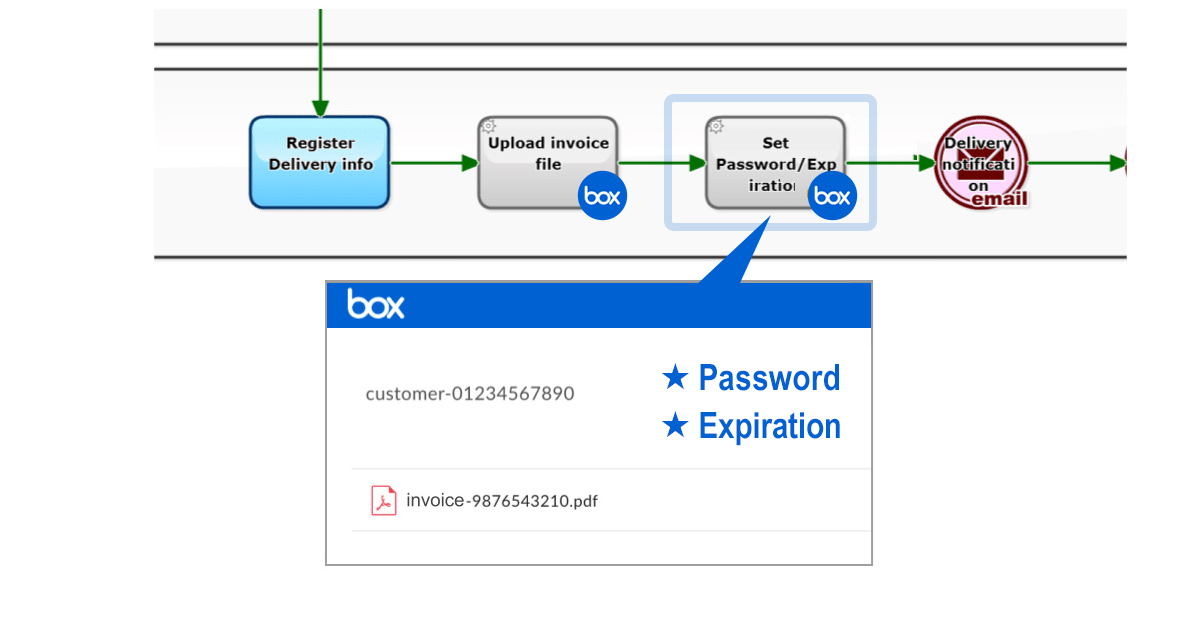
You will be able to share the files stored in Box using these items. You can set a password and expiration date for viewing, so you will be able to build a mechanism that allows you to safely share file deliverables such as those created by materials requests and quotation requests with outside parties (requesters, etc.). Previously, it was possible to share in folders, but now it is no longer necessary to create folders just for sharing. * Available in Advanced, Professional
Improved flexibility in Flow Splitting conditions
When Splitting in a workflow, in addition to selecting a conventional conditional expression, you will be able to define an arbitrary conditional expression (SpEL). You will be able to set conditions such as for example, “if the Title starts with [Urgent],” “if it is 24 hours before the deadline,” or “if the annual amount (that is calculated from the monthly amount) is equal to or more than 1 million.” * Available in Basic, Advanced, Professional
Kyoto, Japan, July 12th, 2021, Questetra, Inc., the global SaaS provider of Business Process Management (BPM), today announced that they have published the new version 13.1 of the Cloud-based Workflow product Questetra BPM Suite. This new version is capable of automatically sending HTML Emails in which business data has been embedded.
There may be many cases where emails are sent automatically by local governments or companies to their applicants or prospective customers. Even some of the COVID 19 vaccination reservation systems also use such a mechanism.
Up to now, although Questetra was able to insert, for example, company names or individual’s names into emails sent to applicants upon application for a seminar, the email body had to be simple without any decorations. With this new version, you can use HTML in the body of emails so that you can color the text, insert an image, place a button with a link, and so on.
The beautiful decorations in an email body enhances the visual effect. Your message will be conveyed more easily and more accurately, and customer satisfaction is expected to increase. In addition, you will also be able to embed tags that measure the open rate of the emails that will lead to more effective marketing activities.
Questetra BPM Suite
Cloud-based Workflow Questetra BPM Suite is a business platform for realizing paperless environments and remote-working. Business issues are controlled according to a Business Flow Diagram. When a Process reaches a Human Task the user will be asked to add their input. Also, when an issue reaches an automated Step the predetermined processing (server-side processing) such as generating a PDF and saving it to cloud storage is performed automatically. (BPM: Business Process Management))
You can apply it to various business operations such as an Approval request flow, Document translation flow, Quality check process, and Invoice issuance process. Process owners of each Business Process can practice the Improvement of Business Processes little by little in daily work.
HTML in the body of the automatic email sending feature
By placing an email sending event in a workflow, an email with business data inserted will be automatically sent every time an Issue passes. It is now possible to specify HTML in the email body. This makes it possible to implement beautiful decoration with HTML in the body of emails sent automatically from the system, such as confirmations for the reception of seminars or service applications, delivery notifications, and deadline notifications.
HTML in the Mail Body
Other Improvements
Box: Move File, Delete File
Using these Service Steps, you can now move or delete files that have been stored in Box. For example, it will be possible to build a mechanism in which CAD files approved in the Delivery Step in Design Drawing Production work are automatically moved from the drafting folder to the submission folder.* Available in Advanced, Professional Edition
Google Calendar: Move Event, Delete Event
Using these Service Steps, you can now move or delete events registered on Google Calendar. In the business of planning seminars, for example, it will be possible to build a mechanism that once a plan is approved, the seminar schedule registered in the Planning calendar is automatically moved to the Public calendar. * Available in Advanced, Professional Edition
API search utilizing saved search criteria
It is possible to save the search criteria in the All Processes function when doing a filtered search on all Process data. It is now possible to search by API (Process search/Task search) specifying a key (reportId) that selects saved search criteria. This will reduce the trouble of specifying search criteria when using the API.
Process start triggered by Box, kintone, Google Calendar
Kyoto, Japan, April 12th, 2021, Questetra, Inc., the global SaaS provider of Business Process Management (BPM), today announced that they have published the new version 13.0 of the Cloud-based Workflow product Questetra BPM Suite. This new version is capable of automatically starting Business Processes triggered by data handled in popular business-oriented SaaS products such as Box, etc.
Today, various business-oriented SaaS products have come to be used for promoting Digital Transformation and to build frameworks to support remote working. However, even though some sort of effect is achieved, there is still the problem that it takes a lot of time and effort to exchange data between multiple SaaS products.
With the new version of Questetra BPM Suite, it is possible to build a mechanism, without coding, that automatically assigns an Examination Process to the appropriate person in charge when a contract document is placed in, for example, the file storage service Box. This will allow you to reduce the time and effort for work requests via email or chat services.
It is also able to build such a mechanism using data registered in kintone and Google Calendar in addition to Box as a trigger.
Questetra BPM Suite
Cloud-based Workflow Questetra BPM Suite is a business platform for realizing paperless environments and remote-working. Business issues are controlled according to a Business Flow Diagram. When a Process reaches a Human Task the user will be asked to add their input. Also, when an issue reaches an automated Step the predetermined processing (server-side processing) such as generating a PDF and saving it to cloud storage is performed automatically. (BPM: Business Process Management)) You can apply it to various business operations such as an Approval request flow, Document translation flow, Quality check process, and Invoice issuance process. Process owners of each Business Process can practice the Improvement of Business Processes little by little in daily work.
Automatically starting a new business operation linked with SaaS
Start Events have been added that automatically start Processes when new data (or files) are registered in SaaS. Box, kintone, Google Calendar are supported. *Available Editions: Advanced, Professional, Enterprise
Settings that automatically start a Business Process when files are placed in the folder in Box
Other Improvements
Box: Download File
This new Service Task allows you to automatically attach files stored in Box to a File-type Data Item. In the case of a Contract Creation workflow, for example, it will be possible to achieve a state in which the contract template saved in Box has been imported in advance. *Available Editions: Advanced, Professional, Enterprise
Box: Delete Shared Folder Link
This new Service Task allows you to automatically delete a Shared Link to a folder in Box. For example, it will be possible to build a mechanism in which a folder that has been set to be shared will automatically stop being shared after a specified period of time. *Available Editions: Advanced, Professional, Enterprise
Automatic generation of Google Meet URL
In a Service Task where appointments are automatically added to Google Calendar, the URL of Google Meet will be automatically generated and added to the appointment information. For example, in the business of managing online meeting reservations with customers, you can build a mechanism where once you enter the date and time of the meeting, the appointment with the Meet URL set is automatically registered, and the customer is informed of the URL by the email notification function. *Available Editions: Advanced, Professional, Enterprise
Kyoto, Japan, October 12th, 2020, Questetra, Inc., the global SaaS provider of Business Process Management (BPM) today announced that they have published the new version 12.2 of the Cloud-based Workflow product “Questetra BPM Suite” on Oct. 12th, 2020. This new version 12.2 allows building a mechanism that automatically uploads files for business use to Microsoft OneDrive with standard functions.
Home-based remote working is rapidly becoming widespread during the COVID-19 quarantine and work style reforms. Along with that, the use of cloud storage (online storage), which allows files to be shared and managed safely, is expanding.
So far, Questetra BPM Suite has been providing automatic processing features for connecting with the cloud storage services Google Drive and Box to upload files or to create folders, etc. Starting with the new version, it will also be possible to incorporate automated processing to do the same with Microsoft OneDrive.
For example, if you are doing market research, the final checked Research Report will be automatically uploaded to a folder in the Microsoft OneDrive. You can improve efficiency and prevent mistakes such as forgetting to upload or uploading to a wrong folder, in comparison with uploading manually.
Questetra BPM Suite
Cloud-based Workflow Questetra BPM Suite is a business platform for realizing paperless environments and remote-working. Business issues are controlled according to a Business Flow Diagram. When a Process reaches a Human Task the user will be asked to add their input. Also, when an issue reaches an automated Step the predetermined processing (server-side processing) such as Generating a PDF and Saving it to cloud storage is performed automatically. (BPM: Business Process Management)
You can apply it to various business operations such as Approval request flow, Document translation flow, Quality check process, and Invoice issuance process. Process owners of each Business Process can practice the Improvement of Business Processes little by little in daily work.
Automatic file upload etc. to Microsoft OneDrive
The Service Task of automatically uploading files to OneDrive (Microsoft 365 Business) is now available. Moreover, creating folders, deleting, and duplicating files/folders is possible. You will be able, for example, to automatically delete files stored in OneDrive after a specified period of time.
*Available in Editions of Advanced, Professional, and Enterprise
Other Improvements
Box Copy Files
Using this Service Task, you can duplicate the files stored in your Box storage. For example, files in folders that are accessible to employees only can be automatically duplicated in a folder that is open to the public to be shared.
*Available in Editions of Advanced, Professional, and Enterprise
Tasks list display sorted by Title
You can now sort the list of Tasks by Titles such as in My Tasks and All Processes. For example, if the Service Task (Data Assignment) is set so that the Title begins with the company name, the Task list can be sorted in order of the supplier name.
*Available in all Editions
Added GraalJS to script execution engine
GraalVM JavaScript (GraalJS) has now been added to the execution engine that can be used in the Script Task.
*Available in Editions of Professional and Enterprise
Never missing a primal issue, accelerating productivity improvement
Kyoto, Japan, July 13th, 2020, Questetra, Inc., the global SaaS provider of Business Process Management (BPM), today announced that they have published the new version 12.1 of the Cloud-based Workflow product “Questetra BPM Suite” on Jul. 13th, 2020. This new version allows displaying a list of your duties narrowing down by conditions you wish such as “new arrival” or “close to deadline” with one click.
Amid growing concerns over labor shortages due to work style reforms and the declining birthrate and aging population, improving productivity is a major issue. In the most business scene, employees themselves are also trying to implement measures to improve their productivity. A huge amount of work is being processed in daily business, and it is one of the ways to improve productivity that processing duties in the order of priority.
Although it was possible to classify by the priority by putting stars on one’s tasks in Questetra BPM Suite, it was troublesome that they had to be manually attached. In the new version 12.1, a feature that allows narrowing down tasks by conditions you like is provided. With this feature, you can one-click display the narrowed down tasks list after saving the criteria that filter by high priority specific task, client, or words in the title, etc.
Questetra BPM Suite
Cloud-based Workflow Questetra BPM Suite is a business platform for realizing paperless environments and remote-working. Business issues are controlled according to a Business Flow Diagram. When a Process reaches a Human Task the user will be asked to add their input. Also, when an issue reaches an automated Step the predetermined processing (server-side processing) such as Generating PDF and Saving to cloud storage is performed automatically. (BPM: Business Process Management))
You can apply it to various business operations such as Approval request flow, Document translation flow, Quality check process, and Invoice issuance process. Process owners of each Business Process can practice the Improvement of Business Processes little by little in daily work.
Filtering function on My Tasks and Offered
On the screens of [My Tasks] and [Offered] that lists tasks, you can now execute searches with setting search conditions and specifying display items. And the configured condition can be named, saved, and displayed on the side menu as a button. Using the button, you can display the search result (the list of filtered tasks) with one click.
Other Improvements
Paging display of My Tasks/Offered
When the number of Tasks in My Tasks or Offered exceeds the specified number, they are displayed on multiple pages. You no longer need to scroll all the way down to the bottom, by specifying the number of items per page appropriately.
Indication of Contract information
You can check the “Edition” and “Payment Plan” on the license information page (viewable only by the system administrator).
Enhanced Script Task
The Script Task is now capable of parsing the XML string and encoding/decoding Bsc64. Also capable of getting the header information of the response to the HTTP request sent in the script.
The software field of Robotic Process Automation (RPA) has surprisingly come to attract attention. In recent years the phrase “Work Style Reform” has become a buzzword in Japan, and RPA is obviously one of the keywords for releasing working people from simple computer work.
0. RPA? Is it a buzzword??
Recently, I’ve seen more articles about RPA, however, most of them make me worried about possible misunderstandings.
In other words, some articles give an abstract introduction to the mechanism of Robots in the first line, such as the automation of daily work by robots. However, from the next line, they describe at length a dramatic future dominated by robots. Even in the articles regarding the application, they introduce improper usage.
To begin with, RPA is not omnipotent. Its weaknesses and risks should be explained in detail. I think it’s better to take the articles written by such social affairs reporters of general newspapers with a pinch of salt (my personal opinion, though).
Table of contents
1. What is RPA
It is a category name of software.
*First of all, if some people don’t define that, conflict can happen. (Definition is necessary.)
According to Wikipedia, it defines the efforts to improve the efficiency and automation of white-collar work. That’s almost right, however, what I’d like you to recognize more deeply is the definition of ”a software application that replicates the actions of a human being interacting with the user interface of a computer system”.
Wikipedia(English): a software application that replicates the actions of a human being interacting with the user interface of a computer system
The core of RPA is the ability to remember your typing operation on your computer. To be clear, the basic function is to learn how to use the keyboard and mouse “operational macro”.
*If you’re interested, you can search for a video of ‘Blue Prism’ (a long-established product) or ‘Selenium’ (free software). Recently, they have released not only on-premises (desktop type) but also cloud-type products.
Incidentally, in the field of software, the word “robot” is often used with the nuance of “duplicate” or “replica”. That is, humans are the “original” upon which robots are based (a dualistic concept). On the other hand, AI does not have such an “original”, so AI and robots are defined separately.
*In other words, robots in the software industry don’t resemble Osamu Tezuka’s Astro Boy, but rather the “Copy Robot” in Perman by Fujiko F. Fujio. (Hope some of you can understand the point.)
2. Evolution of robots
Today, RPA can understand a variety of User Interfaces (UI).
This means you can continue to use a system built for human manipulation (The User interface is the Human interface). This means it is possible to promote the automation of business without modifying existing business systems.
Reducing IT capital expenditure is a great advantage.
Testing the operation of software is a classic application of RPA. Now, products that can switch between various screens and that are split according to the condition of an event have been realized. RPA these days has been applied to online banking operations, which can also automatically scrape (or extract) displayed data. In other words, RPA can handle tasks – like obtaining a history of cash flows and viewing balances – more accurately and much faster than humans.
Screen scraping has been done on the server side in accounting clouds
3. Robot boycott?
However, I’m wondering if robots are able to handle everything.
If you think about it, mechanisms to eliminate robotic logins, such as two-factor authentication and a visual verification are also evolving. There are also many other systems that require human authentication by using security tokens, puzzles, and fingerprints.
In fact, the information provider (similar to a resource server operator) requires that the log in subject be human.
Why is that?
In the first place, from the point of view of the information provider robots are inconvenient in various ways.
For example, if there are announcements to users, they probably won’t be passed. On the other hand, if the User Interface is improved, the robots will give errors.
This is not very helpful, and if robots access the User Interface many times it can sometimes be defined as an attack. Furthermore, there’s a concern about overlooking malicious operations.
4. Suitable areas for RPA
You should determine areas in which to use RPA after a thorough risk analysis. (It really depends on the case, though.)
However, the question of whether or not to give a robot a password is hugely controversial.
In this case, if a password is leaked from the robot, that is the worst scenario. In many cases, that password gives access not only to the work you want the robot to do but also the authority to delete data and users. At least, I suggest you shouldn’t set a password on any robots for automation.
Incidentally, the biggest feature of RPA is that it is possible to control a User Interface (UI), but today’s business systems also have Application Programming Interface (API) as well.
And with the API mechanism, there is no need to tell the computer the password. The Japanese government has been promoting Bank API since 2017 in the Banking Act because they want to protect depositors through strict password management.
In addition, there is an RPA product that covers communications with Computer Interfaces. To use it, it is important to distinguish between the system which is communicating with a Human Interface and the one which is communicating with a Computer Interface.
The details of APIs are covered in other articles, but I can say that a technology called OAuth Authorization is being used widely in API communications these days. It is the system where authorizers allow specific automatic communications. For example, you can link data between Facebook and Twitter without giving your password. Moreover, you can precisely specify the range of data that may be referenced and what can be updated. “What is “OAuth”, the Cloud Technology which Everyone Should Know?”
5. How BPMS makes external requests
Finally, I’d like to describe how Questetra, the BPMS (business process management system) requests data updates and data references from external systems.
At least for Questetra, we suggest that data communication via BPMS is not implemented with a communication function through a User Interface. In other words, requests should be made as an OAuth client for the data update Task and the data reference Task.
A system without API connections certainly makes automated tasks difficult, but API connections are necessary to reduce the security risk. (I.e. the age of API connections as a precondition seems to be coming to an end.)
Eliminates unintentional deletion or content tampering
Kyoto, Japan, January 20th, 2020, Questetra, Inc., the global SaaS provider of Business Process Management (BPM), today announced that they have published the new version 11.13 of the Cloud-based Workflow product “Questetra BPM Suite” on Jan. 20th, 2020. This new version allows the automated text file generation in a fixed format based on business data.
In daily work, various text information is generated. For example, various types of text information are generated, from reports such as “Changes in the number of Web accesses” to official documents such as “Current state of the company.” In many cases, those text information is saved as a text file.
With the new version 11.13, it is possible to place an automatic step at which text information is automatically saved in the middle of a Business Process. That is in other words, you can easily build a mechanism in which a file in a specified format is automatically generated at the same time text information is approved. For example, by arranging an automatic process such as automatic upload to cloud storage at further downstream, a series of document management processes can be unmanned so that the risk of unintentional text deletion or content tampering can be eliminated.
Questetra BPM Suite
Cloud-based Workflow “Questetra BPM Suite” is a business platform for realizing paperless environments and remote-working. Business issues are controlled according to a Business Flow Diagram. When a Process reaches a Human Task the user will be asked to add their input. Also, when an issue reaches an automated Step the predetermined processing (server-side processing) such as “Generate PDF” and “Save to cloud storage” is performed automatically. (BPM: Business Process Management)
You can apply it to various business operations such as “Approval request flow”, “Document translation flow”, Quality check process, “Invoice issuance process”. Process owners of each Business Process can practice the “improvement of Business Processes” little by little in daily work.
Automatic File-generation based on Business Data
Using a Service Task a text file in accordance with the specified format is automatically generated out of business data. In addition to report files, it is capable of generating text files in various formats such as HTML, JSON, XML, or CSV.
Text File Generation Configuration
Other Improvements
Converter of CSV file to Table-type data
Using a Service Task, the contents of a CSV file can be inserted into a Table-type Data Item. At the approval step in a Work Report Process, for example, you can build a mechanism that allows you to check the CSV file in a table format without downloading it, or to enter the check results at each row. Converter (Excel-CSV FILE to Table type data)
Converter of Table-type data to CSV file
Using a Service Task, data entered in a table format can be converted to a CSV file. In the Business Partner Addition Process, for example, business partner information entered in a table format is converted to a CSV file, and the file can be uploaded to your core system. Converter (Table type data to Excel-CSV File)
Enhanced automatic business data assignment
In the Service Task that performs concatenation of String-type data and calculation of Numeric-type data, etc. the name and email address in User-type data can be output individually. Also, upon inserting a Table-type Data Item, it is now possible to output the value of each cell. Service Task (Data Assignment)
Questetra, Inc. will change the service system of the cloud-based business process management, Questetra BPM Suite from July 1st, 2020. Specifically, we will shift from two service systems to four.
Service System (current)
Business
VIP
Service System (from July 2020)
Basic
Advanced
Professional
Enterprise
Responding to increasingly complex automation functions
The cloud-based business process management system Questetra BPM Suite is capable of equipping various automatic processes in the middle of workflows.
In recent years, simple processes such as PDF file generation and cloud storage have been successively replaced by automated processes. Such efforts for automation and labor-saving can no longer be called “differentiation measures”. In the current DX era, it may be more of an “essential activity”.
Questetra, Inc. has released many implementation methods for automatic processing on the server-side. However, since many of them were unguaranteed and used at the user’s own risk, they did not necessarily meet the needs of customers (users). With the prospect of more complex automation needs in the future, we would like to provide assurance of operation for as many automatic processing functions as possible.
Basic: Automatic data update, automatic email transmission
Advanced: Automatic cloud connection
Professional: PDF auto-generation, addition of self-made auto-processing
Enterprise: (Same as Professional)
Responding to diversifying support needs
The cloud-based business process management system Questetra BPM Suite is widely applied to a variety of fields.
It has been used in a wide range of operations, from cases such as approving vacation applications, to advanced cases such as Unmanned processing of Cloud orchestration along with online payment”. Along with the maturity of the API Economy growing in recent years, there are more chances to see ways for customers to use it which we could never have imagined even as a vendor.
We, Questetra, Inc. have been providing uniform support services to all customers. However, the use of business process management (BPM) is expected to become more diverse. In the future, we would like to provide more detailed support services according to each customer’s level of utilization.
* BPM: Business Process Management
Basic: Inquiries on bulletin boards
Advanced: Inquiry by email
Professional: Inquiries by video chat
Enterprise: (Same as Professional)
Price
Tax excluded. Also, the annual pricing discount (20% off) is offered. Trial mode: Number of users that can be registered 100 / Available for 60 days / Free
Effective date
July 1st, 2020
Details
For the details by each edition please see this chart.
Regarding the transition procedure due to a service system change
For customers who are subscribing via partner-company, please consult your partner. Customers who have directly applied Questetra BPM Suite, please visit Business to Professional.
Kyoto, Japan – October 7th, 2019 – Questetra, Inc., the global SaaS provider of Business Process Management (BPM), today announced that they have published the new version 11.12 of the Cloud-based Workflow product “Questetra BPM Suite” on Oct. 7th, 2019. This new version allows the automated controlling of Box folders. (Box: a cloud content management service)
In recent years, even though the idea of “cloud-first” (i.e. prioritizing the use of cloud services when constructing a system) is spreading, many organizations still have vague concerns about information security.
With the new version 11.12 you can equip your Business Processes with automation, such as setting up a download password and expiration date for Box folders. That is, for example, settings for sharing an invoice file will be configured automatically. This will greatly reduce the risk of “settings errors” and “settings omissions” in file-sharing operations with business partners.
Questetra BPM Suite
Cloud-based Workflow “Questetra BPM Suite” is a business platform for realizing paperless environments and remote-working. Business issues are controlled according to a Business Flow Diagram. When a Process reaches a Human Task the user will be asked to add their input. Also, when an issue reaches an automated Step the predetermined processing (server-side processing) such as “Generate PDF” and “Save to cloud storage” is performed automatically. (BPM: Business Process Management)
You can apply it to various business operations such as “Approval request flow”, “Document translation flow”, Quality check process, “Invoice issuance process”. Process owners of each Business Process can practice the “improvement of Business Processes” little by little in daily work.
Box Folder Sharing
Using a Service Task, folders that have been created in Box can be shared. Also, the download-password and expiration date will be set so that you can securely share files such as invoices, estimates, catalogs, etc. with your partners. (Box: Create Shared link to Folder)
Box Create Shared link to Folder
Other Improvements
Box: Search Folder
Using this Service Task, you can automate a folder search of Box folders. You can easily configure automation, for example, checking the existence of a certain folder and creating that folder if it didn’t exist.
Box: Delete Folder
Using this Service Task, you can automate the deletion of folders in Box. You can easily configure automation, for example, removing folders after their expiration.
HTML5 Modeler
The new App editing function [HTML5 Modeler], which uses HTML/Javascript, is now available as a preview version. We are planning to migrate to the HTML5 Modeler from the flash version in the first half of 2020.
Kyoto, Japan July 8th, 2019 Questetra, Inc., the global SaaS provider of Business Process Management (BPM), today announced that they have published the new version 11.11 of the Cloud-based Workflow product “Questetra BPM Suite” on Jul. 8th, 2019. This new version introduces a mechanism of automatically appending rows to a Google Sheets using only the standard features.
In daily work, various systems and services besides Workflow systems are used within the organization for the purpose of sales support, file storage/sharing, communication, collaboration, etc. In order to improve the convenience and productivity of users, it is essential to automate data coordination and processing among these multiple services.
Up to now “Questetra BPM Suite” has been capable of passing and receiving data in cooperation with external services by setting up HTTP communication or importing packaged “Add-ons” for communication processing, but knowledge of APIs and preparations in advance were required for them. In v11.11 a Service Task that performs the function has been added. By using the Service Task you will be able to build a system such as an “Order acceptance flow”, for example, in which data concerning an order is automatically added to a Google Sheets right after the approval Step is processed, without the need for any extra programming.
Questetra BPM Suite
Cloud-based Workflow “Questetra BPM Suite” is a business platform for realizing paperless environments and remote-working.
Business issues are controlled according to a Business Flow Diagram. When a Process reaches a Human Task, the user will be asked to add their input. Also, when an issue reaches an automated Step the predetermined processing (server-side processing) such as “Generate PDF” and “Save to cloud storage” is performed automatically. (BPM: Business Process Management)
You can apply it to various business operations such as “Approval request flow”, “Document translation flow”, Quality check process, “Invoice issuance process”. Process owners of each Business Process can practice “improvement of Business Process” little by little in daily work.
Google Sheets: Append New Row
It will be able to automatically append data to Google Sheets using the Service Task. When you are using Google Sheets for aggregating sales or expenses, you can connect them with your business. Thus, you can reduce the work time spent on the administration of this process.
Other Improvements
Google Sheets: Download Choice Data
It allows you to collectively retrieve various master data (i.e. Customer master, Product master, etc.) automatically using the Service Task. The retrieved data can be used as options in the Select type Data Item.
Converter (Date to Japanese era string)
Using the Service Task, Date type and Datetime type data can be converted to a string of Japanese calendar date format. (e.g. Converts a value of Date type Data “2019-07-08” to “令和元年7月8日”)
Google Drive: Folder Search
This Service Task allows you to search for folders on Google Drive. It can be used incorporated in processing such as to store files to a folder that are found in a search.
Directly imports files released by the government into business data
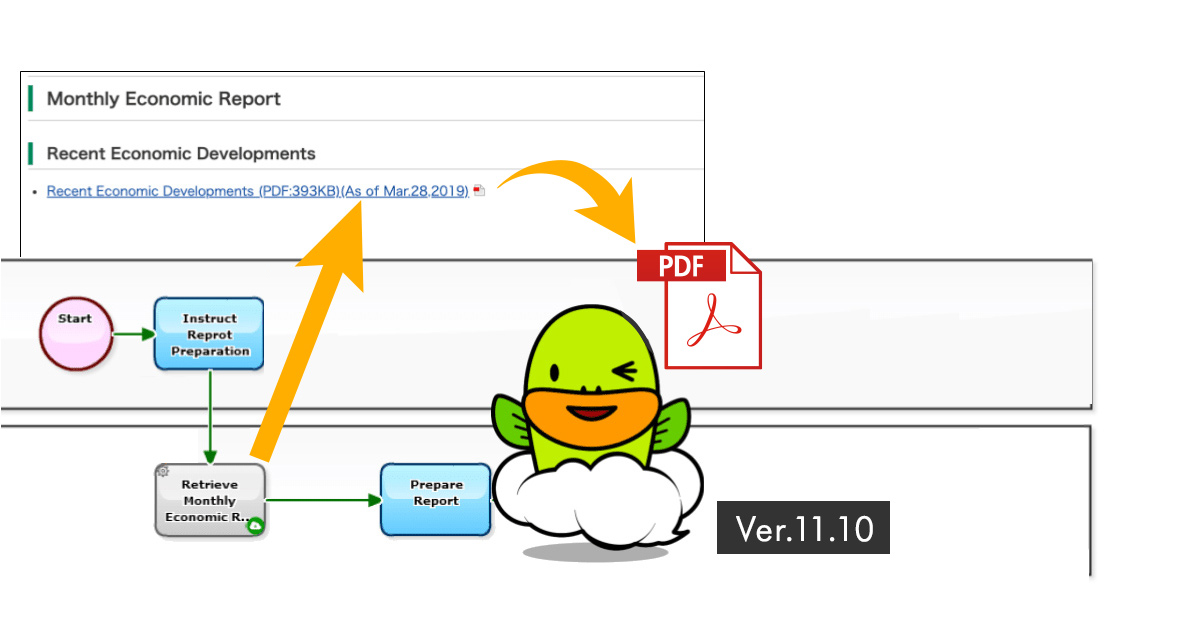
Kyoto, Japan – April 8th, 2019 – Questetra, Inc., the global SaaS provider of Business Process Management (BPM), today announced that they have published the new version 11.10 of the Cloud-based Workflow product “Questetra BPM Suite” on Apr. 8th, 2019. This new version is capable of importing designated files into Business data automatically. In a Workflow App for corresponding to document request, for example, document files to be sent to the customer is attached automatically.
In daily work, “files” are used in various scenes. To deal with many files, the effort of downloading the files and uploading them to the system is iterated. While work styles reform being promoted so productivity improvement has been attracted much attention, if you can automate file-related tasks, you can expect to be able to concentrate on more added value operations.
Until now, retrieving files stored on the Internet was possible by HTTP communication and simple programming, but it required preparation based on the knowledge regarding communication and programming. On and after the new version 11.10, a Service Task for “downloading files from any website” is added. With this, you can easily obtain files from any web site simply by placing and setting modeling elements on a Workflow diagram. By utilizing this feature, it is possible to configure a scheme that automatically attaches monthly statistical data (PDF) published by the government every month or catalog file in responding to the customer request.
Questetra BPM Suite
Cloud-based Workflow “Questetra BPM Suite” is a business platform for realizing environments of paper-less and remote-working. Business issues are controlled according to Business Flow Diagram. When a process reaches a Human Task, the user will be asked to input. Also, when an issue reaches to automated Step, the predetermined processing (server-side processing) such as “Generate PDF” and “Save to cloud storage” is performed automatically. (BPM: Business Process Management)
You can apply it to various business operations such as “Approval request flow”, “Document translation flow”, “Quality check process, “Invoice issuance process”. Process owner of each Business Process can practice “improvement of Business Process” little by little in daily work. (Examples of Business Flow Diagram: https://en.workflow-sample.net/)
Automatic File Retrieving
Using this Service Task, files on any website can be automatically set (attached) to File type Data Item. Instead of you had to download a file on the Internet manually and then upload (attach) it to File type Data Item so far, you can automate this task.
Other Improvements
Slack File Upload
Using this Service Task, it is possible to post files to the specified channel of Slack, an enterprise social networking. You can check files (deliverables, etc.) created and confirmed on a Workflow on the e-chat that you use on a daily basis.
Expansion of utilization of Field Name
In Service Task (Data Assignment), it becomes possible to write formulas using “Field Names”. Utilizing Field Names, maintainability will be improved since checking of configuration becomes easier for good visibility.
Easy configuration for OAuth2.0
Configuring a Service Task (Add-on), OAuth2 setting can be done by selecting.