タグ: Product

利用中のカテゴリ:info-en(英語プレスリリース)

  • Cloud Workflow v10.4 Offers Mass-Data Combobox

    Cloud Workflow v10.4 Offers Mass-Data Combobox

    Original Japanese version

    Compatible with Customer Master or Postcode List!

    Kyoto, Japan – November 2nd, 2015 – Questetra, Inc., the global SaaS provider of Business Process Management (BPM), today announced that they have published the new version 10.4 of the cloud-based Workflow product “Questetra BPM Suite” on November 2nd, 2015.

    In this new version 10.4, significant speeding up has been achieved in “Combo-box form” (Search select) in the data input screen. This will allow a Select input form to set up to refer a Master data which is as large as tens of thousands of articles. For example, by registering “Customer Master” in the Workflow platform, “Selection of a Customer” in invoicing or billing operation will become more efficient and accurate. It is also possible to register entire “Postcode-address Master” which the number of records reaches 150,000.


    Speeding up Combo-box (Search-select)

    The processing speed of the Data Selection Form that refers to the “Options master” (options XML), has become significantly faster. For example, a setting of input completion of data, such as “Address” and “Postcode” in referring the entire Postcode list which reaches to 150,000 lines, is now available.You can confirm the operation on the demonstration system in the following URL. http://en.workflow-sample.net/2015/11/zipcode-xml.html


    Other Improvements

    Debugging Execution

    A designer of Business Process Definition (Process Model) becomes to be able to test run a Process Model (Debugging execution) in the middle of designing. From now on, you are able to flow testing Issues freely, without affecting the Process Models in operation nor Issue processing logs, whereas previously there was a need to test operation on another Workflow environment when you have modified many parts.

    User Timezone

    It becomes capable of displaying by the Timezone of each User of the time information on Issue date and in the logs of Issue processing, etc. It allows overseas staffs and remote workers who are working in different Timezone from the system standard time (server time) to recognize the time information more easily.

    Request Message Throwing (enhanced)

    In the function of HTTP Request automatic sending to external servers, it becomes capable of sending any text as Request body. However, it is limited to the formats (Content-type) of “text/xml”, “text/plain”, “application/json”, for the time being.

    Select Animation


  • Cloud Workflow v10.3 Logs its own Fitness

    Cloud Workflow v10.3 Logs its own Fitness

    Original Japanese version

    Charts of Downtime, Response Time, for each Tenant

    Kyoto, Japan – July 6th, 2015 – Questetra, Inc., the global SaaS provider of Business Process Management (BPM), today announced that they have published the new version 10.3 of the cloud-based Workflow product “Questetra BPM Suite” on July 6th, 2015.

    In this new version, System monitoring function for each user company has been added. Thereby each company will be able to confirm that their workflow platform is running normally at any time as well as the service down in the past. This allows the personnel for system operations, to take quick and effective measures against such as cloud linkage error.


    Chart of Uptime and Downtime feature

    Service Uptime is indicated in a chart, together with Uptime ratio, Response time, and failures of the past so that you can confirm at any time. Your dedicated web page is prepared separately on a server other than your Workflow system.


    Other Improvements

    Sequential Operation feature

    You can now sequentially operate Tasks which assigned to you. Clicking on the “Execute sequentially” button after selecting multiple Tasks on the list screen, Operating screen will open one after another. It is convenient, e.g. when you want to handle all the Approval Tasks which are close to its deadline.

    Image Embedding in PDF Auto-generation

    You can embed “Image file” (File type data) at PDF Auto-generation Step. Thereby you can embed any business data to “Template PDF” such as “Date type” or “Select type”. However, files to be embedded are limited to 100KB or less.

    Annotation on Business Flow Diagram

    When defining a Business Process, you can describe “Text annotations” at any location on the Flow diagram. Since annotations are indicated on the screens for normal workers to check the progress of an Issue, you can have them help raising awareness for the notes on the business.

    Mitigation of Limit on Number of Start

    System limitation of “100 Starts” in every 15 minutes is now mitigated to “100 plus Number of the license”.


  • Cloud Workflow v10.2 Provides Varieties of Charts

    Cloud Workflow v10.2 Provides Varieties of Charts

    Original Japanese version

    Performance Analysis Accelerates Process Improvement Cycle

    Kyoto, Japan – April 20th, 2015 – Questetra, Inc., the global SaaS provider of Business Process Management(BPM), today announced that they have published the new version 10.2 of the cloud-based Workflow product “Questetra BPM Suite” on April 20th, 2015.

    In this new version, “Aggregation Chart feature” has been enhanced, so that more multifaceted Business analysis and performance monitoring become possible. For example, if you are using it for the business operation of Quotation approvals, you will be able to display the quotations that have been approved by the supervisor among all the quote data flowed through the Workflow, in a Bar chart in which ‘Total amount by the type of Quotation’ has been stacked in monthly units. (Filtering Chart)

    Aggregation Chart feature

    The functions of BPM system are categorized into, 1) Designing Business Process, 2) Passing of data in daily operations, 3) Monitoring and aggregation the operational progress. The “Aggregation Chart feature” is categorized in 3), so it is utilized for resource controlling or improvement of procedure at work site, or for the improvement of the entire Business Process.

    Other Improvements

    PDF Auto-generation feature

    The PDF Auto-generation feature is for generating a PDF file which Business Data have been inserted automatically in the middle of the Workflow. In this version 10.2 and later, it became much easier to prepare ‘Base-PDF’ (fillable PDF form) which is needed to set the automated process. Specifically, a ‘Sample of Base-PDF’ is now available by downloading, and you can use it as ‘Base-PDF’ as it is, or you can create your own ‘Base-PDF’ by merging the ‘Insertion configuration’ of the sample with your PDF that you have made in Word or Excel.

    G Suite Connector

    *The name of “G Suite” was changed into “Google Workspace” in October 2020

    “Google Drive storage feature”, a function that works with cloud-based office products “G Suite”, is the ability to output the File type business data such as “Quote.pdf” or “Invoice.pdf”, into Google Drive automatically in the middle of Workflow (OAuth connect). In this version 10.2 and later, you can specify a folder in any hierarchy as the Save destination.

    Operability

    We have renewed Menu icons. The TimeLine notifications that tell occurrence of tasks have been concentrated into ‘Notification feature’

  • Cloud Workflow v10.1 Opens New Servers in Germany

    Cloud Workflow v10.1 Opens New Servers in Germany

    Improve Network Latency for Faster Service in Europe

    Original Japanese version

    Kyoto, Japan – February 9, 2015 – Questetra, Inc., the global SaaS provider of Business Process Management (BPM), today announced that they have published the new version 10.1 of the cloud-based Workflow product “Questetra BPM Suite” on February 9, 2015. At the same time, they have activated new servers in European region.

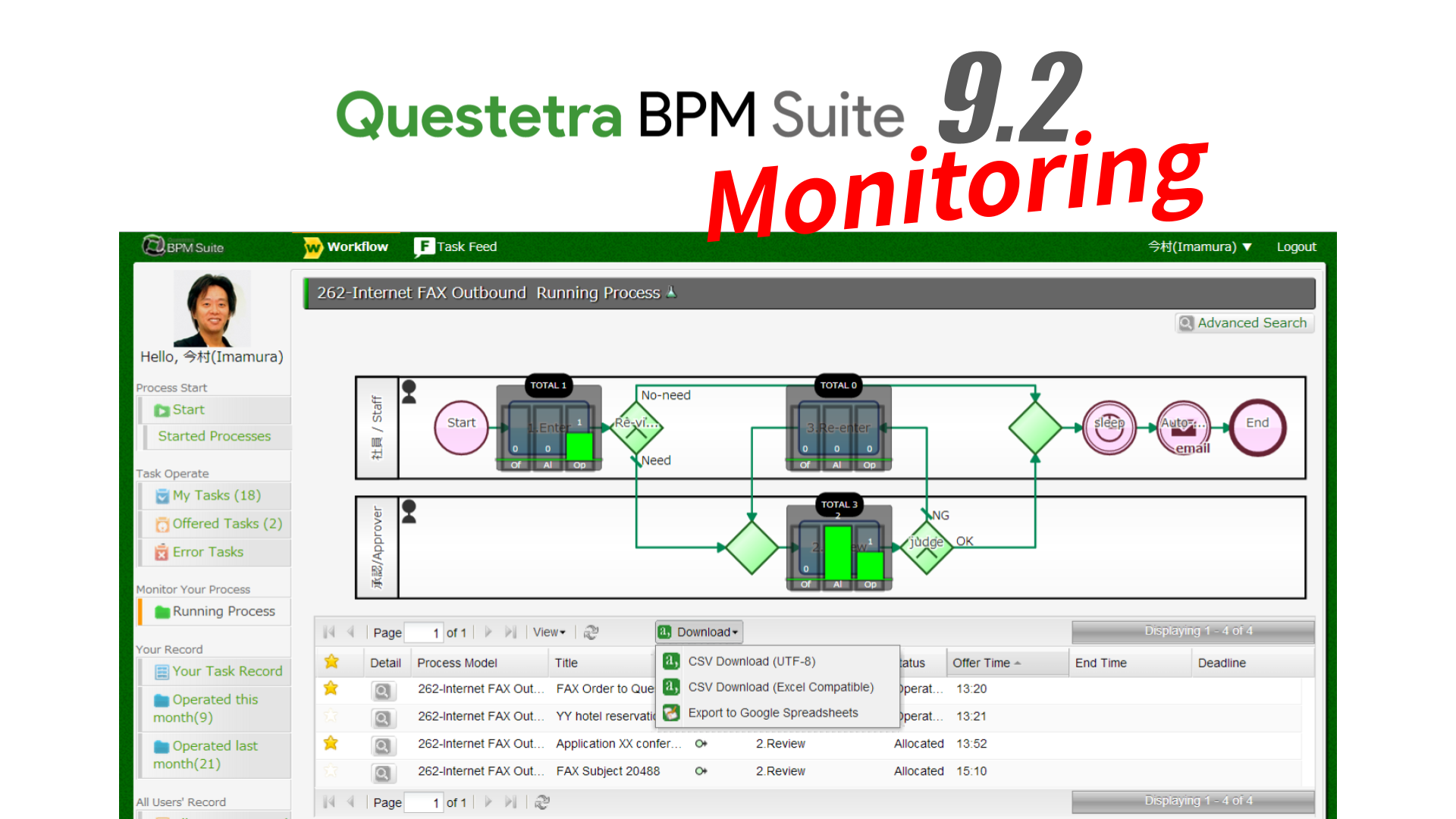
    In this new version, Status Monitoring feature has been enhanced, so that who had worked on which Step is shown on the Process Diagram. For example, the executives and the internal audit team will be able to understand the status of order fulfillment or billing easier.

    Status Monitoring feature

    As a feature for monitoring the status of progress, the current Step (individual progress) of each Issue and the number of retention (Heat map) in the entire Issues can be shown on a Process Diagram. From the new version 10.1, icons of the personnel who have handled each Step will be appeared when checking the Individual progress. Although the operator of each Step could be confirmed only in the logs previously, the relation between a step and its operator becomes easier to be recognized visually now. 

    Newly Opened Server in Europe

    Today, Questetra BPM Suite has been utilized by enterprises and organizations in all over the world for day-to-day work, recording of them and visualization of their progress. In the past, we have been providing a cloud computing service (SaaS cloud) using servers in Japan/US and the Content Delivery Network (CDN). Now, we have opened the new servers in Germany, so we believe that we can provide our service more stable and faster in the European region.

    Other Improvements

    Performance Monitoring

    We have enhanced the Filtering Chart feature, which is to aggregate Issue data through Business Processes graphically, so that access permission can be set on the aggregation charts, such as ‘Monthly transition of invoice total amount’ or ‘Monthly transition of the number of inquiries’. Also, the graph can be shared with Users without Data Viewer Authorization.

    Data Items Setting

    You are now able to set the minimum and the maximum values on the number of the files to be attached when you do configuration of File type data item to the data format of Issue, such as ‘Blueprint’ or ‘Project plan’.

  • Cloud Workflow v10 gets Expanded Free Tier

    Cloud Workflow v10 gets Expanded Free Tier

    Unveiling New Filtering Chart for Business Process Improvement

    Kyoto, Japan – November 10, 2014 — Questetra, Inc., the global SaaS provider of Business Process Management (BPM), today announced that they have published the new version 10.0 of the cloud-based Workflow product “Questetra BPM Suite” on November 10, 2014.

    In this new version which is a major upgrading since two years, it has enhanced features such as ‘Filtering Chart’ which aggregates flowed data graphically. This will help, for example, to analyze Business Progression by graphing the Issues that have been approved and Invoice PDF that has been automatically generated in it, into a chart of ‘Transition of Monthly Billing total’.

    Moreover, the Number of Users Limitation on Free SaaS Edition is expanded to 10 Users, to commemorate Release of version 10.0. This will allow easier introduction of Cloud environment for the owners of smaller office or for a particular section in a company.

    Graphical Business Data Analysis feature

    With this feature, you can filter those Numeric data and number of Issues which has flowed on Workflow, and summarize the result in a Chart. e.g. Line Chart of ‘Weekly Estimate amount’ which shows the total price of the approved estimate in ‘Estimate flow’; Bar Chart of ‘Type of Question and its Number’ which shows the Types of Questions and its number in ‘Inquiry flow’. (Filtering Chart)

    Other Improvements

    Exceptional Flow Definition

    In setting rules on each Step, you can set up automatic ‘terminate’ and ‘turn around to Exception flow’, instead of previous behavior at the deadline i.e. ‘Alerting’ or ‘End’. (BPMN Timer Boundary Event)

    Mitigation of Looping Structure Restriction

    Previously, a Looping structure which consists of only Auto-processing had not been allowed. Now you can compose Looping with Auto-processing only, such as ‘Email Transmission’ (Event element) and ‘Script processing’ (Service Task element). However, it will become an error if exceeding 500 steps before all the process is finished.

    Dashboard

    You will be able to display the graphs that are generated by each function in one screen, i.e. Number of processed and Total number of Issues, etc.

    Enhanced HTTP Auto-request

    It became to support more communication methods for Auto-request processing to external system (OAuth 2.0).

  • Cloud Workflow v9.6 Throws Files to Google Drive

    Cloud Workflow v9.6 Throws Files to Google Drive

    Enhancing Google Workspace Connection, Automated File Backup is Now Available

    Kyoto, Japan, June 17, 2013, Questetra, Inc., the global SaaS provider of Business Process Management (BPM), today announced that they have published the new version 9.6 of the cloud-based Workflow product “Questetra BPM Suite”. With the new version, With the new version, storing files to Google Drive, the Online Storage, is automated. 

    e.g. Only the approved quote is transferred after automatically generated 

    “Questetra BPM Suite” (Cloud-based Workflow) that digitizes business data, has been equipped with “Service Task” which ‘automates processing’. You can automate PDF file Generating, Arithmetic operations or Date calculation, only by placing Service Tasks in between human processing such as ‘Input’ and ‘Approve’. 

    With this new version 9.6, it automates File-Storing to Google Drive, the Cloud-storage as well. With this feature for example, you can totally automate the processing that ‘Storing a backup of only approved Quotation to “Google Drive”. 

    Questetra BPM Suite

    “Questetra BPM Suite” is a Cloud-based Workflow which you can build and adjust your Business system by drag and drop placement of processing steps. No programming is needed. BPM: Business Process Management

    Because it is standardly equipped with Real Time monitoring feature for business bottleneck and with Aggregation feature for performance, it helps you to improving the flow of business (Business Process) aggressively and continuously. The Free Trial Edition, it is limited by the number of users up to five. 

    Google Apps Connectivity

    Even though they are independent Cloud-Services, you can use “Questetra BPM Suite” the Cloud-based Workflow, and “Google Apps” the Cloud-based Office Suite, in collaboration by 5 minutes setting. 

    • Single Sign-on: Log-in with Google Apps ID/Password (OpenID) 
    • Synchronizing of Users, Groups, Roles: Synchronizing with Google Apps Accounts (OAuth Consumer) 
    • Google Gadget on Gmail: MyTask List, Colleague Workload (OAuth Service Provider) 
    • Google Calendar Export: Exporting deadline date to Google Calendar (OAuth Consumer) 
    • Google Drive Export: Exporting the list of business data or files to Google Drive (OAuth Consumer) 
    • [New Feature] Google Drive Auto-Storing: Background file throwing to Google Drive (OAuth 2.0 Client) 

    Google Drive:

    “Google Drive” is a Cloud-based storage (online storage) service, which is widely used to centralized management and to share of files. It is also included in “Google Apps”, the Cloud-based office Suite. In the year 2012, it has added features such as directly attach stored files to “Gmail” or “Google+”, and feature to synchronize with folders in Personal Computer. Now it is becoming a main service of Google Apps.


    [New Feature] Auto-File-Throwing to Google Drive 

    Other Upgrading

    In the New version 9.6, the following features are added other than ‘Auto-File-throwing to Google Drive’. 

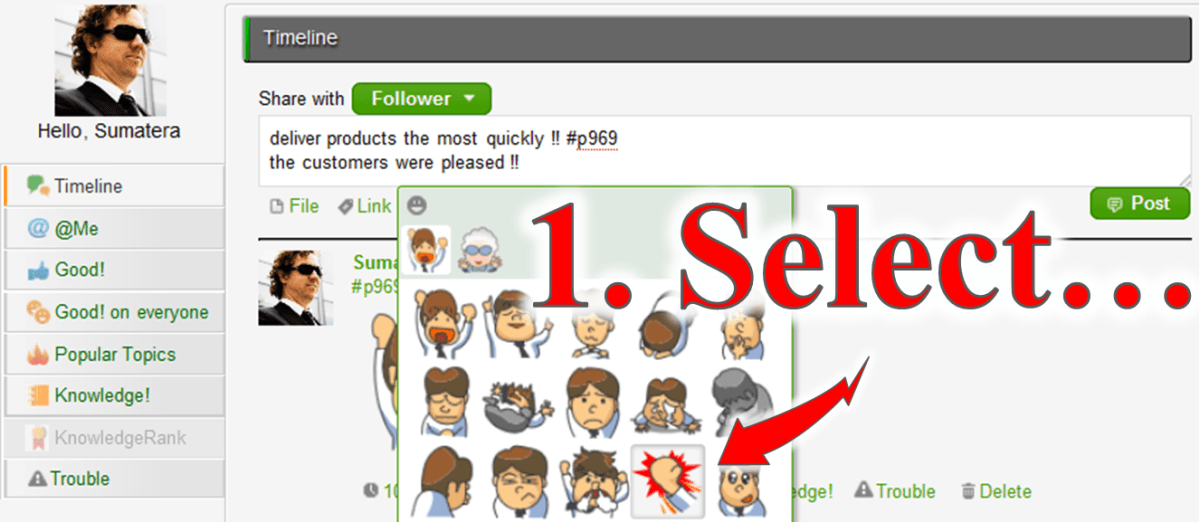
    More Stiackers for Enterprise Social networking:

    New series of Stickers which help to show feelings are added. 

    Messages of Enterprise Social Networking in Workflow screen:

    Message-box will remain open on the screen to operate an allocated Task if there are messages related to the process. 

    APIs for Developer:

    New APIs which operate allocation and termination are added to “Monitoring API” in Workflow APIs. Also, added new search criteria ‘Starred’ in “Worklist API”, sorted JSON response is available. 

    About Questetra

    Questetra, Inc. is the enterprise cloud computing company in Kyoto Japan, founded in 2008. We optimize the world’s Business Processes.

  • Cloud Workflow v9.5 Enhanced API

    Cloud Workflow v9.5 Enhanced API

    Make your own APP for Workflow Automation!

    Kyoto, Japan, April 22, 2013, Questetra, Inc., the global SaaS provider of business process management (BPM), today announced that it has published the new version 9.5 of the cloud-based Workflow product “Questetra BPM Suite”. The new version is enhanced “Developer APIs” which are for programmers, allows to develop more advanced own applications that contribute to business process improvement. 

    Auto-Input APP and Monitoring System

    In a Cloud-based Workflow product “Questetra BPM Suite” which is capable of passing business data through online, a mechanism of system cooperation called API* is available in standard. Since the publication of version 6.0 (June, 2010), Questetra has been utilized for business efficiency such as, not only a simple connection as ‘Estimate flow and Production flow’, but also ‘retrieving business data from the core system’. 

    *API: Application Programming Interface. A mechanism to make system functions available from the outside. Among them, Web API that enables to connect system via the Internet is spreading rapidly, since 2000. Web API is broadly classified into SOAP communication to perform strict XML file exchange, and REST communication to assume access from, such as JavaScript. 

    In this new version 9.5, we have enhanced “Developer APIs” which is for programmers among API that “Questetra BPM Suite” is offering. You are now able to develop such as ‘an Application for automatically enter some part of the inspection work report’ or ‘Monitoring system that displays real-time reporting Photos arriving from all over’. 

    Questetra BPM Suite

     “Questetra BPM Suite” can be flexibly changed the flow of the business. 

    “Questetra BPM Suite” consists of features such as

    • Modeling feature: Available to build the business system without programming. 
    • Task Operation feature: Available to enter the deliverable of accepted duties.
    • Enterprise Social feature: available to communicate closed to within the company.
    • Monitoring feature: Available to browse the progress in real time, or the performance of the past. 

    It is a Workflow that enables the active improvement of the business flow (business processes) continuous, to fit the actual processing situation. Programming knowledge and server knowledge is not needed. There is a limit of the number of users up to 5 people in the Free SaaS. 

    Screenshot: List of MyTask

    APIs for Questetra BPM Suite

    There are “Process Model Connecting APIs” which Workflow Designers also use, and “Developer APIs” which Programmers use. In the “Developer APIs” it will respond “JSON format” and “XML format”, etc. against the “HTTP request” (REST request). Both of “OAuth” and “Basic Authentication” are supported. 

    Process Model Connecting APIs

    • Email Receiving Process Start [Message Start Event (email)]: Automatic start triggered by email receiving 
      *cf. [Message Throwing Intermediate Event (email)] is used to send an email that is inserted business data.
    • HTTP Receiving Process Start [Message Start Event (HTTP)]: Automatic start triggered by HTTP Request
    • HTTP receive data Capture [Message Catching Intermediate Event (HTTP)]: Data capturing
      *cf. [Message Throwing Intermediate Event (HTTP)] is used to transmit business data in HTTP. 

    Developer APIs

    Workflow APIs

    • Process Start API: Processing the first task of business flow – e.g. Internal Affairs, Reporting of Orders
    • Worklist API: To confirm the User’s own allocated Tasks
    • Task Handling API: Processing the User’s own accepting Tasks
    • Monitoring API: Browsing data and current progress of the Process that is authorized to view

    System Settings APIs

    • User Setting API: Adding, Deleting, etc. the login Users
    • Organization Setting API: Adding, Deleting, or changing the name of section and organization. 
    • Membership Setting API: Updating of the Users who belong to department, etc.
    • Choices information API: Updating on choices that is utilized across business – e.g. Product Code List

    About Questetra

    Questetra, Inc. is the enterprise cloud computing company in Kyoto Japan, founded in 2008. We optimize the world’s Business Processes. Visit questetra.com 

    For more press release information, please contact:
    https://questetra.com/en/contact-en/ or +81-75-205-5007

  • Cloud Workflow v9.4 Sticker Post function

    Cloud Workflow v9.4 Sticker Post function

    Kyoto, Japan, March 18, 2013, SaaS vendor company Questetra Inc. has published the new version 9.4 of the cloud-based Workflow product “Questetra BPM Suite SaaS Edition”. At the new version, “Sticker” is equipped on the Enterprise Social Network.(Keywords: Enterprise Social, Sticker, Cloud Workflow, SaaS BPM, Business Process Improvement)

    “Questetra BPM Suite” (Cloud-based Workflow product) that provides delivery of Business data on Cloud, is equipped “Enterprise Social Network feature” as a standard. It makes the Users feel free to make advice regarding business data, and to share ‘URL’ or ‘Images’.

    In the new version 9.4, “Sticker” that helps to express User’s emotion easily on the “Enterprise Social Network feature” is available. For example, when a delivery of goods has been successfully accepted, the project member can actively originate their feelings. It will promote the sharing of emotions that have been difficult by conventional internal e-mail or the report.

    Questetra BPM Suite

    The Business process ‘To-Be’ is changing along the changes in the business environment day by day. “Questetra BPM Suite” is a cloud-based workflow product which has a great feature of the flexibility to change the flow of the business. 

    • “Modeling feature”, can build a Business System in non-programming
    • “Operating feature”, each worker can input their deliverables
    • “Enterprise Social Network feature”, good for sharing internal information
    • “Monitoring Feature”, visualizing progress and records; etc.

    Aggressive improvement on the Flow of Business (Business Process) will be available because it visualizes the bottlenecks and Business challenges. You can take advantage of it for free of charge if your organization is up to 5 people. You do not need Programming knowledge nor Server Operational knowledge. In addition, the method of drawing business flow diagrams is in compliance with international standard notation, BPMN. (Other features: PDF Auto-generation, Data calculation, Google Apps connectivity, Multiple language, Open API, etc.)

    *BPM: Business Process Management


    “Enjoy your Routine!” We are start-up company in Kyoto Japan, have been continuing to create Business Software, and working hard to organize the world’s Business Processes. 

  • SaaS Workflow v9.3 Enhanced Features for Outsourcing

    SaaS Workflow v9.3 Enhanced Features for Outsourcing

    Flow control by comparing multiple entered data

    Kyoto, Japan — December 18, 2012 — SaaS vendor company Questetra, Inc. has published the new version 9.3 of the cloud-based Workflow product “Questetra BPM Suite”, which visualizes both of ‘Business Flow Diagram’ and ‘ Progress of each Project’, on Dec. 17th, 2012. In the new version, features for Business Process Outsourcers (BPO) have been enhanced.

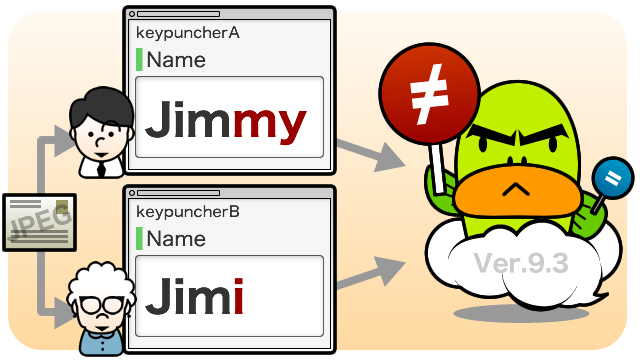
    In the BPO process, in order to improve the quality of data, steps of ‘Comparing multiple data’ are installed. For example, supposing a simple commissioned business such as digitizing manuscripts from ‘postcard application’ ‘questionnaire’, or information of characters inside photo image. There a step, that verifying identity of two text data which have been input by two independent operators will be installed. (Verify input method)

    Before the version 9.3, it was available only conditional expression by monadic evaluation, such as “the {Billing amount} is less than 1,000,000 JPY”, or “{Home Address} starts with Kyoto prefecture and includes Nakagyo-ku”. But in the new version 9.3, it is available to set conditional expressions by comparing two items, such as “{Billing amount} is greater than {Quote}” or “{Work Address} is the same as the {Home Address}”. From now on, it is possible to automate more verification processes for BPO business companies and other business which needs data verification.

    Questetra BPM Suite

    The Business process ‘To Be’ is changing day by day along changes in the business environment, penetration of cloud technology, and the evolution of mobile devices. We must aggressively think about “new business flow” that we’ve never thought in the past, such as approval with the Tablet for automatically generated quotes, quick response with the Smartphone to complaints, or manual preparation at home by telecommuting.

    Cloud-based Workflow, “Questetra BPM Suite” is a service to build the flow of business on the Internet. Not only the “Workflow Feature (Task Processing function)” which enables to pass project data online, equipped as the standard also “Monitoring Feature” which visualizes the progress of Process, and “Modeling Feature” which is easy modifying the flow of Process with Drag & Drop .Not only providing complex business process quickly to IT, It visualizes processing records of “Who What and When” graphically. No need to know about neither Programming nor Server operation. Is also possible to find “business bottleneck” work “point of mistake” by workers and improve the flow of the business by themselves (Employee driven PDCA cycle). Questetra will contribute to the realization of paperless and eradication of human error.

    BPM: Business Process Management
    Process Templates: http://en.workflow-sample.net/ (BPMN subset)
    Application Free Account: http://www.questetra.com/en/free-trial-en/

    How to Automate 2 Items comparison

    1. Placing Icon of SPLIT
    Place a Split icon (Gateway) into Business Flow Diagram with Drag & Drop.

    2. Setting SPLIT Condition Expression
    Open the Condition Rule setting in property, select business data to compare.

    Questetra, Inc.

    “Enjoy your Routine!” We are start-up company in Kyoto Japan, have been continuing to create Business Software, and working hard to organize the world’s Business Processes.

  • Cloud Workflow v9.2 Enhances Monitoring

    Cloud Workflow v9.2 Enhances Monitoring

    Original Japanese version

    Provides the Progress Indicator for Every Employee of Their Own

    Kyoto, Japan — November 13, 2012 — SaaS vendor company Questetra, Inc. has published the new version 9.2 of the cloud-based Workflow product “Questetra BPM Suite SaaS Edition” on Nov. 13th, 2012. In the new version, it’s available to easily check, the progress of the projects that a User has personally involved, on the work flow diagram. By clicking the business process, it is also possible to display a list of projects that are stuck.

    In the “Quote Approval Workflow”, for example, if a salesperson has been submitted for approval on multiple Quotes, the salesperson will be able to check what stage the approval is, easily on the work flow diagram.

    Questetra BPM Suite

    Questetra BPM Suite SaaS Edition, the cloud based Workflow system, is a service to design a flow of your Business on the Internet. It makes handling business data smoothly in various works such as Decision makings, Expense applications, Complaints support. Also, it helps continuous business improvement by visualizing ‘who did what’ and ‘time spent to process’.

    Because it can be designed without programming even complicated conditional split or collaboration between Workflows, not limited to mere approval flow, it can be applied to various other business processes such as Customer Services, Marketing and Product Development. In addition, we are publishing more than 400 business templates which conforming to international standard notation (BPMN 2.0) for Free.

    (Workflow Samples: https ://en.workflow-sample.net/ )

    New Features of Ver. 9.2

    Process Breakdown Chart by one click – enhanced

    The jobs done by a User oneself will be able to be visualized in a Processes breakdown pie chart. Because the data list is narrowed down in the “click in the chart area”, you will be able to easily see the project you have recently worked with.

    Monthly Operation Chart by one click – enhanced

    The jobs done by a User oneself will be able to be visualized in a Monthly Task Operation bar chart. Because the data list is narrowed down in the “click in the chart area”, you will be able to easily see the project you have done in certain month.

    Notification function to the Social Enterprise – enhanced

    In the standard equipped social enterprise feature, a new original mascot character will inform the Task allocation. When the deadline is approaching or has been exceeded, it would tweet to you more gently. Watch out, sometimes it would turn into angry face.

    Free Trial

    Questetra is always issuing Free accounts on-line. There is neither functional limitation nor Usage expiration. Though, service will be automatically shutdown if not login for 15 days. And the number of users to be register is limited at 5 people.

    Questetra, Inc.

    “Enjoy your Routine!” We are start-up company in Kyoto Japan, have been continuing to create Business Software, and working hard to organize the world’s Business Processes.

  • Cloud Workflow v9.1, Further Labor-Saving of Data Entry

    Cloud Workflow v9.1, Further Labor-Saving of Data Entry

    Enhanced Workflow Automation also Contributes to Compliance

    Kyoto, Japan, September 19, 2012, SaaS vendor company Questetra, Inc. has published the new version 9.1 of the cloud-enabled Workflow product “Questetra BPM Suite SaaS Edition”. We have enhanced the auto-assignment of business data for this new version. More specifically, in addition to “the ability to assign an initial value (the default value) at the start workflow” and that “the ability to automatically calculate the aggregate value at the time of data entry, etc.” so far, we have added ‘the ability to assign a data at any business point’.

    For example in the ‘Quote Approval flow’, it provides the auto-processing on ‘Calculation of consumption tax for the entered estimated amount’ or ‘Setting the quote expiration according to the estimated amount’ after entering the details of the Quotation. You can reduce the time with data entry, reduce miscalculation or reduce errors in applying in-house rules.

    Questetra BPM Suite

    Questetra BPM Suite SaaS Edition, the cloud based Workflow system, is a service to design a flow of your Business on the Internet. It makes handling business data smoothly in various works such as Decision makings, Expense applications, Complaints support. Also, it helps continuous business improvement by visualizing ‘who did what’ and ‘time spent to process’.

    Because it can be designed without programming even complicated conditional split or collaboration between Workflows, not limited to mere approval flow, it can be applied to various other business processes such as Customer Services, Marketing and Product Development. In addition, we are publishing more than 400 business templates which conforming to international standard notation (BPMN 2.0) for Free. (Workflow Samples: https ://en.workflow-sample.net/)

    New Features of Ver. 9.1

    Data Assignment function – Enhanced

    We have enhanced the ‘Service Task (data assignment)’ which can be layout in the middle of the Workflow. Business data is automatically assigned according to the mathematical expression and calculation formulas, when the process has reached the “(setting data) service tasks”. Combined with a split conditional (gateway), you can build a business processing environment that complies with business rules. Values that can be assigned are as follows.

    • ‘Numeric type’ business data (e.g. total estimate, consumption tax, the total cost …): Arithmetic operation result
    • ‘Datetime type’ business data (e.g. payment deadlines, reply deadline): Combination of the beginning or the end of a month, and adding days or subtraction of time
    • ‘String type’ business data (e.g. reception number, quote ID …): String concatenation and The results of date and numerical data format conversion

    Business Data Search function – Enhanced

    We have enhanced the Search filter function of business data that flows through the workflow. You can create a search filter which behaves differently depending on the person who performed the search, such as ‘Approval document which the approver is “me”‘. And you can create a search filter which behaves differently depending on the time when search is performed, such as ‘Projects which begin on or after “Today”‘. It is also possible to share relatively and complex search filter, such as ‘Quotes which I had issued as the sales representative, and have not expired in that moment’.

    Other Additional Functions and Specification Changes

    • Enhanced sorting to the list of search results (e.g. Sort by Workflow step name; Task name)
    • Capability to control auto-post to SNS-house per Workflow, etc.

    Free Trial

    Questetra is always issuing Free accounts on-line. There is neither functional limitation nor Usage expiration. Though, service will be automatically shutdown if not login for 15 days. And the number of users to be register is limited at 5 people.

    Questetra, Inc.

    “Making Fun out of Routine!” We are start-up company in Kyoto Japan, have been continuing to create Business Software, and working hard to organize the world’s Business Processes.

  • Cloud Workflow v9 Equipped PDF Generation

    Cloud Workflow v9 Equipped PDF Generation

    Major Version Upgrade after 1 Year, Standardizing ‘Process Start by Email Receiving’

    Original Japanese version

    Kyoto, Japan, August 21, 2012 SaaS vendor company Questetra, Inc. has published the new version 9.0 of the cloud-based business process management “Questetra BPM Suite SaaS Edition”. Since the publishing of version 8.0 which equipped with Enterprise Social, it has been major upgraded after about 1 year.

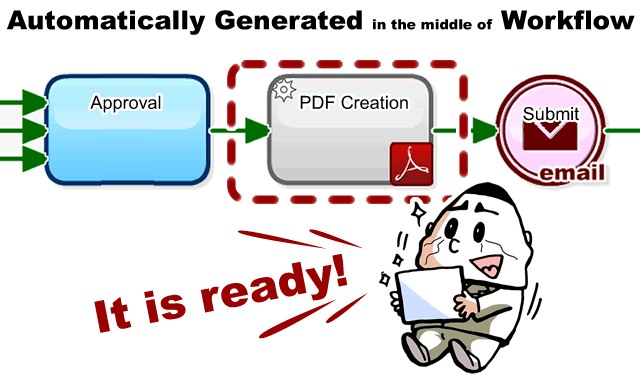
    The new version has added features to streamline the daily business such as automatically generate a “PDF forms that business data has been inserted”. That is for example, it makes possible to automate process such as, generating Quotation PDF from quote data which has been approved in a Workflow, attach it to an email and send to the Sales person in charge.

    Questetra BPM Suite

    Questetra BPM Suite SaaS Edition, the cloud based Workflow system, is a service to design a flow of your Business on the Internet. It makes handling business data smoothly in various works such as Decision makings, Expense applications, Complaints support. Also, it helps continuous business improvement by visualizing ‘who did what’ and ‘time spent to process’.

    Because it can be designed without programming even complicated conditional split or collaboration between Workflows, not limited to mere approval flow, it can be applied to various other business processes such as Customer Services, Marketing and Product Development. In addition, we are publishing more than 400 business templates which conforming to international standard notation (BPMN 2.0) for Free.

    New Features of Ver. 9.0

    Automatic Generation of PDF Document

    ‘Service Task (PDF generation)’ is available to place in the middle of Workflows. Different from ‘Normal Tasks’ that allocate Tasks to human on Process arrival, it processes automatically by itself within the System. The System automatically inserts business data into where specified by the template (PDF Form), and save it as a new PDF file. It makes available to automate various document creation, not only Quotations or Invoices, even “year-end adjustment declaration form” or “letter of appointment”, as well. Sorry not available for Download Edition.

    Email Conjunction Process Start Feature

    ‘Message Start Event (email)’ is available to place in the middle of Workflows. Email reception at specific email address will trigger to start a New Process automatically. Available to capture the Subject, From, and Body of the email, etc. as business data. Sorry not available for Download Edition.

    Other Additional Functions and Specification Changes

    Many other features have been added such as the feature that any “Workflow Designer” can manage Choices type data (Master File) across Business Processes, the feature of repeatedly alert when exceeded deadline, and so on.

    Free Trial

    Questetra is always issuing Free accounts on -line. There is neither functional limitation nor Usage expiration. Though, service will be automatically shutdown if not login for 15 days. And the number of users to be register is limited at 5 people. See the detail of Free SaaS HERE. https://questetra.com/en/free-trial-en/

    Questetra, Inc.

    “Making Fun out of Routine!” – We are start-up company in Kyoto/Japan, have been continuing to create Business Software, and working hard to organize the world’s Business Processes.