Easy in-house sharing by posting to company channel
Kyoto, Japan – February 4th, 2019 – Questetra, Inc., the global SaaS provider of Business Process Management (BPM), today announced that they have published the new version 11.9 of the Cloud-based Workflow product “Questetra BPM Suite” on Feb. 4th, 2019. This new version allows configuration of an automatic posting to “Slack”, an enterprise chat service, solely with the standard feature.
In daily work, various systems and services besides Workflow system are used within the organization for the purpose of sales support, file storage/sharing, communication, collaboration, etc. In order to improve the convenience and productivity of users, it is essential to automate data coordination and processing among these multiple services. In other words, publishing APIs (Application Programming Interface), or enabling easy cooperation with other services would increase the value of the service itself.
So far, as well, it was possible to pass and receive data in cooperation with external service, by setting up HTTP communication or importing packaged “Add-on” for communication processing. But knowledge of APIs and preparations in advance were required for them. On and after v11.9, it becomes easier to use the service connection simply by arranging and setting the modeling elements available as standard. This makes it easy to create a Workflow App that posts the contents of the order automatically to the channel for the entire company in Slack to share it inside the company when you receive a new Issue of order.
Questetra BPM Suite
Cloud-based Workflow “Questetra BPM Suite” is a business platform for realizing environments of paper-less and remote-working.
Business issues are controlled according with Business Flow Diagram. When a process reaches human task, the user will be asked to input. Also, when an issue reaches to automated Step, the predetermined processing (server-side processing) such as “Generate PDF” and “Save to cloud storage” is performed automatically. (BPM: Business Process Management)
You can apply it to various business operations such as “Approval request flow”, “Document translation flow”, “Quality check process”, “Invoice issuance process”. Process owner of each Business Process can practice “improvement of Business Process” little by little in daily work. (Examples of Business Flow Diagram: https://en.workflow-sample.net/ )
Slack Post feature
You will be able to post messages to the designated channel of the company in Slack by using the Service Task. On the chatting tool you are using on a daily basis, you will be able to notify the responsible team when an Issue arrives at a specific Step, or to share the information related to an Issue within the organization so that members can be aware of the progress of the Workflow.
Settings of Slack Post
Other Improvements
G Suite Connectivity:
Regarding Service Task, processing of “Folder Create” and “Delete File/Folder” become available in addition to “Upload File” to Google Drive. You can create a Workflow App, for example, that you can share files on Google Drive with people outside your company by specifying a time limit. Moreover, “Insert Event” to Google Calendar is also available.
Prevent erroneous operation of App deletion:
Workflow Apps in the state of “Active” become not possible to delete. This prevents the accidental deletion of Apps and its related data. If you want to delete an App, “Suspend” the App before operating deletion.
Retrieving system limitation value by a Script:
You will be able to retrieve the system limit value of “HTTP request count”, “the number of emails sent”, “the number of Open Chat posts” in Script Task. Therefore, you can write, for example, a script that iterates the processing considering the limit value.
On December 2018, “5.0” of “WordPress”, a cloud-based CMS, has come. How the “Gutenberg impact” will turn out to be?
Table of contents
1. The environment has Changed
1-1. From WordPress to WordPress?
May 2018, we have migrated our “Website platform”
Speaking simply, we carried out moving to “WordPress.Com” from “WordPress.Org“. (though you may say “Nothing seems to have changed…)
However, things wouldn’t get going, just like a “home moving”. What it all comes down to get stuck up “wondering whether throwing away or not”, or “being hooked up with nostalgic photo albums”.
Formerly: On-premise CMS software “WordPress.Org” (self-operated on AWS)
Currently: Cloud-based CMS service “WordPress.Com” (SaaS WordPress)
There are not only “bad things”. In other words, decluttering is done here and there.
I abandoned negative legacies such as “stray plug-in” and “black-box Plug-in”, and replaced with “brand new plug-ins”. I have no choice than giving up those which I have turned a blind eye on till now when it comes to ” Should I bring it to a new house?”
1-2. It all started when WP.com expanded their service
My motivation was simple. That was because “adding arbitrary plug-ins became possible”.
Until the summer of 2017, only plug-ins which had been permitted by WordPress.com were available. But, it is now possible to install third-party plug-ins only for users who purchased its subscription (Business Plan: 35800 JPY). The Automattic Inc. used to acquire the label that is “safe but unfree”, but I found “they are getting serious in the SaaS business at last”.
Questetra is also one of SaaS business operator! We only have to try it aggressively!
I knew I should pay attention to their activities such as “vip.wordpress.com” since before.
I mean, I thought that “it is an interesting company …” with some sort of jealous.
I would like to omit concerning actual moving project since it is unrememberable, too many things happened, tedious.
However, as a frank comment, I acutely felt that “it is truly growing”. At the same time, I understood that “it hadn’t been a service which was perfectly prepared”.
And in the “(provisional) Website migration project ” that lasted nine months, the following decisions were made. (Incidentally, I had a desire to deal with companies in various countries.)
Adopted “WPML Multilingual CMS” Plug-in
A multilingual plug-in by OnTheGoSystems Limited (Hong Kong). A favorite since 2012. I tried looking for other but could not find good one. Charged.
Adopted “Astra Theme”
Theme by Brainstorm Force (India). It gives me a premonition that WPML will work smoothly on it. “No jQuery”, that’s kinky fabulous. Charged.
Adopted the official plug-ins totally
Adopts all of Jetpack by WordPress.com, Akismet Anti-Spam, and AMP.
Adopted “Shortcodes Ultimate” Plug-in.
Vladimir Anokhin (Russia). I wanted to get rid of self-made shortcodes. Extra Shortcodes, with additional Skins. Charged.
Adopted “Font Awesome”, icon library
Fonticons, Inc (USA). They are beginning to expand paid service. Could we reduce text by using icons a lot? Charged.
I want to separate information for core users such as Manuals. Visit support.questetra.com. Technical terms are on the support site.
I did good-by to my self-made theme
The WP theme we created with various challenges of blood, sweat, and tears. Good-by along with memories of nearly six years …
Changed the product logo
Got rid of embossing and color gradation…
*As of April,2018= WordPress Version 4.9.5 (PHP 7.0.28)
2. What has changed?
2-1. Operations have changed
When “the environment” changes, “operations” also change. (It is as a matter of course, though…)
For an obvious example, along with this SaaS migration (WP.com conversion), some operations are gone!
Specifically, “backup by ourselves” and “self-arranged failure detection system” have become no longer necessary. Speaking without being afraid of misunderstanding about them, I feel that “useless work is gone” (containing faulty expression somewhat). Although I cannot express it well, it is close to the feeling when I shifted to “server operation on IaaS cloud”, since”server operation in the data center (with getting tangled in cables)” has become unnecessary ten years ago. (Though it is not truly unnecessary…)
On the other hand, with this SaaS migration (WP.com conversion), various operations have increased!?
Specifically, subdivisioning of operations, such as site division depending on the assumed target readers, … or, moreover, dependency on external tools such as Zendesk/Github is raised …, was done. Along with, new “Business Processes” have been added/designed by a new “Process Owner” (administrator). (Plugin update work, manual revision work, inquiry handling Process, etc.)
Well, (although it is rather sensuous), I feel that it can be said that “the works relevant with the platform have been simplified, and the works to be done by humans has been subdivided”. In any case, the probability of occurrence of “business mistake” and “business fraud” decreases, and “work efficiency” is improved as a whole! (I try to believe so…)
2-2. Latest trends become to come in
After migrating to SaaS, “Information inflow” increased!?
It is difficult to explain but to put it exaggeratedly, I think that it is like the situation where “the Japanese government which quit isolation policy and opened the country”.
That is, the CMS that we used to operate on our own platform (actually, it was AWS) so far was a state of “National seclusion”. However, “Isolation was ended” by SaaS migration (WP.com conversion) of this time, and it has become inevitable to accept various technologies (almost forcibly). Questetra is (probably) a Web technology company, but it is quite doubtful when asked if we have followed up the latest trend about “Website operation”.
“What? Google Tag Manager?” “Huh? Accelerated Mobile Pages?”
If we have not ended isolation, I guess that I could be thinking only like “What is it? Is it delicious?”, even now.
(Of course, it is another argument concerning the good or bad of National seclusion. Continuing isolation is also right as one strategy.)
2-3. Considering totally different ways.
We got confused here and there…, since “Work” increased in some part…, and “inflow of information” from the outer world increased…
But “confusion” is not always bad. Rather I think that it is better to occur if it is “confusion” of once in a few years. Certainly, “confusion” will lower productivity, output quality, and ultimately overtime work will result. However, those are temporary things! (maybe) And that sure is the time to firmly consider “what is necessary and what is not?”
“That operation should be changed to this way!”
It is similar to the mysterious law which is the state of “To be” comes up while overnight work to respond to system trouble… And what you realize is not “a unique way in a closed world”. It is “a way applicable to someone else”. In other words, what you realize is, “an irreplaceable precious experience” and is “worth sharing” as “a knowledge”.
I cannot say it well, but I think that this is not noticed in “peaceful days” such as “keep living in the same house” or “keep on isolating” and so on. (As mentioned before, the good or bad discussion is different.)
3. What should be changed in the future?
3-1. Gutenberg impact?
Website managers may know it. Releasing of WordPress Ver.5.0 was announced last week.
In WordPress.com, SaaS CMS, it suddenly (not that so) switched to “5.0” on Friday last week (2018 – 12 – 07)…
I suppose that administrators who looked at the information for “WordPress.Org” (*), and misunderstood as “It is still ahead for us!”, were panicked.
(Gutenberg is “HTML editor” newly installed in WordPress 5.0.)
However, even this “impact”, it is merely an “inflow of information”. If I have “ended the isolation” once, I have to respond with a strong will. Moreover, it is a new function proposed by the top share, WordPress. Many companies will be forced to accept the “environmental change” from now on. If so, we should understand it straight on the early stage.
Incidentally, what has been changed is only becoming “an editor that manages HTML in blocks”, so that “additional information” like the following, which is rather “noise”, is added.
There is nothing to be afraid of…(probably…) If cases where “Shortcodes” become unstable, you just work around by using “wp:html”!
<-- wp:html -->
[su_box title="Journal-TSV Create" style="soft" box_color="#ff99ff" title_color="#000000" radius="0"]Creates the Journal-Slip TSV. The transfer slip TSV of the sales is generated based on the Invoice data. To generate a file that can be imported into the accounting system, place a converter such as "TSV to Excel-CSV FILE" in the downstream process.<br><a href="https://support.questetra.com/addons/journal-tsv-create/" target="_Blank">https://support.questetra.com/addons/journal-tsv-create/</a><br><span style="float: right;">2018-12-10 (C) Questetra, Inc. (MIT License)</span>[/su_box]
<!-- /wp:html -->
For the time being, we started operation with the “Classic Editor” plugin was installed and “Allow user to switch editor = Yes”. However, Astra Theme is appealing that “Compatible with Gutenberg.” And no noticeable trouble has also occurred. (This post is also written in Gutenberg.)
3-2. Automation and labor saving of Website operations
One of major advantage in using SaaS is the utilization of APIs. “WordPress.com” as a SaaS CMS also has “WordPress.com REST API” (WP.COM API).
Questetra as a company that develops SaaS Workflow “Questetra BPM Suite”, we would like to take the initiative on automation, labor saving, efficiency improvement, and unmanning, of “Website operations” as well.
Specifically, first of all, we would like to expand Auto-steps (Add-ons) such as “Page update” and “Media upload” (Unmanning of Business
Process). Then we want to refine those by utilizing them in the daily work by ourselves. Then we would like to propose widely to the world about “what Business Processes should be”. (Promotion of “API economy”)
(Incidentally, although WordPress as software also has an API function (WP REST API), setting up an authorization mechanism is troublesome.
A workflow in which approved illustration files are automatically uploaded (PAGE)Workflow which automatically records “pageview count” on 7 days after publication (PAGE)
3-3. More focus on SaaS!
Looking back at the day of establishment of Questetra (April 2008), we have introduced ‘G Suite’ (at that time it was Google Apps Premier Edition) on the very day. Then we led it to the development of the linkage function with Questetra BPM Suite.
However, “SaaS introduction” of ever since seems rather not so aggressive. In other words, although I was thinking to promote in introducing various SaaS products, now I think that it was done “just a formality introduction”, or with the thoughts of “would like to minimize the change of our own”. So It seems like I did not take aggressive changes… In fact, it cannot be said that the active development of “cooperation function” has been achieved.
Migration to “WordPress.com” this time was really a tough project. At the same time, however, we have got a very good stimulus from Automattic. I cannot say well, but I think it was a good opportunity for us to go back to the original intention that is “More focus on SaaS!”.
Memo 2018-12-14
WordPress: 5.0.1 (PHP: 7.0.33)
WPML Multilingual CMS: 4.1.2
Astra Theme: 1.6.1
Jetpack by WordPress.com: 6.8.1
Akismet Anti-Spam: 4.1
AMP: 1.0.1
Classic Editor: 1.3
Shortcodes Ultimate: 5.1.1
Font Awesome: 5.6.1
P.S.: By the way, I also have a “banner link for affiliate” anyway… (There is never the case sold, but yet I am curious about its mechanism.)
Answer deadline on Post-event-survey questionnaire
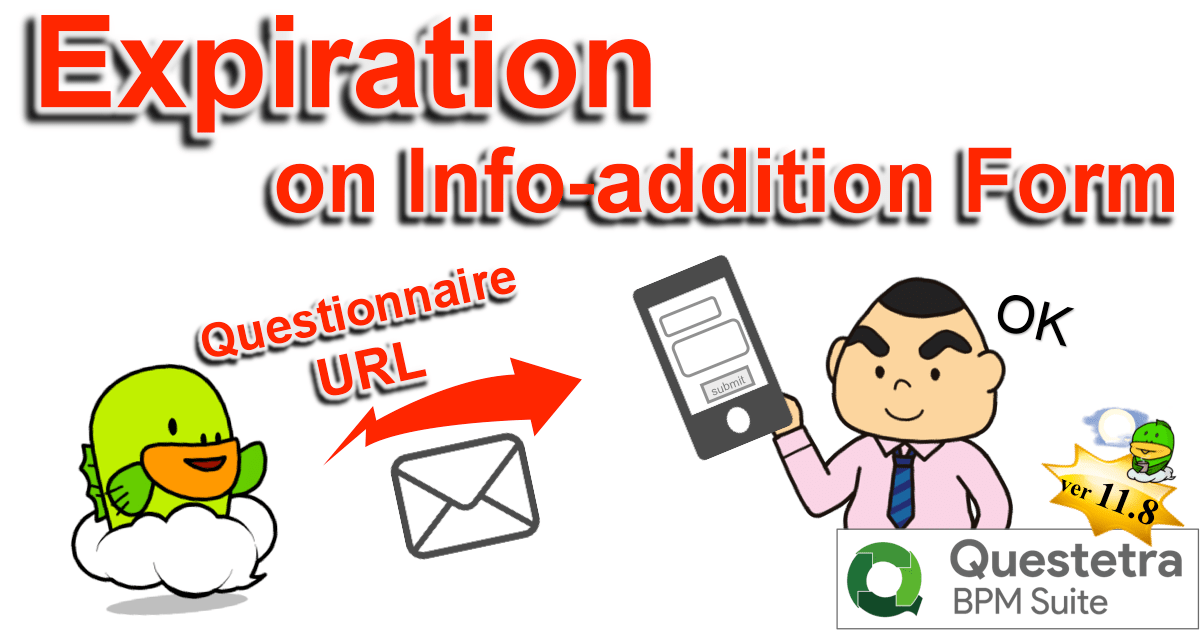
Kyoto, Japan – October 22nd, 2018 – Questetra, Inc., the global SaaS provider of Business Process Management (BPM), today announced that they have published the new version 11.8 of the Cloud-based Workflow product “Questetra BPM Suite” on Oct. 22nd, 2018. This new version allows setting an expiration to intermediate Steps which await web form input by outsiders. (Form Standby feature)
Workflow system nowadays is widely used not only as a “tool to promote paperless for work that has been done on paper documents” but also as “tool to visualize stagnation at departments in the company”. It is becoming to be considered as a “core tool” to realize “labor reform” and “productivity improvement” within the company. However, there are many cases, in daily business processes, where to have to be waiting for additional information from people outside the company.
The cloud-based Workflow “Questetra BPM Suite” has equipped various features for receiving additional information in the middle of a flow, On the new version 11.8, it becomes possible to set up the expiration to the “Steps for receiving additional information”. Specifically, it is possible to set the deadline to, such as, a) the Step of “Acceptance report by customer” in the Delivery process, b) the Step of “Request participants a questionnaire” after the event is over in the Event participation reception process, and c) the Step of “Receiving additional information after confirming the existence of the email address” in the Membership registration process. With these, you can achieve a smoother business process environment with no stagnation.
Questetra BPM Suite
Cloud-based Workflow “Questetra BPM Suite” is a business platform for realizing environments of paper-less and remote-working.
Business issues are controlled according to Business Flow Diagram. When a Process reaches Human Task, the user will be asked to input. Also, when an issue reaches to automated Step, the predetermined processing (server-side processing) such as “Generate PDF” and “Save to cloud storage” is performed automatically. (BPM: Business Process Management)
You can apply it to various business operations such as “Approval request flow”, “Document translation flow”, Quality check process, “Invoice issuance process”. Process owner of each Business Process can practice “improvement of Business Process” little by little in daily work. (Examples of Business Flow Diagram: https://en.workflow-sample.net/ )
Form Standby feature
When an “information addition web form” that accepts input from outside person who does not have a user account or a “Webhook reception” which waits for HTTP request is placed in the middle of a Workflow, it is possible to set the deadline of it, and to define the flow of processing after reaching the deadline respectively. With this, if there is no input before the deadline due date, it will be possible to take actions such as advancing the Process with closing the form as private or continue waiting after automatically sending an email that prompts input.
Other Improvements
Data conversion to DateTime type from Date type
It becomes possible to convert Date type data into DateTime type using Service Task (Data assignment). By doing so, configurations such as, once you entered the “Bill issuance date (Date type)” the bill will be sent automatically by email at 9 am on the day, is possible.
Transition after submitting web form
In “Receive Task (Form)”, it becomes possible to navigate to the arbitrary page (URL) after submission of the form completed. By displaying your own page, it allows showing your message or leading the submitter to the next action.
Enhancement/improvement on Add-on management
At the time of uploading an Add-on file, it becomes to calculate hash and retain/display it. With the hash value, you are able to identify with Add-on files in your local folder. And it will be checked as an error when trying to register the same file. In addition, the flow of procedure is separated to new registration and overwrite registration (updating of existing file) so that improve convenience.
* Please see our Release note for the detail of New Features
Kyoto, Japan – June 11th, 2018 – Questetra, Inc., the global SaaS provider of Business Process Management (BPM), today announced that they have published the new version 11.7 of the Cloud-based Workflow product “Questetra BPM Suite” on Jun. 11th, 2018. This new version allows arranging intermediate Steps that await input by outsiders. (Form standby function)
Workflow systems of today are greatly contributing to the delivery of information within organization. However, there are many information interactions with outside parties in daily business processes. The cloud-based workflow “Questetra BPM Suite” has been supporting such as, 1) Starting Workflow by people outside the organization (entry to a published Webform/Sending an email), 2) Starting Workflow by an external system (transmission of Json Webhook/Transmission of Multipart Data), and 3) Standing-by communication from external system (Json Webhook standby/Multipart Data standby) in midstream Step.
On the new version 11.7, it is capable of standby for “an outsider accesses unique URL and completes web form input”. This will allow arranging Steps in the middle of the processes such as, for example, “acceptance report by customer” in the delivery process, or “covenant registration by a new employee” in the recruitment process, or “addition of information by a newly joining member” in the membership registration process.
Questetra BPM Suite
Cloud-based Workflow “Questetra BPM Suite” is a business platform for realizing environments of paper-less and remote-working.
Business issues are controlled according with Business Flow Diagram. When a process reaches human task, the user will be asked to input. Also, when an issue reaches to automated Step, the predetermined processing (server-side processing) such as “Generate PDF” and “Save to cloud storage” is performed automatically. (BPM: Business Process Management)
You can apply it to various business operations such as “Approval request flow”, “Document translation flow”, “Quality check process”, “Invoice issuance process”. Process owner of each Business Process can practice “improvement of Business Process” little by little in daily work. (Examples of Business Flow Diagram: https://en.workflow-sample.net/ )
Form Standby feature
Regarding “Published Webform” which is to accept inputs from users who do not have user accounts, it now becomes possible to be placed in the middle of a Workflow, in addition to only at the beginning of a Workflow (Start point of an Issue). This allows those concerned who do not belong to the organization in which the Workflow platform is used also participate in the Workflow and enter and edit data in the designated Step.
Other Improvements
Enhanced Webhook receiving
Upon receiving Webhook, it is now possible to return HTTP response including data in an Issue. This will allow in a specific process, not only to transmit the Issue data externally but also to acquire them by an external trigger (Webhook).
Support Exception flow upon failure of automatic processing
When automatic processing such as “Script Task/Service Task (Add-on)” or “Service Task (Google Drive)” fails, the process can flow to the exception flow. You can isolate the succeeding processing at the time of error occurrence.
Enhanced feature of process logging
The log of “Script Task/Service Task (Add-on)” and the log at the time of processing failure of “Webhook receiving” are output to [Process Log]. Moreover, users who have privileges on the Workflow application become able to view the [Process Log] of the corresponding App, in addition to those who with the [System Administrator] so far.
Event-notification of cloud era tightens service collaboration
Kyoto, Japan – March 12th, 2018 – Questetra, Inc., the global SaaS provider of Business Process Management (BPM), today announced that they have published the new version 11.6 of the Cloud-based Workflow product “Questetra BPM Suite” on Mar. 12th, 2018. This new version allows setting a Process to be triggered by Webhook. (Webhook receiving feature)
Even a Workflow system for improving productivity will become meaningless unless “Request” or “Registration” of the most upstream Step is made. The cloud-based Workflow, “Questetra BPM Suite”, has been corresponding to such as 1) Workflow start by a user in the system, 2) Automatic start triggered by “incoming email” from outside, 3) Automatic start triggered by an entry in a published Web form, 4) Automatic start triggered by “reception of standard HTTP request.
Since the new version 11.6, it becomes possible to automatically start the Workflow with the reception of “Webhook between servers” as a trigger. Specifically, it will be able to receive Webhook from “kintone”, a cloud database service, and “PayPal”, a payment service. With this feature, it becomes possible a collaboration, for example, which “Commodity registration flow” to the EC site is Started by adding products to “Product master” (kintone).
Questetra BPM Suite
Cloud-based Workflow “Questetra BPM Suite” is a business platform for realizing environments of paper-less and remote-working.
Business issues are controlled according to Business Flow Diagram. When a process reaches human task, the user will be asked to input. Also, when an issue reaches to automated Step, the predetermined processing (server-side processing) such as “Generate PDF” and “Save to cloud storage” is performed automatically. (BPM: Business Process Management)
You can apply it to various business operations such as “Approval request flow”, “Document translation flow”, “Quality check process”, “Invoice issuance process”. Process owner of each Business Process can practice “improvement of Business Process” little by little in daily work.
Catching Message Event API
Regarding Start Event and Catching Intermediated Event/Receive Task, a data receiving method that “To store the whole message body in a Data Item” becomes available in addition to “Storing values into respective Data Items as specified by parameter”. It is also possible to specify “Content-type” of the HTTP request to receive.
Message Start Event (HTTP): Start a Process upon arrival of an HTTP request at certain URL (Parameter)
Message Start Event (Webhook): Start a Process upon arrival of an HTTP request at certain URL (Message body)
Catching Message Intermediate Event (HTTP): Stand by for arrival of an HTTP request at certain URL (Parameter)
Catching Message Intermediate Event (Webhook): Stand by for arrival of an HTTP request at certain URL (Message body)
Setting of Webhook
Other Improvements
Process Details screen for Smartphones
Delegate/Return and Terminate/Delete become available on Smartphones. Also, a URL string entered in String type Data Item is automatically displayed as a hyperlink on a Process details screen.
Logging feature in Script Task
Regarding [Script Task] and [Service Task (Add-on)], it becomes capable of outputting logs to processing record using log output method. Also, error contents will be recorded automatically to processing log when an error occurs.
API for App management
An API for retrieving a list of Business Process Definitions (App), and one for activating (Release) the Developing version become available.
Kyoto, Japan – November 20th, 2017 – Questetra, Inc., the global SaaS provider of Business Process Management (BPM), today announced that they have published the new version 11.5 of the Cloud-based Workflow product “Questetra BPM Suite” on Nov. 20th, 2017. With this new version, it allows users to easily implement API collaborations and self-development, since the API documents and REST API testing environment have been organized to which conforms to OpenAPI specification (formerly Swagger).
In order to improve the productivity of day-to-day operations, automation of Business Processes is essential. Since numbers of cloud service company publishes APIs (Application Programming Interface) which are for accessing resource of their own services, cases of “self-development of app using API” or “API collaboration between multiple services” are increasing its number.
On and after the new version 11.5, you can promote not only automatizing request transmission to external systems (external APIs) using “Auto step”, but also automatizing requesting from external systems to the Workflow platform. For companies that utilizing multiple cloud services, Questetra can be the core cloud service.
Questetra BPM Suite
Cloud-based Workflow “Questetra BPM Suite” is a business platform for realizing environments of paper-less and remote-working.
Business issues are controlled according with Business Flow Diagram. When a process reaches human task, the user will be asked to input. Also, when an issue reaches to automated Step, the predetermined processing (server-side processing) such as “Generate PDF” and “Save to cloud storage” is performed automatically. (BPM: Business Process Management)
You can apply it to various business operations such as “Approval request flow”, “Document translation flow”, “Quality check process”, “Invoice issuance process”. Process owner of each Business Process can practice “improvement of Business Process” little by little in daily work. (Examples of Business Flow Diagram: http://en.workflow-sample.net/ )
OpenAPI specification
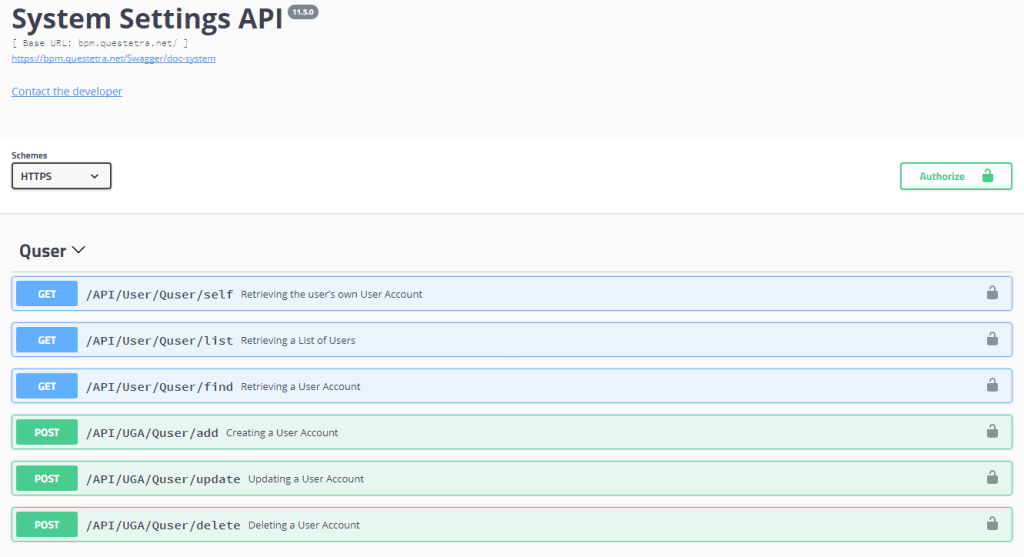
It is an online document generated dynamically according to Workflow platform. It allows developers to write program code that suites for their own Workflow platform efficiently. In addition, since communication test of request can be executed within online document, it is possible to create program code while simulating various data transmission.
System Settings API : APIs for performing changes in settings of the Workflow platform such as Users, Organizations, or System privileges
Workflow API : APIs for controlling or processing on Issues flowing on Workflow, searching for Issues, managing App privileges
OpenAPI Documentation
Other Improvements
All Operators complete option
In addition to the existing “Each task is finished when one of the allocated user has executed”, you can set an option of “Each task is finished when every allocated user has executed”. It is useful in a situation where all the operators must see.
Enhance Single Sign-on (SAML)
Enabled to set “Authentication lifetime” in ID Provider setting, so that you can use Google as the ID Provider. Also, adopting encryption that can be used as certificate, it supports more advanced algorithm.
STARTTLS
Email transmission from Questetra BPM Suite corresponds email encryption. It allows secure email transmission if the target email server supports STARTTLS.
Connect to Workflow from the Backbone System more securely.
Kyoto, Japan – September 11th, 2017 – Questetra, Inc., the global SaaS provider of Business Process Management (BPM), today announced that they have published the new version 11.4 of the Cloud-based Workflow product “Questetra BPM Suite” on Sep 11th, 2017. In this new version, you can configure “Allowed IP” onto each Data Catching Event (API Endpoint) of Workflow. (API IP Filtering)
To improve the productivity of day-to-day operations, automation of Business Processes is essential. Work style reform is recommended today, and cases of API connection, such as automatically starting a Workflow system from a business system in an in-house server or cloud storage service AWS, are no longer unusual. (e.g. Starting “Materials sending Process” when there is an application to the campaign site, starting “Lecturing Process” upon service contract, etc.)
On and after the new version 11.4, you can set “list of IPs that allow access” for each API-URI (Endpoint of Questetra BPM Suite). We have supported various kinds of secure communication so far, but from now on, it will be possible to realize cooperation between systems with even higher security levels.
Questetra BPM Suite
Cloud-based Workflow “Questetra BPM Suite” is a business platform for realizing environments of paper-less and remote-working.
Business issues are controlled according with Business Flow Diagram. When a process reaches human task, the user will be asked to input. Also, when an issue reaches to automated Step, the predetermined processing (server-side processing) such as “Generate PDF” and “Save to cloud storage” is performed automatically. (BPM: Business Process Management)
You can apply it to various business operations such as “Approval request flow”, “Document translation flow”, “Quality check process”, “Invoice issuance process”. Process owner of each Business Process can practice “improvement of Business Process” little by little in daily work.
API IP Filtering function
Regarding access to Start Event and Catching Intermediate Event (“Message Catch Event API”), you can set “source IP address to allow access” for the URI path, in addition to the access restriction by the “API key” so far (Whitelisting by “Source IP” or “IP range CIDR”). You can apply different IP restrictions to each one of plural events. System administrator privilege is required for setting.
Message Start Event (HTTP): Starting a Process upon an HTTP request comes to the URI
Catching Message Intermediate Event (HTTP): Standing by for an HTTP request coming to the URI
Message Start Event (Form): Starting a Process if there is a post on a Web form for huma
Note 1) The Workflow App connection (Process Model connection) within the same Workflow platform is not affected by the API IP Filtering.
Note 2) Developer APIs such as “System Setting APIs” to change setting of Workflow platform and “Workflow APIs” to control flowing Issues are not subject to the API IP Filtering function, initially. Please use secure communication by “OAuth 2 authorization” or “Basic authentication” as before.
IP Filtering setting for “Message start event (form)” will restrict access by human.
IP Address Filtering
Other Improvements
User-Interface IP Filtering
“Source IP address to allow access” can be set also for user access from personal computers, smartphones, etc. (Whitelisting)
Format of API Access URI
Resource information such as “Workflow App ID” and “Event Node ID” was specified in the query part and body part when accessing Start Event and Catching Intermediate Event (“Message Catch Event API”), so far. From now on, it will be possible to specify it by “path parameter “. (e.g. “/System/Event/MessageStart/APP-ID/NODE-ID/start”)
Cross-Origin Resource Sharing function
It is possible to set to allow CORS access to “Message Catch Event API” and “Workflow Control API” etc.
Automated task such as “Date Formatting” and “Slack Posting” is available for companywide
Kyoto, Japan – March 13rd, 2017 – Questetra, Inc., the global SaaS provider of Business Process Management (BPM), today announced that they have published the new version 11.3 of the Cloud-based Workflow product “Questetra BPM Suite” on Mar 13rd, 2017. In this new version, “automatic steps” utilized in various departments within the company can be managed unitary.
When modeling daily works such as “Quotation process” or “Invoice process” into Workflow systems, the Process owner (Workflow designer) defines the process by arranging several “Human Tasks” and “Automated Tasks”. However, if you wanted to place an automated task that is not included as a standard modeling element, you had to download or make your own definition file (Addon XML) and import it individually for each modeling so far. Since the new version 11.3, it is possible to share definition files.
With this function, in a company with many desk works of document preparation for Japanese government agencies for example, if the automated task of “Date Format Converter for JP” has been shared, you will be able to call it from any department. Alternatively, if an automated task which “Auto-Posting to Slack” has been shared in a company where promoting work progress to be posted to Slack, it will be possible to easily design Workflows containing it in any department. (Slack: Cloud based enterprise social network service which is widely used as a communication platform)
User companies will be able to improve their own productivity with automation.
Questetra BPM Suite
Cloud-based Workflow “Questetra BPM Suite” is a business platform for realizing environments of paper-less and remote-working. When a process reaches “Human task”, the user will be asked to input. If it reaches “Automated task”, server-side scripting will be executed. (BPM: Business Process Management)
Since it is possible to add arbitrary “Automated tasks” besides ones incorporated as standard such as “PDF Auto-Generation” and “Auto-Save to Google Drive”, you will be able to promote “Labor saving” or “Error rate reduction” or “Eliminating fraud”, etc., proactively in accordance with the management issues. More than 500 downloadable samples have been published for your convenience.
Shared File feature
By importing the service definition file (Addon XML) describing the contents of processing of the server-side in advance, you can use Service-Task not included in the standard menu as a modeling element. Starting with version 11.3, you can import it as a shared addon that can be used across the entire business platform. You can place this Service-Task to any work you are modeling.
Other Improvements
Smartphone Interface
Improved to a responsive interface to support multiple devices. In Version 11.3, we have greatly improved screen to confirm the details of the content of the Issue, and the screen for operating the Issues in My Tasks.
Personal Default of Listing
It is now possible to specify the default value for the number of items to display when displaying the list, such as Operation history of your own or Issues you have Started. Each user can select from “10 items / 20 items / 50 items / 100 items”.
Dependency on Shared-File
You can check which App is referring the shared-file in a list. It will be helpful for the maintenance of;
“Options Master” to be referred by Select type data item setting,
“PDF Form” (Template PDF) to be referred by the Service-Task for PDF Auto-Generation,
In addition to PDF generation, capable of generating Excel files and saving received files
Kyoto, Japan – November 28th, 2016 – Questetra, Inc., the global SaaS provider of Business Process Management (BPM), today announced that they have published the new version 11.2 of the Cloud-based Workflow product “Questetra BPM Suite” on Nov 28th, 2016. In this new version 11.2, auto-steps such as “Excel-CSV file conversion of Table type data” and “saving received binary from external API” can be done.
Today, productivity improvement is the main focus, so the delivery of business information is now being shifted from “transfer of paper” to “data flow in system”, and the “manual work processing” in each step is replaced by “automatic computer processing” . Even in the Cloud-based workflow “Questetra BPM Suite”, various Processing can be automated, not only for simple work Step such as counting the “number of characters” in draft data, but even complicated process such as acquiring the latest information (JSON / XML) from an external API.
In the new version 11.2, the function of adding new files has been enhanced, so that you can automate the processing steps such as, 1) Creation and storage of files in which the entity is defined in string data, 2) Saving of received binary files, 3) Duplication and storage of files which are attached to a File type data item. In the invoice issuance process, for example, it is also possible to automatically generate a “CSV file for importing into accounting system” (File type data) from “Billing data” (Numeric type data).
Questetra BPM Suite
Cloud-based Workflow “Questetra BPM Suite” is a business platform for achieving paperless and telework environments. When a business issue “arrives” at a Step, a User (worker) processes it in a previously specified manner and enters the work result, then the issue goes on to the next Step automatically. Its most outstanding feature is its drag&drop feature used in the configuration of the “Business flow”. This feature allows a Process-owner to iterate the Improvement cycle on his/her as a part of the day-to-day work.
(BPM: Business Process Management).
Since it is applicable not only to simple business operations such as “Decision-making request” or “Document translation”, but also more complicated operations such as “Pre-shipment Quality check” and “Invoicing-Payment confirmation”, it allows to centrally visualize the progress of various in-house businesses. More than 500 downloadable Business Samples have been published for your convenience.
File Addition feature
It can be said that the file type data items so far were “items mainly for uploading work as human processing”. As a function for automatically adding new files, there was only the “PDF generation function” (function to generate PDF with strings and images inserted into the template). With the new version 11.2 onwards, you can automatically generate and save various text-based files such as CSV, TSV, JSON, and XML. In addition, binary files such as JPEG, PNG, DOC, PPT can be received from the external APIs and saved. It is also possible to automatically delete data by overwriting it wit null data. Note that, no method is provided for binary editing in v11.2.
Other Improvements
Enhancement of Table type data
When defining each column of “Table type data”, “Date column” can be set now, in addition to “String column”, “Numeric column” and “Select column”. Also, when defining settings that automatically calculate cell values in each column (record), you could only set the “product of two numeric columns”, but you can now define “sums of two numeric columns” or “addition of constant values”.
Enhancement of Nested Select type data
When setting filtered indication of “Select type data” by referring to nested data, narrowed down display was possible only for “Select type” and “Radio button type”, but now it is also possible to set it for “Checkbox type”.
Enhancement of Automated Step
Up until now, only one data setting formula could be set for one “Service Task (Data assignment)”, but now it is possible to define multiple data setting formulas. (It makes items easy-to-see such as Business flow with multiple Service Tasks standing in a row.)
Kyoto, Japan – September 5th, 2016 – Questetra, Inc., the global SaaS provider of Business Process Management (BPM), today announced that they have published the new version 11.1 of the Cloud-based Workflow product “Questetra BPM Suite” on Sep. 5th, 2016. In this new version 11.1, Modelling Elements which were not included as standard functions, such as “Automatic submission to other Cloud” or “Automatic conversion to CSV format” are now available. (Service-Task add-on feature)
To formulate a “Quotation submission” into Workflow (Business system), for example, a Process-owner (administrator of business operation) would arrange several human-processing Steps and automated Steps to create a Business Process Definition (Modelling). Specifically, to define by drag & drop placement of Step-icons, such as #1) Drafting, #2) Approving, #3) Submitting, #4) Reporting the Result, #5) Storing the PDF of Winning Quotation into File Server.
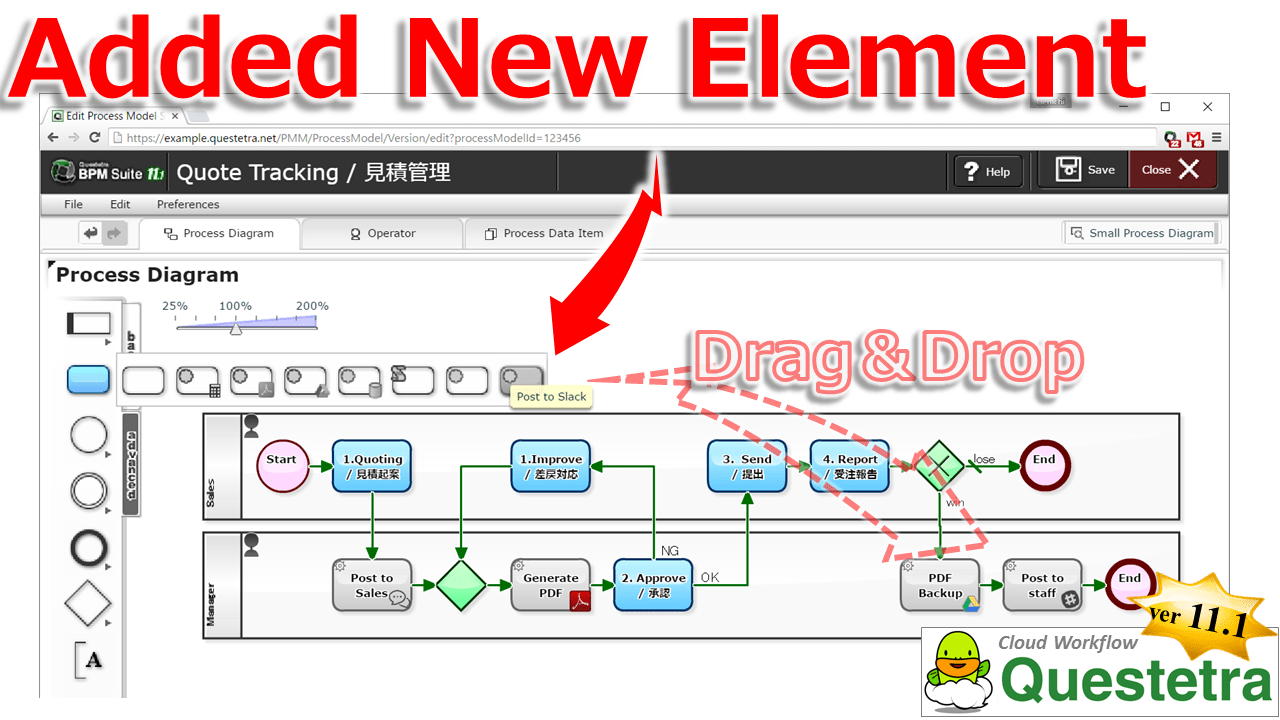
Thus far, it was also possible for anyone to undergo the automation of processing easily with icons of pre-equipped Auto-processing Steps, such as “Auto-generation of PDF” and “Auto-storing to Google Drive”. However, in order to create an Auto-step icon for a processing that is not prepared as a standard Modelling Element, advanced configurations were required, such as writing a Script. With the new version 11.1, you are able to add Modelling Elements by importing Add-ons that specify data treatment and request procedures. That will allow you an easy drag & drop placement of Auto-processing Step icons, such as “Sharing Win-loss information with other departments on Slack”. This will help Questetra users to promote “Improvement of productivity” by using automated Steps.
Questetra BPM Suite
Cloud-based Workflow “Questetra BPM Suite” is a business platform for achieving paperless and telework environments. When a business issue “arrives” at a Step, a User (worker) processes it in a previously specified manner and enters the work result, then the issue goes on to the next step automatically. Its most outstanding feature is its drag & drop feature used in the configuration of the “Business flow”. This feature allows a Process-owner to iterate the Improvement cycle on his/her as a part of the day-to-day work. (BPM: Business Process Management).
Since it is applicable not only to simple business operations such as “Decision-making request” or “Document translation”, but also more complicated operations such as “Pre-shipment Quality check” and “Invoicing-Payment confirmation”, it allows to centrally visualize the progress of various in-house businesses.
Service-Task Addon feature
By importing Service definition files (Add-on XML) in advance, custom Service Steps (Service Tasks) will become available for Business Modelling. It is also possible to create definition files (Add-on XML) on your own, in case where you could not find what you want.
Other Improvements
Enhancement of Script Step
In [Script Task] (Script Step) for Auto-processing, “Method of HTTP request transmission” and “Method of Email transmission” are now available. This enables to complete external communication processing only by [Script Task], which had been thus far separately arranged as [Throwing Message Intermediate Event]. Also, due to the addition of external communication functions, time-out period of the Auto-processing Step will be extended to 30 seconds from two seconds. (Likewise, [Service Task] that has been added by Add-on XML will have a 30 seconds limitation.)
Renewal of Collective setting Functions in the Editing permission on all Human Steps
We have changed the access level configuration (read/write setting) which used to be a matrix structure of Processing-step and Business data, to a more graphical configuration screen. Moreover, the configuration of Access level is now able to be imported and exported in CSV format.
OAuth 2.0 for [Developer APIs]
Concerning [Developer APIs] which responds to requests from outside (Workflow APIs and System Settings APIs), OAuth 2.0 communication is available now. Although communication in Basic Authentication and in OAuth 1.0 is currently available, OAuth 1.0 has become deprecated and will not be supported in future versions.
Exchanges JSON with Cloud Services via OAuth2 or Custom-Headers
Kyoto, Japan – May 23rd, 2016 – Questetra, Inc., the global SaaS provider of Business Process Management (BPM), today announced that they have published the new version 11.0 of the cloud-based Workflow product “Questetra BPM Suite” on May 23rd, 2016.
In this new version 11.0, it has become capable of communicating with more External APIs, for its automatic communication function has been enhanced. Specifically, it allows data federation with Core system which requires “Custom HTTP header” such as a Cloud database service “kintone”. This feature will allow configurations, e.g., automatic reference to “Client Master information” which exists external in the middle of “Estimate approval Process”, and automatic update of Common options file by “Daily synchronization Process”.
Questetra BPM Suite
“Questetra BPM Suite” is a multipurpose Cloud-based Workflow product (SaaS product) which is capable of “PDF Auto-generation” and “External connectivity”, etc. Using this product, you will be able to make various in-house processes going Online, not only simple business operations such as “Application procedure”, “Decision-making request”, or “Document translation”, also complicated operations such as “Service provisioning Process” or “Process of sequential operations to Bill issuance from Order acceptance”. (BPM: Business Process Management)
Its most outstanding feature is Mouse-driven configuration of “Business flow”. This feature allows a Process-owner, who knows the business should be, to continue to iterate the Improvement cycle on his/her own in day-to-day work. (Free for up to 10 Users)
Enhancement of HTTP Request Transmission function
Regarding Setting property of “Throwing Message Intermediate Event (HTTP)”, an optional “HTTP header” becomes available to be added. With this function, it is now capable of communication methods which adding header such as “X-Cybozu-API-Token:” or “X-ChatWorkToken:”, instead of having been capable of secure communications only Requests that were authorized by “OAuth 2.0 communication” or by “Basic Authentication” until now.
Regarding the feature to indicate current progress (current Step) on a Business Flow Diagram, “Route that passed through up to that point in time” has become obvious. In addition to “Current location of the Issue” and “Operator of the upstream Step” that have been indicated with icons, “Pass route” is shown in red arrow.
Dashboard
Regarding [Dashboard] feature which concurrently displays multiple Aggregation graph, it is now available to display, e.g. a line graph such as “Monthly change in the total amount of the order”, or a bar chart of “Weekly changes in total amount of Reimbursed expenses (Department breakdown)”. You are now able to display graphs from various aspects, in addition to being limited to “the number of Issues that operated by own” or “Bottlenecking in Decision-making Process (Heat map)” so far.
Hierarchical Select-box
You are able to set up hierarchical relation (dependency) among Select type data items. For example, when you select an option of “8: East Asia” at a Selection form for “Area” (out of 1: North America/2: Africa…./8:East Asia), in a Select form for “Country”, only “81: Japan/82:Korea/852:Hong Kong/86: China…” will be displayed. So far, additional description of JavaScript was required to achieve this, you are now able to set up easily by specifying the dependency. (Forward Match of [Options ID])
We will start Questetra BPMS SLA on April 1, 2016.
Now, we would like to announce that we are going to change some of the contents of our service from April 1st, 2016; including the “Introduction of service quality guarantee system”. This is a summary of those changes.
For more details regarding each change, we are planning to add a description on the related web pages, such as “Price”.
1. Implementation of SLA
As the use of the Cloud service is becoming common, many of our customers have requested us to clarify our service level. However, we were unable to provide a baseline since the service started in 2009 up until now.
From April 1st, 2016 on, we will establish an “Equal to or more than 99.9% uptime” as our Service Level Agreement. If by any chance, the accumulated downtime and the actual value of the “Service availability rate” became less than the guaranteed value, we will issue “Service credits”.
Service credit
If the availability rate is less than 99.9% in a given month: The equivalent of 10% of the month’s fee will be issued as service credit.
If the availability rate is less than 99.0% in a given month: The equivalent of 30% of the month’s fee will be issued as service credit.
Downtime is defined as the state in which the main system has no external connectivity.
Service credits will be issued within 30 days upon receipt of claim from the customer.
Service credits can only be applied for future payments of the customer.
Service credits cannot be transferred or be applied to the payment of other contracts.
As the “Electronic document storage” of receipts of expense has increased, many of our customers have requested us to provide more storage capacity. However, we have limited the storage for “Attachments” to up to the equivalent of “1GB multiplied by the number of available User accounts”.
From April 1st, 2016 on, we will ensure storage capacity to up to the equivalent of “5GB multiplied by the number of available User accounts”, which is 5 times more than before. As a result, you’ll be able to save a larger amount of “attachments”.
Subject of Storage limit (specification)
Files stored in File type data items in the Workflow
Files attached on Open Chat (Enterprise SNS)
We will also start selling options for Extra Storage for those who need more capacity.
There are no limitations on the type of data stored, such as String type data items and Date type data items, etc.
Separate “Communication restrictions” apply to the transmission of data to Questetra (HTTP: 100MB).
3. Coverage for Flexible plan
Some customers, such as the ones who were conducting trials in small teams, or whose business have busy seasons and offseason, have requested a charge method according to actual usage. So far, even in such a cases, you had to register specifying the number of User accounts in advance.
From April 1st, 2016 on, you will be able to choose the “Flexible Plan”, which is based on the actual use. In those cases, you will pay the fee that corresponds only to the use (Fluctuating number of accounts registered) on a subsequent basis.
New Prices
Flexible Plan: 12.00 USD per User / Month (6.00 USD per User / Month for Contracts Over 200 Users)
Annual Plan: 9.60 USD per User / Month (4.80 USD per User / Month for Contracts Over 200 Users)
Addition and Deletion of Users is available at anytime through [Users with Administrators privileges].
When “The number of registered Users” on a given day is less than 20, it will be considered as 20 people (minimum).
In the “Annual Plan”, we do not refund based on cancellation or decrease in User accounts that occur within the validity period of a contract.
You cannot change to “Flexible Plan” from “Annual Plan”(only until the annual update).
Please note that, the “Monthly Plan”(currently in use) will no longer be available in the future. We appreciate your understanding in this matter.