
Honda Motor Co., Ltd.
Used for Company-wide Approval Flows such as general affairs applications, training recepti…
View More

Linking send/stop processes as parent-child enabled identifying emails causing unsubscribes.
An agricultural company operates an online mail-order business that delivers vegetables from local farms nationwide. The mail-order team regularly sends out email newsletters to repeat customers introducing seasonal vegetables and recipes.
The newsletter was generally well-received, and the person in charge had put a lot of effort into creating the content. However, there were still requests to stop receiving the newsletter without the reason being known. The team wanted to understand which emails were causing people to stop subscribing in order to improve the newsletter content.
However, because the sending and stopping processes were performed in separate processes, it was not possible to identify the email that caused the problem without comparing the records of both. This meant that analysis took a long time, delaying improvements to the content of the email newsletter and reviewing measures.
The process owner has now linked the distribution and unsubscribe processes, which were previously performed separately, as parent-child processes.
Specifically, they incorporated a Service Task into the parent process that delivers emails, which calls a child process that executes the unsubscribe process. This automatically links the parent and child process IDs, allowing them to correlate and check the delivery and stop history of each process.
As a result, mail order team members were able to accurately identify who had been sent the email and which email had triggered the suspension.
Accurately identify the specific emails that triggered unsubscribes to refine your strategy.
Before


Input TSV Text data
Extract TSV data line by line
The process for sending the email newsletter will now begin. The process will end once all TSV data has been processed and the newsletters have been sent.
After

Input TSV Text data
Extract TSV data line by line
A subprocess is initiated to handle the unsubscription process.
The process for sending the email newsletter will now begin. The process will end once all TSV data has been processed and the newsletters have been sent.


Used for Company-wide Approval Flows such as general affairs applications, training recepti…
View MoreVisualized the purchasing operations of reagents and materials, reducing communication cost…
View MoreIn automobile development, an environment to simulate performance and reliability was estab…
View MoreWe will enable AI-based reviews for the following tasks:
Accurately recording inquiry history
Coupon application and approval process

Auto-branching by contract length skips unnecessary emails, reducing workload and errors.

To prevent lost files and incomplete minutes, URLs will be auto-posted to chat.

Defining roles and automating shares ensures every meeting is documented without fail.
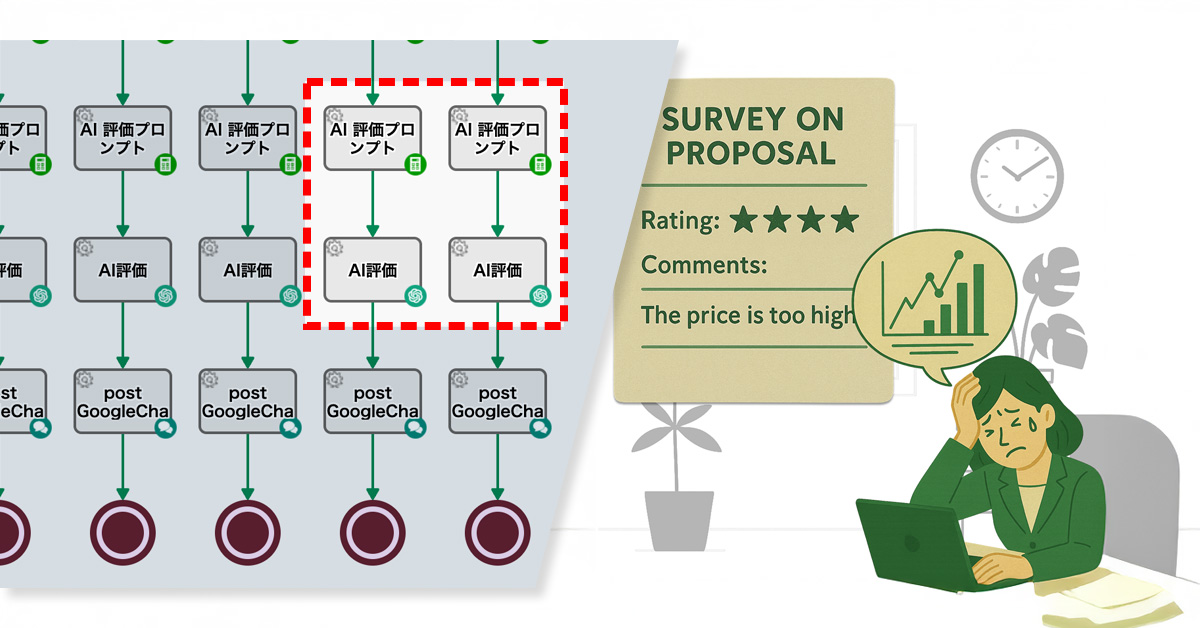
営業担当者は提案後の評価アンケートを基に次の提案を考えていたが、多忙で分析不足により活用できていなかった。AIで課題抽出・提案提示・評価算出を自動化し、提案精度・商談スピード・顧客満足度を向上させた。
DaikoDaiko社は、ITサービス製品の営業代行事業を展開しています。営業担当者は、見込み顧客に提案書をメールで送付して商談につなげています。
その際、提案書に対する不満や改善点を把握するため、5段階評価と自由記述コメントで構成された”満足度調査アンケート”も併せて送付しています。
各営業担当者はアンケートの評価やコメントを参考に次の提案書を考えていますが、抱える顧客数が多いため十分に分析する時間が取れず、活用しきれていない状況が続いていました。
その結果、顧客の期待から外れる提案が増え、導入検討に至るまでに複数回の提案が必要となり、営業効率の低下を招いていました。

この課題を解決するため、プロセスオーナーは生成AI(ChatGPT)を満足度調査フローに組み込みました。
顧客アンケートの「対象提案タイトル・5段階評価・コメント」データが解析指示のプロンプトに挿し込まれます。そのプロンプトを基にAIにより解析が行われ、①主要な課題や要望を特定し、 ②次の提案アクション ③総合満足度評価(1〜5)が生成されます。
これにより、営業担当者はアンケートを効率的に活用し、次の提案を検討できるようになりました。

Before

手動、または外部システムからのHTTPリクエストで開始。
アンケートごとに Key が設定されます。
入力の不備(営業担当者名が空)などがあった場合調査は中止されます。
満足度調査依頼メールが送信されます。
顧客が選んだ評価ごとにアンケート回答FORMが発行され、顧客にコメントを求めます。
★ランク付けされた評価を数字にデータ変換します。※★★の場合は「2」など
アンケート回答内容がGoogleChatに投稿されます。
After

手動、または外部システムからのHTTPリクエストで開始。
アンケートごとに Key が設定されます。
入力の不備(営業担当者名が空)などがあった場合調査は中止されます。
満足度調査依頼メールが送信されます。
顧客が選んだ評価ごとにアンケート回答FORMが発行され、顧客にコメントを求めます。
★ランク付けされた評価を数字にデータ変換します。※★★の場合は「2」など
アンケート回答内容が解析指示のプロンプトに差し込まれ、成型されます。
成型されたプロンプトがAI(ChatGPT)に渡され、以下が解析されます。
主要な課題・要望の抽出/次の営業アクションの提示/総合満足度(1〜5)の算出
アンケート回答内容がGoogleChatに投稿されます。


改善点が明確になり、提案回数が減少しました。その結果、商談スピードが向上しました。
回答解釈の手間が減り、提案準備時間を短縮でき、より多くの顧客に対応できるようになりました。
初期段階から課題に合った提案ができ、顧客の反応が早まり信頼関係の構築につながりました。

アンケート結果を解析し、広告メッセージを最適化して反応率を高める効果を期待できます。
問い合わせ内容をAIが解析し、FAQ更新や改善アクションに即時反映できます。
AIが提示するアクション事例を教材化し、短期間で実務に即した教育が可能になります。

500 Applications Per Month Completely Digitized! Reduced Labour and Eliminated Printing and Mailing Costs

Main Business
General gas pipeline business, etc.
Industry
Electricity and Gas
User Department
Company-wide application processes, departmental administrative tasks.
Toho Gas Network Co., Ltd. is an infrastructure company that supports local communities and industries by supplying city gas. The Pipeline Department & Engineering Center, Negotiation and Design Section handles the front-line duties of receiving various applications and consultation requests from external design firms.
As part of their specific duties they handle daily tasks such as receiving requests for gas pipe drawings and surveys of buried gas pipe structures. They then forward the necessary information to the relevant internal departments, and, after the investigation and confirmation are complete, they provide a response.
The Negotiation and Design Section is working on reviewing and improving its overall workflow, as well as implementing and operating various new tools, in addition to its daily tasks. Based on the challenges we’ve encountered while managing day-to-day operations, we have been exploring ways to improve efficiency and gain better visibility into our processes. Specifically, we’ve felt the limitations of using a paper and email-based system to handle over 500 applications per month.
The Toho Gas Group as a whole is also prioritizing business digitization as part of its broader DX (Digital Transformation) strategy. As a department, we strongly recognize the need to actively drive these specific initiatives.
When handling applications, we previously used a paper-based system.
Applicants had to fill out, print, and mail their forms. On our end, we would receive, review, and distribute the documents internally, then print and mail a response. This process was extremely burdensome. Not only was each task time-consuming, but the lead time for mailing, the effort of printing and filing, and the need for physical storage space created a significant workload.
With over 500 applications per month, we were spending a massive amount of time on administrative tasks alone. It was also difficult to track the status of each application, making it a challenge to visualize progress and expedite our responses.
We compared several tools while considering a complete review of our workflow.
Among the options, Questetra BPM Suite stood out because it allowed us to design business processes using visual diagrams and its cloud-based operation.
Additionally, the fact that another department had been using it for about 10 years gave us confidence in its reliability.
The most significant factor was its ability to build workflow applications with no-code. This meant we wouldn’t need to rely on the IT department, and as the people who fully understood the on-site operations, we could instead freely design and adjust the workflows ourselves. This ability for rapid improvement was very appealing.
Another major reason for our decision was the user-friendly web form feature for applicants. We felt it was so intuitive that anyone could fill it out without getting confused.

We began our digital transformation by tackling two specific tasks: requests for drawings and surveys of buried structures.
We started by organizing our workflow for each process. We then defined them as a formal process and converted them into workflow applications using Questetra BPM Suite.

With our new system, applicants submit their information through a web form. This data is then automatically assigned to the relevant internal department. When an employee completes an assigned task, the process automatically moves to the next step.
This has nearly eliminated the need for our previous paper, email, and phone-based communication, significantly improving both the speed and accuracy of our work.
Additionally, the progress of each step is now visible in real-time, allowing us to track the entire process and ensure consistent handling of every application.

By fully digitizing more than 500 applications per month, we were able to eliminate tasks related to printing and mailing, such as preparing envelopes, tracking mail, and managing physical storage. This resulted in a reduction of several dozen hours of work per month.
We also completely eliminated all costs related to printing and postage.
The user-friendly web form has nearly eliminated inquiries from applicants. Previously, we received frequent questions like “How should I fill out this field?”, but we no longer receive any.
We’ve also received a lot of positive feedback from end-users, with many saying they appreciate being able to complete the entire application and response process without having to visit our office. This has made the experience significantly more convenient for them. The increase in operational speed has also been well-received, with users commenting that they now get a response much faster.
What we find particularly useful is the high degree of customization for web forms. Information entered into the forms can be captured in the exact format we need, which makes our internal processes much smoother.
Additionally, the standard feature for managing the status of ongoing projects is a major help. We can see at a glance what stage each project is in, which prevents us from missing any steps.

Another significant benefit is that, as a cloud service, it allows us to check and respond to tasks from anywhere. This gives us the flexibility to work without being tied to a specific time or location.
To any company that feels the limitations of a paper and email-based workflow, I encourage you to give Questetra BPM Suite a try. Since you can build workflow apps without any coding knowledge, your team can take the lead in improving your processes.
What’s more, the support from Questetra’s customer service team makes the barrier to entry much lower than we expected. Initially, we were worried about whether it would work for us, but now it’s an indispensable tool for our daily operations.
You can start with just one business process. I believe that taking that first step will lead to your next major success.

* This case study is based on information from the time of the interview.


Manual retry workflow fixed email mismatches in automated issuance, boosting efficiency.
As an unlisted company that does not issue physical share certificates, we provide shareholders with a Certificate of Entry in the Register of Shareholders. Shareholders request these certificates through a publicly accessible web form.
The certificate issuance process is largely automated. Specifically, the system uses the applicant’s email address to identify their shareholder information within the shareholder register (a TSV file), which is then automatically merged into a PDF certificate.
However, issues arise when a shareholder’s email address isn’t recorded in the shareholder register, or when a single email address is linked to multiple shareholders. In such cases, the system can’t uniquely identify the shareholder, leading to failed certificate creation. This results in certificates being generated with blank fields.
Compounding this, the current process lacks integrated error handling. This means that when an issue occurs, the manual intervention of staff is required to issue the certificate, significantly impacting operational efficiency.
To tackle errors during certificate issuance, the process owner implemented a manual retry workflow.
Now, if an operator identifies discrepancies during the certificate review, they can manually correct the shareholder information. Once the information is updated, the system automatically feeds it back into the process to regenerate the PDF certificate.
Boosts operational efficiency by reducing manual errors and accelerating certificate issuance.
Before

After


Used for Company-wide Approval Flows such as general affairs applications, training recepti…
View More500 Applications Per Month Completely Digitized! Reduced Labour and Eliminated Printing and…
View MoreMoving Complex Business that had been processed by Notes to the cloud workflow. Approximate…
View MoreWe will enable AI-based reviews for the following tasks:
Inventory Management System
Customer Data Update Process

Return-for-revision enables feedback, reduces rework, and improves organizational decision quality.

Amount-based routing reduces bottlenecks by limiting division manager approvals to high-value cases …

Operators can now manually reassign tasks to reduce supervisor workload.


Automated PDF generation from Google Sheets to stop copy-paste errors and ensure data accuracy.
As a non-certificated company, the Corporation issues Shareholder Registration Certificates to its members. Shareholders request the issuance of these certificates via a web form.
Currently, the administrative staff responsible for handling these requests uses document creation software to manually compile the certificates by copying and pasting information from other records. This manual process is prone to errors such as incorrect names, addresses, or stock quantities due to misplacement or omission of information.
Issuing certificates with incorrect information can lead to shareholder distrust in the company’s administrative procedures and poses a risk to the company’s credibility.
The process owner has automated the certificate issuance workflow, significantly reducing manual tasks.
Specifically, the system now cross-references shareholder registry data stored within the company (via Google Sheets) with the requestor’s information submitted through the web form (such as their email address). When there is a match, a certificate PDF with automatically inserted shareholder information from the registry is generated.
Additionally, if the requestor’s information doesn’t match any record in the shareholder registry, the PDF generation process is aborted.
Automating manual tasks has minimized copy-paste errors, significantly enhancing certificate accuracy.
Before


After


Used for Company-wide Approval Flows such as general affairs applications, training recepti…
View More500 Applications Per Month Completely Digitized! Reduced Labour and Eliminated Printing and…
View MoreMoving Complex Business that had been processed by Notes to the cloud workflow. Approximate…
View MoreWe will enable AI-based reviews for the following tasks:
Invoice Issuance
Customer Support Interaction Documentation
Return-for-revision enables feedback, reduces rework, and improves organizational decision quality.
Amount-based routing reduces bottlenecks by limiting division manager approvals to high-value cases …
Operators can now manually reassign tasks to reduce supervisor workload.
クラウド型業務プロセス管理システム(SaaS BPMS)「Questetra BPM Suite」を提供する株式会社クエステトラ(本社:京都市中京区、代表執行役CEO:今村 元一、以下、当社)は、東邦ガスネットワーク株式会社(本社:愛知県名古屋市、代表取締役社長:柴田 喜充、以下、東邦ガスネットワーク)への導入事例インタビューを公開しました。
東邦ガスネットワークの「導管部 他工事センター協議設計課」では、2024年にQuestetra BPM Suiteを導入。月間500件を超える申請業務を完全にデジタル化し、工数削減と印刷・郵送コストゼロを実現しました。導入の経緯から具体的な効果まで、協議設計課のご担当者にお話をうかがいました。
東邦ガスネットワークの「導管部 他工事センター協議設計課」では、外部設計会社からの「ガス管の出図依頼」や「埋設物調査」といった申請を日々受け付けています。
従来は紙やメールによるやり取りが中心で、申請者は印刷・郵送を行い、社内では内容の確認・展開・回答を紙で行っていました。その結果、月間500件を超える処理に膨大な工数がかかり、郵送によるコストと時間的ロスも発生。さらに案件の進捗が見えにくく、対応スピードに課題を抱えていました。
業務フロー見直しの一環で複数ツールを比較した結果、Questetra BPM Suiteを採用しました。現場がノーコードで業務を設計できる柔軟性、申請者が迷わず入力できるWebフォーム、クラウドならではの利便性に加え、別部門で10年以上利用されている実績が安心感を後押ししました。
特に魅力的だったのはノーコード設計で、IT部門に頼らず現場で自在に調整できるため、迅速な改善が可能だと感じました。
導入により、月間500件を超える申請業務が完全にデジタル化されました。印刷や郵送に関わる作業とコストはゼロとなり、数十時間規模の業務を削減。Webフォームのわかりやすさから申請者の問い合わせもほとんどなくなり、来社不要で申請から回答まで完結できるようになりました。
さらに、各案件の進捗状況をリアルタイムで把握できるようになり、業務全体を見渡しながら漏れなく対応できる体制も実現しました。


Questetra BPM Suite は、クラウド型の業務プロセス管理システム (SaaS BPMS) です。ワークフローシステム(ワークフローアプリ)の開発および運用が、Webブラウザだけで完結します。プログラミングの知識(Codingスキル)は必要ありません。業務部門が主体となって、継続的に業務プロセスを改善できます。
稟議申請や見積提出、問い合わせ対応などの定型業務プロセスを、ワークフローシステムとしてノーコードで作成できます。さらに、生成AIを組み込むことで、「ドラフト文書の自動生成」や「回答案の草案作成」といった知的作業の自動化も実現できます。
所在地
愛知県名古屋市熱田区
代表
代表取締役社長 柴田 喜充
事業内容
一般ガス導管事業 など
設立
2021年
所在地
京都市中京区
代表
代表執行役CEO 今村 元一
事業内容
クラウド型業務プロセス管理システム (SaaS BPMS) の開発・提供
設立
2008年
本プレスリリースに関する問い合わせ
pr@questetra.com or 075-205-5007

▶️こんな方にオススメ
生成AIの活用は注目を集めていますが、「業務に組み込めている」と言える企業はまだ少数です。
その理由は・・・
つまり、AIと業務をつなぐ“最後の一手”が欠けているからです。
例えば、見積承認。AIが要約や誤字を指摘をしても、単発の支援にとどまり、承認者は細部確認や繰り返し作業から解放されません。
ですがもし──
など、役割に応じてAIを柔軟に活用できれば、業務プロセス全体のスピード・精度が高まります。
この仕組みを実現するには「AIをワークフローシステムへ組み込むこと」が不可欠です。
Questetra BPM Suite は、AIをノーコードで業務プロセスに自在に組み込めるクラウド型ワークフローシステムです。
誰でも使える形で「現場からの業務改善」を実現します。
Questetra BPM Suite は大手企業をはじめ、さまざまな業種で採用され、企業の生産性向上に寄与しています。


生成AI × ワークフローで業務改善。まずは60日間の無料トライアルをお試しください。


AI-driven expense audits now catch fraud that supervisors and accounting previously missed.
As a manufacturer and seller of industrial machinery, the company handles a high volume of expense reports due to frequent business travel.
The process for these reports is that an employee submits the report, their supervisor reviews and approves it, and then the accounting department handles the payment.
However, some expense reports contained fraudulent or non-compliant entries. Supervisors often failed to detect these issues, as the reports appeared to have no superficial problems, and approved them anyway.
As a result, the accounting department had to take on the additional task of checking for fraud, which significantly increased their workload.
To solve this problem, the process owner integrated an “AI Agent” step into the workflow.
The AI analyzes the submitted expense report against the company’s internal rules and regulations to identify potential fraud and policy violations.
AI reliably catches subtle fraud and policy violations missed by human eyes.
Before

An employee submits an expense report.
Based on the report from step 1, a formatted report is automatically generated.
Irregularities are detected and highlighted by the AI based on the instructions and the expense report from x1.
Boss Approval or Rejection
Accounting will either approve or reject the payment.
After

An employee submits an expense report.
Based on the report from step 1, a formatted report is automatically generated.
Irregularities are detected and highlighted by the AI based on the instructions and the expense report from x1.
Based on the expense report from x1 and the provided instructions, the AI detects and highlights fraud and policy violations.
Boss Approval or Rejection
Accounting will either approve or reject the payment.


Used for Company-wide Approval Flows such as general affairs applications, training recepti…
View More500 Applications Per Month Completely Digitized! Reduced Labour and Eliminated Printing and…
View MoreMoving Complex Business that had been processed by Notes to the cloud workflow. Approximate…
View MoreWe will enable AI-based reviews for the following tasks:
Ensuring Proper Purchase Requisitions
Monitoring Contract-Related Expenses
Return-for-revision enables feedback, reduces rework, and improves organizational decision quality.
Amount-based routing reduces bottlenecks by limiting division manager approvals to high-value cases …
Operators can now manually reassign tasks to reduce supervisor workload.


AI reviews request content and suggests improvements to help applicants draft better requests.
The IT department manages internal IT infrastructure and handles urgent employee requests every day. Inquiries are submitted through a web form, with automated acknowledgment sent instantly upon receipt.
With 20 staff members, each handles 1-2 queries per day, sometimes up to 30 during peak periods. The complexity of inquiries has increased due to the adoption of cloud services, making it more time-consuming to craft responses.
As a result, there was a demand for a more efficient and rapid process for handling inquiries.
The process owner reviewed the internal workflow and introduced the “AI Agent” auto step.
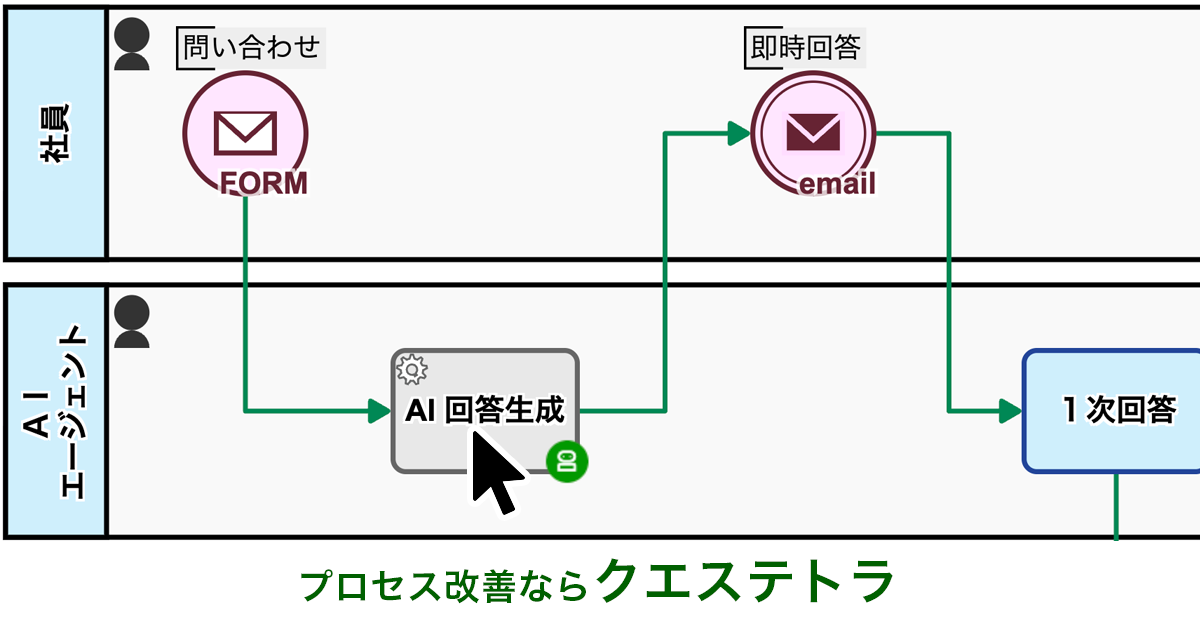
This process kicks in right after an inquiry is logged, with AI gathering relevant information to draft potential solutions and preliminary responses automatically. This relieves staff from creating responses from scratch.
AI assistance saves time by eliminating the need to draft responses from scratch.
Before


The requester fills out the inquiry form.
Receive notification of inquiry acceptance.
The internal help desk agent provides the initial response.
When “Noise” is selected in step 1, the case status will be set to “Noise”.
When ‘Final Answer’ is selected in step 1, the case status will be set to ‘Completed’.
When “Reply & Escalate” is selected in step 1, the case status will be set to “Under Secondary Review.”
Receive initial response via email, and the process is complete.
Receive initial response via email, and the process is complete.
The technical support agent enters a second response or, if the investigation will take time, an estimated completion date.
If you select “Second Response” in step 2, the case status will be set to “Completed.”
If you select “Second Response” in step 2, the case status will be set to “Under secondary review (with a provided estimated completion date).”
Receive the second response via email and complete the process.
Receive an email with the estimated completion date.
The technical support agent enters a second response.
Receive the second response via email and complete the process.
After


The requester fills out the inquiry form.
Receive notification of inquiry acceptance.
The AI automatically gathers relevant information, then generates potential solutions and a draft of the response.
The internal help desk agent provides the initial response.
When “Noise” is selected in step 1, the case status will be set to “Noise”.
When ‘Final Answer’ is selected in step 1, the case status will be set to ‘Completed’.
When “Reply & Escalate” is selected in step 1, the case status will be set to “Under Secondary Review.”
Receive initial response via email, and the process is complete.
Receive initial response via email, and the process is complete.
The technical support agent enters a second response or, if the investigation will take time, an estimated completion date.
If you select “Second Response” in step 2, the case status will be set to “Completed.”
If you select “Second Response” in step 2, the case status will be set to “Under secondary review (with a provided estimated completion date).”
Receive the second response via email and complete the process.
Receive an email with the estimated completion date.
The technical support agent enters a second response.
Receive the second response via email and complete the process.


Used for Company-wide Approval Flows such as general affairs applications, training recepti…
View More500 Applications Per Month Completely Digitized! Reduced Labour and Eliminated Printing and…
View MoreMoving Complex Business that had been processed by Notes to the cloud workflow. Approximate…
View MoreWe will enable AI-based reviews for the following tasks:
Front Desk Operations in Medical Facilities
IT Support in Educational Institutions
Return-for-revision enables feedback, reduces rework, and improves organizational decision quality.
Amount-based routing reduces bottlenecks by limiting division manager approvals to high-value cases …
Operators can now manually reassign tasks to reduce supervisor workload.
⽉間500件の申請を完全デジタル化!⼯数削減&印刷・郵送コストゼロを実現
事業内容
一般ガス導管事業 など
利用部門
全社の申請業務、部門別の事務業務
この事例に関連するプロセス改善記事
東邦ガスネットワーク株式会社は、都市ガス供給を通じて地域の⽣活と産業を⽀えるインフラ企業です。「導管部他⼯事センター協議設計課」は、外部設計会社からの各種申請や協議依頼を受け付ける窓⼝業務を担っています。
そのうち具体的な業務の⼀部として、「ガス管の出図依頼」や「ガス管の埋設物調査」に関する申請を受け付け、必要な情報を社内の担当部⾨に展開し、調査・確認後に回答を返す業務を⽇々⾏っています。
協議設計課では、⽇々の業務に加え、業務フローの全体的な⾒直しや改善、各種ツールの導⼊・運⽤に取り組んでいます。これまでも、現場で実際に業務を回す中で感じた課題を踏まえ、効率化や⾒える化の⽅法を模索してきました。その中でも特に、⽉に500件を超えることもある申請対応業務において、紙やメール中⼼の運⽤に限界を感じていました。
東邦ガスグループ全体でもDX戦略の⼀環として業務のデジタル化が重視されており、部⾨としても具体的な推進に取り組む必要性を強く認識していました。
申請対応業務について、以前は申請を紙で受け付けていました。
申請者は記⼊・印刷・郵送します。当社側ではそれを受け取り、確認、社内展開、そしてまた紙で回答書を出⼒・送付するという流れでした。このフローでは、個々の作業に時間がかかるだけでなく、郵送にかかるリードタイム、印刷やファイリングの⼿間、保管スペースの確保など、⾮常に⼤きな業務負担がありました。
⽉間500件以上の申請では、事務的な対応だけで膨⼤な時間を費やしていました。また、どの案件がどの段階にあるのかを把握しづらく、進捗の⾒える化や対応のスピードアップも課題でした。
業務フローの⾒直しを検討する中で、複数のツールを⽐較しました。
その中で Questetra BPM Suite は、業務プロセスを図式化して設計できる点や、クラウドで運⽤できる点が⾮常に魅⼒的でした。
加えて、別部⾨で10年ほど利⽤されているという実績もあり、安⼼して導⼊できると感じました。
特に⼤きかったのは、ノーコードでワークフローアプリを構築できる点です。これにより、IT部⾨に依頼することなく、現場の業務を熟知している私たち⾃⾝で⾃由に設計・調整が可能となり、迅速な改善に繋がると感じました。
また、申請者が利⽤するWebフォーム機能が⾮常に分かりやすく、「誰でも迷わず⼊⼒できる」と感じられたことも、選定の⼤きな理由となりました。

まずは「出図依頼」と「埋設物調査」の2業務からデジタル化に着⼿しました。
業務フローを整理し、プロセスとして定義した上で、それぞれを Questetra BPM Suite 上でワークフローアプリ化しました。

申請者にはWebフォームを通じて⼊⼒してもらい、その内容が⾃動で社内の関係部⾨へ割り当てられる仕組みになっています。担当者は割り当てられたタスクを処理することで、⾃動的に次の⼯程に進みます。
これにより、従来の紙・メール・電話でのやり取りがほぼ不要になり、業務のスピードと正確性が⼤きく向上しました。
また、各⼯程の進捗状況はリアルタイムで可視化されるため、業務全体を把握しながら⼀貫した対応が可能になりました。

⽉間500件以上の申請を完全にデジタル化したことで、印刷や郵送に関わる作業(封筒の⽤意・郵送物の追跡・保管など)が不要になり、⽉間で数⼗時間規模の業務時間を削減できました。
加えて、印刷代や郵送代といったコストもゼロになりました。
Webフォームが⾮常に分かりやすいため、導⼊後は申請者からの問い合わせがほとんどなくなりました。
以前は「この項⽬はどう書けばいいのか?」といった問い合わせが多かったのですが、現在では⼀切ありません。
また、「来社不要で申請・回答まで完結するのがありがたい」という声も多く、エンドユーザーの利便性が格段に向上しました。業務スピードも向上し、「すぐに対応してもらえるようになった」と喜ばれています。
特に便利だと感じるのは、Webフォームのカスタマイズ性の⾼さです。フォームに⼊⼒された情報は必要な形式で取得できるため、社内処理がスムーズになります。
また、進⾏中案件のステータス管理機能が標準で利⽤できるため、現在どの⼯程にあるのかが⼀⽬で把握でき、対応漏れの防⽌にも繋がっています。
クラウドサービスであるため、外出先からでも確認・対応が可能となり、時間や場所に縛られない柔軟な運⽤が可能になった点も⼤きなメリットです。
紙やメール中⼼の業務に限界を感じている企業の⽅には、まずは⼀度 Questetra BPM Suiteを試していただきたいです。ノーコードでワークフローアプリを構築できるため、現場主導で業務改善を進められます。
また、Questetra 社のサポート部⾨カスタマーサポート部⾨からの⽀援もあり、導⼊のハードルは思ったよりずっと低いと感じています。私たちも最初は「本当にうまくいくのだろうか」という不安がありましたが、今ではなくてはならないツールになっています。
まずは⼀つの業務からでも構いません。始めてみることが、次の⼤きな成果に繋がると思います。
※ 本事例は取材当時の情報です。
あわせて読む


