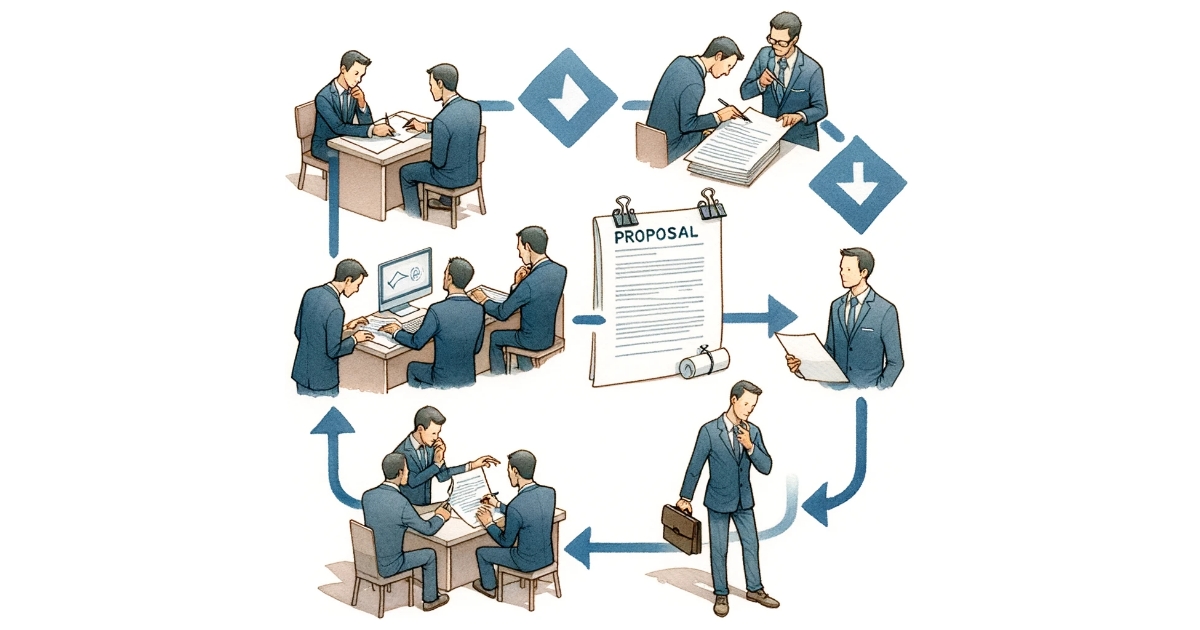
“I’d like to promote transparency of our company’s business processes.” “I want to thoroughly discuss the ultimate ideal business flow.”
Discussions on the improvement of business processes are never easy, regardless of the scale of improvement. In fact, you may have had experience with disastrous discussions, ambiguous decisions, and an overall lack of gain in proportion to the energy spent. So what steps must be taken to define a business process?
In this section, we describe the methods of efficiently defining white-collar business processes.
Episode 1. Define the Deliverable of the Business Process.
Episode 2. Establish the Trigger of the Business Process.
Episode 3. Divide the Business Process into Roles and Tasks.
Episode 4. Arrange the Order and Route of Tasks.
Episode 1. Define the Deliverable of the Business Process
First, envision the output
For example…
When you send data to a printer, you get a printout.
When you give a vending machine money and your wish, you get a product.
What exactly is the output of the business process (workflow) you are in charge of? This can be a difficult question to answer, even with processes we perform daily.
Some examples…
When you make an inquiry at an information desk, you get an answer.
When you inform a salesperson of what you want, you get an estimate.
When you submit a job application to HR, you may go through various exchanges in between, but in the end you get an acceptance/rejection letter.
There may be complicated transactions involved within an organization. Or some matters may be concluded arbitrarily by one member. But there is always some sort of processing followed by some sort of output. When designing business processes, it is important to first grasp each process objectively and think of what the output should be.
Define the final output
“The materials are the input, and the balance sheet and Profit & Loss statement are the outputs.”
Although this is a bit extreme, it is, so to say, a correct statement. However, the moment you try to grasp processes too macro-scopically, you begin to lose the efficiency of the discussion. The greatest aim of BPM is consistent improvement, and we want to talk about improvement in units that appropriately divide the company.
This brings us to the question: What is the optimum way to divide a company? Let’s use a website production company as an example. We can think of various deliverables in a website production company, such as estimate sheets, websites, setup manuals, etc. Naturally, it is not conducive to define a business process for every single possible
deliverable. For example, the website and setup manual are both managed by the
production team, and created at the same stage in a one-on-one work environment. These should be thought of as outputs of the single Website Production process. In this case, a data CD could be envisioned as the final output of the Website Production process, and
the website and setup manual can be created at various tasks within the process.
This is why it is important to define the deliverable “the final output” when establishing business processes.
ALWAYS define the final output
There are many business processes for which the deliverable (final output) is difficult to define. For example, what would be the deliverable of a “Respond to request for deletion of personal information” workflow?
Generally, business processes that entail mere browsing, updating or deletion of stored information rarely create new information, so defining the deliverable is challenging. Of course, we can demand a “performance record” or some such output, but in some cases security measures limit the information that can be included in the record. Also, these processes tend to end before the generation of the deliverable (final output) because the main objective has already been fulfilled.
Still, it is important to define the deliverable and make sure it is generated each time the process is completed. Why?
To clarify the condition for ending each process.
To be able to refer to the past records of each process.
It is particularly valuable for an organization to keep records. This way, we can optimize new process operations based on past performance, or use records as reference when discussing the improvement of business processes.
It is preferable to define deliverables for all business processes — including those that prove to be difficult to define — such as records of operation time and content, or comments and evaluations of performance. And there are many ways to consider better efficiency, such as automatic recording and system coordination.
Anticipate the QCD of each output
In many cases, business processes are evaluated by comparing the QCD (quality, cost, delivery) of deliverables. It goes without saying that the higher the quality of deliverables the better, the lower the cost (labor) of operation the better, and the shorter the time until delivery the better.
However, QCD analysis usually signifies a tradeoff situation, as in, “the quality improves in proportion to the cost invested.” So it is important to keep a comprehensive view on the “ideal QCD.”
Let’s look at some business processes and corresponding deliverables of a website production company.
Let’s say that 5 and 6 are business processes managed by the production team, which consists of 20 staff members, and 1 through 4 are managed by the sales team, which consists of 5 members. Say, for instance, if the overall business goal is “to achieve 4 regular website production orders each week,” then an average order ratio (from
experience) may imply the necessity of “6 estimate sheets a week,” “10 proposals a week,” and “20 records of proceedings a week,” giving clear goals for each deliverable. Thus, the cost and quality to be allotted to each regular order can be hypothesized.
Record of proceedings: A quality that ensures 50% lead to proposals, about 5 hours per case
Estimate sheet: A quality that ensures 50% lead to orders, about 2 hours per case
If we anticipate the QCD of deliverables beforehand, in accordance with the specific business environment of the organization, this will ensure more efficient discussions in the future.
Episode 2. Establish the Trigger of the Business Process
2-1 Begin with leader-initiated
Once you establish the deliverable (final output) of the business process and the QCD of each deliverable, the next effective step is to think about how to initiate the process.
In contrast to the deliverable (final output), which is the condition for ending the business process, we are now talking about the condition for starting the business process. The funny thing is that discussions about business processes tend to exclude considerations on how to initiate a process.
It is true that in some cases the trigger of a process is already fairly clear, for example responding to external inquiries, or processing applications from outside the organization. These can be considered passively initiated processes, and in most cases do not allow the possibility of not starting the process.
On the other hand, submitting proposals is an actively initiated process within an organization. For instance, if we envision an output as “Proposal for company A,” several people can potentially be in charge of initiating the process. For example:
Sales member in charge of company A
Sales leader in charge of sales division
Decide by majority rule in a meeting
When operating business processes, it’s good to focus on a goal such as “consistently completing 10 proposals each week.” In this case, an effective initiator of the Proposal Preparation process could be the leader, who selects 10 appropriate cases to be worked on, and assigns appropriate staff members to each.
Consider the possibility of member-initiated
Alas, there are always problems with a system that does not allow the creation of a proposal without the leader’s initiation. For example, a sales member that just finished meeting with a prospective client will most likely want to start creating a proposal as soon as possible. He/she may come up with great proposal ideas while writing up the record of proceedings, and regardless of business rules may not be able to wait for the leader’s orders.
A process owner should contemplate the trigger of each process with an understanding of the whole, including the:
Characteristic of the business process,
Level of the organization’s maturity,
And progress of the organization’s business
It may be necessary to change the process to member-initiated, in order to realize a more maneuverable business process.
2-3 Prepare several starting points
Within one organization, there can be members who are good at actively and independently creating projects, and those who contribute by performing work provided by their supervisors. In reality, there are many business processes where it is not realistic to limit the initiator of the process to only the leader or only members. In these cases it is
good to define a business process in which both can initiate the process.
In the above Proposal Preparation process, we can think of some tasks that fall under the management of divisions other than the sales team, such as reviewing the rough estimate and judging the feasibility of the proposal. (In the above figure, this applies to 3. Review rough estimate.) It is questionable whether the utilization of the production team’s resources should be allowed every time a sales member has an idea.
Even in an Estimate Preparation process, we can think of some tasks that significantly use the production team’s resources, such as preparing detailed estimates and assigning resources to each factor.
We need to consider who can start the business process, and whether or not to limit how many times one is allowed to start the process, with an overall understanding of the process’s characteristic.
Define the input format
Establishing the trigger of a business process includes not only “WHO starts the process,” but also “WHAT to start the process with.”
In other words, we need to define the input format for starting the process, regardless of whether it is initiated by the leader’s whim or by a member’s desire to meet his/her quota.
For example, the input format for creating a proposal may include:
Name of client
Expected date of proposal submission
Rough estimate
In reality, there may be many cases where proposals are initiated with too little information; therefore, to avoid this and to clarify the generation of tasks, it is important to clarify the trigger of a process.
Episode3. Divide the Business Process into Roles and Tasks
Divide by specialty
An estimate sheet is a document that is submitted during meetings with the client. In general, an Estimate Preparation process is managed by the sales team, and the sales team should be the main participant in deliberating the ideal state of the process.
Let’s define the input format of this Estimate Preparation process as:
Name of client
Expected date of estimate submission
Range of expected estimate
In this case the data entered at this point may be:
Company A
April 1, 2010
1.0 – 1.5 million yen
The actual estimate sheet may include:
Website specifications for company A
Expiration date of estimate: April 15, 2010
Expected delivery: May 31, 2010
Items for delivery: Data CD (website, setup manual)
Including internal information may also be helpful, such as:
Estimated production requirements, time and person in charge of the estimation
Expected production members
Person in charge of settlement, date of settlement
Specification evaluation by person in charge of settlement
In this case, creating the estimate sheet inevitably falls to the production team, and all other tasks are managed by the sales team.
As in this case, business processes that straddle multiple teams are naturally divided into “specialized tasks.”
3-2 Divide the process as much as possible
Dividing tasks offers the additional benefit of permitting downstream workers to check the tasks. So how can we divide business tasks that are executed within the sales team, such as the Client Meeting Report process?
Here are a couple suggestions:
Divide by sales team members, and improve quality of output
Divide within sales team by abilities, such as composition and design.
In the former case, the tasks may be divided into Prepare rough draft, Peer review, and Evaluation, and the sales members can support each other with tips and advice on writing records of proceedings and recording methods.
Alternatively, if we conclude that this job doesn’t need to be divided, it can be made into one task within the Proposal Preparation process.
Make sure the leader is responsible for deliverables
The leader should be responsible for the number and quality of generated outputs. When dividing business processes into tasks, it is best if the responsible person speculates the placement of evaluation and review tasks, in the route to finalizing the deliverable (final output).
One effect of this is stricter conditions for ending the process. In other words, members are not allowed to end it half-heartedly. Dividing execution and supervision does slow down the process to an extent, but the quality is guaranteed to improve.
Another effect is Knowledge Management. If you grade deliverables at the point of completion, this will promote the assessment of best practices when performing similar processes in the future.
3-4 Evaluate the cost structure
When we define the end and beginning of a business process and divide it into tasks, we can then specifically calculate the cost (production requirements) necessary for completing a standard process.p>
Let’s look at a sales team task within a business process regarding the acquisition of an order. We can calculate the following costs:
In reality, a lot of time is spent on atypical tasks aside from those in clearly defined business processes, such as dealing with tasks within business processes managed by other divisions, or discussing the improvement of business processes.
In the above example, the total execution time is 158 hours per week, but it should be assessed whether this can be performed by the actual number of personnel.
If you carelessly divide a task into too many pieces, you may be stuck with a process in which the goal cannot be achieved with the current number of personnel. You may even have to redefine the deliverables.
Episode 4. Arrange the Order and Route of Tasks
Consider concurrent processing
Once you have defined the “trigger (start),” “deliverable (end),” and tasks that compose a business process, we can say the business process is roughly established.
The final step is to arrange the order and route of tasks.
Here are some things we need to consider when discussing the order and route of tasks:
Minimizing the chances of stagnant tasks
Minimizing the chances of held up tasks
Assessing the probability of risk
In reality, it is often more effective to put a business process into operation and improve the problems afterwards, instead of to theoretically discuss improvement points before starting.
However, one method that is surprisingly effective for many problems, although not often implemented, is “concurrent processing.” For example, having several members of the production team simultaneously and independently estimate the production requirements will ensure a safer and more definite average of the estimation. Also, even if one member is not able to execute the task soon enough, the production requirements can be decided on as long as at least one member makes it in time, and a harmful delay can be avoided.
4-2 Prepare shortcuts
When a business process is in operation, one problem that occurs more often than not is “neglected tasks.” This may seem synonymous to “stagnant tasks,” but it indicates a state in which there is no longer any reason to execute the task.
There are various causes for this, as well as different tendencies in each organization, but a common one involves deadlines. That is, tasks that were started with every intention to complete validly, but that could not continue to be processed regularly because of an increasingly impending deadline. For example, there is no reason to have a leader review a proposal that has already been submitted.
For these cases that involve time limitations, it is often more effective to prepare a route that allows omitting middle tasks than to stop processes midway each time.
4-3 Try combining with other business processes
It is often not necessary to divide an “Apply for Paid Leave” process from an “Apply for Long-term Leave” process. Although there may be some differences in the applications, it is fairly reasonable to combine them into an “Apply for Paid or Long-term Leave” process, because of their similar flows and number of tasks. Also, an employee that submits this application only a few times a year would probably appreciate being able to apply for different types of leaves with one business process.
In reality it is not smart to blindly promote common or general business processes without contemplating who will be given authorization to browse past data or how past data will be searched. What we want to say is that when you are creating new business processes it is important to also keep in mind the business processes currently in operation.
4-4 Think of the business process’s operation goal
More often than not, a business process is destined to be redefined countless times even after being put into operation. We want these improvements to focus on the ideal QCD of deliverables and the number of completed processes, and we want to be able to share this information within the organization.
For example, when contemplating matters such as:
What can we do to ensure the completion of 10 proposals a week?
How can we maintain a quality of proposals that ensures a 60% success rate?
…perhaps someone will come up with a new goal of, say, “completing each proposal within 1 week after writing up the record of proceedings of the client meeting.”
Defining business processes is the most important activity in BPM (Business Process Management). We must be able to design them with adequate deliberation on key performance indicators.
<Key Performance Indicators>
Record of proceedings Goal: 20 a week
Proposal Goal: 10 a week
Estimate sheet Goal: 6 a week, estimate total of \10 mil. a week
Agreement Goal: Receive 4 orders a week, total of \6 mil. a week
A comic for learning Business Process Improvement. See how TAKEO, who just joined the TAKETORI firm, practically improve the Order-taking Process? A heart-shaking story of a young businessman’s growth steadily while listening to the teachings of “BPM Master”! (All to read for free)
クラウド型ワークフロー『Questetra BPM Suite』は、ペーパーレス環境やリモートワーク環境を推進するための業務プラットフォームです。業務案件は業務フロー図に従ってコントロールされ、案件が人間工程に到達すれば担当者はアウトプットを求められます。また、案件が自動工程に到達した際には、「PDFの生成」や「クラウドストレージへの保存」といった既定の処理(サーバサイド処理)が自動的に行われます。(BPM: Business Process Management)
Answer deadline on Post-event-survey questionnaire
Kyoto, Japan – October 22nd, 2018 – Questetra, Inc., the global SaaS provider of Business Process Management (BPM), today announced that they have published the new version 11.8 of the Cloud-based Workflow product “Questetra BPM Suite” on Oct. 22nd, 2018. This new version allows setting an expiration to intermediate Steps which await web form input by outsiders. (Form Standby feature)
Workflow system nowadays is widely used not only as a “tool to promote paperless for work that has been done on paper documents” but also as “tool to visualize stagnation at departments in the company”. It is becoming to be considered as a “core tool” to realize “labor reform” and “productivity improvement” within the company. However, there are many cases, in daily business processes, where to have to be waiting for additional information from people outside the company.
The cloud-based Workflow “Questetra BPM Suite” has equipped various features for receiving additional information in the middle of a flow, On the new version 11.8, it becomes possible to set up the expiration to the “Steps for receiving additional information”. Specifically, it is possible to set the deadline to, such as, a) the Step of “Acceptance report by customer” in the Delivery process, b) the Step of “Request participants a questionnaire” after the event is over in the Event participation reception process, and c) the Step of “Receiving additional information after confirming the existence of the email address” in the Membership registration process. With these, you can achieve a smoother business process environment with no stagnation.
Questetra BPM Suite
Cloud-based Workflow “Questetra BPM Suite” is a business platform for realizing environments of paper-less and remote-working.
Business issues are controlled according to Business Flow Diagram. When a Process reaches Human Task, the user will be asked to input. Also, when an issue reaches to automated Step, the predetermined processing (server-side processing) such as “Generate PDF” and “Save to cloud storage” is performed automatically. (BPM: Business Process Management)
You can apply it to various business operations such as “Approval request flow”, “Document translation flow”, Quality check process, “Invoice issuance process”. Process owner of each Business Process can practice “improvement of Business Process” little by little in daily work. (Examples of Business Flow Diagram: https://en.workflow-sample.net/ )
Form Standby feature
When an “information addition web form” that accepts input from outside person who does not have a user account or a “Webhook reception” which waits for HTTP request is placed in the middle of a Workflow, it is possible to set the deadline of it, and to define the flow of processing after reaching the deadline respectively. With this, if there is no input before the deadline due date, it will be possible to take actions such as advancing the Process with closing the form as private or continue waiting after automatically sending an email that prompts input.
Other Improvements
Data conversion to DateTime type from Date type
It becomes possible to convert Date type data into DateTime type using Service Task (Data assignment). By doing so, configurations such as, once you entered the “Bill issuance date (Date type)” the bill will be sent automatically by email at 9 am on the day, is possible.
Transition after submitting web form
In “Receive Task (Form)”, it becomes possible to navigate to the arbitrary page (URL) after submission of the form completed. By displaying your own page, it allows showing your message or leading the submitter to the next action.
Enhancement/improvement on Add-on management
At the time of uploading an Add-on file, it becomes to calculate hash and retain/display it. With the hash value, you are able to identify with Add-on files in your local folder. And it will be checked as an error when trying to register the same file. In addition, the flow of procedure is separated to new registration and overwrite registration (updating of existing file) so that improve convenience.
* Please see our Release note for the detail of New Features
#まれに「情報処理サービス業(3921)」や「アプリケーション・サービス・コンテンツ・プロバイダ(4012)」に分類したがる人もいる。でも、SaaS は Software as a Service の略であって、ソフトウェアを作ることが Questetra 社の “主な事業” だ。ハードウェアやネットワークなどのオーナーシップ(管理責任)があるのも事実だが、、、ソレは、団子屋さんで言えば「包装紙」にすぎない。(←エライ人には、それが分からんのです)