ブログ

  • Proactive Advice from AI for Responses

    Proactive Advice from AI for Responses

    AI-generated draft advice reduces supervisor workload and speeds inquiry responses.

    1.Issue: Delayed responses due to backlog of requests for advice

    A BPO company provides initial responses to inquiry emails on behalf of client companies.

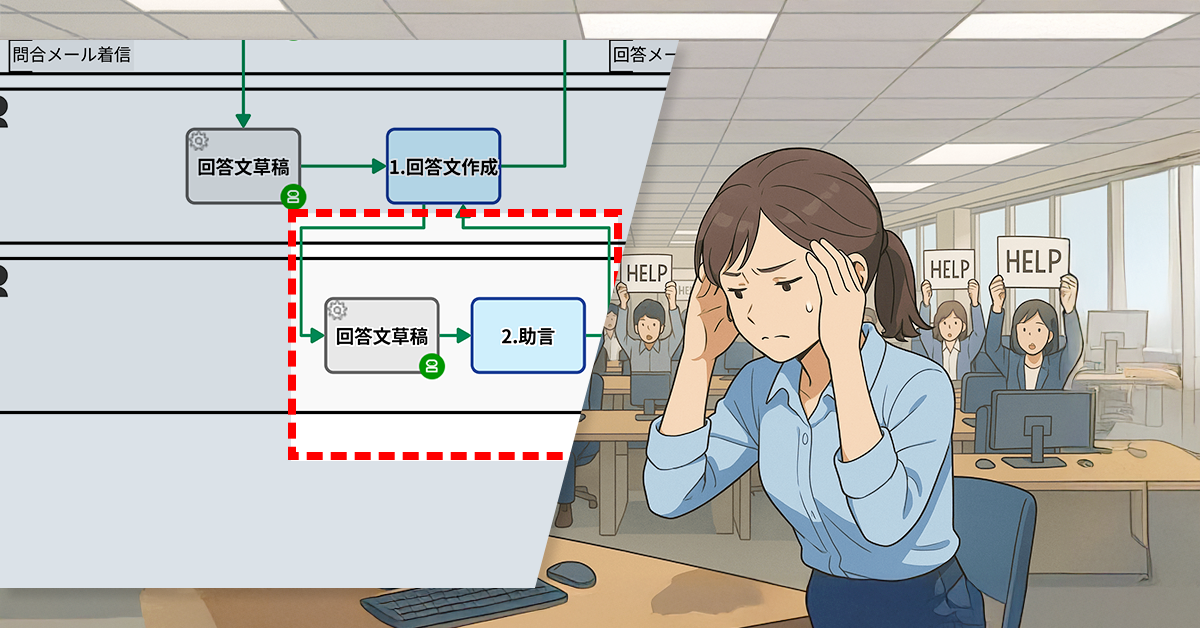
    Thirty staff members respond to inquiries on a daily basis, and when they are unsure of a decision, they ask for advice from a supervisor.

    Supervisors are overwhelmed by frequent requests for advice, leading to backlogs and delays in overall inquiry response times.

    2.Solution: AI-Generated Advice

    To address this issue, the process owner has implemented an AI service step. At the same time, the prompts that the AI ​​uses to generate advice were set using a prompt generator.

    This means that when a request for advice is made, a preliminary suggestion will be automatically generated by the AI, and the supervisor can refer to it when providing advice.

    Supervisors’ workload is reduced as AI prepares draft advice for review and adjustment.

    Basic Edition
    Advanced Edition
    Professional Edition
    View details of the workflow diagram
    • Process triggered by email arrival
    • 50-character summary by AI agent
      • Email content is summarized
    • Draft response by AI agent
    • 1.Create response document
      • Send reply email
      • Request review from supervisor
    • 2.Advice
    • Send email
    Basic Edition
    Advanced Edition
    Professional Edition
    View details of the workflow diagram
    • Process triggered by email arrival
    • 50-character summary by AI agent
      • Email content is summarized
    • Draft response by AI agent
    • 1.Create response document
      • Send reply email
      • Request review from supervisor
    • Draft response by AI agent
    • 2.Advice
    • Send email
    You can move the slider

    3. Customers Case Study

    4. Other Business Applications

    We will enable AI-based reviews for the following tasks:

    Escalation handling in call centers

    Reviews of internal business regulations

    5. Related Posts

  • Understanding Inquiry Details Instantly with AI

    Understanding Inquiry Details Instantly with AI

    AI summarizes emails in subject lines so operators grasp inquiries quickly and respond faster.

    1.Issue: Reading comprehension workload

    As part of its BPO outsourcing business, the company operates a contact center where 20 operators respond to email inquiries.

    Incoming inquiries are managed through a system where available responders self-assign cases. Operators with available time choose a case from the queue and take ownership. Upon selection, the operator reviews the complete inquiry to assess their ability to handle it.

    The complexity and length of numerous email inquiries prolong the decision-making process. Consequently, case acceptance becomes challenging, and overall response efficiency diminishes.

    2.Solution: Automatically summarize inquiry details in the subject line using generative AI

    The process owner incorporated a step into the workflow in which the email body is automatically summarized using generative AI.

    Upon receiving an email, the AI initially analyzes its content and produces a concise summary of about 50 characters. This summary is then displayed in the subject line of the “Offered” list. Consequently, respondents can grasp the main point of the inquiry by reading the summary before needing to open and examine the complete email.

    Faster responses to inquiries by quickly identifying case details, enabling smoother handling.

    Basic Edition
    Advanced Edition
    Professional Edition
    View details of the workflow diagram
    • Process starts when email arrives
    • 1.Enter reply
      • Send reply email
      • Request supervisor review
    • 2.Review response
    • Send email
    Basic Edition
    Advanced Edition
    Professional Edition
    View details of the workflow diagram
    • Process starts when email arrives
    • 50-character summary by OpenAI
      • The contents of the email are summarized
    • 1.Enter reply
      • Send reply email
      • Request supervisor review
    • 2.Review response
    • Send email
    Before / After comparison (slider can be moved)

    3. Customers Case Study

    4. Other Business Applications

    We will enable AI-based reviews for the following tasks:

    Improved response efficiency

    5. Related Posts

  • Ensure All High-value Projects Have Executive Approval

    Ensure All High-value Projects Have Executive Approval

    Revamping our approval flow: Executive approval is now mandatory for high-value projects! This will ensure greater transparency and stronger risk management.

    *This process improvement story is a work of fiction. Any resemblance to actual persons, entities, or events is purely coincidental.

    1. Issue: Risk of High-Value Proposals That Have Not Been Approved

    DonGan Manufacturing is a company with approximately 200 employees that manufactures and sells industrial equipment. In the company’s quote approval process, the staff member responsible creates a quotation based on customer requests, which is reviewed by a manager before being sent to the client for notification.

    Nevertheless, cases where high-value proposals proceeded without executive approval have been identified, causing inconsistencies with decision-making authority regulations and operational flow. This heightens the risk of inappropriate estimates, posing potential risks of loss to the company. To avoid such risks and improve operational alignment, a comprehensive review of the approval process is urgently needed.

    2. Solution: Mandate Executive Approval for High-Value Projects

    The process owner will revise the workflow to make executive approval mandatory for high-value proposals. Specifically, estimates exceeding 5 million yen must be approved by an executive after being reviewed by a manager, and then a notification will be sent. This improvement streamlines the communication channels, enabling swift and accurate operations.

    View details of the workflow diagram
    1. Quotation Creation

    The person in charge manually enters the quote.

    2. Manager Review

    The manager reviews the quote content and sends it back if there are any deficiencies.

    1x. Quotation Revision

    The quote is revised and resubmitted

    Approval Notification

    Once approved during the manager’s review, a notification email is sent.

    View details of the workflow diagram
    1. Quotation Creation

    The person in charge manually enters the quotation details. 

    x1. Quotation Revision

    Revise the content and resubmit it.

    2. Manager Review

    The manager checks the quotation content and sends it back if there are any deficiencies.

    3. Executive Approval

    The executive in charge approves or rejects high-value cases.

    Approval Notification

    An email notifying the approved content will be sent.

    Rejection Notification

    An email notifying the rejected content will be sent.

    Before / After Comparison (you can move the slider)

    3. Benefits

    Risk Mitigation

    • By adding a reliable executive approval step that ensures that high-value projects are not overlooked, the risk of loss is prevented.

    Strengthening Internal Controls

    • Aligning decision-making authority regulations with operations improves audit readiness and strengthens internal controls.

    Enhancing Process Reliability

    • With increased transparency across processes, employee compliance awareness improves, establishing a trustworthy operational flow.

    4. Other Business Applications

    Enhancing the Purchase Request Process

    Make department head and executive approval mandatory for high-value purchase requests. Establish an approval flow to prevent wasteful purchases and excessive spending.

    Optimizing Budget Approvals

    New projects exceeding a defined budget threshold require executive approval. Proactive risk assessment is crucial before project commencement to mitigate potential budget overruns.

  • AI-powered Analysis of Daily Reports to Provide Accurate Advice

    AI-powered Analysis of Daily Reports to Provide Accurate Advice

    AI analyzes and summarizes daily reports, highlighting issues and helping managers give timely feedback.

    1. Issue: Insufficient feedback

    In the marketing department, employees submit daily reports to share their work progress and any issues they encounter. The daily report submission process begins when employees input and submit their report.

    Managers can get a timely understanding of their subordinates’ work status and quickly detect any delays in progress or signs of problems so they can take prompt action.

    However, busy managers were concerned that they were not able to provide accurate feedback. Due to time constraints, it was difficult for them to read daily reports in depth, and they were concerned that there was a risk of overlooking potential problems, especially in areas where the expressions were unclear.

    2. Solution: Use AI to analyze the problem

    The manager and process owner addressed the issue by enhancing the workflow. The improvement included incorporating an AI to summarize and analyze daily reports.

    The summary and analysis are as follows:

    1. Tasks: The tasks the staff members are working on
    2. Content: Report on the progress and current status of the work
    3. Points of Interest: AI Analysis
      • Explicit negative signs: Clearly expressed challenges or stagnation
      • Implicit negative signs: Indirect issues and concerns
      • Ambiguous next action: What staff should do next is unclear.
    4. Suggested Advice: Example of an advice sentence for members

    This feature arranges and presents to managers the issues identified in their subordinates’ daily reports.

    Basic Edition
    Advanced Edition
    Professional Edition
    View details of the workflow diagram
    • Start the process automatically at 7:00 AM
    • 1x. Determine business day
      • If it is determined to be a holiday, the process branches and ends
    • 1. Daily report input
    • 2. Confirmation
      • Review the content and provide feedback
    • 3. Resubmit (in case of return)
    • 4. Feedback confirmation
    Basic Edition
    Advanced Edition
    Professional Edition
    View details of the workflow diagram
    • Start the process automatically at 7:00 AM
    • 1x. Determine business day
      • If it is determined to be a holiday, the process branches and ends
    • 1. Daily report input
    • 2x. AI summary & analysis
    • 2. Confirmation
      • Review the content and provide feedback
    • 3. Resubmit (in case of return)
    • 4. Feedback confirmation
    You can move the slider
    Example prompt
    #{#q_daily_report}
    --
    Please summarize the daily report you entered above in bullet points.
    In the following order: 1: Tasks, 2: Content, 3: Points of Interest, 4: Suggested Advice.
    --
    3: Please describe the Points of Interest when the following analysis A~C applies.
    The item names should be: Explicit negative sign, Implicit negative sign, Ambiguous next action.
    More than one is acceptable. If none, please indicate “None”.
    
    Analysis method
    --
    A: Explicit Negative Sign: If the daily report clearly states the issue, please address this point.
    E.g. Expressions such as "no progress" or "not started"
    
    B: Implicit negative signs: If the contents of your daily report contain negative expressions that are not directly related to the issue, pick up on those points.
    E.g. Expressions such as "It's taking a little time" and "It's taking a while."。
    
    C: Ambiguous next action: Please pick up things where the next action or person is not clear.
    E.g. “We will continue to respond tomorrow,” or other expressions lacking specific details.
    --
    4.For the Suggested Advice, please write 3: Suggested improvement advice for the Points of Interest.
    3: If there are no points of interest, please write “None”.
    –
    Please output in Markdown format.
    The Markdown format is as follows.
    
    #### Business name
    - Contents
    - Contents
    ##### [For managers] Points of Interest
    - 
    ##### [For managers] Suggested Advice
    -
    ***

    3. Customers Case Study

    4. Other Business Applications

    We will enable AI-based reviews for the following tasks:

    Summary of project progress reports

    Employee survey analysis

    Analysis of customer correspondence records

    5. Related Posts

  • DM送信記録を顧客ごとに可視化

    DM送信記録を顧客ごとに可視化

    1. 課題:無効アドレスの特定に時間がかかる

    ある美容室では、約50名のVIP顧客に「臨時休業のお知らせ」や「料金改定のご案内」などを一斉メールで配信しています。

    これまでは、顧客名簿のTSVデータ(※)を使って、業務アプリ内で50件のメール送信処理を立ち上げ、それぞれの顧客に個別のメールを送っていました。このアプリは一度の操作で複数のメールを自動で送信できる仕組みです。

    しかし、まれに無効なメールアドレスが含まれていると、エラーが発生します。エラーが発生した際、どのメールアドレスが原因かをすぐに特定することができず、1つのプロセスで50回実行される全てのメール送信ログを確認しなければなりません。このことが、担当者の負担となっていました。

    ※TSVデータとは、顧客名やメールアドレスなどの情報がタブで区切られて並ぶテキスト形式のデータです。

    どのメールアドレスが原因??

    2. 解決策:メール送信処理を顧客ごとに分離

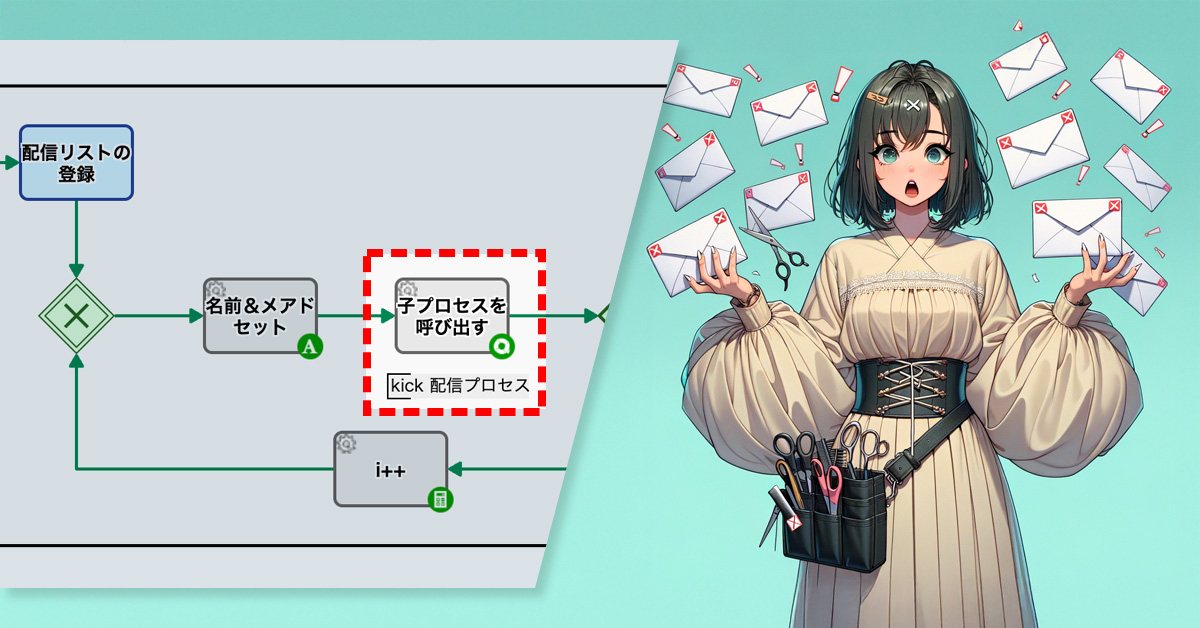
    この課題を解決するため、プロセスオーナーはメール配信の仕組みを見直し、処理を再構成しました。従来はすべての送信を1つの業務アプリで管理していましたが、顧客ごとにメール送信を分けて処理する形(子プロセス)に変更しました。

    具体的には、「顧客名」「メールアドレス」「告知文」の情報を子プロセスに渡し、各処理の中で1通ずつメールを自動送信する構成としています。さらに、エラーメッセージに必ずメールアドレスを含めるように設定することで、送信に失敗した場合も、どのメールアドレスが原因かをすぐに特定できるようになりました。

    顧客ごとに送信ログが残る
    Basic Edition
    Advanced Edition
    Professional Edition
    ワークフロー図の詳細を見る
    配信リストの登録

    スタッフが、DM配信リストを登録します。

    名前&メアドセット

    TSV文字列: セルデータの抽出 が行われます。顧客名と顧客メールアドレスが抽出されます。

    メール自動送信

    抽出された顧客に対し、自動的にメールが配信されます。

    子プロセス
    Basic Edition
    Advanced Edition
    Professional Edition
    ワークフロー図の詳細を見る
    配信リストの登録

    スタッフが、DM配信リストを登録します。

    名前&メアドセット

    TSV文字列: セルデータの抽出 が行われます。顧客名と顧客メールアドレスが抽出されます。

    子プロセスを呼び出す

    子プロセスを呼び出し、個別に配信処理を行います。

    メール自動送信

    抽出された顧客に対し、自動的にメールが配信されます。

    Before / After 比較(スライダが動きます)

    3. 効果

    エラーメールの特定

    送信が顧客単位で管理されるようになり、エラーメッセージに送信先メールアドレスを含める設定を行ったことで、エラーメールの特定が容易になりました。

    担当者の作業負荷の軽減

    全件チェックが不要になり、確認作業の負担が大幅に減りました。

    配信プロセスの保守性向上

    顧客単位で明確に管理できるので、今後の改善やトラブル時の対応がしやすくなりました。

    4. その他の業務への応用

    アンケート依頼の配信

    顧客や取引先へのアンケートURLを送信する際、送信記録を分離することで、回答状況や未回答者の把握が容易になります。

    契約更新・確認連絡

    契約更新案内や各種確認依頼も顧客単位で処理を分けることで、送信・返信履歴を正確に管理できます。

    見積書・請求書の送付

    見積書や請求書の送信業務でも、履歴を顧客ごとに記録でき、誤送信や再送依頼にもすぐに対応可能になります。

    5. 提案資料

    当社サービスの導入を検討いただく際の提案書サンプルです。課題に対する解決策の概要を記載しています。実際の相談内容に応じて、内容を個別にカスタマイズして提供いたします。

  • オンラインDEMOに申し込む

    オンラインDEMOに申し込む

    製品DEMOお打ち合わせなどをリクエストしていただけます。営業チームが迅速にご対応いたします。

    よくある質問

    どのような内容のデモを見ることができますか?

    担当者さんとの打ち合わせだけでも申し込めますか?

    まだ導入するか決まっていないのですが、大丈夫ですか?

    オンラインDEMOに参加するには何が必要ですか?

  • Sales Pitches Improved by Generative AI

    Sales Pitches Improved by Generative AI

    AI reviews call scripts objectively, improving consistency and quality.

    1. Issue: Subjectivity in call script evaluation

    The company provides sales support services and focuses on inside sales operations where sales operators call potential customers to set up appointments. The operators develop their individual call scripts, which are then reviewed by both themselves and their team leader.

    However, the reliance on the reviewer’s experience and intuition resulted in a lack of clear evaluation criteria and objectivity. This made it challenging to utilize the reviews to enhance the script based on quantifiable data.

    2. Solution: Introduce objective reviews with generative AI

    To address this, the process owner implemented a system where a generative AI analyzes the script’s structure and phrasing after submission to determine if revisions are needed. The AI then clearly outlines any necessary changes.

    The AI provides feedback, and the script writer reviews and resubmits the content if needed. The team leader then conducts a final check, ensuring a more objective and accurate review process.

    AI ensures consistent document quality through standardized reviews, eliminating author-based variation.

    Basic Edition
    Advanced Edition
    Professional Edition
    View workflow diagram details
    1a. Update call script

    Improve a call script already in use.

    1b. Register new call script

    Create a new call script.

    x1. Assign ID

    An ID will be automatically assigned to the call script.

    x3-1. Set subject

    The subject will be set automatically.

    2. Check

    The sales team leader will conduct the review.

    1x. Revision

    If the reader rejects the submission, the writer will revise the content and resubmit it.

    x3-2. Add [Withdrawn] to the subject

    The process will be terminated, and the subject will be automatically updated to “Withdrawal” if you cancel during the creation or modification of the call script.

    Basic Edition
    Advanced Edition
    Professional Edition
    View workflow diagram details
    1a. Update call script

    Improve your existing call script.

    1b. Register new call script

    Create a new call script.

    x1. Assign ID

    An ID will be automatically assigned to the call script.

    x2-1.Generate prompt

    Prompts are automatically generated based on your input.

    x2-2. AI review

    The AI reviews the call script based on the generated prompts.

    x3-1. Set subject

    The subject will be set automatically.

    2. Check

    The sales team leader will conduct the review.

    1x. Revision

    If the reader rejects the submission, the writer will revise the content and resubmit it.

    x3-2. Add [Withdrawn] to the subject

    The process will be terminated, and the subject will be automatically updated to “Withdrawal” if you cancel during the creation or modification of the call script.

    Before / After Comparison (you can move the slider)

    3. Customers Case Study

    4. Other Business Applications

    We will enable AI-based reviews for the following tasks:

    Managing customer interaction history

    Initial check of sales materials and proposals

    Improvement of internal manuals and training materials

    5. Related Posts

  • Allocate Queries Equally Through Rotation

    Allocate Queries Equally Through Rotation

    Rotational task allocation balances operator workload and improves response speed.

    1. Issue: A system that allows task avoidance

    The contact center, staffed with 20 operators, handles email inquiries as part of its BPO outsourcing services.

    Inquiries are handled by operators who take on the case themselves. When an operator is available, they select an inquiry from the waiting list and take it on.

    Hourly paid operators are evaluated based on customer feedback. Positive evaluations are given for excellent service, while complaints result in negative evaluations.

    Since the evaluation system doesn’t consider the number of cases handled, employees lack the motivation to take on cases proactively. This results in procrastination and a decline in overall productivity.

    2. Solution: Rotate and allocate evenly

    To address this, the process owner implemented a rotation allocation method. This new approach ensures inquiries are distributed equally, replacing the previous system where responders selected work voluntarily.

    Each job is assigned a process serial number. The serial number is divided by 20, and the remainder plus 1 is used to assign the job to one of 20 operators. Each number between 1 and 20 corresponds to a specific operator. For example, Mr. E is assigned jobs numbered 5, Mr. N is assigned jobs numbered 14, and so on.

    Workload is balanced among operators, improving response speed and reducing inquiry delays.

    ※ To calculate the number, use a Script Task

    Basic Edition
    Advanced Edition
    Professional Edition
    View details of the workflow diagram
    • Process started by receiving an email
    • 50-character summary by OpenAI
      • The contents of the email are summarized
    • 1. Enter your reply
      • Send a reply email
      • Request review from supervisor
    • 2. Review the response
    • Send email
    Basic Edition
    Advanced Edition
    Professional Edition
    View details of the workflow diagram
    • Process started by receiving an email
    • 50-character summary by OpenAI
      • The contents of the email are summarized
    • Process serial number % 20 (remainder when divided by 20) + 1
    • Update the TSV’s Nth line with the respondent’s information
    • 1. Enter your reply
      • Send a reply email
      • Request review from supervisor
    • 2. Review the response
    • Send email
    Before / After comparison (slider can be moved)

    3. Customers Case Study

    4. Other Business Applications

    We will enable AI-based reviews for the following tasks:

    Providing equitable support responses

    Optimizing the distribution of internal tasks

    Reviews of internal business regulations

    5. Related Posts

  • その回答への助言、AIが先回り

    その回答への助言、AIが先回り

    助言案をAIが自動生成し、スーパーバイザーの負担を軽減。対応遅延を抑えつつ回答品質を均一化し、顧客満足度と応対効率を同時に向上。

    1. 課題:助言の滞留による業務遅延

    SakuSakuメール社は、クライアント企業の代わりにメール問い合わせへの回答を迅速に行うBPO会社です。

    30名のスタッフが日々対応にあたっており、判断に迷う場合はスーパーバイザーに助言を求める仕組みになっています。

    ところが、助言依頼が常に多く寄せられているため、スーパーバイザーの業務がひっ迫し、対応が滞ることで、問い合わせ全体の回答が遅れるという課題が生じています。

    2. 解決策:AIによる助言案の作成支援

    この課題を解決するために、プロセスオーナーはAIサービス工程を導入しました。あわせて、AIが助言案を生成する際のプロンプト(指示内容)は、プロンプトジェネレーター(プロンプト作成支援ツール)を使って設定しました。

    これにより、助言依頼があった場合、一次的な助言案がAIによって自動生成され、スーパーバイザーはその内容を参照して助言を行うことができます。

    Basic Edition
    Advanced Edition
    Professional Edition
    詳細を見る
    • Email着信によりプロセス起動
    • 50文字要約 by AIエージェント
      • Emailの内容が要約される
    • 回答文草稿 by AIエージェント
    • 1.回答文作成
      • 返信メールを送信
      • SVにレビュー依頼
    • 2.助言
    • Email送信
    Basic Edition
    Advanced Edition
    Professional Edition
    詳細を見る
    • Email着信によりプロセス起動
    • 50文字要約 by AIエージェント
      • Emailの内容が要約される
    • 回答文草稿 by AIエージェント
    • 1.回答文作成
      • 返信メールを送信
      • SVにレビュー依頼
    • 回答文草稿 by AIエージェント
    • 2.助言
    • Email送信
    中央のバー操作で Before / After が比較できます

    3. 効果

    1. 業務負担を軽減
      • 助言案をAIが用意することで、スーパーバイザは確認・調整に集中できるようになりました。
    2. 回答までのリードタイムを短縮
      • 助言待ちの停滞が解消され、メール返信のスピードが向上しました。
    3. 顧客満足度の向上に寄与
      • 迅速で的確な回答が可能となり、サービス品質への評価が高まりました。
      • AIと人の連携によって、精度とスピードを両立した対応が実現し、満足度向上に貢献しています。

    4. その他の業務への応用

    1. FAQ対応やチャットサポート
      • 類似した問い合わせが多いため、助言の自動生成が有効に働きます。
    2. コールセンターのエスカレーション対応
      • AIが初期助言を用意することで、管理者の判断をスムーズに支援できます。

    5. 提案資料

    当社サービスの導入を検討いただく際の提案書サンプルです。課題に対する解決策の概要を記載しています。実際の相談内容に応じて、内容を個別にカスタマイズして提供いたします。

  • 問合情報の社内共有でナレッジ集約

    問合情報の社内共有でナレッジ集約

    問い合わせ対応プロセスに社内チャット共有を組み込み、案件情報を全社共有。多様な視点や経験から助言を得ることで、複雑案件でも迅速かつ高品質な対応が可能に。加えてスタッフ間の意見交換が活発化し、日常的なコミュニケーションも促進された。

    1.課題:対応ナレッジが活用できていない

    SakuSakuメール社は、クライアント企業に代わって、メールによる問い合わせへの迅速な対応を提供するBPO企業です。

    現在、対応業務は主に担当者とスーパーバイザーが担っており、他のスタッフが関与する機会はほとんどありません。そのため、回答に際して、過去の類似案件に関する知見が十分に活用されていないのが現状です。情報共有の仕組みが整っていないこともあり、特に複雑な案件では対応に時間がかかり、結果として業務全体の効率が下がっています。

    2.解決策:社内チャットに内容を共有

    プロセスオーナーは、現在のプロセスに社内チャットツール「CollabChat」への投稿機能を組み込むことを決定しました。

    具体的には、メールの問い合わせ内容とその緊急度、簡単な要約および回答文の草案が、自動的に全社チャットに投稿される工程をワークフローに追加します。

    知見のある社内メンバは、チャットへのコメントを通じて、担当者に助言をします。これにより、案件担当者は他のスタッフから新たな視点や過去の経験に基づく助言を得やすくなります。

    ※「CollabChat」への投稿は、アドオン自動工程「コラボチャット: 投稿」を利用します。

    Before :

    詳細を見る
    • Email着信によりプロセス起動
    • 50文字要約 by AIエージェント
      • Emailの内容が要約される
    • 緊急度判定 by AIエージェント
    • 回答文草稿 by AIエージェント
    • 分岐
      • 緊急度Aの場合、SuperVisor にメールが通知される
    • 1.回答文作成
      • 返信メールを送信
      • SVにレビュー依頼
    • 回答文草稿 by AIエージェント
    • Email送信

    After :

    詳細を見る
    • Email着信によりプロセス起動
    • 50文字要約 by AIエージェント
      • Emailの内容が要約される
    • 緊急度判定 by AIエージェント
    • 回答文草稿 by AIエージェント
    • CollabChat 投稿
    • 分岐
      • 緊急度Aの場合、SuperVisor にメールが通知される
    • 1.回答文作成
      • 返信メールを送信
      • SVにレビュー依頼
    • 回答文草稿 by AIエージェント
    • Email送信

    Compare Before/After

    (スライダを使い before/after の比較が可能です)

    3.効果

    1. チャットを通じた集合知の集約
      • 情報が社内全体で共有されることで、多様な視点から知見が集まりやすくなります。
    2. スタッフ間のコミュニケーション促進
      • スタッフ同士の意見交換や助言が活発になり、日常的なコミュニケーションの活性化にもつながります。
    3. 対応スピードと質の向上
      • 複雑な問合せにも迅速かつ適切に対応できるようになり、クライアント満足度も向上します。

    4.他業務への応用

    1. 他チャネルの問い合わせ対応業務
      • メール以外にも、電話、チャットボット、SNSなど複数チャネルでの問い合わせ対応業務にも適用でき、同様に集合知を活用した迅速な対応が可能になります。
    2. 社内FAQやナレッジ整備業務
      • スタッフ間で集まった知見をナレッジとして蓄積し、FAQやマニュアル作成業務にも活かすことで、問い合わせ対応の標準化と効率化を促進します。
    3. クレームやトラブル対応業務
      • 複雑かつ判断が難しいクレーム対応やトラブル案件でも、多様な意見や過去事例を集約し、迅速かつ適切な対応判断を下すための仕組みとして活用できます。

    5.提案資料

    当社サービスの導入を検討いただく際の提案書サンプルです。課題に対する解決策の概要を記載しています。実際の相談内容に応じて、内容を個別にカスタマイズして提供いたします。

  • 問合メールの緊急度をAIが判定

    問合メールの緊急度をAIが判定

    問合メールをAIが緊急度A〜Eに自動分類。緊急度Aは即通知され、即時対応を実現。優先順位付けが明確化され、判断・処理の迅速化を支援。

    1. 課題:緊急度がわからない

    SakuSakuメール社は、クライアント企業の代わりにメール問い合わせへの回答を迅速に行うBPO会社です。

    問合内容は、緊急度の低いものと高いものが混在しています。現状、問合内容の緊急度に応じた優先対応が十分に行えておらず、全ての問い合わせが同じ手続きで処理されています。

    クライアント企業が動物園の場合、例えば「動物園の入場チケットを無くしてしまった」などの緊急性が高いと想定される問い合わせであっても、通常の問い合わせと同様のプロセスで処理され、迅速な対応が妨げられることがあります。このため、問い合わせの緊急度を効率的に判断し、適切な優先順位をつけて対応する必要性が高まっています。

    2. 解決策:AIによる緊急度分類を実装

    この課題を解決するため、プロセスオーナーは、AI自動工程(AIエージェント工程)と、メールを自動で送信する工程(メッセージ送信中間イベント)を組み込みました。

    具体的には、AI自動工程ではAIが問い合わせメールの件名や本文を解析し、緊急度をA〜Eの5段階で自動判定します。その判定結果はプロセスの件名の先頭にプレフィックスとして自動的に付加されるようになります。
    また、緊急度Aに分類された問い合わせについては、スーパーバイザへ自動的にメール通知されます。

    Basic Edition
    Advanced Edition
    Professional Edition
    ワークフロー図詳細を見る
    • Email着信によりプロセス起動
    • 50文字要約 by AIエージェント
      • Emailの内容が要約される
    • 回答文草稿 by AIエージェント
    • 1.回答文作成
      • 返信メールを送信
      • SVにレビュー依頼
    • 回答文草稿 by AIエージェント
    • Email送信
    Basic Edition
    Advanced Edition
    Professional Edition
    ワークフロー図詳細を見る
    • Email着信によりプロセス起動
    • 50文字要約 by AIエージェント
      • Emailの内容が要約される
    • 回答文草稿 by AIエージェント
    • 緊急度判定 by AIエージェント
    • 分岐
      • 緊急度Aの場合、SuperVisor にメールが通知される
    • 1.回答文作成
      • 返信メールを送信
      • SVにレビュー依頼
    • 回答文草稿 by AIエージェント
    • Email送信
    中央のバー操作で Before / After が比較できます

    3. 効果

    1. 顧客満足度の向上
      • 緊急度の高い問い合わせを優先的に処理できるため、迅速な対応が実現し、クライアントからの信頼と満足度が高まります。
    2. 業務効率の向上
      • 緊急度に応じた自動分類により、優先順位が明確になり、処理の無駄が減少。人的リソースの配分も効率的になります。
    3. 業務の標準化と属人性の排除
      • AIによる緊急度判定で対応フローが定型化され、担当者ごとの判断差がなくなり、誰でも同レベルの対応が可能になります。

    4. その他の業務への応用

    1. カスタマーサポートの問い合わせ対応業務
    2. 修理依頼・トラブル報告の受付窓口(家電、IT機器など)
    3. 社内ヘルプデスク(情シス・総務・人事)への問い合わせ
    4. クレーム受付・対応業務(流通、小売、金融など)
    5. 旅行代理店の緊急対応窓口(フライト遅延、トラブルなど)

    5. 提案資料

    当社サービスの導入を検討いただく際の提案書サンプルです。課題に対する解決策の概要を記載しています。実際の相談内容に応じて、内容を個別にカスタマイズして提供いたします。

  • AI草稿で問合対応を効率化

    AI草稿で問合対応を効率化

    AIが下書きを用意、スピード対応で顧客満足アップ!

    回答草稿をAIが自動作成し、確認・修正のみで対応完了。文面のばらつきを抑制しつつ対応時間を短縮、応答品質と処理効率を両立。

    ※このプロセス改善ストーリーはフィクションです。実在の人物や団体などとは関係ありません。

    1. 課題:顧客対応スピードの遅れ

    SakuSakuメール社は、クライアント企業のメール問い合わせに対して一次回答を代行するBPO受託会社です。

    スタッフ30人が対応していますが、緊急度の高いメールを優先しているため、他の問い合わせ対応が遅れがちでした。顧客対応のスピードを向上させる業務プロセスが必要とされていました。

    2. 解決策:AIによる草稿生成で作業時間を短縮

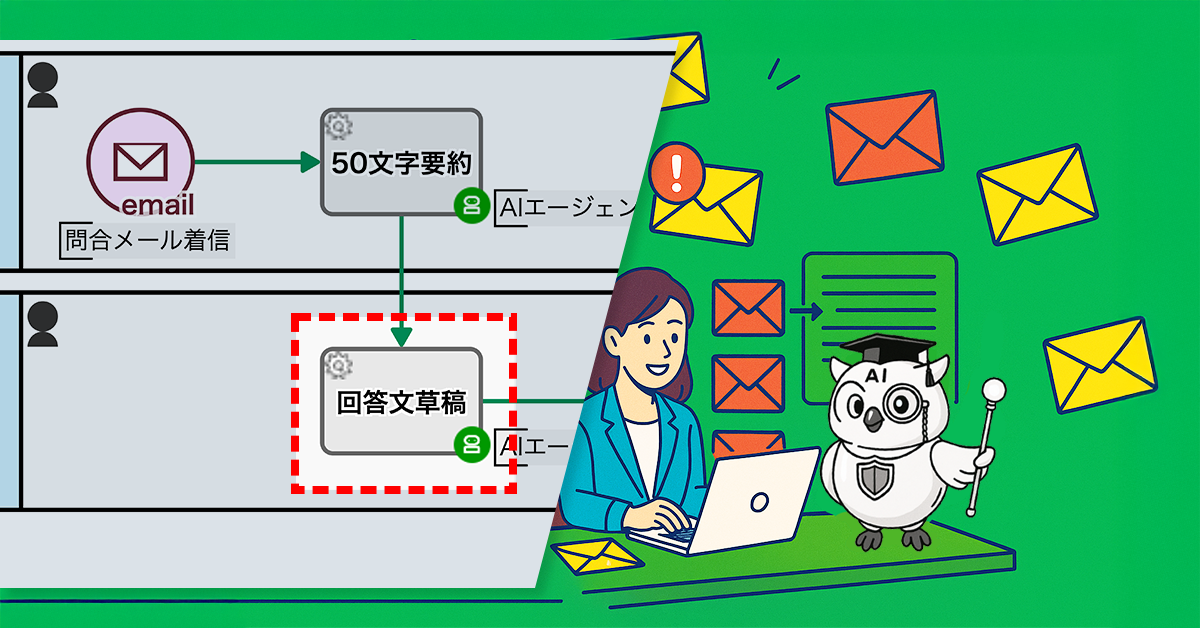
    プロセスオーナーはAIエージェント工程を導入し、[回答文草稿]を生成する仕組みを導入しました。問い合わせメールを受信すると、あらかじめ設定したプロンプトに基づき、AIが自動で「回答文草稿」を生成します。スタッフはこの草稿を参考にして、回答文を効率よく作成できるようになりました。

    Basic Edition
    Advanced Edition
    Professional Edition
    ワークフロー図詳細を見る
    50文字要約(AIエージェント工程)

    AIエージェントが、問合メールの内容を50文字に要約したテキストを作成します

    1. 回答文作成

    作成された要約文を確認し、回答文を作成します

    回答メール送信

    作成した回答文を返信します

    Basic Edition
    Advanced Edition
    Professional Edition
    ワークフロー図詳細を見る
    50文字要約(AIエージェント工程)

    AIエージェントが、問合メールの内容を50文字に要約したテキストを作成します

    回答文草稿(AIエージェント工程)

    作成された要約文の内容から、AIエージェントが回答文の草稿を作成します

    1. 回答文作成

    AIエージェントに作成された「回答文草稿」を確認し、回答文を作成します

    回答メール送信

    作成した回答文を返信します

    中央のバー操作で Before / After が比較できます

    3. 効果

    • 回答作成の時間が短縮され、平均応答時間が改善されました。
    • スタッフの業務負担が軽減されました。
    • 顧客満足度が向上しました。
    • 回答の品質と一貫性が向上しました。
    • 将来的なコスト削減も期待されています。

    4. その他の業務への応用

    FAQ対応の効率化

    • 定型的な質問に対する回答もAIで草稿を生成することで、対応スピードが向上します。

    社内問い合わせ対応の改善

    • システムや経理など、社内向けの問い合わせ対応にも応用でき、業務時間の短縮につながります。

    営業メールの下書き作成

    初回アプローチや定型的な営業メールの草稿を自動生成することで、営業担当者の効率化が実現します。

    5. 提案資料

    当社サービスの導入を検討いただく際の提案書サンプルです。課題に対する解決策の概要を記載しています。実際の相談内容に応じて、内容を個別にカスタマイズして提供いたします。