ブログ

  • Boost Membership with an Extra Campaign Announcement!

    Boost Membership with an Extra Campaign Announcement!

    A gym boosted conversions by extending its no-fee offer via automated follow-up emails.

    1. Issue: Insufficient Outreach to Potential Members

    A membership-based gym chain with 30 locations across the country offers prospective members a trial program before they decide whether to sign up.While the studio gauges interest after the trial, few individuals sign up immediately. This has highlighted a need to boost their conversion rates.

    To address this, the Kyoto branch independently launched a “No Enrollment Fee Campaign”. This initiative waived the enrollment fee for anyone who joined within seven days of their trial. The campaign successfully increased the branch’s membership conversion rate by 1.5 times compared to before its implementation.

    However, a new challenge has emerged: this campaign doesn’t effectively reach potential members who don’t sign up within the initial seven-day window.

    2. Solution: Automated Email for Extended Campaign Offers

    First-First Fitness Studio’s Kyoto branch is supercharging its “No Enrollment Fee Campaign” to better engage potential members. They’ll launch a special email campaign targeting individuals who didn’t sign up immediately after their trial. This email will announce a seven-day extension of the “No Enrollment Fee” offer, giving them another chance to reconsider joining.

    To make this happen, the process owner will revamp the workflow system. It’ll automatically dispatch the “Campaign Extension Email” seven days after a free trial if the prospective member hasn’t yet enrolled.

    The plan boosts conversions by extending the “No Enrollment Fee” offer, giving trial members a second chance to join.

    Basic Edition
    Advanced Edition
    Professional Edition
    View details of the workflow diagram
    • 3.Membership Confirmation
      • We’ll confirm your enrollment after the trial on the same day
    • 4.Enter Keyword (for Pending Membership)
      • The assigned trainer will input three keywords gathered from the prospective member
    • The AI will generate a thank-you message
    • 5.Content Confirmation
      • The receptionist will review the generated text and make minor adjustments to the phrasing
    • A thank-you email containing feedback from the assigned trainer will be sent to the prospective member
    • 6.Later Enrollment
      • We’ll process the membership application if the candidate wishes to join at a later date. This option automatically expires if 7 days pass from the trial date.
    • 7.Feedback
      • The trainer who provided the free trial will check the membership outcome and enter their reflections
    Basic Edition
    Advanced Edition
    Professional Edition
    View details of the workflow diagram
    • 3.Membership Confirmation
      • We’ll confirm your enrollment after the trial on the same day
    • 4.Enter Keyword (for Pending Membership)
      • The assigned trainer will input three keywords gathered from the prospective member
    • The AI will generate a thank-you message
    • 5.Content Confirmation
      • The receptionist will review the generated text and make minor adjustments to the phrasing
    • A thank-you email containing feedback from the assigned trainer will be sent to the prospective member
    • 6.Later Enrollment
      • We’ll process the membership application if the candidate wishes to join at a later date. This option automatically expires if 7 days pass from the trial date.
    • Send campaign extension email
      • If 7 days have passed since the trial date, an email will be sent
    • 7.Final Judgment
      • After the extension email is sent, we’ll process the membership if there’s an enrollment request
    • 8.Feedback
      • The trainer who provided the free trial will check the membership outcome and enter their reflections
    You can move the slider

    3. Customers Case Study

    4. Other Business Applications

    We will enable AI-based reviews for the following tasks:

    Webinar Sales Follow-up

    Sample to Order

    5. Related Posts

  • Automatically Updating the List of Call Handlers

    Automatically Updating the List of Call Handlers

    To ensure the AI functions correctly, we need to prepare accurate data.

    1. Issue: The Heavy Burden of Updating Call Handler Lists

    BizyBizy Corporation, a leading provider of office essentials like copiers and printers, has been actively enhancing its phone answering operations. They’ve adopted an answering service where operators handle calls to the main number, and the results are shared with the administrative department via email. Recently, BizyBizy further boosted efficiency by integrating an AI-powered system for automatic call assignee selection.

    However, managing this AI system presents its own set of challenges. The AI relies on a pre-established “responder list” for its selections, but this list needs constant updates due to changes in staff because of new hires, departures, or transfers.

    Maintaining this list has become a significant burden for the process owner. When updates are delayed, the AI can’t select the right person for calls, especially for unregistered employees. This means staff often have to manually handle calls to compensate for the AI’s selection errors, undermining the very efficiency the system was designed to achieve.

    2. Solution: Automate List Updates Using Platform User Information

    To tackle these challenges, the process owner integrated a system into the phone answering workflow that automatically generates the responder list based on the workflow platform’s user information.

    This change ensures the responder list is always kept up-to-date.

    Basic Edition
    Advanced Edition
    Professional Edition
    View details of the workflow diagram

    x1. Acquire Email Content

    When an email with the Phone Call label is received in Gmail, its content is read.

    x2. Importance Determination by AI

    The AI analyzes the email content to determine if it is a sales solicitation. The data item Judgment Result is set to “not important” if it’s a solicitation, and “important” otherwise.

    x4. Responder Determination by AI

    The AI analyzes the email content and selects a responder (email address) from a pre-prepared responder list.

    x5. Set Responder

    Based on the responder (email address) selected in the “x4. Responder Determination by AI” automated step, the processing handler for the “2. Record Response Outcome” step is set.

    g1. AI Judgment Result

    Depending on the value of the Judgment Result data item, the path is selected as follows:

    • If “not important,” proceed to the “1. Determine Responder” step.
    • If “important,” proceed to the email sending event (note*) “m1. Urgent Response Request.”
      *Accurately referred to as [Message Sending Intermediate Event (Email)].

    m1. Urgent Response Request

    An email is sent to administrative department members and the responder determined in “x3. Responder Determination by AI,” prompting them to process the “2. Record Response Outcome” step.

    1. Determine Responder

    Administrative department members determine the “responder” based on the email content. At this point, the responder determined in “x4. Responder Determination by AI” is pre-filled.

    2. Record Response Outcome

    The responder confirms the email content and records how they handled the inquiry.

    Basic Edition
    Advanced Edition
    Professional Edition
    View details of the workflow diagram

    x1. Acquire Email Content

    When an email with the Phone Call label is received in Gmail, its content is read.

    x2. Importance Determination by AI

    The AI analyzes the email content to determine if it is a sales solicitation. The data item Judgment Result is set to “not important” if it’s a solicitation, and “important” otherwise.

    x4. Responder Determination by AI

    The AI analyzes the email content and selects a responder (email address) from the responder list acquired in “x3. Acquire Responder List.”

    x5. Set Responder

    Based on the responder (email address) selected in the “x4. Responder Determination by AI” automated step, the processing handler for the “2. Record Response Outcome” step is set.

    g1. AI Judgment Result

    Depending on the value of the Judgment Result data item, the path is selected as follows:

    • If “not important,” proceed to the “1. Determine Responder” step.
    • If “important,” proceed to the email sending event (note*) “m1. Urgent Response Request.”
      *Accurately referred to as [Message Sending Intermediate Event (Email)].

    m1. Urgent Response Request

    An email is sent to administrative department members and the responder determined in “x4. Responder Determination by AI,” prompting them to process the “2. Record Response Outcome” step.

    1. Determine Responder

    Administrative department members determine the “responder” based on the email content. At this point, the responder determined in “x4. Responder Determination by AI” is pre-filled.

    2. Record Response Outcome

    The responder confirms the email content and records how they handled the inquiry.

    You can move the slider

    3. Benefits

    Improved Accuracy

    Because the responder list is always up-to-date, the AI can accurately select the appropriate responder. This prevents human error and manual mistakes, enabling precise task execution.

    Expedited Customer Response

    With the immediate selection of the correct responder, the speed of customer service improves. This leads to higher customer satisfaction and strengthens trust.

    Cost Reduction

    By reducing the labor and time spent on manual update tasks, personnel and operational costs are lowered. As a result, corporate profitability improves.

    4. Other Business Applications

    The mechanism of utilizing user information registered in a workflow platform can be applied to the following types of operations:

    Information Security Training

    • After the training manager determines the training content and schedule, a mechanism can be built where users registered in the workflow platform (which can be limited to specific departments) are automatically assigned as handlers for the “Result Report” step.
    • This streamlines the management of training progress and prevents coordination errors among responsible parties.

    Year-End Tax Adjustment

    • After the administrative department sets the year-end tax adjustment schedule, a mechanism can be built where users on the workflow platform are automatically assigned as handlers for the “Document Submission” step.
    • This mechanism facilitates the dissemination of submission deadlines and the tracking of progress, leading to increased operational efficiency.

    Event Planning

    • After the content and schedule of internal events are determined, a mechanism can be built where users registered in the workflow platform (limited to specific departments if necessary) are assigned as handlers for the “Participation Confirmation” step.
    • This enables quick and reliable confirmation of participation, contributing to the smooth operation of events.
  • Create a Streamlined Shipping System Though Automation

    Create a Streamlined Shipping System Though Automation

    Surging orders overwhelmed rotating staff, so tasks are auto-reassigned after two hours to prevent delays.

    1. Issue: Shipping Delays Due to Overwhelmed Staff

    A traditional inn, known for its exceptional cuisine and prime location near major tourist attractions, is now facing a new challenge. The recent launch of their signature hot pot soup in vacuum-sealed frozen packs has been a huge success, leading to a surge in orders via phone, fax, and their website.

    While their current system attempts to balance the workload by rotating shipping assignments among the team, the sheer volume of new orders means that assigned staff are frequently overwhelmed, causing significant backlogs.

    2. Solution: Automated Task Handoffs Based on Staff Availability

    The process owner implemented a system that automatically reassigns shipping tasks to the next available staff member, if the initially assigned person can’t complete the work within two hours. This ensures that tasks are handed off proactively before delays occur, as assignments are rotated sequentially within the shipping team.

    Automatically reassigning handlers prevents backlogs and ensures on-time shipping.

    Basic Edition
    Advanced Edition
    Professional Edition
    View details of the workflow diagram
    1. Order Information Entry (Manual)

    The team manually inputs customer order information.

    2. Primary Shipping Task (Main Handler)

    The main shipping handler carries out the shipping tasks. Once complete, a shipping confirmation email is sent.

    x1. Subject Line Configuration

    The workflow system sets the subject line for communications, including the order ID and order date.

    x2. Primary Handler Assignment

    The workflow system designates the main shipping handler by rotating assignments among the shipping team.

    Basic Edition
    Advanced Edition
    Professional Edition
    View details of the workflow diagram
    1. Order Information Entry (Manual)

    Staff members manually input order information.

    2. Shipping Task (Primary Handler)

    The primary shipping handler performs the shipping tasks. A shipping confirmation email is sent upon completion.

    2′. Shipping Task (Secondary Handler)

    The secondary shipping handler performs the shipping tasks. A shipping confirmation email is sent upon completion.

    x1. Subject Line Setting

    The workflow platform sets the subject line with the order ID and order date.

    x2. Primary Handler Assignment

    The workflow platform designates the primary shipping handler from the shipping team on a rotating basis.

    x3. Exclude Primary Handler from Candidates

    The workflow platform adds a rule to exclude the primary handler from further assignment considerations.

    x4. Secondary Handler Assignment

    The workflow platform designates a secondary handler, excluding the primary shipping handler.

    You can move the slider

    3. Customers Case Study

    4. Other Business Applications

    We will enable AI-based reviews for the following tasks:

    Customer Support Operations

    Inventory Management Operations

    Event Preparation Operations

    5. Related Posts

  • ノイズ記録・分析で社内ヘルプ改善

    ノイズ記録・分析で社内ヘルプ改善

    1. 課題:ノイズ案件の記録・分析ができない

    キビキビ商事の情報システム部は、社内のITインフラを支えるヘルプデスクとして、総勢20名のスタッフが社員からの技術的な問い合わせに日々対応しており、1日あたり20〜30件の相談を処理しています。

    近年、「会議室の使い方」や「家庭のWi-Fi設定」など、部門の管轄外と考えられる“ノイズ問い合わせ”が増加しています。

    しかし、案件データを“ノイズ問い合わせ”として分類・記録する仕組みがなく、傾向を把握できていないため、予防策にもつながらず、同様の問い合わせが繰り返されていました。

    2. 解決策:案件ステータスの自動分類

    プロセスオーナーは、ワークフローに案件ステータスを分類・記録する仕組みを導入しました。

    〔1.一次回答を入力〕〔2.二次回答文を入力〕といったヒューマン工程の前後に自動工程を挿入し、進行に応じて『一時対応中』『二次対応中』『対応済』『ノイズ』のいずれかがステータスとして設定されます。

    これにより、スタッフが一次回答時に『ノイズ』ボタンを押すと、ステータスは「ノイズ」に分類され、その情報は案件データとして自動的に記録されます。

    Basic Edition
    Advanced Edition
    Professional Edition
    ワークフロー図の詳細を見る
    問合入力[FORM]

    社員が問い合わせ内容をフォームに入力します・

    受付通知受信

    問い合わせの受付の通知を受信します。

    1.一次回答文を入力

    社内ヘルプデスクの担当者が1次回答を入力します。

    ノイズ…終了、暫定回答→返信&2次回答、最終回答→最終回答を返信

    一次回答(最終)

    一次回答内容をメールで通知し、終了します。

    一次回答(暫定)

    一次回答内容をメールで通知し、終了します。

    2.二次回答文を入力

    技術対応担当者が二次回答文を入力します。

    二次回答(最終)

    二次回答内容をメールで通知し、終了します。

    Basic Edition
    Advanced Edition
    Professional Edition
    ワークフロー図の詳細を見る
    問合入力[FORM]

    社員が問い合わせ内容をフォームに入力します・

    受付通知受信

    問い合わせの受付の通知を受信します。

    1.一次回答文を入力

    社内ヘルプデスクの担当者が1次回答を入力します。

    Status:ノイズ

    1.でノイズを選択した場合、案件ステータスが『ノイズ』に設定されます。

    Status:対応済

    1.で最終回答を選択した場合、案件ステータスが『対応済』に設定されます。

    Status:二次対応中

    1.で返信&2次回答と選択した場合、案件ステータスが『二次対応中』に設定されます。

    一次回答(最終)

    一次回答内容をメールで通知し、終了します。

    一次回答(暫定)

    一次回答内容をメールで通知し、終了します。

    2.二次回答文を入力

    技術対応担当者が二次回答文を入力します。

    Status:対応済

    2.で二次回答を選択した場合、案件ステータスが『対応済』に設定されます。

    二次回答(最終)

    二次回答内容をメールで通知し、終了します。

    中央のバー操作で比較できます

    3.効果

    問い合わせ傾向の可視化

    分類されたノイズ情報を蓄積・分析することで、再発防止や業務改善に役立ちます。

    ノイズ対応の時間短縮

    不要な問い合わせを迅速に見極められるようになり、対応時間の削減につながります。

    対応方針の標準化

    ノイズの判断基準が明確になり、全スタッフが統一的な対応を取れるようになりました。

    4. その他の業務への応用

    サプライチェーン問い合わせ

    不要な在庫確認などを除外することで、優先度の高い対応に集中できます。

    カスタマーサポート

    標準的な問い合わせと個別対応を分けることで、重要顧客への対応力が高まります。

    人事への社内問い合わせ

    繰り返される一般的な質問を判別することで、戦略的業務への時間確保につなげられます。

    5. 提案資料

    当社サービスの導入を検討いただく際の提案書サンプルです。課題に対する解決策の概要を記載しています。実際の相談内容に応じて、内容を個別にカスタマイズして提供いたします。

  • 取り下げ通知で無駄作業を無くそう

    取り下げ通知で無駄作業を無くそう

    取り下げられた問い合わせを対応中のスタッフに自動通知することで、対応不要な案件の作業を即時中止可能に。気付かずに回答作業を続けてしまう無駄を防ぎ、業務効率の低下を防止。

    1. 課題:回答作成の労力が無駄になる

    キビキビ商事の社内ヘルプデスクでは、社員からのITに関する問い合わせをWebフォームで受け付けており、1日あたり20〜30件に対応しています。

    このフォームには、ユーザーが自ら問い合わせを取り下げる機能があります。しかし、取り下げられたことはヘルプデスクのスタッフに通知される仕組みになっていません。そのため、スタッフは取り下げに気づかず、回答作成作業を続けるケースが発生していました。

    その結果、不要な作業が発生し、業務全体の効率低下を招く要因となっていました。

    2. 解決策:即時共有される「取り下げ通知」

    この問題を解決するために、プロセスオーナーは、ワークフローに通知機能を追加しました。

    具体的には、問い合わせが取り下げられた時点で、自動的にスタッフ全員にメールで通知される仕組みです。通知には、問い合わせの件名やID、取り下げ日時が記載されており、スタッフは中止の詳細を即時に把握できます。

    これにより、スタッフは対応中の案件が不要となったことをすぐに確認でき、速やかに作業を中止し、次の対応に移行できるようになりました。

    Basic Edition
    Advanced Edition
    Professional Edition
    ワークフロー図詳細を見る
    問合入力

    一般社員が、社内ヘルプデスクに問い合わせます。

    AI回答

    AIにより一次回答が行われます。

    受付通知

    一般社員に、受付通知が自動送信されます。

    問合取下

    問合内容が取り下げられます。

    全終了

    全てのフローが強制終了されます。

    Basic Edition
    Advanced Edition
    Professional Edition
    ワークフロー図詳細を見る
    問合入力

    社員が社内ヘルプデスクに問い合わせます。

    AI回答

    AIにより一次回答が行われます。

    受付通知

    受付通知が自動送信されます。

    問合取下

    問合内容が取り下げられます。

    取下通知

    ヘルプデスクスタッフに、取下通知が自動送信されます。

    全終了

    全てのフローが強制終了されます。

    中央のバー操作で比較できます

    3. 効果

    無駄な労力の削減

    取り下げ通知により、不要な回答作成を未然に防止できます。

    対応判断の即時化

    取り下げの有無をリアルタイムで把握できるため、複数案件への対応時に優先順位が迅速に判断できます。

    情報共有の強化

    取り下げ通知により、案件の状況が即時に共有され、スタッフ間でスムーズに作業を分担できます。

    4. その他の業務への応用

    顧客サポート

    顧客からの問い合わせが取り下げられた際に即時通知することで、無駄な対応を防ぎ、業務を効率化できます。

    製品開発部門

    プロジェクトの中止や仕様変更を関係者に即時通知することで、不要な作業を早期に止め、リソースを優先タスクへ集中できます。

    総務部門

    会議のキャンセルや日程変更をリアルタイムに通知することで、参加者の時間調整が容易になり、スケジュール管理の精度が向上します。

    5. 提案資料

    当社サービスの導入を検討いただく際の提案書サンプルです。課題に対する解決策の概要を記載しています。実際の相談内容に応じて、内容を個別にカスタマイズして提供いたします。

  • Create Thank You Emails with AI to Save Time!

    Create Thank You Emails with AI to Save Time!

    AI automates thank-you messages, reducing staff workload and improving efficiency.

    1. Issue: The Effort of Writing Thank You Notes for Visitors

    A membership-based gym chain with 30 locations across Japan offers a successful free trial program that significantly contributes to new member acquisition. While member management is centralized, each branch handles free trial registration and management independently.

    The Kyoto branch has implemented a unique workflow system that includes a web form for trial sign-ups and automated booking confirmation emails. After a free trial, reception staff ask visitors about their interest in joining. However, many attendees don’t commit on the spot and prefer to decide later. This makes sending a prompt thank you email crucial to keep their interest high.

    It’s been observed that sending a personalized thank you email, including a message from the assigned trainer, on the same day as the trial has significantly improved visitor impression and led to an average 5% increase in membership conversion rates. The thank you email sending function is also integrated into the workflow system.

    Despite its proven effectiveness, the current process of trainers individually crafting these thank you messages is time-consuming and labor-intensive, leading to increased overtime hours. Furthermore, this task presents a significant psychological burden for trainers who struggle with writing. Therefore, efficiency is urgently needed to maintain the positive impact on conversion rates without overworking staff.

    2. Solution: Automating Thank You Message Generation with AI

    The process owner will revamp the workflow to enable automatic thank you message generation using AI (ChatGPT).

    Based on these inputs, the AI will automatically generate the thank you message. This change eliminates the need for trainers to compose messages themselves.

    Automating thank-you messages reduces workload and stress for trainers, improving productivity and overall business efficiency.

    Basic Edition
    Advanced Edition
    Professional Edition
    View details of the workflow diagram
    3.Membership Confirmation

    We’ll confirm your membership after your trial session concludes today.

    4.Post-Trial Thank You (If Membership is Pending)

    The assigned trainer will enter feedback for the trial participant, limited to approximately 100 characters.

    A thank-you email containing feedback from your assigned trainer will be sent to all visitors.

    5.Delayed Membership Enrollment

    Should a visitor express a desire to join at a later date, we’ll process their membership enrollment. (This option will automatically expire after a set period.)

    Post-Trial Review

    Trainers who provided the free trial will check the membership outcome (whether the visitor joined or not) and enter their reflections.

    Basic Edition
    Advanced Edition
    Professional Edition
    View details of the workflow diagram
    3.Membership Confirmation

    We’ll confirm your membership after your trial session concludes today.

    Keyword Entry (If Membership is Pending)

    The assigned trainer will enter three keywords gathered from the visitor during the consultation.

    AI will generate the thank-you message.

    Review Message

    The reception staff will review the generated message and make minor wording adjustments.

    A thank-you email containing feedback from your assigned trainer will be sent to all visitors.

    5.Delayed Membership Enrollment

    Should a visitor express a desire to join at a later date, we’ll process their membership enrollment. (This option will automatically expire after a set period.)

    Post-Trial Review

    Trainers who provided the free trial will check the membership outcome (whether the visitor joined or not) and enter their reflections.

    You can move the slider

    3. Customers Case Study

    4. Other Business Applications

    We will enable AI-based reviews for the following tasks:

    Reviews of periodic reports

    Reviews of internal business regulations

    5. Related Posts

  • From Risk Detection to Smooth Mitigation

    From Risk Detection to Smooth Mitigation

    Automating risk workflows ensures all high-risk cases are addressed promptly, reducing missed actions and accelerating response times.

    1. Issue: Slow Initial Responses

    In a cloud-based company, every employee can keep track of each client’s usage. Specifically, the Usage Aggregation Process workflow app automatically posts usage graphs (Looker Studio reports) for each client to the internal chat tool, Collab Chat. On top of that, each graph comes with an account cancellation risk assessment generated by AI.

    The Customer Success team manually initiates the Risk Action Process (risk response workflow) when risk mitigation is needed. However, with the recent increase in the number of clients, there have been instances where the Risk Action Process is not being initiated. The root cause of this is that team members are unsure how to make a decision. For example, time can pass while they consider that maybe no risk mitigation is necessary if they feel that there was a similar risk in the past.

    2. Solution: Initiate Countermeasures Immediately Upon High-Risk Identification

    The process owner changed their approach to initial risk response measures.

    The new rule is to initiate the Risk Action Process for all high-risk assessments, meaning risk countermeasures will be considered within the Risk Action Process. Even if a risk was previously addressed or is currently being handled, any usage graph data (client data) determined to be high-risk will now be passed to the Risk Action Process. Within this process, the risk control policy will then be decided.

    Specifically, an automated step to launch the Risk Action Process was added downstream in the workflow diagram.

    This process improvement ensures that all client data identified as high-risk by either the AI-generated system or human assessment is automatically passed to the Risk Action Process. Additionally, a new option, “5. Previously Addressed / Currently Being Handled”, was added to the Risk Control Policy management item within the downstream Risk Action Process.

    • 1. Risk Avoidance
    • 2. Risk Reduction
    • 3. Risk Sharing
    • 4. Risk Retention
    • 5. Previously Addressed / Currently Being Handled

    Automated risk processes eliminate missed cases and enable faster responses to cancellation risks.

    Basic Edition
    Advanced Edition
    Professional Edition
    Basic Edition
    Advanced Edition
    Professional Edition
    You can move the slider

    3. Customers Case Study

    4. Other Business Applications

    We will enable AI-based reviews for the following tasks:

    Faster Invoice Approval

    Auto Contract Renewal

    5. Related Posts

  • AI Call Responder Selection

    AI Call Responder Selection

    AI now auto-assigns responders to inquiry emails, reducing workload and improving efficiency.

    1. Issue: Selecting Call Handlers is Time-consuming

    There is a company that offers a wide range of office essentials, including copiers and printers.The company utilizes a Representative Phone Answering Service where professional external operators handle phone calls as if they were in-house employees. They then report the call’s content via email. This service ensures a courteous initial response that only professionals can provide.

    Recently, an AI-generated system was integrated into their call answering operations to automatically classify the priority of these report emails. This new system automatically notifies the management department when a report email requiring urgent attention arrives, thereby reducing the risk of delays in responding to inquiries.

    Upon receiving these notifications, the Management Department assigns responders based on the priority of the report emails, starting with the most urgent. However, they ultimately need to allocate responders for all inquiry resolution emails, which results in a significant workload.

    Currently, we’re managing within our capacity. However, we anticipate an increase in projects due to business expansion, which raises concerns about an even heavier workload. If this burden continues to grow, it risks interfering with other crucial operations.

    While the current workload is manageable, the company anticipates an increase in cases due to business expansion, raising concerns about an even greater burden. If this burden continues to grow, there’s a risk it could disrupt other critical operations.

    2. Solution: Automating Responder Selection with AI

    To address these issues, the process owner integrated an AI-generated system into their workflow to automatically assign responders. Specifically, the AI analyzes the content of report emails and selects the most suitable responder from a prepared list. Following this, the selected responder is automatically set as the processor for the Record Response Outcome step.

    This new system automates the entire process, from the arrival of an operator’s email regarding an important call to the assignment of the Record Response Outcome step to an internal team member. As a result, the management department no longer needs to manually select responders for critical calls, minimizing the impact on other operations as the business expands. Ultimately, this enables efficient and low-burden operations.

    Automating responder selection reduces manual work for management, allowing them to focus on more important tasks.

    Basic Edition
    Advanced Edition
    Professional Edition
    View details of the workflow diagram

    x1. Retrieve Email Content

    When an email with the label “Phone” arrives in Gmail, its content is read.

    x2. Urgency Assessment by AI

    The AI analyzes the email content to determine if it’s a sales solicitation. The result is then assigned to the data field “Judgment Result”, if it’s a sales pitch, it’s set to “not important”; otherwise, it’s set to “important.”

    g1. AI Judgment Result

    The workflow path is selected based on the value in the Judgment Result data field, as follows:

    • If the Judgment Result is “not important,” the workflow proceeds to the “1. Assign Responder” step.
    • If the Judgment Result is “important,” the workflow proceeds to the “m1. Urgent Action Request” email sending event (which is technically referred to as a Throwing Message Intermediate Event).

    m1. Urgent Action Request

    An email is sent to the management department members, prompting them to accept and process the “1. Assign Responder” step.

    1. Assign Responder

    A member of the management department determines the “responder” based on the email’s content.

    2. Record Response Outcome

    The assigned responder reviews the email content and records how the inquiry was handled.

    Basic Edition
    Advanced Edition
    Professional Edition
    View details of the workflow diagram

    x1. Retrieve Email Content

    When an email with the label “Phone” arrives in Gmail, its content is read.

    x2. Urgency Assessment by AI

    The AI analyzes the email content to determine if it’s a sales solicitation. The result is then assigned to the data field “Judgment Result”, if it’s a sales pitch, it’s set to “not important”; otherwise, it’s set to “important”.

    g1. AI Judgment Result

    The workflow path is selected based on the value in the Judgment Result data field, as follows:

    • If the Judgment Result is “not important,” the workflow proceeds to the “1. Assign Responder” step.
    • If the Judgment Result is “important,” the workflow proceeds to the “m1. Urgent Action Request” email sending event (which is technically referred to as a Throwing Message Intermediate Event).

    m1. Urgent Action Request

    1. Assign Responder

    2. Record Response Outcome

    The assigned responder reviews the email content and records how the inquiry was handled.

    You can move the slider

    3. Customers Case Study

    4. Other Business Applications

    We will enable AI-based reviews for the following tasks:

    Prioritizing Cases

    Support Center Ticket Assignment

    Setting Priority for Trouble Resolution

    5. Related Posts

  • AI Reliably Captures Calls

    AI Reliably Captures Calls

    AI filters inquiry emails, separating spam from real leads for faster response.

    1. Issue: Delayed Response to Inquiries

    A comprehensive provider of office essentials such as copiers and printers has significantly streamlined its inquiry management process. The company utilizes a representative telephone answering service, where professional external operators handle incoming calls on behalf of employees and report the contents of the calls by email. This not only reduces the burden of initial call handling for staff but also ensures a polite and professional first point of contact for callers.

    Recently, the company implemented an automated system that integrates report emails from the answering service directly into its workflow system.This crucial enhancement plays a vital role in preventing missed inquiries and ensures that all communications are tracked and addressed efficiently.

    Despite these improvements, the company now faces a new challenge: more than half of the automatically imported report emails are sales solicitations. This creates a significant problem where genuine inquiries from potential customers get buried amidst the spam.

    As a direct result, the company is unable to respond promptly to valuable leads, leading to a serious risk of missing out on crucial business opportunities.

    2. Solution: AI-Powered Urgency Assessment

    The process owner has successfully integrated an AI-powered automatic classification system into their workflow for handling report emails.

    Specifically, as soon as a report email enters the workflow system, an automated AI step analyzes its content and classifies it as either a sales solicitation or not. Based on this classification, the processing path automatically diverges.

    With this setup, “report emails” identified as sales solicitations are categorized as not important. Conversely, all other emails are classified as important. Furthermore, whenever an email is classified as important, a notification email is automatically sent to the relevant administrative department, prompting their immediate attention.

    Basic Edition
    Advanced Edition
    Professional Edition
    View details of the workflow diagram

    x1. Retrieve Email Content

    When an email with the label “Phone” arrives in Gmail, its content is read.

    1. Assign Responder

    A member of the management department determines the “responder” based on the email’s content.

    2. Record Response Outcome

    The assigned responder reviews the email content and records how the inquiry was handled.

    Basic Edition
    Advanced Edition
    Professional Edition
    View details of the workflow diagram

    x1. Retrieve Email Content

    When an email with the label “Phone” arrives in Gmail, its content is read.

    1. Assign Responder

    A member of the management department determines the responder based on the email’s content.

    2. Record Response Outcome

    The assigned responder reviews the email content and records how the inquiry was handled.

    Compare Before/After (You can move the slider)

    3. Customers Case Study

    4. Other Business Applications

    We will enable AI-based reviews for the following tasks:

    Sales Department: Prospect Management

    IT Support: Ticket Management

    Internal Request Processing

    5. Related Posts

  • 株主証明書はWチェックで正確作成

    株主証明書はWチェックで正確作成

    「株主名簿記載事項証明書」PDF生成後に別担当者が確認する工程を追加し、ダブルチェックを徹底。確認の属人化で生じていた誤記載を抑止し、信用低下リスクを軽減。

    1.課題:証明書の発行ミス

    EsEs 株式会社(未上場・株券不発行会社)では、株主に対して「株主名簿記載事項証明書」を発行しています。証明書発行依頼を受けた後、管理部の担当者は株主名簿から必要なデータを抽出して証明書PDFを作成し、送信しています。この一連の業務は管理部担当者が一人で実施していました。

    時折、発行時に作業ミスがあり、誤った情報が証明書に含まれることがありました。このような問題はデータ抽出や確認の不十分さ、ならびにチェック体制の属人化が原因であり、信用の低下を招いていました。

    2.解決策:ダブルチェック体制の導入

    プロセスオーナーは、ワークフローアプリに、証明書PDF生成後に別の担当者が確認を行う工程を追加しました。これにより、従来は担当者一名のみで発行・確認されていた証明書PDFが、二人の異なるメンバーによって確認されるようになりました。

    Before :

    詳細を見る
    • 株主が公開Webフォームより請求
    • 証明書PDF生成
      • 株主名簿をもとに、証明書PDF自動生成される
    • 1. 依頼受理の判断
      • 依頼内容に不備がないかを判断する
    • Email送信

    After :

    詳細を見る
    • 株主が公開Webフォームより請求
    • 証明書PDF生成
      • 株主名簿をもとに、証明書PDF自動生成される
    • 1. 依頼受理の判断
      • 依頼内容に不備がないかを判断する
    • 2.PDFダブルチェック
      • 管理部の別メンバによってダブルチェックが実施される
    • Email送信

    Compare Before/After

    (スライダを使い before/after の比較が可能です)

    3.効果

    1. ミス発生の減少
      • ダブルチェック体制により、証明書発行のミスが顕著に減少しました。
    2. 業務プロセスの透明性向上
      • 二人の担当者による確認プロセスが実現され、業務の透明性と信頼性が向上しました。
    3. 担当者の業務負荷の適正化
      • ダブルチェック体制により、業務が分担され、担当者一人当たりの業務負荷が適正化されました。

    4.他業務への応用

    1. 金融機関での重要書類の発行プロセス
      • ダブルチェック体制を導入し、発行ミスを防ぎ、顧客満足度の低下を防ぎます。
    2. 製造業の品質管理プロセス
      • 品質管理プロセスでダブルチェック体制を取り入れることで、不良品の出荷を防ぎ、安定した品質が確保できます。
    3. 不動産業界における契約書類作成プロセス
      • 担当者が契約書を作成した後、別の法務担当や営業リーダーが内容をチェックする体制を整備し、ミスを防止します。

    5.提案資料

    当社サービスの導入を検討いただく際の提案書サンプルです。課題に対する解決策の概要を記載しています。実際の相談内容に応じて、内容を個別にカスタマイズして提供いたします。

  • 株主証明書への電子署名で信頼向上

    株主証明書への電子署名で信頼向上

    証明書発行フローに電子署名工程を追加し、役員が手動署名可能に。署名未付与によりVCから改ざん懸念が生じ、信頼構築や資本提携に支障を来していた。

    1. 課題:電子署名の未付与

    EsEs 株式会社(未上場・株券不発行会社)では、株主に対して「株主名簿記載事項証明書」を発行しています。この業務は管理部が担当しており、管理部は株主名簿をもとに証明書PDFを作成し、送信しています。

    現在、証明書には電子署名が付与されておらず、一部のベンチャーキャピタル(VC)からは「改ざんの可能性が否定できない」との指摘を受けることがあります。この際の対応は、手間の増加や不信感の原因となっており、VCとの資本提携において信頼構築の妨げとなる可能性があります。

    2. 解決策:電子署名工程の追加

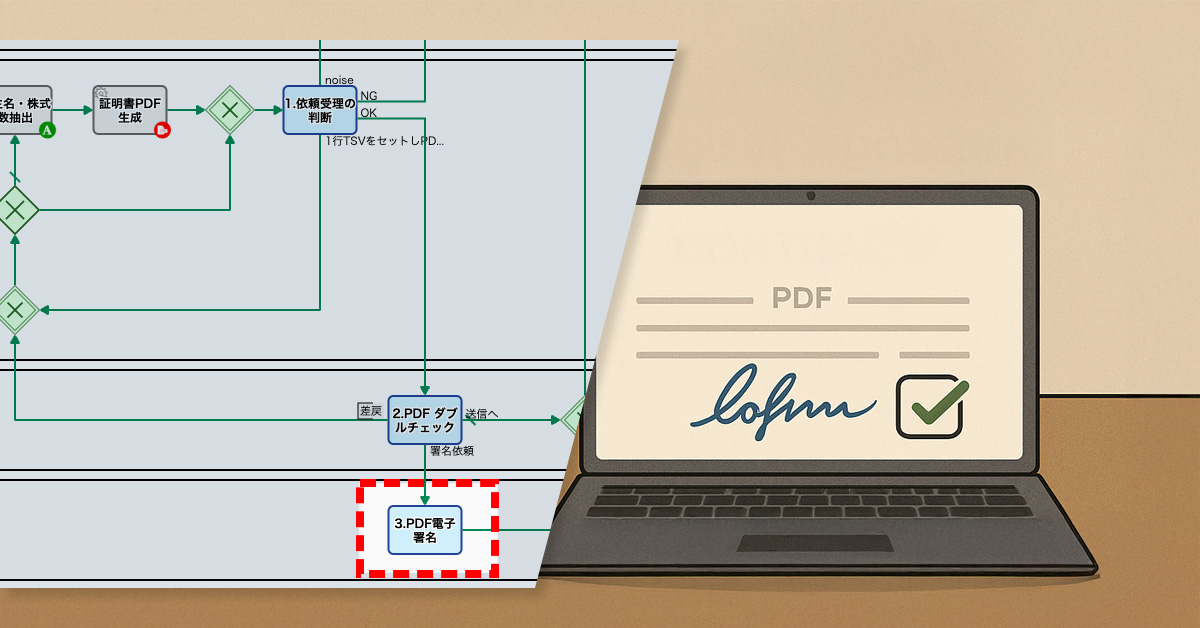
    プロセスオーナーは、ワークフローに電子署名の工程を追加しました。具体的には、管理部による証明書のチェックが完了した後、役員が証明書に電子署名する工程を設けました。

    これにより、担当役員が手動で電子署名を追加することが可能になり、VCが求める「電子署名付き証明書」を提供できるようになりました。

    Basic Edition
    Advanced Edition
    Professional Edition
    ワークフロー図詳細を見る
    • 株主が公開Webフォームより請求
    • 証明書PDF生成
      • 株主名簿をもとに、証明書PDF自動生成される
    • 1. 依頼受理の判断
      • 依頼内容に不備がないかを判断する
    • 2.PDFダブルチェック
      • 管理部の別メンバによってダブルチェックが実施される
    • Email送信
    Basic Edition
    Advanced Edition
    Professional Edition
    ワークフロー図詳細を見る
    • 株主が公開Webフォームより請求
    • 証明書PDF生成
      • 株主名簿をもとに、証明書PDF自動生成される
    • 1. 依頼受理の判断
      • 依頼内容に不備がないかを判断する
    • 2.PDFダブルチェック
      • 管理部の別メンバによってダブルチェックが実施される
    • 3.PDF電子署名
      • 役員によって電子署名が行われる
    • Email送信
    中央のバー操作で Before / After が比較できます

    3. 効果

    信頼性の向上

    電子署名により証明書の真正性が担保され、投資家との信頼構築につながります。

    顧客満足度の向上

    電子署名付き証明書を発行することで、多様な顧客ニーズに対応でき、満足度が向上します。

    業務効率の改善

    署名工程の導入により発行フローが整備され、管理部の負荷を軽減します。

    4. その他の業務への応用

    EC企業の納品書対応

    電子署名付き納品書の要望に対してスムーズに応える体制を構築できます。

    学校の成績証明書発行

    成績証明書に署名を付与することで、卒業生の申請手続きを円滑に進められます。

    保険会社の請求処理

    署名付きフローにより、請求処理の信頼性と効率を同時に高めることができます。

    5. 提案資料

    提案書サンプルです。ご希望に応じて、個別のご提案が可能です。

  • Boost Your Generative AI’s Accuracy!

    Boost Your Generative AI’s Accuracy!

    Human labeling of high-risk AI outputs improves prediction accuracy, reduces misjudgment, and enables continuous AI optimization.

    1. Issue: Insufficient Verification of Prediction Accuracy

    A company providing cloud services has a system that ensures all employees can understand the usage status of each contracted company. This widespread access to customer usage data promotes transparency and likely supports better decision-making across the organization.

    This company has a robust system in place for sharing customer usage data company-wide. Every week, Looker Studio graphs detailing each contracted company’s usage are automatically posted to OpenChat. What’s more, these posts include a multimodal generative AI’s churn rate risk assessment, rated on a scale of A to E.

    This system helps teams like Customer Success prioritize checking high-risk customers’ usage to devise churn rate reduction strategies. Similarly, the Field Sales team uses it to propose additional services to loyal, low-risk clients.

    However, a critical issue remains: the AI’s risk assessment accuracy isn’t sufficiently verified. There’s a perceived misjudgment rate of about 30%. To prepare for future business expansion, it’s crucial to gradually establish a framework to improve the AI’s prediction accuracy.

    2. Solution: Diligent Data Labeling

    The process owner has decided on a clear initial strategy: human data labeling will first be applied to high-risk (D-E) assessments.

    * “Data labeling” is the process where humans identify and add information to various forms of data. For example, this could involve determining if a photo contains a horse, if a video includes footage of a fire, or if a spot on an X-ray image is a tumor. This labeled data is indispensable for training artificial intelligence models.

    To improve the validation of AI-driven risk assessments, this company has refined its workflow. Here’s a breakdown of the key changes:

    New Workflow Adjustments:
    – Added an OR Gateway for Branching: High-risk assessment reports are now concurrently routed to multiple paths.
    – Automated Subject Line Modification: Reports automatically receive a “Risk_” label in their subject line.
    – Introduced Human Review Step: A new human task allows for “agree” (Risk) or “disagree” (no risk) judgments on the AI’s high-risk assessment.
    – Automated Subject Line Modification for Disagreements: Reports flagged as “disagree” automatically get a “Wolf_Risk_” label (indicating a false alarm or “wolf in sheep’s clothing” risk).

    To these enhancements, every high-risk assessment report now carries either a “Risk_” or “Wolf_Risk_” label. This critical improvement empowers all employees to validate the generative AI’s prediction accuracy (and its misjudgment rate), fostering transparency and accountability in the AI’s performance.

    Analyzing and labeling AI errors improves prediction accuracy while enabling continuous prompt optimization.

    * Data labeling is the essential process where human

    Basic Edition
    Advanced Edition
    Professional Edition
    Basic Edition
    Advanced Edition
    Professional Edition
    You can move the slider

    3. Customers Case Study

    4. Other Business Applications

    We will enable AI-based reviews for the following tasks:

    5. Related Posts