ブログ

  • Case Study: Reorganizing ID Management Processes in the Era of SaaS Proliferation with Questetra

    Case Study: Reorganizing ID Management Processes in the Era of SaaS Proliferation with Questetra

    Questetra, Inc. (Head Office: Nakagyo-ku, Kyoto; CEO: Genichi Imamura), provider of the cloud-based business process management system (SaaS BPMS) “Questetra BPM Suite,” has published a customer success story featuring CLARA, Inc. (Head Office: Minato-ku, Tokyo; President & CEO: Kentaro Iemoto), a cloud services provider operating primarily in Japan and China.

    As digital transformation accelerates and the number of SaaS applications in use continues to grow, many organizations are facing increasing operational burdens and governance challenges in account management processes. Using Questetra for more than a decade, CLARA successfully established a framework that clearly separates human decision-making from system-driven automation. As a result, the company reduced the lead time required to prepare accounts for new employees from a cumulative one week to effectively half a day.

    In this case study, Mr. Yamazaki of the Corporate IT Group, Cloud Solution Division at CLARA, discusses the company’s challenges, implementation approach, and the operational improvements achieved through Questetra.

    CLARA, Inc. Office Entrance Wall
    CLARA, Inc. Office Entrance Wall

    Issues: The Limits of Manual Operations and Fragmented Progress Management Amid Rapid SaaS Expansion

    At CLARA, account lifecycle management for employee onboarding and offboarding had long been administered on Questetra, enabling smooth coordination among HR and various other departments. However, following the widespread adoption of remote work during the COVID-19 pandemic, the number of SaaS applications in use increased dramatically. Although the workflows themselves were visible and standardized, the actual account provisioning tasks still depended heavily on manual operations, such as copying and pasting data across multiple administrative interfaces.

    As a result, not only did operational workloads increase, but challenges also emerged in tracking progress and coordinating among stakeholders in a remote working environment. For the Corporate IT Group, a critical priority became how to automate provisioning processes without human intervention while maintaining proper governance and operational control.

    Why Questetra: A Foundation Capable of Reliably Governing Complex Business Processes

    While alternative tools were evaluated, CLARA ultimately decided to continue leveraging its existing Questetra platform. The primary reason was Questetra’s ability to represent complex business processes as they are, including interdepartmental dependencies and operational relationships across teams.
    In workflows involving multiple departments, dependencies naturally arise, such as situations where downstream tasks cannot proceed until upstream processes are completed. When managed solely through email or chat, these handoffs tend to become highly dependent on individuals and informal coordination, increasing the risk of delays, bottlenecks, and missed actions.

    Questetra enables these interactions and parallel processes to be directly modeled as workflows, clearly visualizing who needs to do what, and when. One of its greatest strengths lies in its ability to handle real-world operations “as-is,” including complex decision-making and exceptional cases.

    CLARA evaluated various workflow platforms; however, no other solution was able to represent and reliably control such sophisticated branching logic, human decision points, and parallel processing structures without operational breakdowns.

    Building upon this foundation, CLARA integrated Questetra with external services, enabling human approval processes and automated operations—such as account provisioning—to be seamlessly orchestrated within a single unified workflow.

    Implementation Results: Achieving Both Dramatic Lead Time Reduction and Elimination of Human Error

    By positioning Questetra as the central orchestration hub and integrating it via APIs with various SaaS platforms—including Okta for automated account provisioning, Jira for IT service request handling, and Slack for notifications and communication—CLARA achieved the following results:

    Significant Reduction in Lead Time:

    Account preparation processes that previously required a cumulative lead time of approximately one week can now be completed effectively within half a day.

    Elimination of Manual Entry Errors:

    Data entered by HR is transferred directly to each SaaS platform, completely eliminating human input and transcription errors caused by manual operations.

    Improved Real-Time Visibility and Bottleneck Detection:

    Workflow progress is now visualized in real time, enabling immediate detection of stalled tasks. Once processing is completed, results are automatically communicated back to HR, ensuring employees can begin work on their first day without operational concerns.

    Another key success factor was the flexible extensibility of CLARA’s internally developed add-ons that support integration with external tools. By leveraging generative AI to learn implementation rules and development patterns, CLARA significantly lowered development barriers and established a framework capable of rapidly delivering features tailored to highly specific operational needs.

    Future Outlook: Process Governance Will Become Even More Critical in the AI Era

    As AI increasingly takes over repetitive operational tasks, CLARA believes that a model in which AI performs processing while humans make final decisions will become the standard operating approach.

    Based on the assumption that even if certain tasks are replaced by AI, there will always remain critical points requiring human judgment when viewed from the perspective of the overall process, CLARA intends to continue positioning Questetra as the central platform connecting people, AI, and SaaS systems.

    Going forward, the company will continue building business processes aligned with its corporate mission of “paving the way for the next era.”

    About Questetra BPM Suite

    Questetra BPM Suite is a cloud-based Business Process Management System (SaaS BPMS).

    The platform enables organizations to develop and operate workflow applications entirely through a web browser, without requiring programming expertise or coding skills. Business departments themselves can continuously improve operational processes independently.

    Standardized business workflows—such as approval requests, quotation submissions, and inquiry handling—can be created as no-code workflow applications. Furthermore, by incorporating generative AI capabilities, organizations can automate knowledge-intensive tasks such as draft document generation and response proposal creation.

    About Questetra, Inc.

    Questetra, Inc. is a Kyoto-based SaaS BPM vendor dedicated to optimizing business processes worldwide.

    Company Name : Questetra, Inc.
    CEO : Genichi Imamura, Chief Executive Officer
    Head Office : Oike Building 4F, 206 Takamiya-cho, Oike-dori Manjuji Higashi-iru, Nakagyo-ku, Kyoto, Japan
    Established : April 2008
    Capital : 184,057,500 JPY
    URL : https://questetra.com/

    Press Contact

    pr@questetra.com


  • 【事例紹介】SaaS乱立時代のID管理プロセスをQuestetraで再編、アカウント発行業務を1/10に短縮

    【事例紹介】SaaS乱立時代のID管理プロセスをQuestetraで再編、アカウント発行業務を1/10に短縮

    クラウド型業務プロセス管理システム (SaaS BPMS) 「Questetra BPM Suite」を提供する株式会社クエステトラ(本社:京都市中京区、代表執行役CEO:今村 元一)は、日本・中国を軸にクラウド事業を展開するクララ株式会社(本社:東京都港区、代表取締役社長:家本 賢太郎、以下、クララ)の導入事例を公開しました。

    DX推進に伴い利用SaaSが急増する中、多くの企業ではアカウント運用の負荷増大や業務プロセスの統制に課題を抱えています。クララでは、10年以上にわたり活用してきたQuestetraを基盤とし、「人の判断」と「システムによる自動実行」を適切に切り分け、新入社員向けアカウント準備のリードタイムを延べ1週間から実質半日へと短縮しました。課題や導入効果について、クララのクラウドソリューション事業部 コーポレートITグループ 山崎様にお話をうかがいました。

    クララ株式会社 エントランス画像
    クララ株式会社 エントランス画像

    課題:SaaS急増による「手作業の限界」と「進捗の断絶」

    当社(クララ)では以前から、Questetra上で「入退社に伴うアカウント管理」を運用しており、人事や各部門との連携は円滑に行われていました。しかし、コロナ禍以降のリモートワーク普及により利用SaaSが急増。プロセス自体は可視化されているものの、実際のアカウント発行作業は各管理画面でのコピー&ペーストといった手作業に依存せざるを得ませんでした。

    その結果、作業負荷の増大に加え、リモート環境下での進捗把握や関係者間の連携にも課題が生じていました。いかに統制を維持しながら、人手を介さずプロビジョニングを自動化するかが、当社のコーポレートITグループにおける喫緊の課題となりました。

    なぜQuestetraか:複雑な業務を破綻なく統制できる基盤

    新たなツールへの置き換えも検討しましたが、当社では既存のQuestetraを基盤として活用し続ける判断をしました。その理由は、複雑な業務プロセスをそのまま表現し、部門を跨いだ依存関係まで含めて管理できる点にあります。

    複数の部門が関与する業務では、「前工程が完了しなければ次に進めない」といった関係が生じます。これをメールやチャットで運用すると、やり取りは属人的で“泥臭い”バトンタッチとなり、停滞や漏れが発生しやすくなります。Questetraでは、こうしたやり取りや並列処理をそのままフローとして定義し、「誰が・いつ・何をすべきか」を明確に可視化できます。複雑な判断や例外も含めて、“ありのまま”の業務を扱える点が大きな強みです。他のワークフローシステムも検討してきましたが、これほど複雑な分岐や人の判断、並列処理をそのまま表現し、破綻なく制御できる製品はありませんでした。

    この基盤を活かし、Questetraを起点に外部サービスと連携することで、人の判断プロセスとアカウント発行などの自動処理を一つのフローとしてつなぎ直しました。

    導入効果:リードタイム短縮とミス撲滅を両立

    Questetraをハブとして、Okta(アカウント発行の自動化)やJira(IT作業の受付・対応)、Slack(通知・コミュニケーション)などの各種SaaSとAPI連携したアーキテクチャを構築した結果、以下の成果が得られました。

    リードタイムの大幅短縮

    延べ1週間を要していたアカウント準備作業が、実質「半日」で完了。

    転記ミスの撲滅

    人事が入力したデータが直接各SaaSへ流れるため、手作業による入力ミスが完全に解消。

    リアルタイム性の向上と滞留検知

    プロセスの進捗がリアルタイムに可視化され、タスクの滞留を即座に検知。処理完了後すぐに結果が人事へ通知されることで、入社当日を安心して迎えられる環境を実現。

    さらに、外部ツールとの連携を支える「自作アドオン」の柔軟な拡張性も大きな鍵となりました。実装ルールを生成AIに学習させることで、開発のハードルを大幅に下げ、現場の細かなニーズに対しても極めて迅速に機能を実装できる体制を構築しています。

    ※具体的なフロー図は、クエステトラ社の導入事例ページをご覧ください。

    今後の展望:AI時代こそ「プロセス統制」が鍵

    AIが反復業務を担う時代において、当社は「AIが処理を行い、人が最終判断をする」形が一般化すると考えています。

    「AIに置き換わる業務があっても、プロセス全体を俯瞰すれば必ず人の判断が必要なポイントが存在する」という前提のもと、今後もQuestetraを人・AI・SaaSをつなぐ中心に据え、クララの掲げるミッションである、「次の時代を道づくる」業務プロセスの構築に取り組んでいく方針です。

    Questetra BPM Suiteとは

    Questetra BPM Suite は、クラウド型の業務プロセス管理システム (SaaS BPMS) です。

    ワークフローシステム(ワークフローアプリ)の開発および運用が、Webブラウザだけで完結します。プログラミングの知識(Codingスキル)は必要ありません。業務部門が主体となって、継続的に業務プロセスを改善できます。

    稟議申請や見積提出、問い合わせ対応などの定型業務プロセスを、ワークフローシステムとしてノーコードで作成できます。さらに、生成AIを組み込むことで、「ドラフト文書の自動生成」や「回答案の草案作成」といった知的作業の自動化も実現できます。

    クエステトラ社について

    株式会社クエステトラは京都を拠点とする SaaS BPM ベンダーです。世界中のビジネスプロセスを最適化します。

    商号:株式会社クエステトラ
    代表:代表執行役 CEO 今村 元一
    所在地:京都市中京区御池通間之町東入高宮町 206 御池ビル4F
    設立:2008年4月
    資本金:1億8405万7500円
    URL:https://questetra.com/ja/

    本プレスリリースに関する問い合わせ

    pr@questetra.com or 075-205-5007


  • Questetra BPM Suite(クエステトラ)-担当者に依存しない問い合わせ対応をAIで“振り分け・承認・対応”まで自動化

    Questetra BPM Suite(クエステトラ)-担当者に依存しない問い合わせ対応をAIで“振り分け・承認・対応”まで自動化

    Questetra BPM Suite

    社内ヘルプデスク業務の属人化を解消する、

    業務プロセス管理システム

    問い合わせ対応を標準化し、「人に依存しない」運用へ。
    AIで分析・回答作成・担当者振り分けを行い、業務全体を効率化。

    対応時間大幅削減
    人に依存しない安定した運用へ
    対応状況を可視化、二重対応防止

    社内ヘルプデスク業務の属人化を解消する、

    業務プロセス管理システム

    問い合わせ対応を標準化、「人に依存しない」運用へ。AIで分析・回答作成・担当者振り分けを行い、業務全体を効率化。

    こんなお悩み、ありませんか?

    簡単な問い合わせも、シニアメンバーに集中している

    簡単な問い合わせも、シニアメンバーに集中している

    チャットボットで返信は楽に、でも運用負荷は変わらない

    チャットボットで返信は楽に、でも運用負荷は変わらない

    担当者の振り分けや、エスカレーションは手作業のまま

    担当者の振り分けや、エスカレーションは手作業のまま

    誰が・いつ対応したか、管理・追跡ができない

    誰が・いつ対応したか、管理・追跡ができない

    問い合わせ対応の効率化だけでなく、運用全体の標準化が重要です

    チャットボットで一次回答を効率化しても、その後の振り分け・エスカレーション・対応管理・履歴管理などの業務が分断されたままでは、運用負荷は軽減されません。

    Questetra BPM Suiteなら、分断された問い合わせ対応全体をフローとしてつなぎ、運用を標準化します。

    問い合わせ対応を、

    回答だけでなく、その後の振り分け・エスカレーション・対応管理まで含めて、問い合わせ対応全体をワークフロー化できます。

    AIを業務フローに組み込むことで、

    従来は人が対応していた、回答作成・難易度判定・担当者振り分けを自動化。対応負荷や属人化を軽減できます。

    AIエージェント工程

    さまざまな業務プロセスにAIエージェント工程を組み込めます。

    自然な日本語の指示文を入力するだけで、それをもとにAIが処理を自動実行する機能です。特別なプログラミングやAPI設定などの専門知識は不要です。

    社内ヘルプデスク業務がここまで変わる

    対応時間大幅削減

    対応工数を削減し、他業務への時間を確保

    人に依存しない安定した運用へ

    属人的な判断・対応を業務フローで標準化

    対応状況を可視化、二重対応防止

    履歴・対応状況を一元管理し、運用品質を向上

    問い合わせ対応だけでなく、ITSM運用全体を標準化

    アカウント申請・権限管理
    • 申請内容の妥当性チェック
    • アカウント発行・削除
    • 完了・差し戻し通知の自動化
    • 退職者アカウントの削除漏れ防止
    問い合わせ対応・サポート
    • AIによる一次回答
    • AIによる難易度判定
    • 自動振り分け
    • 対応履歴の一元管理
    インシデント管理
    • AIによる重大度判定(トリアージ)
    • 対応フローの標準化
    • 進捗管理・リマインド
    • レビュー・報告の自動化
    不具合報告・苦情対応
    • 報告の受付・一次対応
    • AIによる重大度判定(セベリティ)
    • 重複対応の防止
    • クローズまでの記録を一元管理

    導入企業の声

    クララ株式会社

    急増するSaaS管理の最適解は「すべてを自動化しない」こと。
    人とシステムを繋ぐプロセス統制

    入退社に伴うアカウント発行業務を自動化し、処理時間を「1週間→半日」に短縮。Questetraを起点に、Okta・Jira・Slackなど各SaaSを連携。人手による転記や進捗確認を削減し、部門をまたぐ業務プロセス統制を実現しました。

    クララ株式会社
    導入企業ロゴ一覧
  • AI-Generated Narrative of Post-Aggregation Numerical Changes

    AI-Generated Narrative of Post-Aggregation Numerical Changes

    AI summarizes notable client sales changes, helping teams quickly detect important trends and anomalies.

    1. Issue: Growth in client-specific sales data makes changes harder to detect

    The accounting department of a cloud services company operated with a three-person team and had already systemized processes ranging from importing accounting data to generating monthly client-specific sales summaries and month-over-month comparisons. These routine operations were running stably, and the aggregated results were regularly shared with executive management and the sales department.

    However, as the number of clients increased, the client-specific sales report with month-over-month comparisons grew to several hundred rows. Even when accounting staff manually reviewed the report, it became difficult to determine which clients required closer attention.

    In actual monthly review operations, the team could still track sales amounts and month-over-month changes for a few major clients. On the other hand, for medium-sized clients, even significant month-over-month fluctuations tended to be buried within the large report, making it difficult to identify and share important changes with the sales department and executive management.

    2. Solution: Use AI to Generate Narrative Explanations of Key Sales Changes

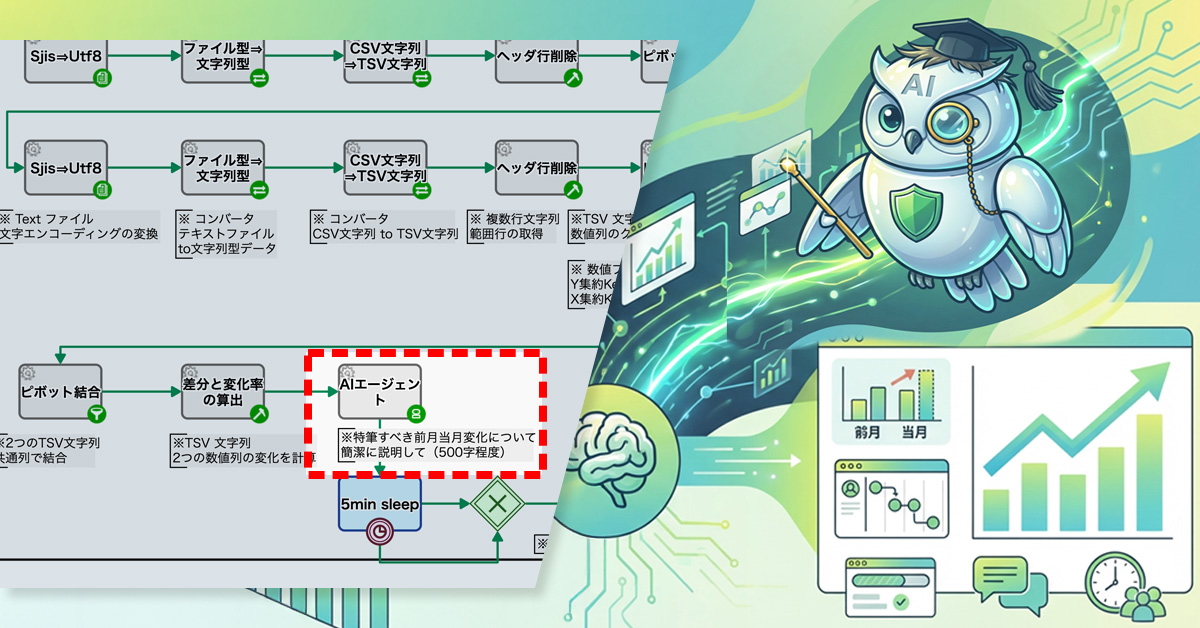
    The process owner added an AI agent after the aggregation step so that, in addition to the numerical report, the details of sales changes are output as text.

    Specifically, the AI agent was given a prompt to “briefly explain notable sales changes based on the difference data between the previous month and the current month.” This allows the AI to extract major changes and distinctive trends from the difference data. Each time the monthly process is executed, the AI summarizes changes in client-specific sales in narrative form.

    AI highlights major client sales changes instantly before reviewing detailed reports.

    Basic Edition
    Advanced Edition
    Professional Edition
    View details of workflow diagram
    Register 2 files

    Register the current month file and the previous month file, then start the monthly comparison process.

    Pivot Aggregation

    Aggregate sales amounts by business partner and subaccount, and list the monthly sales structure.

    Pivot Merge

    Join the current month and previous month aggregation results using common fields to create comparable data.

    Calculate Differences and Change Rates

    Calculate the month-over-month difference and change rate to clearly quantify sales changes.

    email

    The key points organized by AI are automatically notified and shared with executive management and the sales department.

    Basic Edition
    Advanced Edition
    Professional Edition
    View details of workflow diagram
    Register 2 files

    Register the current month file and the previous month file, then start the monthly comparison process.

    Pivot Aggregation

    Aggregate sales amounts by business partner and subaccount, and list the monthly sales structure.

    Pivot Merge

    Join the current month and previous month aggregation results using common fields to create comparable data.

    Calculate Differences and Change Rates

    Calculate the month-over-month difference and change rate to clearly quantify sales changes.

    AI Agent

    Based on the difference data, AI summarizes notable sales changes from the previous month to the current month in narrative form.

    It extracts important changes not only for major clients but also for medium-sized clients.

    email

    The key points organized by AI are automatically notified and shared with executive management and the sales department.

    Before / After comparison (slider can be moved)

    3. Customers Case Study

    4. Other Business Applications

    We will enable AI-based reviews for the following tasks:

    Tracking inquiry response status

    5. Related Posts

  • CLARA, Inc.

    CLARA, Inc.

    Optimizing SaaS Management: Balancing Automation with Human Oversight. Linking Processes Between People and Systems

    Established

    May 20, 1997

    No. of Employees

    267 (Group consolidated, excluding regular directors as of October 31, 2023)

    Main Business

    Internet service infrastructure, Business consulting, Licensed employment agency, Recruitment consulting, Import/export and trade consulting

    Industry

    Hitech

    User Department

    Company-wide Approval Flows

    Company and Department Roles

    CLARA, Inc. specializes in cloud infrastructure development and operations, business consulting, and human resource services, primarily focusing on Japan and China. Since our founding in 1997, we’ve helped enterprises grow their cross-border businesses. Within CLARA, Inc., the Corporate IT Group, part of our Cloud Solutions Department, manages the company’s entire information system infrastructure. In today’s environment, where SaaS is widely accessible, our goal is to create seamless collaboration between people and systems, preventing the IT department from becoming a bottleneck.

    Challenges in Managing Diverse SaaS Applications

    For some time, we’ve used Questetra to manage account administration tasks related to employee onboarding and offboarding, ensuring smooth coordination with HR and other departments. However, the rapid shift to remote work following the COVID-19 pandemic led to a dramatic increase in SaaS usage, significantly increasing the workload associated with issuing new accounts. Although our processes were visible in Questetra, the actual configuration required manual work: accessing each service’s management interface, copying and pasting information, and executing commands. In a remote setting, checking progress through informal communication became difficult, leading to increased workload and communication issues.

    This situation highlighted the need to automate account provisioning while maintaining control and minimizing reliance on manual intervention.

    Why We Chose to Continue Using Questetra as the Foundation

    Instead of replacing our existing tools, we decided to build upon Questetra to address these challenges. Questetra is more than just a workflow system; it provides robust control over complex tasks and inter-departmental dependencies. For example, our “Order Fulfillment Process” involves sales, contract management, finance, and multiple engineering teams (server, network, SSL), resulting in complex branching and parallel processing. Critical dependencies, such as not being able to bill until the server is activated, are deeply integrated into our operations. Managing these processes via email or chat inevitably leads to delays and errors.

    Questetra allows us to directly define these cross-departmental handovers and parallel processes within the workflow, clearly outlining who does what and when. We explored other workflow systems, but none matched Questetra’s ability to represent and control such complexity, human decisions, and parallel execution. With this control as our foundation, we’ve successfully integrated automation to solve our current challenges.

    Questetra’s Integration of Human-Centric Processes and Automation

    Our focus was on avoiding complete automation. We aimed for a system that eliminates unnecessary manual tasks and data entry errors while maintaining control by incorporating human judgment and confirmation points within the processes. Instead of forcing a single system to handle everything, we adopted an architecture that leverages each tool’s strengths in its optimal location.

    The architecture is designed with Questetra as the central hub, orchestrating the automated actions of various backend tools. The roles are divided as follows:

    • Human Process and Progress Management: Questetra BPM Suite
    • Notifications and Communication: Slack
    • IT Task Management and Audit Logs: Jira Service Management
    • Account Provisioning Automation Engine:Okta / Okta Workflows

    HR initiates a workflow in Questetra, and upon approval, a ticket is automatically created in Jira via an API, triggering automatic account provisioning in Okta. Previously, these manual tasks introduced delays; now, results are immediately returned to Questetra upon completion, and HR is promptly notified.

    Implementation Benefits

    Integrating various SaaS tools using Questetra as a central hub has yielded significant quantitative and qualitative benefits. Preparing a new employee’s account, which used to take about a week, can now be completed in half a day. While automation through Okta and other tools is crucial, Questetra’s role as the process’s starting point allows us to directly transfer accurately entered HR data to each system, eliminating wasteful manual transcription steps and errors.

    Improved real-time capabilities have also enabled progress visualization and bottleneck detection, creating an environment where we can confidently prepare for an employee’s first day.

    Useful Features of Questetra BPM Suite

    To further enhance integration with third-party SaaS applications, we actively use custom add-ons. In addition to integrating with external tools such as automatic task creation in Jira, we’ve tailored features to specific needs, such as supplementing Slack notifications with custom logic to accommodate holidays. This development is guided by internal guidelines summarizing Questetra’s unique implementation rules and characteristics. Employees have uploaded these guidelines to AI systems for enhanced usability.

    As a result, the challenges of differing specifications and constraints that we previously struggled with have become far more manageable, enabling efficient development. We can now respond quickly to even the most specific needs of our users, demonstrating that Questetra’s flexibility to add business-specific add-ons is critical for maximizing its utility.

    Process Control in the AI Era and Initiatives for Building the Next Era

    In an era where AI manages repetitive tasks, we expect Questetra to function as the central hub connecting people, AI, and SaaS. We anticipate a future where AI handles processes while humans make final decisions.

    Within this framework, expectations for Questetra are growing as a process platform that seamlessly integrates decisions among various SaaS, AI systems, and humans. Even if some tasks are replaced by AI, assuming that human judgment is always necessary at certain points when looking at the overall picture, the value of Questetra, which allows for overseeing and controlling the entire process, remains unchanged.

    In line with CLARA, Inc.’s mission of building the next era, we will continue to partner with Questetra to develop business processes tailored for the future.

    CLARA, Inc. Office Entrance Wall
    CLARA, Inc. Office Entrance Wall
  • クララ株式会社

    クララ株式会社

    急増するSaaS管理の最適解は「すべてを自動化しない」こと。人とシステムを繋ぐプロセス統制

    クララ株式会社

    1997年5月20日

    グループ連結 293名
    ※2024年6月末 時点(常勤役員を除く)

    インターネットサービス基盤、ビジネスコンサルティング、有料職業紹介、人材採用コンサルティング、輸出入業務・貿易コンサルティング

    申請・承認、会計・経理、製造・開発

    会社や部門の役割について

    クララ株式会社は、日本および中国を軸としたクラウド構築・運用、ビジネスコンサルティング、人材紹介の3事業を展開し、企業のクロスボーダーなビジネス発展を強力に支援しています 。1997年の創業以来、20年以上にわたりインターネットインフラの運用実績を有する専門企業です 。

    当社のクラウドソリューション事業部 コーポレートITグループは、全社の情報システム管理を担っています。SaaSが普及し、誰もがツールを使える時代だからこそ、IT部門がボトルネックにならず、人とシステムが最も効率よく連携できる仕組みを追求しています。

    この記事の目次

    多様なSaaS管理における課題

    当社では以前から、Questetra上で「入退社に伴うアカウント管理業務」を運用しており、人事や各部門との連携は円滑に行われていました。

    しかしコロナ禍以降、リモートワークの普及とともに利用するSaaSが急増。その結果、アカウント発行業務の負担が爆発的に増大しました。プロセス自体はQuestetraで可視化されている一方で、実際の設定作業は各サービスの管理画面を個別に開き、情報をコピー&ペーストしてコマンドを実行するという手作業が発生。対面であれば声掛けで補完できた進捗確認も、リモート環境では難しくなり、業務負荷とコミュニケーションの断絶が限界に達していました。

    こうした背景から、「統制を維持しながら、いかに人手を介さずアカウント発行(プロビジョニング)を自動化するか」が重要な課題となりました。

    基盤としてQuestetraを「使い続ける」という選択

    この課題に対しては、新たなツールに置き換えるのではなく、既存のQuestetraを基盤として活用し続ける判断をしました。その理由は、Questetraが単なるワークフローにとどまらず、複雑な業務や部門間の依存関係を一貫して制御できる、高い統制力を備えているためです。

    例えば「受注納品業務」では、営業、契約管理、経理、そして複数のエンジニアチーム(サーバー、ネットワーク、SSLなど)が関与し、複雑な分岐や並列処理が発生します。そこには「サーバー開通が完了しなければ請求できない」といった業務上の強い依存関係が存在します。これをメールやチャットで管理すると、必ずどこかで待ちや漏れが発生します。

    Questetraではこうした部門を跨ぐ「泥臭いバトンタッチ」や並列処理をそのままフローとして定義でき、「誰が・いつ・何をすべきか」を明確に可視化できます。これまで他のワークフローシステムの検討も行ってきましたが、これほど複雑な分岐や人の判断、並列処理をありのままに表現し、制御できる製品はありませんでした。

    このように、業務全体を統制できる基盤があるからこそ、その上に自動化を組み合わせることで、今回の課題解決にもつなげることができました。

    Questetraによる「人間系×自動化」の実現

    今回の仕組み構築で重視したのは、「すべてを自動化しない」という考え方です。人が担うべき判断や確認はプロセスとして残し、自動化すべき実務のみを切り出すことで、無駄な手作業や転記ミスを排除しながら、全体のプロセスを統制できる構造を目指しました。この「人とシステムの分業」をスムーズに実現するため、単一のシステムで無理に完結させるのではなく、各ツールの強みを活かして適材適所で連携させる構成を採用しています。

    具体的には、「Questetraを起点に裏側の各ツールが自動で動く」アーキテクチャとなっており、役割分担は以下の通りです。

    • 人間系業務と進行管理: Questetra BPM Suite
    • 通知・コミュニケーション: Slack
    • IT業務の管理・監査ログ: Jira Service Management
    • アカウント発行等の自動化エンジン:Okta / Okta Workflows

    人事がQuestetraでフローを開始し、承認が完了すると、APIを通じてJiraにチケットが起票され、Oktaでアカウントが自動発行されます。従来は手作業を介していたため、処理完了までにタイムラグが発生していましたが、現在は処理完了後すぐにQuestetraへ結果が返り、人事へ通知される仕組みとなっています。

    実際の入退社フロー(クリックで左右それぞれ別ウィンドウ表示)

    導入効果

    Questetraをハブとして各SaaSを連携したことで、定量・定性の両面で大きな効果が生まれました。

    入社のアカウント準備等は、延べ日数で1週間ほどかかっていたものが、実質「半日」で完了するようになりました。もちろん、これは背後のOkta等による自動化が寄与する部分も大きいですが、Questetraがプロセスの起点となり、人事が入力した正確なデータをそのまま各システムへ受け渡す仕組みを構築したことで、人間による「転記」という無駄な工程やミスを完全にゼロにできたことが大きな要因の一つです。

    また、リアルタイム性の向上により、進捗の可視化やタスクの滞留検知が可能になり、「安心して入社当日を迎えられる」環境が実現しています。

    Questetra BPM Suiteの便利な機能

    外部SaaSとの連携を強化するため、「自作アドオン」を積極的に活用しています。Jiraへのタスク自動起票などの外部ツール連携に加え、Slack通知についても祝祭日を考慮した通知時間の制御ロジックをアドオンで補完し、業務に合わせた機能を独自に実装しています。

    これらの開発ではQuestetra独自の実装ルールや特徴をまとめた社内ガイドラインを作成し、AIに読み込ませて活用しています。これにより、従来苦労していた仕様差異や制約への対応ハードルが大幅に下がり、効率的な開発が可能になりました。

    その結果、現場の細かなニーズにも迅速に対応できるようになっています。このように、業務に適合したアドオンを柔軟かつ迅速に追加できる拡張性の高さが、Questetraを最大限に活用する上での重要な要素となっています。

    AI時代のプロセス統制と「次の時代を道づくる」取り組み

    AIが反復業務を担う時代において、Questetraには「人・AI・SaaSをつなぐ中心」としての役割が期待されています。今後は「AIが処理を行い、人が最終判断をする」という形が一般化すると考えています。

    その中で、複数のSaaSやAI、人の判断をシームレスに連携できるプロセス基盤として、Questetraへの期待はさらに高まっています。「AIに置き換わる業務があっても、全体を俯瞰すれば必ず人の判断が必要なポイントが存在する」という前提に立つと、プロセス全体を見渡し、統制できるQuestetraの価値は変わりません。

    クララ株式会社の掲げる「次の時代を道づくる」というミッションのもと、今後もQuestetraとともに、新たな時代に適した業務プロセスの構築に取り組んでいきます。

    クララ株式会社 エントランス
    クララ株式会社 エントランス

    ※ 本事例は取材当時の情報です。

    同業種の導入事例

  • How to Align Approval Standards

    How to Align Approval Standards

    Return-for-revision enables feedback, reduces rework, and improves organizational decision quality.

    1. Issue: The division manager cannot provide feedback on the section manager’s decision

    In the approval process for equipment purchases, a hierarchical workflow was used in which the applicant submitted a request, the section manager reviewed it, and the division manager made the final decision. This process included an “AI assessment” step to check application details, significantly reducing returns due to formal deficiencies.

    However, as operations continued, another issue emerged. Cases approved by the section manager were repeatedly rejected by the division manager, the final decision-maker. The division manager could only choose between “approval” and “rejection,” and once rejected, the case was closed at that point.

    This structure created the following problems:

    • Since the reasons for rejection were not shared, the basis for decisions was not accumulated or learned by section managers or the organization as a whole
    • Rejected cases were terminated, requiring applicants to recreate and resubmit them from scratch

    2. Solution: Addition of a return-for-revision route

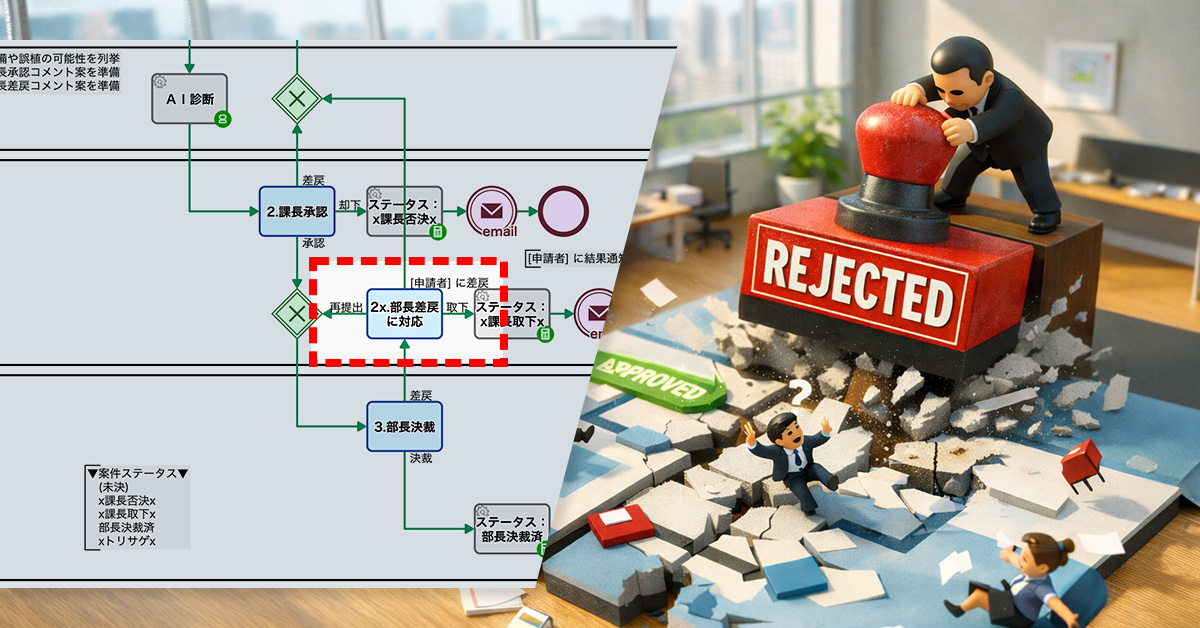
    The process owner designed a new “return-for-revision route” that allows cases to be sent back from the division manager to the section manager.

    With this design, the division manager can now choose either “approval” or “return for revision” at the decision stage. When returning a case, providing a reason is mandatory, and the case is sent back to the section manager instead of being closed.

    As a result, the section manager can review the reason for return and decide whether to resubmit, request revisions from the applicant, or withdraw the application.

    Sharing clear feedback builds organizational knowledge and improves decision-making.

    Basic Edition
    Advanced Edition
    Professional Edition
    View details of the workflow diagram
    1.Apply

    The applicant initiates a request for equipment purchase. They enter the requested amount and details, and start the approval process.

    AI Assessment

    For the application details, AI checks for possible omissions and formal deficiencies. At the same time, it automatically generates draft comments for the section manager to reference during approval.

    2.Section Manager Approval

    The section manager reviews the application details and decides whether to approve or return it for revision. They make the decision efficiently while referring to the AI-generated comment suggestions.

    3.Division Manager Approval

    The division manager makes the final decision, choosing either approval or rejection.

    Result Notification

    The decision result is automatically notified to the applicant. Whether approved or rejected, the outcome is shared promptly.

    Basic Edition
    Advanced Edition
    Professional Edition
    View details of the workflow diagram
    1.Apply

    The applicant initiates a request for equipment purchase. They enter the requested amount and details, and start the approval process.

    AI Assessment

    For the application details, AI checks for possible omissions and formal deficiencies. At the same time, it automatically generates draft comments for the section manager to reference during approval.

    2.Section Manager Approval

    The section manager reviews the application details and decides whether to approve or return it for revision. They make the decision efficiently while referring to the AI-generated comment suggestions.

    3.Division Manager Approval

    The division manager makes the final decision, choosing either approval or return for revision.

    2x. Respond to division manager’s return (request for revision)

    Based on the feedback returned by the division manager, the section manager can choose to request resubmission from the applicant, resubmit the application, or withdraw it.

    Result Notification

    The decision result is automatically notified to the applicant. Whether approved or rejected, the outcome is shared promptly.

    Before / After comparison (slider can be moved)

    3. Customers Case Study

    4. Other Business Applications

    We will enable AI-based reviews for the following tasks:

    Application to the contract review process

    Application to the investment approval workflow

    Application to the personnel evaluation approval workflow

    5. Related Posts

  • Contract Renewal Email Process Automation

    Contract Renewal Email Process Automation

    Auto-branching by contract length skips unnecessary emails, reducing workload and errors.

    1. Issue: Burden of reviewing the renewal confirmation email list

    A company currently, approximately 30 client companies have outsourcing contracts related to DX promotion support. Contract periods range from one month to about one year, and around 80% of clients renew their contracts. The sales department’s contract management staff send renewal confirmation emails to clients 60 days and 30 days before the contract end date, based on customer information registered in the system.

    These sending schedules are automatically set in advance based on the contract end date. Staff members check the delivery list ყოველდღ and send emails to the relevant clients after confirming there are no errors. However, for contracts with short durations, there is a possibility that renewal confirmation emails may be sent shortly after the contract begins, which is not appropriate.

    Therefore, staff needed to check not only the number of days remaining until the contract end date but also the contract duration each time to determine whether the email should be sent. Since this verification task occurs daily, it created a significant workload and introduced risks of judgment errors and oversight.

    2. Solution: Automatic branching based on contract duration

    The process owner incorporated a branching event before the renewal confirmation email sending step, where a decision is made based on the contract duration.

    Specifically, if the contract period is less than two months, the workflow branches to a route that skips the 60-day prior email sending step. If the contract period is less than one month, it is configured to skip the 30-day prior email sending step as well.

    Automation reduces manual checks and improves contract management efficiency.

    Basic Edition
    Advanced Edition
    Professional Edition
    View details of the workflow diagram
    Customer Registration

    The sales representative registers the customer information.

    x1.Scheduled Sending Date and Time

    The scheduled date and time for sending contract renewal confirmation emails are automatically set based on the registered customer information.

    2.Sending Approval (60 days prior)

    The contract manager reviews the email content and scheduled sending date 60 days before the contract end, and approves the email for sending after confirming there are no errors.

    Pending (60 days prior)

    The process waits until 60 days before the contract end date.

    Send 60-day prior notification email

    Send an email to the customer.

    3.Sending Approval (30 days prior)

    The contract manager reviews the email content and scheduled sending date 30 days before the contract end, and approves the email for sending after confirming there are no errors.

    Pending (30 days prior)

    The process waits until 30 days before the contract end date.

    Send 30-day prior notification email

    Send an email to the customer.

    Basic Edition
    Advanced Edition
    Professional Edition
    View details of the workflow diagram
    Customer Registration

    The sales representative registers the customer information.

    x1.Scheduled Sending Date and Time

    The scheduled date and time for sending contract renewal confirmation emails are automatically set based on the registered customer information.

    Branching

    If the contract period is two months or longer, the process proceeds to the “2. Sending Approval (60 days prior)” route. If it is less than two months, the process moves to the next branching point.

    2.Sending Approval (60 days prior)

    The contract manager reviews the email content and scheduled sending date 60 days before the contract end, and approves the email for sending after confirming there are no errors.

    Pending (60 days prior)

    The process waits until 60 days before the contract end date.

    Send 60-day prior notification email

    Send an email to the customer.

    Branching

    If the contract period is one month or longer, the process proceeds to the “3. Sending Approval (30 days prior)” route. If it is less than one month, the process proceeds to the end.

    3.Sending Approval (30 days prior)

    The contract manager reviews the email content and scheduled sending date 30 days before the contract end, and approves the email for sending after confirming there are no errors.

    Pending (30 days prior)

    The process waits until 30 days before the contract end date.

    Send 30-day prior notification email

    Send an email to the customer.

    You can move the slider

    3. Customers Case Study

    4. Other Business Applications

    We will enable AI-based reviews for the following tasks:

    Automated management of contract renewal notifications

    Subscription contract renewal management

    5. Related Posts

  • Approval Workflow Branch by Amount

    Approval Workflow Branch by Amount

    Amount-based routing reduces bottlenecks by limiting division manager approvals to high-value cases only.

    1. Issue: Decision-making concentrated on the division manager

    In the approval process for equipment purchases, a hierarchical workflow was used in which the applicant submitted a request, the section manager reviewed it, and the division manager made the final decision.

    AI-based checks for errors and the generation of draft comments had been introduced, reducing formal mistakes in applications. However, the approval workflow itself had not been revised, and the division manager consistently remained responsible for the final decision. As a result, the bottleneck in the approval process was not structurally resolved.

    Since all cases, regardless of amount, required the division manager’s approval, requests were constantly concentrated at that level. The division manager had to process a large number of cases in a short time, making it difficult to secure sufficient time for careful review—especially for high-value cases that would normally require more thorough consideration.

    2. Solution: Branching approval routes based on amount thresholds

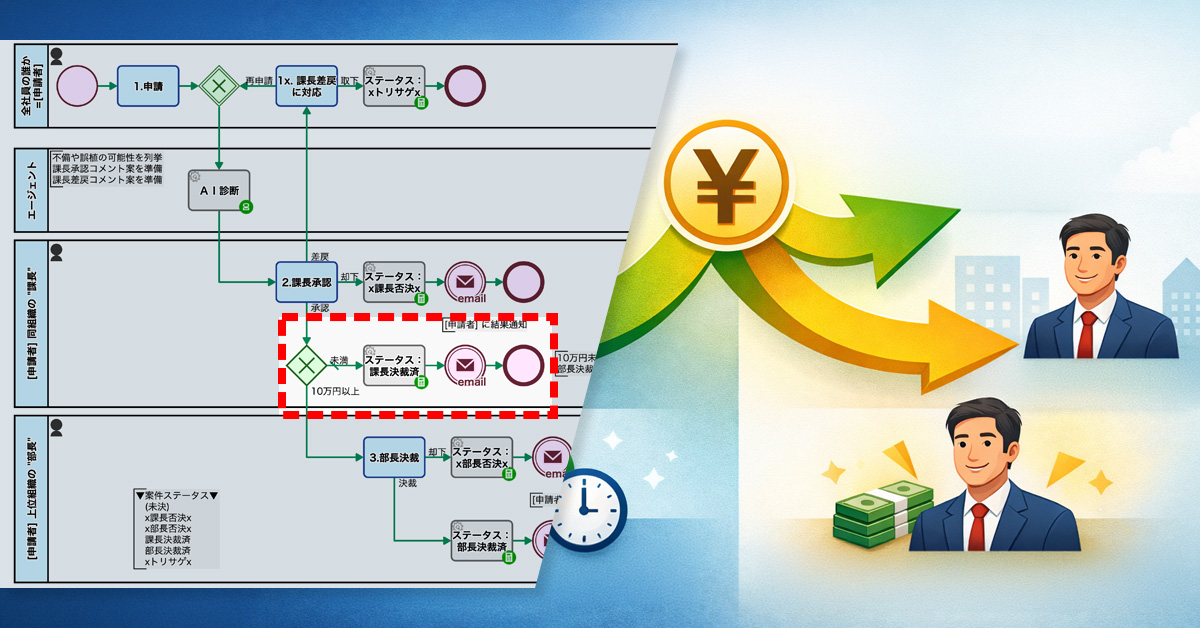
    The process owner incorporated amount-based branching into the approval workflow. The approval route is automatically determined based on the amount entered by the applicant.

    As a result, cases under 100,000 yen are completed with section manager approval, while only cases of 100,000 yen or more proceed to division manager approval.

    Faster processing by completing small cases at the section manager level.

    Basic Edition
    Advanced Edition
    Professional Edition
    View details of the workflow diagram
    1.Apply

    The applicant initiates a request for equipment purchase. They enter the requested amount and details, and start the approval process.

    AI Assessment

    For the application details, AI checks for possible omissions and formal deficiencies. At the same time, it automatically generates draft comments for the section manager to reference during approval.

    2.Section Manager Approval

    The section manager reviews the application details and decides whether to approve or return it for revision. They make the decision efficiently while referring to the AI-generated comment suggestions.

    3.Division Manager Approval

    The division manager makes the final decision.

    Result Notification

    The decision result is automatically notified to the applicant. Whether approved or rejected, the outcome is shared promptly.

    Basic Edition
    Advanced Edition
    Professional Edition
    View details of the workflow diagram
    1.Apply

    The applicant initiates a request for equipment purchase. They enter the requested amount and details, and start the approval process.

    AI Assessment

    For the application details, AI checks for possible omissions and formal deficiencies. At the same time, it automatically generates draft comments for the section manager to reference during approval.

    2.Section Manager Approval

    The section manager reviews the application details and decides whether to approve or return it for revision. They make the decision efficiently while referring to the AI-generated comment suggestions.

    Branching based on amount thresholds

    After the section manager’s approval, the approval route is determined based on the requested amount. Requests under 100,000 yen are completed with section manager approval, while only requests of 100,000 yen or more proceed to division manager approval.

    3.Division Manager Approval (for cases of 100,000 yen or more)

    Only when the requested amount is 100,000 yen or more does the division manager make the final decision. This setup allows the division manager to focus on high-value or exceptional cases.

    Result Notification

    The decision result is automatically notified to the applicant. Whether approved or rejected, the outcome is shared promptly.

    Before / After comparison (slider can be moved)

    3. Customers Case Study

    4. Other Business Applications

    We will enable AI-based reviews for the following tasks:

    Approval workflow for business trip and expense requests

    IT account issuance request

    5. Related Posts

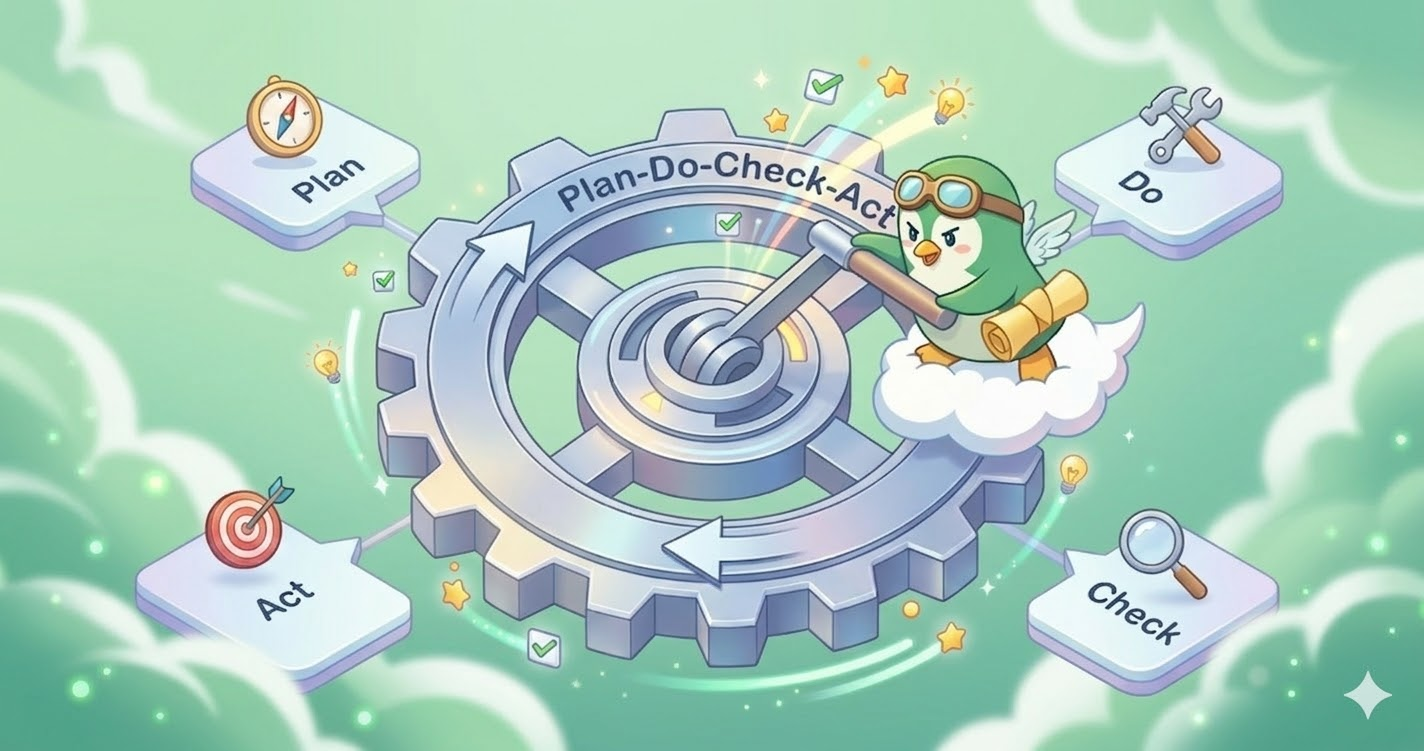
  • 「PDCA サイクル」と「BPM サイクル」は何が違うのか?

    「PDCA サイクル」と「BPM サイクル」は何が違うのか?

    ビジネスプロセスの改善に終わりは来ない。「改善」の先には、また新たな「課題」が見つかる。

    PDCA サイクルって何だっけ?

    「継続的に改善し続ける」という考え方だ。たとえば、次のような違和感はすべて改善テーマになり得る。

    • A. 顧客からクレームが来た
    • B. セールスチームの成果が伸びない
    • C. せっかく内定を出しても辞退されてしまう
    • D. 毎朝「スマホ探し」の時間がかかってしまっている…

    そして『課題』を感じた瞬間こそが、PDCA プロジェクトを立ち上げるチャンスとなる。(Plan ⇒ Do ⇒ Check ⇒ Act ⇒ Plan ⇒ …)

    改善テーマA: 食品工場の衛生管理

    • Stage.0 (課題設定): 顧客から「毛髪混入」のクレームがあった。食品加工工場としては信頼失墜の危機。再発防止が大目標。
    • Stage.1 (Plan): 「Selfチェックは甘くなる」の仮説を立て、作業者同士がペアを組む「Buddyチェック制度」を設計した。毛髪はみ出しやローラーの掛け残しを互いに確認し合う。30日間の毛髪ゼロが目標。
    • Stage.2 (Do): 一部の工場にて「Buddyチェック制度」を運用し、抜き取り検査を強化した。
    • Stage.3 (Check): 1か月後、検査結果および顧客フィードバックを集計し、毛髪混入ゼロを確認した。なお、副次効果として、互いの身だしなみを確認する文化が生まれ、小さな異常やミスも指摘しやすい雰囲気が醸成された。
    • Stage.4 (Act): 工場の「衛生管理標準」を公式に改訂し「Buddyチェック」を新入社員の教育カリキュラムとして完全に組み込んだ。毛髪以外の異物(作業服の繊維、手袋の破片など)についても管理を強化すべきではないかという議論が生まれ、新たな課題としてチームで認識された。

    改善テーマB: セールス商談の競合負け

    • Stage.0 (課題設定): 失注理由「価格面で競合に負けた」の割合が増加傾向にある。
    • Stage.1 (Plan): 新人メンバが「強みを伝えきれていない」という仮説を立て、「費用対効果が明確化された提案書ひな型」を新たに開発した。「成約率20%→25%」を目標とした。
    • Stage.2 (Do): 一部の営業チームに、新しい提案書ひな型を導入した。同時に、顧客ごとにコスト削減額・業務時間削減を数値で説明するよう徹底した。
    • Stage.3 (Check): 1か月後、商談数・成約率・失注理由を分析した。「価格が高い」という理由での失注は減少しておりROI説明の効果は一定程度確認された。一方で、成約率自体は20%のままであり、価格以外の要因が成約に影響している可能性が示唆された。
    • Stage.4 (Act): 新しい提案書と説明手法を全営業チームに展開し、営業マニュアルに組み込んだ。同時に「そもそも商談昇格の認識にバラツキがある」という新たな課題がチーム内で認識された。

    改善テーマC: 新卒採用の内定辞退

    • Stage.0 (課題設定): 近年、内定辞退率が高い。今年は、予定人数を確保できなかった。
    • Stage.1 (Plan): 「内定後も会社を知ってもらう企画が必要では?」という意見をもとにフォロー施策を企画した。「内定辞退率30%→15%へ」を目標とした。
    • Stage.2 (Do): 内定者に対し「職場見学&社員交流会」というフォロー施策イベントを実施した。
    • Stage.3 (Check): 内定辞退理由を分析した結果、内定辞退率30%→20%で目標には届かなかった。しかし「仕事内容への理解不足」を理由とする辞退は減少した。
    • Stage.4 (Act): フォロー施策イベントを次年度の標準プロセスに組み込んだ。同時に「入社後のキャリアイメージが不明確」という声が一定数あることが分かった。

    改善テーマD: 朝のドタバタ

    • Stage.0 (課題設定): しばしばスマホが行方不明になる。特に朝。布団の中、ソファの隙間、まれに冷蔵庫の上。
    • Stage.1 (Plan): ベッド脇に「スマホ専用トレー」を設置し、使用後は必ずそこに置くルールを設定した。「朝の探索3分→10秒」が目標。
    • Stage.2 (Do): 「ここに置け」と書いたメモをトレーに貼り付けたうえでルールを運用した。
    • Stage.3 (Check): 1か月経過後も、スマホ探索時間ゼロを維持した。朝の出発はスムーズになった。ただ、鍵の行方不明が顕在化した。
    • Stage.4 (Act): トレーを「スマホ・鍵・財布トレー」に拡張し、生活標準プロセスとして正式採用した。しかし、寝る直前までスマホを触れてしまうことが、夜更かしを助長しているのではないか?ひいては朝のドタバタを助長しているのではないか?という新たな課題を感じるに至った。

    もっとも重要な Stage は?

    PDCA サイクルは「次の Plan に繋げる」のが難しい。

    つまり、1回目の「Stage.1 (Plan)」には『課題』(← Stage.0)があった。しかし、2回目の「Stage.1 (Plan)」に『課題』が曖昧になってしまうのだ。 (※ Stage.0 ⇒ Stage.1 ⇒ Stage.2 ⇒ Stage.3 ⇒ Stage.4 ⇒ Stage.1 ⇒ …)

    PDCA が回らなくなってしまう最大原因は『課題の消失』。n周目のStage.4(と Stage.3)は、(n+1)周目の Stage.0 を兼ねているということを自認し続けなければならない。

    BPM サイクルとは?

    「PDCA サイクル」が改善一般のフレームワークであるのに対し、「BPM サイクル」はビジネスプロセスの改善に焦点を当てた考え方だ。(※ Business Process Management)

    「BPM サイクル」も、出発点はやはり『課題』の認識である。

    改善テーマX: 問合対応プロセス

    • Stage.0 (課題設定): 既存顧客から「対応が遅い」とのクレーム。たしかに緊急対応すべき問い合わせだった。
    • Stage.1 (Plan): プロセスオーナーは「CS担当者によって緊急度の認識にバラツキがある」の仮説を立て、「AIによる緊急度自動判定工程」を追加した。AIが「最も緊急度が高い」と判定した問い合わせは「60分以内に一次回答」を目標とした。
    • Stage.2 (Do): すべてのメール問い合わせが「緊急度」で自動分類されるようになった。
    • Stage.3 (Check): 2週間の運用後、一次回答までの所要時間と顧客満足度を分析した。すべての緊急問い合わせが60分以内に回答されていた。所要時間の短縮と顧客満足度の改善を確認した。
    • Stage.4 (Act): 回答担当者からのフィードバックを受け、AI判定の精度向上に取り組んだ。一方で、「緊急度だけでなく難易度も判定されるべき」との意見が上がった。

    改善テーマY: 稟議決裁プロセス

    • Stage.0 (課題設定): ヒューマン工程「課長承認」の滞留時間が長い。意思決定が遅い。
    • Stage.1 (Plan): 「承認コメントや差戻コメントの作文に時間を要しているようだ」とプロセスオーナーは考えた。承認工程の前に「AIが承認・差戻コメントの両方を準備」を追加した。
    • Stage.2 (Do): 「承認コメント案」と「差戻コメント案」がAIによって自動生成されるようになった。課長は、必要に応じて修正して、承認できるようになった。
    • Stage.3 (Check): 2週間の運用後、承認までのリードタイムと滞留時間を分析した。その結果、コメント作成にかかる時間が削減され、特に軽微な案件において承認スピードが向上したことを確認した。
    • Stage.4 (Act): 課長からは「判断の視野が広がった」といった肯定的なコメントが投稿されるようになった。申請者からは「不適切なコメントでは?」といった否定的なフィードバックも散見されるようになった。

    改善テーマZ: Webコンテンツ更新プロセス

    • Stage.0 (課題設定): コピペミスによって、ブログ原稿の「最終章」が無い状態で公開されてしまった。
    • Stage.1 (Plan): プロセスオーナーは「人間コピペ」ではミスは避けられないと判断した。「下書き作成」(WordPress.com)を自動化した。コピペ漏れゼロを目標にした。
    • Stage.2 (Do): ワークフローで承認された原稿(タイトル・本文・抜粋)が WordPress.com の下書き記事として自動登録されるようになった。公開担当者はレイアウトデザインに集中できるようになった。
    • Stage.3 (Check): 1か月経過しても、コピペ漏れや章抜けといった単純ミスは発生しなかった。公開作業の所要時間も大幅に短縮されるようになった。
    • Stage.4 (Act): ブログ原稿以外もこのワークフローが活用されるようになった。公開作業がスムーズになった一方で、文章表現の品質レビューに対する要望が増えた。AIレビューが必要では?という意見も出るようになった。

    改善テーマW: 受注対応プロセス

    • Stage.0 (課題設定): 注文書の内容を手作業で登録している。登録ミスが後を絶たない。
    • Stage.1 (Plan): プロセスオーナーは、注文メール受信で自動的にワークフローが開始されるように変更した。また、AI工程「注文内容抽出」を追加し、注文内容がプリセットされるようにした。「受注登録ミス率10%→4%」を目標とした。
    • Stage.2 (Do): 営業担当の作業は、「注文書の内容」を登録する作業から、「注文書の内容」と「プリセットされた注文内容」を見比べてチェックする作業に変わった。
    • Stage.3 (Check): 商品コード・数量・納期の登録ミスは大きく減り、ミス率は1%に減少した。
    • Stage.4 (Act): 営業担当のフィードバックによれば、「注文内容自体が誤っているケース」があることが分かった。見積内容との照合(差異チェック)を自動化すべきではないかという新たな課題がチーム内で認識された。

    もっとも重要な Stage は?

    「BPMサイクル」でも、『次の課題』を明確にし続けることが大切だ。

    n周目のStage.4(と Stage.3)は、(n+1)周目の Stage.0 を兼ねているということを自認し続けなければならない。

    BPM サイクルには BPM スイートが重要になる

    こうした「BPM サイクル」を現実の業務で回し続けるには、設計・実行・監視・改善を支える基盤が必要になる。

    たしかに「BPM サイクル」を人手だけで回すことは不可能ではない。しかし効率よく回すためには、PDCA の各ステージを支える機能を一式で提供する「BPM スイート」が便利だ。たとえば “Office Suite” は、ドキュメント・表計算・スライドアプリを一式まとめて提供している。

    『Questetra BPM Suite』では、次のような機能を提供している。

    Plan (Design):

    • フロー設計機能: プロセスオーナーは、ビジネスプロセスやビジネスデータをモデリングする。結果、業務の流れやデータ項目が「見える化」される。
      • 分岐設定、メール自動送信設定、メール待ち受け設定、フォーム待ち受け設定、PDF自動生成設定、子プロセス連携設定、ECMAScript処理設定、など
    • 割り当てルール編集機能: プロセスオーナーは、各工程のタスク処理候補者(引き受けルール)を設定する。
    • 業務データ編集機能: 文字列型、数値型、日付型、日時型、ファイル型、テーブル型、など。
    • ※ IT業務統制機能、プロセスデザイン機能などとも呼ばれる。ワークフロー図の定義には国際標準記法 BPMN が活用されることが多い。
    • ※ 単に、モデリング機能、Design-Time 機能、設計機能、開発機能と総称されることもある。

    Do (Execute):

    • リリース機能: プロセスオーナーは、モデル(ワークフローアプリ)を業務システムとして運用し、適宜バージョンアップする。
    • タスク処理機能: 一般社員は、マイタスクを処理する。自分に割り当てられたタスクを、そのまま日常業務として処理できる。
    • ※ 単に、ワークフロー機能、Runtime 機能、実行機能、運用機能と総称されることもある。

    Check (Monitor):

    • 進捗ステータス確認機能: 実行中プロセスの個別の進捗を監視する。今どの工程まで進捗しているのかを把握できる。
    • ヒートマップ機能: 実行中プロセスの全体分布を監視する。今どの工程が渋滞しているのかを確認できる。
    • 実績データ集計機能: 全工程完了プロセスの実績(ボトルネック等)を確認する。次の改善ポイントを見つけやすくなる。
    • ※ 単に、モニタリング機能、ステータスモニタリング機能、パフォーマンスモニタリング機能と総称されることもある。
    • ※ 主に Runtime に活用されるが、次の Design-Time に向けた見直しにも役立つ。

    Act (Optimize):

    • チームチャット機能: チーム内のメンバとチャットできる。要員配置や要員シフトについて議論しやすい。
    • アプリチャット機能: ワークフローアプリと紐づけてチャットできる。改善の気づきを蓄積・共有しやすい。
    • 案件チャット機能: プロセスと紐づけてチャットできる。案件固有の事情を共有しやすい。
    • カスタムチャンネル機能: 特定の話題に絞って議論しやすい。
    • ※ 単に、社内チャット機能と総称されることもある。
    • ※ プロセスオーナーは、進捗状況や実績データをもとに、必要に応じて Runtime におけるリソース配分や担当人数を最適化する。
    • ※ プロセスオーナーは、ワークフローアプリの課題を認識し、次の Design-Time のヒントとする。

    なお、BPM の世界では、「Plan ⇒ Do ⇒ Check ⇒ Act」を「Design ⇒ Execute ⇒ Monitor ⇒ Optimize」と呼称することもある。しかし、それらの本質は変わらない。

    まとめ

    PDCA も BPM も、「課題に気づき、改善を繰り返す」という考え方だ。しかし実際には、その改善は人やチームの意識に依存しやすく、いつの間にか次の課題が曖昧になり、サイクルが止まってしまうことも少なくない。

    とくに BPM の場合は、「ビジネスプロセスそのものを改善する」という、より難易度の高い取り組みになる。業務の流れや役割分担、データの扱いまで含めて見直す必要があり、属人的な運用のままでは継続的に回し続けることは難しい。

    だからこそ、Check(監視)や Act(改善)のステージは、ITシステムによって支えられるべき領域である。プロセスの進捗や実績データを可視化し、ボトルネックや課題を継続的に把握できる環境があってこそ、次の改善につなげることができる。

    BPM スイートは、こうした設計・実行・監視・改善のサイクルを一体として支え、改善を日常業務の中で回し続けるための基盤となる。継続的な業務改善を実現するためには、「気づいたら改善する」のではなく、「改善が回り続ける仕組みを維持する」ことが重要だ。

  •  [Case Study] Nippon Light Metal Streamlines Quality Assurance with Questetra, Eliminating Bottlenecks and Driving Business Process Reform

     [Case Study] Nippon Light Metal Streamlines Quality Assurance with Questetra, Eliminating Bottlenecks and Driving Business Process Reform

     [Release Date: March 24, 2026 / Source: Questetra, Inc.]

    Questetra, Inc. (Headquarters: Nakagyo-ku, Kyoto; CEO: Genichi Imamura), provider of the cloud-based Business Process Management Suite (SaaS BPMS) “Questetra BPM Suite,” has published a case study detailing Nippon Light Metal Company, Ltd.’s (Headquarters: Minato-ku, Tokyo; President: Ichiro Okamoto) successful implementation of their system.

    Nippon Light Metal’s Quality Assurance Group at the Kambara Electrical Material Center has digitized processes previously managed with paper and email, enabling real-time progress tracking. They have already developed around 20 applications, including solutions for complaint handling and blueprint registration, significantly accelerating business improvements driven by employees in the field. We interviewed key personnel to understand the reasons behind the implementation and its specific benefits.

    Case Study Page: https://questetra.com/en/customers/nikkeikin-202602-en/

    Nippon Light Metal Company, Ltd.

    Background: Breaking Down Progress “Black Boxes” and Reducing Data Entry Burden

    The Quality Assurance Group is responsible for managing the quality assurance system, issuing inspection reports, and handling customer complaints. Addressing reported issues requires collaboration across multiple departments.

    Previously, relying on paper and email made it difficult to track progress, leading to a “black box” effect where it was unclear which tasks were stalled, where, and why, resulting in delays. Furthermore, redundant data entry and transcription placed a significant burden on staff.

    Why Questetra: Focusing on Flow Management, Not Just Task Management

    After evaluating various tools to advance business reform through digital transformation (DX), we selected Questetra. A key deciding factor was Questetra’s design philosophy, which emphasizes viewing business processes not simply as record management, but as a continuous flow connecting seamlessly to subsequent stages.

    Nippon Light Metal also highly valued the platform’s flexibility, allowing field personnel to create applications independently without the need for coding skills, and the ability to quickly identify bottlenecks using features like heatmaps and search functions.

    Implementation Results: Empowering Field-Driven Improvement

    Starting with a simple “Attendance Report” application, Nippon Light Metal has now developed approximately 20 applications, including “Defect Notifications”, “Calibration Management”, and “Drawing Registration”, with about 10 currently in active use.

    • Real-Time Progress Tracking:
      Visualizing the status of each process has enabled timely follow-up and effectively identified bottlenecks.
    • Significantly Improved Operational Efficiency:
      Digitalization has reduced the time-consuming tasks of data transcription and cumbersome approval procedures.
    • Empowered Field Improvement Discussions:
      Leveraging web form functions allows them to gather feedback even from workers without a Questetra account, fostering field-driven discussions on continuous improvement.

    About Questetra BPM Suite

    Questetra BPM Suite is a cloud-based Business Process Management System (SaaS BPMS).

    Users can develop and operate workflow systems entirely through a web browser, without requiring any programming knowledge (coding skills). This empowers business departments to continuously improve their business processes independently.

    Typical business processes, such as approval requests, quotation submissions, and inquiry handling, can be created as workflow systems using a no-code approach. Furthermore, integration with generative AI allows for the automation of tasks such as automatic draft document generation and generating draft response proposals.

    Company Info

    Nippon Light Metal Company, Ltd.

    Location

    Minato-ku, Tokyo

    Representative

    Ichiro Okamoto

    Business Activities

    Manufacture and sale of alumina, aluminum hydroxide, various chemicals, and aluminum ingots/alloys. etc.

    Established

    1939

    Questetra, Inc.

    Location

    Nakagyo-ku, Kyoto

    Representative

    Genichi Imamura

    Business Activities

    Development and provision of cloud-based business process management systems (SaaS BPMS)

    Established

    2008

  • 【事例紹介】日本軽金属、「Questetra BPM Suite」の導入で、品質保証の「停滞」を解消。

    【事例紹介】日本軽金属、「Questetra BPM Suite」の導入で、品質保証の「停滞」を解消。

    クラウド型業務プロセス管理システム(SaaS BPMS)「Questetra BPM Suite」を提供する株式会社クエステトラ(本社:京都市中京区、代表執行役CEO:今村 元一、以下、当社)は、 日本軽金属株式会社(本社:東京都港区、代表取締役社長:岡本 一郎、以下、日本軽金属)に対する導入事例インタビューを公開しました

    日本軽金属 蒲原電材センター 品質保証グループは、紙やメールに依存していた業務プロセスをデジタル化し、進捗をリアルタイムに把握できる環境を整備。現在までに、苦情対応や図面登録など約20件のアプリを構築し、現場主導の業務改善を加速させています。  導入の経緯から具体的な効果まで、ご担当者にお話をうかがいました。

    導入事例ページ:https://questetra.com/ja/customers/nikkeikin-202602/

    日本軽金属本社

    導入の背景:進捗の「ブラックボックス化」と転記作業の負担

    品質保証グループでは、品質保証体制の管理、検査成績表の発行、顧客からの苦情・クレーム対応などの業務を行っています。各業務において報告された問題は複数部門と連携しながら改善を推進しています。

    従来は紙やメールでのやり取りが中心だったため、「どの業務が、どこで、なぜ止まっているか」が外部から見えにくく、対応の遅延を招く要因となっていました。また、二重の入力や転記といった非効率な作業も現場の負担となっていました。

    選定理由:業務を「管理」するのではなく「流れとして回す」

    DXによる業務改革を進めるためのツールを検討した結果、Questetraを採用しました。

    決め手となったのは、単なる記録管理ではなく、業務を「流れ(プロセス)」として捉え、確実に次工程へ繋げる設計思想です。

    ノーコードで現場がアプリを自作できる柔軟性に加え、ヒートマップや検索機能で「滞留ポイント」を即座に把握できる点が社内で高く評価されました。

    導入効果:現場が「自分たちの手で」改善を回す仕組みへ

    「出退勤報告」からスモールスタートし、現在は「不具合連絡」「校正管理」「図面登録」など約20件のアプリを作成。うち約10件が実運用されています。

    • 進捗のタイムリーな把握:
      業務状況が可視化され、適切なフォローが可能になったことでボトルネックが明確化。
    • 業務効率の大幅向上:
      デジタル化により、煩雑な転記作業や承認手続きの手間を削減。
    • 現場改善の議論が活発化:
      Webフォーム機能を活用し、アカウントを持たないメンバーからも情報を収集。現場主導で「どう改善すべきか」の議論が生まれています。

    今後の展望:AI工程の組み込みによる更なる高度化

    今後は、若手社員を中心にアプリ開発の輪を広げ、現場主導の改善をさらに定着させていく方針です。また、将来的な展望として、蓄積されたデータのAIエージェント機能による自動分析や、業務の自動化など、さらなる品質向上に向けた仕組みづくりも検討しています。

    Questetra BPM Suiteについて

    Questetra BPM Suite は、クラウド型の業務プロセス管理システム (SaaS BPMS) です。ワークフローシステム(ワークフローアプリ)の開発および運用が、Webブラウザだけで完結します。プログラミングの知識(Codingスキル)は必要ありません。業務部門が主体となって、継続的に業務プロセスを改善できます。

    稟議申請や見積提出、問い合わせ対応などの定型業務プロセスを、ワークフローシステムとしてノーコードで作成できます。さらに、生成AIを組み込むことで、「ドラフト文書の自動生成」や「回答案の草案作成」といった知的作業の自動化も実現できます。

    会社概要

    日本軽金属株式会社

    所在地

    東京都港区

    代表

    代表取締役社長 岡本 一郎

    事業内容

    アルミナ、水酸化アルミニウム、各種化学品、アルミ地金・合金の製造・販売、アルミ板製品、輸送関連製品、電子材料等の製造・販売

    設立

    1939年

    株式会社クエステトラ

    所在地

    京都市中京区

    代表

    代表執行役CEO 今村 元一

    事業内容

    クラウド型業務プロセス管理システム (SaaS BPMS) の開発・提供

    設立

    2008年

    本プレスリリースに関する問い合わせ

    pr@questetra.com or 075-205-5007