ブログ

  • Google Icon: Material Icons & Material Symbols

    Google Icon: Material Icons & Material Symbols

    Icons have the potential to overcome language barriers because they can be understood by everyone, and they can be understood immediately. And now, in 2022, Google Icons seem to have moved. I’m a little late to the game, but I’m going to give it a try right away.

    0. Material Symbols

    I’m really interested in Material Symbols, which is the latest icon system.

    When I see something like Variable Font Technology I want to look it up.

    Say hello to the newest iconography using variable font technology, Material Symbols! Available in 3 styles: Outlined, Rounded and Sharp. Each provides 4 stylistic attributes: Weight, Fill, Optical size, and Grade. Check out the full library at http://fonts.google.com/icons

    [icon name=”twitter” prefix=”fa-brands”] 2022-04-21 Google Fonts https://twitter.com/googlefonts/status/1516934123700383744

    1. The Possibilities of Icons

    Icons (pictograms) are indispensable to human society.

    • Road signs
    • Danger signs ⇒ ISO 7010
    • Olympic event guides
    • Pictograms…

    In recent years a common understanding has developed in the IT industry, that

    • settingsThe gear icon is the settings menu
    • menuThe three-line icon (⇔ hamburger icon) is the main menu

    In the future, the dependence on languages will decrease more and more. If the standardization of icons continues at this rate, it may become possible to use any language without feeling uncomfortable, even if the appropriate language is not selected. (Maybe the day is not far off when all mankind will be operating with the same interface.)

    Is it because of the spread of smartphones with narrow screens? In any case, the culture of the last century of explaining things clearly with words has completely gone out of fashion.

    2. Are There Any Easy to Use Icons?

    All systems/software in the world should use the same icons. (originality should be kept to a minimum)

    • Accessible to all
    • Easy to use
    • Free to use

    Such an icon collection continues to be anticipated. As of today, the most promising are:

    • Font Awesome and
    • Google Fonts Material Icons

    And in 2022, a sister collection to Google Fonts Material Icons appeared.

    • Google Fonts Material Symbols

    ※ It is more like a parent-child version (i.e. slightly higher) than a sister version (where both are equal).

    The Material Symbols font is the variable version of the Material Icons font.

    https://material.io/blog/introducing-symbols (2022-04-19)

    Incidentally, Questetra’s website uses Font Awesome, and in 2018 the company became a user of the paid version (Font Awesome Pro). In addition, Questetra products have recently introduced Google Fonts Material Icons by Google Inc. All the operation screens already have Google Icons (I think).

    3. Variable Font Technology!?

    In layman’s terms, it is a technology that covers the variation/customization of:

    • FILL axis: Fill or not (Fill)
    • wght axis: 7 levels of Weight (thickness)
    • GRAD axis: Grade 3 levels (degree of embossment)
    • opsz axis: Size 4 steps (size)

    ※ It does not cover the differences in shape (Outlined, Rounded, and Sharp).

    ★ For example, the “unselected” and “selected” states of an icon can be achieved by changing the CSS style from FILL 0 to FILL 1.

    ★ When “Fill” was made an on-off variable (0-1 variable), the two-tone icon (e.g.email) that existed in the Material Icons era could no longer exist (← the price of evolution).

    <div style="font-variation-settings: 'FILL' 0, 'wght' 700;">
    <div style="font-variation-settings: 'FILL' 1, 'wght' 700;">

    In other words, what used to be done by replacing the unselected state icon with a selected state icon can now be done by changing a single icon.

    • Animation “Web Animations API animate()” and other useful things!
    • It may be useful for expressing pointer hover (CSS : hover), etc.!

    Android’s Material Design icon font supports variable font technology
    ~4 styles in a single font file~

    https://forest.watch.impress.co.jp/docs/news/1404656.html

    Incidentally, an unfilled email in global standard Business Process Management Notation (BPMN) means incoming (Catch). A filled email means sending (Throw). Material Symbols can be displayed with the same font data! (How cool is that?)

    ▽ “Static font” mode

    ▽ “Variable font” mode

    4. Better to Learn By Doing!

    Google Fonts Material Symbols will be used in many fields.

    The mere mention of being able to reduce the amount of font data is attractive enough. (Just the mention that it was created by Google?)

    Therefore, I set up Google Fonts’ icon font Material Symbols and (Material Icons) so that they can be displayed on websites.

    • help_outline What icons are available in Google Fonts Material Icons?
    • What icons are available in Google Fonts Material Symbols?
    • How well does Google Fonts work with WordPress?
    • What operations are required to edit a WordPress post?
    • How is it different from FontAwesome?
    • Where should icons be used in HTML text?
    • And what is the point of having them alongside FontAwesome?

    Questetra uses the cloud service WordPress.com (WordPress theme: Astra) as its Content Management System (CMS).

    5. Directions

    Basically, all you have to do is select an icon in the respective gallery and embed the code that appears. Material Symbols, Font Awesome and Material Icons are not all that different from each other.

    5-0. In the Case of Material Icons

    If you type <span class="material-icons">settings</span>

    The filled character settings will be displayed.

    If you type <span class="material-icons-outlined">settings</span>

    The outlined character settings will be displayed.

    (Note: Default Filled and Outlined are treated as different shapes.)

    5-1. In the Case of Material Symbols

    If you type <span class="material-symbols-outlined">settings</span>

    settings will be displayed.

    If you type <span class="material-symbols-outlined" style="font-variation-settings: 'FILL' 1;">settings</span>

    settings will be displayed.

    5-2. In the Case of Font Awesome

    If you type <i class="fa-solid fa-gear"></i>

    [icon name=”gear” prefix=”fa-solid”] will be displayed. Incidentally, if you have installed the Plugin, you may enter [[icon name="gear" prefix="fa-solid"]].
    6. Troubles that Occurred

    6-1. Icon display position shifts up and down

    WordPress administrative privileged users are to be set up with reference to the documentation.

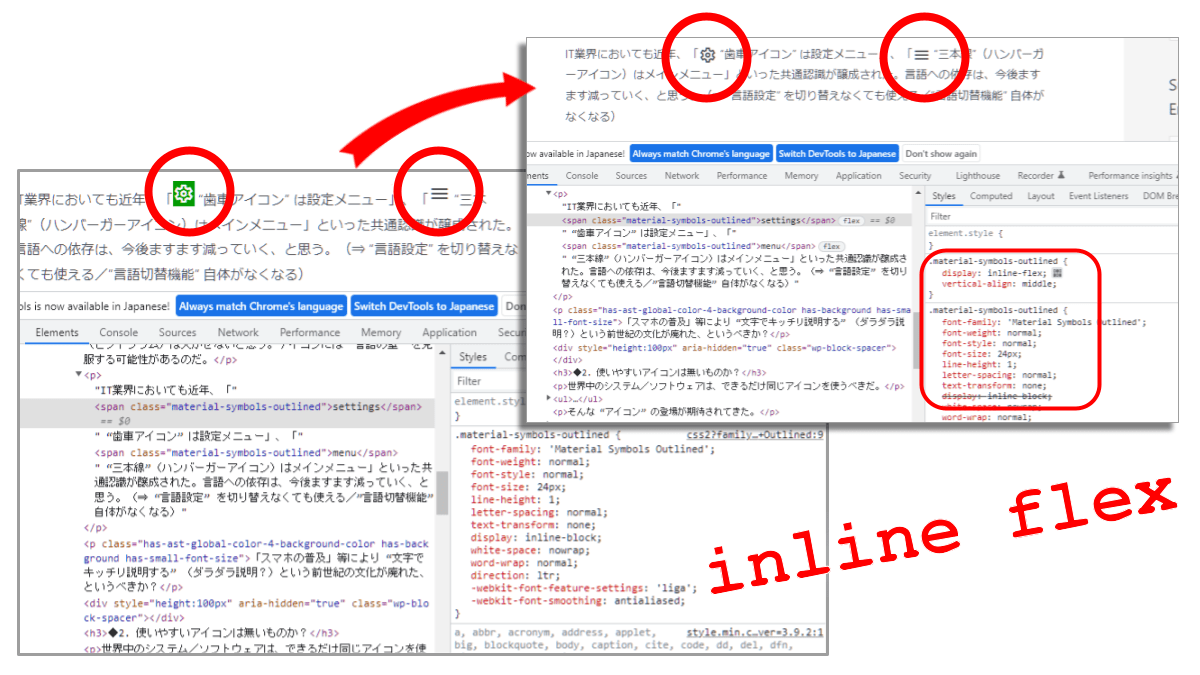
    However, when used as is, there was a discrepancy. It seems that the reason is that the setting is 「line-hight:1, display:inline-block, …」. Although the intention is unclear, this trouble is avoided by applying the netizens’ recommendation of (↓ Static font / Variable font):

    • display: inline-blockdisplay: inline-flex
    • vertical-align: middle
    <link href="https://fonts.googleapis.com/icon?family=Material+Icons" rel="stylesheet">
    <link href="https://fonts.googleapis.com/icon?family=Material+Icons+Outlined" rel="stylesheet" />
    <link href="https://fonts.googleapis.com/css2?family=Material+Symbols+Outlined" rel="stylesheet" />
    <style type="text/css" id="material-css-nandezurennen">
    .material-icons { display: inline-flex; vertical-align: middle; }
    .material-icons-outlined { display: inline-flex; vertical-align: middle; }
    .material-symbols-outlined { display: inline-flex; vertical-align: middle; }
    </style>
    <link href="https://fonts.googleapis.com/icon?family=Material+Icons" rel="stylesheet">
    <link href="https://fonts.googleapis.com/icon?family=Material+Icons+Outlined" rel="stylesheet" />
    <link href="https://fonts.googleapis.com/css2?family=Material+Symbols+Outlined:opsz,wght,FILL,GRAD@20..48,100..700,0..1,-50..200" rel="stylesheet" />
    <style type="text/css" id="material-css-nandezurennen">
    .material-icons { display: inline-flex; vertical-align: middle; }
    .material-icons-outlined { display: inline-flex; vertical-align: middle; }
    .material-symbols-outlined { display: inline-flex; vertical-align: middle; }
    </style>

    6-2. Compatibility with WordPress Editor is Not Good

    Like Font Awesome, Material Symbols (and Material Icons) are incompatible with the WordPress editor (Gutenberg).

    Currently, if you use “Edit as HTML” for each block to input span tags, the input you have written may be rewritten. In particular, multi-level listings cannot be input.

    It is a hassle to enter span tags when editing as HTML to begin with. Font Awesome is a stable editing tool because you don’t have to switch to Edit as HTML by entering a shortcode. (⇒Material Symbols (and Material Icons) should also be made into a plug-in)

    6-3. The range of CSS loading that should be there is troubling

    • 0. Don’t use Material Symbols
    • 1. I want to use Material Symbols as a Static font
    • 2. I want to use Material Symbols as Variable font

    It depends on each page. If you want to compose various axes in a static font and want to control it in detail, does the writer themself decide the range to be read (in number..number format)? (This is too cumbersome, tedious & difficult to maintain.)

    However, the font file (WOFF2) for the whole pattern is almost 10 times larger, 2026KB. (Should we assume that there is only one?)

    ▽ For the time being, all patterns should be considered…?

    <link href="https://fonts.googleapis.com/icon?family=Material+Icons" rel="stylesheet">
    <link href="https://fonts.googleapis.com/icon?family=Material+Icons+Outlined" rel="stylesheet" />
    <link href="https://fonts.googleapis.com/css2?family=Material+Symbols+Outlined:opsz,wght,FILL,GRAD@20..48,100..700,0..1,-50..200" rel="stylesheet" />
    <style type="text/css" id="material-css-nandezurennen">
    .material-icons { display: inline-flex; vertical-align: middle; }
    .material-icons-outlined { display: inline-flex; vertical-align: middle; }
    .material-symbols-outlined { display: inline-flex; vertical-align: middle; }
    </style>

    (The trick of loading that Font family again in the middle of an article does not work)

    <!-- loads the entire Variable Font -->
    <link href="https://fonts.googleapis.com/css2?family=Material+Symbols+Outlined:opsz,wght,FILL,GRAD@20..48,100..700,0..1,-50..200" rel="stylesheet" />

    6-4. The Japanese in the manual is strange

    Sometimes it says, “Hmmm…” (It’s usually the readers who are annoyed.)

    7. Experimenting With All Kinds of Things…

    ※ If you have any requests, I’d love to hear them!

    There is still very little information on how to use the site. At any rate, I think the Official website [icon name=”arrow-up-right-from-square” prefix=”fas”] is a must-read.

    • Material Symbols guide
      • Using Material Symbols
        • Use in Web
          • Static font with Google Fonts
          • Variable font with Google Fonts
          • Self-hosting the font
          • Using the icons in HTML
          • Styling icons in Material Design
        • Use in Android
        • Use in iOS
        • Use in Flutter
    <span class="material-symbols-outlined"
    >add_circle</span>
    
    <span class="material-symbols-outlined"
     style="font-variation-settings: 'FILL' 1;"
    >add_circle</span>
    
    <span class="material-symbols-outlined"
     style="font-variation-settings: 'opsz' 48;"
    >add_circle</span>
    
    <span class="material-symbols-outlined"
     style="font-variation-settings: 'FILL' 0, 'opsz' 40;"
    >add_circle</span>
    
    <span class="material-symbols-outlined"
     style="font-variation-settings: 'wght' 700, 'opsz' 40;"
    >add_circle</span>
    
    <span class="material-symbols-outlined"
     style="font-variation-settings: 'wght' 700, 'opsz' 40;
     background: black;"
    >add_circle</span>
    add_circle add_circle add_circle add_circle add_circle add_circle
    <span class="material-symbols-outlined"
     style="
       font-variation-settings: 'FILL' 0, 'wght' 100, 'GRAD' 0, 'opsz' 48;
     "
    >mail</span>
    
    <span class="material-symbols-outlined"
     style="
       font-variation-settings: 'FILL' 0, 'wght' 400, 'GRAD' 0, 'opsz' 48;
     "
    >mail</span>
    
    <span class="material-symbols-outlined"
     style="
       font-variation-settings: 'FILL' 0, 'wght' 700, 'GRAD' 0, 'opsz' 48;
     "
    >mail</span>
    
    <span class="material-symbols-outlined"
     style="
       font-variation-settings: 'FILL' 1, 'wght' 100, 'GRAD' 0, 'opsz' 48;
     "
    >mail</span>
    
    <span class="material-symbols-outlined"
     style="
       font-variation-settings: 'FILL' 1, 'wght' 400, 'GRAD' 0, 'opsz' 48;
     "
    >mail</span>
    
    <span class="material-symbols-outlined"
     style="
       font-variation-settings: 'FILL' 1, 'wght' 700, 'GRAD' 0, 'opsz' 48;
     "
    >mail</span>
    
    <span class="material-symbols-outlined"
     style="
       font-variation-settings: 'FILL' 0, 'wght' 400, 'GRAD' 0, 'opsz' 20;
     "
    >mail</span>
    
    <span class="material-symbols-outlined"
     style="
       font-variation-settings: 'FILL' 1, 'wght' 400, 'GRAD' 0, 'opsz' 20;
     "
    >mail</span>
    mail mail mail mail mail mail mail mail
    <span class="material-symbols-outlined"
     style="
       font-variation-settings: 'FILL' 0, 'wght' 400, 'GRAD' 0, 'opsz' 48;
     "
    >forward_to_inbox</span>
    
    <span class="material-symbols-outlined"
     style="
       font-variation-settings: 'FILL' 1, 'wght' 400, 'GRAD' 0, 'opsz' 48;
     "
    >forward_to_inbox</span>
    
    <span class="material-symbols-outlined"
     style="
       font-variation-settings: 'FILL' 0, 'wght' 400, 'GRAD' 0, 'opsz' 48;
     "
    >inbox</span>
    
    <span class="material-symbols-outlined"
     style="
       font-variation-settings: 'FILL' 1, 'wght' 400, 'GRAD' 0, 'opsz' 48;
     "
    >inbox</span>
    
    <span class="material-symbols-outlined"
     style="
       font-variation-settings: 'FILL' 0, 'wght' 400, 'GRAD' 0, 'opsz' 48;
       font-size: 40px;
     "
    >forward_to_inbox</span>
    
    <span class="material-symbols-outlined"
     style="
       font-variation-settings: 'FILL' 1, 'wght' 400, 'GRAD' 0, 'opsz' 48;
       font-size: 40px;
     "
    >forward_to_inbox</span>
    
    <span class="material-symbols-outlined"
     style="
       font-variation-settings: 'FILL' 0, 'wght' 400, 'GRAD' 0, 'opsz' 48;
       font-size: 40px;
     "
    >inbox</span>
    
    <span class="material-symbols-outlined"
     style="
       font-variation-settings: 'FILL' 1, 'wght' 400, 'GRAD' 0, 'opsz' 48;
       font-size: 40px;
     "
    >inbox</span>
    forward_to_inbox forward_to_inbox inbox inbox forward_to_inbox forward_to_inbox inbox inbox
    <script>
    function user_enlargeIcon ( spanId ) {
      let elIcon = document.querySelector( "#" + spanId );
      elIcon.animate([
        {
          fontVariationSettings: "'FILL' 0, 'wght' 400, 'GRAD' 0, 'opsz' 48",
          fontSize: "20px"
        },
        {
          fontVariationSettings: "'FILL' 1, 'wght' 400, 'GRAD' 0, 'opsz' 48",
          fontSize: "80px"
        }
      ],{duration:5000,fill:'none',easing:'ease-in'});
    }
    </script>
    
    <button type='button' onclick='user_enlargeIcon( "account_tree" );
    '>Grow BIGGER</button>
    
    <span class="material-symbols-outlined"
     id="account_tree"
    >account_tree</span>
    account_tree

    Addendum

    HTML input is still not realistic. We have created a plugin that allows short code input and are currently testing it.

    • If you type [gfmi name=home]
      • A Material Icons home icon (Filled) will be displayed
    • If you type [gfmio name=home]
      • A Material Icons home icon (Outlined) will be displayed.
    • If you type [gfmso name=home]
      • A Material Symbols home icon (Outlined) will be displayed.
      • If you type [gfmso name=home fill=1], the status “FILL: 1” will be displayed.
    add_shortcode ( 'gfmi', 'q_gfmi' );
    // https://developer.wordpress.org/reference/functions/add_shortcode/
    
    function q_gfmi ( $atts ) {
      //// set default
      $supported_attributes = array(
        'name' => 'home', 
      );
      //// get shortcode attributes
      $atts = shortcode_atts( $supported_attributes, $atts, 'gfmi' );
        // https://developer.wordpress.org/reference/functions/shortcode_atts/
      //// build up the output string
      $output  = '<span class="material-icons">';
      $output .= $atts['name'];
      $output .= '</span>';
      return $output;
    }
  • BCPとワークフローの密接な関係

    BCPとワークフローの密接な関係

    こんにちは、マーケティング部の林です。

    突然ですが、2011年の東日本大震災のとき、私はビルの11階にあるオフィスで仕事をしていました(クエステトラ社ではありません)。オフィスは関西にあったので、震度は大きくありませんでしたが、ビル周辺の地盤がゆるいことも関係して、私がいた11階ではビルが折れそうなほどの揺れに感じられました。そして、その揺れは長い時間続きました。さて、そのとき、私がいたオフィスではみんなどうしていたかというと…

    「うっそー」
    「えー」

    みたいな黄色い声を上げながら、笑っている人が大半だったのです。

    今にして思えば、これは恐怖のあまり何も行動できず、笑ったまま「固まってしまった」という感じなのでしょう。ごく一部の人たちが、非常階段につながる扉を開けて避難ルートを確保するなどの対応を自主的におこないましたが、誰も具体的な指示を出せる人はいませんでした。

    これは無理もないことで、逃げようにもエレベーターは止まっているし、揺れが続いている中で非常階段を11階から1階まで下りるのは危険です。みんな、「どうしたらいいかわからない」のは当たり前です。実際、そのとき即座に避難をしたのは、ビルの2階にいた人たちだけでした。

    しかし、こうした場合に備えて色々と取り決めがされていれば、状況は違ったと思います。災害時の対応や、その後の事業継続に向けての対策は BCP(Business Continuity Plan / 事業継続計画)の基本といえるものです。残念ながら、私が当時勤めていた会社では、災害など緊急事態に備えたガイドラインなどはまったく定められていませんでした。

    一方、現在ではコロナ禍の影響により、以前よりも企業に BCP の策定が求められるようになり、事業継続についての意識も高まってきています。そこで今回は、クエステトラ社の例や自分の実感を元に、Questetra BPM Suite やワークフローを、BCP に役立てる方法について解説します。

    コロナ禍は BCP 策定のチャンス?

    2020年の初頭から本格化したコロナ禍では、多くの企業が影響を受けました。もちろん、コロナ禍をきっかけに業績を伸ばした企業もありますが、そういった「マイナスをプラスに転じる」ことができたケースは少ないかもしれません。しかし、BCP に関して言うと、コロナ禍は適切な BCP を策定するチャンスといえます。なぜなら、いまだコロナ禍が続いている状況にあることで、

    • どのようなことで困っているのか?
    • 何をどう決めておけばよいのか?

    といったポイントを実感を持って検証でき、より実践的で非常時に役立つプランを策定できるからです。

    クエステトラ社の業務はコロナ禍でどう変化したか?

    さて、クエステトラ社における私の業務ですが、「コロナ以前」と「コロナ以後」であまり変わったところはありません。

    これには、私がもともとリモートワークで業務をおこなっていたことも関係しています。私は入社した当初こそオフィスで仕事をしていましたが、やがてリモートワークが主体になり、今はコロナ禍をきっかけに完全なリモートワークに移行しています。

    リモートワークに移行する際、当時の上司とも話し合ったのですが、私の場合は特にオフィスに出社しなければならない理由は見当たらず、スムーズに「完全リモート」に移行できました。これには以下の2つの理由があります。

    • クエステトラ社の業務では Questetra BPM Suite が最大限に利用されていること
    • それに付随してペーパーレス化が進められていること

    次の項ではこれらのポイントについて詳しく述べていきます。

    なぜ、クエステトラ社の業務はコロナ禍でも「変わらなかった」のか?

    上の項でも述べたように、クエステトラ社の業務では Questetra BPM Suite がフル活用されています。それぞれの業務はワークフロー図に沿って自動で進行していくため、仕事の受け渡しの手間はなく、メールや電話を使ってやり取りすることもほぼありません。

    給与に関することなど、プライベートな事柄についてはメールでやり取りがおこなわれることもありますが、私たちは通常の連絡には Questetra BPM Suite の社内SNS機能である『オープンチャット』を利用しています。

    クエステトラ社には、遠隔地でリモート勤務をおこなう人もいます。また、オフィス勤務とリモート勤務を使い分けている人も多く見られます。こうした状況において、リアルタイムでやり取りができる『オープンチャット』はとても役に立ちます。

    ちなみに弊社では、勤怠管理にも『オープンチャット』を活用しています。掲示板に投稿していく形式の『オープンチャット』は、業務の開始や遅刻・早退といった連絡だけでなく、災害時の安否確認にも有効なツールです。たとえば、どこかで地震があったときなどは、現地にいる人が即座に「ゆれた」といった書き込みをしたり、それに誰かが詳細な情報をコメントしたりといったやり取りも見られます。これは、大雨や交通機関の遅延など、ほかに業務に影響のありそうな出来事があった場合も同様です。

    <Questetra BPM Suite『オープンチャット』:タイムラインのサンプル画面>

    また、Questetra BPM Suite はクラウド型のソフトウェアなので、インターネット環境さえあれば、どこにいてもオフィスと同じシステムにアクセスして仕事ができます。これも、リモートワークにスムーズに移行する上で大きなポイントとなりました。

    日頃、こうした業務の進め方をしているおかげで、私はコロナ禍の影響をあまり受けずに業務を続けることができています。

    いかにして「普段通り」に業務を継続するか?

    これまでの話をまとめると、クエステトラ社で私がおこなっている業務には、まず、

    • Questetra BPM Suite によって構築・管理される業務プロセス

    というしっかりした「軸」があります。Questetra BPM Suite は、パソコン上でワークフロー図を作成すると、その通りに業務を自動で進行させられるだけでなく、構築した業務プロセスの変更や共有も簡単におこなえます。そのため緊急事態が発生した場合でも、臨機応変にプロセスを変更して対応できます。こうしたプロセスの柔軟性も、BCP における重要なポイントといえます。

    また上述したとおり、Questetra BPM Suite はクラウド型のソフトウェアであり、オフィス以外の場所で、スマートフォンやタブレットからでも業務プロセスにアクセスして仕事ができるというフットワークの軽さを持っています。

    このように、ワークフローというしっかりした「軸」と、状況の変化に即座に対応できる「柔軟性」、そして場所やデバイスを選ばず業務を進行できる「フットワークの軽さ」の3つが、災害などの緊急事態が起こったときでも「普段通り」に業務を継続するための3つの柱といえるかもしれません。

    もちろん、建物が倒壊するレベルの地震など、大規模な災害が起きた際には、普段とまったく同じように業務を進行することは不可能でしょう。しかしそうした状況でも、電力の供給やインターネット環境が無事な状態であれば、上記の『オープンチャット』で安否確認や情報交換をおこないながら、業務の再開に備えることはできるはずです。

    ちなみに Questetra BPM Suite をご利用いただいているミラクル・リナックス株式会社(現:サイバートラスト株式会社)様からは下記のようなコメントをいただいています。

    「(東日本大震災の際に社内サーバが利用できなくなったり、帰宅困難になったりという混乱した状況の中でも)クラウド型サービスである『G Suite(現:Google Workspace)』(メール/ファイル)と『Questetra』(ワークフロー)は安定して利用し続ける事ができた」

    「当時は身をもって『クラウド型サービスのお陰でビジネス活動を止めずに済んだのだ』と実感した」

    というコメントをいただいています。

    同社が Questetra BPM Suite を導入したのは、東日本大震災が発生する1年ほど前のこと。上記の例は、平時の業務で構築してきた業務プロセスが、非常時に力を発揮した好例といえるでしょう。

    非常時への備えは平時の業務を見直すことから始まります。まずは無料お試しから、Questetra BPM Suite で「いつもの業務プロセス」を見直してみませんか?

  • Optimize Operations and Reduce Unnecessary Overtime

    Optimize Operations and Reduce Unnecessary Overtime

    Original Japanese version

    Hello, this is Hayashi from the Marketing Department.
    Suddenly, not many people like to work overtime, do they?

    If it is also wasted overtime, even more so.

    At my former company, long hours of overtime work were the norm. It was common practice to stay at the office until late at night just to check in with your boss or wait for the return of circulated documents. Looking back on it now, we wasted most of that overtime. There were many people who worked overtime to make up for their low base salary, and there was even one particular person who spent all his time at his desk making origami “turtles” to kill time (unrelated to his work, of course).

    This is an extreme example, but even though sweatshops and death from overwork have become social problems, the reality is that there are still many company employees in Japan who usually return home late at night. Both workers and companies should not want to work overtime if possible.

    Therefore, in this article we will explain how to reduce overtime work by improving business processes, using actual examples. Even the turtle maker in the above example, would not have to do this kind of overtime work if the company’s operations were made more efficient, leading to higher salaries.

    What is the best way to reduce unnecessary overtime?

    Operations need to be optimized to improve efficiency and reduce wasteful overtime.

    The meaning of the word “optimization” varies depending on the situation in which it is used, but when used in the context of optimizing business processes, it refers to:

    • reviewing and improving business flows and procedures

    Below are some examples of operations that we would like to optimize if possible.

    1. Time-consuming approvals, applications and requests for approval
    2. Past cases that are difficult to refer to
    3. Obviously wasteful work, such as duplication of work or duplication of effort
    4. Where only the person in charge knows about the work
    5. Where it is time-consuming to communicate with external parties

    These are issues and problems that we see a lot in our operations.

    So how can we review these points?

    In the next section, we will provide examples of how we have successfully optimized operations and reduced overtime.

    A Case Study of Reducing Overtime Work by Optimizing Operations
    (From a case study of Ichijo Sendai Corporation)

    A custom-built housing manufacturer, Ichijo Sendai Construction Co., Ltd. had a problem with excessive overtime work by site supervisors.

    FAX Communication Becomes a Major Burden

    In general, various types of construction work are outsourced to outside subcontractors for the construction of custom-built houses. In addition, these subcontractors are subject to a wide variety of procedures, such as requests, inspections, and payments.

    The company’s business process involves reporting, communicating, and confirming these procedures by fax, so it was necessary to improve efficiency in the following areas.

    • Burden of documentation (site supervisor)
    • Too much time and effort required to send faxes (both site supervisor and subcontractors)
    • Need to return to the office only to check the faxed documents (site supervisor)
    • Burden of follow-up confirmation when faxing errors occur (both site supervisors and subcontractors)

    In addition, fax communication not only caused excessive overtime for site supervisors, but also delayed construction work due to the difficulty of checking the status of the work.

    Automate, Digitize and Optimize Operations

    First and foremost, in order to optimize operations in this case, it was imperative to make the fax-based operations paperless. Therefore, the company decided to introduce Questetra BPM Suite to automate and digitize operations.

    Specifically, construction plan data is input into Questetra BPM Suite, and PDF files of documents such as request forms and notices are automatically generated accordingly. These files are automatically sent to the subcontractors via email, greatly reducing the workload of the site supervisor in creating documents and communicating with external parties. The subcontractors can also simply reply to the email with a simple comment, and the work proceeds more smoothly, as they can report the completion of construction and notify the client of the billing process.

    Files generated by Questetra BPM Suite are also automatically saved to Google Drive. This means that the foreman can now check the contents of documents on his smartphone or tablet while on site. There is no longer a need to return to the office just to check an incoming fax.

    Challenges Solved by Optimization

    Ichijo Sendai Corporation has succeeded in drastically reducing overtime work for site supervisors by optimizing operations.

    As many of you may have noticed, the company’s case study included issues such as:

    • More efficient communication with external parties
    • Easier reference to records and tracking of progress
    • Improving inefficient operations

    This applies to the operations we mentioned at the beginning of this article, which we would like to optimize if possible. We have already mentioned that the company solved these issues by utilizing Questetra BPM Suite and Google Drive.

    Although not directly mentioned in the company’s case study, the problem of time-consuming approvals, applications, and requests for approval can also be solved by eliminating paper documents through automation and paperless processes, thereby eliminating the need for a rubber stamp. In particular, cloud-based BPM tools and workflow systems can speed up the application and approval process, as they can be used anywhere as long as there is an Internet environment.

    Questetra BPM Suite to Support Business Optimization

    Questetra BPM Suite, introduced in the case study above, is a cloud-based BPM tool.

    To begin with, BPM tools are software that supports the progress and improvement of business operations in accordance with the concept of BPM (Business Process Management). BPM is a business management concept that aims to keep business processes constantly optimized through the PDCA cycle.

    In other words, it is inevitable that Questetra BPM Suite, a BPM tool, was used for business optimization in the case of Ichijo Sendai Corporation. Business optimization is the process of identifying problems and issues in business processes and improving them, and BPM tools play an important role in this process.

    For example, with Questetra BPM Suite you can draw a business process diagram on the computer screen and proceed with the business automatically according to the diagram. In addition, it is easy to refer to past cases as data related to the business is accumulated. Such convenience in business visualization and data reference makes it easy to identify issues and problems latent in the business and strongly supports the optimization of the business.

    Optimization of operations has a direct impact on improving the workplace environment, such as reducing overtime work, and leads to improved corporate performance. Why don’t you take this opportunity to take the first step toward optimizing operations to reduce wasteful overtime with Questetra BPM Suite, which you can try for free?

  • Relationship between Business Process Management and Tools (2) Cloud Storage

    Relationship between Business Process Management and Tools (2) Cloud Storage

    Hello, this is Hayashi from the Marketing Department.

    In the previous article we discussed how spreadsheet-based operations can be improved from a business process management (BPM) perspective. That article was mainly about how to improve business processes within a team.

    However, there are cases where business processes are not limited to those within the team, but also include those outside the team (clients and business partners, etc.). In addition, these processes may involve exchanging files and data with external companies.

    Cloud storage such as Google Drive and Box are useful tools not only for sharing within a team, but also for such external interactions.

    In this issue, we will discuss BPM methods and business process improvement using BPM tools with specific examples on the theme of external interactions utilizing cloud storage.

    The Importance of Sharing in BPM

    The details of Business Process Management (BPM) have been explained in the previous article, so I won’t go into them here, but in general, BPM is:

    • A business management approach that continuously improves business processes through the PDCA (Plan-Do-Check-Act) cycle

    and the 4 components are,

    1. Business modelling (definition and visualization of business processes)
    2. Execution of operations
    3. Monitoring of process status (grasping the situation)
    4. Analysis, problem detection, and process improvement

    Now, two types Sharing will be the major points in improving business processes through BPM.

    The first is the sharing of business processes within the team, which is essential to the execution of operations described above. The other is the process of sharing documents and data in the business process.

    In many cases, sharing such documents and data has become a business challenge. In the next section, we will introduce an example of business process improvement by reconsidering sharing from the perspective of BPM.

    Sharing via Cloud Storage

    In the case of Ichijo Sendai Corporation, it was reported that by reviewing the exchange/sharing of documents with external parties, operations were greatly improved.

    The company is a custom-built housing manufacturer specializing in wooden houses, but in the past, communication with subcontractors involved in the construction of houses was handled by fax. This was in order to handle the wide variety of procedures involved in the construction of houses, including requests, inspections, and payments. However, each time a report, communication, or confirmation is made, a large number of documents are naturally created and sent. This was a huge burden for both companies, leading to excessive overtime work for site supervisors and delays in construction. This is a problem stemming from the sharing of documents.

    The company therefore embarked on a fundamental review of its construction management operations and began to improve processes using Questetra BPM Suite.

    Questetra BPM Suite is a software (BPM tool) that supports the progression and improvement of business operations based on the BPM concept. In this improvement activity, the linkage between Questetra and Google Drive was an important point.¥

    In the new construction management process using Questetra, documents such as construction request forms and inspection acceptance notification forms, which were previously prepared by the person in charge and sent by fax, are now automatically generated as PDF files by Questetra and automatically sent to subcontractors via email.

    Upon receiving the file via email, the subcontractor simply replies to the email with a brief comment ( which was previously done by fax), and the completion report and invoicing notice can be sent. At the same time, Questetra automatically generates the related documents (completion reports and invoicing notifications). The generated files are also automatically saved to Google Drive, so that the person in charge can check the documents with a smartphone or other device even when they are not in the office.

    Results of Reviewing Sharing Procedures in BPM

    Ichijo Sendai Corporation, which introduced Questetra BPM Suite and improved its business processes using BPM methods, achieved the following results.

    • Reduced the burden of paperwork
    • Eliminated the need to return to the office to confirm receipt of faxes (significantly reducing overtime work)
    • Reduced the time and effort required to exchange documents with subcontractors
    • Significantly reduced construction delays due to fax omissions, etc.

    The key point of this business improvement is that the sharing of documents for construction management, which used to be done by fax, was made more efficient by linking Questetra BPM Suite, a BPM tool, with Google Drive, a cloud storage system. The effect was not only to reduce the time and effort required for document preparation, transmission, and confirmation, but also to drastically reduce overtime work for site supervisors and construction delays.

    Further Improvement by Integrating Questetra BPM Suite and Cloud Storage

    Incidentally, the Kyoto University iPS Cell Research Foundation, which also utilized Questetra BPM Suite to streamline its purchasing process, cited the following reason for choosing Questetra BPM Suite over other workflow products:

    • Questetra comes standard with functions that can be integrated with Box

    As more and more companies and organizations are utilizing Box for their business operations in recent years, Questetra is also strengthening its Box integration functions.

    Cloud storage, which allows access to files and data from anywhere with an Internet environment, is a tool that can be used on its own to improve business efficiency. However, as shown in the above case study, when considering further streamlining and improving business processes, including file sharing via cloud storage, integration with BPM tools is an effective option.

    Why don’t you start with Questetra BPM Suite, a free trial of which is also available, to connect with BPM tools that will take your business on the next step towards improving efficiency by implementing cloud storage?

  • Relationship between Business Process Management and Tools (1) Spreadsheet Software

    Relationship between Business Process Management and Tools (1) Spreadsheet Software

    Original Japanese version

    Hello, this is Hayashi from the Marketing Department.

    Today, many companies utilize a variety of tools on their PCs, ranging from simple programs such as Word and Excel to workflow systems that manage the entire business. Without these tools, many companies would not be able to conduct their daily operations.

    Furthermore, in the past few years there have been major changes in work styles, as typified by remote work. Many companies are reviewing their business processes (work flow and procedures) and re-selecting the tools used in their operations.

    BPM (Business Process Management) is an effective business management method for reviewing and improving such business processes. The use of appropriate tools is an important aspect of business process improvement.

    In this series, we will examine how typical tools used in the office can be used to improve business operations from a BPM perspective.

    In the first session, we will discuss spreadsheet software such as Excel, based on actual examples of business efficiency improvement.

    What is BPM (Business Process Management)?

    BPM (Business Process Management) is a business management approach that continuously improves business processes through the PDCA cycle and consists of the following four elements:

    1. Modeling of business operations (definition and visualization of business processes)
    2. Business implementation
    3. Process condition monitoring (monitoring the status of process conditions)
    4. Analysis, problem identification and process improvement

    The purpose of BPM is to constantly optimize business processes by repeating these elements. If a system is established in which the status of business processes is constantly checked and problems are immediately corrected when discovered, errors and retention will be reduced, and business can always proceed efficiently.

    In addition, the field’s ability to independently identify and improve operational issues and problems will help improve organizational capabilities.

    For more information on the relationship between the PDCA cycle and BPM, please refer to this article.

    Relationship between BPM and Tools

    We will now discuss the relationship between spreadsheets and BPM.

    Advantages and Disadvantages of Excel

    Many companies use Excel in their operations.

    One of the advantages of Excel is its versatility; it does not require special knowledge to write or save data and can be handled by anyone. Spreadsheet software such as Excel is indispensable, especially for administrative tasks that involve tabulation.

    In the past Excel had weaknesses such as:

    • Difficulty sharing files in real time
    • Multiple people could not edit a file at the same time

    However, with the advent of Excel Online, a cloud-based service, these disadvantages have been improved considerably.

    However, when Excel is used by itself, the time-consuming process of adding and deleting information is a point where there is room for improvement.

    It is not uncommon for the updating process of opening an Excel file, entering and deleting information, and so on, to become a burden on the business process. If this work is done manually, there is a risk of input errors and omissions.

    In the next section, we will discuss the possibilities of integrating tools based on a case study that successfully improved the efficiency of tabulation operations from the perspective of BPM.

    Manual Input into Spreadsheet Software Becomes a Burden on Operations

    In the case study of Impress Professional Works Inc. it was reported that the company succeeded in going paperless and improving efficiency by utilizing Questetra BPM Suite to handle inquiries that were previously handled by paper-based systems.

    The company’s conventional inquiry response operations had the following problems:

    • Time-consuming data entry and tabulation
    • Difficulty keeping track of progress

    This was due to the fact that the company used to manage and tally the status of responses using paper inquiry response forms, and the data necessary for tallying was manually entered into a spreadsheet software program by counting the number of inquiry response forms. In addition, it was impossible to confirm who was in charge of which case and how the case was being handled without asking the person in charge about the progress of the case.

    Therefore, the company introduced Questetra BPM Suite, a BPM tool, and embarked on full-scale business improvement.

    What is the Right Tool for BPM Promotion?

    Questetra BPM Suite and other BPM tools are software specialized for promoting business and operational improvements in line with the concept of Business Process Management (BPM).

    Software known as BPM tools or workflow systems are characterized by their ability to approach the entire business process, for example, a BPM tool can easily do things like:

    • Schematize business processes and automatically execute operations according to the diagram (modeling and execution of operations)
    • Real-time display of the progress of operations and the workload of each person (monitoring)
    • See how long it took to complete a process (analysis and problem detection)

    Now, the figure below is a sample screen of a business process visualized by Questetra BPM Suite.

    Sample screen of a Questetra BPM Suite “Work Request Flow”

    Questetra visualizes the progress of operations in real time, so the problem of struggling to grasp the progress status described in the above section is easily solved.

    Real-life Examples of Business Improvement by Linking Tools

    On the other hand, the company solved the other problem of time-consuming data entry and tabulation by linking the tools together.

    This was done by using the ability to link data from Questetra BPM Suite to Google SpreadSheet, and the company has built a business process so that inquiry data is automatically added to Google SpreadSheet. The integration of these tools has greatly reduced the time and effort required for data entry and tabulation.

    Example of an Inquiry Response Flow incorporating automatic processing tasks to Google SpreadSheet

    Smoothly Implement BPM with Questetra BPM Suite

    As in the case study described in the section above, the options for business process improvement can be greatly expanded by linking BPM tools with other tools. Furthermore, it cannot be overlooked that such improvements are greatly influenced by the BPM concept of visualizing business processes, monitoring the processes, and identifying and improving issues and problems.

    As mentioned at the beginning, Questetra BPM Suite is a BPM tool that supports business progress and process improvement in line with the concept of BPM. These BPM tools are indispensable for the smooth implementation of the BPM method.

    Questetra BPM Suite, a cloud-based BPM tool, can be used immediately after application, and a free trial is also available. Why don’t you take this opportunity to improve your business processes by BPM with Questetra BPM Suite?

  • 業務プロセスの「ホンネ」と「タテマエ」

    業務プロセスの「ホンネ」と「タテマエ」

    こんにちは、マーケティング部の林です。

    当たり前のことですが、企業では日々多くの業務がおこなわれています。しかし、そうした業務の中には「それ、本当に必要なの?」と首を傾げてしまうものがあるのも実情です。「ずっとこのやり方でやってきているから」「変えるのが面倒だから」といった理由で、中身のない「タテマエ」だけの工程や手順に煩わされていませんか?

    今回は、ワークフローを活用して業務における「タテマエ」を取り除き、効率的な「ホンネ」の業務プロセスに改善していく方法について解説します。

    ホンネとタテマエ その1:ペーパーレス化

    近年、業務効率化やコスト削減のために「脱ハンコ」や「ペーパーレス化」に踏み切る企業が増えています。しかし、多くの人が紙の書類によるやり取りに効率の悪さや不満を感じていても、「上司のハンコ」や「書類の回覧」をやめられない、というケースは少なくありません。

    なぜ、ペーパーレス化に踏み切れないのか?

    私が以前勤めていた会社では、商品提案であれ、広告デザインであれ、すべて社長のチェックを受けなければなりませんでした。そうやって社長が「すべての書類はワシが目を通すっ!」ということになると、なぜか専務までもが「ワタクシもっ!」と言い出し、結局すべての書類を「社長と専務」に回覧するのがルールとなっていました。

    その会社は従業員300人程度の通販メーカーでしたが、社長&専務に回覧される書類の数はそれなりに膨大な量です。たとえ小さな広告のラフ案であっても、リーダー→専務→社長、と回覧しなければならず、手元に戻ってくるまでに1週間ぐらいはかかっていました。しかし、この非効率的な回覧作業は社長命令なので、誰も「やめよう」とは言い出せないのでした。

    まあこれは極端な例ですが、単に「長年の習慣だから変えられない」(=変えるのが面倒)というケースも多いのではないでしょうか。

    ペーパーレス化に成功すると…

    その一方で、ペーパーレス化を実践して、業務効率化やコスト削減に成功している企業もたくさんあります。

    たとえば、Questetra BPM Suite を導入していただいている三信電気株式会社様の事例では、受発注業務と申請業務をペーパーレス化して、管理コストを50%削減したことが報告されています。同様に、ヴァイタル・インフォメーション株式会社様の事例でも、Questetra BPM Suite を利用して受注決裁業務をペーパーレス化し、管理部門の業務時間を月間20時間削減したことが述べられています。

    また、2021年に一般社団法人日本能率協会がおこなった調査では「職場でのペーパーレス化はメリットがある」とする回答者が全体の8割以上を占めたという結果も報告されています(一般社団法人日本能率協会「2021年ビジネスパーソン1,000人調査【ペーパーレス化の実施状況】」より)。

    ホンネとタテマエ その2:その会議は本当に必要なのか?

    さて、「タテマエ」でおこなわれている業務といえば、会議やミーティングも挙げられます。もちろん、業務上どうしても必要な会議やミーティングもあるでしょう。また、リモートワークが一般化した現在だからこそ、直接顔を合わせてのコミュニケーションが大切な場合もあると思います。しかしミーティングの多さや、会議のための「資料作成」があまりにも負担になっているのなら、その「あり方」を見直す必要があるかもしれません。

    資料作成で燃え尽きる若手社員

    これは『その1』で述べたのとは別の企業ですが、私がかつてお世話になっていた出版系の会社では、「いざ会議」となると若手の社員が徹夜で資料を作成している光景がよく見られました。会議が終わったら、資料作成で疲れ果てた社員は机に突っ伏して寝ていたり…。このように、会議のための資料作成が従業員の大きな負担となっている例はめずらしくないと思われます。

    しかし、そこまで苦労して資料を作らなくても、ほかに情報の共有手段はないのでしょうか?というより、情報を共有するため「だけ」に、その会議をおこなう必要はあるのでしょうか?

    これは、小人数でのミーティングも同様です。メールや社内SNSなどの文章で伝えきれない内容ならばともかく、情報を共有するためだけ、あるいは上司の話を聞くためだけのミーティングなら、それは単なる時間の浪費になっているかもしれません。

    『オープンチャット』でスムーズに情報を共有

    情報共有といえば、Questetra BPM Suite には『オープンチャット』という社内チャット機能があります。

    チャットツールの大きなメリットは、リアルタイムで情報を共有できること。『オープンチャット』では、ファイルを添付したり、特定の相手にメンションを飛ばしたりすることも可能です。ほかにも、『オープンチャット』の画面から業務の詳細を簡単な操作で確認したり、ワークフローのタスク処理画面から『オープンチャット』に投稿したりと、構築した業務プロセスとさまざまな形で連携できます。

    この『オープンチャット』で情報の共有がスムーズになれば、ムダな会議やミーティングも削減できるでしょう。

    また、Questetra BPM Suite を利用すると、業務プロセスの変更や共有も簡単におこなえます。そのため、「業務の手順が変わった」などの理由で会議やミーティングをおこなう必要もなくなります。

    Questetra BPM Suite で「ホンネ」の業務プロセスを

    「それって本当に必要なの?」という業務を検証し、業務プロセスの見直しをおこなうことは、業務効率化や生産性向上、コスト削減などのためには欠かせません。そうしてムダな負担が軽減されれば、従業員も本来の業務にもっと注力できるはずです。

    では、「タテマエ」を捨てて、「ホンネ」の業務プロセスを構築していくためにはどうすれば良いのでしょうか?

    長い前置きになりましたが、Questetra BPM Suite を活用すれば、「ホンネ」の業務プロセスを構築しやすくなります。Questetra BPM Suite は、パソコン上で業務プロセス図を作成すると、その通りに業務を自動で進行させる BPM ツール です。

    Questetra BPM Suite では業務プロセスが図として「見える化」されるため、ムダな「タテマエ」の部分を発見しやすくなり、プロセスの「検証→変更→共有」もスムーズにおこなえます。

    また、Questetra BPM Suite はクラウド型のソフトウェアなので、インターネット環境さえあれば、どこにいてもオフィスと同じシステムにアクセスして、「必要なタイミングで、必要な業務を」処理することができます。お申込み後、面倒な手続きなしでスグにご利用いただけるのも強みです。

    この機会にまずは無料お試しから、Questetra BPM Suite で「ホンネ」の業務プロセス構築への第1歩を踏み出してみませんか?

  • What Business Processes Prevent Work Errors?

    What Business Processes Prevent Work Errors?

    Original Japanese version

    Hello, I am Hayashi from the Marketing Department.
    Who hasn’t experienced an inadvertent mistake at work?

    As human beings, it is difficult to eliminate 100% of these mistakes.

    However, sometimes a small mistake in work can develop into a major situation that could affect the company’s credibility, so error prevention is a major issue regardless of industry.

    In this article we will explain how to create a system to prevent work errors in the context of business processes.

    What are the Causes of Work Erarors?

    Careless mistakes are often caused by a lack of attention. Forgetting a task that needs to be done or skipping a necessary step are examples of such mistakes.

    So why do these mistakes happen? The causes can vary. For example, if fatigue is causing a loss of attention and concentration, taking appropriate breaks may help prevent mistakes.

    However, if there are problems with work procedures or the work environment that are causing frequent errors, then these need to be reviewed from the ground up.

    Problem #1: No “check” process

    If no one in the business process checks the work (deliverables), then;

    • Establishing a “checking process”

    …may help to reduce errors in the work process.

    The figure below shows a business process diagram for handling inquiries.

    At first glance, there appears to be no problem, but there is no checking step in this process, and no measures are taken to prevent operational errors. This could result in a response email with errors or misspellings being overlooked.

    Therefore, we will improve this as shown in the figure below.

    By designating a third party to perform the checks, errors can be detected at an early stage and their effects can be prevented from spreading.

    Another method is to incorporate processes such as double-checking if a simple check is not sufficient. However, it is also important to keep in mind that checking also costs time, labor, and other costs, and to be careful to avoid unnecessary duplication of work.

    Problem #2: Operations are not Standardized

    On the other hand, there are cases in which each individual has his or her own way of doing the work, which may cause work errors.

    While veteran workers can perform tasks according to the procedures that are easiest for them, newcomers have a disadvantage in that they find it difficult to understand the correct procedures.

    Even those who know the work well may make mistakes due to carelessness caused by familiarity, and performing work without a clear understanding of the procedures is a high-risk activity.

    Therefore, standardization of operations is necessary.

    Standardization of operations means extracting the best business procedures at that point in time, and then creating manuals so that everyone can follow the same procedures.

    If standardization is properly implemented, it will be easier to avoid mistakes caused by lack of knowledge or experience. However, even if a manual is prepared for a person who is familiar with the work, he or she may ignore the manual and skip processes that are not considered necessary or cut corners in less important processes.

    This disregard for manuals is troublesome because it may lead to more efficient work for the employee, but if this disregard for manuals becomes the norm, it is hard to understand why manuals exist.

    Therefore, it is important to constantly optimize the work process by promptly improving the manual when a problem is discovered or a better method is found. By taking the initiative in this process, each member of the team will have a sense of ownership, and a culture of compliance with the manual will be fostered.

    Establish Business Processes to Prevent Work Errors

    Now, we have discussed the causes of work errors and their solutions. As many of you may have already noticed, preventing work errors is closely related to improving business processes.

    For example, whether it is improving or restructuring a business process to include a checking process, or extracting the best procedures and creating a manual, such work cannot be done without first gaining a firm grasp of the entire business process.

    What is needed is visualization of business operations.

    The modelling of business operations is intended to make it easier to grasp the flow of business operations by presenting a graphical representation of the flow. In the above section, process diagrams without checking processes and process diagrams with checking processes have already appeared, but these are business process diagrams (workflow diagrams) drawn in BPMN notation.

    For example, the figure below is an example of a basic business process diagram drawn using BPMN. The “process” part actually includes specific tasks, but this diagrammatic representation allows anyone to intuitively grasp the flow of the entire business process.

    Other business processes can also be represented visually to obtain advantages such as the following:

    • Gain a bird’s eye view of the entire business
    • Make it easier to identify problems and issues

    For example, bottlenecks in operations (points where operations have become stagnant) and unnecessary duplication of work, which have been somehow overlooked, may become clear at a glance when they are depicted in a diagram.

    Automate Operations to Prevent Work Errors

    On the other hand, there is a solution to avoid human error, although it may sound a bit rough, which is to not have humans perform the work.

    For example, if the work involves data collection, entry, and processing, one approach is to introduce RPA tools and have robots take charge of these tasks. Of course, there is a cost involved in introducing RPA, but the advantage of RPA is that by having a robot perform simple tasks on behalf of a human, the human can focus on more important tasks. Robots do not lose concentration due to fatigue, nor do they make mistakes because of it.

    Another effective way to prevent work errors is to use BPM tools to automate the progress and management of the entire business. In the case of Sanshin Electric Co. Ltd. which uses Questetra BPM Suite for order management, it is reported that the introduction of BPM tools has not only reduced input errors but also succeeded in reducing costs.

    Questetra Helps Build a System to Prevent Work Errors

    In the above section, we discussed two types of software: RPA tools and BPM tools. Roughly speaking, RPA tools are tools that automate specific tasks that are part of business operations, while BPM tools automate the progress and management of the entire business.

    However, there are cases in which the handing over of tasks becomes an issue when introducing RPA tools, for example. This is because there are cases where it is time-consuming for a human to give work instructions to a robot or for a human to receive the results of work done by a robot.

    However, these issues can be solved by linking BPM tools with RPA tools.

    This is a collaboration in which the entire business process is managed by the BPM tool and the process by the RPA tool is incorporated into the BPM tool. This linkage automates the work transfer between humans and robots and enhances the effectiveness of RPA tool implementation.

    Questetra BPM Suite, introduced in the case study mentioned above, is a cloud-based BPM tool that can be widely integrated with RPA tools.

    Reference: Collaboration between BPM Workflow and RPA Tool

    Questetra BPM Suite is available for free trial. Why don’t you start by visualizing and reviewing your business processes with Questetra and practice preventing work errors?

  • How is DX progressing?

    How is DX progressing?

    Are companies making progress in DX?

    ※ According to the Information-technology Promotion Agency, Japan’s DX White Paper (2021), about 54% of companies are working on DX (based on a company-wide strategy). Compared with 79% in the U.S., the number of companies promoting DX in Japan is still small.

    By industry, both Japan and the U.S. are seeing more DX in the information and communications industry, the financial industry, and the insurance industry (although compared to 91.0% in the U.S., Japan’s ICT industry lags far behind at 57.5%). On the other hand, Japan’s distribution, retail, manufacturing, and service industries have low ratios and have not made much progress in DX.

    Source: DX White Paper 2021, Information-technology Promotion Agency, Japan
    (Copyright DX White Paper 2021(2021) IPA)

    ※ Survey target: 534 companies in 26 industries (manufacturing/non-manufacturing) within the scope of the METI Information Processing Survey. Survey period: July – August 2021

    What will happen if we don’t work on DX?

    The 2021 edition of the Ministry of Internal Affairs and Communications’ White Paper on Information and Communications measures the relationship between a company’s level of DX promotion and its sales. (The degree of DX promotion is defined by classifying the level of progress from 1 to 3 based on whether or not the company is working on the development of an internal organization and vision for DX promotion, as well as external collaboration.)

    The chart below shows the increase/decrease in sales (in FY2020) by the level of DX progress, with companies with higher levels of DX progress reportedly reporting higher sales compared to the previous year.

    Source: Ministry of Internal Affairs and Communications, White Paper on Information and Communications 2021

    The report also simulates the impact on sales if DX were to progress to the same degree in Japan as in the U.S. As a result, it is estimated that sales in both manufacturing and non-manufacturing industries would increase by approximately 5%.

    In other words, it has been shown that if DX is not addressed, sales growth will be sluggish and if it is addressed, sales growth is likely to increase.

    What is needed to promote DX?

    Digital transformation (DX) is the use of digital technology to adapt organizations and businesses to changes in the external environment (technological innovation). This creates new value (in terms of customer experience, systems, etc.), enhances the competitiveness of the company, and eventually transforms social systems and systems culture.

    However, it is difficult to suddenly change existing systems or create new systems in society. For this reason, companies that have yet to promote DX should first work on digitization and digitalization.

    Digitization is the conversion of analog information/business processes into digital format by introducing in-house digital tools, as represented by buzzwords such as digitization and paperless.

    Digitalization, on the other hand, is an effort to digitize not only the company’s internal efforts but also the entire business process, including external parties such as clients and partners, and includes the method of providing products and services and the transformation of business models.

    Indeed, digitization/digitalization and DX are completely different. Digitization/digitalization is the digitization of existing analog operations, while DX focuses on the creation of new value that is not based on existing analog operations. The scope of influence of the former is limited to the company (in the case of a company) and its customer partners, while DX extends to society as a whole.

    However, it is difficult for companies whose existing operations are in an analog state to move forward with DX. In other words, it is not realistic for companies that are already in business to skip digitization and engage in DX.

    Classification of Digitization

    ※ Digital technologies: 3rd platform (cloud, mobility, big data/analytics, social technologies)

    Start with Digitization

    Efforts to renew product/service delivery methods and business models through digitization and digitalization also face high implementation hurdles.

    Therefore, we recommend starting with digitization. The first step toward DX is to digitize the analog information and business processes that remain in the company.

    Some of the digitization being done at Questetra is as follows.

    – Digitalization of business processes

    • Attendance management
    • Internal communication, information sharing/recording
    • Application/Approval
    • Customer Management
    • Billing Management
    • SNS Posting Management
    • Blog Posting Management
    • Landing Page Creation Management

    – Business Automation

    • Inquiry reception/response
    • Free Trial Reception/Response
    • Scheduled Email Campaign (nurturing)
    • Aggregation
    • Receiving/responding to applications for useful information

    All of this is done with the cloud workflow Questetra BPM Suite. It can also be linked to cloud services such as Google Workspace and Box, which are used for other business operations, so appointments can be automatically added to Google Calendar and files can be automatically saved to Box.

    Questetra BPM Suite can create systems (workflow applications) related to the above business processes with no code. Therefore, even non-engineers can easily start digitization.

  • NKK Switches Corporation

    NKK Switches Corporation

    Workflow Apps automate task delivery and transfer. Visualization of tasks involving many departments/personnel is achieved.

    Established

    1953

    No. of Employees

    148 (Standalone), 288 (Consolidated) as of March 31, 2023

    Main Business

    Development, manufacturing, and sales of various switches for industrial equipment

    Industry

    Manufacturing

    User Department

    Manufacturing dept

    NKK Switches is an electronic component manufacturer that develops and manufactures switches and peripheral devices for industrial equipment. Specific areas of demand include information and telecommunications equipment, space satellite equipment, factory automation equipment, aviation, railroads, ships, medical care, disaster prevention, measurement, semiconductor-related equipment, and entertainment.

    Sales are not limited to the domestic market, but are expanding globally to the United States, Europe, Asia, Oceania, Africa, and other regions.

    (From left to right) Mr. Ken Ishii, Development Promotion Division; Mr. Takashi Furumura, Business Planning Division; Mr. Naoshi Maruyama, both in the same division

    Q. What kind of business do you use Questetra for?

    It is used for drawing change requests and product discontinuation management.

    There are many cases in which design drawings must be changed in the manufacturing of electronic components. For example, when materials have to be changed or user requests have to be accommodated. However, changes to drawings require confirmation and approval from many departments. In other words, it requires confirmation and approval from many departments, such as production, quality, assembly, and materials. In many cases, revisions or additions are also required. The workflow app “Drawing Change Request” assigns a confirmation task to every person in charge. After confirmation and approval, development performs a final check and changes the drawing.

    Product Discontinuation Management manages obsolete products that have been decided to be discontinued. After two years, the process is restarted and final confirmation of discontinuation is made.

    Q. What challenges did you face before introducing the system?

    Because of paper and verbal communication, it took time to respond to requests and progress could not be monitored.

    In particular, Product Discontinuation Management had challenges in visualizing the progress status. Even if a decision is made to discontinue a product, the manufacturer is responsible for supplying the product and cannot immediately stop selling it. Therefore, it is necessary to coordinate procurement and manage inventory of parts necessary for product production for several years until sales are discontinued. The challenge was that there were so many departments and personnel involved that it was difficult to know who was holding the ball for each job.

    Q. How did you resolve the issue?

    All processes have been incorporated into the workflow app, which has completely automated the passing of tasks between the people in charge of the work. Even though the work process involves a large number of departments and personnel, it is now handled according to a predefined workflow.

    Task hand-offs are now automated, which speeds up responses to requests. In addition, Product Discontinuation Management has made it possible to grasp who is handling the workload, preventing work stoppages and facilitating smooth progress in the business.

    In addition, a timer process was used to automatically restart the process after two years. This created a mechanism to ensure that tasks several years in the future, which might have been missed if performed manually, could be handled reliably.

    Q. What would you like to work on in the future?

    We would like to expand the scope of operations using Questetra to the entire company. For example, a request for consideration of a custom-made product. In the custom order request process, the sales department receives a consultation from a customer about a custom order and asks the development department whether or not it can be produced and at what price. In addition, we would like to expand the scope of this business to include application work, such as requests for decision-making.

    In terms of functionality, we would like to take on the challenge of integrating business flows. Currently, each business flow is used independently. However, in reality, once one business flow is completed, another business flow is often started. We would like to automate the linkage between such flows.

  • 「進行管理」をワークフローで効率化する

    「進行管理」をワークフローで効率化する

    こんにちは、マーケティング部の林です。

    制作系の仕事に欠かせない「進行管理」。これはその名の通り、業務の進行を管理する業務であり、小さなところではチラシの制作から、規模が大きくなると国家規模(?)のプロジェクトまで、必要とされるポジションです。

    どのような業種であれ、進行管理の担当者は業務の進捗状況を随時把握しながら、スケジュールなどの調整をおこないます。ハッキリいって大変な仕事です。少なくとも、私が見てきた「進行管理さん」は、みんな苦労していました。

    そこで今回は、そんな進行管理さんの業務をワークフローで効率化する方法を考えてみました。

    進行管理の仕事って?

    私は進行管理の仕事をしていたことはありません。しかし、ライターやエディターという制作系の仕事をする上で、進行管理担当と関わることは多く、その仕事内容も近くで見てきました。

    これはたびたび書いていることですが、かつて私は通販メーカーでコピーライターをしていました。15年ほど前のことなので、現在はいろいろと改善されているかもしれませんが、そこで私が見た「カタログ制作」の進行管理業務は、本当に過酷なものでした。

    そもそも、こうした制作の現場では予定が「予定通り」に進むことはまずありません。たとえば、商品サンプルが届かない→商品写真の撮影ができない→デザインができない、みたいなことは日常茶飯事です。そのたびに進行管理さんはエクセルで作成したスケジュール表を修正し、それを印刷してチーム内に配布していました。

    それでも、ディレクターからは「アレはどうなってるんだ!」と怒鳴られ、催促をすると営業担当にはイヤな顔をされ、ライターやデザイナーは締め切りを守らない、という理不尽な目にあうのが進行管理さんです。そのため、私がいた会社では進行管理というポジションに人材がまったく定着しませんでした。

    ワークフローで進行管理さんを救え!

    たしかに、世の中のすべての「進行管理」が上述したように過酷なものとは限りません。しかし、ゲームアプリの制作会社で進行管理をしていた知人も「帰宅が深夜になるのは当たり前」「納期前は会社に泊まりこむ」という状態だったので、進行管理に過剰な負荷がかかる状況はめずらしくないと思われます。少なくとも、私が勤めていた会社の進行管理においては、業務に非効率的な部分があったのは事実です。

    そこでカタログ制作を例にとり、クエステトラが無料公開しているワークフローテンプレートから、進行管理業務の効率化に役立ちそうなものをピックアップしました。こうしたワークフローを活用することで、全国の理不尽な目にあっている「進行管理さん」が少しでも救われますように!

    ワークフロー その1:作業依頼フロー

    「作業を依頼する」というプロセスはワークフローの基本です。

    この『作業依頼フロー』はシンプルですが、進行管理さんがチーム内外のさまざまな人とやり取りをする際に有効となるワークフローです。

    <『作業依頼フロー』のワークフローサンプル>

    このフローでは業務が自動で進行されるだけでなく、依頼を受けた人が依頼者に質問したり、内容に不備があった場合に差戻しをしたりすることも可能です。そのため、少なくともメールや電話でのやり取りの負担は大幅に軽減されるでしょう。

    また、ディレクターがこのワークフローを使用すれば、進行管理さんが間に入って調整をおこなう手間を省けるかもしれません。

    ワークフロー その2:進捗報告プロセス

    『進捗報告プロセス』は、1~4名の報告者を指名して、指定した日付における進捗報告を求めるワークフローです。

    <『進捗報告プロセス』のワークフローサンプル>

    デザイナー・ライター・カメラマンなどに報告を義務付ければ、スケジュール通りに業務が進行しているかどうかを早い段階で確認できます。人数が多い場合には、チーフやリーダに報告を義務付けるのも良いでしょう。

    また報告を受けた後は報告値の集計もおこなわれるので、プロジェクト全体の進捗状況を把握する上でも役立ちます。

    ワークフロー その3:マンガ制作フロー

    『マンガ制作フロー』は、マンガだけでなく、さまざまな制作系のプロセスに応用できるテンプレートです。

    <『マンガ制作フロー』のワークフローサンプル>

    このフローでは「制作」→「提出」→「確認」というやり取りを繰り返しながら、工程が進んでいきます。そして、業務の進行にあわせて「打合せ完了」「ラフ案確認中」「下書き完成」といったように、業務の進捗状況(ステータス)が自動で更新され、入力画面に表示されます。

    これはどちらかというとディレクター向きのテンプレートかもしれませんが、進行管理さんにフローの閲覧権限があれば、進捗状況を把握しやすくなるはずです。

    ワークフロー その4:受託~納品フロー

    『受託~納品フロー』のポイントは、Google カレンダーと連携し、リーダが納期を確認したら、自動的に納品日が書き込まれることです。

    <『受託~納品フロー』のワークフローサンプル>

    たとえばカタログ制作では、ページや役割ごとに締め切りが異なるケースもあります。そうした場合、ひとつのカレンダーにそれぞれの締め切り日を登録して一覧することも可能です。

    現在では、Google カレンダーでスケジュールを共有する企業も多いと思います。本フローはそこから1歩進んで、カレンダーへの登録も自動化します。フロー内の工程の文言など修正は必要ですが、割とストレートに進行管理さんの負担軽減に役立つフローです。

    Questetra BPM Suite で業務負担を軽減しよう!

    上の項で紹介したワークフローだけでなく、

    • 「仕事のボール」がどこにあるのか?
    • 誰のところで業務が止まっているのか?

    といったことをひと目で分かるように「見える化」するのは、Questetra BPM Suite の得意とするところです。

    Questetra BPM Suite によって同じフローがチーム内で共有され、ペーパーレス化・自動化が進めば、進行管理さんの負担はかなり軽減されるのではないでしょうか。

    いまやリモートワークが当たり前の時代。進行管理さんがオフィス以外で作業するケースも多いと思われます。 Questetra BPM Suite はクラウド型なので、インターネット環境がある場所なら、どこにいてもオフィスと同じシステムにアクセスして業務を進められます。

    お申込み後、面倒な手続きなしでスグに始められるのもクラウド型の強みです。まずは無料お試しから、お気軽にどうぞ!

  • CreativeHope Inc.

    CreativeHope Inc.

    CreativeHope Inc.

    Established

    2002

    Business

    Business consulting and web consulting services., Planning, design, development, and operation of websites and web systems., New business development.


    Industry

    Hitech

    User Departments

    Marketing, Manufacturing dept, Approval Flows

    CreativeHope is a consulting company that specializes in supporting the introduction of HubSpot, a tool that enables the integrated management of marketing and sales activities.

    We provide a full range of support from consulting to UI/UX development to help companies succeed in their business with our technology and knowledge.

    Improved the order approval process for a major BtoB manufacturer that handles a wide variety of products, building a unique system with HubSpot and Questetra.

    (From right to left) Mr. Shinohara, Mr. Uenohara, and Mr. Tokuhiro, Growth Hack Team Leaders

    Q. What kind of operations do you use Questetra for?

    We use this system for order settlement. Our customer, a major manufacturer (hereinafter referred to as “the customer”), is using this service.

    Specifically, it is an order approval flow in which a sales representative submits a request for the desired order amount, which is then forwarded to their supervisor and the accounting/administrative department. We have been supporting our clients to build a platform around HubSpot, and Questetra is being used as an order approval system/workflow platform in conjunction with HubSpot.

    Q. What challenges did you face with order fulfillment?

    The main issues were that there was a lot of analog work and a lack of information/functions necessary for the operation of the order approval flow.

    Previously, we were using another company’s order settlement system and HubSpot (SalesHub). However, the two systems were not linked. As a result, PDFs and printing of documents were required for information and task transfer.

    In addition, the previous order approval system did not record information such as the background and requirements of the order when it was approved. Therefore, there was no information to reference when verifying the past in order to improve the balance of payments, and verification was not possible.

    As for workflow, HubSpot has simple functionality. However, it was not possible to implement a complex flow across departments.

    Q. How did you resolve the issue?

    The integration between HubSpot and Questetra has automated much of the information and task delivery, eliminating the need for PDFs and printing.

    Process information is recorded in Questetra. Therefore, the history of the person in charge’s comments, approval conditions, and other decisions in each process of the order approval flow can be referred to. By exporting this information on a regular basis, it is now possible to verify the order approval process and improve the balance.

    In addition, Questetra performs operations according to the workflow diagram that you have created. Therefore, an order approval flow has been realized in which the order is circulated to the parties concerned according to the predefined rules/sequence.

    Specifically, we were able to create an order approval flow that corresponds to each application price and product category. In addition, an order approval flow that can be handled not only by the sales department, but also by all related departments, including the accounting and administrative departments, was created.

    In addition to these efforts, Questetra has also achieved operational efficiency through a variety of other innovations.

    For example, the cost of goods and operating profit against actual application prices are now displayed on the task processing screen. This has reduced errors in judgment by the decision makers. In addition, the administrative department no longer has to investigate this information on their own, which has increased operational efficiency.

    Furthermore, the “deadline” function reduces the backlog of circulations. Depending on the approval flow, there may be cases where approval is not required, but it is necessary to circulate the documents to those above a certain position. However, simply circulating the documents would cause a backlog of work until they are approved. Therefore, we were able to handle such cases by using the deadline function to automatically move to the next step after a set amount of time has elapsed.

    Q. What would you like to work on in the future?

    As well as this case study, we are receiving an increasing number of inquiries from HubSpot users who want to create a quote creation approval flow, or who want flow through administrative procedures after event acceptance, and so on. We would like to use Questetra to meet the needs for such complex workflows in the future.

    Questetra can display the calculation results of input values on the screen in real time. In this example, the estimated profit for the approved price is automatically calculated and displayed on the screen. However, complex calculations are imported into Questetra after preprocessing the cost/actual data. In the future, if more complex processing such as SQL can be performed in Questetra, we expect that the range of applicable operations will expand even further.

    crhjpn-desk1
    ※ Mr. Shinohara expresses his expectations for the possibilities of cooperation between HubSpot and Questetra.
  • Are You Going Paperless?

    Are You Going Paperless?

    The Status of Paperless Implementation

    According to the Japan Management Association’s 2021 Survey of 1,000 Businesspersons [Status of Paperless Implementation]*, more than half of the respondents (approximately 56%) have not gone paperless in the past year.

    Regarding the paperless progress by work, attendance management is the most advanced, and about 70% of the total (n=770) seems to have been computerized (completely/partially computerized). On the other hand, the paperless rate of seals, faxes, and contracts is generally less than half, which is still low.

    * Survey period: August 2021; survey target: 1,000 regular employees/officers/managers working for companies (organizations) nationwide, aged 20 to 69; survey method: Internet survey

    Paperless Promotion Awareness and Challenges

    What is the mindset of business people in a situation where paperless systems are not yet in place?

    According to the survey, more than 80% of the respondents said that going paperless in the workplace is beneficial, thus many people feel that going paperless is beneficial.

    So what are the challenges?

    According to the survey, more than 60% of all respondents were concerned about going paperless, of which more than 40% were concerned about IT skills and security.

    What are the Advantages of Going Paperless?

    Going paperless means changing the destination for recording/storing information from paper to electronic media. This electronic conversion reduces the costs associated with paper media. It also increases the flexibility and speed of information exchange. Specifically, it enables work to be performed remotely and speeds up the retrieval, revision, and sharing of information. Such operational efficiency improvements will ultimately lead to cost reductions. In addition, the paperless system reduces the risk of information leaks and enables BCP measures due to its ease of information management.

    Specific benefits are as follows.

    Cost reduction

    • Paper purchase/printing/disposal costs
    • Storage space cost
    • Shipping costs

    Improved business efficiency

    • Improved searchability
    • Improvement of correction speed
    • Improvement of information sharing speed
    • Increased speed of application approval
    • Easy backup of information

    Reduce the risk of information leakage

    • Prevention of loss/theft
    • Viewing restrictions are possible

    BCP Measures

    • Preventing loss of documents due to disasters

    What is the Objective of Paperless Systems?

    The paper media to be digitized include documents used internally and contracts with customers. The main items are as follows.

    Internal documents

    • Approval documents
    • Expense report
    • Various application forms
    • Conference materials
    • Minutes
    • Forms
    • Articles of incorporation
    • Financial statements

    External Documents/Materials

    • Quotations
    • Invoices
    • Receipts
    • Proposals
    • Product/service introduction materials
    • Contracts (some contracts cannot be converted to electronic format)

    On the other hand, there are some items that cannot be digitized. Examples include ship’s manuals (which are highly readable in case of emergency) and licenses/permits (which are highly physical) that are subject to treaty restrictions.

    Specific Methods of Paperless Conversion

    Data entry, scanning/OCR, etc. are methods of digitizing existing paper media, and cloud storage is a method of storing the data.

    After the digitization of such existing media is completed, it is necessary to consider how the workflow should be implemented to record/store the data in electronic media from the outset. This is because although the application forms and other media themselves have been digitized, we are faced with the problem of how to transfer tasks such as application/approval methods.

    The solution to this problem is the computerization of business processes.

    How to Digitize/Automate Business Processes

    Cloud Workflow Questetra BPM Suite makes it easy to digitize and automate business processes.

    Questetra BPM Suite is not just a paperless system, but also provides the following benefits by digitizing business processes.

    • Reduction of operational errors
    • Visualization of business progress
    • Automation of operations
      • Automation of task handover
      • Automation of task processing

    The main features of Questetra BPM Suite are as follows.

    • No-code/low-code business applications can be created
      Build systems by drawing workflow diagrams
    • The workflow diagram you create becomes a business application by itself
      The workflow diagram becomes a business manual and tasks can be processed according to predetermined rules
    • Business progress is visualized
      Actual performance, progress, and flow status can be checked in real time for each task on the workflow diagram
    • Tasks can be automated
      ・Task processing can be automated. (Automatic sending of e-mails / insertion of business data / automatic calculation and aggregation of data, etc.)

      ・Able to automate processing of cloud services linked with APIs

    With these features, Questetra BPM Suite solves many of the concerns of going paperless.

    Lack of IT literacy

    • No-code development is possible, so engineers are not necessarily needed.

    Increased cost

    • No need to hire new engineers thanks to no-code development. In addition, costs (paper media-related costs/production costs due to more efficient operations, etc.) can be expected to be reduced through the introduction of the system.

    Security

    • Various access privileges can be set for each situation. (App Administrator authority / Process Manager authority / Data Viewer authority / Data Viewer (only Progress Information) authority)
    • Automatic processing of API-linked cloud services eliminates the need for individual logins to cloud services. (It is also possible to limit the services used by each employee so that they can be controlled by the authority settings of Questetra BPM Suite.)

    I would recommend it to anyone who wants to go paperless.