ブログ

  • Questetra BPM Suite Releases New Feature: “AI Agent”

    Questetra BPM Suite Releases New Feature: “AI Agent”

    Kyoto, Japan – Questetra, Inc. has released a new feature called “AI Agent Task” in its cloud-based workflow product, Questetra BPM Suite, enabling easy and practical use of generative AI within workflow applications.

    With this feature, generative AI can be seamlessly incorporated into workflow apps. For example, by simply configuring an automated step as “Summarize inquiries concisely,” each inquiry will be automatically summarized.

    Background: The Gap Between Expectations and Reality in Generative AI Utilization

    Interest in generative AI continues to grow among companies, with many considering its adoption to reduce man-hours and operational costs.

    However, actual implementation often stalls due to challenges such as:

    • A lack of personnel with knowledge and skills regarding generative AI.
    • Difficulty identifying concrete use cases

    Overview of the New Feature: What is AI Agent ?

    The AI Agent allows users to input natural words instructions, based on which the AI automatically executes processing. No specialized knowledge such as programming or API configuration is required.

    Powered by Anthropic’s LLM model, Claude 3.5 Sonnet v2, the AI Agent delivers high comprehension and accuracy.

    Example instructions include:

    • “Please summarize the inquiry concisely.”
    • “Translate this application document into French.”
    • “Classify the report contents into categories.”

    The AI output can be used as-is or reviewed by a human in a subsequent step, ensuring both safety and accuracy.

    In Questetra BPM Suite, it has been possible to incorporate generated AI such as OpenAI ChatGPT and Google Gemini into workflow applications, but API linkage settings and individual contracts with each generated AI provider were required. The new functionality is available at no additional cost for all editions of Basic, Advanced, and Professional.

    Benefits of AI Agent Task × Flexible Workflow Design

    AI Agent Task is designed to handle commonly recurring use cases in business such as translation, summarization, classification, and requirement extraction. Moreover, Questetra BPM Suite allows AI Agent tasks to be freely placed anywhere in the workflow, and this flexibility supports ease of deployment in the field.

    Thus, field personnel can experience the tangible effects immediately by incorporating and trying it out without worrying how to use AI.

    Comments from the Development Manager

    Questetra, Inc. CTO Akihiro Hatanaka

    The AI Agent is tailored to address the biggest challenge in the introduction of generative AI in the field; We don’t know how to utilize generative AI in our business. This feature allows AI to be integrated into the business process as if it is a member of the field.

    Comments from Partner Company

    Naoto Kume, CEO, Highsmart Corporation

    We offer consulting services specializing in the medical industry. We are supporting DX promotion using BPMS, especially in administrative operations where operations are required to be carried out by a smaller number of people.

    The AI Agent is very attractive in that it can incorporate the power of generated AI into business processes even in the medical industry, where so-called IT departments are not well organized. It can execute tasks simply by writing what you want to be done, thus accelerating the on-site improvement cycle significantly. We regard it as a big step forward in autonomous business improvement.

    About Questetra BPM Suite

    Questetra BPM Suite is a cloud-based business process management system (SaaS BPMS). You can develop and operate workflow systems (Workflow Apps) entirely through a web browser, without needing programming knowledge (coding skills). This allows business departments to lead continuous process improvements.

    You can systematize various day-to-day operations such as approval flows, quotation submission processes, and inquiry handling. Advanced automation, such as “Requesting AI to draft a document” or “Saving files to Google Drive,” can also be implemented in No-Code.

    (Examples of business process improvements:  https://questetra.com/en-solutions/ )

    (Examples of Business Flow Diagrams: https://questetra.zendesk.com/hc/en-us/articles/360012492211)

    Please see the Release Notes for details.

    About Questetra, Inc.

    Questetra, Inc. is an enterprise cloud computing company in Kyoto Japan, founded in 2008. We optimize the world’s Business Processes.
    Visit https://questetra.com/

    Corporate Name: Questetra, Inc. (株式会社クエステトラ)
    CEO: IMAMURA Genichi
    Corporate Address: 206 Takamiya-cho Oike Bldg. 4th Fl., Nakagyo-ku, Kyoto 604-0835, Japan
    Capital Stock: 184,057,500 JPY
    Founded: April 1, 2008
    URL: https://questetra.com/
    Contact: pr@questetra.com
  • Questetra BPM Suite、新機能「AIエージェント工程」をリリース

    Questetra BPM Suite、新機能「AIエージェント工程」をリリース

    株式会社クエステトラ(本社:京都市、代表執行役 CEO:今村元一)は、クラウド型ワークフロー製品『Questetra BPM Suite』において、生成AIを簡単に活用できる新機能「AIエージェント工程」の提供を開始しました。

    本機能により、「生成 AI 処理」を、ワークフローアプリ内に組み込めるようになります。例えば、現場部門担当者が、工程の設定に「問合内容を簡潔に要約する」と書いておくだけで、全ての問い合わせが自動的に要約されるようになります。

    背景:生成 AI 活用への期待と現実のギャップ

    現在、日本企業においても生成 AI 活用に対する期待が高まっています。その中でも、多くの企業が「工数削減」「コスト削減」を目的に導入を検討しています。しかし現実には、以下のような課題により生成AIの活用が検討止まりとなり、業務現場への導入が進まない状況が続いています。

    • 「生成AIに関する知識・スキルを持つ人材が少ない」
    • 「業務において、生成 AI の利用シーンが思い浮かばない」

    新機能の概要:「AIエージェント工程」とは

    「AIエージェント工程」は、ユーザが自然な日本語の指示文を入力するだけで、それをもとにAIが処理を自動実行する機能です。特別なプログラミングやAPI設定などの専門知識は一切不要です。

    バックエンドには Anthropic 社が提供する『Claude 3.5 Sonnet v2』モデルが採用されており、高度な理解力と応答精度を備えています。たとえば、以下のような指示が可能です:

    • 「問合内容を簡潔に要約してください」
    • 「この申請文を英訳してください」
    • 「報告内容をカテゴリに分類してください」

    また、AIが出力した内容は、そのまま使うだけでなく次の工程で人が確認するようにもできるため、業務の安全性や正確性を保ちつつ活用できます。

    Questetra BPM Suite においては、従来より OpenAI ChatGPT や Google Gemini といった生成 AI をワークフローアプリケーションに組み込むことは実現可能でしたが、その際にはAPI連携の設定や、生成 AI 提供各社との個別契約が必須でした。今般提供を開始した本機能は、Basic / Advanced / Professional の全エディションにおいて、追加費用なしでご利用いただけます。

    AIエージェント工程 × 自由設計ワークフローのメリット

    「AIエージェント工程」は、翻訳・要約・分類・要件抽出など、業務で頻出する代表的なユースケースに対応しています。加えて、Questetra BPM Suite は、ワークフロー上の任意の位置にAI工程を自由に配置できる構造を持っており、この柔軟性こそが現場での展開のしやすさを支えています。

    そのため、現場の担当者は「AIをどう使えばいいか分からない」と悩むことなく、まずは「AIエージェント工程」を組み込んで使ってみることで具体的な効果をすぐに体感できるようになります。

    開発者責任者からのコメント

    株式会社クエステトラ CTO 畠中 晃弘

    AIエージェント工程は、“生成AIを業務の中でどう活用すればよいか分からない”という、現場の生成AI導入における最大の課題に向き合った機能です。これにより、AIは現場の一員として業務プロセスに溶け込んでいきます。

    パートナー企業からのコメント

    株式会社ハイスマート 代表取締役 粂 直人様

    当社は、医療業界に特化したコンサルティング事業を展開しています。中でも、より少人数でのオペレーションが求められている事務業務において、BPMSを活用したDX推進を支援しています。

    今回の『AIエージェント工程』は、 いわゆる情報システム部門の体制が乏しい医療業界でも、生成AIの力を業務プロセスに組み込める点が非常に魅力的です。特別な知識がなくても、“やってほしいこと”を日本語で書くだけで実行できるため、現場での改善サイクルが飛躍的に高速化されると感じています。業務の自律的改善において、非常に大きな一歩だと捉えています。

    Questetra BPM Suite とは

    Questetra BPM Suite は、クラウド型の業務プロセス管理システム (SaaS BPMS) です。ワークフローシステム(ワークフローアプリ)の開発および運用が、Webブラウザだけで完結します。プログラミングの知識(Codingスキル)は必要ありません。業務部門が主体となって、継続的に業務プロセスを改善できます。

    稟議申請や見積提出、問い合わせ対応などの定型業務プロセスを、ワークフローシステムとしてノーコードで作成できます。さらに、生成AIを組み込むことで、「ドラフト文書の自動生成」や「回答案の草案作成」といった知的作業の自動化も実現できます。

    (業務プロセスの改善例: https://questetra.com/solutions/
    (業務フロー図サンプル: https://questetra.zendesk.com/hc/ja/articles/360012492211

    詳細については、リリースノートを御参照ください。

    クエステトラ社について

    株式会社クエステトラは京都を拠点とする SaaS BPM ベンダーです。世界中のビジネスプロセスを最適化します。

    商号

    株式会社クエステトラ (Questetra, Inc.)

    代表

    代表執行役CEO 今村 元一

    所在地

    京都市中京区御池通間之町東入高宮町206 御池ビル4階

    設立

    2008年4月

    資本金

    1億8405万7500円

    本プレスリリースに関する問い合わせ

    pr@questetra.com or 075-205-5007

  • 全件確認やめます!目視は最小限

    全件確認やめます!目視は最小限

    1. 課題:目視確認の負担が大きい

    Fuwari美容室では、「臨時休業のお知らせ」や「料金改定のご案内」などを、毎月、約50人のVIP顧客に一斉にメール配信しています。これまでは、配信前に顧客名簿のTSVデータ(※)もとに、顧客台帳と照らし合わせながら、氏名とメールアドレスを1件ずつ目視で確認していました。

    しかし、ここ半年ほどは誤りが確認されず、確認作業の必要性が低下していました。そのため、形式的に行っているこの作業が、スタッフにとって負担になっていました。

    ※TSVデータとは、顧客名やメールアドレスなどの情報がタブで区切られて並ぶテキスト形式のデータです。

    2. 解決策:抜き取りチェックで省力運用

    確認作業の負担を減らすため、プロセスオーナーは全件確認をやめ、ランダムに2〜3名のデータだけを抜き取って確認する方式に変更しました。サンプルに問題がなければそのまま進行し、問題があれば従来通り全件確認を行います。

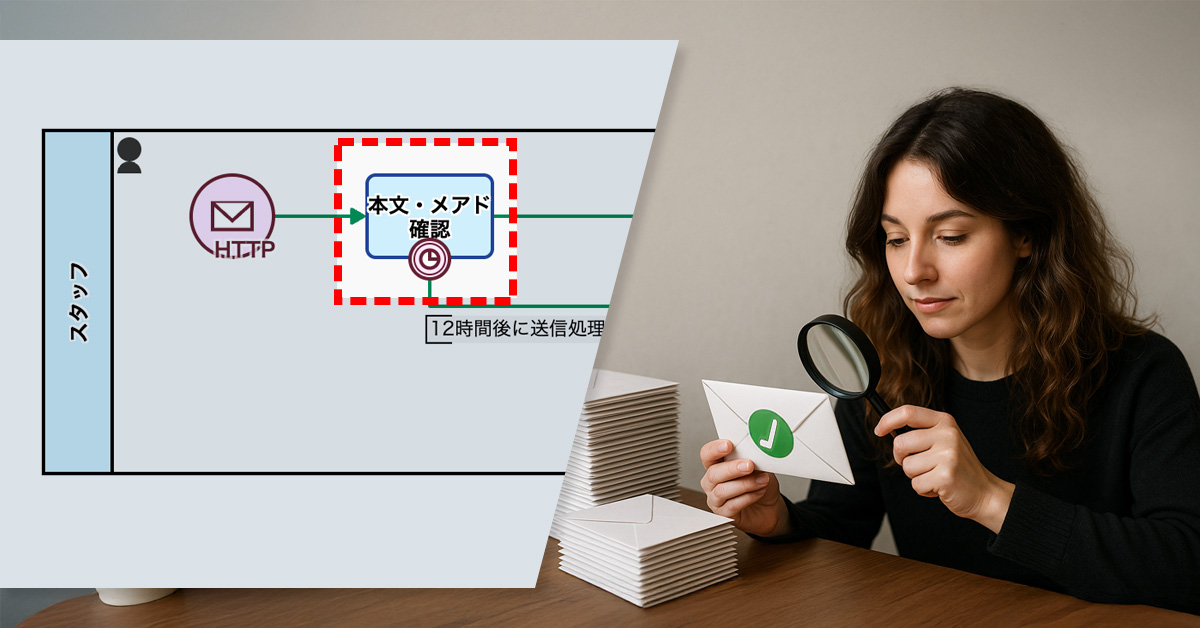
    さらに、確認には「開始後12時間以内」という締切を設定。期限までに対応がなければ、残りの顧客へは自動でメールが配信される仕組みとしました。

    Basic Edition
    Advanced Edition
    Professional Edition
    子プロセスのワークフロー図詳細を見る
    本文・メアド確認

    スタッフが、配信データを目視で確認します。

    メール自動送信

    顧客に対し、自動的にメールが配信されます。

    Basic Edition
    Advanced Edition
    Professional Edition
    子プロセスのワークフロー図詳細を見る
    本文・メアド確認

    スタッフが、配信データを目視で確認します。

    確認しない場合は、12時間経過後、自動的にメール送信処理に進みます。

    メール自動送信

    顧客に対し、自動的にメールが配信されます。

    子プロセス Before / After 比較(スライダが動きます)

    3. 効果

    確認作業の省力化

    抜き取り方式により、従来より少ない工数で確認が完了します。

    目視確認の負担軽減

    全件を1件ずつ目視で確認する作業が不要となり、スタッフの負担が大きく軽減されます。

    配信スケジュールの安定

    締切と自動配信の仕組みによって、送信のタイミングが明確になります。

    4. その他の業務への応用

    アンケート集計

    一定時間後に自動的に集計や送信が進む仕組みで、担当者の確認作業の負担が軽減されます。

    在庫管理

    在庫データの確認が完了しなくても、期限後に自動的に処理が進みます。

    5. 提案資料

    当社サービスの導入を検討いただく際の提案書サンプルです。課題に対する解決策の概要を記載しています。実際の相談内容に応じて、内容を個別にカスタマイズして提供いたします。

  • Eliminating Errors in Vote Counting

    Eliminating Errors in Vote Counting

    There is an issue of miscounting when compiling votes for and against proposals at general shareholders’ meetings. Our proposed solution introduces a new workflow where shareholders submit their votes via a web form. Upon submission, the status of their vote will automatically be updated to “exercised.” This automated process will significantly reduce the risk of miscalculation for administrative staff and streamline the vote-tallying process. Furthermore, the management screen will provide real-time visibility into the current voting status.

    1. Issue: Miscounting Votes For or Against Proposal

    DoDo Cloud, an IT startup with approximately 20 shareholders, currently manages the voting process for its general shareholder meetings by having administrative staff email the proposals to shareholders. Shareholders then submit their votes (for or against) via a web form.

    However, the existing process presents a significant challenge: administrative staff lack a consolidated view of which shareholders have already cast their votes. This forces them to individually verify the status of each shareholder’s vote, increasing the risk of tallying errors and potentially leading to inaccurate reporting of results. The current method also makes the vote-counting process labor-intensive, highlighting a clear need for operational improvement.

    2. Solution: Visualize Voting Status / Make Voting Status Visible

    The process owner will modify the workflow App to accurately track the voting status by enabling its management within the system.

    Specifically, after a shareholder completes their vote submission via the web form, a mechanism will be added to automatically update the “Status” data field to “Exercised.” This will allow administrative staff to instantly check the voting status on the management screen.

    Before :

    View details of the workflow diagram
    • Process Initiation
    • Email Distribution to Shareholders
    • Shareholder Submission of Votes via Web Form

    After :

    View details of the workflow diagram
    • Process Initiation
    • Email Distribution to Shareholders
    • Shareholder Submission of Votes via Web Form
    • When filled out, the status changes from “Not exercised” to “Exercised”.

    Compare Before/After

    Before / After Comparison (you can move the slider)

    Reference: Parent Process (Shareholder Meeting Proposal Registration Process)

    The Voting Process in Shareholder Meetings is initiated from its parent process, the “Shareholder Meeting Proposal Registration Process”.

    3. Benefits

    1. Enhanced Accuracy in Vote Tallying
      • Automated status updates eliminate human error during the vote counting process.
      • This ensures that the results for each proposal are managed accurately.
    2. Real-time Monitoring of Voting Status
      • Administrative staff can instantly check the voting status on the management screen.
      • This enables them to appropriately follow up with shareholders who haven’t yet responded.

    4. Other Business Applications

    • Contract Approval Workflow
      • Automate the approval status updates from each department to significantly expedite the contract finalization process. This also enables timely reminders to responsible parties whose approval is still pending.
    • Internal Approval Progress Management
      • Visualize the approval flow for budget requests and operational improvement proposals to reduce the lead time from submission to approval.
    • Event Participant Attendance Confirmation
      • Track event and training registrations (both internal and external) in real-time. This allows for smooth follow-up with attendees who have not yet confirmed their attendance.
  • Smooth Billing with Inferred Inspections!

    Smooth Billing with Inferred Inspections!

    ◯△× Co., Ltd. is a creative company that specializes in producing promotional videos for small and medium-sized businesses. They mainly target the manufacturing and service industries and produce a wide range of videos, including product introductions, recruitment videos, and brand videos.

    The company’s operations follow  an integrated process that begins with receiving a request from a client and continues through concept design, video shooting, editing, and delivery. The small, elite production department of approximately 10 people delivers an average of 5 to 10 videos per month, and efficient process management to handle multiple projects simultaneously is the key to the success of the business.

    1. Issue: The Billing Process Is Not Progressing

    Client review and acceptance reports are important steps in completing video production projects completion, but delays in the latter frequently hinder the billing process, causing significant issues.

    Inspection delays will impede the issuance of invoices and payment confirmation. As a result, cash flow will become unstable and revenue recognition will be delayed, which will have a negative impact on the company’s income and expenditure plans. For small and medium-sized enterprises in particular, stable cash flow is directly linked to securing working capital, so these delays risk affecting investments in other projects and employee payments.

    2. Solution: Introduce “Inferred Inspections”

    To address this issue, the process owner sets an inspection deadline for the public form and implements an inferred inspection process. This process dictates that if the client fails to report the inspection within a defined timeframe (for example, 14 days following delivery), the inspection will be automatically considered complete.

    During implementation, it is important to clearly communicate inferred inspection rules and deadlines to clients. Flexibility regarding special circumstances fosters client trust and strengthens relationships.

    Basic Edition
    Advanced Edition
    Professional Edition
    View details of the workflow diagram
    1. Private URL Registration

    The production department enters the video inspection request details.

    2. Shipping Inspection

    Internal reviewers inspect the delivery data. If there are any revisions, they send it back to the production department; otherwise, they complete the process.

    Delivery Notification (Throwing Message Intermediate Event (email)) 

    An inspection request email is sent to the client.

    x1. Acceptance Reporting

    The client inspects the delivered data.

    3. Acceptance Completion Confirmation

    The production department confirms the completion of the acceptance.

    Basic Edition
    Advanced Edition
    Professional Edition
    View details of the workflow diagram
    1. Private URL Registration

    The production department enters the video inspection request details.

    2. Shipping Inspection

    Internal reviewers inspect the delivery data. If there are any revisions, they send it back to the production department; otherwise, they complete the process.

    Delivery Notification (Throwing Message Intermediate Event (email)) 

    An inspection request email is sent to the client.

    3. Acceptance Completion Confirmation

    The production department confirms the completion of the acceptance.

    Before / After Comparison (you can move the slider)

    3. Benefits

    Stabilizing Cash Flow

    Eliminating delays in inspections means that invoices can be issued without interruption, payment obligations can be determined more quickly, and companies can secure a stable source of working capital.

    Efficient Project Progress

    Streamlining acceptance inspections will ensure smoother project progression, freeing up resources for subsequent projects. This will enhance the efficiency of our small, specialized team managing concurrent projects.

    Preventing Delays in Recording Revenue

    Smooth billing processes allow revenue to be recorded more quickly. This prevents adverse effects on a company’s financial planning and supports accurate business planning.

    4. Other Business Applications

    Software Development

    By implementing a system to ensure that client inspection is completed within the deadline after the delivery of the application or system development, it is possible to prevent delays in release and billing processing. This system makes it possible to smoothly progress the project and utilize development resources efficiently.

    Construction Industry

    Implementing a post-completion inspection system in construction and renovation projects accelerates the handover confirmation process, enabling quicker initiation of the next project and faster billing. This improves project management efficiency and stabilizes cash flow.

    Education and Training Industry

    Collect feedback and completion confirmations for online courses or training programs by a set deadline to streamline payment processing and enable timely progression to future programs, thereby enhancing operational efficiency and accelerating revenue generation.

    E-commerce Site Management

    Streamline your product sales and returns process by setting deadlines for customer confirmation of returns and review ratings. This system enables quick completion, efficient inventory management, and better planning for future shipments.

  • Automatically prevent omissions/oversights in articles

    Automatically prevent omissions/oversights in articles

    1. Issue: Required fields like “excerpt” are missing.

    The Marketing Department at ◯△× Company is responsible for publishing articles on WordPress.com, based on requests originating from other departments. The current workflow involves departmental personnel submitting information via a dedicated form, which then automatically generates a draft article.

    This automated process is designed to populate four critical fields: “Article Title”, “Article Body”, “Inserted Images”, and “Excerpt”. However, there’s a recurring issue in many cases where essential information is missing.

    The most prominent omission is the “Excerpt”. This frequently leads to the core message of the articles not being effectively conveyed to readers. As the excerpt is vital for concisely summarizing an article’s appeal, its absence or inaccuracy negatively impacts search engine visibility and social media engagement.

    Furthermore, even experienced marketers occasionally overlook these data inaccuracies, which presents a significant operational challenge for the department.

    2. Solution: Automate the checking of required fields.

    To address this issue, we’re implementing a system to automatically check for all required fields.

    Specifically, during the draft creation stage, the system will automatically verify the presence of the article title, article body, inserted images, and excerpt. If any are missing, the draft will be routed to the proofreading process for correction.

    Basic Edition
    Advanced Edition
    Professional Edition
    View details of the workflow diagram
    Upload Images to WP

    Upload media files to WordPress.com.

    Submit Draft to WP

    Create an article (post) in draft status on WordPress.com.

    Refine and Publish

    Marketing department members make minor adjustments to the draft and publish it.

    Publication Notification

    The article’s publication is shared internally within the department.

    Basic Edition
    Advanced Edition
    Professional Edition
    View details of the workflow diagram
    Proofread

    If all items required for publication aren’t set, a marketing team member will proofread the draft.

    Upload Images to WP

    Upload media files to WordPress.com.

    Submit Draft to WP

    Create an article (post) in draft status on WordPress.com.

    Refine and Publish

    Marketing department members make minor adjustments to the draft and publish it.

    Publication Notification

    The article’s publication is shared internally within the department.

    Before / After Comparison (you can move the slider)

    3. Benefits

    Required Fields are Completed and Accurate Articles are Published

    By automatically checking all required fields, we can now publish articles without omissions or missing information. This is particularly beneficial for the “excerpt”, as its proper setting will improve the effectiveness of how it is displayed on search engines and social media, significantly boosting the article’s appeal.

    Streamlined Article Submission Process

    Automating data checks during the draft creation phase eliminates last-minute corrections (supplementary) work before publication. This reduces the effort spent on corrections, leading to a smoother and more efficient article submission workflow.

    Enhanced Reliability Through Error Prevention

    Detecting data deficiencies early on helps prevent the publication of inaccurate information or data omissions. This ensures we deliver accurate information to readers and stakeholders, thereby improving overall reliability and trust.

    4. Other Business Applications

    Product Data Management (E-commerce)

    For e-commerce product listings, automatically verifying that essential data such as product name, description, price, and images are complete can significantly reduce pre-publication review time and prevent the release of incorrect information.

    Customer Support Operations

    In customer service, implementing a system to confirm the accurate recording of inquiry details and resolution status helps prevent information loss and ensures smoother customer interactions.

    Education and Training Operations

    When delivering online courses or training programs, by requesting evaluations and completion confirmation from participants or clients within deadlines, payment confirmation and the provision of the next program can be streamlined. This mechanism not only improves operational efficiency but also accelerates revenue generation.

    Document Creation

    For internal and external reports or presentation materials, utilizing a system to check whether all the essential elements like the title, summary, data, and visual aids are complete can reduce post-completion revision work and boost overall operational efficiency.

  • New Hires Become Immediate Contributors! Methods for Assigning Quoting Tasks

    New Hires Become Immediate Contributors! Methods for Assigning Quoting Tasks

    At FukaFuka Building Materials Co., Ltd., the Sales Division primarily focuses on handling requests for building material quotations as part of its daily operations.

    The sales team, consisting of 10 members, is tasked with promptly responding to quotation requests from a diverse range of clients, from major construction companies to local building contractors, on a daily basis.

    1. Issue: Workload concentrated on veteran employees

    Estimation tasks are assigned on a rotating basis, but the difficulty level varies significantly depending on the request.

    When product model numbers are provided, new employees can respond quickly as no special technical skills are required. Conversely, requests without product model numbers demand specialized proposals and a deep understanding of the products. These are difficult for new employees to handle, necessitating the assistance of experienced veteran employees.

    Although these latter requests account for only about 30% of the total, they compel veteran employees to be involved in all quotation requests, even while managing their other responsibilities. This results in an excessive workload concentrating on veteran employees, making it difficult to respond swiftly to quotation requests.

    2. Solution: Assigning Responsibilities Based on Request Content

    To address this, the process owner redesigned the estimation task assignment, abolishing the current rotation system. Assignments are now automatically allocated based on whether a product model number is provided.

    Specifically, the following rules are applied in response to customer requests:

    • If a product model number is provided → Assigned to new employees.
    • If no product model number is provided → Assigned to veteran employees.

    This means new employees will handle all requests where a product model number is present, while veteran employees will only be responsible for requests without a product model number that require specialized proposals or deep product understanding.

    Basic Edition
    Advanced Edition
    Professional Edition
    View details of the workflow diagram
    0. In-person / Web Request

    Quotation requests are submitted either in person or via the web.

    1a. Enter Quotation Price (Product Model Number Provided)

    A new sales team member inputs the quotation price.

    1b. Enter Quotation Price (No Product Model Number Provided)

    A veteran sales team member inputs the quotation price.

    2. Quotation Approval

    The Sales Manager reviews the quotation price and either approves it or sends it back for revision.

    2X. Handle Rework

    If a quotation is sent back in step 2, the individual who originally entered the quotation price in step 1 (1a or 1b) makes the necessary corrections.

    3. Quotation Submission Completion Report

    Upon receiving quotation approval and submitting the quotation, a completion report is filed.

    Before / After Comparison (you can move the slider)

    3. Effects

    Realization of quick response

    The speed of response is improved by having new employees handle simple requests while veteran employees focus on more complex requests.

    Reduction of burden on veteran employees

    By dividing the workload appropriately, the excessive workload on veteran employees is reduced.

    Improved efficiency of the entire team

    Clarification of responsibilities improves the work efficiency of the entire team and increases productivity.

    4. Application to other operations

    This methodology clarifies work distribution and improves efficiency, and can be horizontally applied to the following industries and businesses.

    • Customer support/call center
    • IT support/help desk
    • Manufacturing/quality control

  • Improving Inquiry Handling Efficiency with AI Drafts

    Improving Inquiry Handling Efficiency with AI Drafts

    AI-generated draft replies reduce response creation time and improve overall customer response speed.

    1. Issue: Slow customer response speed

    A BPO service delivers initial responses to inquiries on behalf of client companies.

    The company has 30 staff members dedicated to handling client email inquiries. However, their prioritization of urgent emails leads to delays in responding to less critical inquiries. Consequently, a more efficient process is necessary to improve overall customer response times.

    2. Solution: Reduce work time by generating drafts using AI

    To reduce response times, an AI Agent Task was implemented to automatically generate draft replies upon receiving inquiry emails. Using predefined prompts, the AI creates these drafts, enabling staff to efficiently formulate their responses by using them as a basis.

    Response creation time has been reduced and average response time has improved.

    Basic Edition
    Advanced Edition
    Professional Edition
    View Workflow Diagram Details
    50-character Summary (AI Agent Process)

    The AI agent generates a 50-character summary of the inquiry email.

    1. Answer Drafting 

    Review the summary and draft a reply.

    Send Reply Email

    Send the drafted reply.

    Basic Edition
    Advanced Edition
    Professional Edition
    View Workflow Diagram Details
    50-character Summary (AI Agent Process)

    The AI agent generates a 50-character summary of the inquiry email.

    Answer Draft (AI Agent Process)

    The AI agent generates a draft reply based on the summary.

    1. Answer Drafting 

    Review the draft reply created by the AI agent and finalize the reply.

    Answer Drafting

    Send the drafted reply.

    Send Reply Email

    Send the drafted reply.

    Before / After comparison (slider can be moved)

    3. Customers Case Study

    4. Other Business Applications

    We will enable AI-based reviews for the following tasks:

    Improving efficiency of FAQ responses

    Improving internal inquiry responses

    Creating draft sales emails

    5. Related Posts

  • Proactive Advice from AI for Responses

    Proactive Advice from AI for Responses

    AI-generated draft advice reduces supervisor workload and speeds inquiry responses.

    1.Issue: Delayed responses due to backlog of requests for advice

    A BPO company provides initial responses to inquiry emails on behalf of client companies.

    Thirty staff members respond to inquiries on a daily basis, and when they are unsure of a decision, they ask for advice from a supervisor.

    Supervisors are overwhelmed by frequent requests for advice, leading to backlogs and delays in overall inquiry response times.

    2.Solution: AI-Generated Advice

    To address this issue, the process owner has implemented an AI service step. At the same time, the prompts that the AI ​​uses to generate advice were set using a prompt generator.

    This means that when a request for advice is made, a preliminary suggestion will be automatically generated by the AI, and the supervisor can refer to it when providing advice.

    Supervisors’ workload is reduced as AI prepares draft advice for review and adjustment.

    Basic Edition
    Advanced Edition
    Professional Edition
    View details of the workflow diagram
    • Process triggered by email arrival
    • 50-character summary by AI agent
      • Email content is summarized
    • Draft response by AI agent
    • 1.Create response document
      • Send reply email
      • Request review from supervisor
    • 2.Advice
    • Send email
    Basic Edition
    Advanced Edition
    Professional Edition
    View details of the workflow diagram
    • Process triggered by email arrival
    • 50-character summary by AI agent
      • Email content is summarized
    • Draft response by AI agent
    • 1.Create response document
      • Send reply email
      • Request review from supervisor
    • Draft response by AI agent
    • 2.Advice
    • Send email
    You can move the slider

    3. Customers Case Study

    4. Other Business Applications

    We will enable AI-based reviews for the following tasks:

    Escalation handling in call centers

    Reviews of internal business regulations

    5. Related Posts

  • Understanding Inquiry Details Instantly with AI

    Understanding Inquiry Details Instantly with AI

    AI summarizes emails in subject lines so operators grasp inquiries quickly and respond faster.

    1.Issue: Reading comprehension workload

    As part of its BPO outsourcing business, the company operates a contact center where 20 operators respond to email inquiries.

    Incoming inquiries are managed through a system where available responders self-assign cases. Operators with available time choose a case from the queue and take ownership. Upon selection, the operator reviews the complete inquiry to assess their ability to handle it.

    The complexity and length of numerous email inquiries prolong the decision-making process. Consequently, case acceptance becomes challenging, and overall response efficiency diminishes.

    2.Solution: Automatically summarize inquiry details in the subject line using generative AI

    The process owner incorporated a step into the workflow in which the email body is automatically summarized using generative AI.

    Upon receiving an email, the AI initially analyzes its content and produces a concise summary of about 50 characters. This summary is then displayed in the subject line of the “Offered” list. Consequently, respondents can grasp the main point of the inquiry by reading the summary before needing to open and examine the complete email.

    Faster responses to inquiries by quickly identifying case details, enabling smoother handling.

    Basic Edition
    Advanced Edition
    Professional Edition
    View details of the workflow diagram
    • Process starts when email arrives
    • 1.Enter reply
      • Send reply email
      • Request supervisor review
    • 2.Review response
    • Send email
    Basic Edition
    Advanced Edition
    Professional Edition
    View details of the workflow diagram
    • Process starts when email arrives
    • 50-character summary by OpenAI
      • The contents of the email are summarized
    • 1.Enter reply
      • Send reply email
      • Request supervisor review
    • 2.Review response
    • Send email
    Before / After comparison (slider can be moved)

    3. Customers Case Study

    4. Other Business Applications

    We will enable AI-based reviews for the following tasks:

    Improved response efficiency

    5. Related Posts

  • Ensure All High-value Projects Have Executive Approval

    Ensure All High-value Projects Have Executive Approval

    Revamping our approval flow: Executive approval is now mandatory for high-value projects! This will ensure greater transparency and stronger risk management.

    *This process improvement story is a work of fiction. Any resemblance to actual persons, entities, or events is purely coincidental.

    1. Issue: Risk of High-Value Proposals That Have Not Been Approved

    DonGan Manufacturing is a company with approximately 200 employees that manufactures and sells industrial equipment. In the company’s quote approval process, the staff member responsible creates a quotation based on customer requests, which is reviewed by a manager before being sent to the client for notification.

    Nevertheless, cases where high-value proposals proceeded without executive approval have been identified, causing inconsistencies with decision-making authority regulations and operational flow. This heightens the risk of inappropriate estimates, posing potential risks of loss to the company. To avoid such risks and improve operational alignment, a comprehensive review of the approval process is urgently needed.

    2. Solution: Mandate Executive Approval for High-Value Projects

    The process owner will revise the workflow to make executive approval mandatory for high-value proposals. Specifically, estimates exceeding 5 million yen must be approved by an executive after being reviewed by a manager, and then a notification will be sent. This improvement streamlines the communication channels, enabling swift and accurate operations.

    View details of the workflow diagram
    1. Quotation Creation

    The person in charge manually enters the quote.

    2. Manager Review

    The manager reviews the quote content and sends it back if there are any deficiencies.

    1x. Quotation Revision

    The quote is revised and resubmitted

    Approval Notification

    Once approved during the manager’s review, a notification email is sent.

    View details of the workflow diagram
    1. Quotation Creation

    The person in charge manually enters the quotation details. 

    x1. Quotation Revision

    Revise the content and resubmit it.

    2. Manager Review

    The manager checks the quotation content and sends it back if there are any deficiencies.

    3. Executive Approval

    The executive in charge approves or rejects high-value cases.

    Approval Notification

    An email notifying the approved content will be sent.

    Rejection Notification

    An email notifying the rejected content will be sent.

    Before / After Comparison (you can move the slider)

    3. Benefits

    Risk Mitigation

    • By adding a reliable executive approval step that ensures that high-value projects are not overlooked, the risk of loss is prevented.

    Strengthening Internal Controls

    • Aligning decision-making authority regulations with operations improves audit readiness and strengthens internal controls.

    Enhancing Process Reliability

    • With increased transparency across processes, employee compliance awareness improves, establishing a trustworthy operational flow.

    4. Other Business Applications

    Enhancing the Purchase Request Process

    Make department head and executive approval mandatory for high-value purchase requests. Establish an approval flow to prevent wasteful purchases and excessive spending.

    Optimizing Budget Approvals

    New projects exceeding a defined budget threshold require executive approval. Proactive risk assessment is crucial before project commencement to mitigate potential budget overruns.

  • AI-powered Analysis of Daily Reports to Provide Accurate Advice

    AI-powered Analysis of Daily Reports to Provide Accurate Advice

    AI analyzes and summarizes daily reports, highlighting issues and helping managers give timely feedback.

    1. Issue: Insufficient feedback

    In the marketing department, employees submit daily reports to share their work progress and any issues they encounter. The daily report submission process begins when employees input and submit their report.

    Managers can get a timely understanding of their subordinates’ work status and quickly detect any delays in progress or signs of problems so they can take prompt action.

    However, busy managers were concerned that they were not able to provide accurate feedback. Due to time constraints, it was difficult for them to read daily reports in depth, and they were concerned that there was a risk of overlooking potential problems, especially in areas where the expressions were unclear.

    2. Solution: Use AI to analyze the problem

    The manager and process owner addressed the issue by enhancing the workflow. The improvement included incorporating an AI to summarize and analyze daily reports.

    The summary and analysis are as follows:

    1. Tasks: The tasks the staff members are working on
    2. Content: Report on the progress and current status of the work
    3. Points of Interest: AI Analysis
      • Explicit negative signs: Clearly expressed challenges or stagnation
      • Implicit negative signs: Indirect issues and concerns
      • Ambiguous next action: What staff should do next is unclear.
    4. Suggested Advice: Example of an advice sentence for members

    This feature arranges and presents to managers the issues identified in their subordinates’ daily reports.

    Basic Edition
    Advanced Edition
    Professional Edition
    View details of the workflow diagram
    • Start the process automatically at 7:00 AM
    • 1x. Determine business day
      • If it is determined to be a holiday, the process branches and ends
    • 1. Daily report input
    • 2. Confirmation
      • Review the content and provide feedback
    • 3. Resubmit (in case of return)
    • 4. Feedback confirmation
    Basic Edition
    Advanced Edition
    Professional Edition
    View details of the workflow diagram
    • Start the process automatically at 7:00 AM
    • 1x. Determine business day
      • If it is determined to be a holiday, the process branches and ends
    • 1. Daily report input
    • 2x. AI summary & analysis
    • 2. Confirmation
      • Review the content and provide feedback
    • 3. Resubmit (in case of return)
    • 4. Feedback confirmation
    You can move the slider
    Example prompt
    #{#q_daily_report}
    --
    Please summarize the daily report you entered above in bullet points.
    In the following order: 1: Tasks, 2: Content, 3: Points of Interest, 4: Suggested Advice.
    --
    3: Please describe the Points of Interest when the following analysis A~C applies.
    The item names should be: Explicit negative sign, Implicit negative sign, Ambiguous next action.
    More than one is acceptable. If none, please indicate “None”.
    
    Analysis method
    --
    A: Explicit Negative Sign: If the daily report clearly states the issue, please address this point.
    E.g. Expressions such as "no progress" or "not started"
    
    B: Implicit negative signs: If the contents of your daily report contain negative expressions that are not directly related to the issue, pick up on those points.
    E.g. Expressions such as "It's taking a little time" and "It's taking a while."。
    
    C: Ambiguous next action: Please pick up things where the next action or person is not clear.
    E.g. “We will continue to respond tomorrow,” or other expressions lacking specific details.
    --
    4.For the Suggested Advice, please write 3: Suggested improvement advice for the Points of Interest.
    3: If there are no points of interest, please write “None”.
    –
    Please output in Markdown format.
    The Markdown format is as follows.
    
    #### Business name
    - Contents
    - Contents
    ##### [For managers] Points of Interest
    - 
    ##### [For managers] Suggested Advice
    -
    ***

    3. Customers Case Study

    4. Other Business Applications

    We will enable AI-based reviews for the following tasks:

    Summary of project progress reports

    Employee survey analysis

    Analysis of customer correspondence records

    5. Related Posts