現場監督が担当する「施工」業務を Questetra BPM Suite で管理するようになってからは、台帳に記載するべき情報がすべて Questetra BPM Suite 上に記録されるようになりました。そこで、Questetra BPM Suite に格納されたデータに基づく台帳PDFを、自動的に生成する仕組みを構築しました。こうして、台帳を作成する業務も自動化されました。
一条工務店仙台の社内では、今回の Questetra BPM Suite を利用した BPM の取り組みを通じて、
G Suite と BPM システムを連携させる事で、大幅な事務処理の削減を実現できること
パートさんの手作業に頼っていた事務処理業務の自動化を少しずつ着実に進めていけること
が広く認識されました。
この経験を活かし、G メール・Google ドライブ・Meet・Google フォーム等「G Suite」を使い込んでいる営業部門や設計部門、総務部門などの業務にも、『G Suite の機能と BPM システムを組み合わせて効率化を推進する』 活動が展開されることになっています。
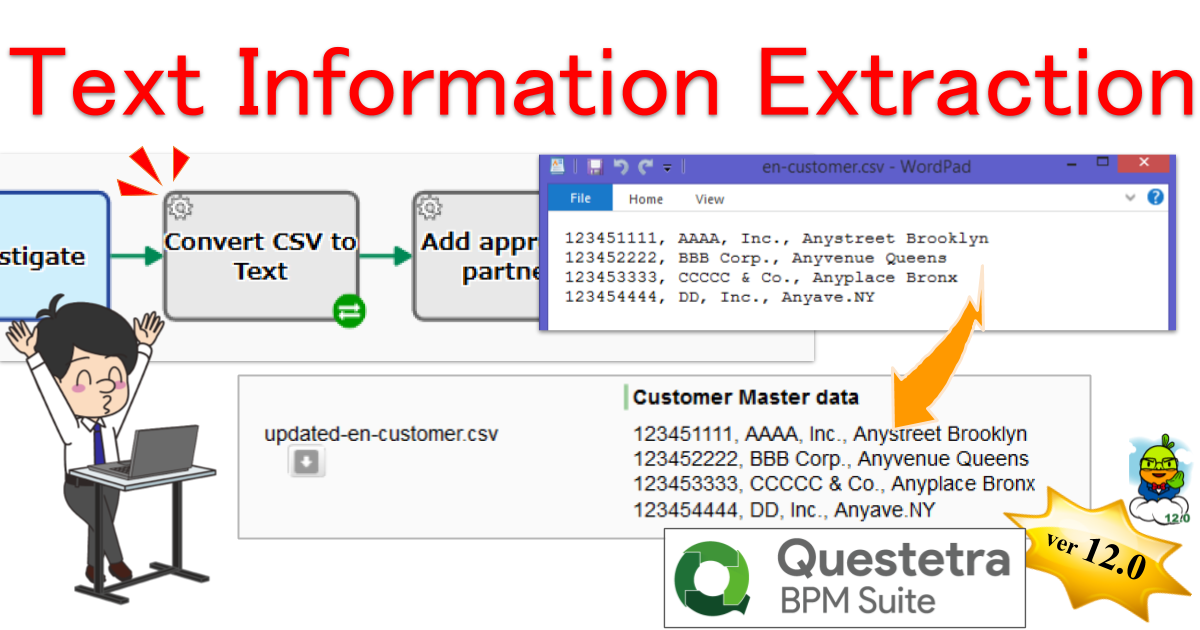
Kyoto, Japan, May 11th, 2020, Questetra, Inc., the global SaaS provider of Business Process Management (BPM), today announced that they have published the new version 12.0 of the Cloud-based Workflow product “Questetra BPM Suite” on May 11th, 2020. This new version is capable of extracting text information from the files, such as CSV, or HTML that are stored in File-type Data Item, and stores it into String-type automatically.
In daily work, various text files are used. Various files such as “master file” that is, for example, Supplier CSV or “Draft file” like newsletter email HTML are used. But the effort of checking the contents of the file is not a few.
With the new version 12.0, an automatic step that converts text files to string data is now available as one of the standard features. By equipping this automatic Step in a business process, the labor of downloading and opening the file is eliminated. In the Credit Check Process of a supplier, for example, the processing of adding the approved supplier information to the existing supplier CSV file will be fully automated using together with other automatic features. It is also possible to eliminate the risk of intentional information deletion or tampering with the contents.
Questetra BPM Suite
Cloud-based Workflow “Questetra BPM Suite” is a business platform for realizing paperless environments and remote-working. Business issues are controlled according to a Business Flow Diagram. When a Process reaches, a Human Task the user will be asked to add their input. Also, when an issue reaches an automated Step the predetermined processing (server-side processing) such as “Generate PDF” and “Save to cloud storage” is performed automatically. (BPM: Business Process Management)
You can apply it to various business operations such as “Approval request flow”, “Document translation flow”, Quality check process, “Invoice issuance process”. Process owners of each Business Process can practice the “improvement of Business Processes” little by little in daily work. (Examples of Business Flow Diagram: https://questetra.zendesk.com/hc/en-us/articles/360012492211 )
Automatic Text Information Extraction
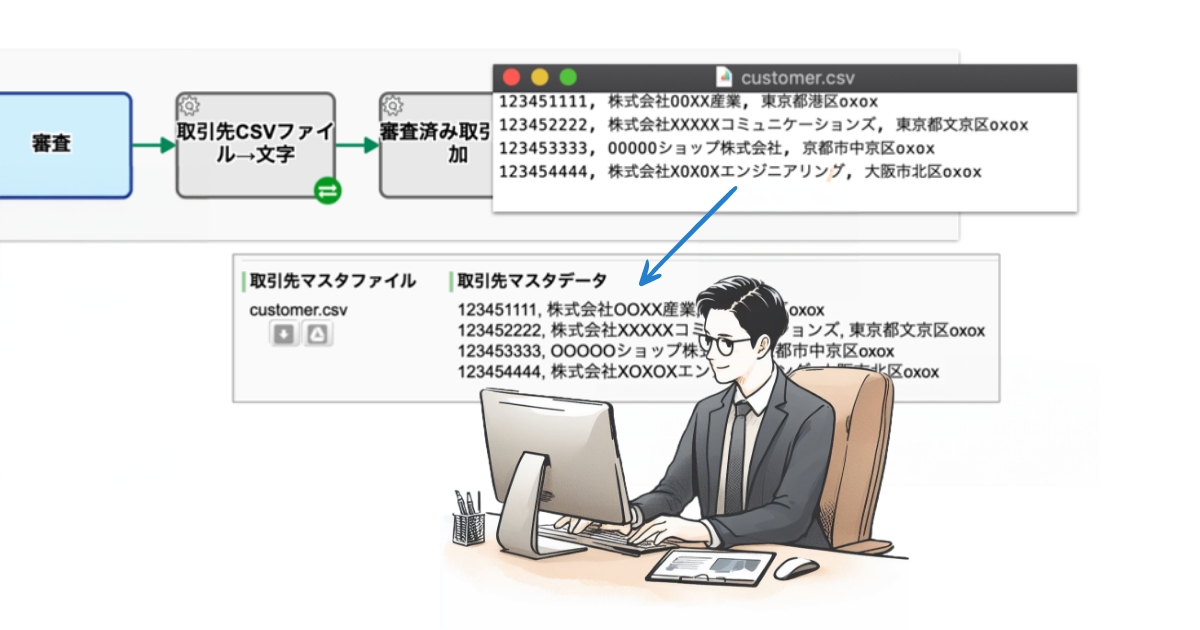
It is now capable of extracting the content of a text file into a String-type Data Item automatically. You can now confirm the contents without downloading the file, for example, the Customer Master that has been set to File-type Data Item. (Converter (Text File to String type data))
Text File Auto-extraction Settings
Other Improvements
Service Task (Throwing Message to Start Event)
It eases the configuration that sending a request to a Message Start Event (HTTP) on the same workflow platform to startup. You do not need to specify the access URL or parameter name, just specify the value of the data to be sent, and you will be able to achieve the “configuration” described above.
Enhanced HTTP request transmission
In the Throwing Message Intermediate Event (HTTP), you can now specify the Content-type when specifying File-type Data Item in the request body. You can set any character string such as “application / octet-stream” so that it will be possible to flexibly respond to API requests of other cloud services.
Official release of HTML5 Modeler
The Flash modeler has been discontinued, and the App editing function (HTML5 modeler) using HTML/Javascript has been officially released.
クラウド型ワークフロー『Questetra BPM Suite』は、ペーパーレス環境やリモートワーク環境を推進するための業務プラットフォームです。業務案件は業務フロー図に従ってコントロールされ、案件が人間工程に到達すれば担当者はアウトプットを求められます。また、案件が自動工程に到達した際には、「PDFの生成」や「クラウドストレージへの保存」といった既定の処理(サーバサイド処理)が自動的に行われます。(BPM: Business Process Management)
最近(2019-10)最大参加者数が、(G Suite Business の場合)、「25人」から「150人」に増えたトコです。加えて、昨日(2020-03-04)、新型コロナウィルス感染症(COVID-19)の流行拡大により、一時的に「各会議の最大参加者数は250人に引き上げ」られたそうです(録画もデキル!)。
As mentioned in the post “Expansion of Service System“, the service system will be changed on July 1, 2020. At that time, reception for the Starter Edition will be closed and a new Trial mode (free) will begin.
Details of the “Trial mode”
Trial mode is a free service for Basic, Advanced, and Professional editions in the new service system from July. When you apply for Trial mode, you will be asked to select the edition to use.
Price: Free
Number of Users that can be registered: 100
Features: Equivalent to the edition you choose (either of Basic / Advanced / Professional)
Period: 60 days (*1)
Service launch: July 1, 2020
*1 The period cannot be extended. *2 The access URL for the workflow platform of Trial Edition is required when applying for the paid Edition.
The expiration date of “Starter Edition” that will be discontinued
The free Starter workflow platform you are using will be closed at the end of December.
Expiration date: The end of December 2020
Reception end date: The middle of July 2020
If you migrate to a paid Edition (either of Basic/Advanced/Professional/Enterprise), you can continue to use the Business Process Definition and Business Data from January 2021 onwards. (Please apply by December 2020)
You can migrate some of the data created in the Starter’s workflow platform to a paid or trial workflow platform for yourself. For how to migrate, please refer to the following “Appendix; Data Migration Procedure”.
*The service of Starter Edition will be automatically stopped if you do not use it for 15 days. Requests for restarting suspended services will be accepted until the end of June 2020.
Appendix; Data Migration Procedure
Data migration is performed in the following procedure.
Export data from Starter’s workflow platform
Import to (migration destination) workflow platform
Some of the data of the workflow platform can be migrated and some cannot.
Organization/Role/User information Can be migrated
Workflow Apps Can be migrated
Business data Export only
Open Chat Cannot export
This section introduces how to export/import Organization/Role/User information and Workflow Apps and how to export Business data.
How to export Organization/Role/User information
Log in to the Starter workflow platform with a User who has “User Manager Authorization” and do the following operations.
After logging in, click on your User name at the top right corner and click on [System Settings] in the dropdown menu
Click [Organizations List] on the left menu
Click on [Download All] above the Organization List and select [CSV Download (UTF-8)]
The organization information CSV file will be downloaded
For the Role/User information, replace “Organization” in the above description with “Role” or “User”.
How to import Organization/Role/User information
Log in to the Starter workflow platform with a User who has “User Manager Authorization” and do the following operations.
After logging in, click on your User name at the top right corner and click on [System Settings] in the dropdown menu
Click [Organizations List] on the left menu
Click on [Import Organization] above the Organization List
Click on [Browse…(or Choose file)] button and select CSV file of Organization information
Click on [Confirm] button after you confirmed the contents of the CSV file has been set into the field [CSV Text]
Click on [Add] button
For the Role/User information, replace “Organization” in the above description with “Role” or “User”. Organizations and Roles related to User information must be registered before importing User information.
How to export Workflow App
Log in to the Starter workflow platform with a User who has “App Administrator” Authorization to the target App and do the following operations.
After logging in, click on your User name at the top right corner and click on [App Settings] in the dropdown menu
Display the details screen of the target workflow App
Click on the [Detail] button of the version you want to export from the version list to display the target version
Click on the button labeled [▼ Version **] just above the Workflow Diagram and select [Export Archive] on the dropdown
The archive file is exported (downloaded)
How to import Workflow App
Log in to the migration destination workflow platform as a User who has “App Creator” authorization, and follow the procedure described in the section “2. Import” on the page linked below.
Log in to the Starter workflow platform as a User who has “Data Viewer” authorization, and follow the procedure described in the page linked below to export (CSV download).
Going Paperless and Cashless, and Others for Improvements in Business Efficiency
I’ve developed a minor service for 12 years which manages business processes (Cloud-type Business Process Management: SaaS BPMS). I have got many opportunities to advise on “process improvement”. However, in some cases, I have some trouble providing an answer because the current process (As-Is Process) is so far removed from the digital era, so of course, they’re forced to use traditional methods. In this article, I reconsider the mindset as an adviser, an expert, and a consultant to handle such cases in the age of digital transformation.
Table of contents of this article
1. Paperless
I think paper documents (e.g. documents for plan, report, approval, estimate, invoice, etc.) are not necessary for the following reasons:
The amount and thickness of the paper can be intimidating.
You will get a sense of relief by seeing the documents stored in a steel library.
You feel a sense of accomplishment just by searching for documents (and copying them).
However, the purpose of paper documents is just to deliver information, their look and feel are meaningless if the business doesn’t proceed smoothly.
Today, there are a lot of communication tools instead of paper documents and most of them require less time to process. However, you may be worried about the following things:
The authenticity is suspicious
IT deployment and operation cost
Learning security cost
Your handwriting may be bad
The sales of the printing shops and stamp shops may drop
Copying and shredding work may disappear
As for history, the “hikyaku messenger” system was replaced by the postal system (and later, the Internet) as a public communication infrastructure because it was quite wasteful and expensive. Paper documents are no different from that. I honestly believe that the traditional way of passing around a paper document will disappear. At least, your routine work should be able to proceed without relying on this.
Basically, paper documents don’t have a “search” function.
The people in charge of promoting business process improvement should first regard “paperless” as the standard.
*In order to digitize these tasks, you should utilize email systems and workflow systems, for example, you need to establish a corporate account based on cloud offices (G Suite, Office 365, etc) plus cloud workflows. In addition, I suggest you use cloud storage (Box, Dropbox, etc) in parallel with these cloud products.
*As for national strategy, I suggest that the government try to change the legal text that values paper documents (It would require a lot of political power, though), which means the government can regard the digital documents as legal documents.
2. Cashless
I think cash (bills and coins, petty cash, change, etc) is not necessary for the following reasons:
The amount and thickness of cash can overwhelm you.
You will get a sense of security by seeing cash stored in a cash box.
Moreover, you feel a sense of accomplishment even by calculating the total.
However, the purpose of cash is just to transfer money (payment) and there are no companies where wages are paid in cash.
Today, there are a lot of payment tools besides cash and most of them require less time to process. However, you may be worried about the following things:
You need petty cash to buy stamps.
You may have a problem with paying on delivery
Some people have to reimburse others for unexpected expenses
You may hesitate to use cashless payment.
You may forget the benefit of sales.
Management of bills and coins may become unnecessary.
(Are you worried somehow?)
As for history, the system of exchanging value (deciding the value by weighing coins) such as using gold and silver was replaced by the “managed currency system” (currency by table: just count the number of notes and coins) by the state power because the former system always starts with weighing and the exchange procedure was complicated. Cash is no different from that. I honestly think that the traditional payment system with cash will disappear. At least, your routine work should be able to proceed without relying on the traditional payment system with cash.
Basically, notes and coins have a cost for their security.
The people in charge of promoting business process improvement should regard “cashless” as the second standard.
*In order to digitize these tasks (both procurement and collection), you need to rely on online services and payment tools provided by financial institutions. For example, you have to open a corporate account based on city banks (Mizuho Bank, The Bank of Tokyo-Mitsubishi UFJ, Sumitomo Mitsui Banking Corporation, etc.) plus direct banks (Rakuten Bank, The Japan Net Bank, etc) or online payment services (PayPal, Stripe, etc). In addition, I suggest you utilize a corporate account of cloud-based accounting systems (Money Forward, freee, Yayoi Online …) to widely manage that data.
*As for national strategy, I suppose cash should be inconvenient and disadvantageous. For example, the government implements the devaluing of currency by continuing to give reward points for cashless payment, discontinuing large denomination bills, and adopting a new currency system. (It will require a lot of political power, though)
3. Meeting-less
I don’t think meetings are necessary. (Strategy meetings, report meetings, and general manager meetings, etc)
# “Meeting” has some elements of an event so it is difficult for me to compare it with paper and cash because they are physical objects. However, the meeting is unnecessary!
I have some reasons:
If you just hold a meeting, you feel like explaining and discussing the project.
You feel like approval has been obtained because no objections were made.
The participants also feel like they are working for some reason.
Actually, the conclusion is often not determined even after the meeting is over, despite the purpose being this determine a conclusion. (Approval of budget, plan, payment, and accomplishment report, etc)
So, Why? I considered some reasons below.
The draft as the input for the meeting has not been refined. (Everyone should improve it)
The draft has only been explained verbally. (Everyone should supplement it)
A draft has basically not been created. (Everyone should consider it)
# Examples: a press release draft, a budget draft for acquiring the certification, a draft of the relocation plan of the office, a draft of the report on advertising effects in the month, and The draft Constitution of Japan, etc.
What you must remember is that the conclusion is only determined based on drafts. You can’t determine the conclusion no matter how many meetings you have: you shouldn’t hold a meeting without any drafts (Input).
As a precaution, you should create a business process where a draft is completed before you hold a meeting. When you draw a business process diagram, you first need to set it up to have the Task of creating a draft complete at the upstream Step, and second, you can set the Task of convening a meeting. Plus, you can set the Task of reviewing the draft as well.
A well-organized draft consequently helps the following things.
Participants only need to express their agreement or disagreement in the meeting.
You only have to ask a few questions.
You just take a majority vote even if there are pros and cons.
(Even if the draft is rejected, its creator can rework it.)
Besides, meetings are tough for those who have a lot of business trips or are in a different time zone (or who are telecommuting).
The people in charge of promoting business process improvement should regard making improvements to become meeting-less as the third standard. (Reducing frequency/time)
Depending on some cases, the meetings may be implemented online or the approval may be done in the workflow system.
4. Aiming for automation and saving
For improving business processes, business knowledge is essential.
Furthermore, much motivation is also required.
Plus, the content of reforms must be supported by colleagues and supervisors.
In other words, improving business processes is a very stressful job.
For example, I think it is a luxury if a railway worker continues to be dispatched to sell tickets even though the automatic ticket gate is invented, a paper invoice is mailed by a seller and a buyer continues to manually enter the data in the mail. And if the commodity manager orders an old computer, a payment order for the warehouse clerk and a receipt order for the section chief are made, moreover, the warehouse clerk manually updates the record book of merchandise in and the department chief manually updates the record book of merchandise in service in response to the order.
An excessive thing destroys an organization. I’m worried that the business process may be obsolete or anachronistic.
Therefore, it is necessary to do a review.
Only reducing excessive operations and automating the tasks can help you to continuously improve business processes.
The people in charge of promoting business process improvement must just keep trying.
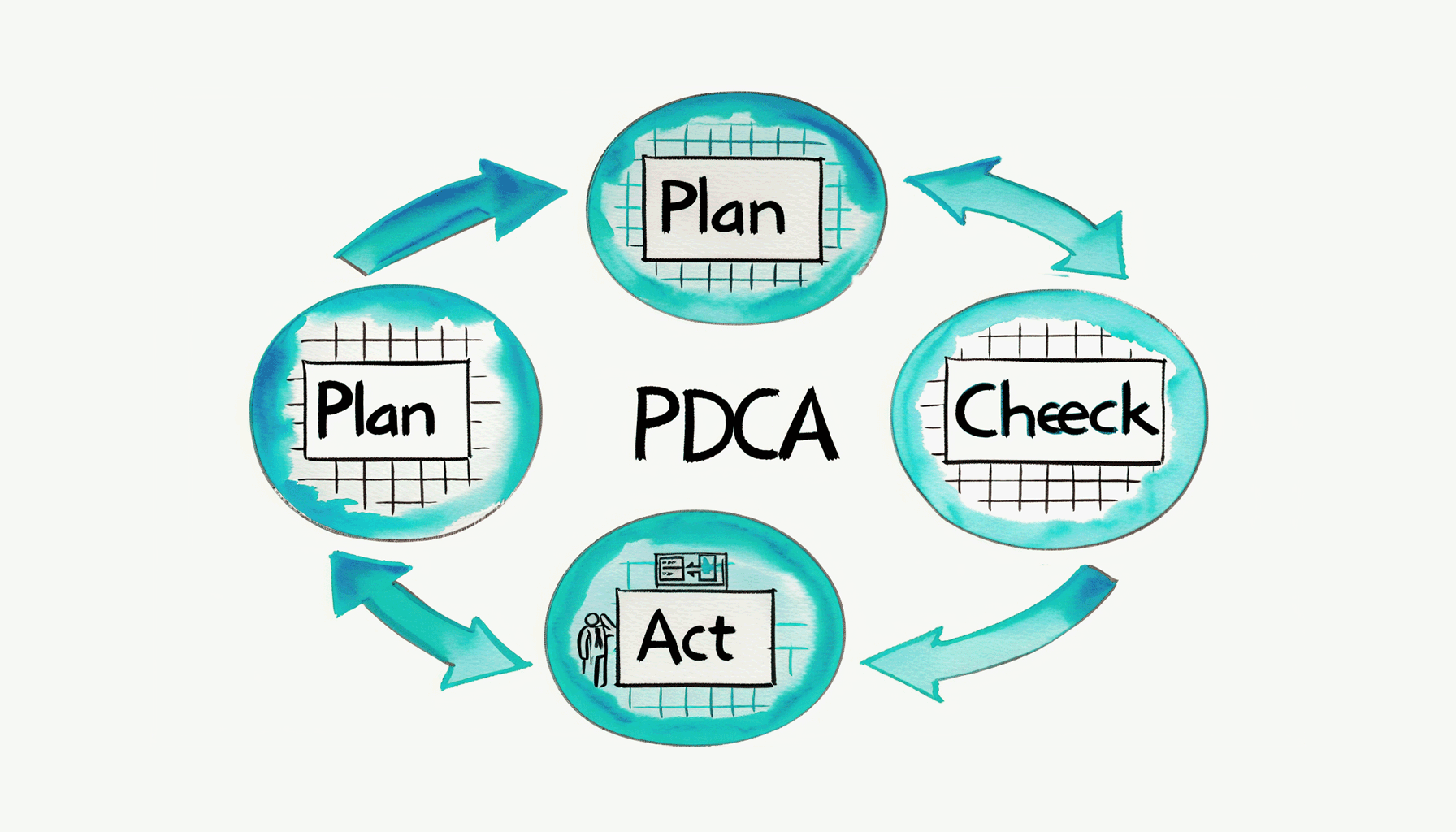
It is tough to implement the improvement cycle of business processes. Although I honestly want to work on PDCA every month and every week, it takes time to grasp the current situation (Check) and deal with it (Act). Rather, it doesn’t seem to be realistic to upgrade the definition of the business process (Re-Plan). Anyway, I would like to show some ways to repeatedly do small improvements with a little ingenuity.
1. Automatic Aggregation
I’m mainly working on the automatic aggregation of business data these days.
In other words, I’m modeling business processes by automatic periodic aggregation and by collecting data flowing to the business process. The company is run by Business Processes.
To put it plainly, it is an automatic reporting function and I have listed some examples below.
For example, if you create a business process (Workflow App) for aggregating the previous month’s expenses, the process starts automatically because of a timer, processes all the intermediate Tasks and ends. Email notifications to stakeholders and Timeline Posts are commonly set near the end of the flow.
222 -Expense Claim
222 -notice- Aggregate and notify the previous month expenses (← Monthly, calculated by each staff member)
222 -cross- Aggregate the previous month expenses (← Monthly, company-wide)
242 – Hours-worked Report
242 notice- Update last week’s employee attendance book (← Weekly and by staff)
242 b – Part-Time Hours-worked Report
242b -cross- Aggregate the total working hours in the previous month by part-time staff
216-Flexible-Billing-Cycle
216-notice-Flexible-Report
(etc.)
The frequently used Data extraction Task “Questetra BPMS: Process, Batch Extract as TSV”
*Extracts process data as a multi-line TSV string from date-filtered processes. Items are specified in CSV format such as “string:0,date:2,select:3”. Tab code and line feed code are deleted.
2. Are there any differences from monitoring?
Honestly, you don’t need to implement the “aggregation process”. If you want to aggregate business data periodically you should use the monitoring function depending on the case. It helps you aggregate the historical data at any time.
Aggregation processes simply automate that monitoring (and report it).
3. Work I can do anytime = Work I will never do
When reviewing the automatic aggregation, It’s actually really hard for people to see the information.
It doesn’t mean they aren’t interested
It doesn’t even mean they aren’t motivated
But they don’t want to review the historical data much.
However, that sentence might be misleading so I’d like to give a further explanation.
I mean, reviewing is usually easier than the new work you face because you just have to look over it. Even so, humans tend to put off doing a review because they don’t see the immediate benefit of it. Consequently, you end up having less time to look at the aggregated data.
If aggregating and reporting KPIs are a part of your work, you might regard it as a priority. However, in that case, you may become tired and less active in reviewing the aggregated work when it is completed. To be clear, you can see KPI information but you won’t go any further or examine it. Therefore, it doesn’t lead to any improvement through the PDCA and BPM cycles at all.
The reason seems to be that if a task can be done at any time (i.e. it doesn’t have a strict deadline), then it’s inevitable that it will never get done.
4. Let’s make an opportunity to Check!
ltimately, an opportunity to inspire the person in charge of the task to do it right now is necessary.
If you look over well-aggregated business data (or review the business), that will encourage everyone to comment and improve it a little. For example:
Director: whose job is to oversee the business
Auditor (accounting/internal office auditor): whose job is to audit
The reason why they can review well is that the documents and reports to be checked are integrated into their routine.
For such an opportunity, external triggers are probably significant. Even if you are good at self-management, it’s not easy to start all your tasks with internal triggers (your own will). It’s even possible to forget their existence.
You have to review, it’s now or never!
It’s time to review efficiently!
Unless you give yourself the motivation to think of doing it, I’m afraid the opportunity won’t be there indefinitely.
The automatic aggregation notification – aggregated, organized, and delivered on time – has become a pleasant self-management tool for me (for now).
The software field of Robotic Process Automation (RPA) has surprisingly come to attract attention. In recent years the phrase “Work Style Reform” has become a buzzword in Japan, and RPA is obviously one of the keywords for releasing working people from simple computer work.
0. RPA? Is it a buzzword??
Recently, I’ve seen more articles about RPA, however, most of them make me worried about possible misunderstandings.
In other words, some articles give an abstract introduction to the mechanism of Robots in the first line, such as the automation of daily work by robots. However, from the next line, they describe at length a dramatic future dominated by robots. Even in the articles regarding the application, they introduce improper usage.
To begin with, RPA is not omnipotent. Its weaknesses and risks should be explained in detail. I think it’s better to take the articles written by such social affairs reporters of general newspapers with a pinch of salt (my personal opinion, though).
Table of contents
1. What is RPA
It is a category name of software.
*First of all, if some people don’t define that, conflict can happen. (Definition is necessary.)
According to Wikipedia, it defines the efforts to improve the efficiency and automation of white-collar work. That’s almost right, however, what I’d like you to recognize more deeply is the definition of ”a software application that replicates the actions of a human being interacting with the user interface of a computer system”.
Wikipedia(English): a software application that replicates the actions of a human being interacting with the user interface of a computer system
The core of RPA is the ability to remember your typing operation on your computer. To be clear, the basic function is to learn how to use the keyboard and mouse “operational macro”.
*If you’re interested, you can search for a video of ‘Blue Prism’ (a long-established product) or ‘Selenium’ (free software). Recently, they have released not only on-premises (desktop type) but also cloud-type products.
Incidentally, in the field of software, the word “robot” is often used with the nuance of “duplicate” or “replica”. That is, humans are the “original” upon which robots are based (a dualistic concept). On the other hand, AI does not have such an “original”, so AI and robots are defined separately.
*In other words, robots in the software industry don’t resemble Osamu Tezuka’s Astro Boy, but rather the “Copy Robot” in Perman by Fujiko F. Fujio. (Hope some of you can understand the point.)
2. Evolution of robots
Today, RPA can understand a variety of User Interfaces (UI).
This means you can continue to use a system built for human manipulation (The User interface is the Human interface). This means it is possible to promote the automation of business without modifying existing business systems.
Reducing IT capital expenditure is a great advantage.
Testing the operation of software is a classic application of RPA. Now, products that can switch between various screens and that are split according to the condition of an event have been realized. RPA these days has been applied to online banking operations, which can also automatically scrape (or extract) displayed data. In other words, RPA can handle tasks – like obtaining a history of cash flows and viewing balances – more accurately and much faster than humans.
Screen scraping has been done on the server side in accounting clouds
3. Robot boycott?
However, I’m wondering if robots are able to handle everything.
If you think about it, mechanisms to eliminate robotic logins, such as two-factor authentication and a visual verification are also evolving. There are also many other systems that require human authentication by using security tokens, puzzles, and fingerprints.
In fact, the information provider (similar to a resource server operator) requires that the log in subject be human.
Why is that?
In the first place, from the point of view of the information provider robots are inconvenient in various ways.
For example, if there are announcements to users, they probably won’t be passed. On the other hand, if the User Interface is improved, the robots will give errors.
This is not very helpful, and if robots access the User Interface many times it can sometimes be defined as an attack. Furthermore, there’s a concern about overlooking malicious operations.
4. Suitable areas for RPA
You should determine areas in which to use RPA after a thorough risk analysis. (It really depends on the case, though.)
However, the question of whether or not to give a robot a password is hugely controversial.
In this case, if a password is leaked from the robot, that is the worst scenario. In many cases, that password gives access not only to the work you want the robot to do but also the authority to delete data and users. At least, I suggest you shouldn’t set a password on any robots for automation.
Incidentally, the biggest feature of RPA is that it is possible to control a User Interface (UI), but today’s business systems also have Application Programming Interface (API) as well.
And with the API mechanism, there is no need to tell the computer the password. The Japanese government has been promoting Bank API since 2017 in the Banking Act because they want to protect depositors through strict password management.
In addition, there is an RPA product that covers communications with Computer Interfaces. To use it, it is important to distinguish between the system which is communicating with a Human Interface and the one which is communicating with a Computer Interface.
The details of APIs are covered in other articles, but I can say that a technology called OAuth Authorization is being used widely in API communications these days. It is the system where authorizers allow specific automatic communications. For example, you can link data between Facebook and Twitter without giving your password. Moreover, you can precisely specify the range of data that may be referenced and what can be updated. “What is “OAuth”, the Cloud Technology which Everyone Should Know?”
5. How BPMS makes external requests
Finally, I’d like to describe how Questetra, the BPMS (business process management system) requests data updates and data references from external systems.
At least for Questetra, we suggest that data communication via BPMS is not implemented with a communication function through a User Interface. In other words, requests should be made as an OAuth client for the data update Task and the data reference Task.
A system without API connections certainly makes automated tasks difficult, but API connections are necessary to reduce the security risk. (I.e. the age of API connections as a precondition seems to be coming to an end.)
Eliminates unintentional deletion or content tampering
Kyoto, Japan, January 20th, 2020, Questetra, Inc., the global SaaS provider of Business Process Management (BPM), today announced that they have published the new version 11.13 of the Cloud-based Workflow product “Questetra BPM Suite” on Jan. 20th, 2020. This new version allows the automated text file generation in a fixed format based on business data.
In daily work, various text information is generated. For example, various types of text information are generated, from reports such as “Changes in the number of Web accesses” to official documents such as “Current state of the company.” In many cases, those text information is saved as a text file.
With the new version 11.13, it is possible to place an automatic step at which text information is automatically saved in the middle of a Business Process. That is in other words, you can easily build a mechanism in which a file in a specified format is automatically generated at the same time text information is approved. For example, by arranging an automatic process such as automatic upload to cloud storage at further downstream, a series of document management processes can be unmanned so that the risk of unintentional text deletion or content tampering can be eliminated.
Questetra BPM Suite
Cloud-based Workflow “Questetra BPM Suite” is a business platform for realizing paperless environments and remote-working. Business issues are controlled according to a Business Flow Diagram. When a Process reaches a Human Task the user will be asked to add their input. Also, when an issue reaches an automated Step the predetermined processing (server-side processing) such as “Generate PDF” and “Save to cloud storage” is performed automatically. (BPM: Business Process Management)
You can apply it to various business operations such as “Approval request flow”, “Document translation flow”, Quality check process, “Invoice issuance process”. Process owners of each Business Process can practice the “improvement of Business Processes” little by little in daily work.
Automatic File-generation based on Business Data
Using a Service Task a text file in accordance with the specified format is automatically generated out of business data. In addition to report files, it is capable of generating text files in various formats such as HTML, JSON, XML, or CSV.
Text File Generation Configuration
Other Improvements
Converter of CSV file to Table-type data
Using a Service Task, the contents of a CSV file can be inserted into a Table-type Data Item. At the approval step in a Work Report Process, for example, you can build a mechanism that allows you to check the CSV file in a table format without downloading it, or to enter the check results at each row. Converter (Excel-CSV FILE to Table type data)
Converter of Table-type data to CSV file
Using a Service Task, data entered in a table format can be converted to a CSV file. In the Business Partner Addition Process, for example, business partner information entered in a table format is converted to a CSV file, and the file can be uploaded to your core system. Converter (Table type data to Excel-CSV File)
Enhanced automatic business data assignment
In the Service Task that performs concatenation of String-type data and calculation of Numeric-type data, etc. the name and email address in User-type data can be output individually. Also, upon inserting a Table-type Data Item, it is now possible to output the value of each cell. Service Task (Data Assignment)